




一、准备工作
3. Jupyter Notebook中配置多版本Python
二、安装步骤
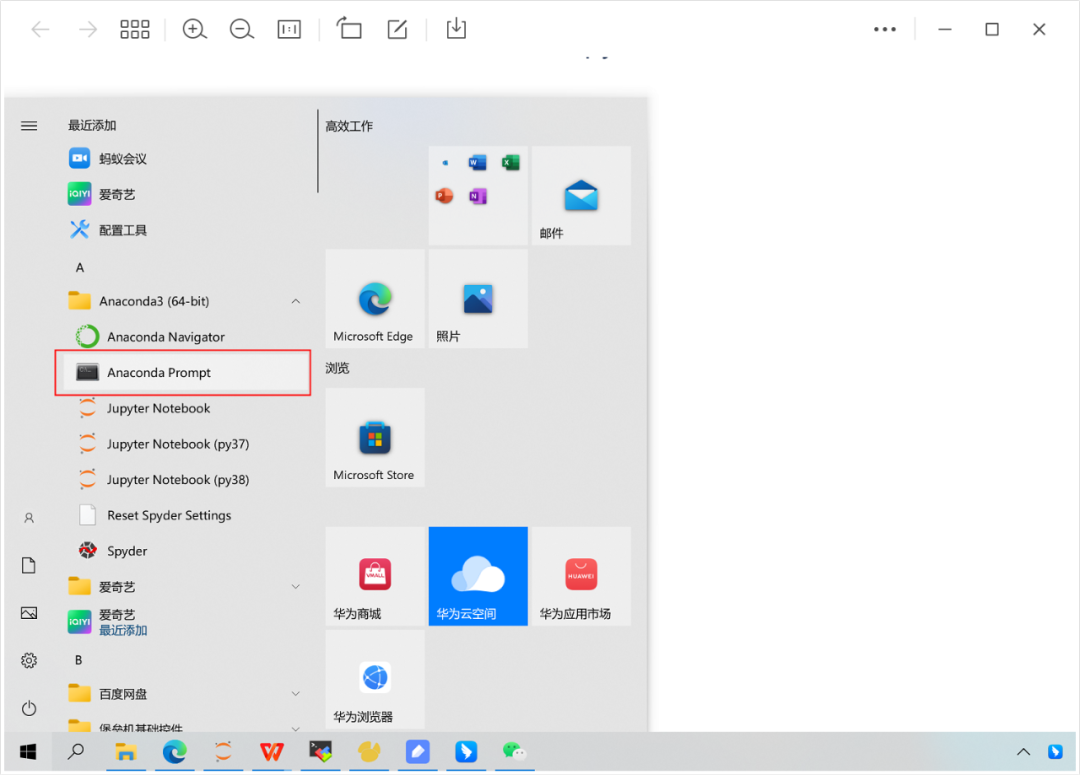
1. windows → 开始 → Anaconda(64-bit) → Anconda Prompt (双击)
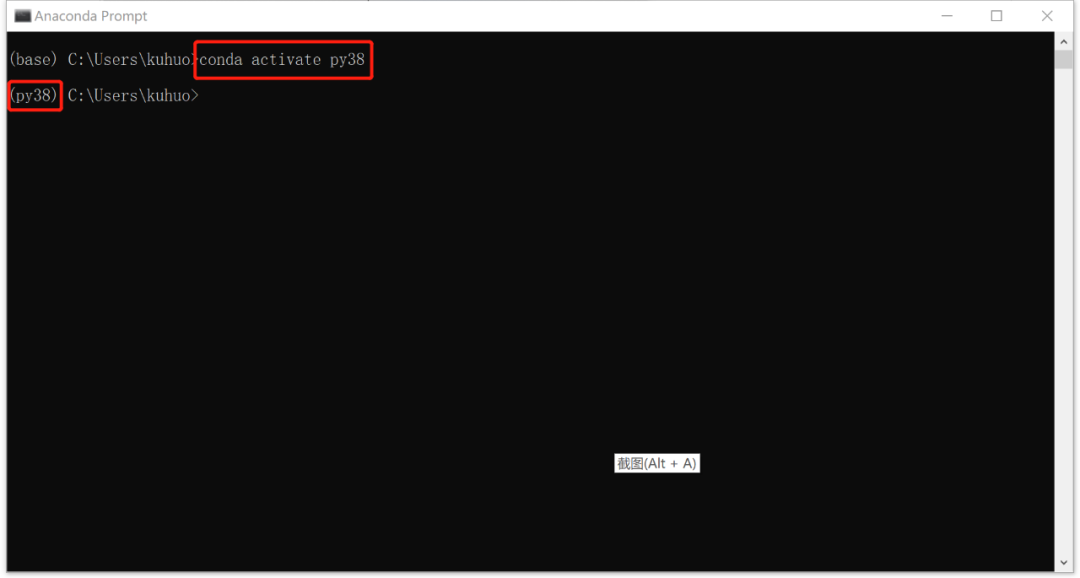
2. 激活虚拟环境:
conda activate py38
3. 激活后的虚拟环境安装pyflink
python -m pip install apache-flink==1.15.2
4. 开发pyflink代码
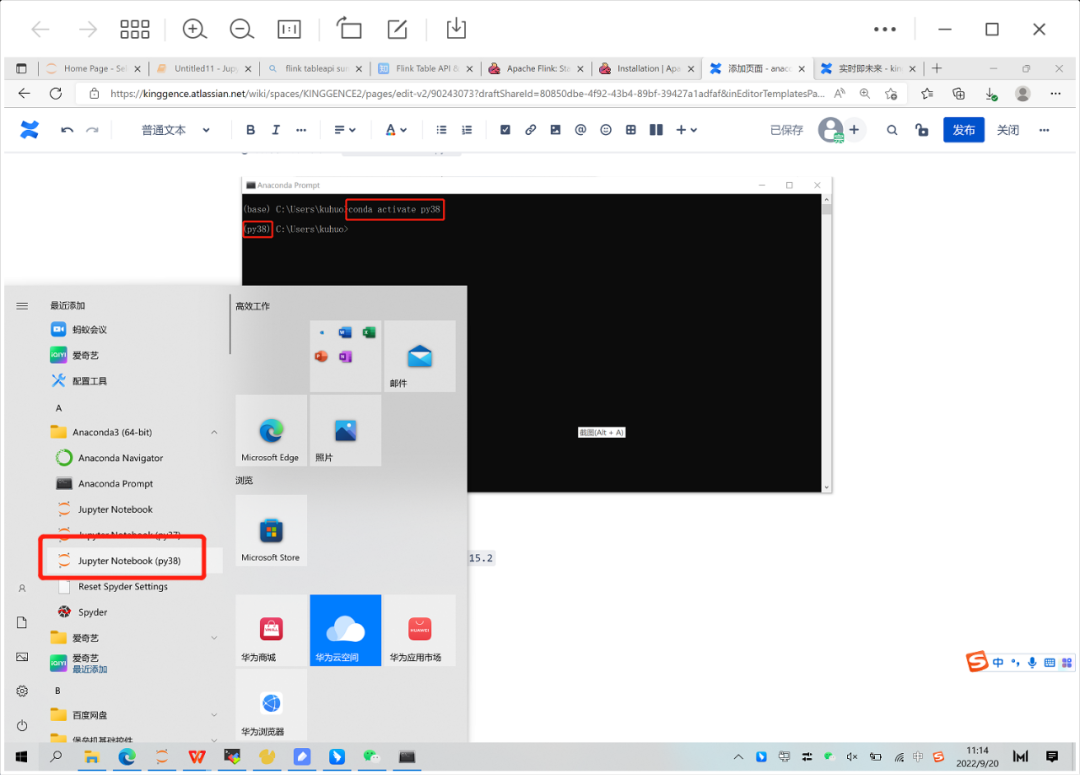
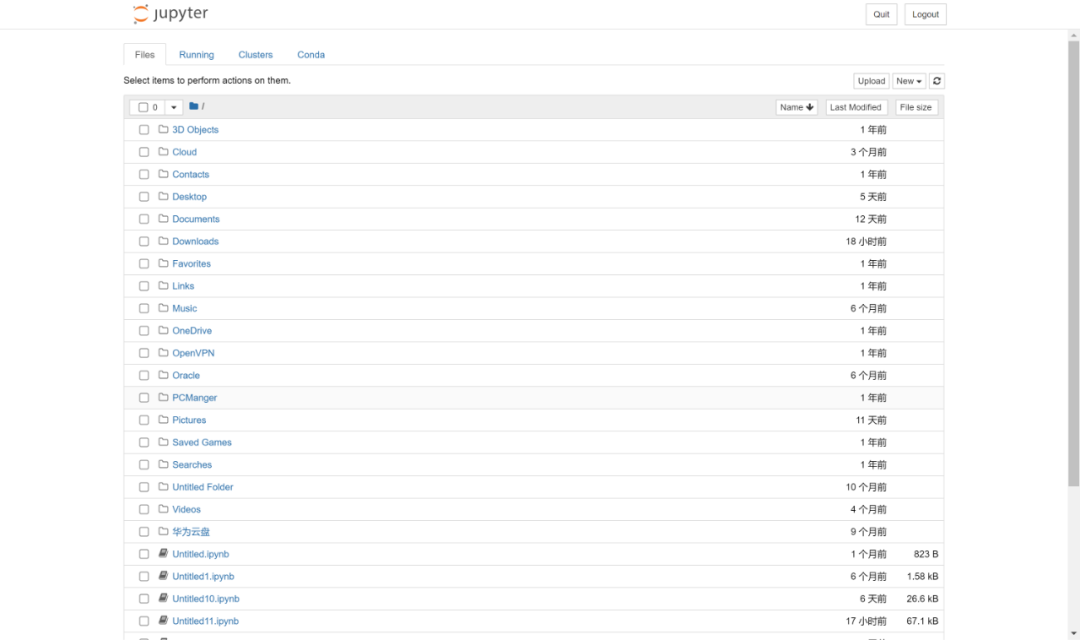
①. 选择安装到pyflink的虚拟环境(点击)
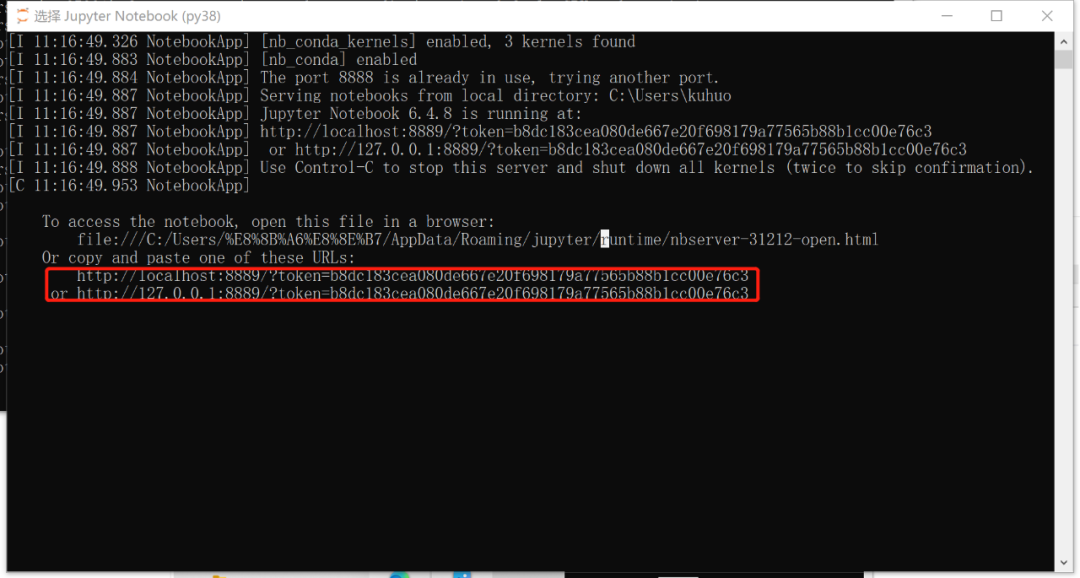
②. 复制最下面的两个链接任何一个到浏览器
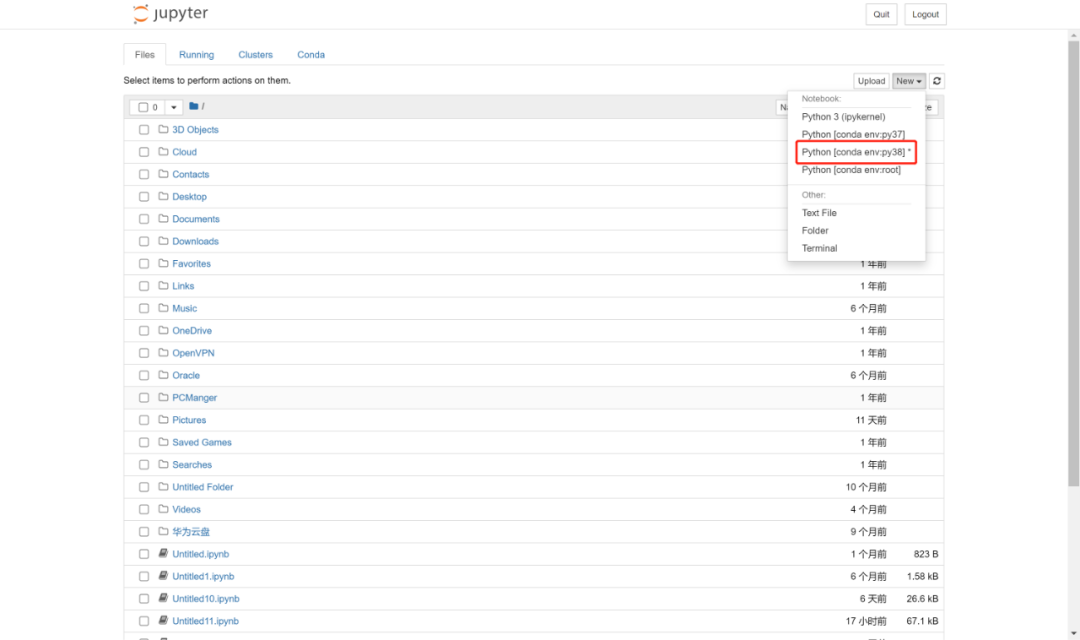
③. 新建编辑文本(选择py38)
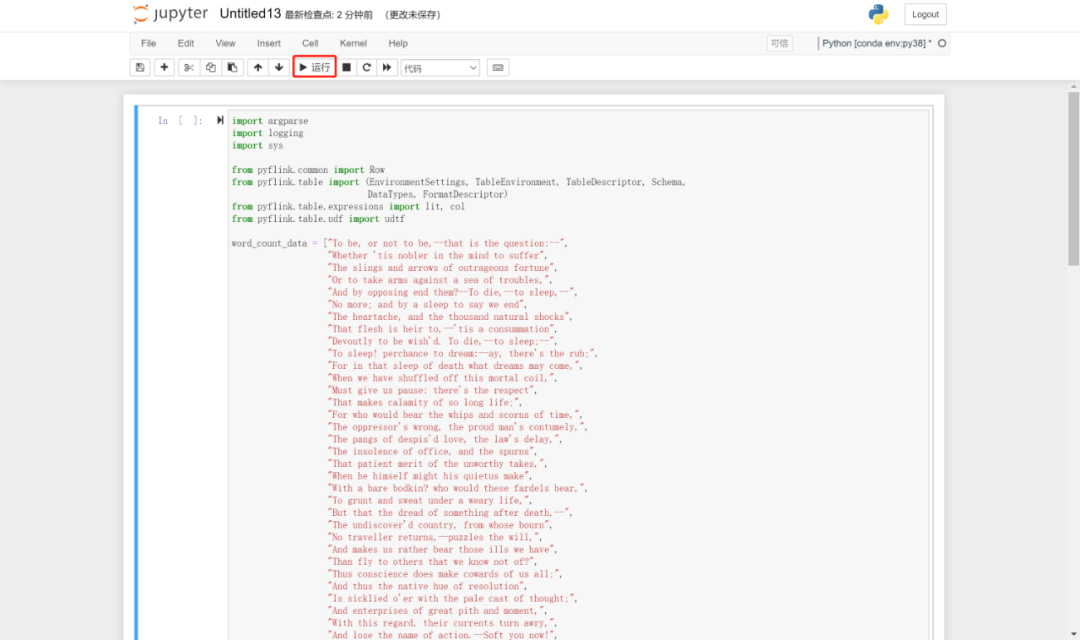
④. 写入验证代码,并点击运行
import argparseimport loggingimport sysfrom pyflink.common import Rowfrom pyflink.table import (EnvironmentSettings, TableEnvironment, TableDescriptor, Schema,DataTypes, FormatDescriptor)from pyflink.table.expressions import lit, colfrom pyflink.table.udf import udtfword_count_data = ["To be, or not to be,--that is the question:--","Whether 'tis nobler in the mind to suffer","The slings and arrows of outrageous fortune","Or to take arms against a sea of troubles,","And by opposing end them?--To die,--to sleep,--","No more; and by a sleep to say we end","The heartache, and the thousand natural shocks","That flesh is heir to,--'tis a consummation","Devoutly to be wish'd. To die,--to sleep;--","To sleep! perchance to dream:--ay, there's the rub;","For in that sleep of death what dreams may come,","When we have shuffled off this mortal coil,","Must give us pause: there's the respect","That makes calamity of so long life;","For who would bear the whips and scorns of time,","The oppressor's wrong, the proud man's contumely,","The pangs of despis'd love, the law's delay,","The insolence of office, and the spurns","That patient merit of the unworthy takes,","When he himself might his quietus make","With a bare bodkin? who would these fardels bear,","To grunt and sweat under a weary life,","But that the dread of something after death,--","The undiscover'd country, from whose bourn","No traveller returns,--puzzles the will,","And makes us rather bear those ills we have","Than fly to others that we know not of?","Thus conscience does make cowards of us all;","And thus the native hue of resolution","Is sicklied o'er with the pale cast of thought;","And enterprises of great pith and moment,","With this regard, their currents turn awry,","And lose the name of action.--Soft you now!","The fair Ophelia!--Nymph, in thy orisons","Be all my sins remember'd."]def word_count(input_path, output_path):t_env = TableEnvironment.create(EnvironmentSettings.in_streaming_mode())# write all the data to one filet_env.get_config().set("parallelism.default", "1")# define the sourceif input_path is not None:t_env.create_temporary_table('source',TableDescriptor.for_connector('filesystem').schema(Schema.new_builder().column('word', DataTypes.STRING()).build()).option('path', input_path).format('csv').build())tab = t_env.from_path('source')else:print("Executing word_count example with default input data set.")print("Use --input to specify file input.")tab = t_env.from_elements(map(lambda i: (i,), word_count_data),DataTypes.ROW([DataTypes.FIELD('line', DataTypes.STRING())]))# define the sinkif output_path is not None:t_env.create_temporary_table('sink',TableDescriptor.for_connector('filesystem').schema(Schema.new_builder().column('word', DataTypes.STRING()).column('count', DataTypes.BIGINT()).build()).option('path', output_path).format(FormatDescriptor.for_format('canal-json').build()).build())else:print("Printing result to stdout. Use --output to specify output path.")t_env.create_temporary_table('sink',TableDescriptor.for_connector('print').schema(Schema.new_builder().column('word', DataTypes.STRING()).column('count', DataTypes.BIGINT()).build()).build())@udtf(result_types=[DataTypes.STRING()])def split(line: Row):for s in line[0].split():yield Row(s)# compute word counttab.flat_map(split).alias('word') \.group_by(col('word')) \.select(col('word'), lit(1).count) \.execute_insert('sink') \.wait()# remove .wait if submitting to a remote cluster, refer to# https://nightlies.apache.org/flink/flink-docs-stable/docs/dev/python/faq/#wait-for-jobs-to-finish-when-executing-jobs-in-mini-cluster# for more detailsif __name__ == '__main__':logging.basicConfig(stream=sys.stdout, level=logging.INFO, format="%(message)s")parser = argparse.ArgumentParser()parser.add_argument('--input',dest='input',required=False,help='Input file to process.')parser.add_argument('--output',dest='output',required=False,help='Output file to write results to.')argv = sys.argv[1:]known_args, _ = parser.parse_known_args(argv)word_count(known_args.input, known_args.output)
⑤. 查看运行结果,控制台输出以下内容即为成功。
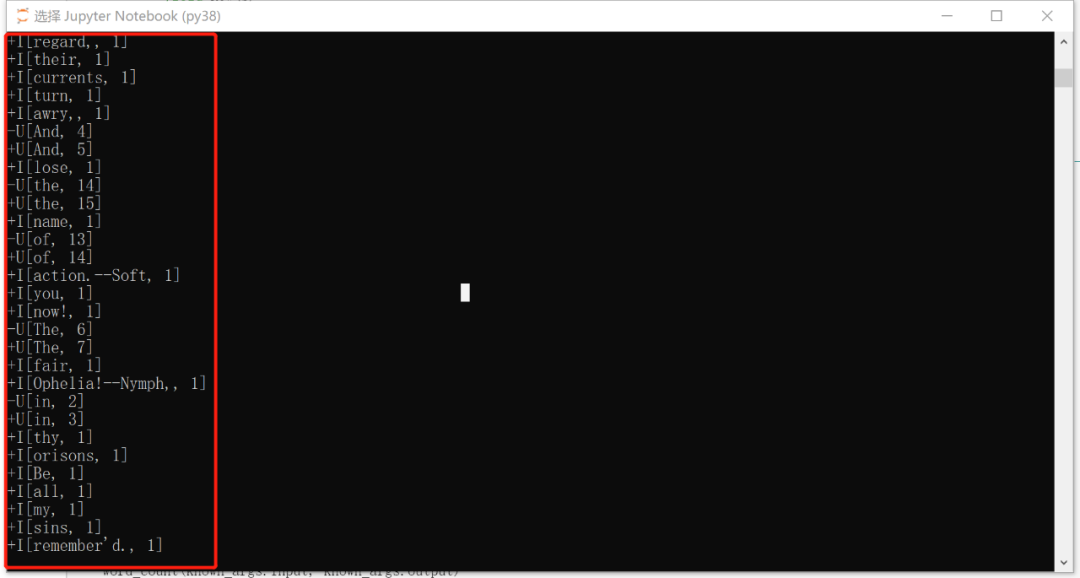
至此,Anaconda 搭建pyflink开发环境完成。
更多实战详情请关注字节智传公众号

往期精彩
14. Jupyter Notebook中配置多版本Python
文章转载自大数据技能圈,如果涉嫌侵权,请发送邮件至:contact@modb.pro进行举报,并提供相关证据,一经查实,墨天轮将立刻删除相关内容。
