



ORA-00600 [3005] [kcbzib_kcrsds_1] 恢复
作者简介:王旭,在数据库管理方面拥有10多年经验。精通主流数据库系统,在企业数据库管理、性能优化、架构设计和高可用性能解决方案方面拥有丰富得实践经验。目前拥有(ORACLE ACE、MYSQL OCP、PG ACE、PGCA、PGCE、PGCM)等数据库认证。
背景
一个用户的oa库在经历了服务器宕机后起不来,无任何有效备份,最开始用户尝试了几天恢复,未能解决。我通过查看他的日志发现,最开始是报ora-00600 [3005],
他在中间多次使用重建控制文件、做基于时间点的恢复,都是失败,最后我接收的时候报一致性错误。再通过强行拉库再报ora-00600 [kcbzib_kcrsds_1] 错误,最后将此问题解决。

在我准备将数据库重建的时候,中间又出现了一个小插曲,数据文件所在的磁盘挂掉了,频闭掉/etc/fstab目录后,也起不来,原因是数据盘在/home上,而该磁盘的xfs文件系统也是损坏的,只是刚好在这个时间点被我触发,通过ls、cp等查看/home的目录下全部报错。通过视频的方式教对方在机房一步一步恢复,最后将系统开机...
最后通过数据库重新导入导出恢复完成,恢复完成后得到用户的一致好评。
由于恢复紧急,部分截图如下;
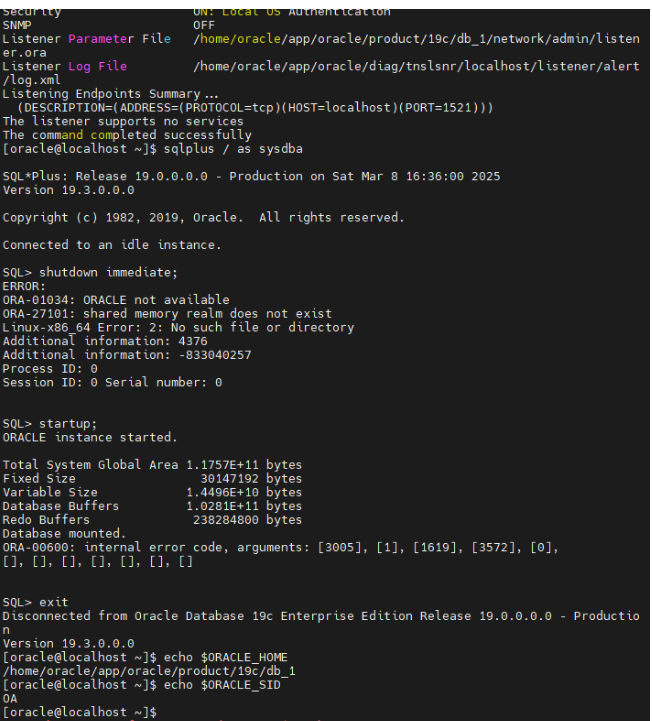
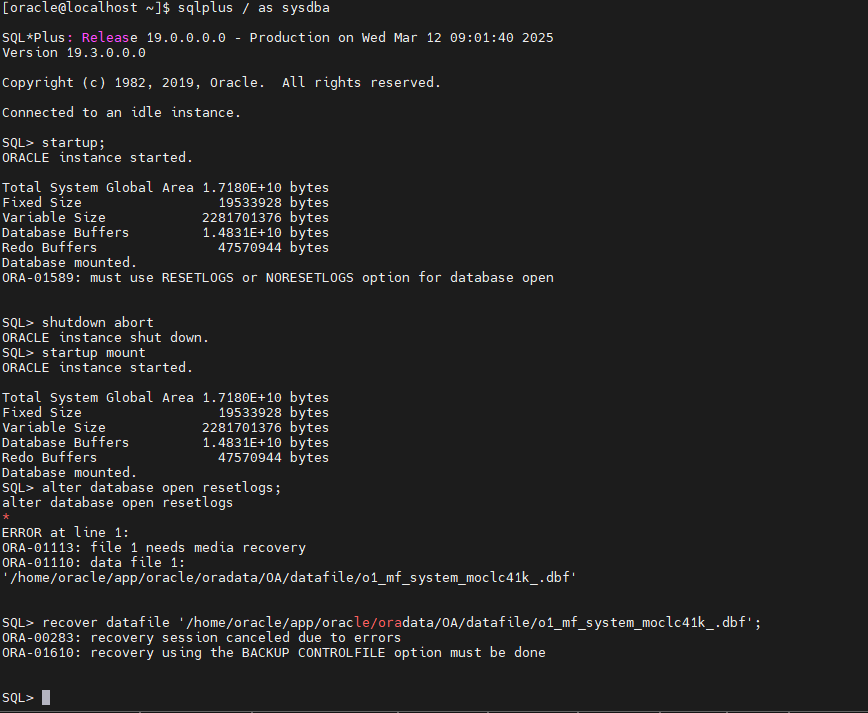
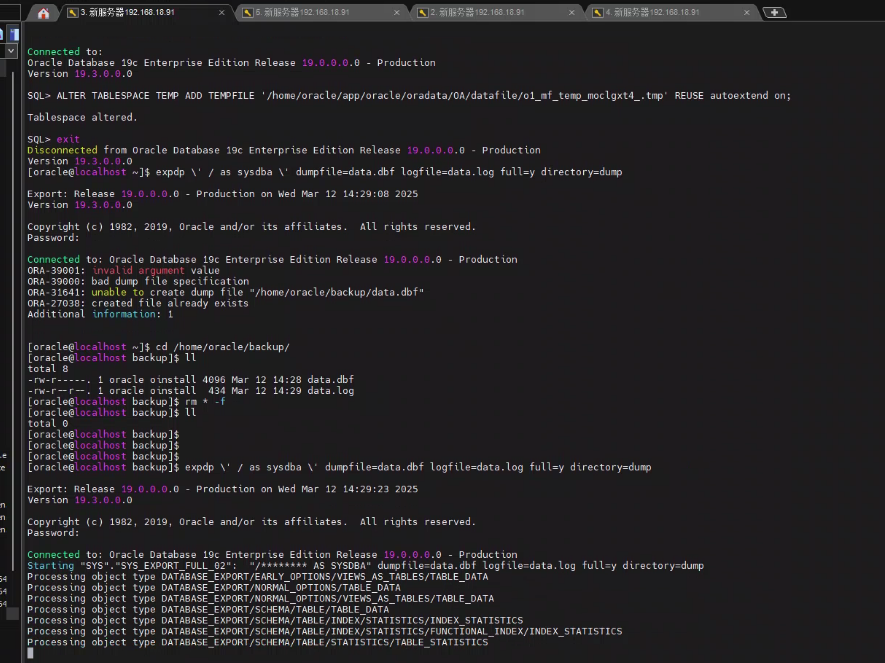
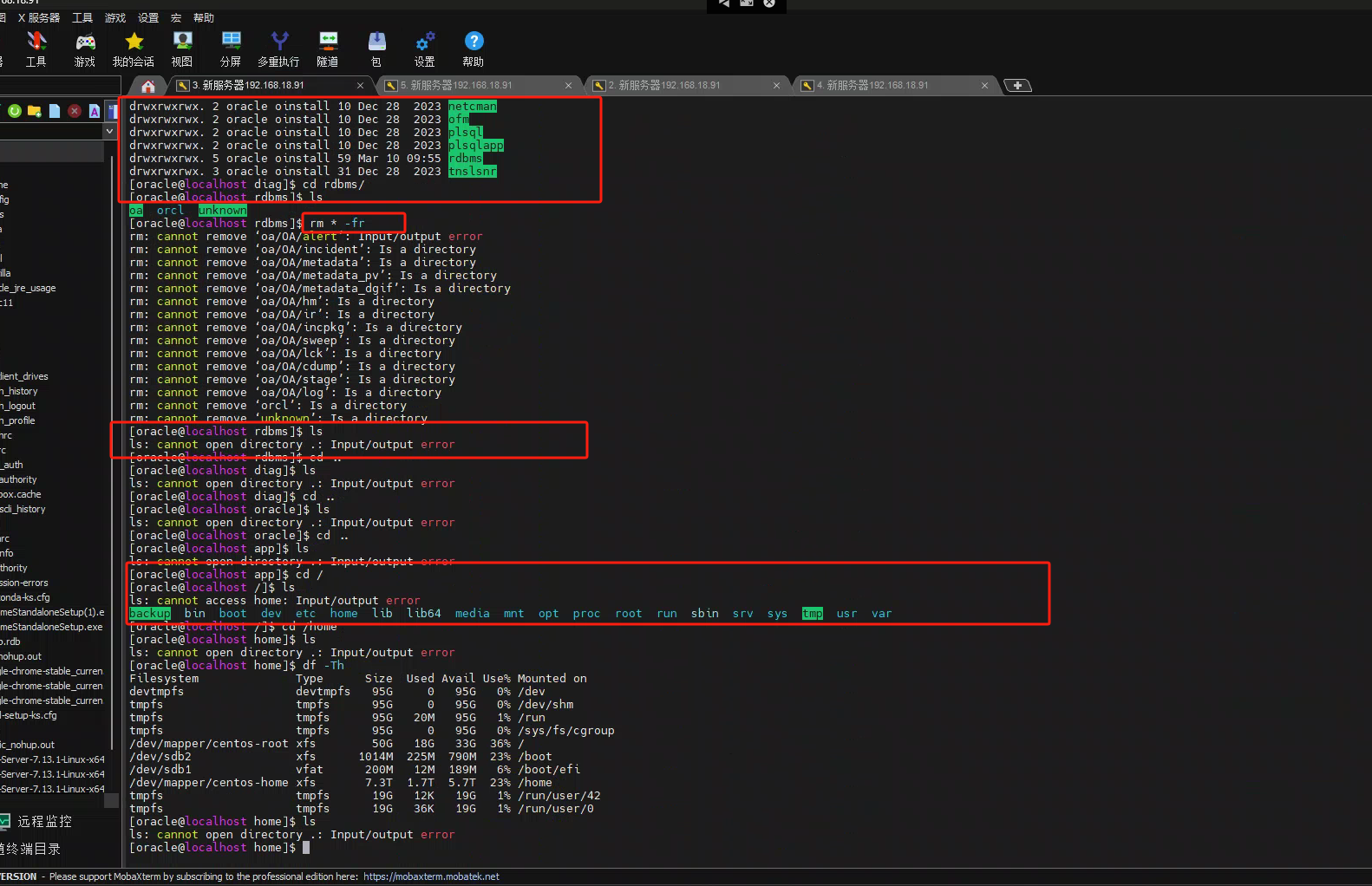
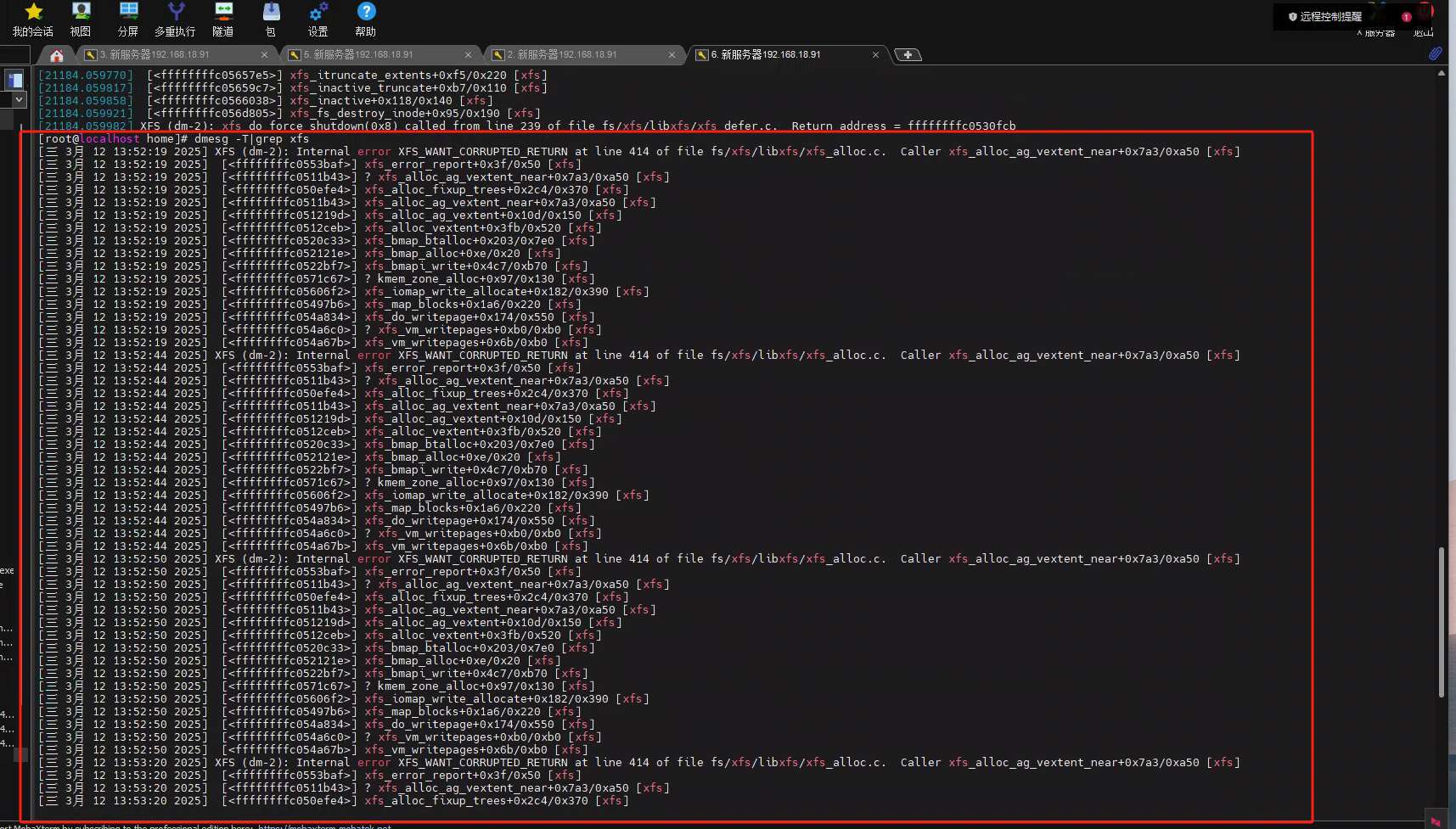
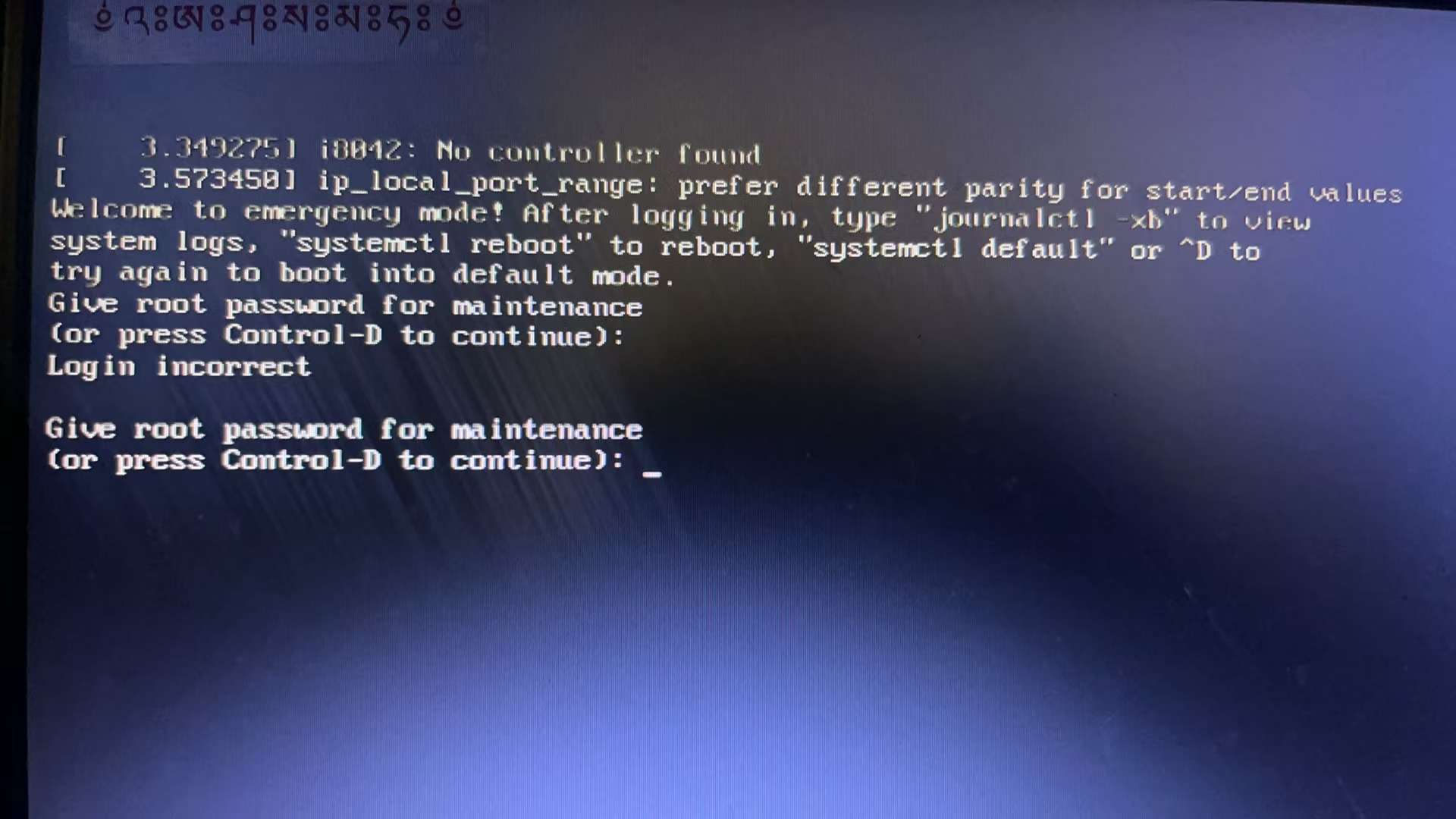
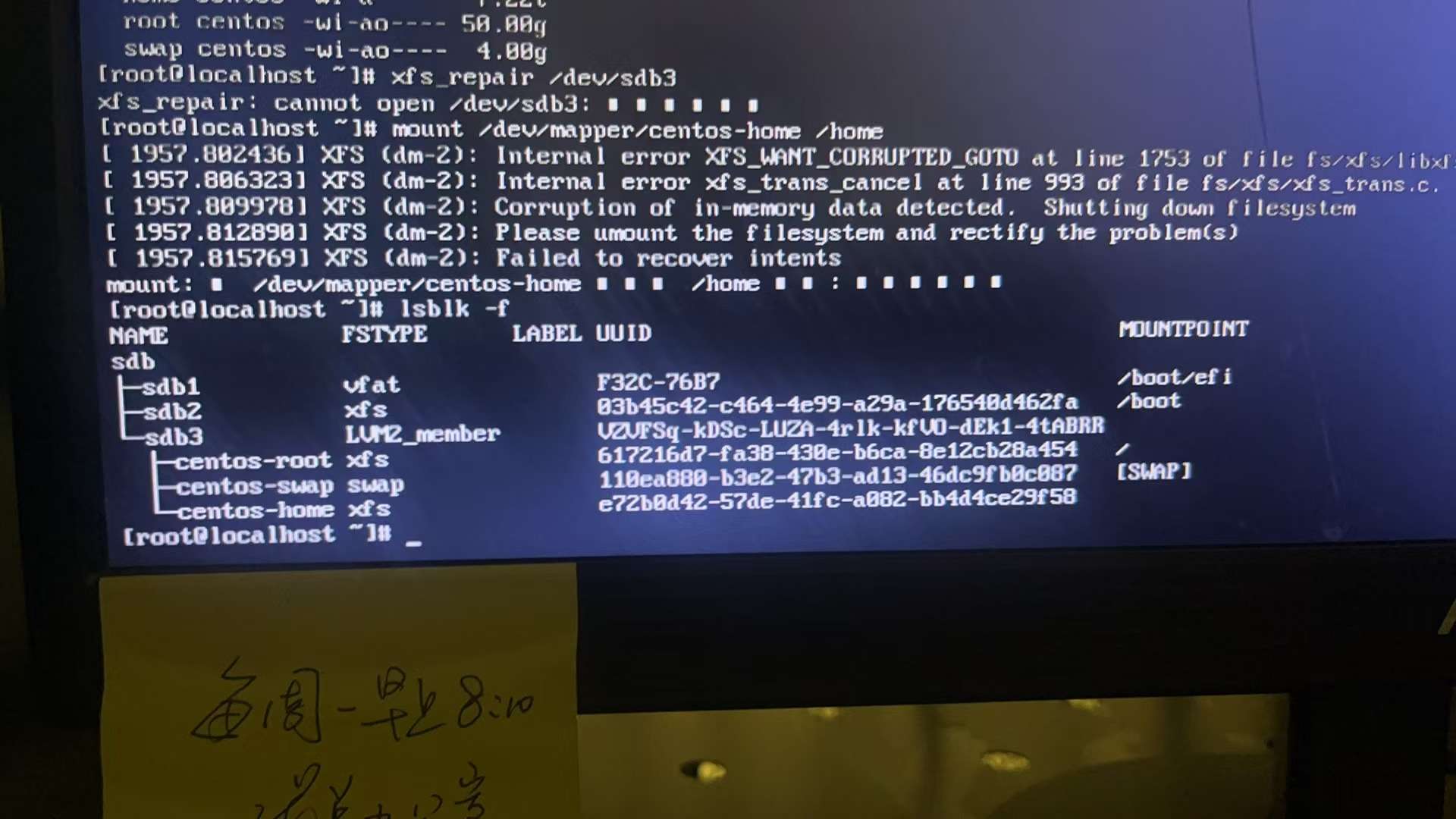
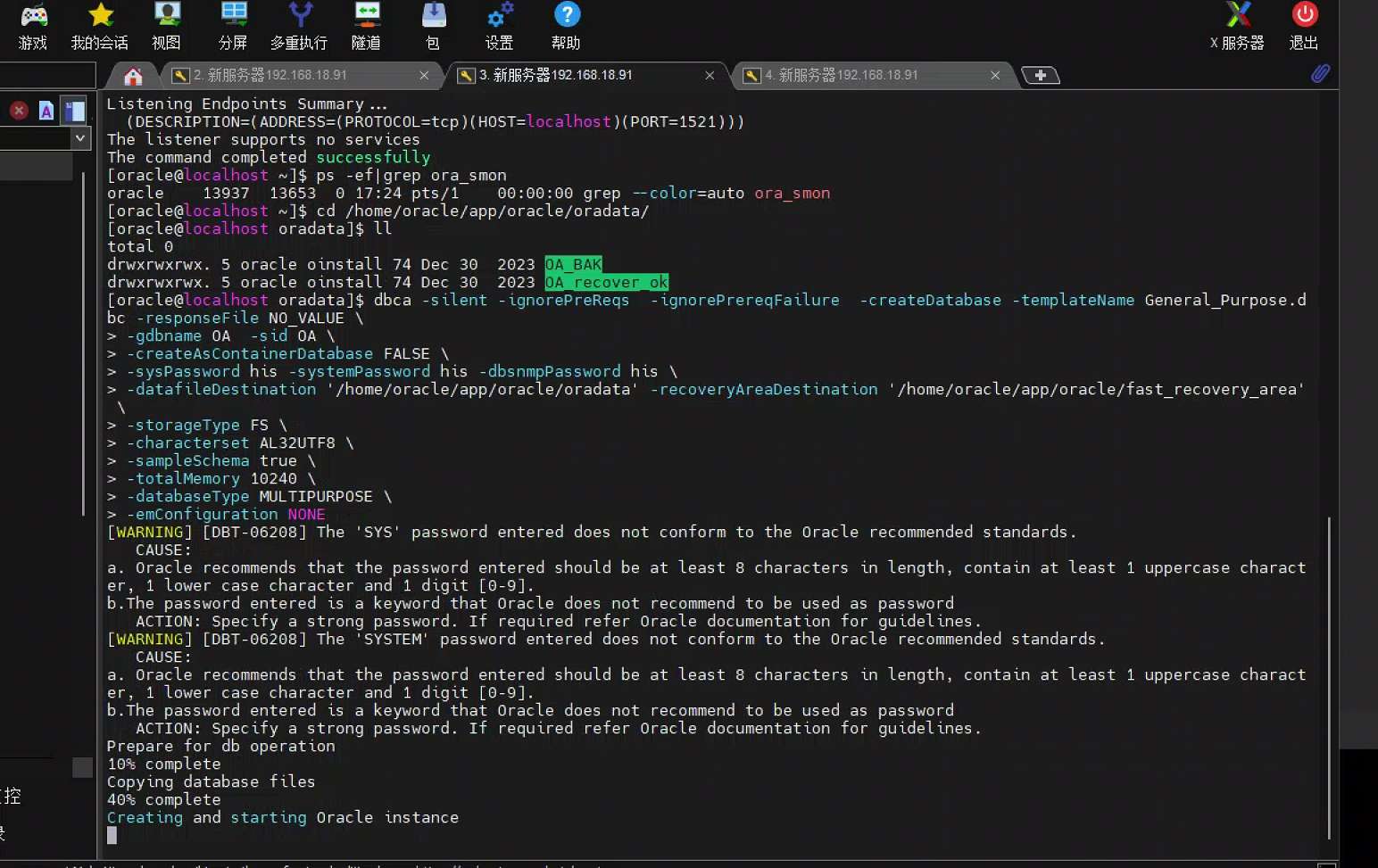
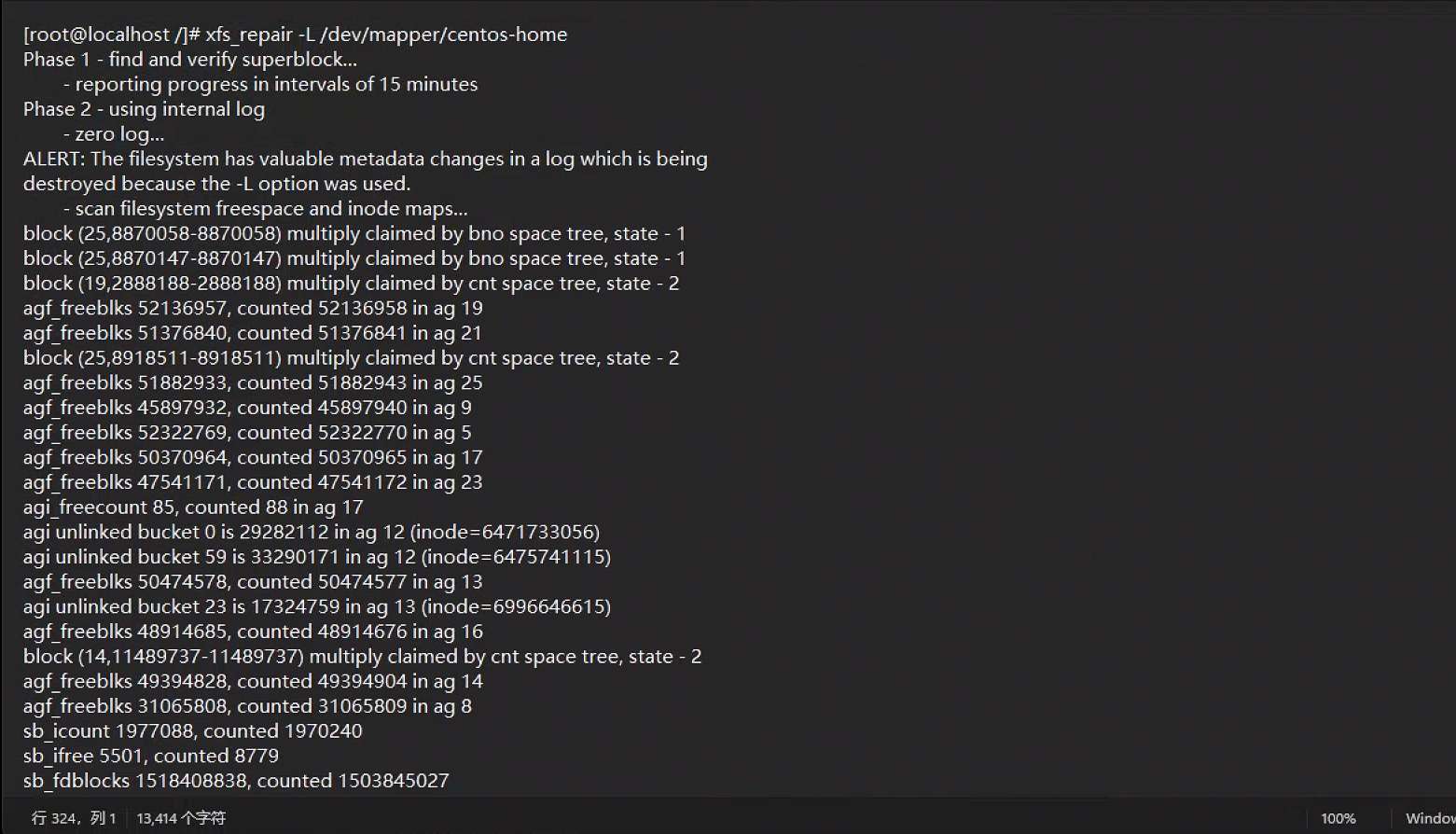

部分恢复使用的命令
[oracle@localhost ~]$ env|grep -i oracle
USER=oracle
LD_LIBRARY_PATH=/home/oracle/app/oracle/product/19c/db_1/lib:/lib:/usr/lib
ORACLE_SID=OA
ORACLE_BASE=/home/oracle/app/oracle
MAIL=/var/spool/mail/oracle
PATH=/home/oracle/app/oracle/product/19c/db_1/bin:/usr/sbin:/home/oracle/app/oracle/product/19c/db_1/;/bin:/home/yunxi/jdk/jdk1.8.0_65/bin:/usr/lib64/qt-3.3/bin:/usr/local/bin:/bin:/usr/bin:/usr/local/sbin:/usr/sbin
PWD=/home/oracle
ORACLE_TERM=xterm
HOME=/home/oracle
LOGNAME=oracle
XDG_DATA_DIRS=/home/oracle/.local/share/flatpak/exports/share:/var/lib/flatpak/exports/share:/usr/local/share:/usr/share
ORACLE_HOME=/home/oracle/app/oracle/product/19c/db_1
[oracle@localhost ~]$
[oracle@localhost ~]$ sqlplus / as sysdba

SQL*Plus: Release 19.0.0.0.0 - Production on Wed Mar 12 13:13:09 2025
Version 19.3.0.0.0

Copyright (c) 1982, 2019, Oracle.  All rights reserved.


Connected to:
Oracle Database 19c Enterprise Edition Release 19.0.0.0.0 - Production
Version 19.3.0.0.0

SQL> select name from v$datafile;

NAME
--------------------------------------------------------------------------------
/home/oracle/app/oracle/oradata/OA/datafile/o1_mf_system_moclc41k_.dbf
/home/oracle/app/oracle/oradata/OA/datafile/o1_mf_sysaux_mocld77q_.dbf
/home/oracle/app/oracle/oradata/OA/datafile/o1_mf_undotbs1_mocldpbw_.dbf
/home/oa/db_data/OAXSPACE.DBF
/home/oracle/app/oracle/oradata/OA/datafile/o1_mf_users_mocldqfn_.dbf

SQL> select member from v$Logfile;

MEMBER
--------------------------------------------------------------------------------
/home/oracle/app/oracle/oradata/OA/onlinelog/o1_mf_3_moclgk0x_.log
/home/oracle/app/oracle/fast_recovery_area/OA/onlinelog/o1_mf_3_moclgk4o_.log
/home/oracle/app/oracle/oradata/OA/onlinelog/o1_mf_2_moclgk04_.log
/home/oracle/app/oracle/fast_recovery_area/OA/onlinelog/o1_mf_2_moclgk43_.log
/home/oracle/app/oracle/oradata/OA/onlinelog/o1_mf_1_moclgjy6_.log
/home/oracle/app/oracle/fast_recovery_area/OA/onlinelog/o1_mf_1_moclgk59_.log

6 rows selected.

SQL> show parameter control

NAME                                 TYPE
------------------------------------ ----------------------
VALUE
------------------------------
control_file_record_keep_time        integer
7
control_files                        string
/home/oracle/app/oracle/oradata/OA/controlfile/o1_mf_moclggk1_.ctl,
 /home/oracle/app/oracle/fast_recovery_area/OA/controlfile/o1_mf_moclggmt_.ctl
control_management_pack_access       string


2025-03-08T12:53:19.533320+08:00
Thread 1 advanced to log sequence 1619 (LGWR switch)
  Current log# 2 seq# 1619 mem# 0: /home/oracle/app/oracle/oradata/OA/onlinelog/o1_mf_2_moclgk04_.log
  Current log# 2 seq# 1619 mem# 1: /home/oracle/app/oracle/fast_recovery_area/OA/onlinelog/o1_mf_2_moclgk43_.log
2025-03-08T14:03:07.811437+08:00
Starting ORACLE instance (normal) (OS id: 14443)
2025-03-08T14:03:08.146299+08:00


2025-03-08T14:03:23.008402+08:00
Beginning crash recovery of 1 threads
 parallel recovery started with 32 processes
 Thread 1: Recovery starting at checkpoint rba (logseq 1619 block 3572), scn 0
2025-03-08T14:03:23.147773+08:00
Started redo scan
Errors in file /home/oracle/app/oracle/diag/rdbms/oa/OA/trace/OA_ora_14832.trc  (incident=284454):
ORA-00600: internal error code, arguments: [3005], [1], [1619], [3572], [0], [], [], [], [], [], [], []
Incident details in: /home/oracle/app/oracle/diag/rdbms/oa/OA/incident/incdir_284454/OA_ora_14832_i284454.trc
2025-03-08T14:03:24.412036+08:00
Use ADRCI or Support Workbench to package the incident.


2025-03-08T16:20:48.928094+08:00
Started redo scan
Errors in file /home/oracle/app/oracle/diag/rdbms/oa/OA/trace/OA_ora_90226.trc  (incident=407386):
ORA-00600: internal error code, arguments: [3005], [1], [1619], [3572], [0], [], [], [], [], [], [], []
Incident details in: /home/oracle/app/oracle/diag/rdbms/oa/OA/incident/incdir_407386/OA_ora_90226_i407386.trc
2025-03-08T16:20:49.783875+08:00
Use ADRCI or Support Workbench to package the incident.


ORA-1113 signalled during: alter database open resetlogs...
2025-03-10T18:43:21.050750+08:00
Errors in file /home/oracle/app/oracle/diag/rdbms/oa/OA/trace/OA_mz00_16371.trc:
ORA-01110: 数据文件 1: '/home/oracle/app/oracle/oradata/OA/datafile/o1_mf_system_moclc41k_.dbf'
2025-03-10T18:43:21.160052+08:00
Errors in file /home/oracle/app/oracle/diag/rdbms/oa/OA/trace/OA_mz00_16371.trc:
ORA-01110: 数据文件 3: '/home/oracle/app/oracle/oradata/OA/datafile/o1_mf_sysaux_mocld77q_.dbf'
2025-03-10T18:43:21.293355+08:00
Errors in file /home/oracle/app/oracle/diag/rdbms/oa/OA/trace/OA_mz00_16371.trc:
ORA-01110: 数据文件 4: '/home/oracle/app/oracle/oradata/OA/datafile/o1_mf_undotbs1_mocldpbw_.dbf'
2025-03-10T18:43:21.434973+08:00
Errors in file /home/oracle/app/oracle/diag/rdbms/oa/OA/trace/OA_mz00_16371.trc:
ORA-01110: 数据文件 5: '/home/oa/db_data/OAXSPACE.DBF'
2025-03-10T18:43:21.543387+08:00
Errors in file /home/oracle/app/oracle/diag/rdbms/oa/OA/trace/OA_mz00_16371.trc:
ORA-01110: 数据文件 7: '/home/oracle/app/oracle/oradata/OA/datafile/o1_mf_users_mocldqfn_.dbf'
2025-03-10T18:43:28.691727+08:00
ALTER DATABASE RECOVER  database until time '2025-03-08'
2025-03-10T18:43:28.691916+08:00
Media Recovery Start
 Started logmerger process
2025-03-10T18:43:28.759792+08:00
Media Recovery failed with error 1610
2025-03-10T18:43:29.859855+08:00
Recovery Slave PR00 previously exited with exception 283
ORA-283 signalled during: ALTER DATABASE RECOVER  database until time '2025-03-08'  ...
2025-03-10T18:48:11.886195+08:00
ALTER DATABASE RECOVER  database until time '2025-03-08'
2025-03-10T18:48:11.886521+08:00
Media Recovery Start


2025-03-10T18:56:28.664605+08:00
Errors in file /home/oracle/app/oracle/diag/rdbms/oa/OA/trace/OA_ora_19059.trc:
ORA-01565: error in identifying file '?=/dbs/dbs1@.dbf'
ORA-27037: unable to obtain file status
Linux-x86_64 Error: 2: No such file or directory
Additional information: 7
ORA-1503 signalled during: CREATE CONTROLFILE REUSE DATABASE "OA" NORESETLOGS  ARCHIVELOG

startup nomount pfile='/tmp/zsk.ora';

STARTUP NOMOUNT
CREATE CONTROLFILE REUSE DATABASE "OA" RESETLOGS  NOARCHIVELOG
    MAXLOGFILES 16
    MAXLOGMEMBERS 3
    MAXDATAFILES 100
    MAXINSTANCES 8
    MAXLOGHISTORY 292
LOGFILE
  GROUP 1 (
    '/home/oracle/app/oracle/oradata/OA/onlinelog/redo01.log'
  ) SIZE 200M BLOCKSIZE 512,
  GROUP 2 (
    '/home/oracle/app/oracle/oradata/OA/onlinelog/redo02.log'
  ) SIZE 200M BLOCKSIZE 512,
  GROUP 3 (
    '/home/oracle/app/oracle/oradata/OA/onlinelog/redo03.log'
  ) SIZE 200M BLOCKSIZE 512
-- STANDBY LOGFILE
DATAFILE
  '/home/oracle/app/oracle/oradata/OA/datafile/o1_mf_system_moclc41k_.dbf',
  '/home/oracle/app/oracle/oradata/OA/datafile/o1_mf_sysaux_mocld77q_.dbf',
  '/home/oracle/app/oracle/oradata/OA/datafile/o1_mf_undotbs1_mocldpbw_.dbf',
  '/home/oracle/app/oracle/oradata/OA/datafile/OAXSPACE.DBF',
  '/home/oracle/app/oracle/oradata/OA/datafile/o1_mf_users_mocldqfn_.dbf'
CHARACTER SET AL32UTF8
;

-- Commands to re-create incarnation table
-- Below log names MUST be changed to existing filenames on
-- disk. Any one log file from each branch can be used to
-- re-create incarnation records.
-- ALTER DATABASE REGISTER LOGFILE '/home/oracle/app/oracle/fast_recovery_area/OA/archivelog/2025_03_12/o1_mf_1_1_%u_.arc';
-- ALTER DATABASE REGISTER LOGFILE '/home/oracle/app/oracle/fast_recovery_area/OA/archivelog/2025_03_12/o1_mf_1_1_%u_.arc';
-- Recovery is required if any of the datafiles are restored backups,
-- or if the last shutdown was not normal or immediate.
RECOVER DATABASE USING BACKUP CONTROLFILE

-- Database can now be opened zeroing the online logs.
ALTER DATABASE OPEN RESETLOGS;

-- Commands to add tempfiles to temporary tablespaces.
-- Online tempfiles have complete space information.
-- Other tempfiles may require adjustment.
ALTER TABLESPACE TEMP ADD TEMPFILE '/home/oracle/app/oracle/oradata/OA/datafile/o1_mf_temp_moclgxt4_.tmp' REUSE autoextend on;
-- End of tempfile additions.


select status,checkpoint_change#,checkpoint_time, resetlogs_change#, resetlogs_time, count(*), fuzzy from v$datafile_header
group by status,checkpoint_change#,checkpoint_time, resetlogs_change#, resetlogs_time, fuzzy;


col member form a60
select v1.thread#, v1.group#, member, sequence#, first_change#, archived, v1.status from v$log v1, v$logfile v2 where v1.group#=v2.group#;


Errors in file /home/oracle/app/oracle/diag/rdbms/oa/OA/trace/OA_ora_161833.trc  (incident=1107598):
ORA-00600: internal error code, arguments: [kcbzib_kcrsds_1], [], [], [], [], [], [], [], [], [], [], []
Incident details in: /home/oracle/app/oracle/diag/rdbms/oa/OA/incident/incdir_1107598/OA_ora_161833_i1107598.trc
Use ADRCI or Support Workbench to package the incident.
See Note 411.1 at My Oracle Support for error and packaging details.
2025-03-12T13:49:22.378951+08:00
Please look for redo dump in pinned buffers history in incident trace file, if not dumped for what so ever reason, use the following command to dump it at the earliest. ALTER SYSTEM DUMP REDO DBA MIN 4 128 DBA MAX 4 128 SCN MIN 1;
2025-03-12T13:49:23.792636+08:00
*****************************************************************
An internal routine has requested a dump of selected redo.
This usually happens following a specific internal error, when
analysis of the redo logs will help Oracle Support with the
diagnosis.
It is recommended that you retain all the redo logs generated (by
all the instances) during the past 12 hours, in case additional
redo dumps are required to help with the diagnosis.
*****************************************************************
Undo initialization recovery: err:600 start: 17787843 end: 17789823 diff: 1980 ms (2.0 seconds)
2025-03-12T13:49:24.105532+08:00
Errors in file /home/oracle/app/oracle/diag/rdbms/oa/OA/trace/OA_ora_161833.trc:
ORA-00600: internal error code, arguments: [kcbzib_kcrsds_1], [], [], [], [], [], [], [], [], [], [], []
2025-03-12T13:49:24.105742+08:00
Errors in file /home/oracle/app/oracle/diag/rdbms/oa/OA/trace/OA_ora_161833.trc:
ORA-00600: internal error code, arguments: [kcbzib_kcrsds_1], [], [], [], [], [], [], [], [], [], [], []
Error 600 happened during db open, shutting down database
2025-03-12T13:49:24.121654+08:00
Dumping diagnostic data in directory=[cdmp_20250312134924], requested by (instance=1, osid=161833), summary=[incident=1107598].
Errors in file /home/oracle/app/oracle/diag/rdbms/oa/OA/trace/OA_ora_161833.trc  (incident=1107599):
ORA-00603: ORACLE server session terminated by fatal error
ORA-01092: ORACLE instance terminated. Disconnection forced
ORA-00600: internal error code, arguments: [kcbzib_kcrsds_1], [], [], [], [], [], [], [], [], [], [], []
Incident details in: /home/oracle/app/oracle/diag/rdbms/oa/OA/incident/incdir_1107599/OA_ora_161833_i1107599.trc


SQL> ALTER DATABASE OPEN RESETLOGS;
ALTER DATABASE OPEN RESETLOGS
*
ERROR at line 1:
ORA-00603: ORACLE server session terminated by fatal error
ORA-01092: ORACLE instance terminated. Disconnection forced
ORA-00600: internal error code, arguments: [kcbzib_kcrsds_1], [], [], [], [],
[], [], [], [], [], [], []
Process ID: 161833
Session ID: 2584 Serial number: 47007


oradebug setmypid
alter session set db_file_multiblock_read_count=1;
oradebug event 10046 trace name context forever,level 12;
oradebug tracefile_name
alter database open resetlogs;


=====================
PARSING IN CURSOR #140285472289704 len=142 dep=1 uid=0 oct=3 lid=0 tim=18018370531 hv=361892850 ad='b7f15220' sqlid='7bd391hat42zk'
select /*+ rule */ name,file#,block#,status$,user#,undosqn,xactsqn,scnbas,scnwrp,DECODE(inst#,0,NULL,inst#),ts#,spare1 from undo$ where us#=:1
END OF STMT
PARSE #140285472289704:c=225,e=225,p=0,cr=0,cu=0,mis=1,r=0,dep=1,og=3,plh=0,tim=18018370531
BINDS #140285472289704:

 Bind#0
  oacdty=02 mxl=22(22) mxlc=00 mal=00 scl=00 pre=00
  oacflg=08 fl2=1000001 frm=00 csi=00 siz=24 off=0
  kxsbbbfp=7f96c19e2bf0  bln=22  avl=02  flg=05
  value=1
EXEC #140285472289704:c=1169,e=435,p=0,cr=0,cu=0,mis=1,r=0,dep=1,og=3,plh=906473769,tim=18018371022
FETCH #140285472289704:c=8,e=8,p=0,cr=2,cu=0,mis=0,r=1,dep=1,og=3,plh=906473769,tim=18018371046
STAT #140285472289704 id=1 cnt=1 pid=0 pos=1 obj=15 op='TABLE ACCESS BY INDEX ROWID UNDO$ (cr=2 pr=0 pw=0 str=1 time=8 us)'
STAT #140285472289704 id=2 cnt=1 pid=1 pos=1 obj=34 op='INDEX UNIQUE SCAN I_UNDO1 (cr=1 pr=0 pw=0 str=1 time=4 us)'
CLOSE #140285472289704:c=3,e=3,dep=1,type=0,tim=18018371102
WAIT #140285561367472: nam='db file sequential read' ela= 13 file#=4 block#=128 blocks=1 obj#=0 tim=18018371144
2025-03-12T13:53:12.714852+08:00
Incident 1123599 created, dump file: /home/oracle/app/oracle/diag/rdbms/oa/OA/incident/incdir_1123599/OA_ora_162704_i1123599.trc
ORA-00600: internal error code, arguments: [kcbzib_kcrsds_1], [], [], [], [], [], [], [], [], [], [], []

<error barrier> at 0x7fff3036ec98 placed dbsdrv.c@4959
ORA-00600: internal error code, arguments: [kcbzib_kcrsds_1], [], [], [], [], [], [], [], [], [], [], []
<error barrier> at 0x7fff3036ec98 placed dbsdrv.c@4959
ORA-00600: internal error code, arguments: [kcbzib_kcrsds_1], [], [], [], [], [], [], [], [], [], [], []
2025-03-12T13:53:13.490178+08:00
Incident 1123600 created, dump file: /home/oracle/app/oracle/diag/rdbms/oa/OA/incident/incdir_1123600/OA_ora_162704_i1123600.trc
ORA-00603: ORACLE server session terminated by fatal error
ORA-01092: ORACLE instance terminated. Disconnection forced
ORA-00600: internal error code, arguments: [kcbzib_kcrsds_1], [], [], [], [], [], [], [], [], [], [], []

kgefec: fatal error 1092

*** 2025-03-12T13:53:14.119338+08:00
USER(prelim) (ospid: 162704): terminating the instance due to ORA error 600


echo "p dba 1,225 kdbr"|bbed parfile=bbed.par|grep kdbr
seq 0 40 | xargs -I{} echo 'x /rncnnnnnnnnnnnnnnn dba 1,225 offset 0 *kdbr[{}]' |bbed parfile=bbed.par|grep "_SYS"|cut -f2 -d:|sed 's/ //g'|tr "\n" ","|sed s'/.$//'

*._offline_rollback_segments=(_SYSSMU1_1261223759$,_SYSSMU2_27624015$,_SYSSMU3_2421748942$,_SYSSMU4_625702278$,_SYSSMU5_2101348960$,_SYSSMU6_813816332$,_SYSSMU7_2329891355$,_SYSSMU8_399776867$,_SYSSMU9_1692468413$,_SYSSMU10_930580995$,_SYSSMU11_753952579$,_SYSSMU12_3102627475$,_SYSSMU13_1119157380$,_SYSSMU14_3250163929$,_SYSSMU15_1244380914$,_SYSSMU16_3803251771$,_SYSSMU17_4289104841$,_SYSSMU18_1226505299$,_SYSSMU19_1600071486$,_SYSSMU20_111249789$,_SYSSMU21_3433252235$,_SYSSMU22_920891658$,_SYSSMU23_1469098340$,_SYSSMU24_1182373226$,_SYSSMU25)
*._corrupted_rollback_segments=(_SYSSMU1_1261223759$,_SYSSMU2_27624015$,_SYSSMU3_2421748942$,_SYSSMU4_625702278$,_SYSSMU5_2101348960$,_SYSSMU6_813816332$,_SYSSMU7_2329891355$,_SYSSMU8_399776867$,_SYSSMU9_1692468413$,_SYSSMU10_930580995$,_SYSSMU11_753952579$,_SYSSMU12_3102627475$,_SYSSMU13_1119157380$,_SYSSMU14_3250163929$,_SYSSMU15_1244380914$,_SYSSMU16_3803251771$,_SYSSMU17_4289104841$,_SYSSMU18_1226505299$,_SYSSMU19_1600071486$,_SYSSMU20_111249789$,_SYSSMU21_3433252235$,_SYSSMU22_920891658$,_SYSSMU23_1469098340$,_SYSSMU24_1182373226$,_SYSSMU25)

_SYSSMU1_1261223759$,_SYSSMU2_27624015$,_SYSSMU3_2421748942$,_SYSSMU4_625702278$,_SYSSMU5_2101348960$,_SYSSMU6_813816332$,_SYSSMU7_2329891355$,_SYSSMU8_399776867$,_SYSSMU9_1692468413$,_SYSSMU10_930580995$,_SYSSMU11_753952579$,_SYSSMU12_3102627475$,_SYSSMU13_1119157380$,_SYSSMU14_3250163929$,_SYSSMU15_1244380914$,_SYSSMU16_3803251771$,_SYSSMU17_4289104841$,_SYSSMU18_1226505299$,_SYSSMU19_1600071486$,_SYSSMU20_111249789$,_SYSSMU21_3433252235$,_SYSSMU22_920891658$,_SYSSMU23_1469098340$,_SYSSMU24_1182373226$,_SYSSMU25_27591892$,_SYSSMU26_2353583145$,_SYSSMU27_2017741906$,_SYSSMU28_2031210365$,_SYSSMU29_2455509823$,_SYSSMU30_4235255366$,_SYSSMU31_1925744483$,_SYSSMU32_2592200758$,_SYSSMU33_1387722376$,_SYSSMU34_398964457$,_SYSSMU35_3717395472$,_SYSSMU36_3025529360$,_SYSSMU37_1720041652$,_SYSSMU38_3774347851$,_SYSSMU39_1246321299$,_SYSSMU40_1622303457$


dbca -silent -deleteDatabase -sourceDB OA -sysDBAUserName sys -sysDBAPassword his -forceArchiveLogDeletion


dbca -silent -ignorePreReqs  -ignorePrereqFailure  -createDatabase -templateName General_Purpose.dbc -responseFile NO_VALUE \
-gdbname OA  -sid OA \
-createAsContainerDatabase FALSE \
-sysPassword his -systemPassword his -dbsnmpPassword his \
-datafileDestination '/home/oracle/app/oracle/oradata' -recoveryAreaDestination '/home/oracle/app/oracle/fast_recovery_area' \
-storageType FS \
-characterset AL32UTF8 \
-sampleSchema true \
-totalMemory 10240 \
-databaseType MULTIPURPOSE \
-emConfiguration NONE

impdp \' / as sysdba \' dumpfile=data.dbf logfile=imp.log directory=imdump include=TABLESPACE sqlfile=tb.sql


CREATE UNDO TABLESPACE "UNDOTBS2" DATAFILE   '/home/oracle/app/oracle/oradata/OA/undotbs2.dbf' SIZE 200m   AUTOEXTEND ON;
CREATE TABLESPACE "OAXSPACE" DATAFILE   '/home/oracle/app/oracle/oradata/OA/OAXSPACE.DBF' SIZE 200m   AUTOEXTEND ON;
CREATE TABLESPACE "USERS" DATAFILE    '/home/oracle/app/oracle/oradata/OA/USERS.DBF' SIZE 200m   AUTOEXTEND ON;

impdp \' / as sysdba \' dumpfile=data.dbf logfile=imp.log directory=imdump full=y
impdp \' / as sysdba \' attach=SYS_IMPORT_FULL_01

exec dbms_stats.set_param('DEGREE','8');
select dbms_stats.get_param('DEGREE') from dual;
exec dbms_stats.gather_database_stats;
exec dbms_stats.gather_dictionary_stats;
exec dbms_stats.gather_system_stats(gathering_mode => 'noworkload');
exec dbms_stats.gather_fixed_objects_stats;
exec dbms_stats.set_param('DEGREE','0');

exec DBMS_STATS.GATHER_SCHEMA_STATS(ownname => 'SYS');
exec DBMS_STATS.GATHER_SCHEMA_STATS(ownname => 'SYSTEM');
--exec DBMS_STATS.GATHER_SCHEMA_STATS(ownname => 'MBSDB');

col inst_id for 999
col event for a26
col st for 999
select event,a.sql_text st  from v$sql a,v$session b
where wait_class#<>6
and a.sql_id=b.sql_id;


CONFIGURE BACKUP OPTIMIZATION ON;
CONFIGURE COMPRESSION ALGORITHM 'MEDIUM' AS OF RELEASE 'DEFAULT' OPTIMIZE FOR LOAD TRUE;
CONFIGURE CONTROLFILE AUTOBACKUP FORMAT FOR DEVICE TYPE DISK TO '/backup/bakset/%F';

[oracle@pacs backup]$ env|grep ORACLE|awk '{print "export " $1}'

#!/bin/bash
export ORACLE_SID=OA
export ORACLE_BASE=/home/oracle/app/oracle
export ORACLE_TERM=xterm
export ORACLE_HOME=/home/oracle/app/oracle/product/19c/db_1
export NLS_DATE_FORMAT="YYYY-MM-DD HH24:MI:SS";
#Execute Rman Script
/home/oracle/app/oracle/product/19c/db_1/bin/rman target / nocatalog cmdfile=/backup/Rman_cmd log=/backup/logs/rman_level0_`date +%Y%m%d%H%M`.log


run{
configure backup optimization on;
crosscheck archivelog all;
delete noprompt expired archivelog all;
delete noprompt archivelog all completed before 'sysdate-7';
delete noprompt archivelog until time 'sysdate-7';
allocate channel c1 device type disk;
allocate channel c2 device type disk;
allocate channel c3 device type disk;
allocate channel c4 device type disk;
backup as compressed backupset incremental level 0 database tag 'Db0' format '/backup/bakset/db0_%d_%u_%p_%s' ;
sql 'alter system archive log current';
sql 'alter system archive log current';
backup as compressed backupset archivelog all not backed up  tag 'Arc0'  format '/backup/bakset/arc0_%d_%u_%p_%s' ;
backup as compressed backupset current controlfile tag 'Ctl0' format '/backup/bakset/ctl0_%d_%u_%p_%s';
backup spfile tag 'Sp0' format '/backup/bakset/sp0_%d_%u_%p_%s';
release channel c1;
release channel c2;
release channel c3;
release channel c4;
report obsolete device type disk;
delete noprompt obsolete device type disk;
crosscheck backup;
delete noprompt expired backup device type disk;
}
list backup summary;
show all;


27 18 * * * /backup/rman.sh   > /dev/null 2>&1
00 03 * * * /bin/find /backup/logs/ -mtime +10 -name "*" -exec rm -rf {} \;
总结
总体来讲还是比较简单,批量修改了文件头的信息顺利实现了开库,频闭了因为oracle去查询和update undo$带来的一些问题。

后续将持续分享,欢迎关注~
「喜欢这篇文章,您的关注和赞赏是给作者最好的鼓励」
关注作者
【版权声明】本文为墨天轮用户原创内容,转载时必须标注文章的来源(墨天轮),文章链接,文章作者等基本信息,否则作者和墨天轮有权追究责任。如果您发现墨天轮中有涉嫌抄袭或者侵权的内容,欢迎发送邮件至:contact@modb.pro进行举报,并提供相关证据,一经查实,墨天轮将立刻删除相关内容。
