



下载
curl -fsSL https://ollama.com/install.sh | sh
日志
>>> Downloading ollama...
######################################################################## 100.0%
>>>Installing ollama to /usr/local/bin...
>>>Creating ollama user...
>>>Adding ollama user to video group...
>>>Adding current user to ollama group...
>>>Creating ollama systemd service...
>>>Enablingand starting ollama service...
Created symlink from/etc/systemd/system/default.target.wants/ollama.service to /etc/systemd/system/ollama.service.
>>>TheOllama API is now available at 127.0.0.1:11434.
>>>Install complete.Run"ollama"from the command line.
WARNING:No NVIDIA/AMD GPU detected.Ollama will run in CPU-only mode.
[root@iZ2zebtab4tvw9cw5060hmZ llama3]#
[root@iZ2zebtab4tvw9cw5060hmZ llama3]#
常用命令
ollama serve #启动ollama
ollama create #从模型文件创建模型
ollama show  #显示模型信息
ollama run  #运行模型
ollama pull  #从注册表中拉取模型
ollama push  #将模型推送到注册表
ollama list  #列出模型
ollama cp  #复制模型
ollama rm  #删除模型
ollama help  #获取有关任何命令的帮助信息
[root@iZ2zebtab4tvw9cw5060hmZ llama3]# ollama list
NAME    ID      SIZE    MODIFIED
[root@iZ2zebtab4tvw9cw5060hmZ llama3]#
运行命令
#下载模型
ollama pull llama3
#下载成功查看模型
ollama list
#运行模型
ollama run llama3
测试
[root@xxx~]# ollama run llama3
>>>1
Just a simple "1"!What's next?

>>> who are you
I am LLaMA, an AI assistant developed by Meta AI that can understand and respond to human input in a conversational manner. I'm not a
human, but a computer program designed to simulate conversation, answer questions,and even generate text on my own!

I was trained on a massive dataset of text from the internet and can generate responses to a wide range of topics and questions. I can be
used to create chatbots,virtual assistants,and other applications that require natural language understanding and generation
capabilities.

So, what's on your mind? Want to talk about something specific or just see where the conversation takes us?

>>> Send a message (/? for help)
general api调用
#input
{
    "model": "llama3",
    "prompt": "Describe the scene of sunny weather after raining",
    "stream": false
}
#output
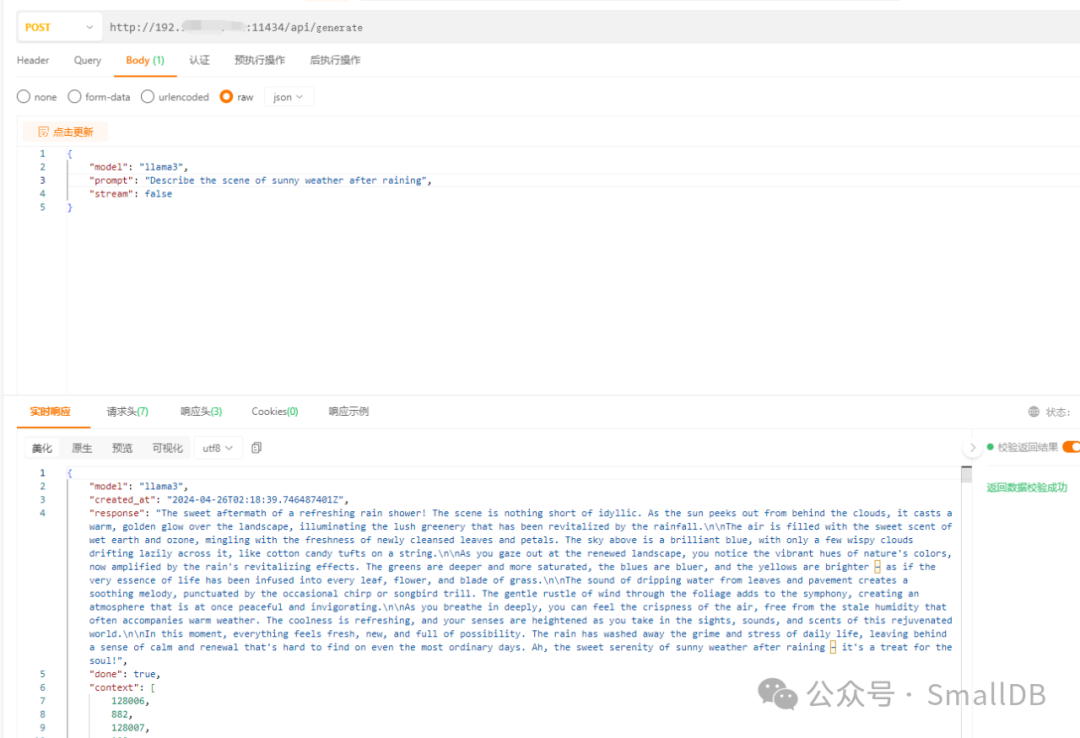
chat api调用
{
    "model":"llama3",
"messages":[
{
"role":"system",
"content":"假设你是一名资深的翻译家,请将接下来的内容翻译成中文"
},
{
"role":"user",
"content":"What a lovely scenario!\n\nAs you step out into the bright, open air."
}
],
"stream":false
}
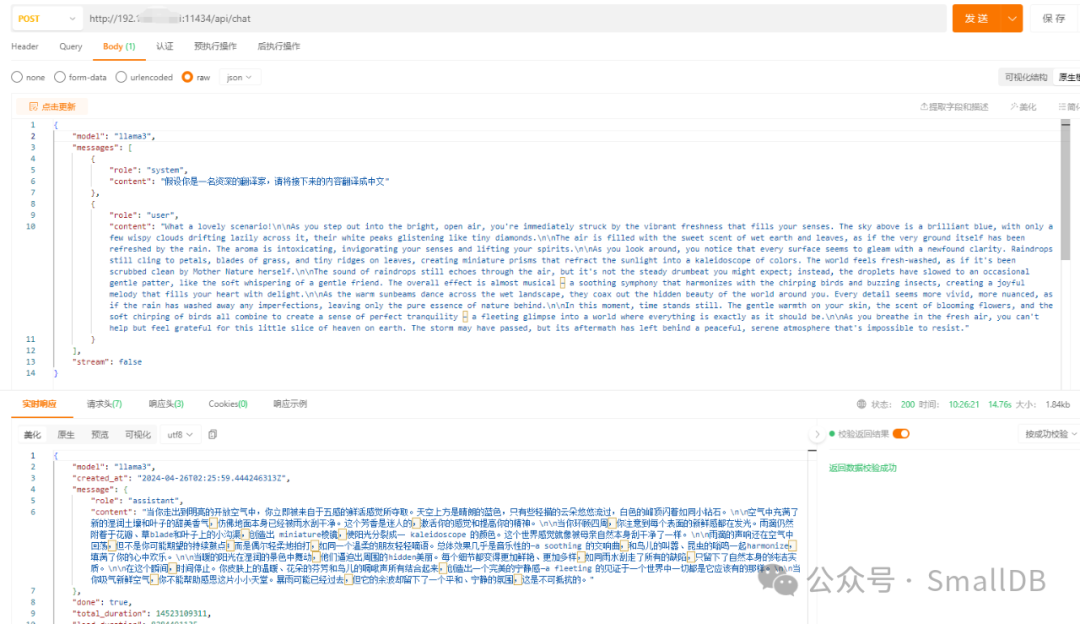
模型下载
llama3 (ollama.com)[1]
配置文件
方式1
#vi /etc/systemd/system/ollama.service
[Unit]
Description=OllamaService
After=network-online.target

[Service]
ExecStart=/usr/local/bin/ollama serve
User=ollama
Group=ollama
Restart=always
RestartSec=3
Environment="PATH=/usr/local/sbin:/usr/local/bin:/usr/sbin:/usr/bin:/root/bin"
#配置远程访问
Environment="OLLAMA_HOST=0.0.0.0"
#配置跨域请求
Environment="OLLAMA_ORIGINS=*"
#配置OLLAMA的模型存放路径,防止内存不足,一般的默认路径是/usr/share/ollama/.ollama/models/
Environment="OLLAMA_MODELS=/home/ollama/.ollama/models"

[Install]
WantedBy=default.target
方式2
[Unit]
Description=OllamaService
After=network-online.target

[Service]
ExecStart=/usr/bin/ollama serve
User=ollama
Group=ollama
Restart=always
RestartSec=3
Environment="OLLAMA_ORIGINS=*"# My added
Environment="OLLAMA_HOST=0.0.0.0"# My added

[Install]
WantedBy=default.target
/etc/systemd/system/ollama.service
方式3
[Unit]
Description=Ollama Service
After=network-online.target

[Service]
ExecStart=/usr/local/bin/ollama serve
User=ollama
Group=ollama
Restart=always
RestartSec=3
Environment="PATH=/usr/local/sbin:/usr/local/bin:/usr/sbin:/usr/bin:/root/bin"

[Install]
WantedBy=default.target
启动
sudo systemctl start ollama
修改完后执行
sudo systemctl daemon-reload
sudo systemctl enable ollama
导入非Ollama Library中的模型
https://modelscope.cn/models
https://hf-mirror.com/
https://huggingface.co/
自己手撮的模型
准备工作
yum -y install zlib-devel bzip2-devel openssl-devel ncurses-devel sqlite-devel readline-devel tk-devel gcc make gdbm-devel db4-devel libpcap-devel xz-devel libffi-devel
安装
wget https://www.python.org/ftp/python/3.9.18/Python-3.9.18.tgz
tar -zxvf Python-3.9.18.tgz
cd Python-3.9.18/
> ./configure --prefix=/usr/local/python3.8
> make
> > make install
配置环境变量
.bash_profile
export PYTHON_HOME=/usr/local/python3.8
export PATH=$PYTHON_HOME/bin:$PATH
配置Llama 3
cd /opt/llama3-demo
git clone https://github.com/meta-llama/llama3
cd /opt/llama3-demo/llama3
/usr/local/python3.8/bin/pip3 install -e .
配置Llama 3
[root@iZ2zebtab4tvw9cw5060hmZ llama3]# ./download.sh
Enter the URL from email:
引用链接
[1]
llama3 (ollama.com): https://ollama.com/library/llama3
文章转载自SmallDB,如果涉嫌侵权,请发送邮件至:contact@modb.pro进行举报,并提供相关证据,一经查实,墨天轮将立刻删除相关内容。
