



主机信息
Linux test 4.19.0-240.23.11.el8_2.bclinux.x86_64 #1 SMP Wed Jun 2 16:11:31 CST 2021 x86_64 x86_64 x86_64 GNU/Linux
在可联网的主机上下载相应安装包及依赖
# 创建名为 ansible-venv 的虚拟环境python3 -m venv ansible-venv# 激活虚拟环境source ~/app/ansible-venv/bin/activate
下载安装包及依赖
#以下操作均在该目录执行mkdir ansible-offline-packagescd ansible-offline-packages# 下载pip安装包python3 -m pip download --no-binary :all: pip# 安装pippython3 -m pip install path/to/downloaded/pip-x.x.x.tar.gz# 验证pip版本为pip 21.3.1pip3 --version# 然后下载ansible安装包及其依赖pip3 download ansible==4.10.0# 下载完成后ansible-offline-packages目录下会有以下这些包ansible-4.10.0.tar.gzansible-core-2.11.12.tar.gzcffi-1.15.1-cp36-cp36m-manylinux_2_5_x86_64.manylinux1_x86_64.whlcryptography-40.0.2-cp36-abi3-manylinux_2_28_x86_64.whlJinja2-3.0.3-py3-none-any.whlMarkupSafe-2.0.1-cp36-cp36m-manylinux_2_5_x86_64.manylinux1_x86_64.manylinux_2_12_x86_64.manylinux2010_x86_64.whlpackaging-21.3-py3-none-any.whlpip-21.3.1.tar.gzpycparser-2.21-py2.py3-none-any.whlpyparsing-3.1.2-py3-none-any.whlPyYAML-6.0.1-cp36-cp36m-manylinux_2_17_x86_64.manylinux2014_x86_64.whlresolvelib-0.5.4-py2.py3-none-any.whl
执行完成后会在该目录下成这样的压缩包,将其下载下来上传到BCLinux8.2主机上。
在自己的家目录下离线部署ansible-4.10.0
# 创建名为 ansible-venv 的虚拟环境python3 -m venv ansible-venv# 激活虚拟环境source ~/app/ansible-venv/bin/activate# 解压tar zxvf ansible-offline-packages# 进入解压目录cd ansible-offline-packagespython3 -m pip install pip-x.x.x.tar.gz# 在ansible-offline-packages目录下安装 Ansible 及其依赖项pip3 install --no-index --find-links=. ansible-4.10.0.tar.gz--no-index:告诉 pip3 不要从 PyPI 源索引中查找软件包。--find-links=.:指定查找软件包的路径为当前目录。# 安装成功会有如下输出Successfully installed MarkupSafe-2.0.1 PyYAML-6.0.1 ansible-4.10.0 ansible-core-2.11.12 cffi-1.15.1 cryptography-40.0.2 jinja2-3.0.3 packaging-21.3 pycparser-2.21 pyparsing-3.1.2 resolvelib-0.5.4
验证ansible
(ansible-venv) [root@bogon ~]# ansible --version[DEPRECATION WARNING]: Ansible will require Python 3.8 or newer on the controller starting with Ansible 2.12. Current version: 3.6.8 (default, Jan 28 2021, 14:05:46) [GCC 8.3.120191121 (Anolis 8.3.1-5.0.1)]. This feature will be removed from ansible-core in version 2.12. Deprecation warnings can be disabled by setting deprecation_warnings=False inansible.cfg./root/ansible-venv/lib64/python3.6/site-packages/ansible/parsing/vault/__init__.py:44: CryptographyDeprecationWarning: Python 3.6 is no longer supported by the Python core team. Therefore, support for it is deprecated in cryptography. The next release of cryptography will remove support for Python 3.6.from cryptography.exceptions import InvalidSignatureansible [core 2.11.12]config file = Noneconfigured module search path = ['/root/.ansible/plugins/modules', '/usr/share/ansible/plugins/modules']ansible python module location = root/ansible-venv/lib64/python3.6/site-packages/ansibleansible collection location = /root/.ansible/collections:/usr/share/ansible/collectionsexecutable location = /root/ansible-venv/bin/ansiblepython version = 3.6.8 (default, Jan 28 2021, 14:05:46) [GCC 8.3.1 20191121 (Anolis 8.3.1-5.0.1)]jinja version = 3.0.3libyaml = True
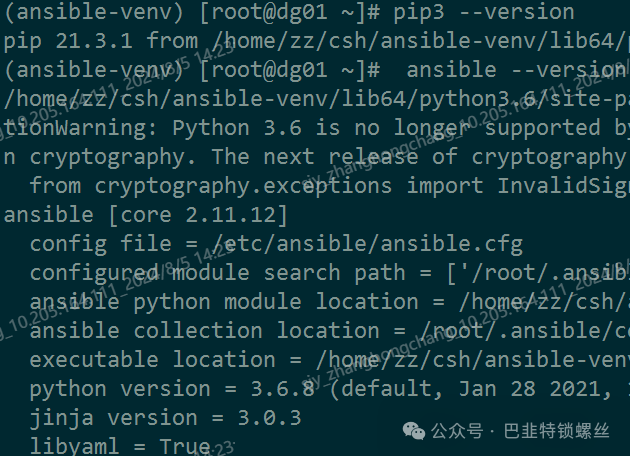
退出虚拟环境
deactivate
将虚拟环境中的 bin 目录添加到 PATH
vim ~/.bash_profilePATH=$PATH:$HOME/bin:$HOME/ansible-venv/binexport PATH
重新加载环境变量
source ~/.bash_profile
验证ansible不在python虚拟环境中是否可用
ansible --version
编写 ansible.cfg 文件关闭警告(没有则手动创建)
vim ~/.ansible.cfg[defaults]host_key_checking = Falsedeprecation_warnings = False
部署完成。

版权声明:本文内容来自CSDN:MarkTo_Boy,遵循CC 4.0 BY-SA版权协议上原文接及本声明。本作品采用知识共享署名-非商业性使用-禁止演绎 2.5 中国大陆许可协议进行可。原文链接:https://blog.csdn.net/STU001_1/article/details/139882786如有涉及到侵权,请联系,将立即予以删除处理。在此特别鸣谢原作者的创作。此篇文章的所有版权归原作者所有,与本公众号无关,商业转载建议请联系原作者,非商业转载请注明出处。
文章转载自巴韭特锁螺丝,如果涉嫌侵权,请发送邮件至:contact@modb.pro进行举报,并提供相关证据,一经查实,墨天轮将立刻删除相关内容。
