



Whoami:5年+金融、政府、医疗领域工作经验的DBACertificate:PGCM、OCP、YCPSkill:Oracle、Mysql、PostgreSQL、国产数据库Platform:CSDN、墨天轮、公众号(呆呆的私房菜)
1. 系统依赖安装
yum -y install gcc gcc-c++ make perl perl-devel perl-DBI perl-DBD-Pg perl-ExtUtils-MakeMaker perl-ExtUtils-CBuilder perl-CPAN perl-ExtUtils-eBuilder perl-Time-HiRes perl-tests cpan perl-Time-HiRes
2. oracle客户端安装 https://www.oracle.com/cn/database/technologies/instant-client/downloads.html
unzip instantclient-sqlplus-linux.x64-23.7.0.25.01.zipunzip instantclient-sdk-linux.x64-23.7.0.25.01.zipunzip instantclient-basic-linux.x64-23.7.0.25.01.zipvi ~/.bashrcexport LD_LIBRARY_PATH=$LD_LIBRARY_PATH:/home/postgres/ora2pg_package/oracleclient/instantclient_23_7source ~/.bashrc
3. dbd:oracle安装
tar xzf DBD-Oracle-1.90.tar.gzcd DBD-Oracle-1.90perl Makefile.PL -Vmake -j 8make install
4. ora2pg安装
tar xzf ora2pg-24.3.tar.gzcd ora2pg-24.3perl Makefile.PL -lmake && make install
5. 检查perl模块安装情况
cat > check.pl <<"EOF"#!/usr/bin/perluse strict;use ExtUtils::Installed;my $inst= ExtUtils::Installed->new();my @modules = $inst->modules();foreach(@modules){my $ver = $inst->version($_) || "???";printf("%-12s -- %s\n", $_, $ver);}exit;EOFperl check.pl
1. Oracle创建测试用户和数据
SQL> show parameter serviceNAME TYPE VALUE------------------------------------ --------------------------------- ------------------------------service_names string szdbSQL> select userenv('language') from dual;USERENV('LANGUAGE')------------------------------------------------------------------------------------------------------------------------------------------------------------AMERICAN_AMERICA.ZHS16GBKSQL> create user ora2pg identified by oracle;User created.SQL> grant dba to ora2pg;Grant succeeded.SQL> conn ora2pg/oracleConnected.SQL> create table t1(id int, name varchar(100), info clob);Table created.SQL> INSERT INTO t1 (id, name, info)SELECTROWNUM AS id,DBMS_RANDOM.STRING('A', DBMS_RANDOM.VALUE(10,100)) AS name,TO_CLOB(DBMS_RANDOM.STRING('A', DBMS_RANDOM.VALUE(500,1000))) AS infoFROM DUALCONNECT BY LEVEL <= 10000; 2 3 4 5 6 710000 rows created.create index t1 on t1(name);
2. 编辑ora2pg配置文件
cp /etc/ora2pg/ora2pg.conf.dist etc/ora2pg/ora2pg.confvi etc/ora2pg/ora2pg.confORACLE_HOME u01/app/oracle/product/12.2.0/dbhome_1ORACLE_DSN dbi:Oracle:host=192.168.56.11;sid=szdb;port=1521ORACLE_USER ora2pgORACLE_PWD oracleINDEXES_RENAMING 1TYPE TABLENLS_LANG AMERICAN_AMERICA.ZHS16GBKSCHEMA ora2pgDEFAULT_NUMERIC numeric
3. 评估迁移难度
[root@host-01 ~]# ora2pg -t SHOW_REPORT --estimate_cost -c etc/ora2pg/ora2pg.conf[2025-03-17 21:02:24] [========================>] 2/2 tables (100.0%) end of scanning.[2025-03-17 21:02:26] [========================>] 6/6 objects types (100.0%) end of objects auditing.-------------------------------------------------------------------------------Ora2Pg v24.3 - Database Migration Report-------------------------------------------------------------------------------Version Oracle Database 12c Enterprise Edition Release 12.2.0.1.0Schema ORA2PGSize 43.44 MB-------------------------------------------------------------------------------Object Number Invalid Estimated cost Comments Details-------------------------------------------------------------------------------DATABASE LINK 0 0 0.00 Database links will be exported as SQL/MED PostgreSQL's Foreign Data Wrapper (FDW) extensions using oracle_fdw.GLOBAL TEMPORARY TABLE 0 0 0.00 Global temporary table are not supported by PostgreSQL and will not be exported. You will have to rewrite some application code to match the PostgreSQL temporary table behavior.INDEX 1 0 1.10 1 index(es) are concerned by the export, others are automatically generated and will do so on PostgreSQL. Bitmap will be exported as btree_gin index(es). Domain index are exported as b-tree but commented to be edited to mainly use FTS. Cluster, bitmap join and IOT indexes will not be exported at all. Reverse indexes are not exported too, you may use a trigram-based index (see pg_trgm) or a reverse() function based index and search. Use 'varchar_pattern_ops', 'text_pattern_ops' or 'bpchar_pattern_ops' operators in your indexes to improve search with the LIKE operator respectively into varchar, text or char columns. 1 b-tree index(es).JOB 0 0 0.00 Job are not exported. You may set external cron job with them.SYNONYM 0 0 0.00 SYNONYMs will be exported as views. SYNONYMs do not exists with PostgreSQL but a common workaround is to use views or set the PostgreSQL search_path in your session to access object outside the current schema.TABLE 2 0 1.00 Total number of rows: 10001. Top 10 of tables sorted by number of rows:. t1_base has 10000 rows. t1 has 1 rows. Top 10 of largest tables:.-------------------------------------------------------------------------------Total 3 0 2.10 2.10 cost migration units means approximatively 1 person-day(s). The migration unit was set to 5 minute(s)-------------------------------------------------------------------------------Migration level : A-1-------------------------------------------------------------------------------Migration levels:A - Migration that might be run automaticallyB - Migration with code rewrite and a human-days cost up to 5 daysC - Migration with code rewrite and a human-days cost above 5 daysTechnical levels:1 = trivial: no stored functions and no triggers2 = easy: no stored functions but with triggers, no manual rewriting3 = simple: stored functions and/or triggers, no manual rewriting4 = manual: no stored functions but with triggers or views with code rewriting5 = difficult: stored functions and/or triggers with code rewriting-------------------------------------------------------------------------------
4. 导出表结构
[root@host-01 ~]# ora2pg -t TABLE -c etc/ora2pg/ora2pg.conf -o ora2pg_ddl.sql[2025-03-17 21:27:22] [========================>] 2/2 tables (100.0%) end of scanning.[2025-03-17 21:27:53] [========================>] 2/2 tables (100.0%) end of table export.
5. 导出表数据
root@host-01 ~]# ora2pg -t COPY -j 4 -c /etc/ora2pg/ora2pg.conf -o ora2pg_data.sql[2025-03-17 21:35:11] [========================>] 2/2 tables (100.0%) end of scanning.[2025-03-17 21:36:16] [========================>] 10000/1 rows (1000000.0%) Table T1 (4 sec., 2500 recs/sec)[2025-03-17 21:36:21] [========================>] 10000/10000 rows (100.0%) Table T1_BASE (5 sec., 2000 recs/sec)[2025-03-17 21:36:21] [========================>] 20000/10001 rows (200.0%) on total estimated data (9 sec., avg: 2222 tuples/sec)
6. 导入表结构和数据
[pg11@host-01 ~]$ psql -h 127.0.0.1 -U test -d testdb -f ora2pg_ddl.sqlSETCREATE TABLECREATE INDEXCREATE TABLE[pg11@host-01 ~]$ psql -h 127.0.0.1 -U test -d testdb -f ora2pg_data.sqlBEGINSETSETCOPY 1001COPY 1001COPY 1001COPY 1001COPY 1001COPY 1001COPY 1001COPY 1001COPY 1001COPY 991SETSETCOPY 1001COPY 1001COPY 1001COPY 1001COPY 1001COPY 1001COPY 1001COPY 1001COPY 1001COPY 991COMMIT[pg11@host-01 ~]$ psql -h 127.0.0.1 -U test -d testdbpsql (11.17)输入 "help" 来获取帮助信息.testdb=> \d+ t1;数据表 "public.t1"栏位 | 类型 | 校对规则 | 可空的 | 预设 | 存储 | 统计目标 | 描述------+------------------------+----------+--------+------+----------+----------+------id | numeric(38,0) | | | | main | |name | character varying(100) | | | | extended | |info | text | | | | extended | |索引:"t1_name" btree (name)testdb=> select count(1) from t1;count-------10000
ok,迁移完成,数据也准确。
数据库迁移过程中需要注意的问题如下:
1. pg 不能创建与表同名的索引; 2. pg 支持boolean类型,可以存储T/F、TRUE/FALSE/NULL; 3. pg 不支持blob和clob类型,可以转换成text类型存储; 4. pg 与 oracle 函数使用差异:
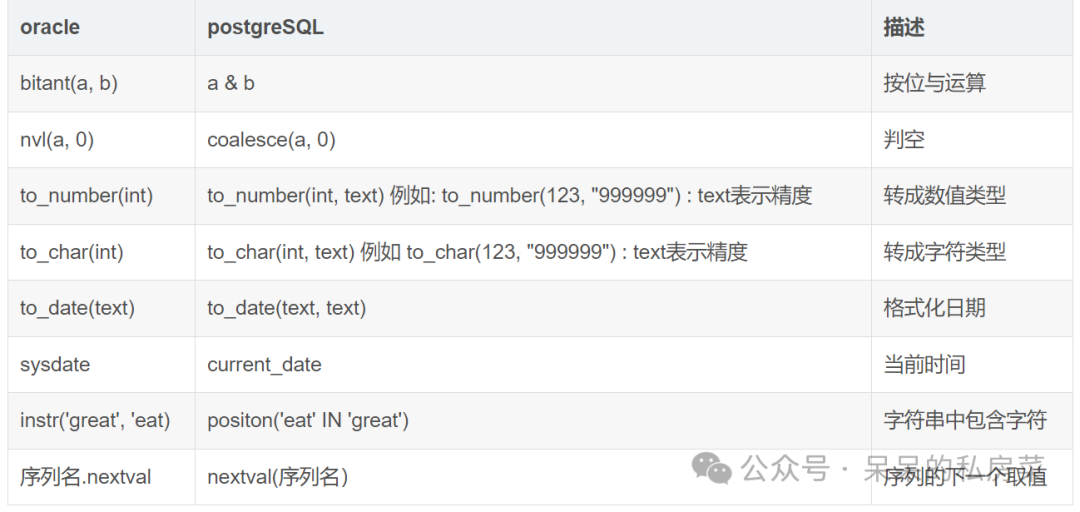
5. pg 要保留时分秒需要用 to_timestamp(text, text); 6. 左右连接的使用注意点:
postgresql:左连接: t1 left join t2 on t1.id = t2.id右连接: t1 right join t2 on t1.id = t2.idoracle:左连接: t1.id = t2.id(+)右连接: t1.id(+) = t2.id
7. pg 系统隐藏字段ctid,是每行数据在表中一个物理标识符,和oracle的rowid类似;不同的是,pg 表被vacuum full或该行被update的时候ctid会变化; 8. pg 使用limit 分页;oracle使用rownum分页; 9. pg 使用case when,oracle使用decode函数;
Select CASEWHEN foo = 'hi' THEN 'there'WHEN foo = 'good' THEN 'bye'ELSE 'default'ENDdecode(条件,值1,返回值1,值2,返回值2,...值n,返回值n,缺省值)该函数的含义如下:IF 条件=值1 THENRETURN(翻译值1)ELSIF 条件=值2 THENRETURN(翻译值2)......ELSIF 条件=值n THENRETURN(翻译值n)ELSERETURN(缺省值)END IF
10. pg 查询时别名使用关键字时需要使用双引号括起来; 11. pg 自动生成uuid的方法:
postgresql: uuid_generate_v1(),uuid_generate_v4()oracle: sys_uuid();
12. pg 无虚拟表,可以创建伪视图替代,并授权:
create or replace view dual asselect NULL::"unknown" where 1=1;alter table dual owner to postgres;grant all on table dual to postgres;grant select on table dual to public;
13. pg 子查询中必须有别名:
select count(1) from (select * from store) s;
14. pg 插入空值时需要修改为null,oracle中""和null是相同的; 15. pg 使用concat函数去实现oracle连接字符串 ||功能:
create or replace function concat(text, text)returns text as$body$select coalesce($1,'') || coalesce($2,'')$body$language 'sql' volatile;alter function concat(text, text) owner to postgres;
16. 用关键字作为字段名必须加上双引号; 17. pg 不支持procedure和package,都需要改写成function;当package有全局变量的情况时,修改会比较麻烦,可以使用临时表进行传递; 18. pg 支持继承和函数重载,oracle不支持; 19. pg 不支持update别名语法。
本文内容就到这啦,相信读完本篇你也掌握了如何使用ora2pg工具进行数据库迁移了吧!希望本篇内容能给你带来帮助。我们下篇再见!

文章转载自呆呆的私房菜,如果涉嫌侵权,请发送邮件至:contact@modb.pro进行举报,并提供相关证据,一经查实,墨天轮将立刻删除相关内容。
