



asp.net core 腾讯验证码的接入
Intro
之前使用的验证码服务是用的极验验证,而且是比较旧的,好久之前接入的,而且验证码服务依赖 Session,有点不太灵活,后来发现腾讯也有验证码服务,而且支持小程序,并且是唯一支持小程序的验证码。。(垄断么。。)
而且相比之下,腾讯验证码不需要依赖 Session,集成起来也比较方便,于是就用了腾讯验证码,详细参考:https://007.qq.com/product.html?ADTAG=index.block
验证流程
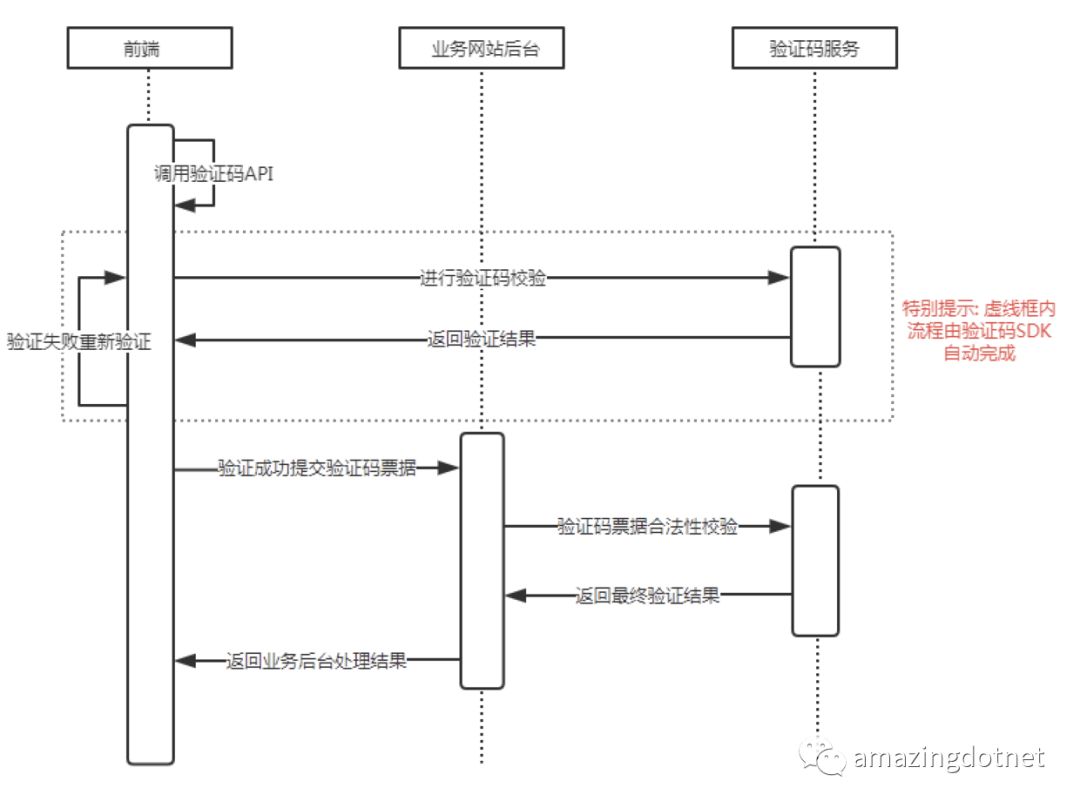
服务器端接入
using System.ComponentModel.DataAnnotations;
using System.Net.Http;
using System.Threading.Tasks;
using Microsoft.Extensions.Logging;
using Microsoft.Extensions.Options;
using Newtonsoft.Json;
using WeihanLi.Extensions;

namespace ActivityReservation.Common
{
    public class TencentCaptchaOptions
    {
        /// <summary>
        /// 客户端AppId
        /// </summary>
        [Required]
        public string AppId { get; set; }

        /// <summary>
        /// App Secret Key
        /// </summary>
        [Required]
        public string AppSecret { get; set; }
    }

    public class TencentCaptchaRequest
    {
        /// <summary>
        /// 验证码客户端验证回调的票据
        /// </summary>
        public string Ticket { get; set; }

        /// <summary>
        /// 验证码客户端验证回调的随机串
        /// </summary>
        public string Nonce { get; set; }

        /// <summary>
        /// 提交验证的用户的IP地址(eg: 10.127.10.2)
        /// </summary>
        public string UserIP { get; set; }
    }

    public class TencentCaptchaHelper
    {
        private class TencentCaptchaResponse
        {
            /// <summary>
            /// 1:验证成功,0:验证失败,100:AppSecretKey参数校验错误
            /// </summary>
            [JsonProperty("response")]
            public int Code { get; set; }

            /// <summary>
            /// 恶意等级 [0, 100]
            /// </summary>
            [JsonProperty("evil_level")]
            public string EvilLevel { get; set; }

            /// <summary>
            /// 错误信息
            /// </summary>
            [JsonProperty("err_msg")]
            public string ErrorMsg { get; set; }
        }

        private const string TencentCaptchaVerifyUrl = "https://ssl.captcha.qq.com/ticket/verify";
        private readonly TencentCaptchaOptions _captchaOptions;
        private readonly ILogger _logger;
        private readonly HttpClient _httpClient;

        public TencentCaptchaHelper(
            IOptions<TencentCaptchaOptions> option,
            ILogger<TencentCaptchaHelper> logger,
            HttpClient httpClient)
        {
            _captchaOptions = option.Value;
            _logger = logger;
            _httpClient = httpClient;
        }

        public async Task<bool> IsValidRequestAsync(TencentCaptchaRequest request)
        {
            // 参考文档:https://007.qq.com/captcha/#/gettingStart
            var response = await _httpClient.GetAsync(
                $"{TencentCaptchaVerifyUrl}?aid={_captchaOptions.AppId}&AppSecretKey={_captchaOptions.AppSecret}&Ticket={request.Ticket}&Randstr={request.Nonce}&UserIP={request.UserIP}");
            var responseText = await response.Content.ReadAsStringAsync();
            if (responseText.IsNotNullOrEmpty())
            {
                _logger.Debug($"Tencent captcha verify response:{responseText}");
                var result = responseText.JsonToType<TencentCaptchaResponse>();
                if (result.Code == 1)
                {
                    return true;
                }
            }
            return false;
        }
    }
}
Startup 配置:
services.AddHttpClient<TencentCaptchaHelper>(client => client.Timeout = TimeSpan.FromSeconds(3))
    .ConfigurePrimaryHttpMessageHandler(() => new NoProxyHttpClientHandler());
services.AddTencentCaptchaHelper(options =>
{
    options.AppId = Configuration["Tencent:Captcha:AppId"];
    options.AppSecret = Configuration["Tencent:Captcha:AppSecret"];
});
前端接入
前端接入这里不作多介绍了,接入方式多种多样,具体可以参考官方文档:https://cloud.tencent.com/document/product/1110/36841
下面的代码是 angular spa 在前端接入的核心代码
  private loadCaptcha(): void {
    var tCaptcha = document.getElementById("tCaptcha");
    if (tCaptcha) {
      this.InitCaptcha();
      return;
    }
    let script = <any>document.createElement('script');
    script.id = "tCaptcha";
    script.type = 'text/javascript';
    script.src = "https://ssl.captcha.qq.com/TCaptcha.js"
    if (script.readyState) {  //IE
      script.onreadystatechange = () => {
        if (script.readyState === "loaded" || script.readyState === "complete") {
          this.InitCaptcha();
        }
      };
    } else {  //Others
      script.onload = () => {
        this.InitCaptcha();
      };
    }
    document.getElementsByTagName('body')[0].appendChild(script);
  }

  private InitCaptcha(): void {
    let captchaDom = document.getElementById('TencentCaptcha1');
    if (!captchaDom) {
      return;
    }
    this.tencentRecaptcha = new TencentCaptcha(
      captchaDom, appId, (res) => {
        this.captchaValid = false;
        console.log(res);
        // res(用户主动关闭验证码)= {ret: 2, ticket: null}
        // res(验证成功) = {ret: 0, ticket: "String", randstr: "String"}
        if (res.ret === 0) {
          this.captchaInfo.nonce = res.randstr;
          this.captchaInfo.ticket = res.ticket;
          this.captchaValid = true;
          this.tencentRecaptcha.destroy();

          let button = <HTMLElement>document.getElementById("btnSubmit");
          button.click();
        }
      }
    );
    console.log(`captcha inited`);
    this.tencentRecaptcha.show();
  }
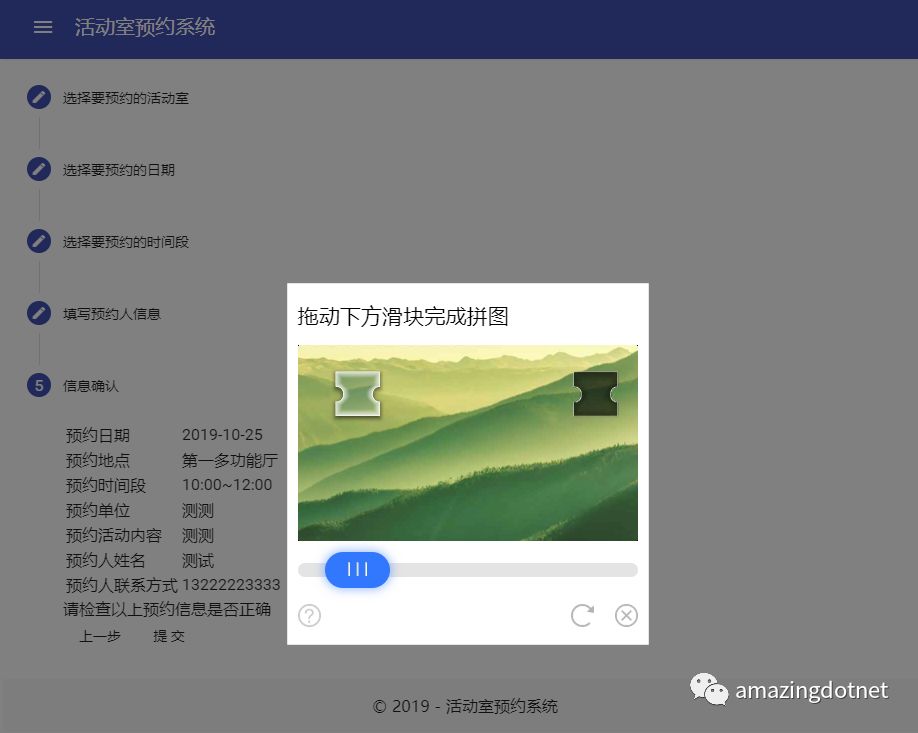
使用效果:
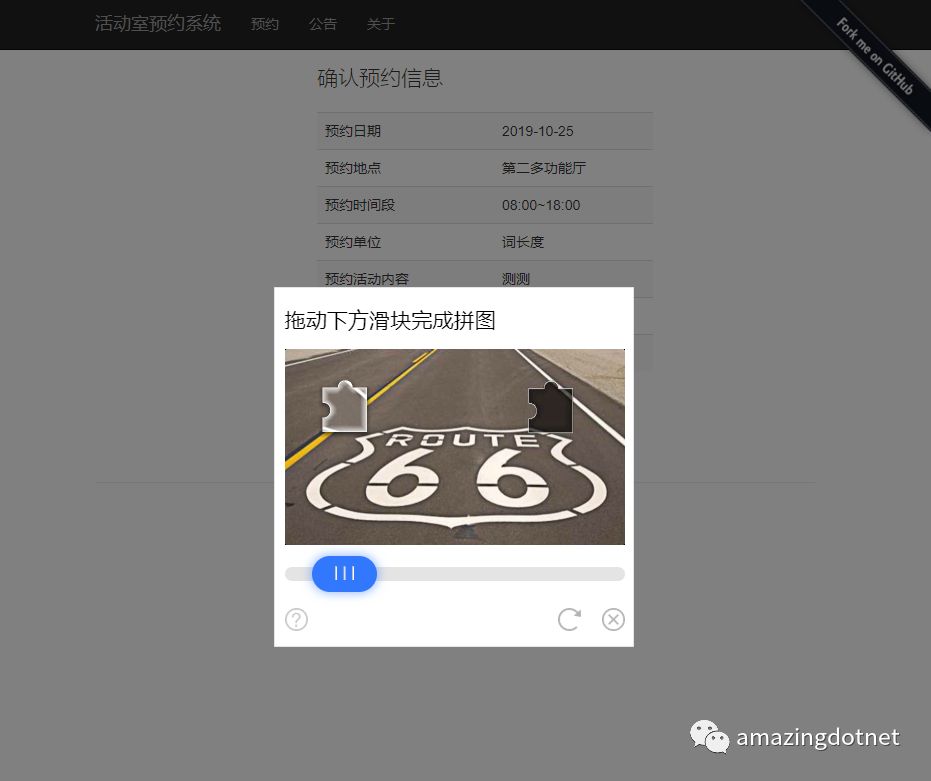
老版网站接入效果:
Reference
https://github.com/WeihanLi/ActivityReservation
https://reservation.weihanli.xyz/Home/Reservate
https://reservation-client.weihanli.xyz/reservation/new
https://cloud.tencent.com/document/product/1110/36841
