



温馨提示:本篇博客的详细代码已发布到 git : https://gitcode.com/nutpi/HarmonyosNext 可以下载运行哦!

HarmonyOS NEXT系列教程之图案锁页面布局详解
效果预览
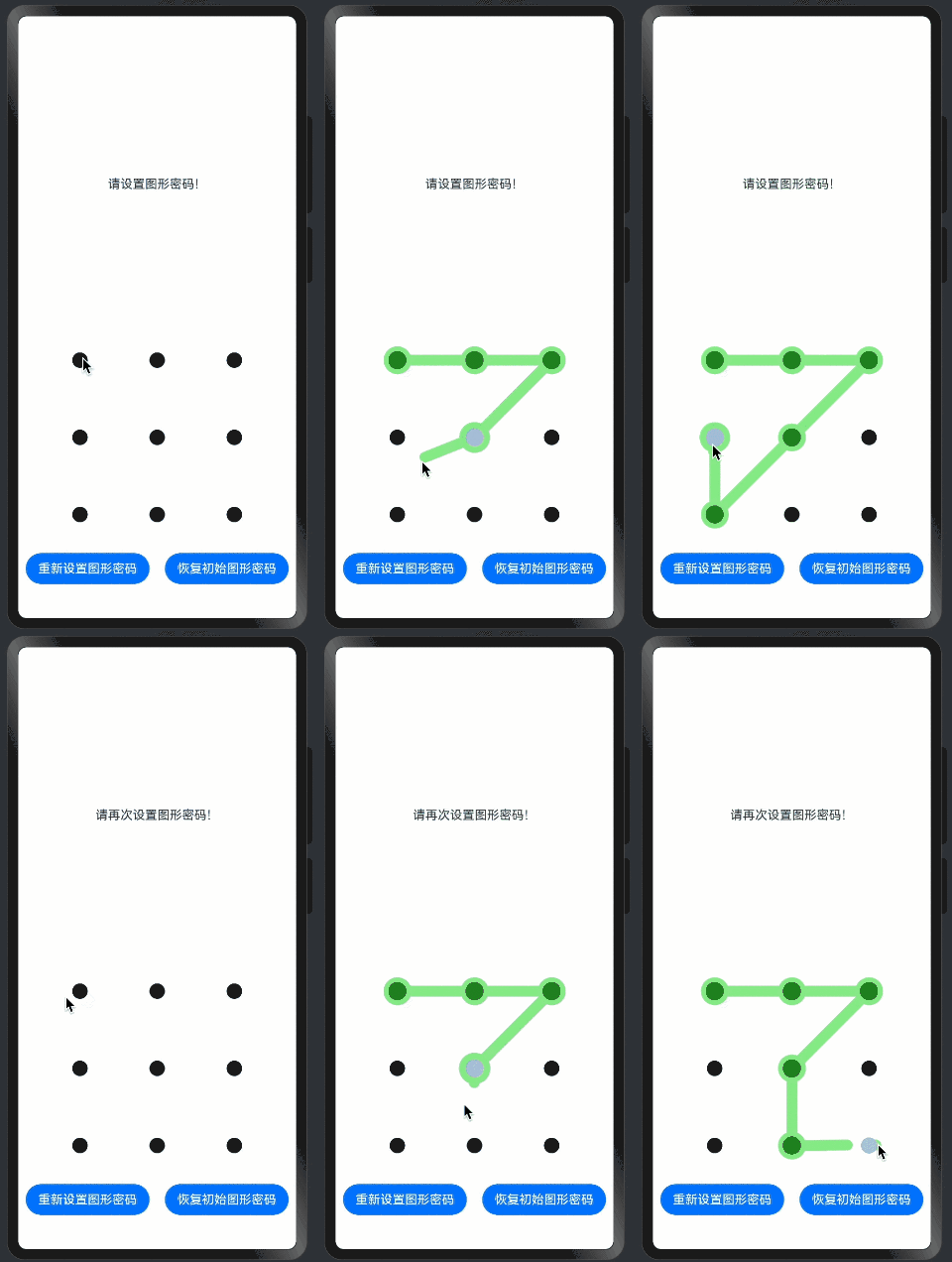
1. 整体布局结构
build() {
    Column() {
        Column() {
            // 提示信息区域
            Text(this.message)
                .textAlign(TextAlign.Center)
                .fontSize($r('app.integer.pattern_lock_message_fontsize'))
        }
        .justifyContent(FlexAlign.Center)
        .height($r('app.string.pattern_lock_size_half'))
        .width($r('app.string.pattern_lock_size_full'))

        Column() {
            // 图案锁区域
            PatternLockComponent({...})

            // 按钮区域
            Row({ space: 20 }) {
                Button($r('app.string.pattern_lock_button_1'))
                Button($r('app.string.pattern_lock_button_2'))
            }
        }
        .justifyContent(FlexAlign.End)
        .width($r('app.string.pattern_lock_size_full'))
        .height($r('app.string.pattern_lock_size_half'))
    }
    .height($r('app.string.pattern_lock_size_full'))
    .width($r('app.string.pattern_lock_size_full'))
}
关键点解析:
-
布局结构:
- 外层Column:垂直布局容器
- 上半部分:提示信息区域
- 下半部分:图案锁和按钮区域
-
尺寸设置:
- 使用资源引用定义尺寸
- 全屏宽高设置
- 区域高度均分
2. 提示信息区域
Column() {
    Text(this.message)
        .textAlign(TextAlign.Center)
        .fontSize($r('app.integer.pattern_lock_message_fontsize'))
}
.justifyContent(FlexAlign.Center)
.height($r('app.string.pattern_lock_size_half'))
.width($r('app.string.pattern_lock_size_full'))
关键点解析:
-
文本样式:
- 居中对齐
- 字体大小引用
- 动态消息显示
-
布局控制:
- 垂直居中
- 占据上半部分
- 全宽显示
3. 图案锁区域
PatternLockComponent({
    patternLockController: this.patternLockController,
    message: this.message,
    initalPasswords: this.initalPasswords,
    passwords: this.passwords
})
关键点解析:
-
组件配置:
- 控制器绑定
- 状态数据传递
- 消息同步
-
布局位置:
- 位于中间区域
- 合理的间距
- 清晰的显示
4. 按钮区域
Row({ space: 20 }) {
    Button($r('app.string.pattern_lock_button_1'))
        .onClick(() => {
            this.patternLockController.reset();
            this.initalPasswords = [];
            this.passwords = [];
            this.message = $r('app.string.pattern_lock_message_8');
        })

    Button($r('app.string.pattern_lock_button_2'))
        .onClick(() => {
            this.patternLockController.reset();
            this.initalPasswords = [0, 1, 2, 4, 6, 7, 8];
            this.passwords = [];
            this.message = $r('app.string.pattern_lock_message_9');
        })
}
.margin({ bottom: $r('app.integer.pattern_lock_row_margin') })
关键点解析:
-
按钮布局:
- 水平排列
- 固定间距
- 底部边距
-
交互处理:
- 点击事件绑定
- 状态重置
- 提示更新
5. 样式和资源引用
5.1 尺寸定义
// 使用资源引用
.height($r('app.string.pattern_lock_size_full'))
.width($r('app.string.pattern_lock_size_full'))
.fontSize($r('app.integer.pattern_lock_message_fontsize'))
关键点解析:
-
资源管理:
- 统一的资源定义
- 支持主题切换
- 便于维护
-
尺寸适配:
- 响应式布局
- 比例设置
- 屏幕适配
5.2 样式设置
.textAlign(TextAlign.Center)
.justifyContent(FlexAlign.Center)
.margin({ bottom: $r('app.integer.pattern_lock_row_margin') })
关键点解析:
-
对齐方式:
- 文本居中
- 内容居中
- 布局对齐
-
间距控制:
- 边距设置
- 间隔定义
- 布局美化
6. 布局优化策略
6.1 性能优化
- 避免深层嵌套
- 合理使用容器
- 减少不必要的包装
- 优化重绘区域
6.2 适配建议
- 使用相对单位
- 考虑屏幕旋转
- 支持不同分辨率
- 处理边界情况
7. 小结
本篇教程详细介绍了:
- 页面整体布局的设计方案
- 各个区域的实现细节
- 样式和资源的使用方法
- 布局优化的策略建议
- 适配处理的最佳实践
这些内容帮助你理解图案锁组件的页面布局实现。下一篇将详细介绍图案锁组件的集成方案。
「喜欢这篇文章,您的关注和赞赏是给作者最好的鼓励」
关注作者
【版权声明】本文为墨天轮用户原创内容,转载时必须标注文章的来源(墨天轮),文章链接,文章作者等基本信息,否则作者和墨天轮有权追究责任。如果您发现墨天轮中有涉嫌抄袭或者侵权的内容,欢迎发送邮件至:contact@modb.pro进行举报,并提供相关证据,一经查实,墨天轮将立刻删除相关内容。
