

DB-GPT
是一款开源的AI原生数据应用开发框架(AI Native Data App Development framework with AWEL and Agents),在V0.7.0
版本中,我们对DB-GPT
模块包进行架构治理,将原有模块包进行分拆,重构了整个框架配置体系,提供了更加清晰,更加灵活,更加可扩展的围绕大模型构建AI原生数据应用管理与开发能力。
V0.7.0版本主要新增、增强了以下核心特性:
MCP(Model Context Protocol)协议。
DeepSeek R1,
QWQ推理模型,原有
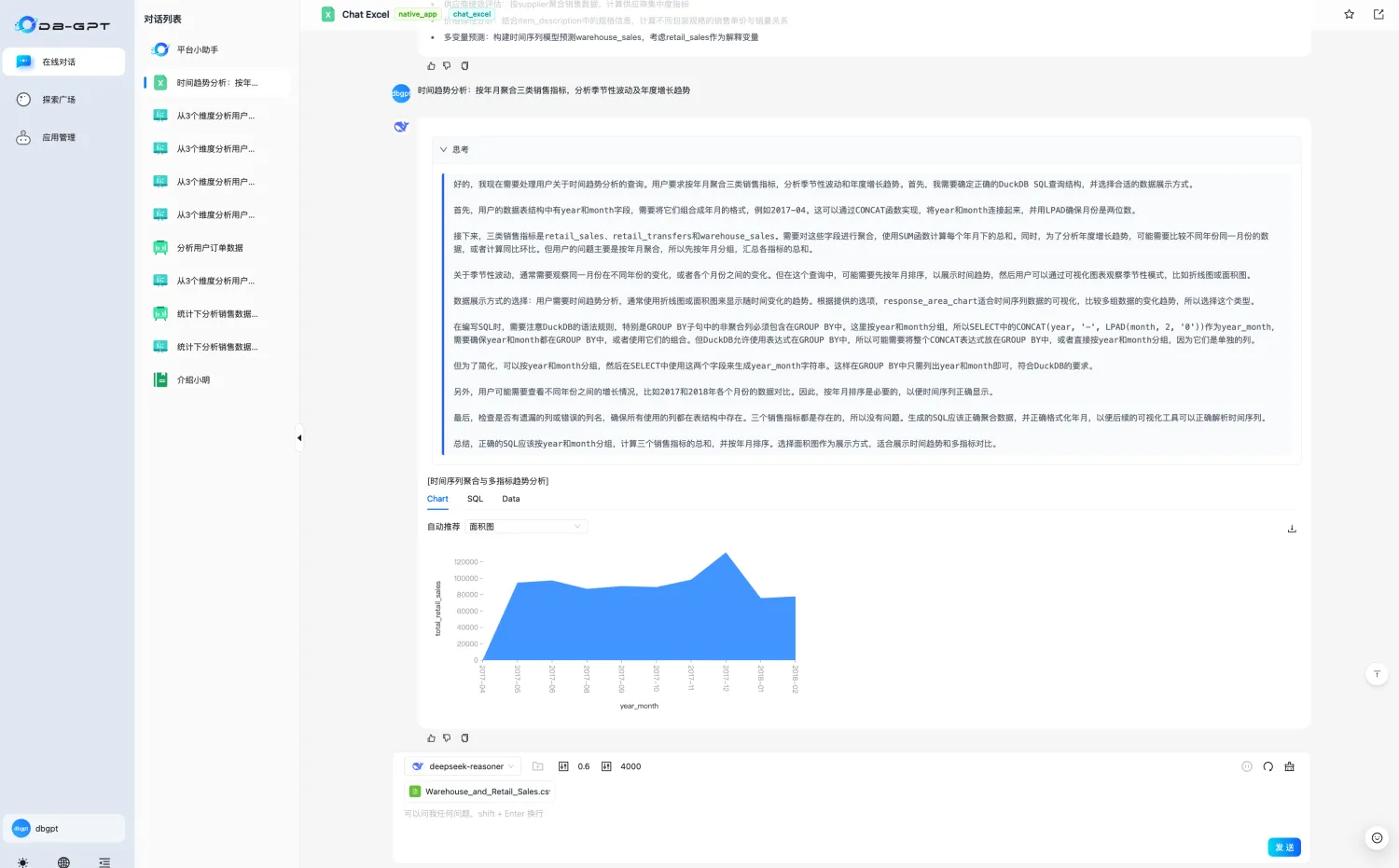
DB-GPT的所有Chat场景都覆盖深度思考能力。
GraphRAG检索链路再增强:支持「向量」、「意图识别+Text2GQL」图检索器。
DB-GPT架构全面升级,原有
dbgpt包拆分为
dbgpt-core,
dbgpt-ext,
dbgpt-serve,
dbgpt-client,
dbgpt-acclerator,
dbgpt-app。
DB-GPT配置体系,配置文件修改为"
.toml"格式,废除原有的
.env配置逻辑。
 新特性
新特性 支持
支持MCP(Model Context Protocol)协议
npx -y supergateway --stdio "uvx mcp-server-fetch"
这里我们运行网页抓取的 mcp-server-fetch
b. 创建 Multi-agent
+ Auto-Planning
+ MCP
的网页抓取和总结 APP。
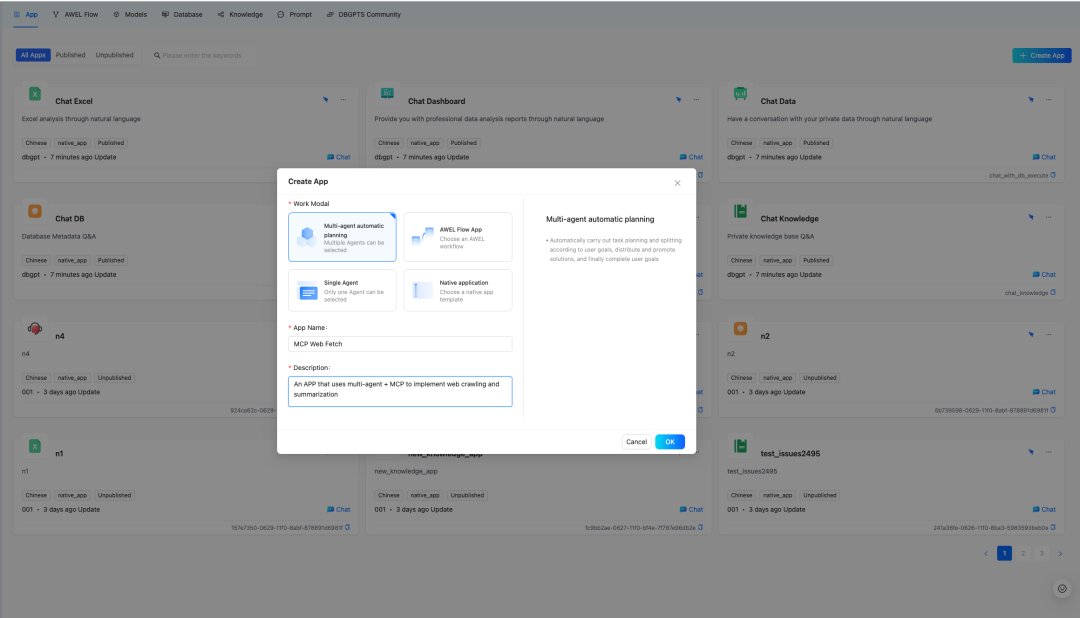
c. 配置 APP,选择 ToolExpert
和 Summarizer
这两个智能体,并给 ToolExpert
添加资源类型是 tool(mcp(sse))
的资源,其中 mcp_servers
填步骤 a 中启动的服务地址(默认是: http://127.0.0.1:8000/sse
),然后保存应用。
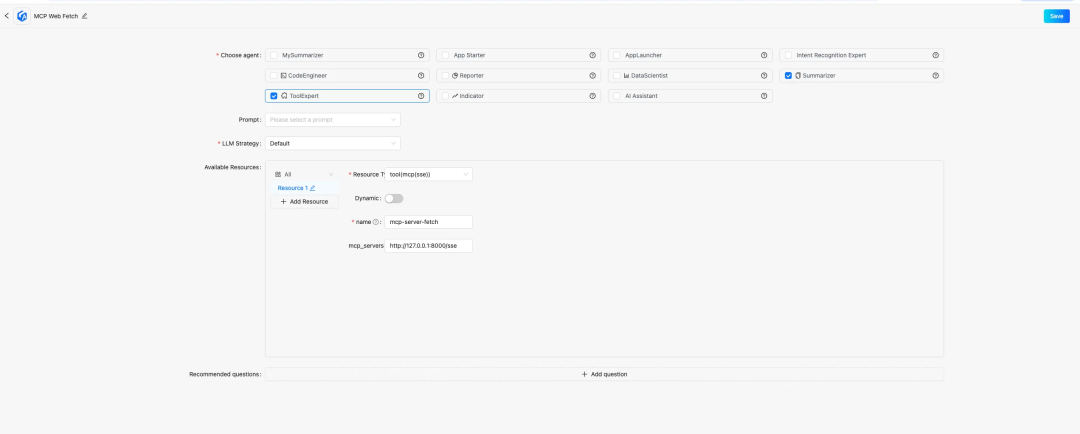
d. 选择刚才新建的 MCP Web Fetch
APP 对话,给出网页让 APP 总结即可:
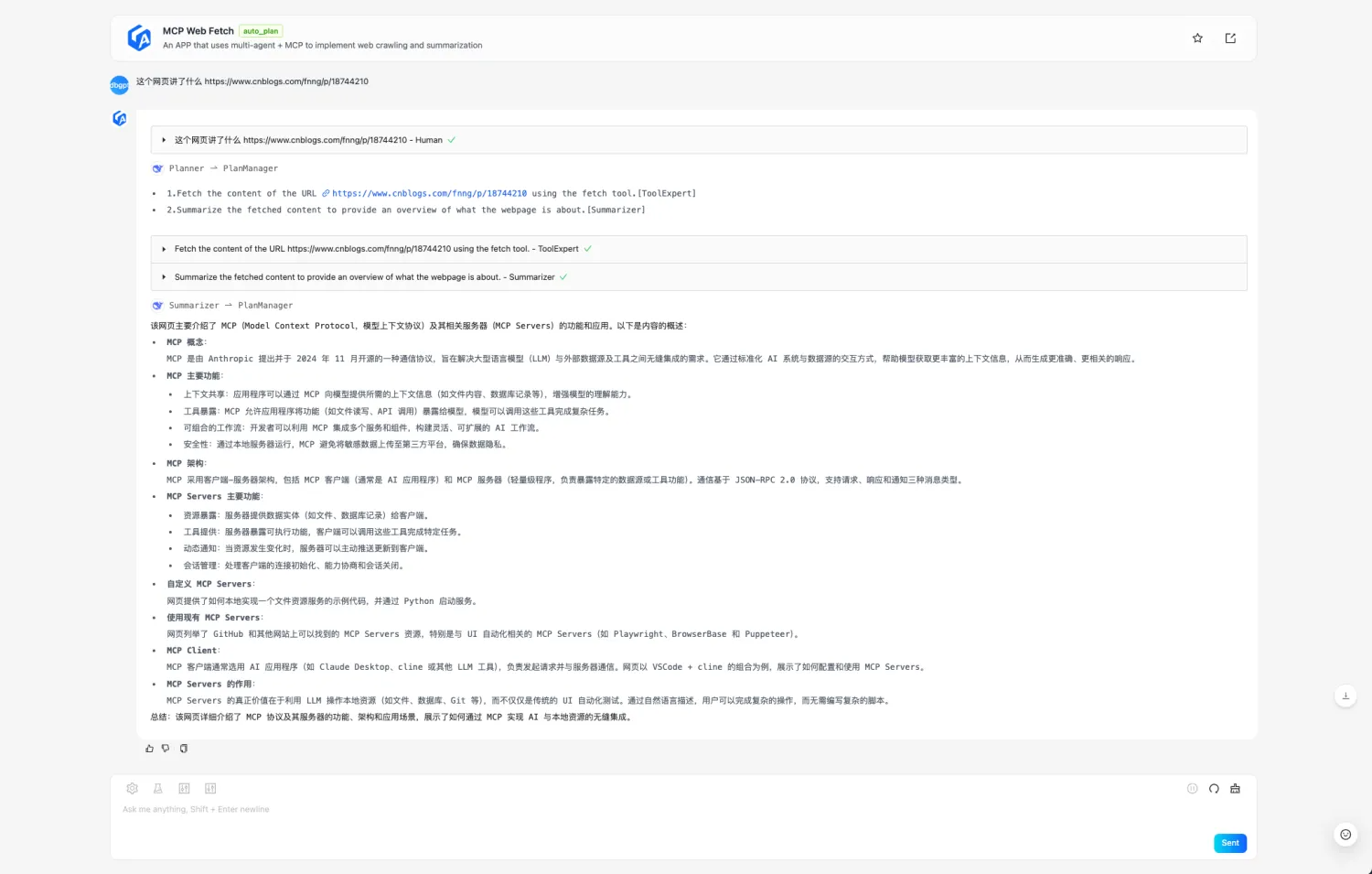
例子中输入的问题是:这个网页讲了什么 https://www.cnblogs.com/fnng/p/18744210
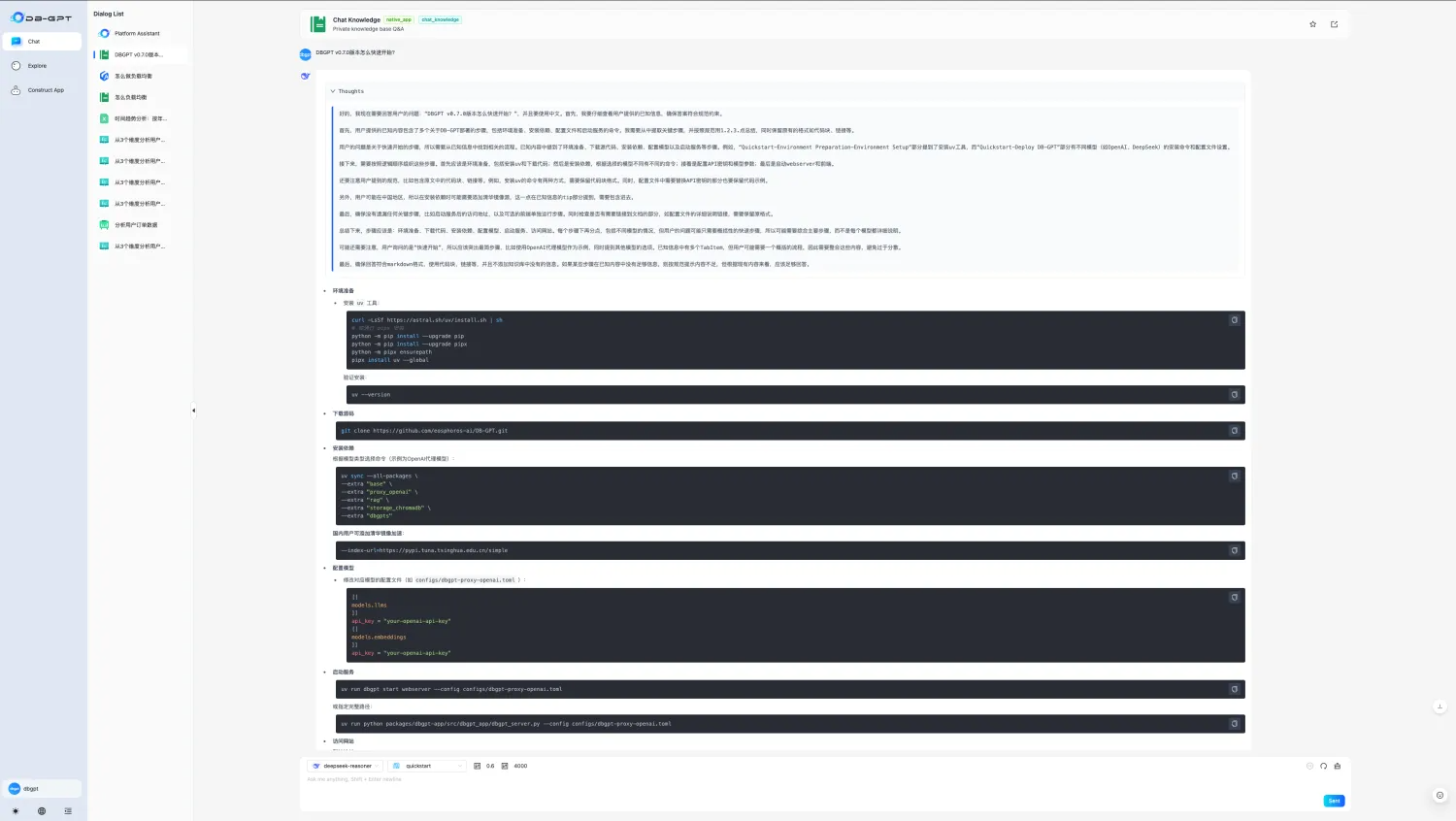
集成DeepSeek R1推理模型,原有DB-GPT的所有Chat场景都具备深度思考能力
如何快速使用参考:http://docs.dbgpt.cn/docs/next/quickstart
GraphRAG检索链路再增强:支持「向量」、「意图识别+Text2GQL」图检索器
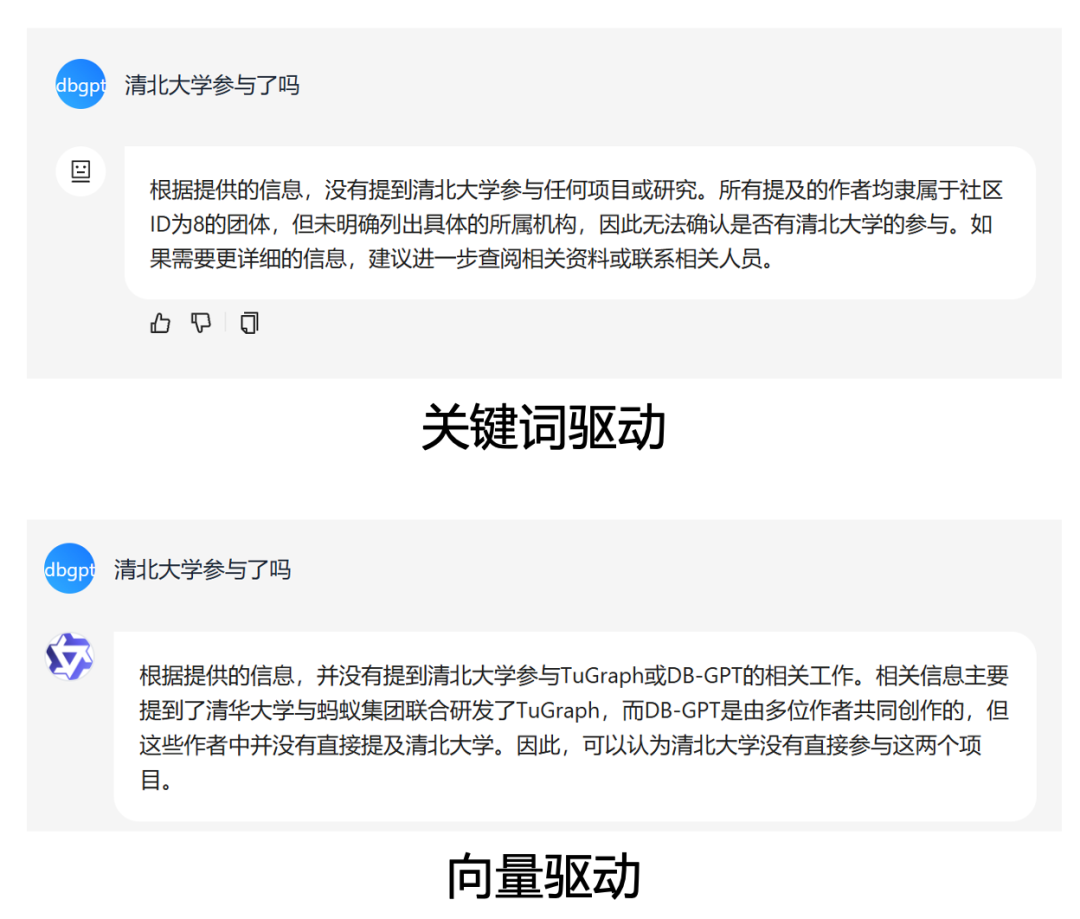
- 「向量」图检索器
知识图谱的构建过程中在所有点边中加入对应的向量并建立索引,在查询时将问题向量化并通过TuGraph-DB自带的向量索引能力,基于HNSW算法查询topk相关的点和边。相比于关键词图检索,能够识别更模糊的问题。
配置样例:
[rag.storage.graph]type = "TuGraph"host="127.0.0.1"port=7687username="admin"password="73@TuGraph"enable_summary="True"triplet_graph_enabled="True"document_graph_enabled="True"# 向量图检索配置项enable_similarity_search="True"knowledge_graph_embedding_batch_size=20similarity_search_topk=5extract_score_threshold=0.7
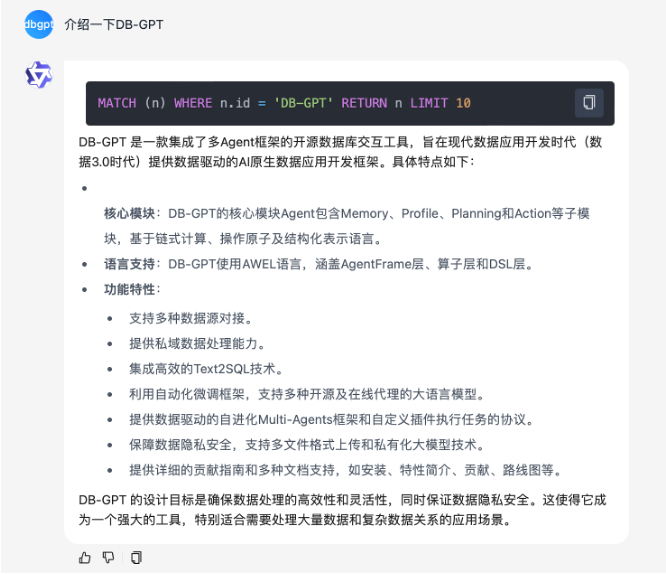
- 「意图识别+Text2GQL」图检索器
将问题通过意图识别模块重写,抽取真实意图以及涉及的实体与关系,之后用Text2GQL模型进行翻译,翻译为GQL语句直接查询。可以进行更精确的图谱查询并显示对应查询语句。除了调用大型模型的api服务之外,也可以使用ollama调用本地Text2GQL模型。
配置样例:
[rag.storage.graph]type = "TuGraph"host="127.0.0.1"port=7687username="admin"password="73@TuGraph"enable_summary="True"triplet_graph_enabled="True"document_graph_enabled="True"# 意图识别+Text2GQL图检索配置项enable_text_search="True"# 使用Ollama部署独立text2gql模型,开启以下配置项# text2gql_model_enabled="True"# text2gql_model_name="tugraph/CodeLlama-7b-Cypher-hf:latest"
DB-GPT 架构全面升级 ,原有dbgpt
包拆分为dbgpt-core
,dbgpt-ext
,dbgpt-serve
,dbgpt-client
,dbgpt-acclerator
,dbgpt-app
随着DB-GPT逐渐发展,服务模块越来越多,导致功能回归测试难,功能兼容问题越来越频繁,因此将原有dbgpt内容进行模块分拆:
dbgpt-core:主要负责dbgpt的awel,model,agent,rag,storage,datasource等内容核心模块接口定义, 发布 Python SDK。 dbgpt-ext:主要负责dbgpt扩展内容的实现,包括datasource数据源扩展,vector-storage,graph-storage的扩展,以及模型接入等扩展,方便社区开发者能够更加快速使用和扩展新的模块内容,发布 Python SDK。 dbgpt-serve: 主要提供dbgpt各个模块原子服务化的Restful接口,方便社区用户能够快速接入。暂不发布 Python SDK。 dbgpt-app:主要负责App,ChatData,ChatKnowledge,ChatExcel,Dashboard等业务场景实现,无 Python SDK。 dbgpt-client:提供统一的 Python 接入的 SDK 客户端。
dbgpt-accelerator:模型推理加速模块,包含了不同版本(不同 torch 版本等)、平台(Windows、MacOS和Linux)、硬件环境(CPU、CUDA 和 ROCM)推理框架(vLLM、llama.cpp)和量化方法(AWQ、bitsandbytes、GPTQ)以及其他加速模块(accelerate、flash-attn)等的适配和兼容,为 DB-GPT 的其它模块提供跨平台的、可按需安装底层环境。
.toml
"格式,废除原有的.env
配置逻辑,每个模块可以自己的配置类,并能自动生成前端配置页面
如何快速使用参考:http://docs.dbgpt.cn/docs/next/quickstart
所有配置参考: http://docs.dbgpt.cn/docs/next/config-reference/app/config_chatdashboardconfig_2480d0
[system]# Load language from environment variable(It is set by the hook)language = "${env:DBGPT_LANG:-zh}"api_keys = []encrypt_key = "your_secret_key"# Server Configurations[service.web]host = "0.0.0.0"port = 5670[service.web.database]type = "sqlite"path = "pilot/meta_data/dbgpt.db"[service.model.worker]host = "127.0.0.1"[rag.storage][rag.storage.vector]type = "chroma"persist_path = "pilot/data"# Model Configurations[models][[models.llms]]name = "deepseek-reasoner"# name = "deepseek-chat"provider = "proxy/deepseek"api_key = "your_deepseek_api_key"
支持 S3、OSS存储[[serves]]type = "file"# Default backend for file serverdefault_backend = "s3"[[serves.backends]]type = "oss"endpoint = "https://oss-cn-beijing.aliyuncs.com"region = "oss-cn-beijing"access_key_id = "${env:OSS_ACCESS_KEY_ID}"access_key_secret = "${env:OSS_ACCESS_KEY_SECRET}"fixed_bucket = "{your_bucket_name}"[[serves.backends]]# Use Tencent COS s3 compatible API as the file servertype = "s3"endpoint = "https://cos.ap-beijing.myqcloud.com"region = "ap-beijing"access_key_id = "${env:COS_SECRETID}"access_key_secret = "${env:COS_SECRETKEY}"fixed_bucket = "{your_bucket_name}
具体配置说明可以参考: http://docs.dbgpt.cn/docs/next/config-reference/utils/config_s3storageconfig_f0cdc9
生产级 llama.cpp 推理支持基于 llama.cpp HTTP Server,支持连续批处理(continuous batching)多用户并行推理等,llama.cpp 推理走向生产系统。
配置样例:
# Model Configurations[models][[models.llms]]name = "DeepSeek-R1-Distill-Qwen-1.5B"provider = "llama.cpp.server"# If not provided, the model will be downloaded from the Hugging Face model hub# uncomment the following line to specify the model path in the local file system# https://huggingface.co/bartowski/DeepSeek-R1-Distill-Qwen-1.5B-GGUF# path = "the-model-path-in-the-local-file-system"path = "models/DeepSeek-R1-Distill-Qwen-1.5B-Q4_K_M.gguf
多模型部署持久目前可以在 DB-GPT 页面完成大部分模型的接入,并能持久化保存配置信息,服务启动自动加载模型。
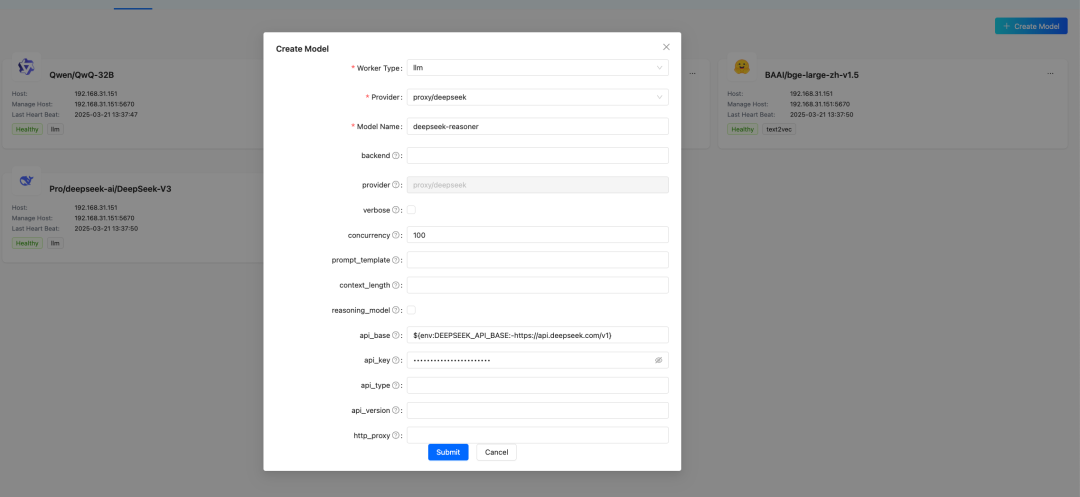
LLM、Embedding、Reranker 扩展能力增强优化了模型的扩展方式,少量几行代码即可接入新模型。原生场景支持基于对话轮数和 Token 数的记忆配置样例:
[app]# 统一配置所有场景的温度temperature = 0.6[[app.configs]]name = "chat_excel"# 使用自定义的温度配置temperature = 0.1duckdb_extensions_dir = []force_install = true[[app.configs]]name = "chat_normal"memory = {type="token", max_token_limit=20000}[[app.configs]]name = "chat_with_db_qa"schema_retrieve_top_k = 50memory = {type="window", keep_start_rounds=0, keep_end_rounds=10}
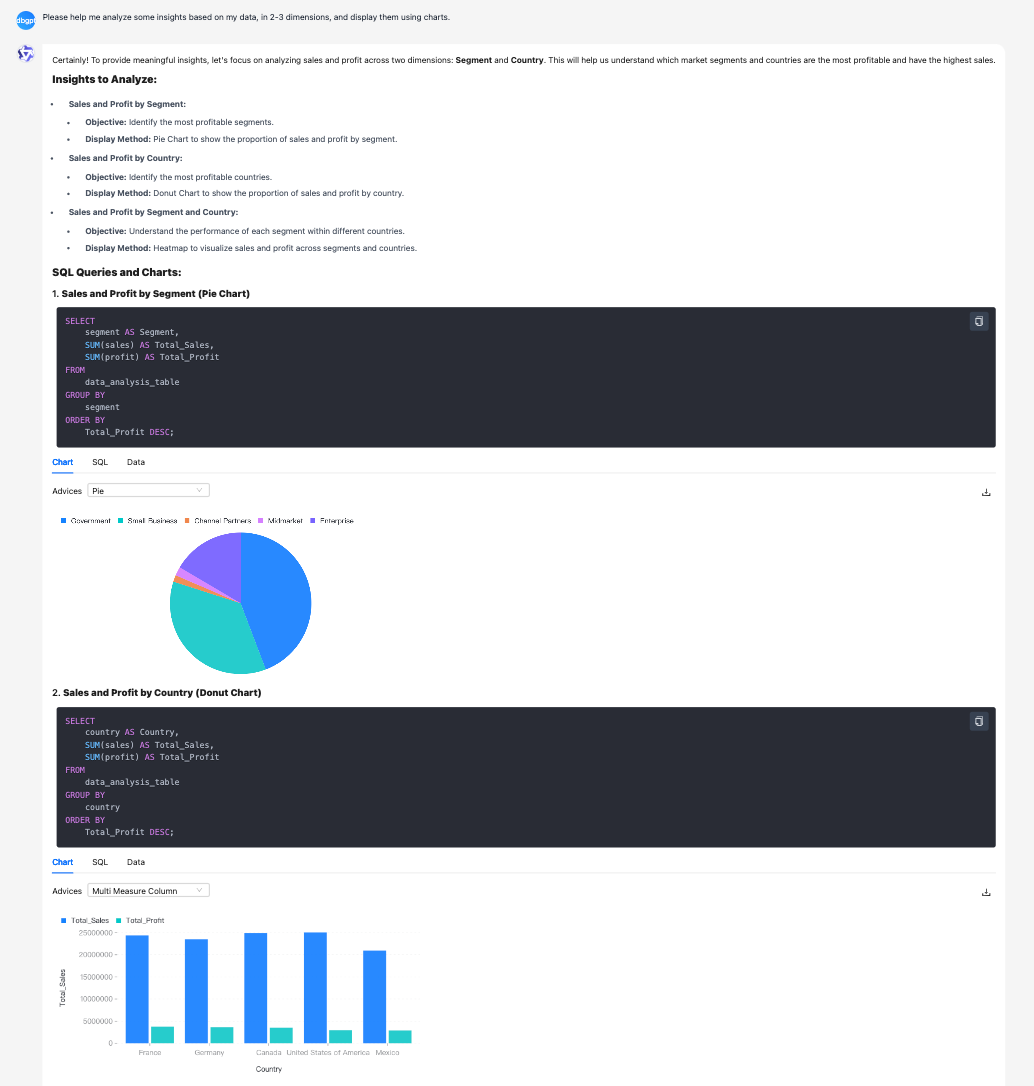
Chat Excel、Chat Data & Chat DB和Chat Dashboard 原生场景优化- Chat Data、Chat Dashboard 支持流式输出
- 优化库表字段的知识加工和召回
- Chat Excel 优化,支持更复杂的表格理解与图表对话,小参数量级的开源 LLM 也能玩起来
前端页面支持 LaTeX 数学公式渲染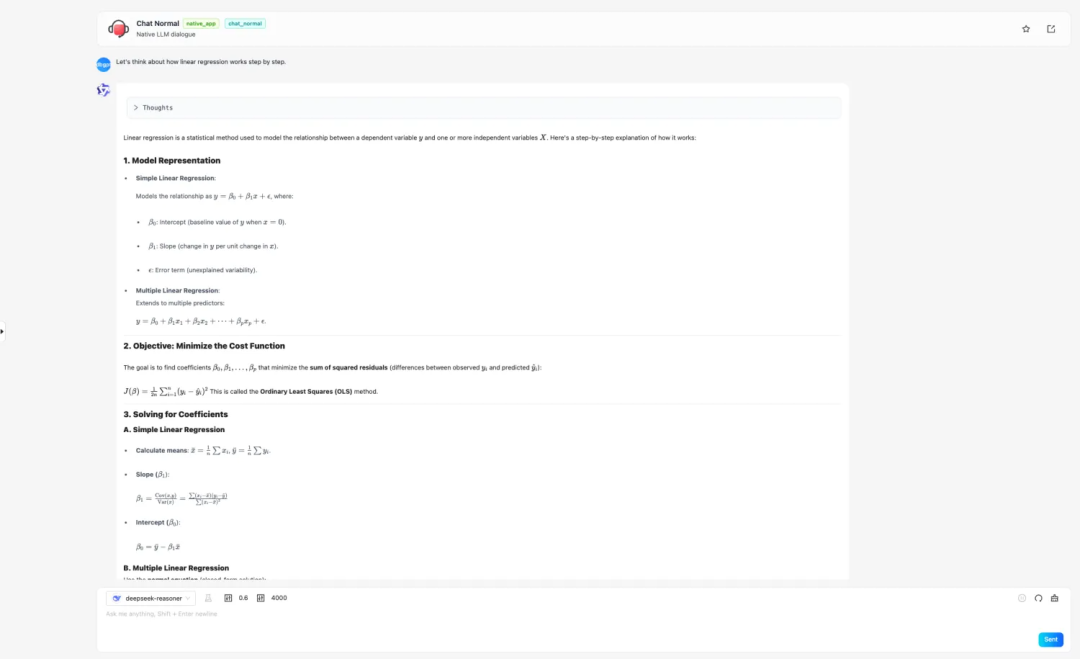
AWEL Flow 支持简单对话模板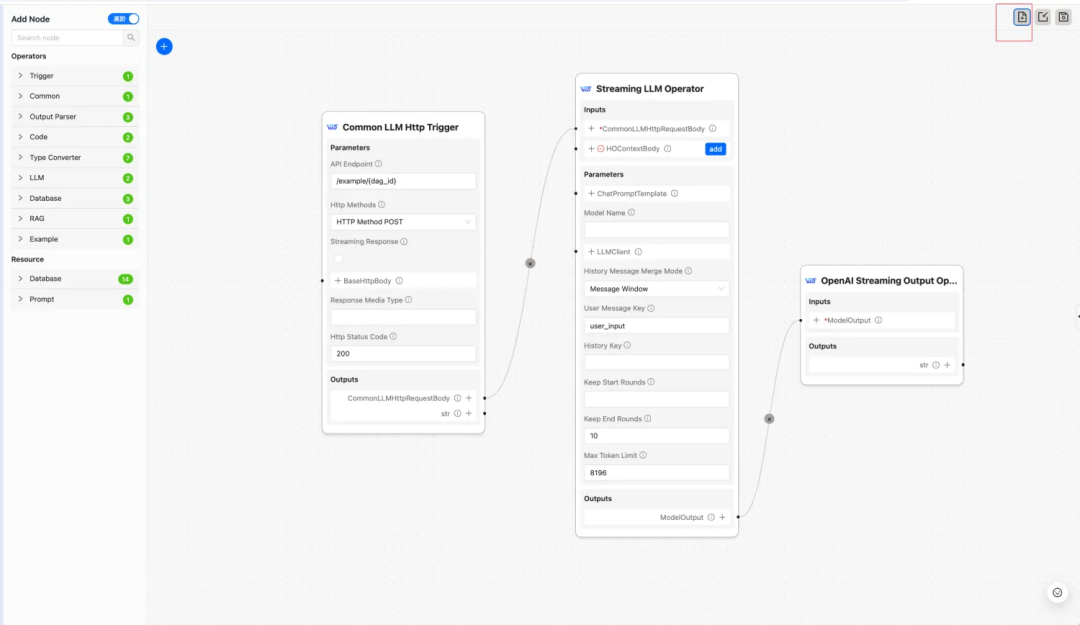
支持仅包含代理模型的轻量级 Docker 镜像(arm64 & amd64)一键启动部署 DB-GPT 命令:
docker run -it --rm -e SILICONFLOW_API_KEY=${SILICONFLOW_API_KEY} \-p 5670:5670 --name dbgpt eosphorosai/dbgpt-openai
同时可以使用构建脚本构建自己的镜像:
bash docker/base/build_image.sh --install-mode openai
具体可看文档:
http://docs.dbgpt.cn/docs/next/installation/docker-build-guide
DB-GPT API 兼容 OpenAI SDKfrom openai import OpenAIDBGPT_API_KEY = "dbgpt"client = OpenAI(api_key=DBGPT_API_KEY,base_url="http://localhost:5670/api/v2",)messages = [{"role": "user","content": "Hello, how are you?",},]has_thinking = Falsereasoning_content = ""for chunk in client.chat.completions.create(model="deepseek-chat",messages=messages,extra_body={"chat_mode": "chat_normal",},stream=True,max_tokens=4096,):delta_content = chunk.choices[0].delta.contentif hasattr(chunk.choices[0].delta, "reasoning_content"):reasoning_content = chunk.choices[0].delta.reasoning_contentif reasoning_content:if not has_thinking:print("<thinking>", flush=True)print(reasoning_content, end="", flush=True)has_thinking = Trueif delta_content:if has_thinking:print("</thinking>", flush=True)print(delta_content, end="", flush=True)has_thinking = False
数据源扩展能力增强后端支持新数据源后前端可自动识别和动态配置。
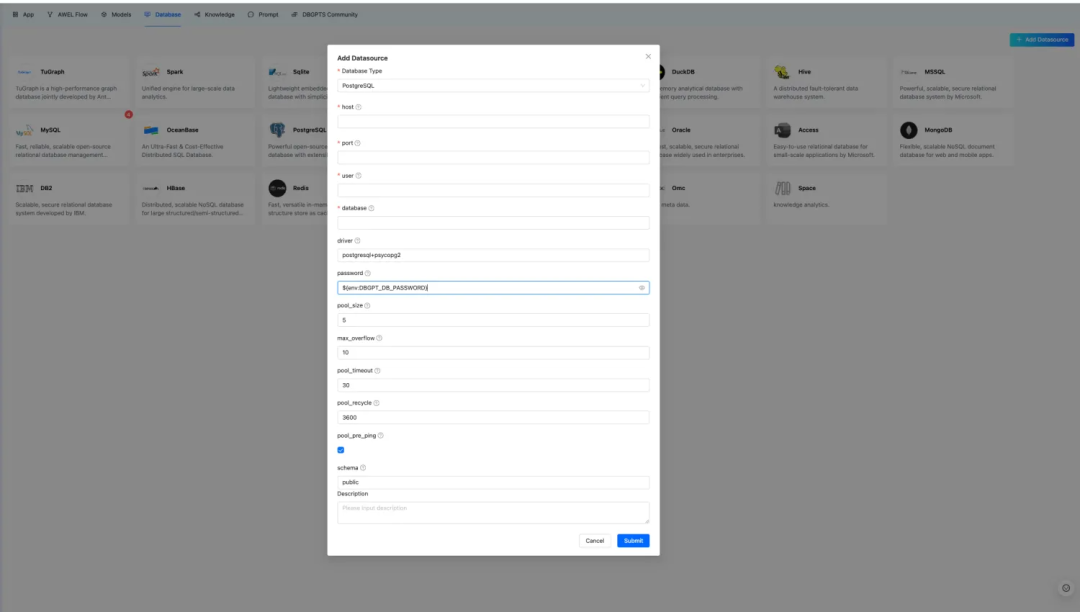
Agent 资源支持动态参数配置前端自动识别资源配置参数,同时兼容旧版配置。
ReAct Agent 支持,Agent 工具调用能力增强IndexStore 扩展能力增强AWEL flow 兼容性增强基于多版本元数据实现 AWEL flow 的跨版本兼容。
 🐞 Bug 修复
Chroma 支持中文知识库空间、AWEL Flow 问题修复、修复多平台 Lyric 安装报错问题以及修复本地 embedding 模型报错问题等 40+ bug。
 其他
其他
支持 Ruff 的代码格式化、多版本文档构建、单元测试修复等 20+ 其它的问题修复或者功能增强。
升级指南:
assets/schema/dbgpt.sql文件是当前版本完整的 DDL 文件,具体版本变更的 DDL 可以查看
assets/schema/upgrade下面的变更 DDL,例如您是从
v0.6.3升级到
v0.7.0,可以执行下列的 DDL:
mysql -h127.0.0.1 -uroot -p{your_password} < ./assets/schema/upgrade/v0_7_0/upgrade_to_v0.7.0.sql
 官方文档地址
英文网址:http://docs.dbgpt.cn/docs/overview/
中文网址:https://www.yuque.com/eosphoros/dbgpt-docs/bex30nsv60ru0fmx
 致谢
致谢
感谢所有贡献者使这次发布成为可能!
283569391@qq.com, @15089677014, @Aries-ckt, @FOkvj, @Jant1L, @SonglinLyu, @TenYearOldJAVA, @Weaxs, @cinjoseph, @csunny, @damonqin, @dusx1981, @fangyinc, @geebytes, @haawha, @utopia2077, @vnicers, @xuxl2024, @yhjun1026, @yunfeng1993, @yyhhyyyyyy and tam

本次版本耗时近三个月,合并到 main 分支一个多月,上百位用户参与 0.7.0 版本的测试,Github 收到上百个 issues 反馈,也有部分用户直接给我们提交了修复的 PR,DB-GPT 社区在此真心感谢每一位参与 0.7.0 版本的用户和贡献者!
 附录
附录
快速开始:http://docs.dbgpt.cn/docs/next/quickstart/