在当今数字化的软件开发环境中,GitLab 作为一款强大的 DevOps 平台,被广泛应用于项目管理与代码协作。而 MinIO 作为高性能的对象存储系统,可提供可靠的数据存储解决方案;CertManager 则能轻松管理 TLS 证书,保障服务的安全性。当我们将 GitLab 与外部 MinIO 和 CertManager 进行对接时,不仅可以充分利用 MinIO 的存储优势,还能借助 CertManager 强化 GitLab 服务的安全性能,从而构建一个更加高效、安全的开发与部署环境。接下来,我们就详细探讨如何实现 GitLab 与外部 MinIO 和 CertManager 的对接。

广阔地方,让人愉悦
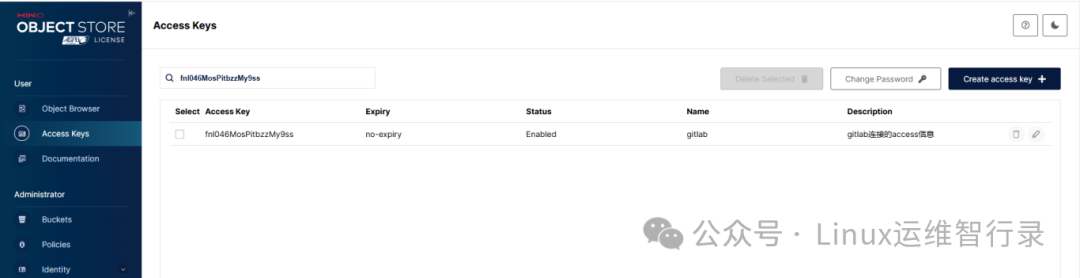
1、Minio创建AK,SK并记录好,后续会使用到。
2、Minio创建好以下11个bucket
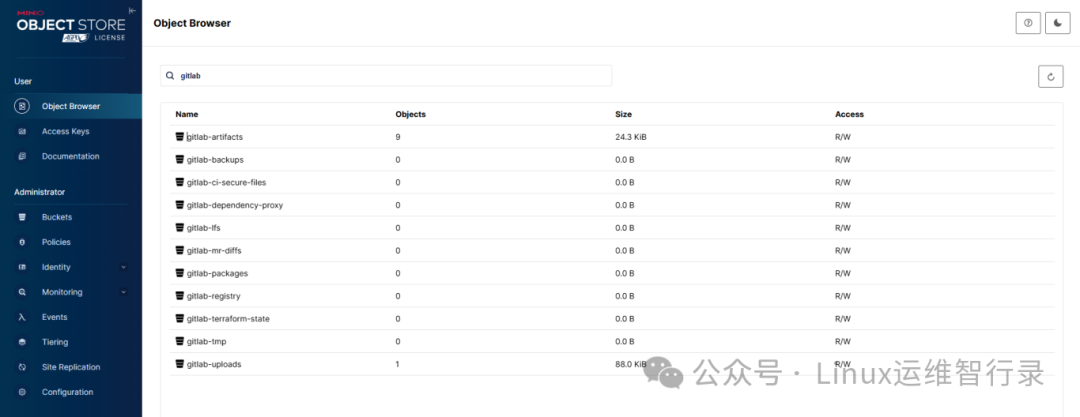
3、gitlab对接外部Minio的相关参数
global:
  # 禁止安装minio
  minio:
    enabled: false
  # 外部minio没有自签证书的话,忽略certificates配置
  certificates:
    customCAs:
    - secret: conn-s3-ca-cert
  registry:
    bucket: gitlab-registry
  appConfig:
    artifacts:
      bucket: gitlab-artifacts
      connection:
        key: connection
        secret: gitlab-s3-storage
    backups:
      bucket: gitlab-backups
      tmpBucket: gitlab-tmp
      connection:
        key: connection
        secret: gitlab-s3-storage
    lfs:
      bucket: gitlab-lfs
      connection:
        key: connection
        secret: gitlab-s3-storage
    packages:
      bucket: gitlab-packages
      connection:
        key: connection
        secret: gitlab-s3-storage
    uploads:
      bucket: gitlab-uploads
      connection:
        key: connection
        secret: gitlab-s3-storage
    externalDiffs:
      bucket: gitlab-mr-diffs
      connection:
        key: connection
        secret: gitlab-s3-storage
    ciSecureFiles:
      bucket: gitlab-ci-secure-files
      connection:
        key: connection
        secret: gitlab-s3-storage
    dependencyProxy:
      bucket: gitlab-dependency-proxy
      connection:
        key: connection
        secret: gitlab-s3-storage
    terraformState:
      bucket: gitlab-terraform-state
      connection:
        key: connection
        secret: gitlab-s3-storage

gitlab:
  toolbox:
    backups:
      objectStorage:
        backend: s3
        config:
          key: connection
          secret: gitlab-s3-storage

registry:
  storage:
    secret: registry-storage
    key: config
4、创建连接s3相关配置
# gitlab连接minio配置
$ cat <<'EOF' | tee tmp/gitlab_conn_s3.yaml > dev/null
provider: AWS
aws_access_key_id: xxxx  # 第一步生成的Access Key
aws_secret_access_key: xxxx # 第一步生成的Secret Key
endpoint: "https://s3.jiaxzeng.com:443"
path_style: true
EOF

$ kubectl -n gitlab create secret generic gitlab-s3-storage --from-file=connection=/tmp/gitlab_conn_s3.yaml

# registry连接minio配置
$ cat <<'EOF' | tee tmp/registry.s3.yaml > dev/null
s3:
  bucket: gitlab-registry
  accesskey: xxxx  # 第一步生成的Access Key
  secretkey: xxxx # 第一步生成的Secret Key
  regionendpoint: https://s3.jiaxzeng.com:443
  region: us-east-1
  v4auth: true
EOF

$ kubectl -n gitlab create secret generic registry-storage --from-file=config=/home/ops/registry.s3.yaml

# 连接Minio的CA证书,如果是http协议则忽略。
$ kubectl -n gitlab create secret generic conn-s3-ca-cert --from-file=s3.crt=/home/ops/s3.crt
5、更新gitlab服务
$ helm -n gitlab upgrade gitlab -f etc/kubernetes/addons/gitlab-values.yaml etc/kubernetes/addons/gitlab
Release "gitlab" has been upgraded. Happy Helming!
NAME: gitlab
LAST DEPLOYED: Sun Jan 19 19:59:21 2025
NAMESPACE: gitlab
STATUS: deployed
REVISION: 2
NOTES:
=== CRITICAL
The following charts are included for evaluation purposes only. They will not be supported by GitLab Support
for production workloads. Use Cloud Native Hybrid deployments for production. For more information visit
https://docs.gitlab.com/charts/installation/index.html#use-the-reference-architectures.
- Gitaly

=== NOTICE
The minimum required version of PostgreSQL is now 13. See https://gitlab.com/gitlab-org/charts/gitlab/-/blob/master/doc/installation/upgrade.md for more details.
1、确保Cert Manager服务正常,能够自动生成证书
2、gitlab对接外部CertManager配置
global:
  ingress:
    # 外部cert-manager
    configureCertmanager: false
    # 配置ClusterIssuer或者Issuer
    annotations:
      cert-manager.io/cluster-issuer: ca-cluster-issuer
    class: nginx

gitlab:
  kas:
    ingress:
      tls:
        secretName: kas-tls-cert-secret
  webservice:
    ingress:
      tls:
        secretName: gitlab-tls-cert-secret

registry:
  ingress:
    tls:
      secretName: registry-tls-cert-secret

certmanager:
  install: false
Tip:【踩坑经验】上述配置虽然没有出现配置gitlab ca证书参数。但一定不能缺少,否则启动会报错。
3、创建gitlab ca证书
$ kubectl -n gitlab create secret generic gitlab-wildcard-tls-ca --from-file=gitlab-wildcard-tls-ca.crt=/tmp/gitlab-wildcard-tls-ca.crt
Tip:Secret名称不能改变;/tmp/gitlab-wildcard-tls-ca.crt是CertManager生成上述tls所用的ca证书。
4、更新gitlab服务
$ helm -n gitlab upgrade gitlab -f etc/kubernetes/addons/gitlab-values.yaml etc/kubernetes/addons/gitlab
Release "gitlab" has been upgraded. Happy Helming!
NAME: gitlab
LAST DEPLOYED: Sun Jan 19 19:59:21 2025
NAMESPACE: gitlab
STATUS: deployed
REVISION: 2
NOTES:
=== CRITICAL
The following charts are included for evaluation purposes only. They will not be supported by GitLab Support
for production workloads. Use Cloud Native Hybrid deployments for production. For more information visit
https://docs.gitlab.com/charts/installation/index.html#use-the-reference-architectures.
- Gitaly

=== NOTICE
The minimum required version of PostgreSQL is now 13. See https://gitlab.com/gitlab-org/charts/gitlab/-/blob/master/doc/installation/upgrade.md for more details.
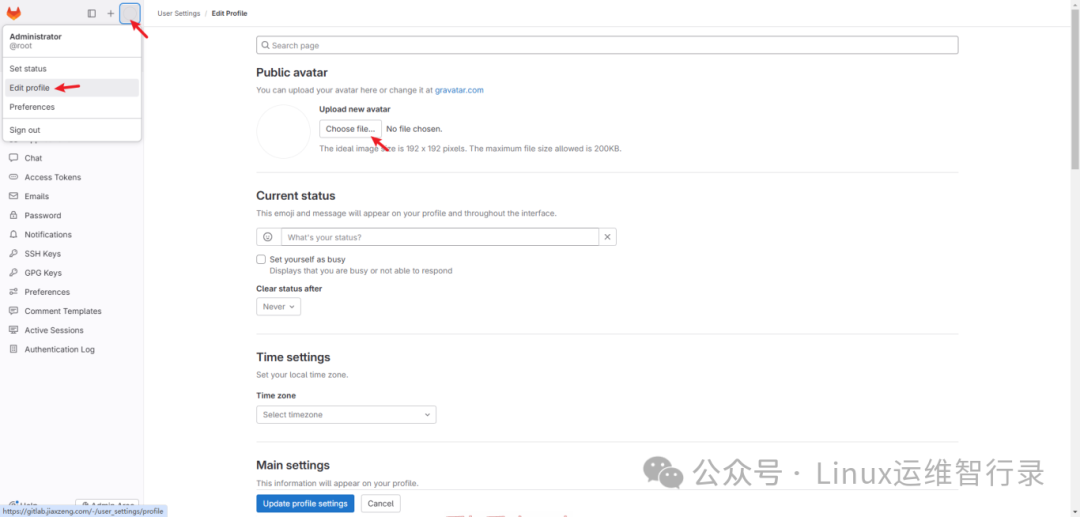
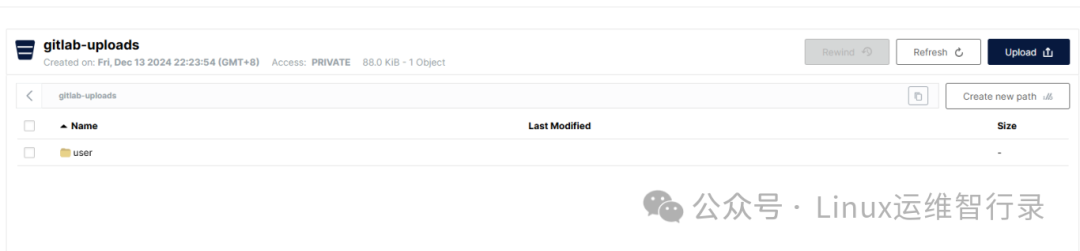
gitlab设置用户头像,头像文件会存放在gitlab-uploads桶。
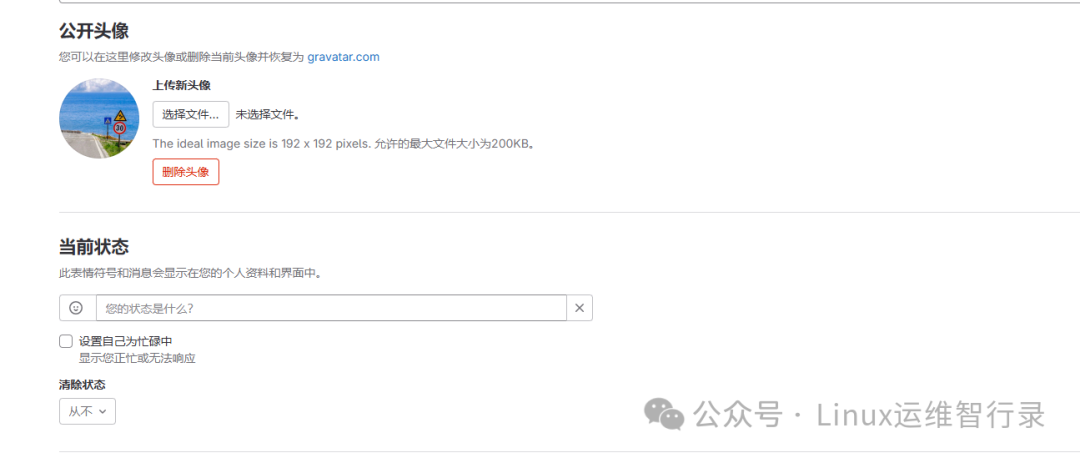
重新登录看头像是否存在,以及看看minio是否有数据
浏览器查看ca证书
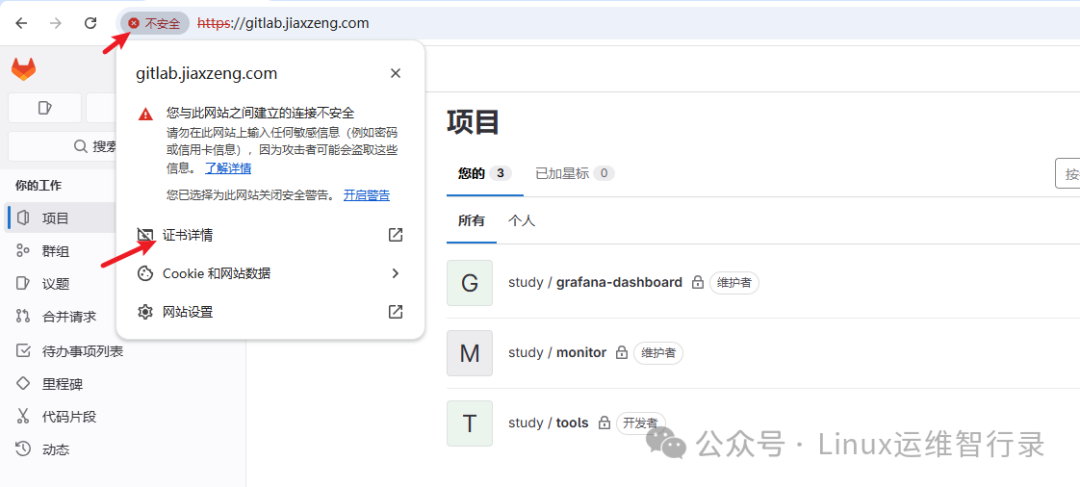
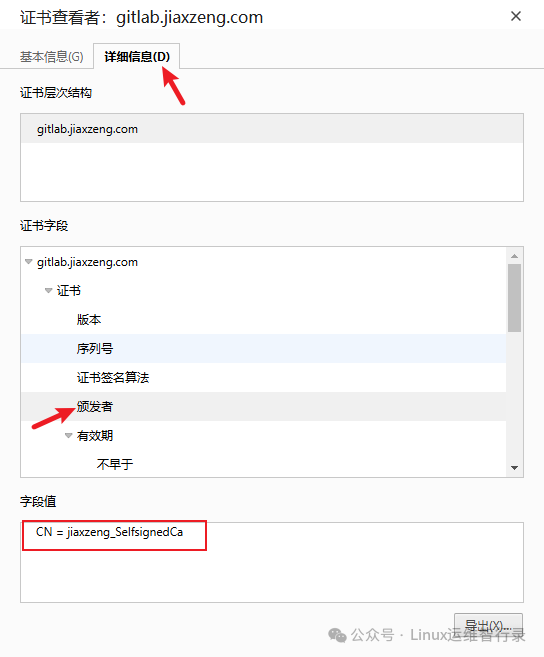
Tip:颁发者的字段值是否达到预期(gitlab-wildcard-tls-ca secret的ca证书)
通过上述步骤,我们成功实现了 GitLab 与外部 MinIO 和 CertManager 的对接。这不仅优化了 GitLab 的数据存储方式,提升了存储效率与可靠性,还通过 CertManager 为 GitLab 服务添加了安全的 TLS 证书,保障了数据传输的安全性。在实际应用中,你可以根据具体的业务需求和环境特点,对相关配置进行进一步优化。
别忘了,关注我们的公众号,获取更多关于容器技术和云原生领域的深度洞察和技术实战,让我们携手在技术的海洋中乘风破浪!