



随着DevOps文化的普及,持续集成和持续部署(CI/CD)成为软件开发不可或缺的一部分。GitLab作为支持完整DevOps生命周期管理的平台,其企业级监控面板为企业提供了一种强大的工具来监督和优化这些过程。通过实时的数据可视化、性能分析和自动化告警功能,GitLab帮助企业更高效地管理和响应项目中的变化,确保了从代码提交到生产部署的每个环节都处于最佳状态。

预防胜于治疗,监控先行
1、gitlab开启metrics端口
$ cat etc/kubernetes/addons/gitlab-values.yaml
gitlab:
  webservice:
    workhorse:
      metrics:
        enabled: true

gitlab-runner:
  metrics:
    enabled: true

global:
  monitoring:
    enabled: true
2、配置文件生效
$ helm -n gitlab upgrade gitlab -f etc/kubernetes/addons/gitlab-values.yaml etc/kubernetes/addons/gitlab
Release "gitlab" has been upgraded. Happy Helming!
NAME: gitlab
LAST DEPLOYED: Mon Dec 16 17:16:50 2024
NAMESPACE: gitlab
STATUS: deployed
REVISION: 25
NOTES:
=== CRITICAL
The following charts are included for evaluation purposes only. They will not be supported by GitLab Support
for production workloads. Use Cloud Native Hybrid deployments for production. For more information visit
https://docs.gitlab.com/charts/installation/index.html#use-the-reference-architectures.
- Gitaly

=== NOTICE
The minimum required version of PostgreSQL is now 13. See https://gitlab.com/gitlab-org/charts/gitlab/-/blob/master/doc/installation/upgrade.md for more details.
1、Prometheus采集gitlab数据
$ kubectl -n kube-system edit cm prometheus
    - job_name: gitlab
      kubernetes_sd_configs:
      - role: pod
      relabel_configs:
      - source_labels: [__meta_kubernetes_pod_annotation_gitlab_com_prometheus_scrape]
        action: keep
        regex: true
      - source_labels: [__meta_kubernetes_pod_annotation_gitlab_com_prometheus_scheme]
        action: replace
        regex: (https?)
        target_label: __scheme__
      - source_labels: [__meta_kubernetes_pod_annotation_gitlab_com_prometheus_path]
        action: replace
        target_label: __metrics_path__
        regex: (.+)
      - source_labels: [__address__, __meta_kubernetes_pod_annotation_gitlab_com_prometheus_port]
        action: replace
        regex: ([^:]+)(?::\d+)?;(\d+)
        replacement: $1:$2
        target_label: __address__
      - action: labelmap
        regex: __meta_kubernetes_pod_label_(.+)
      - source_labels: [__meta_kubernetes_namespace]
        action: replace
        target_label: kubernetes_namespace
      - source_labels: [__meta_kubernetes_pod_name]
        action: replace
        target_label: kubernetes_pod_name

    - job_name: gitlab-workhorse
      kubernetes_sd_configs:
      - role: endpoints
      relabel_configs:
      - action: keep
        source_labels: [__meta_kubernetes_namespace, __meta_kubernetes_endpoints_name, __meta_kubernetes_endpoint_port_name]
        regex: gitlab;gitlab-webservice-default;http-metrics-wh
      - target_label: app
        replacement: workhorse
2、验证是否采集成功
$ curl -s $(kubectl -n kube-system get svc prometheus -ojsonpath='{.spec.clusterIP}:{.spec.ports[0].port}')/prometheus/api/v1/query --data-urlencode 'query=up{job=~"gitlab"}' | jq '.data.result[] | {app: .metric.app, instance: .metric.instance, status: .value[1]}'
{
  "app": "gitlab-gitlab-runner",
  "instance": "10.244.58.236:9252",
  "status": "1"
}
{
  "app": "gitlab-exporter",
  "instance": "10.244.85.250:9168",
  "status": "1"
}
{
  "app": "kas",
  "instance": "10.244.135.169:8151",
  "status": "1"
}
{
  "app": "kas",
  "instance": "10.244.217.112:8151",
  "status": "1"
}
{
  "app": "sidekiq",
  "instance": "10.244.135.140:3807",
  "status": "1"
}
{
  "app": "gitaly",
  "instance": "10.244.58.230:9236",
  "status": "1"
}
{
  "app": "webservice",
  "instance": "10.244.135.131:8083",
  "status": "1"
}
{
  "app": "webservice",
  "instance": "10.244.217.126:8083",
  "status": "1"
}
grafana上导入以下 dashboard ID号: 18917、18923、18921、18925、18926、18927
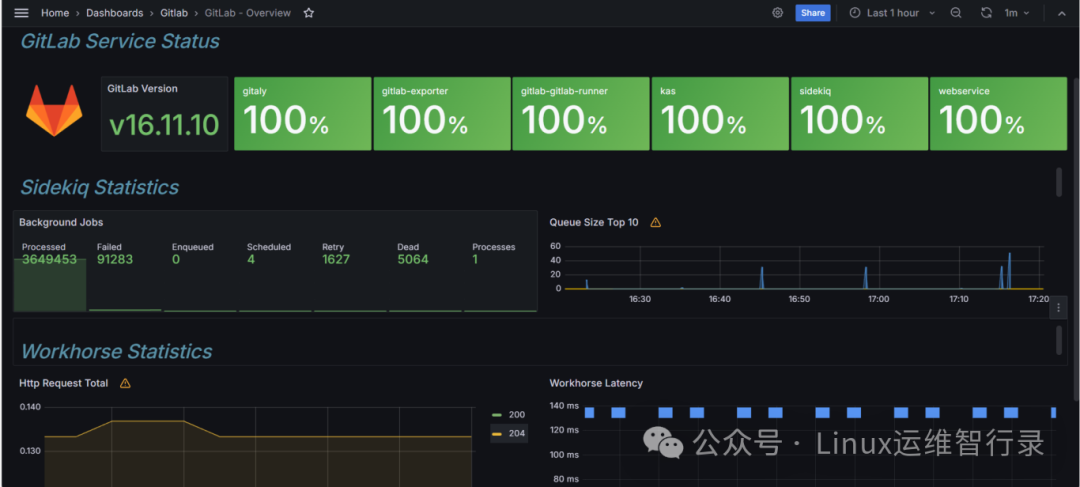
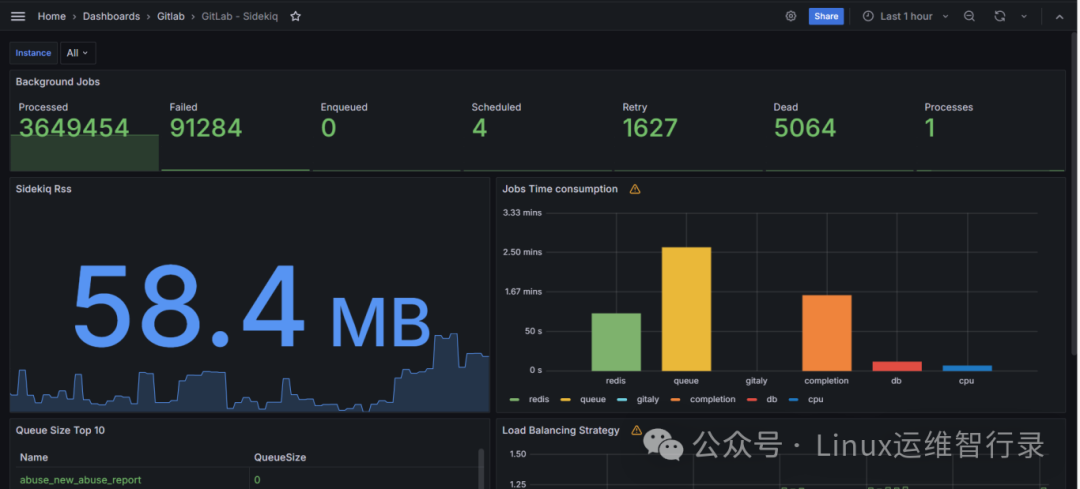
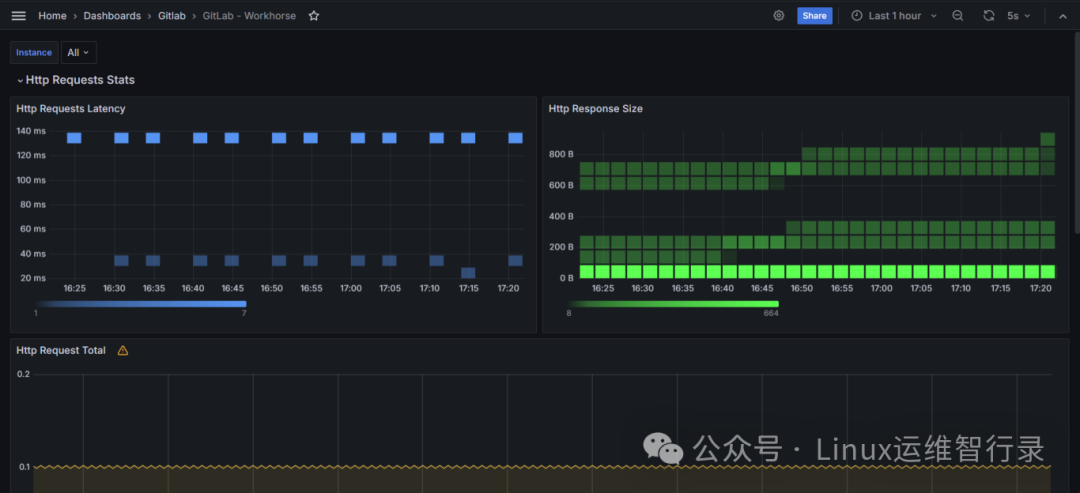
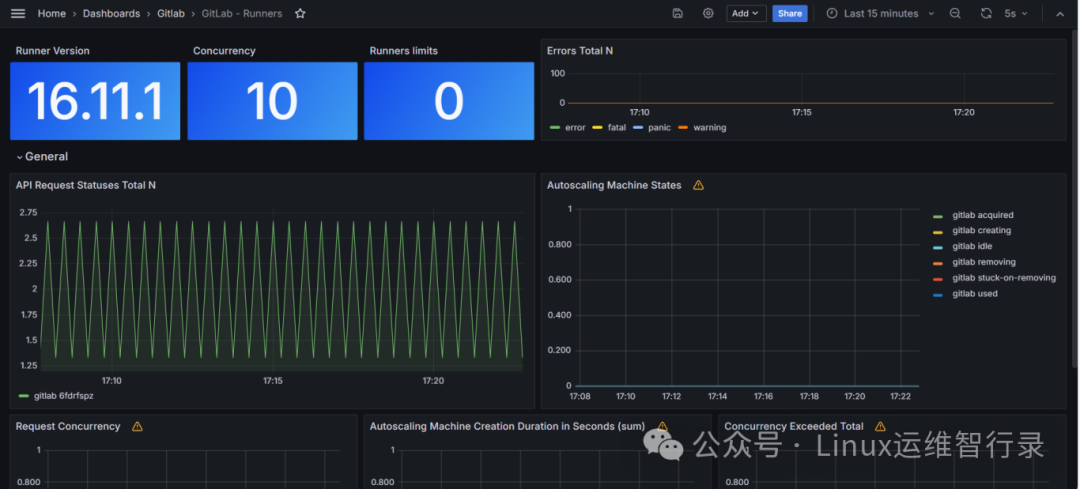
Tip:总共是有6个面板,都是有做过调整才达到上述效果图
综上所述,GitLab企业级监控面板是实现高效能开发运营的重要手段之一。它不仅加强了内部沟通与合作,还提升了整个组织对技术风险的掌控力。面对日益复杂的IT环境,拥有一个可靠的监控体系对于保持业务连续性和竞争优势至关重要。GitLab将继续致力于技术创新,帮助各行业客户更好地迎接未来的挑战。
别忘了,关注我们的公众号,获取更多关于容器技术和云原生领域的深度洞察和技术实战,让我们携手在技术的海洋中乘风破浪!

文章转载自Linux运维智行录,如果涉嫌侵权,请发送邮件至:contact@modb.pro进行举报,并提供相关证据,一经查实,墨天轮将立刻删除相关内容。
