



目录
1 Oracle推出电话号码和电子邮件验证方式
https://support.oracle.com/epmos/faces/NewsNotesDetail?_adf.ctrl-state=6y9vd46qx_4&_afrLoop=77467166830923
Oracle is committed to the enhanced security of your support account through the application of Two-Factor Authentication (2FA), which adds an extra layer of security by requiring a second verification step when signing in to your account.
Who does this apply to?
All Oracle customers who use the Oracle Account to sign into a support portal will be required to enable 2FA.
If you sign in using your Cloud Tenancy credentials, this change will not impact you. Your Cloud administrator manages authentication settings for your account.
What to expect?
When 2FA is required for your login, you will be automatically prompted to set it up during your next sign in.
Follow the on screen instructions to set up 2FA. You can choose between Phone Number (SMS) or Email. Please note that Phone Number is the recommended method.
Once you are enabled, you will be prompted to enroll in 2FA upon your first login. Follow the instructions on the screen to set up 2FA. Mobile SMS or email based One-Time Password (OTP) will be supported. Additional multi-factor authentication (MFA) options will be made available in the future.
2 常见问题
https://support.oracle.com/knowledgefs/?docId=NEWS4
that Phone Number is the recommended method.
For DOD Support Portal users, you will be prompted to re-enroll in 2FA.
Frequently Asked Questions
What should I do if I don’t receive my one-time passcode (OTP)?
Answer - If you don’t receive your OTP:
-Check your spam/junk folder (if using email).
-Ensure your phone has network coverage (if using SMS).
-Click “Resend” to generate a new OTP.
-Ensure "no-reply@identity.oci.oraclecloud is not blocked. Check with your local IT if the email address is on the allowed list (if using email).
-Clear your browser cache and restart from the login URL.
How do I manage or set up a backup (second) factor?
Answer - Your default factor is set during initial MFA registration. To add an additional phone number, modify, or change your default verification method, go to My Login Profile page., and use the Action menu under Authentication Factors.
What factors are available for 2FA?
Answer - Phone Number (SMS) and Email factors are currently available. Phone Number (SMS) is the recommended factor. Email factor verification is a temporary option and will be phased out once additional multi-factor authentication (MFA) options are made available in the future.
Note - If you have previously enabled factors other than Phone Number or Email, please note that these factors are currently not supported in My Oracle Support. Oracle will remove these factors for you, and you will be prompted to re-enroll in 2FA during the sign-in process.
What is the impact of using an email alias/distribution list to log in?
Answer - It is not recommended that you use an email/distribution list for your account login. If you do, the following actions are recommended:
-Verify OTP Delivery. Ensure that the alias correctly forwards emails to your inbox.
-Consider using SMS for 2FA. SMS is the preferred 2FA method. To add your individual phone number to the authentication list, go to My Login Profile > Authentication Factors and select Add Mobile Number as your authentication factor.
Note - Email authentication factor is a temporary option and will be phased out when additional factors become available.
How do I change the email address associated to my support account?
Answer - Use the article below for the portal where the change is needed:
My Oracle Support
My Oracle Cloud Support
3 更换验证方式
https://login-ext.identity.oraclecloud.com/ui/v1/myconsole?root=my-info&my-info=my_profile_security
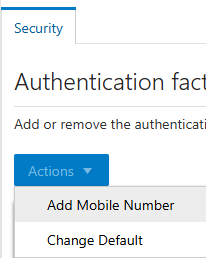
点击Change Default
可以从电子邮件更换为电话号码。
