



Whoami:6年+金融、政府、医疗领域工作经验的DBACertificate:PGCM、OCP、YCPSkill:Oracle、Mysql、PostgreSQL、国产数据库Platform:CSDN、墨天轮、公众号(呆呆的私房菜)
1. 项目地址:
https://github.com/HaloTech-Co-Ltd/openHalo
2. 项目介绍
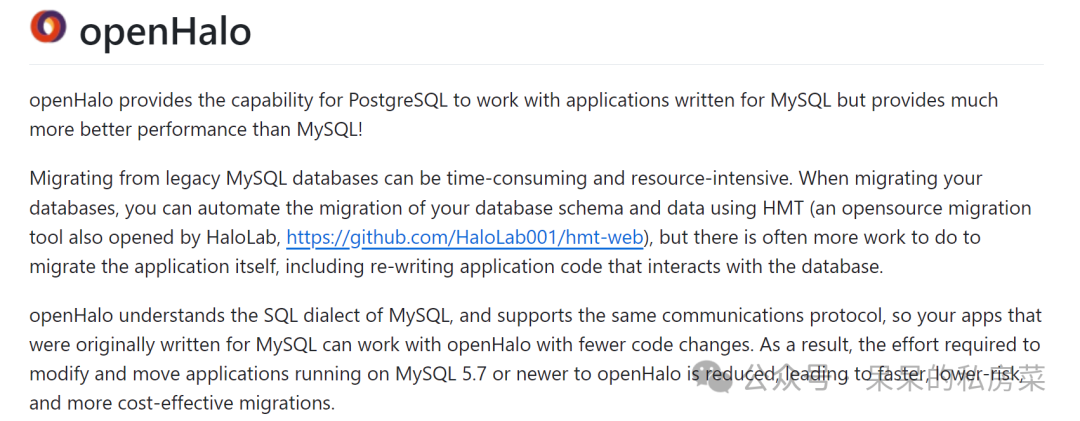
openHalo 打破了 PostgreSQL 与 Mysql 兼容壁垒,提供了Mysql应用程序协同工作的能力,但性能优于Mysql,尤其是针对复杂SQL的场景。
3. 工作原理
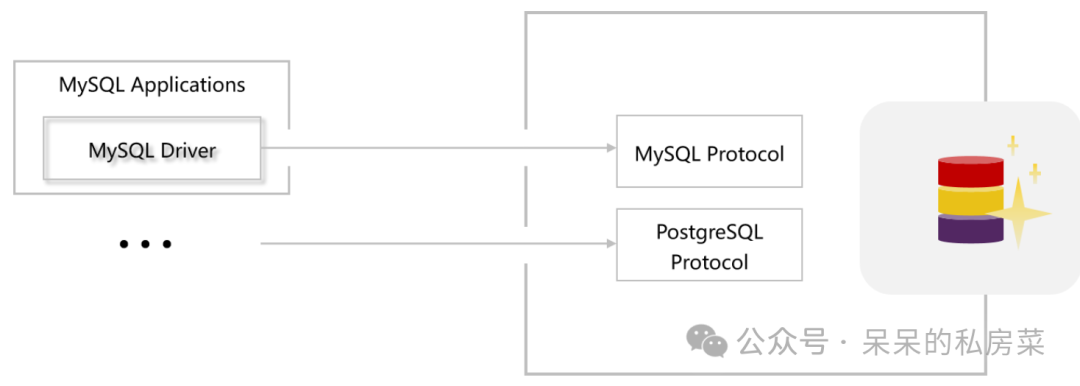
openHalo支持Mysql常用的SQL方言和通信协议,应用代码无需大量重写代码,即可实现与openHalo通信。
环境说明:笔者安装环境为 centos 7.6版本。
[root@host-01 ~]# uname -aLinux host-01 3.10.0-957.el7.x86_64 #1 SMP Thu Oct 4 20:48:51 UTC 2018 x86_64 x86_64 x86_64 GNU/Linux
1. 系统依赖安装
[root@host-01 ~]# yum install -y gcc make autoconf automake libtool uuid-devel libicu-devel zlib-devel openssl-devel readline-devel gdb ltrace strace
2. 创建安装用户
[root@host-01 ~]# groupadd -g 2001 halo[root@host-01 ~]# useradd -u 2001 -g halo halo
3. 上传源码包到/home/halo下,执行解压
[root@host-01 ~]# su - halo[halo@host-01 ~]$ unzip openHalo-master.zip
4. 执行编译,安装
[halo@host-01 openHalo-master]$ ./configure --prefix=/home/halo/openhalo/1.0 --enable-debug --with-uuid=ossp --with-icu CFLAGS=-O2[halo@host-01 openHalo-master]$ make -j 8 && make install[halo@host-01 openHalo-master]$ cd contrib/[halo@host-01 contrib]$ make -j 8 && make install
5. 配置环境变量
[halo@host-01 ~]$ cat >> ~/.bashrc <<EOFexport PGHOME=/home/halo/openhalo/1.0export PGDATA=/home/halo/openhalo/dataexport PGHOST=/home/halo/openhaloexport PATH=$PATH:$PGHOME/binexport LD_LIBRARY_PATH=$PGHOME/libEOF[halo@host-01 ~]$ source ~/.bashrc
6. 初始化数据库
[halo@host-01 openhalo]$ pg_ctl initThe files belonging to this database system will be owned by user "halo".This user must also own the server process.The database cluster will be initialized with locale "zh_CN.UTF-8".The default database encoding has accordingly been set to "UTF8".initdb: could not find suitable text search configuration for locale "zh_CN.UTF-8"The default text search configuration will be set to "simple".Data page checksums are disabled.creating directory /home/halo/openhalo/data ... okcreating subdirectories ... okselecting dynamic shared memory implementation ... posixselecting default max_connections ... 100selecting default shared_buffers ... 128MBselecting default time zone ... PRCcreating configuration files ... okrunning bootstrap script ... okperforming post-bootstrap initialization ... oksyncing data to disk ... okinitdb: warning: enabling "trust" authentication for local connectionsYou can change this by editing pg_hba.conf or using the option -A, or--auth-local and --auth-host, the next time you run initdb.Success. You can now start the database server using:/home/halo/openhalo/1.0/bin/pg_ctl -D /home/halo/openhalo/data -l logfile start
7. 修改数据库配置文件和连接配置文件
cat >> $PGDATA/postgresql.conf <<EOFlisten_addresses = '*'database_compat_mode = 'mysql'mysql.listener_on = truemysql.port = 3306unix_socket_directories = '/home/halo/openhalo'EOFcat >> $PGDATA/pg_hba.conf <<EOFhost all all 0.0.0.0/0 md5EOF
8. 启动数据库
pg_ctl start
9. 初始化mysql环境
[halo@host-01 ~]$ psqlhalo0root=# CREATE EXTENSION aux_mysql CASCADE;NOTICE: installing required extension "uuid-ossp"CREATE EXTENSION
10. 连接、建表、插数据测试
mysql -uhalo -h10.28.12.21Welcome to the MySQL monitor. Commands end with ; or \g.Your MySQL connection id is 1Server version: 5.7.32-log MySQL Server (GPL)Copyright (c) 2000, 2022, Oracle and/or its affiliates.Oracle is a registered trademark of Oracle Corporation and/or itsaffiliates. Other names may be trademarks of their respectiveowners.Type 'help;' or '\h' for help. Type '\c' to clear the current input statement.mysql> show databases;+--------------------+| Database |+--------------------+| information_schema || mys_sys || mysql || performance_schema || sys |+--------------------+5 rows in set (0.00 sec)mysql> create database chendb;Query OK, 0 rows affected (0.01 sec)mysql> create table chendb.`students` (-> `student_id` INT UNSIGNED AUTO_INCREMENT COMMENT '学生唯一标识',-> `name` VARCHAR(50) NOT NULL COMMENT '学生姓名',-> `gender` ENUM('男','女') DEFAULT NULL COMMENT '性别',-> `age` TINYINT UNSIGNED CHECK (age BETWEEN 12 AND 30) COMMENT '年龄范围12-30岁',-> `email` VARCHAR(100) UNIQUE COMMENT '唯一邮箱地址',-> `enrollment_date` DATE NOT NULL DEFAULT (CURRENT_DATE) COMMENT '入学日期',-> `created_at` TIMESTAMP DEFAULT CURRENT_TIMESTAMP COMMENT '记录创建时间',-> PRIMARY KEY (`student_id`),-> INDEX `idx_email` (`email`(20))-> )-> ;Query OK, 0 rows affected (0.04 sec)Reading table information for completion of table and column namesYou can turn off this feature to get a quicker startup with -Amysql> use chendb;mysql> INSERT INTO `students` (`name`, `gender`, `age`, `email`)-> VALUES ('张三', '男', 18, 'zhangsan@school.com');Query OK, 1 row affected (0.01 sec)mysql> select * from `students`;+------------+--------+--------+-----+---------------------+-----------------+---------------------+| student_id | name | gender | age | email | enrollment_date | created_at |+------------+--------+--------+-----+---------------------+-----------------+---------------------+| 1 | 张三 | 男 | 18 | zhangsan@school.com | 2025-04-08 | 2025-04-08 21:30:03 |+------------+--------+--------+-----+---------------------+-----------------+---------------------+1 row in set (0.00 sec)
1. 安装过程还是很顺利的,10分钟不到就可以拿下一个国产mysql环境; 2. 功能上openHalo数据库对mysql的兼容性还有待提高,如函数、过程、分区表功能等; 3. 官网文档比较粗糙,核心特性停留在概念描述,缺乏技术原理剖析和性能对比数据等。 4. 最后,希望 openHalo 这个项目在未来能够发展得越来越好~ 国产数据库,加油!
本文内容就到这啦!希望本篇内容能给你带来帮助。我们下篇再见!

文章转载自呆呆的私房菜,如果涉嫌侵权,请发送邮件至:contact@modb.pro进行举报,并提供相关证据,一经查实,墨天轮将立刻删除相关内容。
