



社交中“附近的人”功能是一个基于地理位置的服务,它允许用户查找并连接附近的其他用户。

一、需求分析
“附近的人”功能允许用户基于地理位置发现周围一定范围内的其他用户。这一功能在社交应用中极为重要,因为它增加了用户之间的互动可能性,促进了社交网络的增长。

二、功能分析
1. 客户端实现
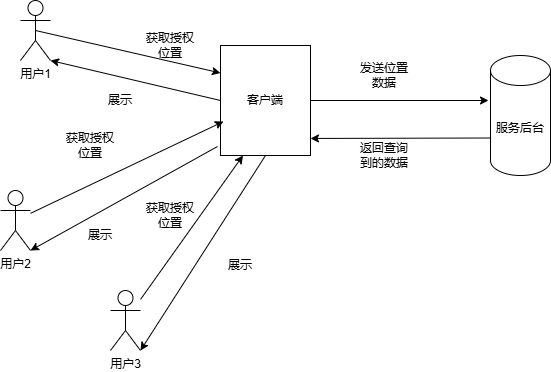
获取位置信息:客户端应用需要请求用户的地理位置权限,并使用定位服务获取用户的当前位置。
发送位置信息:客户端将获取到的位置信息通过网络发送到服务器端。
接收附近用户列表:客户端从服务器接收附近用户的列表,并将其展示给用户。
2. 服务器端实现
存储位置信息:服务器需要存储用户的地理位置信息,并根据用户的登录状态实时更新位置。
查询附近用户:服务器根据接收到的位置信息,在数据库中查询符合条件的用户。
返回结果:服务器将查询到的附近用户列表返回给客户端。

三、技术分析
1. 客户端
负责获取用户的地理位置信息,并将信息发送到服务器。
2. 服务器端
服务后台接收地理位置信息,存储并处理这些信息,然后返回附近的用户列表。
四、技术选择
1. 技术栈
服务器端语言:Java。
Web 框架:Spring Boot。
数据库:MySQL,Redis。
位置服务:Google Maps API 或者百度地图 API。
2. 功能模块
位置信息存储:存储用户的地理位置信息。
位置信息查询:根据用户的地理位置信息查询附近的用户。
API 接口:提供 RESTful API 供客户端调用。
3. 搜索算法
邻近性搜索算法:邻近性搜索算法通常指的是在多维空间中查找与给定点最接近的点或者点集的一种方法。
空间索引技术:空间索引技术是一种用于高效管理和查询多维空间数据的数据结构和算法。

五. 代码实现
1. 创建 Spring Boot 项目
使用 Spring Initializr 创建一个 Spring Boot 项目。
添加 Spring Web 和 JPA 依赖。
2. 定义实体类
创建用户实体User用户信息,包括用户ID、用户名和地理位置坐标。
import javax.persistence.Entity;import javax.persistence.GeneratedValue;import javax.persistence.GenerationType;import javax.persistence.Id;@Entitypublic class User {@Id@GeneratedValue(strategy = GenerationType.IDENTITY)private Long id;private String username;private double latitude;private double longitude;// Getters and setters}
3. 定义 Repository
使用 Spring Data JPA 来操作数据库。
import org.springframework.data.jpa.repository.JpaRepository;public interface UserRepository extends JpaRepository<User, Long> {}
4. 定义 Service
实现位置信息的存储和查询逻辑。
import org.springframework.beans.factory.annotation.Autowired;import org.springframework.stereotype.Service;@Servicepublic class UserService {private final UserRepository userRepository;@Autowiredpublic UserService(UserRepository userRepository) {this.userRepository = userRepository;}public User saveUser(User user) {return userRepository.save(user);}public List<User> findNearbyUsers(double latitude, double longitude, double radiusInMeters) {// 查询附近的用户逻辑// 这里简化处理,实际应用中需要更精确的距离计算List<User> allUsers = userRepository.findAll();return allUsers.stream().filter(user -> isWithinRadius(user, latitude, longitude, radiusInMeters)).collect(Collectors.toList());}private boolean isWithinRadius(User user, double centerLatitude, double centerLongitude, double radiusInMeters) {double earthRadius = 6371; // Earth's radius in kilometersdouble dLat = Math.toRadians(user.getLatitude() - centerLatitude);double dLon = Math.toRadians(user.getLongitude() - centerLongitude);double a = Math.sin(dLat 2) * Math.sin(dLat 2) +Math.cos(Math.toRadians(centerLatitude)) * Math.cos(Math.toRadians(user.getLatitude())) *Math.sin(dLon 2) * Math.sin(dLon 2);double c = 2 * Math.atan2(Math.sqrt(a), Math.sqrt(1 - a));double distance = earthRadius * c * 1000; // Convert to metersreturn distance <= radiusInMeters;}}
5. 定义 Controller
提供 RESTful API 接口。
import org.springframework.beans.factory.annotation.Autowired;import org.springframework.web.bind.annotation.*;import java.util.List;@RestController@RequestMapping("/api/users")public class UserController {private final UserService userService;@Autowiredpublic UserController(UserService userService) {this.userService = userService;}@PostMappingpublic User addUser(@RequestBody User user) {return userService.saveUser(user);}@GetMapping("/nearby")public List<User> getNearbyUsers(@RequestParam double latitude, @RequestParam double longitude, @RequestParam double radiusInMeters) {return userService.findNearbyUsers(latitude, longitude, radiusInMeters);}}
6. Redis Geo存储实现
1. 数据模型
我们需要为每个用户存储他们的经纬度坐标。这些坐标将被存储在一个名为 geolocation 的键中,其中键值对的格式为 user_id 和对应的地理坐标。
2. 存储地理位置
当新用户注册时,我们需要将他们的地理位置存储到 Redis 中。
# 假设用户的 ID 是 12345,经度是 -122.4194,纬度是 37.7749(旧金山的位置)GEOADD geolocation user1 -122.4194 37.7749
3. 查询附近的人
当用户想要查找他们附近的人时,我们可以使用 GEORADIUS 或 GEORADIUSBYMEMBER 命令来获取指定半径内的其他用户。
# 假设用户想知道他们周围 5 公里内的人# 经度和纬度是用户的当前位置GEORADIUS geolocation -122.4194 37.7749 5 km WITHDIST WITHCOORD
这将返回一个列表,其中包含用户 ID、距离(单位为公里)和坐标。
4. 完整示例代码
(1) 下面是一个使用 Python 的 Redis 客户端实现上述功能的例子:
import redis# 连接到 Redisr = redis.Redis(host='localhost', port=6379, db=0)def add_user_location(user_id, longitude, latitude):"""添加用户的地理位置信息到 Redis。"""r.geoadd('geolocation', longitude, latitude, user_id)def find_nearby_users(user_longitude, user_latitude, radius):"""查找给定半径内的用户。"""nearby_users = r.georadius('geolocation',user_longitude,user_latitude,radius,unit='km',withdist=True,withcoord=True)return nearby_users# 示例:添加用户add_user_location(user1, -122.4194, 37.7749)add_user_location(user2, -122.4079, 37.7797) # 另一个用户的坐标# 示例:查找附近的人nearby_users = find_nearby_users(-122.4194, 37.7749, 5)for user in nearby_users:print(f"User ID: {user[0]}, Distance: {user[1]} km, Coordinates: ({user[2][0]}, {user[2][1]})")
(2) 下面是使用 Java 和 Jedis 客户端库实现相同功能的示例代码。
我们将使用 Jedis 客户端来连接 Redis 并执行 Geo 命令。首先,你需要在你的项目中添加 Jedis 的依赖。如果你使用 Maven,可以在 pom.xml 文件中添加如下依赖:
<dependencies><dependency><groupId>redis.clients</groupId><artifactId>jedis</artifactId><version>3.10.0</version></dependency></dependencies>
Java 代码示例:
import redis.clients.jedis.Jedis;import java.util.List;import java.util.Map.Entry;public class GeoSearchExample {private static final String GEOLOCATION_KEY = "geolocation";public static void main(String[] args) {// 连接到 Redistry (Jedis jedis = new Jedis("localhost", 6379)) {// 添加用户的地理位置信息到 RedisaddUserLocation(jedis, user1, -122.4194, 37.7749);addUserLocation(jedis, user2, -122.4079, 37.7797); // 另一个用户的坐标// 查找附近的人List<Entry<String, Double>> nearbyUsers = findNearbyUsers(jedis, -122.4194, 37.7749, 5);// 输出结果for (Entry<String, Double> user : nearbyUsers) {System.out.println("User ID: " + user.getKey() + ", Distance: " + user.getValue() + " km");}} catch (Exception e) {e.printStackTrace();}}public static void addUserLocation(Jedis jedis, long userId, double longitude, double latitude) {// 添加用户的地理位置信息到 Redis。jedis.geoadd(GEOLOCATION_KEY, longitude, latitude, String.valueOf(userId));}public static List<Entry<String, Double>> findNearbyUsers(Jedis jedis, double longitude, double latitude, double radius) {// 查找给定半径内的用户。return jedis.georadius(GEOLOCATION_KEY, longitude, latitude, radius, "km", "WITHDIST");}}
连接 Redis:使用 Jedis 类连接到本地 Redis 服务器。使用 try-with-resources 语句确保连接会在方法结束时自动关闭。
添加用户位置:使用 geoadd 方法将用户的位置添加到 Redis 中的 geolocation 键。
查找附近的人:使用 georadius 方法查找给定半径内的用户。方法接受经度、纬度、半径(单位为公里)和一些选项,如WITHDIST 以获取距离信息。返回的是一个 List,其中每个元素是一个 Entry,包含用户 ID 和距离。
输出结果:循环遍历结果并打印每个用户的 ID 和距离。
5. 扩展功能
按距离排序:默认情况下,GEORADIUS 命令返回的结果已经按距离排序。
限制结果数量:可以使用 COUNT 参数限制返回的结果数量。
使用用户作为中心点:如果已知某个用户的 ID,可以使用 GEORADIUSBYMEMBER 命令以该用户为中心进行查询。
6. 性能考虑
批量操作:对于大量用户的地理位置更新,考虑使用管道(pipelining)来减少网络往返次数。
缓存策略:对于频繁访问的用户位置数据,可以考虑使用 Redis 的缓存机制来减少重复计算。
数据精度:确保存储的经纬度数据足够精确,以提高查询的准确性。 性能优化:对于大规模数据,可以考虑对数据进行分片存储,例如按城市或区域划分不同的集合,以减少单个集合的大小,提高查询效率。 单位选择:根据实际需求选择合适的距离单位(如米、公里等),并在查询时指定正确的单位。

社交中“附近的人”功能是一个很好的例子,展示了如何将地理位置服务与移动应用相结合。通过上述示例,你可以轻松实现一个基于Redis geo的“附近的人”功能,为你的应用提供高效的地理位置查询服务。
