



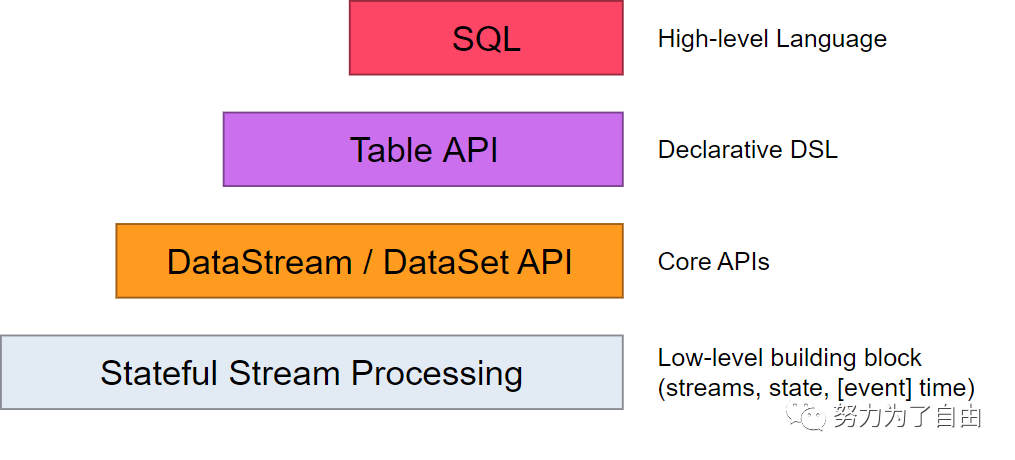
Flink提供了流处理和批处理的抽象级别。
最低级别只提供状态流处理,通过process函数嵌入到datastream中,DataStream和DatasetAPI分别提供流处理和批处理的API,在处理的过程中可以将数据流定义为类似于关系型数据中的表,flink也提供了类似的操作方法,比如select,sum,count等等,在此基础上同样可以定义sql进行相应的数据处理。
Flink数据处理可以接收一个或多个source,经过一系列的transformation最终输出到一个或多个sink.
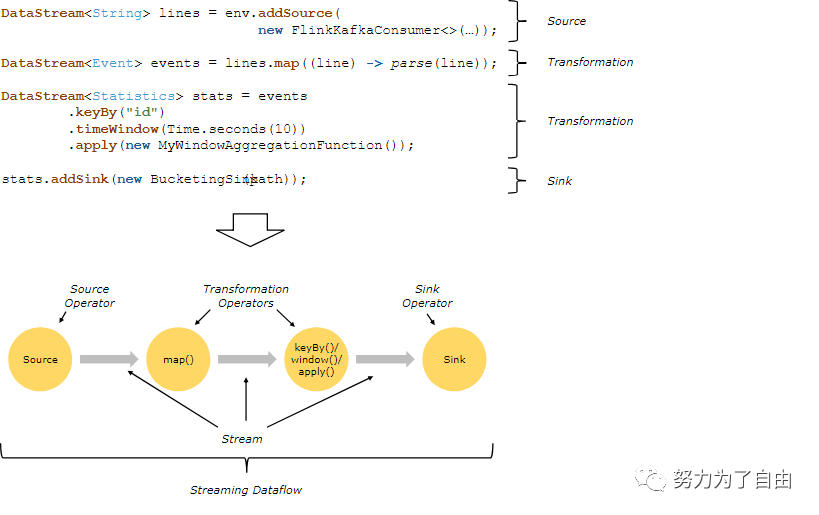
flink流处理是并行的和分布式,operator子任务的并行度取决于operator,流的并行度取决于生成流的operator。不同的operator具有不同的并行度。
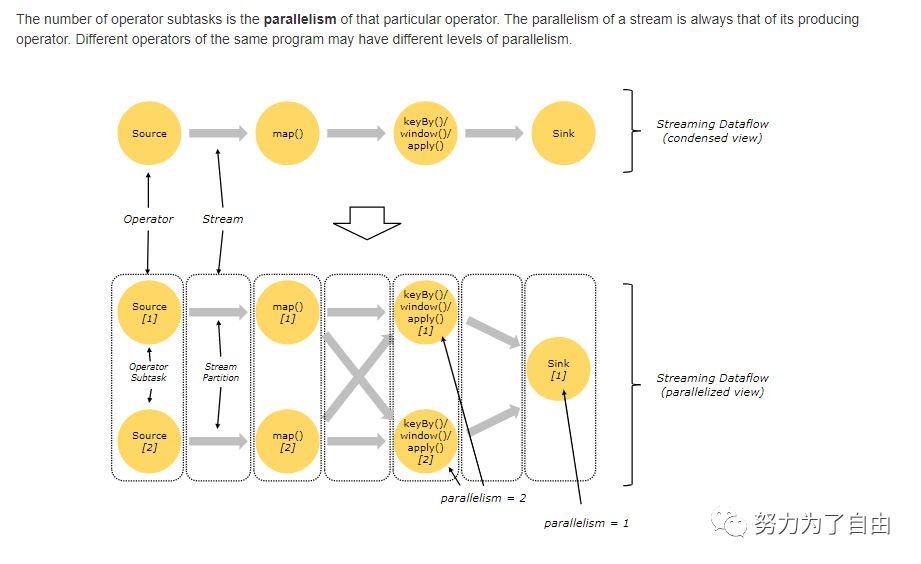
Streams can transport data between two operators in a one-to-one(一对一)(or forwarding) pattern, or in a redistributing(重新分发) pattern:One-to-one streams (for example between the Source and the map() operatorsin the figure above) preserve the partitioning and ordering of theelements.(保持分区和排序) That means that subtask[1] of the map() operatorwill see the same elements in the same order as they were produced bysubtask[1] of the Source operator.Redistributing streams (as between map() and keyBy/window above,as well as between keyBy/window and Sink) change the partitioningof streams(改变分区). Each operator subtask sends data to differenttarget subtasks, depending on the selected transformation. Examples arekeyBy() (which re-partitions by hashing the key), broadcast(),or rebalance() (which re-partitions randomly). In a redistributingexchange the ordering among the elements is only preserved withineach pair of sending and receiving subtasks(只在对应的发送方和接收方保持排序)(for example, subtask[1] of map() and subtask[2] of keyBy/window).So in this example, the ordering within each key is preserved,but the parallelism(并行度) does introduce non-determinism regarding the orderin which the aggregated results for different keys arrive at the sink.
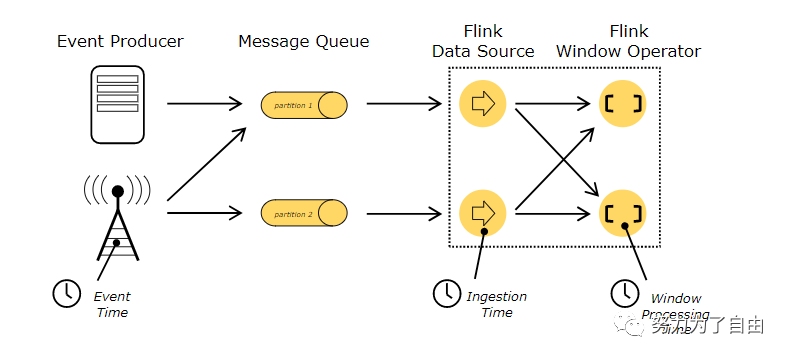
When referring to time in a streaming program (for example todefine windows), one can refer to different notions of time:Event Time is the time when an event was created. It is usuallydescribed by a timestamp in the events, for example attached bythe producing sensor, or the producing service. Flink accessesevent timestamps via timestamp assigners.Ingestion time is the time when an event enters the Flink dataflowat the source operator.Processing Time is the local time at each operator that performs atime-based operation.

client负责启动程序,向JobManager提交数据
JobManager:相当于master,负责任务调度,资源分配,协调checkpoints以及失败恢复,可以是standlone模式,或者使用Yarn,Mesos进行管理
TaskManager:相当于worker,负责任务的执行,定时向JobManager发送心跳
在实际的业务场景中,一般是将数据通过kafka传输到集群进行处理,本文主要是进行flink读取kafka数据实战。
环境介绍
采用standalone模式
环境配置192.168.127.128:hadoop192.168.127.129:kafka(kafka_2.11-0.10.2.1)
启动hadoopcd到hadoop的sbin目录执行 ./start-all.sh
启动zookeepercd到zookeeper的bin目录执行 ./zkServer.sh start
启动kafka./kafka-server-start.sh ../config/server.properties查看kafka topic列表./kafka-topics.sh --list --zookeeper localhost:2181创建topic./kafka-topics.sh --create --topic topicname --replication-factor 1 --partitions 1 --zookeeper localhost:2181删除topic./kafka-topics.sh --delete --zookeeper localhost:2181 --topic test2Topic test2 is marked for deletion此时topic只是标记被删除,并没有真正的删除,真正的删除要到zookeeper目录下删除cd到zookeeper的bin目录下执行 ./zkCli.sh,进入zookeeper命令行执行 ls /brokers/topics 可以看到所有的topic路径[test2, con, test, test1, __consumer_offsets]找到要删除的topic路径,执行 rmr /brokers/topics/test2再执行 ls /brokers/topics[con, test, test1, __consumer_offsets]可以看到test2已经被删除了再进到kafka/bin目录下执行./kafka-topics.sh --list --zookeeper localhost:2181__consumer_offsetscontesttest1 可以看到test2已经被删除了
代码实战
package com.cesgroup.example.kafka;import org.apache.flink.api.common.serialization.SimpleStringSchema;import org.apache.flink.api.java.tuple.Tuple;import org.apache.flink.api.java.tuple.Tuple2;import org.apache.flink.core.fs.FileSystem;import org.apache.flink.streaming.api.TimeCharacteristic;import org.apache.flink.streaming.api.datastream.DataStream;import org.apache.flink.streaming.api.environment.StreamExecutionEnvironment;import org.apache.flink.streaming.api.functions.windowing.WindowFunction;import org.apache.flink.streaming.api.windowing.time.Time;import org.apache.flink.streaming.api.windowing.windows.TimeWindow;import org.apache.flink.streaming.connectors.kafka.FlinkKafkaConsumer010;import org.apache.flink.util.Collector;import java.util.Properties;/****/public class KafkaMessageStreaming {public static void main(String[] args) throws Exception {StreamExecutionEnvironment env = StreamExecutionEnvironment.getExecutionEnvironment();env.enableCheckpointing(5000);env.setStreamTimeCharacteristic(TimeCharacteristic.EventTime);Properties props = new Properties();props.setProperty("bootstrap.servers", "192.168.127.129:9092");props.setProperty("group.id", "test-consumer-group");FlinkKafkaConsumer010<String> consumer =new FlinkKafkaConsumer010<String>("test1", new SimpleStringSchema(), props);consumer.assignTimestampsAndWatermarks(new MessageWaterEmitter());DataStream<Tuple2<String, Long>> kafkaStream = env.addSource(consumer).flatMap(new MessageSplitter()).keyBy(0).timeWindow(Time.seconds(10)).apply(new WindowFunction<Tuple2<String, Long>, Tuple2<String, Long>, Tuple, TimeWindow>() {@Overridepublic void apply(Tuple tuple, TimeWindow window, Iterable<Tuple2<String, Long>> input, Collector<Tuple2<String, Long>> out) throws Exception {long sum = 0L;int count = 0;for (Tuple2<String, Long> record: input) {sum += record.f1;count++;}Tuple2<String, Long> result = input.iterator().next();result.f1 = sum / count;out.collect(result);}});kafkaStream.writeAsText("/opt/result.txt", FileSystem.WriteMode.OVERWRITE);kafkaStream.print();env.execute("Flink-Kafka demo");}}
package com.cesgroup.example.kafka;import org.apache.flink.api.common.functions.FlatMapFunction;import org.apache.flink.api.java.tuple.Tuple2;import org.apache.flink.util.Collector;/*** split message*/public class MessageSplitter implements FlatMapFunction<String, Tuple2<String, Long>> {@Overridepublic void flatMap(String value, Collector<Tuple2<String, Long>> out) throws Exception {if (value != null && value.contains(",")) {String[] parts = value.split(",");out.collect(new Tuple2<String, Long>(parts[1], Long.parseLong(parts[2])));}}}
package com.cesgroup.example.kafka;import com.sun.management.OperatingSystemMXBean;import java.lang.management.ManagementFactory;public class MemoryUsageExtrator {private static OperatingSystemMXBean mxBean =(OperatingSystemMXBean) ManagementFactory.getOperatingSystemMXBean();/*** Get current free memory size in bytes* @return free RAM size*/public static long currentFreeMemorySizeInBytes() {return mxBean.getFreePhysicalMemorySize();}}
package com.cesgroup.example.kafka;import org.apache.commons.lang3.StringUtils;import org.apache.flink.streaming.api.functions.AssignerWithPunctuatedWatermarks;import org.apache.flink.streaming.api.watermark.Watermark;import javax.annotation.Nullable;/*** watermark*/public class MessageWaterEmitter implements AssignerWithPunctuatedWatermarks<String> {@Nullable@Overridepublic Watermark checkAndGetNextWatermark(String lastElement, long extractedTimestamp) {if (lastElement != null && lastElement.contains(",")) {String[] parts = lastElement.split(",");return new Watermark(Long.parseLong(parts[0]));}return null;}@Overridepublic long extractTimestamp(String element, long previousElementTimestamp) {if (element != null && element.contains(",")) {String[] parts = element.split(",");return Long.parseLong(parts[0]);}return 0L;}}
参考:
https://www.cnblogs.com/huxi2b/p/7219792.html
文章转载自努力为了自由,如果涉嫌侵权,请发送邮件至:contact@modb.pro进行举报,并提供相关证据,一经查实,墨天轮将立刻删除相关内容。
