



KubeKey 是由 KubeSphere 社区开发的轻量级 Kubernetes 集群管理工具,旨在简化 Kubernetes 及周边生态组件(如 KubeSphere)的部署、扩缩容和升级流程。以下是其核心功能、使用场景及最新动态的总结:
一、核心功能与特点
灵活部署模式
支持单节点快速部署(All-in-One)和多节点集群搭建,涵盖高可用(HA)场景。
可仅安装 Kubernetes,或同时集成 KubeSphere 企业版/社区版,提供开箱即用的容器平台功能。
支持离线安装,通过预下载镜像包解决网络受限问题。
高效运维能力
集群扩缩容:通过修改配置文件动态添加或删除节点,支持控制平面和工作节点的灵活调整。
版本升级:支持 Kubernetes 和 KubeSphere 的平滑升级,兼容多版本切换。
依赖管理:自动安装 Docker/containerd、CNI 插件(如 Calico)及系统依赖(如 conntrack、socat)。
多架构与云原生生态兼容
支持 x86_64 和 ARM64 架构,提供针对不同硬件的镜像适配方案。
集成主流存储插件(如 OpenEBS、NFS、Ceph),并支持 Helm Chart/YAML 插件扩展。
二、版本与兼容性
最新版本:截至 2025 年 4 月,KubeKey 最新稳定版为 v3.1.8(发布于 2025 年 3 月 26 日),新增对 Kubernetes v1.32 的支持,优化 IPv6 网络和镜像仓库配置功能。
Kubernetes 支持:覆盖 v1.15 至 v1.32 的多个版本,默认推荐 v1.26.5 及以上。
操作系统兼容:包括 Ubuntu、CentOS、Debian、RHEL 等主流 Linux 发行版。
三、典型使用场景与操作指南
1. 快速下载kubekey
# 快速下载kk3.1.8wget https://git.1st.name/https://github.com/kubesphere/kubekey/releases/download/v3.1.8/kubekey-v3.1.8-linux-amd64.tar.gz# 解压缩tar xzvf kubekey-v3.1.8-linux-amd64.tar.gz# 将kk移动mv kk usr/bin/
cd ~mkdir kubekeycd kubekey/# 选择中文区下载(访问 GitHub 受限时使用)export KKZONE=cn# 下载 KubeKey(国内环境可设置 KKZONE=cn 加速)curl -sfL https://get-kk.kubesphere.io | sh -chmod +x kkmv kk usr/bin/
# 生成配置文件(示例指定 Kubernetes v1.26.5)kk create config --with-kubernetes v1.26.5 -f config-sample.yaml# 启动安装(单节点模式)kk create cluster -f config-sample.yaml
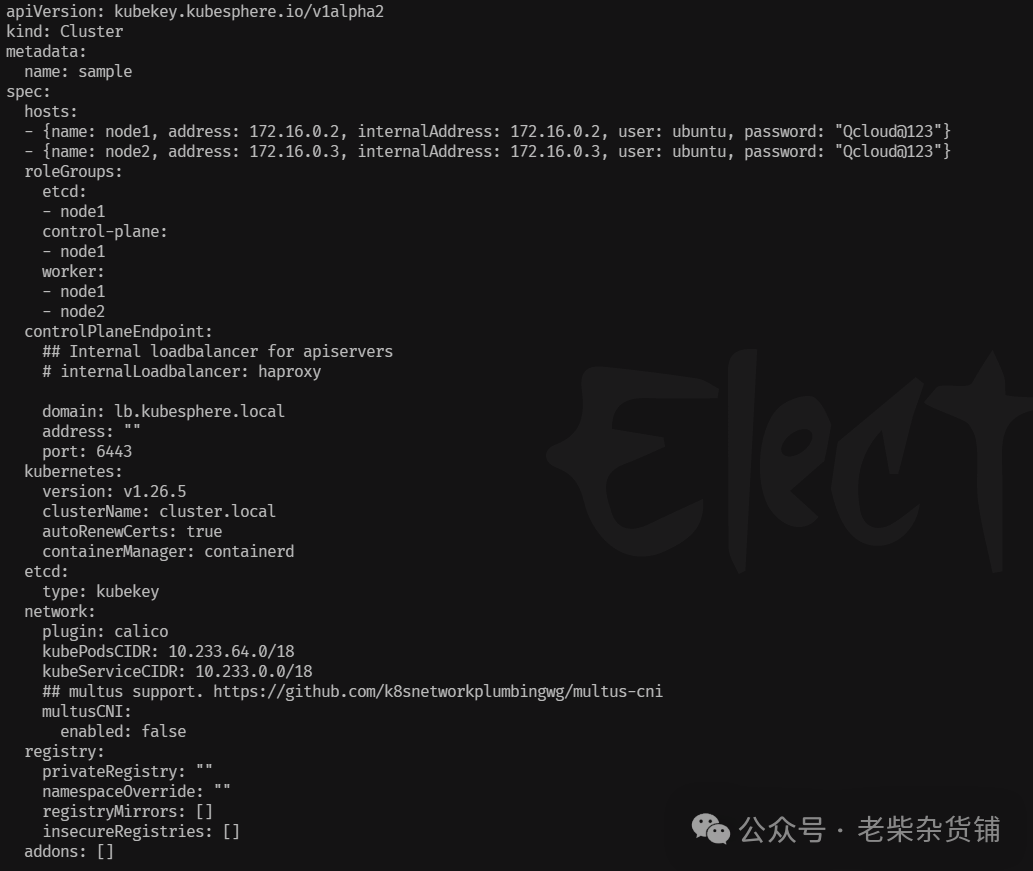
hosts 定义节点信息(IP、角色)。
network 设置 CNI 插件及 Pod/Service CIDR。
registry 配置私有镜像仓库以加速离线部署。
3. 添加集群节点
修改配置文件后执行:
kk add nodes -f config-sample.yaml
注意事项:
新增节点需满足操作系统兼容性及资源要求(建议 8 核 CPU、16 GB 内存)。
若涉及控制平面扩容,需提前配置负载均衡器监听 6443 端口。
4. 集成 KubeSphere
通过 --with-kubesphere 参数启用:
./kk create cluster --with-kubernetes v1.26.5 --with-kubesphere v4.1.1
安装后访问 http://<节点IP>:30880,默认账号为 admin/P@88w0rd。
四、离线部署资源制作
大多时候生产环境不允许直接访问外网,可以通过manifest文件制作离线 安装包,
服务器配置
# 在各服务器上安装依赖包apt-get install socat ipset ipvsadm conntrack chrony -y
和镜像仓库节点(Harbor) |
# 示例:创建包含 kubernetes v1.26.5,且 cpu 架构为 amd64、arm64的 manifests 文件。kk create manifest --with-kubernetes v1.26.5 --arch amd64# 查看生成的manifestcat manifest-sample.yamlapiVersion: kubekey.kubesphere.io/v1alpha2kind: Manifestmetadata:name: samplespec:arches:- amd64operatingSystems: []kubernetesDistributions:- type: kubernetesversion: v1.26.5components:helm:version: v3.14.3cni:version: v1.2.0etcd:version: v3.5.13containerRuntimes:- type: dockerversion: 24.0.9- type: containerdversion: 1.7.13calicoctl:version: v3.27.4crictl:version: v1.29.0docker-registry:version: "2"harbor:version: v2.5.3docker-compose:version: v2.2.2images:- registry.cn-beijing.aliyuncs.com/kubesphereio/pause:3.9- registry.cn-beijing.aliyuncs.com/kubesphereio/kube-apiserver:v1.26.5- registry.cn-beijing.aliyuncs.com/kubesphereio/kube-controller-manager:v1.26.5- registry.cn-beijing.aliyuncs.com/kubesphereio/kube-scheduler:v1.26.5- registry.cn-beijing.aliyuncs.com/kubesphereio/kube-proxy:v1.26.5- registry.cn-beijing.aliyuncs.com/kubesphereio/coredns:1.9.3- registry.cn-beijing.aliyuncs.com/kubesphereio/k8s-dns-node-cache:1.22.20- registry.cn-beijing.aliyuncs.com/kubesphereio/kube-controllers:v3.27.4- registry.cn-beijing.aliyuncs.com/kubesphereio/cni:v3.27.4- registry.cn-beijing.aliyuncs.com/kubesphereio/node:v3.27.4- registry.cn-beijing.aliyuncs.com/kubesphereio/pod2daemon-flexvol:v3.27.4- registry.cn-beijing.aliyuncs.com/kubesphereio/typha:v3.27.4- registry.cn-beijing.aliyuncs.com/kubesphereio/flannel:v0.21.3- registry.cn-beijing.aliyuncs.com/kubesphereio/flannel-cni-plugin:v1.1.2- registry.cn-beijing.aliyuncs.com/kubesphereio/cilium:v1.15.3- registry.cn-beijing.aliyuncs.com/kubesphereio/operator-generic:v1.15.3- registry.cn-beijing.aliyuncs.com/kubesphereio/hybridnet:v0.8.6- registry.cn-beijing.aliyuncs.com/kubesphereio/kube-ovn:v1.10.10- registry.cn-beijing.aliyuncs.com/kubesphereio/multus-cni:v3.8- registry.cn-beijing.aliyuncs.com/kubesphereio/provisioner-localpv:3.3.0- registry.cn-beijing.aliyuncs.com/kubesphereio/linux-utils:3.3.0- registry.cn-beijing.aliyuncs.com/kubesphereio/haproxy:2.9.6-alpine- registry.cn-beijing.aliyuncs.com/kubesphereio/kube-vip:v0.7.2- registry.cn-beijing.aliyuncs.com/kubesphereio/kata-deploy:stable- registry.cn-beijing.aliyuncs.com/kubesphereio/node-feature-discovery:v0.10.0registry:auths: {}# 根据生成的 manifest,执行下面的命令制作制品(artifact)kk artifact export -m manifest-sample.yaml -o ksp-artifact.tar.gz
将生成的制品文件ksp-artifact.tar.gz和kubekey-v3.1.8-linux-amd64.tar.gz 一起复制到部署节点
scp ./k*.tar.gz root@10.168.2.111:./
在目标节点操作:
# 新建目录并将刚复制的文件移动到新建目录cd ~mkdir kubekeymv k*.tar.gz kubekey/# 解压kktar xzvf kubekey-v3.1.8-linux-amd64.tar.gz# 新建offling 配置文件./kk create config --with-kubernetes v1.26.5 -f k8s-v1265-offline.yaml
vi k8s-v1265-offline.yaml
修改 kind: Cluster 小节中 hosts 和 roleGroups 等信息,修改说明如下。
hosts:指定节点的 IP、ssh 用户、ssh 密码、ssh 端口。示例演示了 ssh 端口号的配置方法。同时,新增一个 Registry 节点的配置
roleGroups:指定 3 个 etcd、control-plane 节点,复用相同的机器作为 3 个 worker 节点
必须指定主机组 registry 作为仓库部署节点(本例使用了 KubeKey 自动部署 Harbor 镜像仓库。当然,也可以使用已有的 Harbor,使用已有 Harbor 时此配置可以不加)
internalLoadbalancer: 启用内置的 HAProxy 负载均衡器
system.rpms:新增配置,部署时安装 rpm 包
domain:自定义了一个lb.kubesphere.local,没特殊需求的场景保留默认值即可
containerManager:使用了 containerd
storage.openebs.basePath:新增配置,指定 openebs 默认存储路径为 data/openebs/local
registry:必须指定 type 类型为 harbor,否则默认安装 docker registry
修改后的完整示例如下:
apiVersion: kubekey.kubesphere.io/v1alpha2kind: Clustermetadata:name: samplespec:namespaceOverride: kuberchkovhosts:- {name: ut111, address: 10.168.2.111, internalAddress: 10.168.2.111, user: root, password: "test.123"}- {name: ut112, address: 10.168.2.112, internalAddress: 10.168.2.112, user: root, password: "test.123"}- {name: ut113, address: 10.168.2.113, internalAddress: 10.168.2.113, user: root, password: "test.123"}- {name: ut114, address: 10.168.2.114, internalAddress: 10.168.2.114, user: root, password: "test.123"}roleGroups:etcd:- ut111- ut112- ut113control-plane:- ut111- ut112- ut113worker:- ut111- ut112- ut113registry:- ut114controlPlaneEndpoint:## Internal loadbalancer for apiserversinternalLoadbalancer: haproxydomain: lb.chkov.localaddress: ""port: 6443systems:rpms:- tarkubernetes:version: v1.26.5clusterName: chkov.localautoRenewCerts: truecontainerManager: containerdetcd:type: kubekeymonitoring: true # 将 "false" 更改为 "true"endpointIps: localhostport: 2379tlsEnable: truenetwork:plugin: calicokubePodsCIDR: 10.233.64.0/18kubeServiceCIDR: 10.233.0.0/18## multus support. https://github.com/k8snetworkplumbingwg/multus-cnimultusCNI:enabled: falsenetworkpolicy:enabled: trueippool:type: calicotopology:type: weave-scopestorage:openebs:basePath: data/openebs/localregistry:type: "harbor"# 1、如需使用 kk 部署的 harbor 或其他自定义仓库,可设置对应仓库的 auths,如使用 kk 创建 docker registry 仓库,则无需配置该参数。# 2、kk 部署的 harbor,默认地址为 dockerhub.kubekey.local,如要修改确保与 privateRegistry 字段的值保持一致。auths:"registry.chkov.local":username: adminpassword: Harbor12345certsPath: "/etc/docker/certs.d/registry.chkov.local"# 设置集群部署时使用的私有仓库privateRegistry: "registry.chkov.local"namespaceOverride: "kuberchkov"registryMirrors: []insecureRegistries: []addons: []
安装镜像仓库 Harbor:
./kk init registry -f ./k8s-v1265-offline.yaml -a ./ksp-artifact.tar.gzecho "10.168.2.114 registry.chkov.local">>/etc/hosts
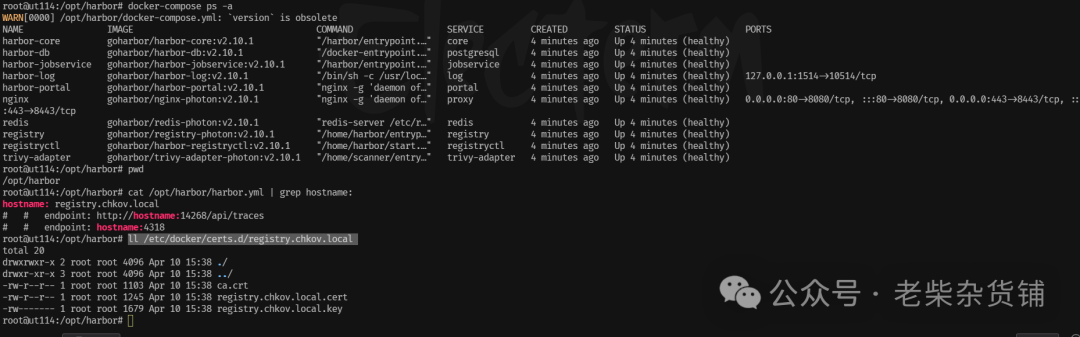
切换到114服务器,执行如下命令:
# 查看安装镜像docker images# 查看 Harbor 服务状态cd /opt/harbordocker-compose ps -a# 查看 hosts(确保使用了自定义域名)cat /etc/hosts# 查看 Harbor 配置的域名(确保使用了自定义域名)cat /opt/harbor/harbor.yml | grep hostname:# 查看 Docker 是否配置了私有证书(确保使用了自定义域名及证书)ll /etc/docker/certs.d/registry.chkov.local
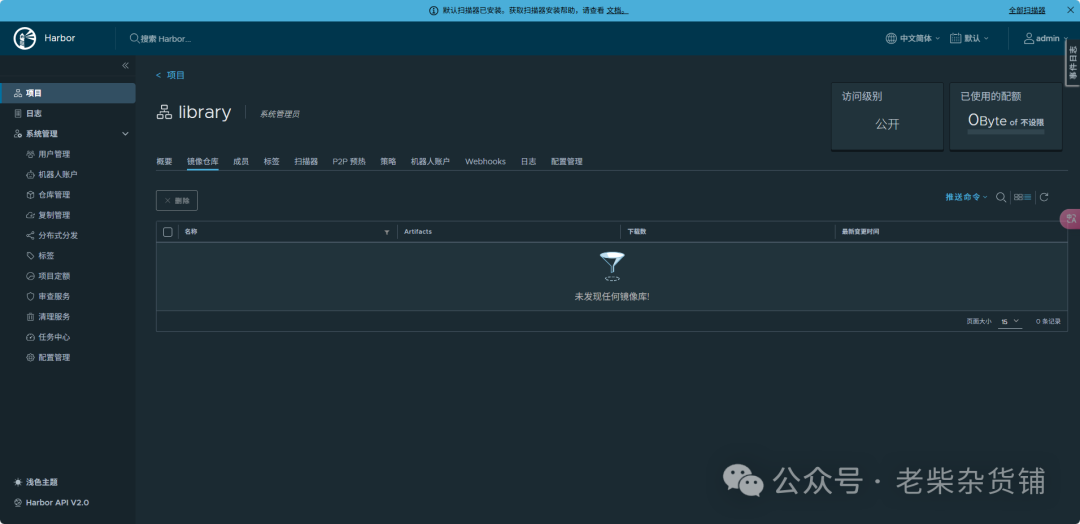
curl -k -u 'admin:Harbor12345' -X POST -H 'Content-Type: application/json' 'https://registry.chkov.local/api/v2.0/projects' -d '{"project_name": "kuberchkov","public": true}'
curl -O https://raw.githubusercontent.com/kubesphere/ks-installer/master/scripts/create_project_harbor.sh
#!/usr/bin/env bash# Copyright 2018 The KubeSphere Authors.## Licensed under the Apache License, Version 2.0 (the "License");# you may not use this file except in compliance with the License.# You may obtain a copy of the License at## http://www.apache.org/licenses/LICENSE-2.0## Unless required by applicable law or agreed to in writing, software# distributed under the License is distributed on an "AS IS" BASIS,# WITHOUT WARRANTIES OR CONDITIONS OF ANY KIND, either express or implied.# See the License for the specific language governing permissions and# limitations under the License.url="https://registry.chkov.local"user="admin"passwd="Harbor12345"harbor_projects=(librarykubespherecalicocorednsopenebscsipluginminiomirrorgooglecontainersosixiapromthanosiojimmidysongrafanaelasticistiojaegertracingjenkinsweaveworksopenpitrixjoosthofmannginxdemosfluentkubeedge)for project in "${harbor_projects[@]}"; doecho "creating $project"curl -k -u "${user}:${passwd}" -X POST -H "Content-Type: application/json" "${url}/api/v2.0/projects" -d "{ \"project_name\": \"${project}\", \"public\": true}"done
kk artifact images push -f k8s-v1265-offline.yaml -a kubekey-v3.1.8-linux-amd64.tar.gz
kk create cluster -f k8s-v1265-offline.yaml -a kubekey-v3.1.8-linux-amd64.tar.gz --with-packages --skip-push-images
参数说明
--with-packages:安装操作系统依赖
--skip-push-images: 忽略推送镜像,前面已经完成了推送镜像到私有仓库的任务
官方文档:KubeSphere 安装指南 提供详细配置示例和故障排查。
GitHub 仓库:kubesphere/kubekey 包含最新 Release 日志及贡献指南。
社区支持:通过 GitHub Issues 或 KubeSphere 论坛获取技术协助。
六、常见问题与优化建议
依赖冲突:确保节点环境干净,禁用 SELinux 或切换为 Permissive 模式。
镜像拉取失败:配置 Docker 镜像加速器或使用私有仓库。
存储配置:生产环境建议使用 Ceph/NFS 替代默认的 OpenEBS。
通过上述功能与操作,KubeKey 可显著降低 Kubernetes 集群的部署复杂度,适用于开发测试、生产环境及混合云场景。
