



JsonPath是一种可以快速解析json数据的方式,JsonPath对于JSON来说,相当于XPath对于XML,JsonPath用来解析多层嵌套的json数据。
官网:https://goessner.net/articles/JsonPath/
想要在Python编程语言中使用JsonPath对json数据快速提取,需要安装jsonpath模块
pip install jsonpath -i https://pypi.tuna.tsinghua.edu.cn/simple
jsonpath
常用语法
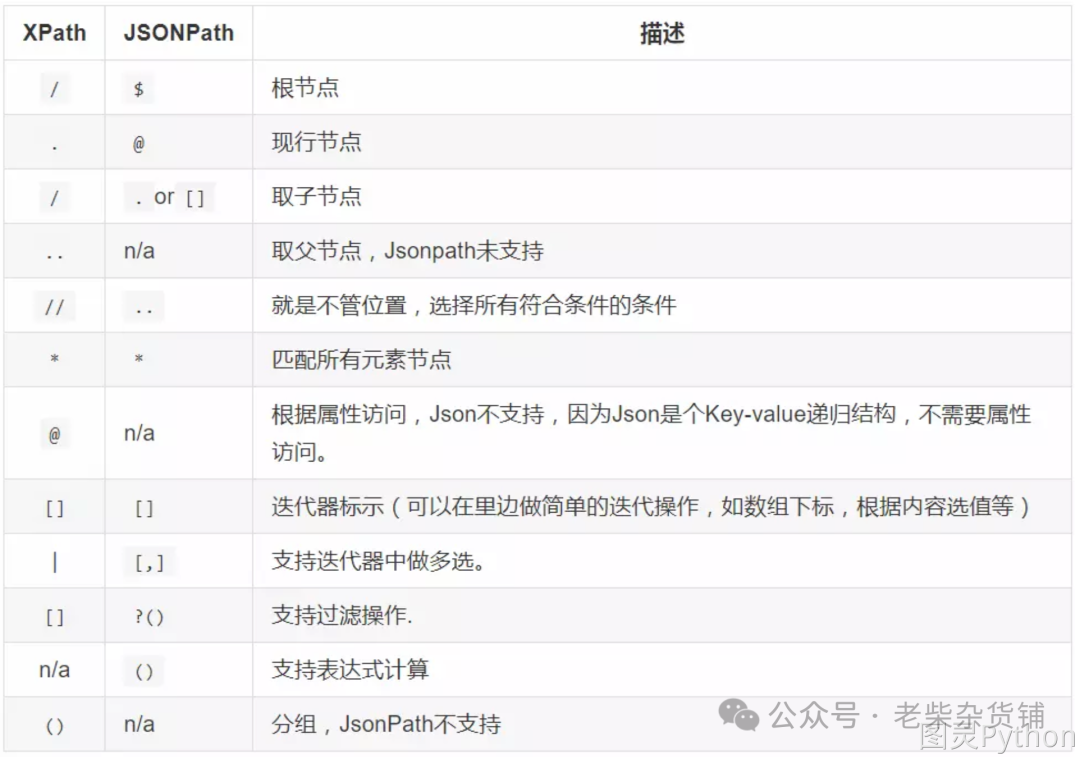
代码示例
import jsonpathinfo = {"error_code": 0,"stu_info": [{"id": 2059,"name": "小白","sex": "男","age": 28,"addr": "河南省济源市北海大道xx号","grade": "天蝎座","phone": "1837830xxxx","gold": 10896,"info": {"card": 12345678,"bank_name": '中国银行'}},{"id": 2067,"name": "小黑","sex": "男","age": 28,"addr": "河南省济源市北海大道xx号","grade": "天蝎座","phone": "87654321","gold": 100}]}"""未使用jsonpath时,提取dict时的方式"""res = info["stu_info"][0]['name'] # 取某个学生姓名的原始方法:通过查找字典中的key以及list方法中的下标索引print(res) # 输出结果是:小白res = info["stu_info"][1]['name']print(res) # 输出结果是:小黑print("----------我是分割线----------")"""使用jsonpath时,提取dict时的方式"""res1 = jsonpath.jsonpath(info, '$.stu_info[0].name') # $表示最外层的{}, . 表示子节点的意思print(res1) # 输出结果是list:['小白']res2 = jsonpath.jsonpath(info, '$.stu_info[1].name')print(res2) # 输出结果是list:['小黑']res3 = jsonpath.jsonpath(info, '$..name') # 嵌套n层也能取到所有学生姓名信息,$表示最外层的{},..表示模糊匹配print(res3) # 输出结果是list:['小白', '小黑']res4 = jsonpath.jsonpath(info, '$..bank_name')print(res4) # 输出结果是list:['中国银行']
jsonpath
对比xpath
:
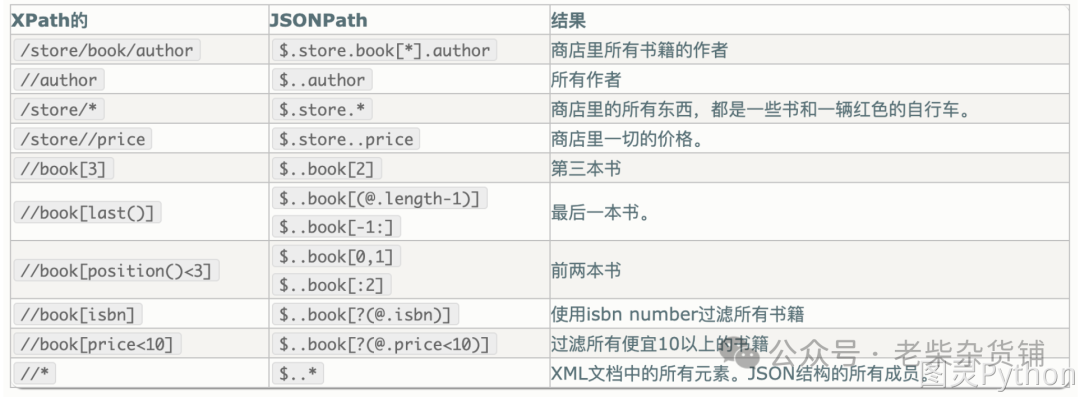
练习代码:
import jsonpathinfo = {"store": {"book": [{"category": "reference","author": "Nigel Rees","title": "Sayings of the Century","price": 8.95},{"category": "fiction","author": "Evelyn Waugh","title": "Sword of Honour","price": 12.99},{"category": "fiction","author": "Herman Melville","title": "Moby Dick","isbn": "0-553-21311-3","price": 8.99},{"category": "fiction","author": "J. R. R. Tolkien","title": "The Lord of the Rings","isbn": "0-395-19395-8","price": 22.99}],"bicycle": {"color": "red","price": 19.95}}}# 1. 提取第1本书的titleprint("\n1. 提取第1本书的title")ret = jsonpath.jsonpath(info, "$.store.book[0].title")print(ret)ret = jsonpath.jsonpath(info, "$['store']['book'][0]['title']")print(ret)# 2. 提取2、3、4本书的标题print("\n2. 提取2、3、4本书的标题")ret = jsonpath.jsonpath(info, "$.store.book[1,2,3].title")print(ret)ret = jsonpath.jsonpath(info, "$.store.book[1,2,3]['title']")print(ret)ret = jsonpath.jsonpath(info, "$.store.book[1:4]['title']")print(ret)# 3. 提取1、3本书的标题print("\n3. 提取1、3本书的标题")ret = jsonpath.jsonpath(info, "$.store.book[::2].title")print(ret)# 4. 提取最后一本书的标题print("\n4. 提取最后一本书的标题")ret = jsonpath.jsonpath(info, "$.store.book[(@.length-1)].title")print(ret)ret = jsonpath.jsonpath(info, "$.store.book[-1:].title")print(ret)# 5. 提取价格小于10的书的标题print("\n5. 提取价格小于10的书的标题")ret = jsonpath.jsonpath(info, "$.store.book[?(@.price < 10)].title")print(ret)# 6. 提取价格小于或者等于20的所有商品的价格print("\n6. 提取价格小于或者等于20的所有商品的价格")ret = jsonpath.jsonpath(info, "$..*[?(@.price <= 20)].price")print(ret)# 7. 获取所有书的作者print("\n7. 获取所有书的作者")ret = jsonpath.jsonpath(info, "$.store.book[::].author")print(ret)ret = jsonpath.jsonpath(info, "$.store.book[*].author")print(ret)# 8. 获取所有作者print("\n8. 获取所有作者")ret = jsonpath.jsonpath(info, "$..author")print(ret)# 9. 获取在store中的所有商品(包括书、自行车)print("\n9. 获取在store中的所有商品(包括书、自行车)")ret = jsonpath.jsonpath(info, "$..store")print(ret)# 10. 获取所有商品(包括书、自行车)的价格print("\n10. 获取所有商品(包括书、自行车)的价格")ret = jsonpath.jsonpath(info, "$.store..price")print(ret)# 11. 获取带有isbn的书print("\n11. 获取带有isbn的书")ret = jsonpath.jsonpath(info, "$..book[?(@.isbn)]")print(ret)# 12. 获取不带有isbn的书print("\n12. 获取不带有isbn的书")ret = jsonpath.jsonpath(info, "$..book[?(!@.isbn)]")print(ret)# 13. 获取价格在5~10之间的书print("\n13. 获取价格在5~10之间的书")ret = jsonpath.jsonpath(info, "$..book[?(@.price>=5 && @.price<=10)]")print(ret)# 14. 获取价格不在5~10之间的书print("\n13. 获取价格在5~10之间的书")ret = jsonpath.jsonpath(info, "$..book[?(@.price<5 || @.price>10)]")print(ret)# 15. 获取所有的元素print("\n15. 获取所有的元素")ret = jsonpath(info, '$.*') # 获取json本身并打印, 相当于print(info)print(ret)ret = jsonpath(info, '$..*') # 获取json全部数据, 并且单独将value获取出来for temp in res:print(temp)
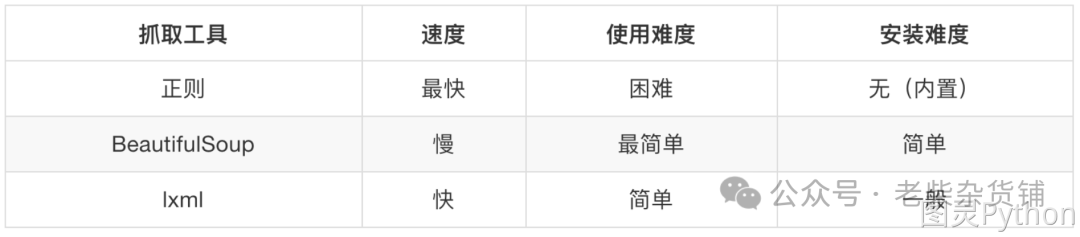
BeautifulSoup4简称BS4,和使用lxml模块 一样,Beautiful Soup 也是一个HTML/XML的解析器,主要的功能也是解析和提取HTML/XML数据。
Beautiful Soup是基于HTML DOM的,会载入整个文档,解析整个DOM树,因此时间和内存开销都会大很多,所以性能要低于lxml模块。
BeautifulSoup用来解析HTML比较简单,API非常人性化,支持CSS选择器、Python标准库中的HTML解析器,也支持lxml模块的XML解析器。
pip install bs4 -i https://mirrors.aliyun.com/pypi/simple
官方文档:http://beautifulsoup.readthedocs.io/zh_CN/v4.4.0
bs4
基本使用示例
from bs4 import BeautifulSouphtml = """<html><head><title>The Dormouse's story</title></head><body><p class="title" name="dromouse"><b>The Dormouse's story</b></p><p class="story">Once upon a time there were three little sisters; and their names were<a href="http://example.com/elsie" class="sister" id="link1">Elsie</a>,<a href="http://example.com/lacie" class="sister" id="link2">Lacie</a> and<a href="http://example.com/tillie" class="sister" id="link3">Tillie</a>;and they lived at the bottom of a well.</p><p class="story">...</p>"""# 创建 Beautiful Soup 对象soup = BeautifulSoup(html, "lxml")# 格式化输出html代码print(soup.prettify())
搜索文档树中的标签、内容、属性
find_all
方法中的参数
def find_all(self, name=None, attrs={}, recursive=True, string=None, limit=None, **kwargs)...
name
参数
当前参数可以传递标签名称字符串,根据传递的标签名称搜索对应标签
# 1. 创建soup对象soup = BeautifulSoup(html_obj, 'lxml')# 2. 根据标签名称搜索标签ret_1 = soup.find_all('b')ret_2 = soup.find_all('a')print(ret_1, ret_2)
除了传递标签名称字符串之外也可传递正则表达式,如果传入正则表达式作为参数,Beautiful Soup
会通过正则表达式的 match()
来匹配内容。下面例子中找出所有以b
开头的标签。
soup = BeautifulSoup(html_obj, 'lxml')for tag in soup.find_all(re.compile('^b')):print(tag.name)
如果传递是一个列表,则Beautiful Soup
会将与列表中任一元素匹配的内容返回。
soup = BeautifulSoup(html_obj, 'lxml')ret = soup.find_all(['a', 'b'])print(ret)
attrs
参数:可以根据标签属性搜索对应标签
from bs4 import BeautifulSouphtml = """<html><head><title>The Dormouse's story</title></head><body><p class="title" name="dromouse"><b>The Dormouse's story</b></p><p class="story">Once upon a time there were three little sisters; and their names were<a href="http://example.com/elsie" class="sister" id="link1">Elsie</a>,<a href="http://example.com/lacie" class="sister" id="link2">Lacie</a> and<a href="http://example.com/tillie" class="sister" id="link3">Tillie</a>;and they lived at the bottom of a well.</p><p class="story">...</p>"""soup = BeautifulSoup(html, "lxml")ret_1 = soup.find_all(attrs={'class': 'sister'})print(ret_1)print('-' * 30)# 简写方式ret_2 = soup.find_all(class_='sister')print(ret_2)print('-' * 30)# 查询id属性为link2的标签ret_3 = soup.find_all(id='link2')print(ret_3)
string
参数:通过string
参数可以搜索文档中的字符串内容,与name
参数的可选值一样, string
参数接受字符串 , 正则表达式 , 列表
import refrom bs4 import BeautifulSouphtml = """<html><head><title>The Dormouse's story</title></head><body><p class="title" name="dromouse"><b>The Dormouse's story</b></p><p class="story">Once upon a time there were three little sisters; and their names were<a href="http://example.com/elsie" class="sister" id="link1">Elsie</a>,<a href="http://example.com/lacie" class="sister" id="link2">Lacie</a> and<a href="http://example.com/tillie" class="sister" id="link3">Tillie</a>;and they lived at the bottom of a well.</p><p class="story">...</p>"""soup = BeautifulSoup(html, "lxml")ret_1 = soup.find_all(string='Elsie')print(ret_1)ret_2 = soup.find_all(string=['Tillie', 'Elsie', 'Lacie'])print(ret_2)ret_3 = soup.find_all(string=re.compile('Dormouse'))print(ret_3)
import refrom bs4 import BeautifulSouphtml = """<html><head><title>The Dormouse's story</title></head><body><p class="title" name="dromouse"><b>The Dormouse's story</b></p><p class="story">Once upon a time there were three little sisters; and their names were<a href="http://example.com/elsie" class="sister" id="link1">Elsie</a>,<a href="http://example.com/lacie" class="sister" id="link2">Lacie</a> and<a href="http://example.com/tillie" class="sister" id="link3">Tillie</a>;and they lived at the bottom of a well.</p><p class="story">...</p>"""soup = BeautifulSoup(html, "lxml")print(soup.select('title'))print(soup.select('a'))print(soup.select('b'))
类选择器
import refrom bs4 import BeautifulSouphtml = """<html><head><title>The Dormouse's story</title></head><body><p class="title" name="dromouse"><b>The Dormouse's story</b></p><p class="story">Once upon a time there were three little sisters; and their names were<a href="http://example.com/elsie" class="sister" id="link1">Elsie</a>,<a href="http://example.com/lacie" class="sister" id="link2">Lacie</a> and<a href="http://example.com/tillie" class="sister" id="link3">Tillie</a>;and they lived at the bottom of a well.</p><p class="story">...</p>"""soup = BeautifulSoup(html, "lxml")print(soup.select('.sister'))
id
选择器
import refrom bs4 import BeautifulSouphtml = """<html><head><title>The Dormouse's story</title></head><body><p class="title" name="dromouse"><b>The Dormouse's story</b></p><p class="story">Once upon a time there were three little sisters; and their names were<a href="http://example.com/elsie" class="sister" id="link1">Elsie</a>,<a href="http://example.com/lacie" class="sister" id="link2">Lacie</a> and<a href="http://example.com/tillie" class="sister" id="link3">Tillie</a>;and they lived at the bottom of a well.</p><p class="story">...</p>"""soup = BeautifulSoup(html, "lxml")print(soup.select('#link1'))
层级选择器
import refrom bs4 import BeautifulSouphtml = """<html><head><title>The Dormouse's story</title></head><body><p class="title" name="dromouse"><b>The Dormouse's story</b></p><p class="story">Once upon a time there were three little sisters; and their names were<a href="http://example.com/elsie" class="sister" id="link1">Elsie</a>,<a href="http://example.com/lacie" class="sister" id="link2">Lacie</a> and<a href="http://example.com/tillie" class="sister" id="link3">Tillie</a>;and they lived at the bottom of a well.</p><p class="story">...</p>"""soup = BeautifulSoup(html, "lxml")print(soup.select('p #link1'))
属性选择器
import refrom bs4 import BeautifulSouphtml = """<html><head><title>The Dormouse's story</title></head><body><p class="title" name="dromouse"><b>The Dormouse's story</b></p><p class="story">Once upon a time there were three little sisters; and their names were<a href="http://example.com/elsie" class="sister" id="link1">Elsie</a>,<a href="http://example.com/lacie" class="sister" id="link2">Lacie</a> and<a href="http://example.com/tillie" class="sister" id="link3">Tillie</a>;and they lived at the bottom of a well.</p><p class="story">...</p>"""soup = BeautifulSoup(html, "lxml")print(soup.select('a[class="sister"]'))print('-' * 30)print(soup.select('a[href="http://example.com/elsie"]'))
get_text()
方法:获取文本内容
import refrom bs4 import BeautifulSouphtml = """<html><head><title>The Dormouse's story</title></head><body><p class="title" name="dromouse"><b>The Dormouse's story</b></p><p class="story">Once upon a time there were three little sisters; and their names were<a href="http://example.com/elsie" class="sister" id="link1">Elsie</a>,<a href="http://example.com/lacie" class="sister" id="link2">Lacie</a> and<a href="http://example.com/tillie" class="sister" id="link3">Tillie</a>;and they lived at the bottom of a well.</p><p class="story">...</p>"""soup = BeautifulSoup(html, "lxml")# select返回的是列表对象, 需要使用for循环遍历列表元素再使用get_text方法获取文本数据for title in soup.select('title'):print(title.get_text())
get()
方法:获取属性
import refrom bs4 import BeautifulSouphtml = """<html><head><title>The Dormouse's story</title></head><body><p class="title" name="dromouse"><b>The Dormouse's story</b></p><p class="story">Once upon a time there were three little sisters; and their names were<a href="http://example.com/elsie" class="sister" id="link1">Elsie</a>,<a href="http://example.com/lacie" class="sister" id="link2">Lacie</a> and<a href="http://example.com/tillie" class="sister" id="link3">Tillie</a>;and they lived at the bottom of a well.</p><p class="story">...</p>"""soup = BeautifulSoup(html, "lxml")for attr in soup.select('a'):print(attr.get('href'))
总结
- 安装
beautifulsoup4
:pip install bs4 beautifulsoup
导包:from bs4 import BeautifulSoupbeautifulsoup
转换类型:BeautifulSoup(html)find
方法返回一个解析完毕的对象findall
方法返回的是解析列表listselect
方法返回的是解析列表list- 获取属性的方法:
get('属性名字') - 和获取文本的方法:
get_text()
import requestsfrom bs4 import BeautifulSoupurl = "https://weixin.sogou.com/weixin?_sug_type_=1&type=2&query=python"headers = {"User-Agent": "Mozilla/5.0 (Macintosh; Intel Mac OS X 10_15_3) ""AppleWebKit/537.36 (KHTML, like Gecko) Chrome/86.0.4240.183 Safari/537.36"}response = requests.get(url, headers=headers).textsoup = BeautifulSoup(response, 'lxml')ul_tag = soup.select('ul[class="news-list"]')# print(ul_tag)h3_list = ul_tag[0].select('h3')for temp in h3_list:print(temp.select('a')[0].get_text(), temp.select('a')[0].get('href'))print('-' * 30)
