



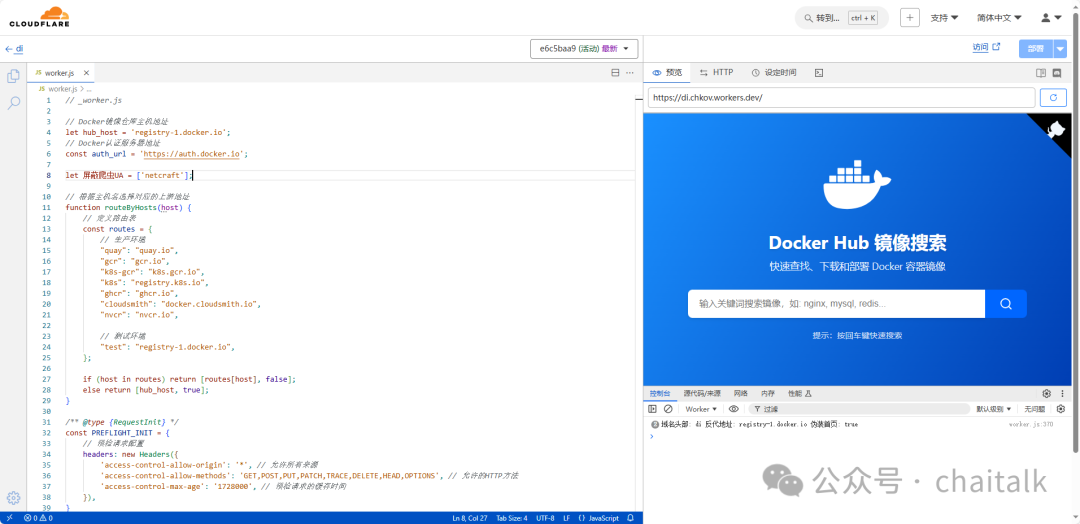
在使用 Cloudflare Workers 搭建 Docker 镜像源时,需要注意 Cloudflare Workers 免费账号每天有次数限制(10 万次)和每分钟限制(1000 次)
前期准备
注册一个 Cloudflare 账号,且能正常访问。
新建一个work,将如下代码粘贴到worker.js代码窗口中部署即可
// _worker.js// Docker镜像仓库主机地址let hub_host = 'registry-1.docker.io';// Docker认证服务器地址const auth_url = 'https://auth.docker.io';let 屏蔽爬虫UA = ['netcraft'];// 根据主机名选择对应的上游地址function routeByHosts(host) {// 定义路由表const routes = {// 生产环境"quay": "quay.io","gcr": "gcr.io","k8s-gcr": "k8s.gcr.io","k8s": "registry.k8s.io","ghcr": "ghcr.io","cloudsmith": "docker.cloudsmith.io","nvcr": "nvcr.io",// 测试环境"test": "registry-1.docker.io",};if (host in routes) return [routes[host], false];else return [hub_host, true];}/** @type {RequestInit} */const PREFLIGHT_INIT = {// 预检请求配置headers: new Headers({'access-control-allow-origin': '*', 允许所有来源'access-control-allow-methods': 'GET,POST,PUT,PATCH,TRACE,DELETE,HEAD,OPTIONS', // 允许的HTTP方法'access-control-max-age': '1728000', // 预检请求的缓存时间}),}/*** 构造响应* @param {any} body 响应体* @param {number} status 响应状态码* @param {Object<string, string>} headers 响应头*/function makeRes(body, status = 200, headers = {}) {headers['access-control-allow-origin'] = '*' // 允许所有来源return new Response(body, { status, headers }) // 返回新构造的响应}/*** 构造新的URL对象* @param {string} urlStr URL字符串* @param {string} base URL base*/function newUrl(urlStr, base) {try {console.log(`Constructing new URL object with path ${urlStr} and base ${base}`);return new URL(urlStr, base); // 尝试构造新的URL对象} catch (err) {console.error(err);return null // 构造失败返回null}}async function nginx() {const text = `<!DOCTYPE html><html><head><title>Welcome to nginx!</title><style>body {width: 35em;margin: 0 auto;font-family: Tahoma, Verdana, Arial, sans-serif;}</style></head><body><h1>Welcome to nginx!</h1><p>If you see this page, the nginx web server is successfully installed andworking. Further configuration is required.</p><p>For online documentation and support please refer to<a href="http://nginx.org/">nginx.org</a>.<br/>Commercial support is available at<a href="http://nginx.com/">nginx.com</a>.</p><p><em>Thank you for using nginx.</em></p></body></html>`return text;}async function searchInterface() {const html = `<!DOCTYPE html><html><head><title>Docker Hub 镜像搜索</title><meta charset="UTF-8"><meta name="viewport" content="width=device-width, initial-scale=1.0"><style>:root {--github-color: #f0f6fc;--githubbj-color: #010409;}* {box-sizing: border-box;margin: 0;padding: 0;}body {font-family: -apple-system, BlinkMacSystemFont, "Segoe UI", Roboto, "Helvetica Neue", Arial, sans-serif;display: flex;flex-direction: column;justify-content: center; // 新增align-items: center;min-height: 100vh;margin: 0;background: linear-gradient(120deg, #1a90ff 0%, #003eb3 100%);padding: 20px;}.container {text-align: center;width: 100%;max-width: 800px;padding: 0 20px;margin: 0 auto; // 修改display: flex; // 新增flex-direction: column; // 新增justify-content: center; // 新增min-height: 70vh; // 新增}.github-corner {position: fixed;top: 0;right: 0;z-index: 999;}.github-corner svg {fill: var(githubbj-color);color: var(--github-color);position: absolute;top: 0;border: 0;right: 0;width: 80px;height: 80px;}.github-corner a,.github-corner a:visited {color: var(--github-color) !important;}.github-corner a,.github-corner a:visited {color: transparent !important;text-decoration: none !important;}.github-corner .octo-body,.github-corner .octo-arm {fill: var(--github-color) !important;}.github-corner:hover .octo-arm {animation: octocat-wave 560ms ease-in-out;}@keyframes octocat-wave {0%, 100% {transform: rotate(0);}20%, 60% {transform: rotate(-25deg);}40%, 80% {transform: rotate(10deg);}}.logo {margin-bottom: 30px;transition: transform 0.3s ease;}.logo:hover {transform: scale(1.05);}.title {color: white;font-size: 2em;margin-bottom: 10px;text-shadow: 0 2px 4px rgba(0,0,0,0.1);}.subtitle {color: rgba(255,255,255,0.9);font-size: 1.1em;margin-bottom: 30px;}.search-container {display: flex;align-items: stretch;width: 100%;max-width: 600px;margin: 0 auto;height: 50px;}#search-input {flex: 1;padding: 15px 20px;font-size: 16px;border: none;border-radius: 8px 0 0 8px;outline: none;box-shadow: 0 2px 6px rgba(0,0,0,0.1);transition: all 0.3s ease;}#search-input {flex: 1;padding: 0 20px;font-size: 16px;border: none;border-radius: 8px 0 0 8px;outline: none;box-shadow: 0 2px 6px rgba(0,0,0,0.1);transition: all 0.3s ease;height: 100%;}#search-button {padding: 0 25px;background-color: #0066ff;border: none;border-radius: 0 8px 8px 0;cursor: pointer;transition: all 0.3s ease;height: 100%;display: flex;align-items: center;justify-content: center;}#search-button:hover {background-color: #0052cc;transform: translateY(-1px);}#search-button svg {width: 24px;height: 24px;}.tips {color: rgba(255,255,255,0.8);margin-top: 20px;font-size: 0.9em;}@media (max-width: 480px) {.container {padding: 0 15px;min-height: 60vh; // 新增}.github-corner svg {width: 60px;height: 60px;}.github-corner:hover .octo-arm {animation: none;}.github-corner .octo-arm {animation: octocat-wave 560ms ease-in-out;}.search-container {height: 45px;}#search-input {padding: 0 15px;}#search-button {padding: 0 20px;}}</style></head><body><a href="https://github.com/cmliu/CF-Workers-docker.io" target="_blank" class="github-corner" aria-label="View source on Github"><svg viewBox="0 0 250 250" aria-hidden="true"><path d="M0,0 L115,115 L130,115 L142,142 L250,250 L250,0 Z"></path><path d="M128.3,109.0 C113.8,99.7 119.0,89.6 119.0,89.6 C122.0,82.7 120.5,78.6 120.5,78.6 C119.2,72.0 123.4,76.3 123.4,76.3 C127.3,80.9 125.5,87.3 125.5,87.3 C122.9,97.6 130.6,101.9 134.4,103.2" fill="currentColor" style="transform-origin: 130px 106px;" class="octo-arm"></path><path d="M115.0,115.0 C114.9,115.1 118.7,116.5 119.8,115.4 L133.7,101.6 C136.9,99.2 139.9,98.4 142.2,98.6 C133.8,88.0 127.5,74.4 143.8,58.0 C148.5,53.4 154.0,51.2 159.7,51.0 C160.3,49.4 163.2,43.6 171.4,40.1 C171.4,40.1 176.1,42.5 178.8,56.2 C183.1,58.6 187.2,61.8 190.9,65.4 C194.5,69.0 197.7,73.2 200.1,77.6 C213.8,80.2 216.3,84.9 216.3,84.9 C212.7,93.1 206.9,96.0 205.4,96.6 C205.1,102.4 203.0,107.8 198.3,112.5 C181.9,128.9 168.3,122.5 157.7,114.1 C157.9,116.9 156.7,120.9 152.7,124.9 L141.0,136.5 C139.8,137.7 141.6,141.9 141.8,141.8 Z" fill="currentColor" class="octo-body"></path></svg></a><div class="container"><div class="logo"><svg xmlns="http://www.w3.org/2000/svg" viewBox="0 0 24 18" fill="#ffffff" width="120" height="90"><path d="M23.763 6.886c-.065-.053-.673-.512-1.954-.512-.32 0-.659.03-1.01.087-.248-1.703-1.651-2.533-1.716-2.57l-.345-.2-.227.328a4.596 4.596 0 0 0-.611 1.433c-.23.972-.09 1.884.403 2.666-.596.331-1.546.418-1.744.42H.752a.753.753 0 0 0-.75.749c-.007 1.456.233 2.864.692 4.07.545 1.43 1.355 2.483 2.409 3.13 1.181.725 3.104 1.14 5.276 1.14 1.016 0 2.03-.092 2.93-.266 1.417-.273 2.705-.742 3.826-1.391a10.497 10.497 0 0 0 2.61-2.14c1.252-1.42 1.998-3.005 2.553-4.408.075.003.148.005.221.005 1.371 0 2.215-.55 2.68-1.01.505-.5.685-.998.704-1.053L24 7.076l-.237-.19Z"></path><path d="M2.216 8.075h2.119a.186.186 0 0 0 .185-.186V6a.186.186 0 0 0-.185-.186H2.216A.186.186 0 0 0 2.031 6v1.89c0 .103.083.186.185.186Zm2.92 0h2.118a.185.185 0 0 0 .185-.186V6a.185.185 0 0 0-.185-.186H5.136A.185.185 0 0 0 4.95 6v1.89c0 .103.083.186.186.186Zm2.964 0h2.118a.186.186 0 0 0 .185-.186V6a.186.186 0 0 0-.185-.186H8.1A.185.185 0 0 0 7.914 6v1.89c0 .103.083.186.186.186Zm2.928 0h2.119a.185.185 0 0 0 .185-.186V6a.185.185 0 0 0-.185-.186h-2.119a.186.186 0 0 0-.185.186v1.89c0 .103.083.186.185.186Zm-5.892-2.72h2.118a.185.185 0 0 0 .185-.186V3.28a.186.186 0 0 0-.185-.186H5.136a.186.186 0 0 0-.186.186v1.89c0 .103.083.186.186.186Zm2.964 0h2.118a.186.186 0 0 0 .185-.186V3.28a.186.186 0 0 0-.185-.186H8.1a.186.186 0 0 0-.186.186v1.89c0 .103.083.186.186.186Zm2.928 0h2.119a.185.185 0 0 0 .185-.186V3.28a.186.186 0 0 0-.185-.186h-2.119a.186.186 0 0 0-.185.186v1.89c0 .103.083.186.185.186Zm0-2.72h2.119a.186.186 0 0 0 .185-.186V.56a.185.185 0 0 0-.185-.186h-2.119a.186.186 0 0 0-.185.186v1.89c0 .103.083.186.185.186Zm2.955 5.44h2.118a.185.185 0 0 0 .186-.186V6a.185.185 0 0 0-.186-.186h-2.118a.185.185 0 0 0-.185.186v1.89c0 .103.083.186.185.186Z"></path></svg></div><h1 class="title">Docker Hub 镜像搜索</h1><p class="subtitle">快速查找、下载和部署 Docker 容器镜像</p><div class="search-container"><input type="text" id="search-input" placeholder="输入关键词搜索镜像,如: nginx, mysql, redis..."><button id="search-button" title="搜索"><svg focusable="false" aria-hidden="true" viewBox="0 0 24 24" fill="none" xmlns="http://www.w3.org/2000/svg"><path d="M21 21L16.65 16.65M19 11C19 15.4183 15.4183 19 11 19C6.58172 19 3 15.4183 3 11C3 6.58172 6.58172 3 11 3C15.4183 3 19 6.58172 19 11Z" stroke="white" stroke-width="2" stroke-linecap="round" stroke-linejoin="round"></path></svg></button></div><p class="tips">提示:按回车键快速搜索</p></div><script>function performSearch() {const query = document.getElementById('search-input').value;if (query) {window.location.href = '/search?q=' + encodeURIComponent(query);}}document.getElementById('search-button').addEventListener('click', performSearch);document.getElementById('search-input').addEventListener('keypress', function(event) {if (event.key === 'Enter') {performSearch();}});</script></body></html>`;return html;}export default {async fetch(request, env, ctx) {const getReqHeader = (key) => request.headers.get(key); // 获取请求头let url = new URL(request.url); // 解析请求URLconst userAgentHeader = request.headers.get('User-Agent');const userAgent = userAgentHeader ? userAgentHeader.toLowerCase() : "null";if (env.UA) 屏蔽爬虫UA = 屏蔽爬虫UA.concat(await ADD(env.UA));const workers_url = `https://${url.hostname}`;// 获取请求参数中的 nsconst ns = url.searchParams.get('ns');const hostname = url.searchParams.get('hubhost') || url.hostname;const hostTop = hostname.split('.')[0]; // 获取主机名的第一部分let checkHost; // 在这里定义 checkHost 变量// 如果存在 ns 参数,优先使用它来确定 hub_hostif (ns) {if (ns === 'docker.io') {hub_host = 'registry-1.docker.io'; // 设置上游地址为 registry-1.docker.io} else {hub_host = ns; // 直接使用 ns 作为 hub_host}} else {checkHost = routeByHosts(hostTop);hub_host = checkHost[0]; // 获取上游地址}const fakePage = checkHost ? checkHost[1] : false; // 确保 fakePage 不为 undefinedconsole.log(`域名头部: ${hostTop} 反代地址: ${hub_host} 伪装首页: ${fakePage}`);if (屏蔽爬虫UA.some(fxxk => userAgent.includes(fxxk)) && 屏蔽爬虫UA.length > 0) {// 首页改成一个nginx伪装页return new Response(await nginx(), {headers: {'Content-Type': 'text/html; charset=UTF-8',},});} else if (userAgent && userAgent.includes('mozilla')) {if (url.pathname == '/') {return new Response(await searchInterface(), {headers: {'Content-Type': 'text/html; charset=UTF-8',},});} else {url.hostname = 'registry.hub.docker.com';const newRequest = new Request(url, request);return fetch(newRequest);}}// 修改包含 %2F 和 %3A 的请求if (!/%2F/.test(url.search) && /%3A/.test(url.toString())) {let modifiedUrl = url.toString().replace(/%3A(?=.*?&)/, '%3Alibrary%2F');url = new URL(modifiedUrl);console.log(`handle_url: ${url}`);}// 处理token请求if (url.pathname.includes('/token')) {let token_parameter = {headers: {'Host': 'auth.docker.io','User-Agent': getReqHeader("User-Agent"),'Accept': getReqHeader("Accept"),'Accept-Language': getReqHeader("Accept-Language"),'Accept-Encoding': getReqHeader("Accept-Encoding"),'Connection': 'keep-alive','Cache-Control': 'max-age=0'}};let token_url = auth_url + url.pathname + url.search;return fetch(new Request(token_url, request), token_parameter);}// 修改 /v2/ 请求路径if (hub_host == 'registry-1.docker.io' && /^\/v2\/[^/]+\/[^/]+\/[^/]+$/.test(url.pathname) && !/^\/v2\/library/.test(url.pathname)) {//url.pathname = url.pathname.replace(/\/v2\//, '/v2/library/');url.pathname = '/v2/library/' + url.pathname.split('/v2/')[1];console.log(`modified_url: ${url.pathname}`);}// 更改请求的主机名url.hostname = hub_host;// 构造请求参数let parameter = {headers: {'Host': hub_host,'User-Agent': getReqHeader("User-Agent"),'Accept': getReqHeader("Accept"),'Accept-Language': getReqHeader("Accept-Language"),'Accept-Encoding': getReqHeader("Accept-Encoding"),'Connection': 'keep-alive','Cache-Control': 'max-age=0'},cacheTtl: 3600 // 缓存时间};// 添加Authorization头if (request.headers.has("Authorization")) {parameter.headers.Authorization = getReqHeader("Authorization");}// 添加可能存在字段X-Amz-Content-Sha256if (request.headers.has("X-Amz-Content-Sha256")) {parameter.headers['X-Amz-Content-Sha256'] = getReqHeader("X-Amz-Content-Sha256");}// 发起请求并处理响应let original_response = await fetch(new Request(url, request), parameter);let original_response_clone = original_response.clone();let original_text = original_response_clone.body;let response_headers = original_response.headers;let new_response_headers = new Headers(response_headers);let status = original_response.status;// 修改 Www-Authenticate 头if (new_response_headers.get("Www-Authenticate")) {let auth = new_response_headers.get("Www-Authenticate");let re = new RegExp(auth_url, 'g');new_response_headers.set("Www-Authenticate", response_headers.get("Www-Authenticate").replace(re, workers_url));}// 处理重定向if (new_response_headers.get("Location")) {const location = new_response_headers.get("Location");console.info(`Found redirection location, redirecting to ${location}`);return httpHandler(request, location, hub_host);}// 返回修改后的响应let response = new Response(original_text, {status,headers: new_response_headers});return response;}};/*** 处理HTTP请求* @param {Request} req 请求对象* @param {string} pathname 请求路径* @param {string} baseHost 基地址*/function httpHandler(req, pathname, baseHost) {const reqHdrRaw = req.headers;// 处理预检请求if (req.method === 'OPTIONS' &&reqHdrRaw.has('access-control-request-headers')) {return new Response(null, PREFLIGHT_INIT);}let rawLen = '';const reqHdrNew = new Headers(reqHdrRaw);const refer = reqHdrNew.get('referer');let urlStr = pathname;const urlObj = newUrl(urlStr, 'https://' + baseHost);/** @type {RequestInit} */const reqInit = {method: req.method,headers: reqHdrNew,redirect: 'follow',body: req.body};return proxy(urlObj, reqInit, rawLen);}/*** 代理请求* @param {URL} urlObj URL对象* @param {RequestInit} reqInit 请求初始化对象* @param {string} rawLen 原始长度*/async function proxy(urlObj, reqInit, rawLen) {const res = await fetch(urlObj.href, reqInit);const resHdrOld = res.headers;const resHdrNew = new Headers(resHdrOld);// 验证长度if (rawLen) {const newLen = resHdrOld.get('content-length') || '';const badLen = (rawLen !== newLen);if (badLen) {return makeRes(res.body, 400, {'--error': `bad len: ${newLen}, except: ${rawLen}`,'access-control-expose-headers': '--error',});}}const status = res.status;resHdrNew.set('access-control-expose-headers', '*');resHdrNew.set('access-control-allow-origin', '*');resHdrNew.set('Cache-Control', 'max-age=1500');// 删除不必要的头resHdrNew.delete('content-security-policy');resHdrNew.delete('content-security-policy-report-only');resHdrNew.delete('clear-site-data');return new Response(res.body, {status,headers: resHdrNew});}async function ADD(envadd) {var addtext = envadd.replace(/[ |"'\r\n]+/g, ',').replace(/,+/g, ','); // 将空格、双引号、单引号和换行符替换为逗号if (addtext.charAt(0) == ',') addtext = addtext.slice(1);if (addtext.charAt(addtext.length - 1) == ',') addtext = addtext.slice(0, addtext.length - 1);const add = addtext.split(',');return add;}
文章转载自老柴杂货铺,如果涉嫌侵权,请发送邮件至:contact@modb.pro进行举报,并提供相关证据,一经查实,墨天轮将立刻删除相关内容。
