



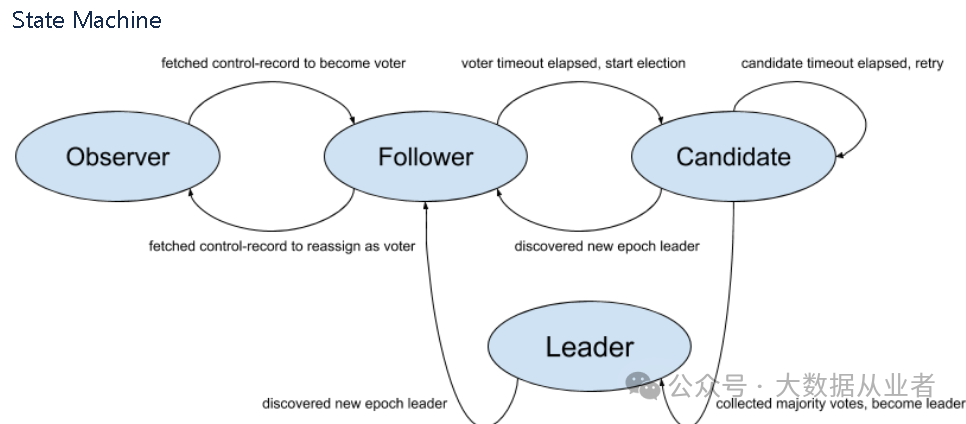
步骤1:新建集群,需要生成集群唯一的cluster id,可以使用官方工具生成,如下:
[root@FelixZhnew kafka_2.13-4.0.0]# KAFKA_CLUSTER_ID="$(bin/kafka-storage.sh random-uuid)"[root@FelixZhnew kafka_2.13-4.0.0]# echo $KAFKA_CLUSTER_ID
强调一点:这个cluster id也可以根据业务场景标识进行自定义设置,比如:mycluster。
步骤2:所有的集群新节点都需要根据对应的cluster id进行数据目录格式化的操作:
[root@FelixZhnew kafka_2.13-4.0.0]# bin/kafka-storage.sh format --standalone -t $KAFKA_CLUSTER_ID -c config/server.properties

步骤3:修改配置文件server.properties
[root@FelixZhnew kafka_2.13-4.0.0-standalone]# vim config/server.propertiesprocess.roles=broker,controllernode.id=1controller.quorum.bootstrap.servers=FelixZhnew:9093advertised.listeners=PLAINTEXT://FelixZhnew:9092,CONTROLLER://FelixZhnew:9093
注意:node.id必须唯一。
步骤4:启动kafka-server服务
[root@FelixZhnew kafka_2.13-4.0.0]# bin/kafka-server-start.sh config/server.properties

如果首次启动:没有格式化数据目录,直接启动server会失败:
[2025-04-09 09:58:10,945] ERROR Exiting Kafka due to fatal exception (kafka.Kafka$)java.lang.RuntimeException: No readable meta.properties files found.

如果非首次启动:增加多个数据目录,还需要再次格式化,注意跳过已格式化的目录:
[root@FelixZhnew kafka_2.13-4.0.0]# bin/kafka-storage.sh format --standalone -t BQCRPlv5TiyNguebINpTRQ -c config/server.properties --ignore-formatted

步骤5:创建topic实践
[root@FelixZhnew bin]# ./kafka-topics.sh --bootstrap-server localhost:9092 --topic test –create[root@FelixZhnew bin]# ./kafka-topics.sh --bootstrap-server localhost:9092 --topic test –describe

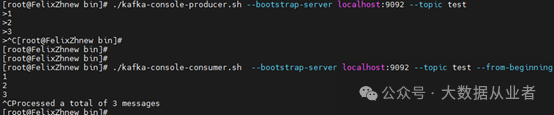
步骤6:生产者、消费者实践
[root@FelixZhnew bin]# ./kafka-console-producer.sh --bootstrap-server localhost:9092 --topic test[root@FelixZhnew bin]# ./kafka-console-consumer.sh --bootstrap-server localhost:9092 --topic test --from-beginning
步骤7:查看cluster id
[root@FelixZhnew bin]# ./kafka-cluster.sh cluster-id --bootstrap-server felixzhnew:9092

集群扩容
步骤1:修改配置
[root@felixzh1 kafka_2.13-4.0.0-standalone]# vim config/server.propertiesprocess.roles=broker,controllernode.id=2controller.quorum.bootstrap.servers=felixzh1:9093,FelixZhnew:9093advertised.listeners=PLAINTEXT://felixzh1:9092,CONTROLLER://felixzh1:9093
注意:node.id唯一,controller.quorum.bootstrap.servers添加已有集群的地址。
步骤2:根据已有集群cluster id格式化数据目录
[root@felixzh1 kafka_2.13-4.0.0-standalone]# bin/kafka-storage.sh format --cluster-id mycluster1 --config config/server.properties --no-initial-controllers

步骤3:启动kafka server服务
[root@felixzh1 kafka_2.13-4.0.0-standalone]# bin/kafka-server-start.sh config/server.properties

步骤4:观察新节点controller状态为Observer,且数据已经追上(lag=0)
[root@FelixZhnew kafka_2.13-4.0.0-standalone]# bin/kafka-metadata-quorum.sh --bootstrap-controller localhost:9093 describe –status

[root@FelixZhnew kafka_2.13-4.0.0-standalone]# bin/kafka-metadata-quorum.sh --bootstrap-controller felixzhnew:9093 describe –replication

步骤5:将新controller节点加入到集群,进行Topic基本功能实践
[root@felixzh1 kafka_2.13-4.0.0-standalone]# bin/kafka-metadata-quorum.sh --command-config config/server.properties --bootstrap-server localhost:9092 add-controller
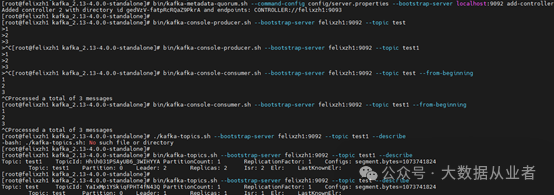
步骤6:查看扩容完成的controller集群状态
[root@FelixZhnew kafka_2.13-4.0.0-standalone]# bin/kafka-metadata-quorum.sh --bootstrap-controller felixzhnew:9093 describe –replication
[root@FelixZhnew kafka_2.13-4.0.0-standalone]# bin/kafka-metadata-quorum.sh --bootstrap-controller localhost:9093 describe –status

集群缩容
步骤 1:查看待缩容节点controller信息、然后remove-controller
[root@FelixZhnew kafka_2.13-4.0.0-standalone]# bin/kafka-metadata-quorum.sh --bootstrap-controller FelixZhnew:9093 describe –status[root@FelixZhnew kafka_2.13-4.0.0-standalone]# bin/kafka-metadata-quorum.sh --bootstrap-controller FelixZhnew:9093 remove-controller --controller-id 2 --controller-directory-id gedVzV-fatpRcRQaZ9PkrA

步骤2:停止kafka-server服务。
总结
综上所述,Kafka Kraft集群部署、集群扩容、集群缩容实践记录完成。欢迎关注微信公众号:大数据从业者。

文章转载自大数据从业者,如果涉嫌侵权,请发送邮件至:contact@modb.pro进行举报,并提供相关证据,一经查实,墨天轮将立刻删除相关内容。
