



大家好,这里是公众号 DBA学习之路,分享一些学习数据库路上的知识和经验。

目录
前言
前几天 19.27 补丁发布了,一直没时间安装测试,今天正好有空,测试一下。
介绍
Oracle 19C RU 每季度更新一次,本次 19.27 对应 202504 季度:

这里顺带分享一下几个 MOS 补丁的下载链接:
- Patch 6880880
- Assistant: Download Reference for Oracle Database/GI Update, Revision, PSU, SPU(CPU), Bundle Patches, Patchsets and Base Releases (Doc ID 2118136.2)
- Primary Note for Database Proactive Patch Program (Doc ID 888.1)
- Database 11.2.0.4 Proactive Patch Information (Doc ID 2285559.1)
- Database 12.2.0.1 Proactive Patch Information (Doc ID 2285557.1)
- Oracle Database 19c Proactive Patch Information (Doc ID 2521164.1)
最近 MOS 增加了双重认证,很多小伙伴的 MOS 账号都无法登录下载了,Oracle 这一手太坏了。
19.27 RU 补丁安装
环境信息:
| 角色 | IP地址 | 数据库版本 | CDB名 | PDB名 |
|---|---|---|---|---|
| 源端 | 192.168.6.191 | 19.3 | orclcdb | lucifer |
为了方便,直接使用 Oracle 一键安装脚本创建测试环境,目前脚本已经开源,需要下载使用的朋友可以直接访问:
https://gitee.com/luciferlpc/OracleShellInstall
下载后即可使用。
环境准备
为了演示补丁安装,使用 Oracle 一键安装脚本快速安装一套 Oracle 19C 无补丁测试环境:
[root@oel8 ~]# cd /soft/
[root@oel8 soft]# ./OracleShellInstall -lf ens33 `# local ip ifname`\
-n oel8 `# hostname`\
-op oracle `# oracle password`\
-d /u01 `# software base dir`\
-ord /oradata `# data dir`\
-o orclcdb `# dbname`\
-pdb lucifer `# pdbname`\
-dp oracle `# sys/system password`\
-ds AL32UTF8 `# database character`\
-ns AL16UTF16 `# national character`\
-redo 100 `# redo size`\
-opd Y `# optimize db`
一键安装过程如下:
   ███████                             ██          ████████ ██               ██  ██ ██                    ██              ██  ██
  ██░░░░░██                           ░██         ██░░░░░░ ░██              ░██ ░██░██                   ░██             ░██ ░██
 ██     ░░██ ██████  ██████    █████  ░██  █████ ░██       ░██       █████  ░██ ░██░██ ███████   ██████ ██████  ██████   ░██ ░██
░██      ░██░░██░░█ ░░░░░░██  ██░░░██ ░██ ██░░░██░█████████░██████  ██░░░██ ░██ ░██░██░░██░░░██ ██░░░░ ░░░██░  ░░░░░░██  ░██ ░██
░██      ░██ ░██ ░   ███████ ░██  ░░  ░██░███████░░░░░░░░██░██░░░██░███████ ░██ ░██░██ ░██  ░██░░█████   ░██    ███████  ░██ ░██
░░██     ██  ░██    ██░░░░██ ░██   ██ ░██░██░░░░        ░██░██  ░██░██░░░░  ░██ ░██░██ ░██  ░██ ░░░░░██  ░██   ██░░░░██  ░██ ░██
 ░░███████  ░███   ░░████████░░█████  ███░░██████ ████████ ░██  ░██░░██████ ███ ███░██ ███  ░██ ██████   ░░██ ░░████████ ███ ███
  ░░░░░░░   ░░░     ░░░░░░░░  ░░░░░  ░░░  ░░░░░░ ░░░░░░░░  ░░   ░░  ░░░░░░ ░░░ ░░░ ░░ ░░░   ░░ ░░░░░░     ░░   ░░░░░░░░ ░░░ ░░░


注意:本脚本仅用于新服务器上实施部署数据库使用,严禁在已运行数据库的主机上执行,以免发生数据丢失或者损坏,造成不可挽回的损失!!!

请选择安装模式 [单机(si)/单机ASM(sa)/集群(rac)] : si

数据库安装模式: single

请选择数据库版本 [11|12|19|21|23] : 19

数据库版本:     19

OracleShellInstall 开始安装,详细安装过程可查看日志: tail -2000f /soft/print_shell_install_20250418112608.log

正在进行安装前检查,请稍等......

正在检测安装包 /soft/LINUX.X64_193000_db_home.zip 的 MD5 值是否正确,请稍等......

正在配置本地软件源......已完成 (耗时: 0 秒)
正在获取操作系统信息......已完成 (耗时: 1 秒)
正在安装依赖包......已完成 (耗时: 101 秒)
正在禁用防火墙......已完成 (耗时: 1 秒)
正在禁用 selinux......已完成 (耗时: 1 秒)
正在配置 nsyctl......已完成 (耗时: 0 秒)
正在配置主机名和 hosts 文件......已完成 (耗时: 0 秒)
正在创建用户和组......已完成 (耗时: 1 秒)
正在创建安装目录......已完成 (耗时: 1 秒)
正在配置 Avahi-daemon 服务......已完成 (耗时: 1 秒)
正在配置透明大页 && NUMA && 磁盘 IO 调度器......已完成 (耗时: 2 秒)
正在配置操作系统参数 sysctl......已完成 (耗时: 2 秒)
正在配置 RemoveIPC......已完成 (耗时: 1 秒)
正在配置用户限制 limit......已完成 (耗时: 1 秒)
正在配置 shm 目录......已完成 (耗时: 1 秒)
正在安装 rlwrap 插件......已完成 (耗时: 11 秒)
正在配置用户环境变量......已完成 (耗时: 1 秒)
正在解压 Oracle 安装包以及补丁......已完成 (耗时: 62 秒)
正在安装 Oracle 软件以及补丁......已完成 (耗时: 88 秒)
正在创建监听......已完成 (耗时: 2 秒)
正在创建数据库......已完成 (耗时: 988 秒)
正在优化数据库......已完成 (耗时: 23 秒)

恭喜!Oracle 一键安装执行完成 (耗时: 1295 秒),现在是否重启主机:[Y/N] Y

正在重启当前节点主机......
安装好的环境为 19C 无补丁数据库版本:
[oracle@oel8:/home/oracle]$ sqlplus -V

SQL*Plus: Release 19.0.0.0.0 - Production
Version 19.3.0.0.0

[oracle@oel8:/home/oracle]$ opatch lspatches
29585399;OCW RELEASE UPDATE 19.3.0.0.0 (29585399)
29517242;Database Release Update : 19.3.0.0.190416 (29517242)

OPatch succeeded.
下面演示一下 Oracle 19C RU 19.27 补丁的安装步骤。
README
首先需要查看补丁的 README 文件(解压补丁后即可获得),其中补丁的前置要求如下:
- You must use the OPatch utility version 12.2.0.1.45 or later to apply this patch.
- If you are using a Data Guard Physical Standby database, you must install this patch on both the primary database and the physical standby database.
- If this is an Oracle RAC environment, install this patch using the OPatch rolling (no downtime) installation method as this patch is rolling RAC installable.
- If this is not a RAC environment, shut down all instances and listeners associated with the Oracle home that you are updating.
翻译一下就是:
- OPatch 版本大于 12.2.0.1.45
- 有 DG 的环境,DG 也要打补丁
- RAC 环境可以滚动升级
- 单机环境需要关闭所有 oracle 相关的服务
升级 OPatch
查看当前数据库的 Opatch 版本:
[oracle@oel8:/home/oracle]$ opatch version
OPatch Version: 12.2.0.1.17

OPatch succeeded.
opatch 版本低于 45,需要下载最新的 OPatch 补丁替换,在 Patch 6880880 下载对应版本的补丁:

下载后上传到数据库主机,解压替换即可(这一步不需要停机,可以在线操作):
## 这里我上传到 /soft 目录,所以需要对目录进行授权
[root@oel8:/root]# chown -R oracle:oinstall /soft/

## oracle 用户静默解压 opatch 到 ORACLE_HOME 目录下
[oracle@oel8:/home/oracle]$ cd /soft/
[oracle@oel8:/soft]$ unzip -qo p6880880_190000_Linux-x86-64.zip -d $ORACLE_HOME

## 查看替换后的 OPatch 版本
[oracle@oel8:/soft]$ opatch version
OPatch Version: 12.2.0.1.46

OPatch succeeded.
升级完 OPatch 版本之后,需要进行安装前补丁冲突检查。
冲突检查
首先需要上传 RU 补丁并解压:
## 这里我上传到 /soft 目录,所以需要对目录进行授权
[root@oel8:/root]# chown -R oracle:oinstall /soft/

## oracle 用户静默解压 RU 补丁包
[oracle@oel8:/soft]$ unzip -q p37642901_190000_Linux-x86-64.zip
[oracle@oel8:/soft]$ cd 37642901/

## 检查冲突,一般是没有问题的
[oracle@oel8:/soft/37642901]$ opatch prereq CheckConflictAgainstOHWithDetail -ph ./
Oracle Interim Patch Installer version 12.2.0.1.46
Copyright (c) 2025, Oracle Corporation.  All rights reserved.

PREREQ session

Oracle Home       : /u01/app/oracle/product/19.3.0/db
Central Inventory : /u01/app/oraInventory
   from           : /u01/app/oracle/product/19.3.0/db/oraInst.loc
OPatch version    : 12.2.0.1.46
OUI version       : 12.2.0.7.0
Log file location : /u01/app/oracle/product/19.3.0/db/cfgtoollogs/opatch/opatch2025-04-18_12-20-11PM_1.log

Invoking prereq "checkconflictagainstohwithdetail"

Prereq "checkConflictAgainstOHWithDetail" passed.

OPatch succeeded.
到这都没问题的话,就可以协商停机时间进行补丁升级了。
补丁升级
前置工作都做完之后,补丁升级步骤其实很简单,RAC 滚动升级也可以使用这种方式:
## 关闭数据库
[oracle@oel8:/soft/37642901]$ sas

SQL*Plus: Release 19.0.0.0.0 - Production on Fri Apr 18 12:20:40 2025
Version 19.3.0.0.0

Copyright (c) 1982, 2019, Oracle.  All rights reserved.


Connected to:
Oracle Database 19c Enterprise Edition Release 19.0.0.0.0 - Production
Version 19.3.0.0.0

SYS@orclcdb SQL> shu immediate
Database closed.
Database dismounted.
ORACLE instance shut down.
SYS@orclcdb SQL>

## 关闭监听
[oracle@oel8:/soft/37642901]$ lsnrctl stop

LSNRCTL for Linux: Version 19.0.0.0.0 - Production on 18-APR-2025 12:21:38

Copyright (c) 1991, 2019, Oracle.  All rights reserved.

Connecting to (DESCRIPTION=(ADDRESS=(PROTOCOL=TCP)(HOST=oel8)(PORT=1521)))
The command completed successfully

## 静默安装补丁(确保没有 oracle 相关进程之后就可以安装补丁)
[oracle@oel8:/soft/37642901]$ opatch apply -silent
Oracle Interim Patch Installer version 12.2.0.1.46
Copyright (c) 2025, Oracle Corporation.  All rights reserved.


Oracle Home       : /u01/app/oracle/product/19.3.0/db
Central Inventory : /u01/app/oraInventory
   from           : /u01/app/oracle/product/19.3.0/db/oraInst.loc
OPatch version    : 12.2.0.1.46
OUI version       : 12.2.0.7.0
Log file location : /u01/app/oracle/product/19.3.0/db/cfgtoollogs/opatch/opatch2025-04-18_12-21-58PM_1.log

Verifying environment and performing prerequisite checks...
OPatch continues with these patches:   37642901

Do you want to proceed? [y|n]
Y (auto-answered by -silent)
User Responded with: Y
All checks passed.

Please shutdown Oracle instances running out of this ORACLE_HOME on the local system.
(Oracle Home = '/u01/app/oracle/product/19.3.0/db')


Is the local system ready for patching? [y|n]
Y (auto-answered by -silent)
User Responded with: Y
Backing up files...
Applying interim patch '37642901' to OH '/u01/app/oracle/product/19.3.0/db'
ApplySession: Optional component(s) [ oracle.network.gsm, 19.0.0.0.0 ] , [ oracle.assistants.asm, 19.0.0.0.0 ] , [ oracle.crypto.rsf, 19.0.0.0.0 ] , [ oracle.pg4appc, 19.0.0.0.0 ] , [ oracle.pg4mq, 19.0.0.0.0 ] , [ oracle.oraolap.mgmt, 19.0.0.0.0 ] , [ oracle.precomp.companion, 19.0.0.0.0 ] , [ oracle.rdbms.ic, 19.0.0.0.0 ] , [ oracle.rdbms.tg4db2, 19.0.0.0.0 ] , [ oracle.sdo.companion, 19.0.0.0.0 ] , [ oracle.tfa, 19.0.0.0.0 ] , [ oracle.ons.cclient, 19.0.0.0.0 ] , [ oracle.options.olap, 19.0.0.0.0 ] , [ oracle.ons.eons.bwcompat, 19.0.0.0.0 ] , [ oracle.options.olap.api, 19.0.0.0.0 ] , [ oracle.network.cman, 19.0.0.0.0 ] , [ oracle.rdbms.tg4sybs, 19.0.0.0.0 ] , [ oracle.rdbms.tg4tera, 19.0.0.0.0 ] , [ oracle.oid.client, 19.0.0.0.0 ] , [ oracle.ldap.ztk, 19.0.0.0.0 ] , [ oracle.java.sqlj.sqljruntime, 19.0.0.0.0 ] , [ oracle.net.cman, 19.0.0.0.0 ] , [ oracle.xdk.companion, 19.0.0.0.0 ] , [ oracle.rdbms.tg4msql, 19.0.0.0.0 ] , [ oracle.rdbms.tg4ifmx, 19.0.0.0.0 ] , [ oracle.jdk, 1.8.0.191.0 ] , [ oracle.jdk, 1.8.0.391.11 ]  not present in the Oracle Home or a higher version is found.

Patching component oracle.rdbms, 19.0.0.0.0...

Patching component oracle.rdbms.util, 19.0.0.0.0...

Patching component oracle.rdbms.rsf, 19.0.0.0.0...

Patching component oracle.assistants.acf, 19.0.0.0.0...

Patching component oracle.assistants.deconfig, 19.0.0.0.0...

Patching component oracle.assistants.server, 19.0.0.0.0...

Patching component oracle.blaslapack, 19.0.0.0.0...

Patching component oracle.buildtools.rsf, 19.0.0.0.0...

Patching component oracle.ctx, 19.0.0.0.0...

Patching component oracle.dbdev, 19.0.0.0.0...

Patching component oracle.dbjava.ic, 19.0.0.0.0...

Patching component oracle.dbjava.jdbc, 19.0.0.0.0...

Patching component oracle.dbjava.ucp, 19.0.0.0.0...

Patching component oracle.duma, 19.0.0.0.0...

Patching component oracle.javavm.client, 19.0.0.0.0...

Patching component oracle.ldap.owm, 19.0.0.0.0...

Patching component oracle.ldap.rsf, 19.0.0.0.0...

Patching component oracle.ldap.security.osdt, 19.0.0.0.0...

Patching component oracle.marvel, 19.0.0.0.0...

Patching component oracle.network.rsf, 19.0.0.0.0...

Patching component oracle.odbc.ic, 19.0.0.0.0...

Patching component oracle.ons, 19.0.0.0.0...

Patching component oracle.ons.ic, 19.0.0.0.0...

Patching component oracle.oracore.rsf, 19.0.0.0.0...

Patching component oracle.perlint, 5.28.1.0.0...

Patching component oracle.precomp.common.core, 19.0.0.0.0...

Patching component oracle.precomp.rsf, 19.0.0.0.0...

Patching component oracle.rdbms.crs, 19.0.0.0.0...

Patching component oracle.rdbms.dbscripts, 19.0.0.0.0...

Patching component oracle.rdbms.deconfig, 19.0.0.0.0...

Patching component oracle.rdbms.oci, 19.0.0.0.0...

Patching component oracle.rdbms.rsf.ic, 19.0.0.0.0...

Patching component oracle.rdbms.scheduler, 19.0.0.0.0...

Patching component oracle.rhp.db, 19.0.0.0.0...

Patching component oracle.rsf, 19.0.0.0.0...

Patching component oracle.sdo, 19.0.0.0.0...

Patching component oracle.sdo.locator.jrf, 19.0.0.0.0...

Patching component oracle.sqlplus, 19.0.0.0.0...

Patching component oracle.sqlplus.ic, 19.0.0.0.0...

Patching component oracle.sqlj.sqljruntime, 19.0.0.0.0...

Patching component oracle.tfa.db, 19.0.0.0.0...

Patching component oracle.wwg.plsql, 19.0.0.0.0...

Patching component oracle.xdk.rsf, 19.0.0.0.0...

Patching component oracle.ldap.client, 19.0.0.0.0...

Patching component oracle.ldap.ssl, 19.0.0.0.0...

Patching component oracle.nlsrtl.rsf.core, 19.0.0.0.0...

Patching component oracle.oraolap.dbscripts, 19.0.0.0.0...

Patching component oracle.mgw.common, 19.0.0.0.0...

Patching component oracle.rdbms.install.plugins, 19.0.0.0.0...

Patching component oracle.ldap.rsf.ic, 19.0.0.0.0...

Patching component oracle.javavm.server, 19.0.0.0.0...

Patching component oracle.ovm, 19.0.0.0.0...

Patching component oracle.rdbms.locator, 19.0.0.0.0...

Patching component oracle.xdk.parser.java, 19.0.0.0.0...

Patching component oracle.oraolap.api, 19.0.0.0.0...

Patching component oracle.nlsrtl.rsf.lbuilder, 19.0.0.0.0...

Patching component oracle.rdbms.lbac, 19.0.0.0.0...

Patching component oracle.ctx.rsf, 19.0.0.0.0...

Patching component oracle.rdbms.install.common, 19.0.0.0.0...

Patching component oracle.network.listener, 19.0.0.0.0...

Patching component oracle.xdk.xquery, 19.0.0.0.0...

Patching component oracle.odbc, 19.0.0.0.0...

Patching component oracle.ctx.atg, 19.0.0.0.0...

Patching component oracle.rdbms.hs_common, 19.0.0.0.0...

Patching component oracle.oraolap, 19.0.0.0.0...

Patching component oracle.network.aso, 19.0.0.0.0...

Patching component oracle.nlsrtl.rsf, 19.0.0.0.0...

Patching component oracle.nlsrtl.rsf.core, 19.0.0.0.0...

Patching component oracle.nlsrtl.rsf.ic, 19.0.0.0.0...

Patching component oracle.dbtoolslistener, 19.0.0.0.0...

Patching component oracle.rdbms.rman, 19.0.0.0.0...

Patching component oracle.xdk, 19.0.0.0.0...

Patching component oracle.rdbms.drdaas, 19.0.0.0.0...

Patching component oracle.rdbms.hsodbc, 19.0.0.0.0...

Patching component oracle.network.client, 19.0.0.0.0...

Patching component oracle.rdbms.dm, 19.0.0.0.0...

Patching component oracle.sdo.locator, 19.0.0.0.0...

Patching component oracle.rdbms.dv, 19.0.0.0.0...

Patching component oracle.rdbms.rat, 19.0.0.0.0...

Patching component oracle.install.deinstalltool, 19.0.0.0.0...

Patching component oracle.precomp.lang, 19.0.0.0.0...

Patching component oracle.precomp.common, 19.0.0.0.0...

Patching component oracle.jdk, 1.8.0.201.0...
Patch 37642901 successfully applied.
Sub-set patch [29517242] has become inactive due to the application of a super-set patch [37642901].
Please refer to Doc ID 2161861.1 for any possible further required actions.
Log file location: /u01/app/oracle/product/19.3.0/db/cfgtoollogs/opatch/opatch2025-04-18_12-21-58PM_1.log

OPatch succeeded.
19.27 RU 补丁安装比较慢,要耐心等待,这里安装完最后还有一个提示(这个是正常的提示,可以忽略):
Sub-set patch [29517242] has become inactive due to the application of a super-set patch [37642901].
Please refer to Doc ID 2161861.1 for any possible further required actions.
这个 29517242 补丁就是我们安装好 19C 数据库之后默认安装的补丁版本:
29517242;Database Release Update : 19.3.0.0.190416 (29517242)
通过查看相关文档可以发现:
For information about Release Updates please read Note:2285040.1 .
The new RUs will be a superset of a previous RU patches.

## Note:2285040.1 About list
It is possible to move back and forth from Updates to Revisions*. However, there are some restrictions as the new patch level must be a super set of the previous. To avoid surprises with patch conflicts, customers should aim to stick to a consistent policy of always taking the same Revision level (i.e. Release.Update.0, Release.Update.1 or Release.Update.2) for their quarterly maintenance cycles.
软件补丁安装完成后,对数据库也要执行 datapatch,需要先打开数据库:
[oracle@oel8:/home/oracle]$ sas

SQL*Plus: Release 19.0.0.0.0 - Production on Fri Apr 18 12:37:43 2025
Version 19.27.0.0.0

Copyright (c) 1982, 2024, Oracle.  All rights reserved.

Connected to an idle instance.

SYS@orclcdb SQL> startup
ORACLE instance started.

Total System Global Area 5335151640 bytes
Fixed Size                  9192472 bytes
Variable Size             905969664 bytes
Database Buffers         4412407808 bytes
Redo Buffers                7581696 bytes
Database mounted.
Database opened.
SYS@orclcdb SQL> show pdbs

    CON_ID CON_NAME                       OPEN MODE  RESTRICTED
---------- ------------------------------ ---------- ----------
         2 PDB$SEED                       READ ONLY  NO
         3 LUCIFER                        READ WRITE NO

## 这里是 CDB 架构,所以需要打开 PDB(如果配置了 PDB 随 CDB 自启,则跳过这一步,安装脚本默认配置了)
SQL> alter pluggable database all open;

SYS@orclcdb SQL> exit
Disconnected from Oracle Database 19c Enterprise Edition Release 19.0.0.0.0 - Production
Version 19.27.0.0.0
执行 datapatch:
## 这一步是可选的,执行后会运行一系列环境和数据库检查,确保 datapatch 能够安装成功
[oracle@oel8:/home/oracle]$ datapatch -sanity_checks
SQL Patching sanity checks version 19.27.0.0.0 on Fri 18 Apr 2025 12:38:51 PM CST
Copyright (c) 2021, 2025, Oracle.  All rights reserved.

Log file for this invocation: /u01/app/oracle/cfgtoollogs/sqlpatch/sanity_checks_20250418_123851_7726/sanity_checks_20250418_123851_7726.log

Running checks
JSON report generated in /u01/app/oracle/cfgtoollogs/sqlpatch/sanity_checks_20250418_123851_7726/sqlpatch_sanity_checks_summary.json file
Checks completed. Printing report:

Check: Database component status - OK
Check: PDB Violations - OK
Check: Invalid System Objects - OK
Check: Tablespace Status - OK
Check: Backup jobs - OK
Check: Temp file exists - OK
Check: Temp file online - OK
Check: Data Pump running - OK
Check: Container status - OK
Check: Oracle Database Keystore - OK
Check: Dictionary statistics gathering - OK
Check: Scheduled Jobs - OK
Check: GoldenGate triggers - OK
Check: Logminer DDL triggers - OK
Check: Check sys public grants - OK
Check: Statistics gathering running - OK
Check: Optim dictionary upgrade parameter - OK
Check: Symlinks on oracle home path - OK
Check: Central Inventory - OK
Check: Queryable Inventory dba directories - OK
Check: Queryable Inventory locks - OK
Check: Queryable Inventory package - ERROR
  CDB$ROOT:
    Error when getting clob length 'select dbms_lob.getlength(XMLSerialize(CONTENT dbms_qopatch.get_pending_activity INDENT)) from dual':
    ORA-20001: Latest xml inventory is not loaded into table
ORA-06512: at "SYS.DBMS_QOPATCH", line 2096
ORA-06512: at "SYS.DBMS_QOPATCH", line 854
ORA-06512: at "SYS.DBMS_QOPATCH", line 937
ORA-06510: PL/SQL: unhandled user-defined exception
ORA-06512: at "SYS.DBMS_QOPATCH", line 932
ORA-29913: error in executing ODCIEXTTABLEFETCH callout
ORA-29400: data cartridge error
KUP-04020: found record longer than buffer size supported, 8388608, in /u01/app/oracle/product/19.3.0/db/QOpatch/qopiprep.bat (offset=0)
ORA-06512: at "SYS.DBMS_QOPATCH", line 919
ORA-06512: at "SYS.DBMS_QOPATCH", line 2286
ORA-06512: at "SYS.DBMS_QOPATCH", line 817
ORA-06512: at "SYS.DBMS_QOPATCH", line 2041 (DBD ERROR: error possibly near <*> indicator at char 47 in 'select dbms_lob.getlength(XMLSerialize(CONTENT <*>dbms_qopatch.get_pending_activity INDENT)) from dual')

Check: Queryable Inventory external table - SKIPPED (ERROR)
  Message: Skipped as previous check wasn't executed successfully.
Check: Imperva processes - OK
Check: Guardium processes - OK
Check: Locale - OK

Refer to MOS Note 2975965.1 and debug log
/u01/app/oracle/cfgtoollogs/sqlpatch/sanity_checks_20250418_123851_7726/sanity_checks_debug_20250418_123851_7726.log

SQL Patching sanity checks completed on Fri 18 Apr 2025 12:39:06 PM CST
这里在执行检查的时候报错:
Check: Queryable Inventory package - ERROR
  CDB$ROOT:
    Error when getting clob length 'select dbms_lob.getlength(XMLSerialize(CONTENT dbms_qopatch.get_pending_activity INDENT)) from dual':
    ORA-20001: Latest xml inventory is not loaded into table
ORA-06512: at "SYS.DBMS_QOPATCH", line 2096
ORA-06512: at "SYS.DBMS_QOPATCH", line 854
ORA-06512: at "SYS.DBMS_QOPATCH", line 937
ORA-06510: PL/SQL: unhandled user-defined exception
ORA-06512: at "SYS.DBMS_QOPATCH", line 932
ORA-29913: error in executing ODCIEXTTABLEFETCH callout
ORA-29400: data cartridge error
KUP-04020: found record longer than buffer size supported, 8388608, in /u01/app/oracle/product/19.3.0/db/QOpatch/qopiprep.bat (offset=0)
ORA-06512: at "SYS.DBMS_QOPATCH", line 919
ORA-06512: at "SYS.DBMS_QOPATCH", line 2286
ORA-06512: at "SYS.DBMS_QOPATCH", line 817
ORA-06512: at "SYS.DBMS_QOPATCH", line 2041 (DBD ERROR: error possibly near <*> indicator at char 47 in 'select dbms_lob.getlength(XMLSerialize(CONTENT <*>dbms_qopatch.get_pending_activity INDENT)) from dual')

Check: Queryable Inventory external table - SKIPPED (ERROR)
通过 MOS 可以查询到:Datapatch -sanity_checks Fails with Error “Queryable Inventory package - ERROR” (Doc ID 3055606.1)
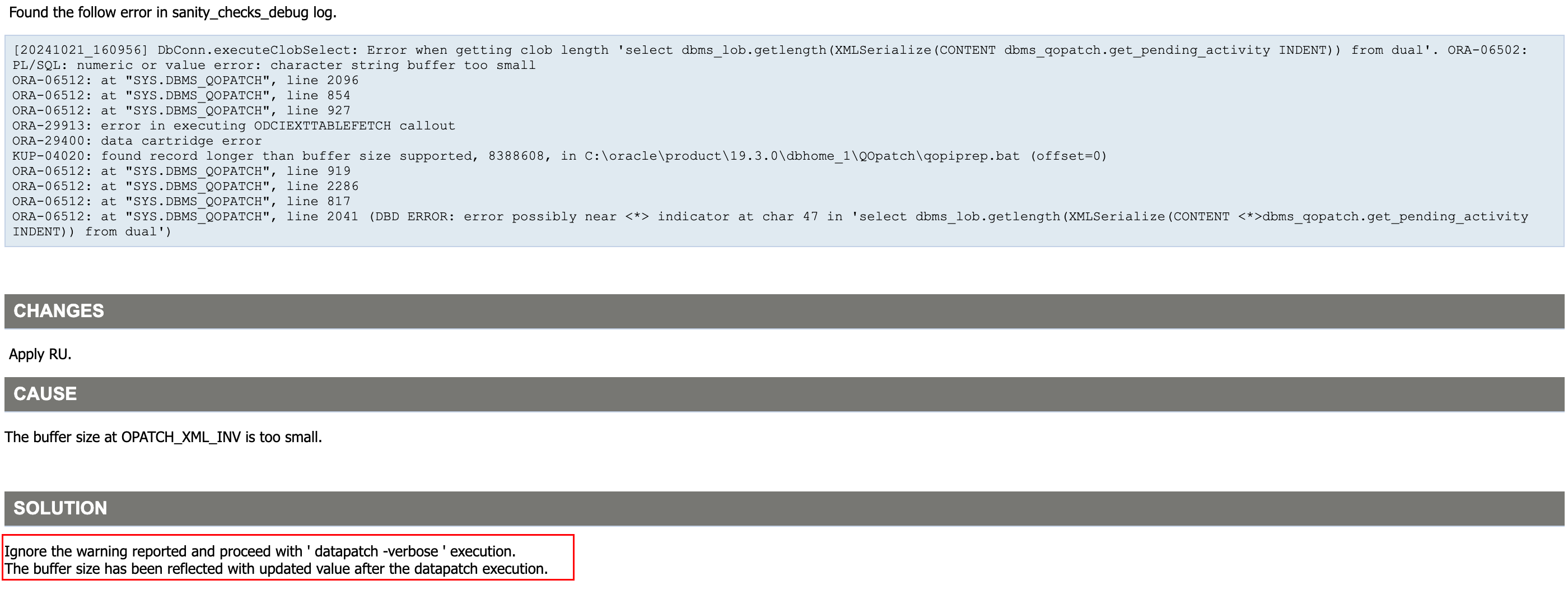
这个报错可以无视,继续执行 datapatch:
[oracle@oel8:/home/oracle]$ datapatch -verbose
SQL Patching tool version 19.27.0.0.0 Production on Fri Apr 18 12:53:53 2025
Copyright (c) 2012, 2025, Oracle.  All rights reserved.

Log file for this invocation: /u01/app/oracle/cfgtoollogs/sqlpatch/sqlpatch_8139_2025_04_18_12_53_53/sqlpatch_invocation.log

Connecting to database...OK
Gathering database info...done

Note:  Datapatch will only apply or rollback SQL fixes for PDBs
       that are in an open state, no patches will be applied to closed PDBs.
       Please refer to Note: Datapatch: Database 12c Post Patch SQL Automation
       (Doc ID 1585822.1)

Bootstrapping registry and package to current versions...done
Determining current state...done

Current state of interim SQL patches:
  No interim patches found

Current state of release update SQL patches:
  Binary registry:
    19.27.0.0.0 Release_Update 250406131139: Installed
  PDB CDB$ROOT:
    Applied 19.3.0.0.0 Release_Update 190410122720 successfully on 18-APR-25 11.36.23.988796 AM
  PDB LUCIFER:
    Applied 19.3.0.0.0 Release_Update 190410122720 successfully on 18-APR-25 11.43.49.009329 AM
  PDB PDB$SEED:
    Applied 19.3.0.0.0 Release_Update 190410122720 successfully on 18-APR-25 11.43.49.009329 AM

Adding patches to installation queue and performing prereq checks...done
Installation queue:
  For the following PDBs: CDB$ROOT PDB$SEED LUCIFER
    No interim patches need to be rolled back
    Patch 37642901 (Database Release Update : 19.27.0.0.250415 (37642901)):
      Apply from 19.3.0.0.0 Release_Update 190410122720 to 19.27.0.0.0 Release_Update 250406131139
    No interim patches need to be applied

Installing patches...
Patch installation complete.  Total patches installed: 3

Validating logfiles...done
Patch 37642901 apply (pdb CDB$ROOT): SUCCESS
  logfile: /u01/app/oracle/cfgtoollogs/sqlpatch/37642901/27123174/37642901_apply_ORCLCDB_CDBROOT_2025Apr18_12_55_25.log (no errors)
Patch 37642901 apply (pdb PDB$SEED): SUCCESS
  logfile: /u01/app/oracle/cfgtoollogs/sqlpatch/37642901/27123174/37642901_apply_ORCLCDB_PDBSEED_2025Apr18_13_04_28.log (no errors)
Patch 37642901 apply (pdb LUCIFER): SUCCESS
  logfile: /u01/app/oracle/cfgtoollogs/sqlpatch/37642901/27123174/37642901_apply_ORCLCDB_LUCIFER_2025Apr18_13_04_27.log (no errors)
SQL Patching tool complete on Fri Apr 18 13:11:41 2025
启动监听:
[oracle@oel8:/home/oracle]$ lsnrctl start

LSNRCTL for Linux: Version 19.0.0.0.0 - Production on 18-APR-2025 13:19:06

Copyright (c) 1991, 2025, Oracle.  All rights reserved.

Starting /u01/app/oracle/product/19.3.0/db/bin/tnslsnr: please wait...

TNSLSNR for Linux: Version 19.0.0.0.0 - Production
System parameter file is /u01/app/oracle/product/19.3.0/db/network/admin/listener.ora
Log messages written to /u01/app/oracle/diag/tnslsnr/oel8/listener/alert/log.xml
Listening on: (DESCRIPTION=(ADDRESS=(PROTOCOL=tcp)(HOST=oel8)(PORT=1521)))
Listening on: (DESCRIPTION=(ADDRESS=(PROTOCOL=ipc)(KEY=EXTPROC1521)))

Connecting to (DESCRIPTION=(ADDRESS=(PROTOCOL=TCP)(HOST=oel8)(PORT=1521)))
STATUS of the LISTENER
------------------------
Alias                     LISTENER
Version                   TNSLSNR for Linux: Version 19.0.0.0.0 - Production
Start Date                18-APR-2025 13:19:06
Uptime                    0 days 0 hr. 0 min. 0 sec
Trace Level               off
Security                  ON: Local OS Authentication
SNMP                      OFF
Listener Parameter File   /u01/app/oracle/product/19.3.0/db/network/admin/listener.ora
Listener Log File         /u01/app/oracle/diag/tnslsnr/oel8/listener/alert/log.xml
Listening Endpoints Summary...
  (DESCRIPTION=(ADDRESS=(PROTOCOL=tcp)(HOST=oel8)(PORT=1521)))
  (DESCRIPTION=(ADDRESS=(PROTOCOL=ipc)(KEY=EXTPROC1521)))
The listener supports no services
The command completed successfully
查看补丁版本:
[oracle@oel8:/home/oracle]$ sqlplus -V

SQL*Plus: Release 19.0.0.0.0 - Production
Version 19.27.0.0.0

[oracle@oel8:/home/oracle]$ opatch lspatches
37642901;Database Release Update : 19.27.0.0.250415 (37642901)
29585399;OCW RELEASE UPDATE 19.3.0.0.0 (29585399)

OPatch succeeded.
至此,数据库 19.27 补丁安装完成。
一键安装补丁
如果你是新安装一套数据库,需要安装最新补丁 19.27,使用 Oracle 一键安装脚本可以轻松完成。
脚本下载:Oracle一键安装脚本
作者微信:Lucifer-0622
这里演示一下 19C 一键安装,同时安装 DB 和 OJVM 补丁的命令:
# 提前上传好安装包和安装脚本即可
[root@oel8 soft]# ll
-rwx------. 1 root root 3059705302 Apr 18 11:03 LINUX.X64_193000_db_home.zip
-rwxr-xr-x. 1 root root     245190 Apr 18 11:02 OracleShellInstall
-rwxr-xr-x. 1 root root  129182987 Apr 18 11:01 p37499406_190000_Linux-x86-64.zip
-rwxr-xr-x. 1 root root 2284324377 Apr 18 11:02 p37642901_190000_Linux-x86-64.zip
-rwxr-xr-x. 1 root root   72539776 Apr 18 11:01 p6880880_190000_Linux-x86-64.zip
-rwxr-xr-x. 1 root root     321590 Apr 18 11:02 rlwrap-0.44.tar.gz

# 执行一键安装命令
[root@oel8 soft]# ./OracleShellInstall -lf ens33 `# local ip ifname`\
-n oel8 `# hostname`\
-op oracle `# oracle password`\
-d /u01 `# software base dir`\
-ord /oradata `# data dir`\
-o orclcdb `# dbname`\
-pdb lucifer `# pdbname`\
-dp oracle `# sys/system password`\
-ds AL32UTF8 `# database character`\
-ns AL16UTF16 `# national character`\
-redo 100 `# redo size`\
-opa 37642901 `# oracle PSU/RU`\
-jpa 37499406 `# OJVM PSU/RU`\
-opd Y `# optimize db`
安装过程如下:
   ███████                             ██          ████████ ██               ██  ██ ██                    ██              ██  ██
  ██░░░░░██                           ░██         ██░░░░░░ ░██              ░██ ░██░██                   ░██             ░██ ░██
 ██     ░░██ ██████  ██████    █████  ░██  █████ ░██       ░██       █████  ░██ ░██░██ ███████   ██████ ██████  ██████   ░██ ░██
░██      ░██░░██░░█ ░░░░░░██  ██░░░██ ░██ ██░░░██░█████████░██████  ██░░░██ ░██ ░██░██░░██░░░██ ██░░░░ ░░░██░  ░░░░░░██  ░██ ░██
░██      ░██ ░██ ░   ███████ ░██  ░░  ░██░███████░░░░░░░░██░██░░░██░███████ ░██ ░██░██ ░██  ░██░░█████   ░██    ███████  ░██ ░██
░░██     ██  ░██    ██░░░░██ ░██   ██ ░██░██░░░░        ░██░██  ░██░██░░░░  ░██ ░██░██ ░██  ░██ ░░░░░██  ░██   ██░░░░██  ░██ ░██
 ░░███████  ░███   ░░████████░░█████  ███░░██████ ████████ ░██  ░██░░██████ ███ ███░██ ███  ░██ ██████   ░░██ ░░████████ ███ ███
  ░░░░░░░   ░░░     ░░░░░░░░  ░░░░░  ░░░  ░░░░░░ ░░░░░░░░  ░░   ░░  ░░░░░░ ░░░ ░░░ ░░ ░░░   ░░ ░░░░░░     ░░   ░░░░░░░░ ░░░ ░░░


注意:本脚本仅用于新服务器上实施部署数据库使用,严禁在已运行数据库的主机上执行,以免发生数据丢失或者损坏,造成不可挽回的损失!!!

请选择安装模式 [单机(si)/单机ASM(sa)/集群(rac)] : si

数据库安装模式: single

请选择数据库版本 [11|12|19|21|23] : 19

数据库版本:     19

OracleShellInstall 开始安装,详细安装过程可查看日志: tail -2000f /soft/print_shell_install_20250418131853.log

正在进行安装前检查,请稍等......

正在检测安装包 /soft/LINUX.X64_193000_db_home.zip 的 MD5 值是否正确,请稍等......

正在配置本地软件源......已完成 (耗时: 0 秒)
正在获取操作系统信息......已完成 (耗时: 1 秒)
正在安装依赖包......已完成 (耗时: 105 秒)
正在禁用防火墙......已完成 (耗时: 1 秒)
正在禁用 selinux......已完成 (耗时: 2 秒)
正在配置 nsyctl......已完成 (耗时: 0 秒)
正在配置主机名和 hosts 文件......已完成 (耗时: 0 秒)
正在创建用户和组......已完成 (耗时: 1 秒)
正在创建安装目录......已完成 (耗时: 1 秒)
正在配置 Avahi-daemon 服务......已完成 (耗时: 1 秒)
正在配置透明大页 && NUMA && 磁盘 IO 调度器......已完成 (耗时: 2 秒)
正在配置操作系统参数 sysctl......已完成 (耗时: 1 秒)
正在配置 RemoveIPC......已完成 (耗时: 1 秒)
正在配置用户限制 limit......已完成 (耗时: 1 秒)
正在配置 shm 目录......已完成 (耗时: 0 秒)
正在安装 rlwrap 插件......已完成 (耗时: 13 秒)
正在配置用户环境变量......已完成 (耗时: 1 秒)
正在解压 Oracle 安装包以及补丁......已完成 (耗时: 120 秒)
正在安装 Oracle 软件以及补丁......已完成 (耗时: 974 秒)
正在创建监听......已完成 (耗时: 3 秒)
正在创建数据库......已完成 (耗时: 1870 秒)
正在优化数据库......已完成 (耗时: 13 秒)

恭喜!Oracle 一键安装执行完成 (耗时: 3118 秒),现在是否重启主机:[Y/N] Y

正在重启当前节点主机......
打补丁 + CDB 架构安装还是比较慢的,查看安装后的版本信息:
[oracle@oel8:/home/oracle]$ sqlplus -V

SQL*Plus: Release 19.0.0.0.0 - Production
Version 19.27.0.0.0

[oracle@oel8:/home/oracle]$ opatch lspatches
37499406;OJVM RELEASE UPDATE: 19.27.0.0.250415 (37499406)
37642901;Database Release Update : 19.27.0.0.250415 (37642901)
29585399;OCW RELEASE UPDATE 19.3.0.0.0 (29585399)

OPatch succeeded.
可以看到数据库补丁以及 OJVM 补丁均已成功安装,数据库内部也可以查看补丁安装记录:
SQL> set line2222 pages1000 tab off
col comments for a80
col version for a30
col action for a20
SELECT con_id,
       comments,
       version,
       action,
       action_time
  FROM cdb_registry_history
 ORDER BY con_id;

    CON_ID COMMENTS                                                                         VERSION                        ACTION               ACTION_TIME
---------- -------------------------------------------------------------------------------- ------------------------------ -------------------- ---------------------------------------------------------------------------
         1 RDBMS_19.27.0.0.0DBRU_LINUX.X64_250405                                           19                             BOOTSTRAP
         1 Patch applied from 19.3.0.0.0 to 19.27.0.0.0: Release_Update - 250406131139      19.0.0.0.0                     RU_APPLY             18-APR-25 01.54.55.239273 PM
         1 OJVM RU post-install                                                             19.27.0.0.250415OJVMRU         APPLY                18-APR-25 01.44.07.116272 PM
         1 RAN jvmpsu.sql                                                                   19.27.0.0.250415OJVMRU         jvmpsu.sql           18-APR-25 01.44.07.082014 PM
         3 RDBMS_19.27.0.0.0DBRU_LINUX.X64_250405                                           19                             BOOTSTRAP
         3 Patch applied from 19.3.0.0.0 to 19.27.0.0.0: Release_Update - 250406131139      19.0.0.0.0                     RU_APPLY             18-APR-25 02.07.25.510690 PM
         3 OJVM RU post-install                                                             19.27.0.0.250415OJVMRU         APPLY                18-APR-25 02.00.05.480527 PM
         3 RAN jvmpsu.sql                                                                   19.27.0.0.250415OJVMRU         jvmpsu.sql           18-APR-25 02.00.05.437234 PM

8 rows selected.
至此,Oracle 一键安装演示结束。
写在最后
Oracle 数据库补丁安装其实并不难,官方提供的 README 已经一目了然,如果大家都可以耐心好好读一读,相信一定会受益匪浅。
📚 推荐阅读:DBA 学习之路
如果这篇文章对你有帮助,推荐访问我的 Oracle DBA 系统学习站点,涵盖 100 天完整学习路线:
- 🔧 Oracle 安装部署 · RMAN 备份恢复 · Data Pump 数据迁移
- 🏗️ RAC 高可用 · DataGuard 容灾 · 多租户架构
- 🔍 故障排查 · 升级迁移 · GoldenGate 数据同步
