




说明
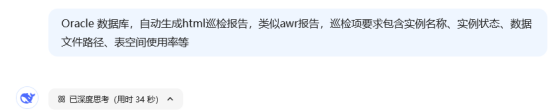
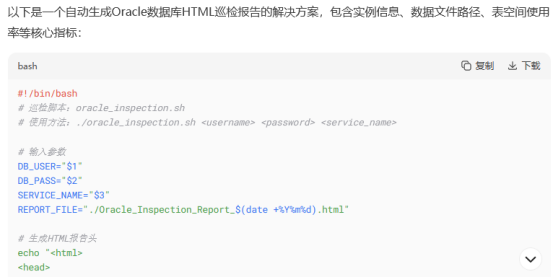
通过DeepSeek 快速生成Oracle数据库巡检脚本,并输出HTML巡检结果,经测试,只需要微调表格颜色,手动新增巡检项等,就可以生成合适的脚本。本文提供的脚本只是一个较为粗糙的框架,可以根据不同需求添加对应的功能。
开始巡检
[oracle@cjc-db-02 scripts]$ sh ora_check_html_cjc_v1.0.sh cjc ****** cjc
专业巡检报告已生成:./Oracle_Inspection_Report_20250420.html
巡检语法说明:
sh 巡检脚本 巡检用户 密码 service_name
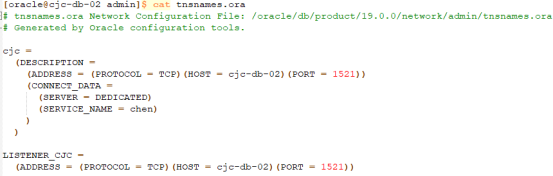
其中 service_name 见tnsnames.ora文件:
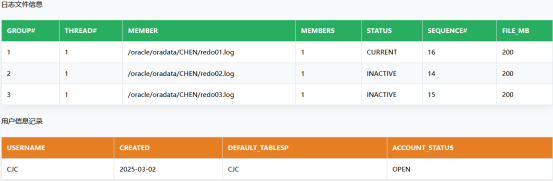
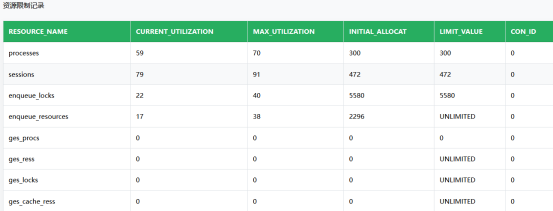
巡检结果展示
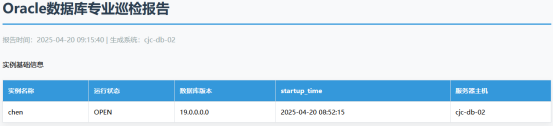
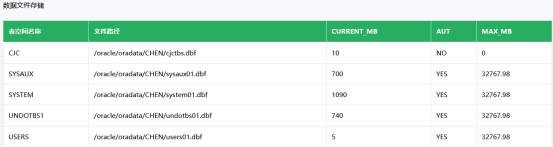
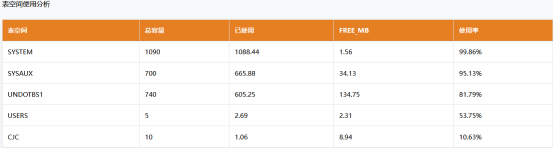
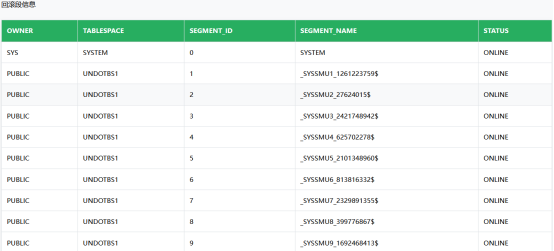
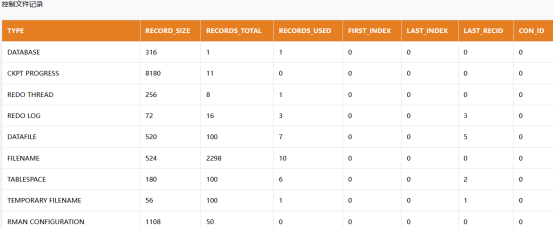
Oracle_Inspection_Report_20250420.html 结果如下:

巡检脚本下载
#!/bin/bash
# 专业巡检脚本 v1.3

DB_USER="$1"
DB_PASS="$2"
SERVICE_NAME="$3"
REPORT_FILE="./Oracle_Inspection_Report_$(date +%Y%m%d).html"

# 配置UTF-8环境
export NLS_LANG=AMERICAN_AMERICA.AL32UTF8
export LANG=en_US.UTF-8

# 生成HTML模板
cat << HTML_HEAD > $REPORT_FILE
<!DOCTYPE html>
<html lang="zh-CN">
<head>
    <meta charset="UTF-8">
    <title>Oracle数据库专业巡检报告</title>
    <style>
        :root {
            --primary-blue: #3498db;
            --primary-green: #27ae60;
            --primary-orange: #e67e22;
        }

        body {
            font-family: 'Helvetica Neue', 'Microsoft YaHei', sans-serif;
            margin: 2rem;
            line-height: 1.6;
            background: #f8f9fa;
        }

        .section-title {
            font-size: 1.4rem;
            color: #2c3e50;
            padding: 0.8rem 1rem;
            margin: 2rem 0 1rem;
            background: linear-gradient(90deg, rgba(52,152,219,0.1) 0%, rgba(255,255,255,1) 50%);
            border-left: 4px solid var(--primary-blue);
            border-radius: 4px;
        }

        .report-table {
            border: 1px solid #dee2e6;
            border-collapse: collapse;
            margin: 1.5rem 0;
            background: white;
            width: 100%;
            box-shadow: 0 0.5rem 1rem rgba(0,0,0,0.05);
        }

        /* 表格分类颜色 */
        .instance-table th { background: var(--primary-blue); }
        .datafile-table th { background: var(--primary-green); }
        .tablespace-table th { background: var(--primary-orange); }

        .report-table th,
        .report-table td {
            border: 1px solid #dee2e6;
            padding: 12px;
            text-align: left;
            font-size: 0.95em;
        }

        .report-table th {
            color: white;
            font-weight: 600;
            border-bottom: 2px solid rgba(0,0,0,0.1);
        }

        .report-table tr:hover {
            background-color: #f8f9fa;
        }

        .critical {
            color: #e74c3c;
            font-weight: 600;
        }
        .warning {
            color: #f1c40f;
        }
    </style>
</head>
<body>
    <h1 style="color: #2c3e50;border-bottom: 3px solid #3498db;padding-bottom:12px;">
        Oracle数据库专业巡检报告
    </h1>
    <div style="color: #95a5a6;margin-bottom: 2rem;">
        报告时间:$(date '+%Y-%m-%d %H:%M:%S') | 生成系统:$(uname -a | cut -d' ' -f2)
    </div>
HTML_HEAD

# 执行数据库查询
sqlplus -s /nolog << SQL_QUERY >> $REPORT_FILE
connect $DB_USER/$DB_PASS@$SERVICE_NAME

set markup html on table "class='report-table instance-table'"
set pagesize 500
set linesize 200
set term off
set heading on
set feedback off

-- 插入实例信息标题
prompt 实例基础信息
SELECT
    instance_name AS "实例名称",
    status AS "运行状态",
    version AS "数据库版本",
    to_char(startup_time,'YYYY-MM-DD HH24:MI:SS') AS "startup_time",
    host_name AS "服务器主机"
FROM v\$instance;

-- 数据文件标题
prompt 数据文件存储
set markup html table "class='report-table datafile-table'"
SELECT
    tablespace_name AS "表空间名称",
    file_name AS "文件路径",
    ROUND(bytes/1024/1024,2) AS "CURRENT_MB",
    autoextensible AS "AUTO",
    ROUND(maxbytes/1024/1024,2) AS "MAX_MB"
FROM dba_data_files
ORDER BY tablespace_name;

-- 临时文件标题
prompt 临时文件存储
set markup html table "class='report-table instance-table'"
set line 300
col tablespace_name for a20
col file_name for a40
select tablespace_name,
file_name,
file_id,
status,
trunc(bytes / 1024 / 1024 / 1024, 2) as FILE_GB,
autoextensible,
trunc(maxbytes / 1024 / 1024 / 1024, 2) as MAX_GB
from dba_temp_files
order by file_id;


-- 表空间标题
prompt 表空间使用分析
set markup html table "class='report-table tablespace-table'"
SELECT
    tablespace_name AS "表空间",
    ROUND(total_mb,2) AS "总容量",
    ROUND(used_mb,2) AS "已使用",
    ROUND(free_mb,2) AS "FREE_MB",
	TO_CHAR(pct_used)||'%' AS "使用率"
FROM (
    SELECT
        a.tablespace_name,
        (a.bytes_alloc - b.bytes_free)/1024/1024 AS used_mb,
        a.bytes_alloc/1024/1024 AS total_mb,
        b.bytes_free/1024/1024 AS free_mb,
        ROUND(((a.bytes_alloc - b.bytes_free)/a.bytes_alloc)*100,2) AS pct_used
    FROM
        (SELECT tablespace_name, SUM(bytes) bytes_alloc
         FROM dba_data_files GROUP BY tablespace_name) a,
        (SELECT tablespace_name, SUM(bytes) bytes_free
         FROM dba_free_space GROUP BY tablespace_name) b
    WHERE a.tablespace_name = b.tablespace_name(+)
)
ORDER BY pct_used DESC;

-- 回滚段标题
prompt 回滚段信息
set markup html table "class='report-table datafile-table'"
set line 150
col tablespace_name for a10
set pagesize 100
select owner, tablespace_name, segment_id, segment_name, status
from dba_rollback_segs order by 2,3;


-- 控制文件标题
prompt 控制文件记录
set markup html table "class='report-table tablespace-table'"
SELECT * FROM V\$CONTROLFILE_RECORD_SECTION;

-- 日志文件标题
prompt 日志文件信息
set markup html table "class='report-table datafile-table'"
set line 300
col member for a50
select a.group#,
THREAD#,
b.member,
a.members,
a.status,
a.sequence#,
bytes / 1024 / 1024 as file_mb
from v\$log a, v\$logfile b
where a.group# = b.group#
order by 2,1;

-- 用户信息标题
prompt 用户信息记录
set markup html table "class='report-table tablespace-table'"
set line 200
set pagesize 100
col ACCOUNT_STATUS for a20
col default_tablespace for a15
col username for a10
select username,to_char(created,'YYYY-MM-DD') created,default_tablespace,ACCOUNT_STATUS from dba_users where to_char(created,'YYYY-MM-DD') !='2019-04-17' order by 2;


-- 资源限制标题
prompt 资源限制记录
set markup html table "class='report-table datafile-table'"
set line 300
set pagesize 100
col RESOURCE_NAME for a30
col INITIAL_ALLOCATION for a15
select * from v\$resource_limit;

set markup html off
disconnect
exit
SQL_QUERY

# 添加HTML结尾
echo "</body></html>" >> $REPORT_FILE

echo "专业巡检报告已生成:$REPORT_FILE"
###chenjuchao 20250420###
欢迎关注我的公众号《IT小Chen》

「喜欢这篇文章,您的关注和赞赏是给作者最好的鼓励」
关注作者
【版权声明】本文为墨天轮用户原创内容,转载时必须标注文章的来源(墨天轮),文章链接,文章作者等基本信息,否则作者和墨天轮有权追究责任。如果您发现墨天轮中有涉嫌抄袭或者侵权的内容,欢迎发送邮件至:contact@modb.pro进行举报,并提供相关证据,一经查实,墨天轮将立刻删除相关内容。
