



背景
监控线上环境死锁信息,通过排查发现一个热表频繁出现死锁。该表为一个商品库存表,业务背景如下:客户在商城下单,下单成功后要扣减商品库存,在搞促销或秒杀等活动时,商品库存表容易产生死锁。
排查问题
业务反馈在订单高峰期会有死锁出现,于是在线上库通过 show engine innodb status 发现了死锁的相关两条语句,都是更新库存表的语句,根据业务日志复原了死锁过程,在订单高峰期 两位客户同时下单A,B两个商品。A客户的购物车A商品在前,B商品在后,B客户的购物车B商品在前,A商品在后。研发是根据购物车顺序扣减商品库存。流程大概如下图

T1与T2两个事务相互等待,就造成了死锁
试验并发度
创建测试数据
create table test_bf
( id int,
  qty int,
  primary key(id)
);
insert into test_bf
with recursive cte as
(
  select 1  as id union all
  select id+1 from cte where id <500
)
select id,0 from cte
生成一个500行 id 1~500的数据
然后再写一个python代码。并发随机顺序update test_bf表 --创建了上面数据后,下面代码复制即可用。
import pymysql
import threading
import random
import string
import time
from typing import List, Tuple
from datetime import datetime

# 数据库配置
DB_CONFIG = {
    'host': '127.0.0.1',
    'user': 'root',
    'password': '123',
    'database': 'db1',
    'autocommit':False,
    'port':3306,
    'cursorclass': pymysql.cursors.DictCursor
}

# 并发控制变量(可随时调整)
CONCURRENCY = 10
UPDATE_RETRIES = 3  # 更新失败重试次数

deadcount = 0
nowdate = datetime.now()
# 全局停止事件
stop_event = threading.Event()


def generate_batch_updates() -> List[Tuple[str, tuple]]:
    """
    生成包含多个UPDATE语句的批处理,总共更新100行
    返回格式:[(sql1, params1), (sql2, params2), ...]
    """
    # 随机选择10个不同的ID(假设ID范围1-500)
    all_ids = random.sample(range(1, 501), 10)
    updates = []


    #all_ids.sort()
    # 将10个ID 分成5条SQL 每条SQL更新两个ID
    while all_ids:
       # batch_size = random.randint(1, min(20, len(all_ids)))
        batch_size = 2
        batch_ids = all_ids[:batch_size]
        all_ids = all_ids[batch_size:]


        # 构建UPDATE语句(用户可修改SET部分)
        sql = """UPDATE test_bf
                SET qty = qty + 1
                WHERE id IN ({})""".format(','.join(['%s']*len(batch_ids)))

        batch_ids.sort()
        params = tuple(batch_ids)
        updates.append((sql, params))

    return updates

def execute_transaction():
    """执行一个包含多个UPDATE语句的事务"""
    conn = None
    for _ in range(UPDATE_RETRIES):
        try:
            conn = pymysql.connect(**DB_CONFIG)
            with conn.cursor() as cursor:
                # 生成批处理更新
                updates = generate_batch_updates()

                # 执行所有UPDATE语句
                for sql, params in updates:
                    cursor.execute(sql, params)

                # 提交事务
                conn.commit()
                return  # 成功则退出重试循环
        except (pymysql.Error, pymysql.Warning) as e:
            if e.args[0] == 1213:
             global deadcount
             global nowdate
             deadcount =  deadcount + 1
            print(f"deadcount:{deadcount}")
            print(f"total_seconds:{(datetime.now()-nowdate).total_seconds()}")
            print(f"Database error: {e}")
            if conn:
                conn.rollback()
            time.sleep(random.uniform(0.1, 0.5))  # 指数退避更好,这里简化处理
        finally:
            if conn:
                conn.close()
    print("Transaction failed after retries")

def worker():
    """工作线程函数"""
    while not stop_event.is_set():
        start_time = time.time()
        execute_transaction()
        # 打印事务耗时(可选)
        # print(f"Transaction completed in {time.time()-start_time:.2f}s")

def start_load_test(concurrency: int):
    """启动并发测试"""
    threads = []
    for _ in range(concurrency):
        t = threading.Thread(target=worker)
        t.start()
        threads.append(t)
    return threads

if __name__ == "__main__":
    try:
        print(f"Starting load test with concurrency: {CONCURRENCY}")
        threads = start_load_test(CONCURRENCY)
        while True:
            time.sleep(1)
    except KeyboardInterrupt:
        print("\nStopping load test...")
        stop_event.set()
        for t in threads:
            t.join()
        print("Load test stopped")
在随机顺序下。并发度为10的死锁率很高
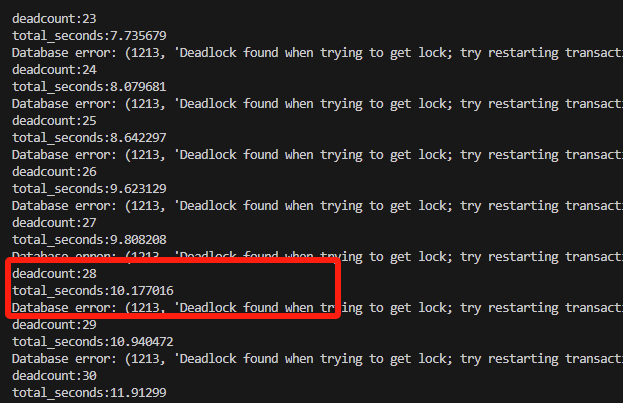
从运行的日志中看到仅执行了10秒钟。就产生了28次死锁
解决方案
将上面测试的随机顺序变成从ID从小到大顺序执行
只需要放开上面注释的代码
all_ids.sort()
运行1分钟。没有一个死锁出现,打印SQL执行次数,并发性能有所下降。因为所有死锁都变成了顺序堵塞
回到当前业务中,解决方案也是一样的。对于热表操作,按主键顺序更新,不会造成死锁。
「喜欢这篇文章,您的关注和赞赏是给作者最好的鼓励」
关注作者
【版权声明】本文为墨天轮用户原创内容,转载时必须标注文章的来源(墨天轮),文章链接,文章作者等基本信息,否则作者和墨天轮有权追究责任。如果您发现墨天轮中有涉嫌抄袭或者侵权的内容,欢迎发送邮件至:contact@modb.pro进行举报,并提供相关证据,一经查实,墨天轮将立刻删除相关内容。
