



介绍
本教程适用于9-11+版本的Grafana,域控(AD)使用Windows Server 2022搭建,域控等级为 2016。
域控域名为 songxwn.com
最终实现AD用户统一认证,统一改密,Grafana用户自动添加。权限由Grafana控制
全局开启LDAP
修改/etc/grafana/grafana.ini 文件
vim etc/grafana/grafana.ini
修改并取消注释以下参数即可
[auth.ldap]
enabled = true
config_file = etc/grafana/ldap.toml
allow_sign_up = true
配置LDAP对接文件
修改/etc/grafana/ldap.toml文件
vim etc/grafana/ldap.toml
文件示例
• host 为域控制器地址。 • port 默认为 389即可,不开启加密 • bind_dn 为域控账号,用于搜索域控账号 • bind_password 为上面账号的密码 • search_filter AD固定为(sAMAccountName=%s) • search_base_dns 为域控路径,可以去ADSI查看
用户组权限映射 - [[servers.group_mappings]]
• group_dn 为用户组的路径 • org_role 为在Grafana用户组的权限,有 Admin、Editor、Viewer (管理、编辑、只读)
如下面所示,我将it1 映射为了Editor,it2 组为Viewer
PS:具体路径建议用ADSI工具查看。
[[servers]]
# Ldap server host (specify multiple hosts space separated)
host = "songxwn.com"
# Default port is 389 or 636 if use_ssl = true
port = 389
# Set to true if LDAP server should use an encrypted TLS connection (either with STARTTLS or LDAPS)
use_ssl = false
# If set to true, use LDAP with STARTTLS instead of LDAPS
start_tls = false
# The value of an accepted TLS cipher. By default, this value is empty. Example value: ["TLS_AES_256_GCM_SHA384"])
# For a complete list of supported ciphers and TLS versions, refer to: https://go.dev/src/crypto/tls/cipher_suites.go
tls_ciphers = []
# This is the minimum TLS version allowed. By default, this value is empty. Accepted values are: TLS1.1, TLS1.2, TLS1.3.
min_tls_version = ""
# set to true if you want to skip ssl cert validation
ssl_skip_verify = false
# set to the path to your root CA certificate or leave unset to use system defaults
# root_ca_cert = "/path/to/certificate.crt"
# Authentication against LDAP servers requiring client certificates
# client_cert = "/path/to/client.crt"
# client_key = "/path/to/client.key"

# Search user bind dn
bind_dn = "admin@songxwn.com"
# Search user bind password
# If the password contains # or ; you have to wrap it with triple quotes. Ex """#password;"""
bind_password = 'password@123'
# We recommend using variable expansion for the bind_password, for more info https://grafana.com/docs/grafana/latest/setup-grafana/configure-grafana/#variable-expansion
# bind_password = '$__env{LDAP_BIND_PASSWORD}'

# Timeout in seconds (applies to each host specified in the 'host' entry (space separated))
timeout = 15

# User search filter, for example "(cn=%s)" or "(sAMAccountName=%s)" or "(uid=%s)"
search_filter = "(sAMAccountName=%s)"

# An array of base dns to search through
search_base_dns = ["dc=songxwn,dc=com"]

## For Posix or LDAP setups that does not support member_of attribute you can define the below settings
## Please check grafana LDAP docs for examples
# group_search_filter = "(&(objectClass=posixGroup)(memberUid=%s))"
# group_search_base_dns = ["ou=groups,dc=grafana,dc=org"]
# group_search_filter_user_attribute = "uid"

# Specify names of the ldap attributes your ldap uses
[servers.attributes]
name = "givenName"
surname = "sn"
username = "sAMAccountName"
member_of = "memberOf"
email =  "mail"

# Map ldap groups to grafana org roles


[[servers.group_mappings]]
group_dn = "cn=it1,cn=users,dc=songxwn,dc=com"
org_role = "Editor"

[[servers.group_mappings]]
# If you want to match all (or no ldap groups) then you can use wildcard
group_dn = "cn=it2,cn=users,dc=songxwn,dc=com"
org_role = "Viewer"
重启和测试
systemctl restart grafana-server.service

# 重启之后,上述配置才能生效。
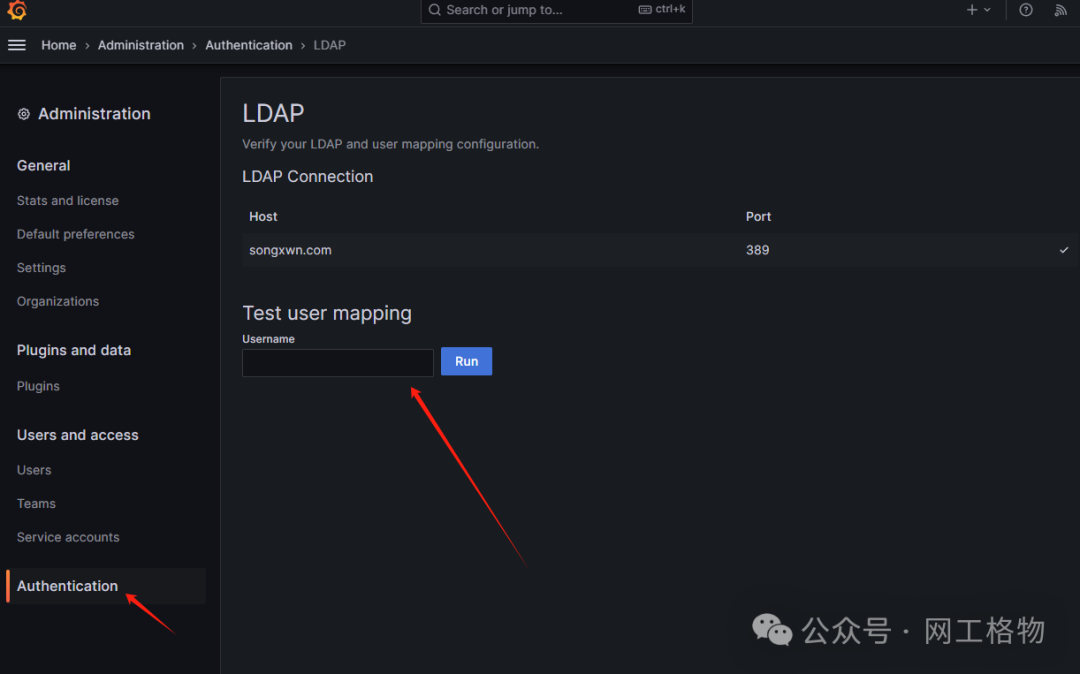
测试用户登录
文章转载自网工格物,如果涉嫌侵权,请发送邮件至:contact@modb.pro进行举报,并提供相关证据,一经查实,墨天轮将立刻删除相关内容。
