



OpenWrt的编译为编译过程中在线下载软件包(dl目录),解压到编译目录(build_dir),从软件包的patches目录中按照顺序打上patch之后进行编译。
配置quilt
root@han-VirtualBox:~# cat > ~/.quiltrc << EOF> QUILT_DIFF_ARGS="--no-timestamps --no-index -p ab --color=auto"> QUILT_REFRESH_ARGS="--no-timestamps --no-index -p ab"> QUILT_SERIES_ARGS="--color=auto"> QUILT_PATCH_OPTS="--unified"> QUILT_DIFF_OPTS="-p"> EDITOR="nano"> EOF
OpenWrt使用quilt实现patch,这里主要配置所采用的编辑器
确认软件包路径
以给busybox中的udhcpc中添加option 138支持为例,主要是确认最终patch应该放置的位置
root@han-VirtualBox: ls package/busybox/ -al总用量 32drwxrwxrwx 5 root root 4096 5月 21 2018 .drwxrwxrwx 150 root root 4096 5月 26 2018 ..drwxrwxrwx 23 root root 4096 5月 21 2018 config-rw-rw-rw- 1 root root 413 5月 21 2018 Config.in-rwxrwxrwx 1 root root 2008 5月 21 2018 convert_menuconfig.pldrwxrwxrwx 2 root root 4096 5月 21 2018 files-rw-rw-rw- 1 root root 2913 5月 21 2018 Makefiledrwxrwxrwx 2 root root 4096 5月 21 2018 patches
确认Patch序号
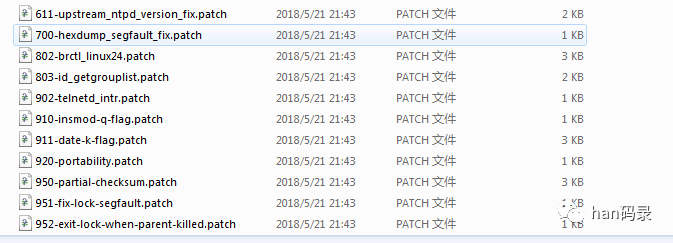
OpenWrt中规定,patch必须以数字为开头,“-”后为patch的描述。开头的数字必须比已有的patch数字都大,使用quilt series可以查看已有的patch列表
这里需要注意的是,如果当前的已经从9开始,那么第一个数字应为9,依次类推,可以增加位数,简单的确认方法为sort一下,看哪个数字能排列在最后
准备目录
make package/busybox/{clean,prepare} V=s QUILT=1
下载软件包并进行unpack
查看并打入现有patch
进入软件包编译目录进行查看
root@han-VirtualBox:busybox-1.19.4# quilt series001-init_avoid_loop_opening_tty.patch002-passwd_use_md5_hash_by_default_like_it_used_to_be.patch003-brctl_show_fix.patch004-upstream-percent_decode_in_place.patch
打入patch
root@han-VirtualBox:busybox-1.19.4# quilt push -aApplying patch 001-init_avoid_loop_opening_tty.patchpatching file init/init.c
创建新patch
root@han-VirtualBox:busybox-1.19.4# quilt new 9800-udhcpc_support_option_138.patchPatch 1010-udhcpc_support_option_138.patch is now on top
一定注意新添加的数字比已有的数字要大
修改文件
root@han-VirtualBox:busybox-1.19.4# quilt edit networking/udhcp/common.c
查看patch内容
root@han-VirtualBox:busybox-1.19.4# quilt diff--- a/networking/udhcp/common.c+++ b/networking/udhcp/common.c
保存内容更新到patch文件
root@han-VirtualBox:busybox-1.19.4# quilt refreshRefreshed patch 9800-udhcpc_support_option_138.patch
将会保存到当前路径
更新测试
将patch文件移动到编译patches路径
root@han-VirtualBox:# make package/busybox/update V=s
如果有问题修改对应的patch文件即可
文章转载自han码录,如果涉嫌侵权,请发送邮件至:contact@modb.pro进行举报,并提供相关证据,一经查实,墨天轮将立刻删除相关内容。
