



上一篇文章(SQL优化 - explain查看SQL执行计划(上))介绍了explain执行计划中id、select_type、table、partition4个列的含义和优化建议,本文继续分享explain后半部分。
- id
- select_type
- table
- partitions
- type
- possible_keys
- key
- key_len
- ref
- rows
- filtered
- Extra
五、type列
访问表或者连接表的类型,性能从高到低。
| 字段值 | 含义 |
|---|---|
| system | 表中只有一条记录。 |
| const | 用主键或者唯一索引,与常数做等值查询,最多只有一行结果。 |
| eq_ref | 在多表连接查询时,使用主键或唯一索引字段连接表。 |
| ref | 用二级索引字段与常数做等值查询。 |
| index_merge | 使用索引合并的方式查询表,如并集、差集。 |
| range | 使用索引查询给定范围的数据。 |
| index | 扫描某个索引的全部记录。 |
| all | 全表扫描。 |
5.1 const
使用primary key或者unique取得一条数据。
特点:show warnings\G可以看到每个字段都已经显示为常数了。
mysql> explain select * from empplus where empno=7499;
+----+-------------+---------+------------+-------+---------------+---------+---------+-------+------+----------+-------+
| id | select_type | table   | partitions | type  | possible_keys | key     | key_len | ref   | rows | filtered | Extra |
+----+-------------+---------+------------+-------+---------------+---------+---------+-------+------+----------+-------+
|  1 | SIMPLE      | empplus | NULL       | const | PRIMARY       | PRIMARY | 4       | const |    1 |   100.00 | NULL  |
+----+-------------+---------+------------+-------+---------------+---------+---------+-------+------+----------+-------+
1 row in set, 1 warning (0.00 sec)

mysql> show warnings;
+-------+------+-----------------------------------------------------------------------------------------------------------------------------------------------------------------------------------------------------------------+
| Level | Code | Message                                                                                                                                                                                                         |
+-------+------+-----------------------------------------------------------------------------------------------------------------------------------------------------------------------------------------------------------------+
| Note  | 1003 | /* select#1 */ select '7499' AS `empno`,'ALLEN' AS `ename`,'SALESMAN' AS `job`,'7698' AS `mgr`,'1981-02-20' AS `hiredate`,'1600.00' AS `sal`,'300.00' AS `comm`,'30' AS `deptno` from `scott`.`empplus` where 1 |
+-------+------+-----------------------------------------------------------------------------------------------------------------------------------------------------------------------------------------------------------------+
1 row in set (0.00 sec)
5.2 eq_ref
只出现在被驱动表上。 在join查询中,被驱动表的连接条件为unique key或primary key时出现。
mysql> explain select * from emp left join empplus on emp.empno=empplus.empno;
+----+-------------+---------+------------+--------+---------------+---------+---------+-----------------+------+----------+-------+
| id | select_type | table   | partitions | type   | possible_keys | key     | key_len | ref             | rows | filtered | Extra |
+----+-------------+---------+------------+--------+---------------+---------+---------+-----------------+------+----------+-------+
|  1 | SIMPLE      | emp     | NULL       | ALL    | NULL          | NULL    | NULL    | NULL            |   14 |   100.00 | NULL  |
|  1 | SIMPLE      | empplus | NULL       | eq_ref | PRIMARY       | PRIMARY | 4       | scott.emp.empno |    1 |   100.00 | NULL  |
+----+-------------+---------+------------+--------+---------------+---------+---------+-----------------+------+----------+-------+
2 rows in set, 1 warning (0.00 sec)
5.3 ref
驱动表、被驱动表上都会出现。表示对索引列的条件进行等值查询。
-- 示例:where deptno=10;
mysql> explain select * from empplus where deptno=10 and hiredate like '1981%';
+----+-------------+---------+------------+------+---------------------+--------+---------+-------+-------+----------+-------------+
| id | select_type | table   | partitions | type | possible_keys       | key    | key_len | ref   | rows  | filtered | Extra       |
+----+-------------+---------+------------+------+---------------------+--------+---------+-------+-------+----------+-------------+
|  1 | SIMPLE      | empplus | NULL       | ref  | deptno,idx_hiredate | deptno | 5       | const | 49064 |    11.11 | Using where |
+----+-------------+---------+------------+------+---------------------+--------+---------+-------+-------+----------+-------------+
1 row in set, 2 warnings (0.00 sec)
扩展:
执行计划中,只走了deptno列的索引,为什么key_len=5 ?
答:INT类型为4个字节,字段类型允许null时,还需要额外1个字节。
在联合索引中,ref可能存在性能问题,ref只能使用等号部分,非等值部分会引发二次过滤。当非等值部分扫描范围过大时,就会影响查询性能,。
-- 示例1:联合索引中的2个字段均为等值查询,通过key、key_len和filtered字段可以判定全部走了索引。
mysql> explain select * from emp where job='SALESMAN' and ename='ALLEN';
+----+-------------+-------+------------+------+---------------+---------------+---------+-------------+------+----------+-------+
| id | select_type | table | partitions | type | possible_keys | key           | key_len | ref         | rows | filtered | Extra |
+----+-------------+-------+------------+------+---------------+---------------+---------+-------------+------+----------+-------+
|  1 | SIMPLE      | emp   | NULL       | ref  | idx_job_ename | idx_job_ename | 81      | const,const |    1 |   100.00 | NULL  |
+----+-------------+-------+------------+------+---------------+---------------+---------+-------------+------+----------+-------+
1 row in set, 1 warning (0.01 sec)
联合索引中非等值部分没有走索引,需要二次过滤回表查询。但是针对这一现象,mysql在5.6版本引入了索引条件下推,即ICP优化(Index Condition Pushdown),后面展开讲。
-- 示例2:联合索引中的第1个字段等值查询,第2个字段非等值查询,通过key、key_len和filtered字段可以判定只有job字段走了索引。
mysql> explain select * from emp where job='SALESMAN' and ename like '%ALLEN';
+----+-------------+-------+------------+------+---------------+---------------+---------+-------+------+----------+-----------------------+
| id | select_type | table | partitions | type | possible_keys | key           | key_len | ref   | rows | filtered | Extra                 |
+----+-------------+-------+------------+------+---------------+---------------+---------+-------+------+----------+-----------------------+
|  1 | SIMPLE      | emp   | NULL       | ref  | idx_job_ename | idx_job_ename | 33      | const |    4 |    11.11 | Using index condition |
+----+-------------+-------+------------+------+---------------+---------------+---------+-------+------+----------+-----------------------+
1 row in set, 1 warning (0.00 sec)
5.4 range
索引范围查询主要出现在 >、<、between、in、like等
mysql> explain select *  from dept d where d.deptno>20;
+----+-------------+-------+------------+-------+---------------+---------+---------+------+------+----------+-------------+
| id | select_type | table | partitions | type  | possible_keys | key     | key_len | ref  | rows | filtered | Extra       |
+----+-------------+-------+------------+-------+---------------+---------+---------+------+------+----------+-------------+
|  1 | SIMPLE      | d     | NULL       | range | PRIMARY       | PRIMARY | 4       | NULL |    2 |   100.00 | Using where |
+----+-------------+-------+------------+-------+---------------+---------+---------+------+------+----------+-------------+
1 row in set, 1 warning (0.00 sec)
range只出现在驱动表,或者被驱动表中子查询的驱动表上。 被驱动表上是不可能用到range的。 示例中,range是 d.deptno>20 上产生的,另外被驱动表是ref,所以e表非等值条件没有用到索引。
mysql> explain select *  from dept d straight_join emp e on d.deptno=e.deptno where d.deptno>20 and e.job='SALESMAN' and e.ename like '%ALLEN';
+----+-------------+-------+------------+-------+----------------------+---------------+---------+-------+------+----------+------------------------------------+
| id | select_type | table | partitions | type  | possible_keys        | key           | key_len | ref   | rows | filtered | Extra                              |
+----+-------------+-------+------------+-------+----------------------+---------------+---------+-------+------+----------+------------------------------------+
|  1 | SIMPLE      | d     | NULL       | range | PRIMARY              | PRIMARY       | 4       | NULL  |    2 |   100.00 | Using where                        |
|  1 | SIMPLE      | e     | NULL       | ref   | deptno,idx_job_ename | idx_job_ename | 33      | const |    4 |     7.14 | Using index condition; Using where |
+----+-------------+-------+------------+-------+----------------------+---------------+---------+-------+------+----------+------------------------------------+
2 rows in set, 1 warning (0.01 sec)
5.5 index
索引全扫描比全表扫描 + order by的情况下快。using index的特点就是扫描很多行,但是因为不需要回表,所以IO较小。但是绝大部分情况下也属于优化对象。
<1> where条件没有索引,但是查询列在索引中或primary key包含查询列中时,会出现index。
mysql> explain select job from empplus where mgr=7902;
+----+-------------+---------+------------+-------+---------------+-------------+---------+------+--------+----------+--------------------------+
| id | select_type | table   | partitions | type  | possible_keys | key         | key_len | ref  | rows   | filtered | Extra                    |
+----+-------------+---------+------------+-------+---------------+-------------+---------+------+--------+----------+--------------------------+
|  1 | SIMPLE      | empplus | NULL       | index | NULL          | idx_job_mgr | 38      | NULL | 114563 |    10.00 | Using where; Using index |
+----+-------------+---------+------------+-------+---------------+-------------+---------+------+--------+----------+--------------------------+
1 row in set, 1 warning (0.00 sec)
<2> 在聚合运算中,group by后面的列在索引或在primary key中,且查询列也在索引中时,会出现index。
mysql> explain select hiredate,count(*) from empplus group by hiredate order by hiredate;
+----+-------------+---------+------------+-------+---------------------------------+--------------+---------+------+--------+----------+-------------+
| id | select_type | table   | partitions | type  | possible_keys                   | key          | key_len | ref  | rows   | filtered | Extra       |
+----+-------------+---------+------------+-------+---------------------------------+--------------+---------+------+--------+----------+-------------+
|  1 | SIMPLE      | empplus | NULL       | index | idx_hiredate,idx_ename_hiredate | idx_hiredate | 4       | NULL | 114563 |   100.00 | Using index |
+----+-------------+---------+------------+-------+---------------------------------+--------------+---------+------+--------+----------+-------------+
1 row in set, 1 warning (0.00 sec)
<3> 扩展:分组列和排序列不相同时,会出现 Using temporary; Using filesort 。性能影响极大,生产严禁出现。
mysql> explain select hiredate,count(*) from empplus group by hiredate order by job;
+----+-------------+---------+------------+-------+---------------------------------+--------------+---------+------+--------+----------+---------------------------------+
| id | select_type | table   | partitions | type  | possible_keys                   | key          | key_len | ref  | rows   | filtered | Extra                           |
+----+-------------+---------+------------+-------+---------------------------------+--------------+---------+------+--------+----------+---------------------------------+
|  1 | SIMPLE      | empplus | NULL       | index | idx_hiredate,idx_ename_hiredate | idx_hiredate | 4       | NULL | 114563 |   100.00 | Using temporary; Using filesort |
+----+-------------+---------+------------+-------+---------------------------------+--------------+---------+------+--------+----------+---------------------------------+
1 row in set, 1 warning (0.00 sec)
5.6 all 全表扫描
一般情况下,全表扫描时非常糟糕的执行计划,除非大表查询40%以上的数据。
优化建议:条件无索引、对索引列进行加工、索引列隐式转换、对日期类型进行like 20%等都会引发全表扫描,写sql时尽可能避免。
六、possible_keys、key、key_len、ref列
6.1 possible_keys列
- 列出可能用到的索引;
- 关于auto_key,5.6之后的版本开始提供auto_key功能。所谓auto_key就是创建临时索引,需要消耗一些cpu和内存。对tmp_table_size,max_heap_table_size依赖较大。
6.2 key列
实际使用的索引,基于CBO的执行计划预估使用不同索引花费的成本,选出执行当前SQL成本最小的索引。
查看索引信息(show index from table; )
在联合索引中,第2列的cardinality是两个列非空唯一值的和;collation有2个值,A或者D,分别代表ASC(升序)、DESC(降序)。

6.3 key_len列
在联合索引中,通过key_len可以判断索引的使用率。
如下示例,可以看到key_len的长度不同,以此判断使用了哪些索引。
这里引用5.3章节的两段代码
-- 示例1:key_len=81
mysql> explain select * from emp where job='SALESMAN' and ename='ALLEN';
+----+-------------+-------+------------+------+---------------+---------------+---------+-------------+------+----------+-------+
| id | select_type | table | partitions | type | possible_keys | key           | key_len | ref         | rows | filtered | Extra |
+----+-------------+-------+------------+------+---------------+---------------+---------+-------------+------+----------+-------+
|  1 | SIMPLE      | emp   | NULL       | ref  | idx_job_ename | idx_job_ename | 81      | const,const |    1 |   100.00 | NULL  |
+----+-------------+-------+------------+------+---------------+---------------+---------+-------------+------+----------+-------+
1 row in set, 1 warning (0.01 sec)
-- 示例2:key_len=33
mysql> explain select * from emp where job='SALESMAN' and ename like '%ALLEN';
+----+-------------+-------+------------+------+---------------+---------------+---------+-------+------+----------+-----------------------+
| id | select_type | table | partitions | type | possible_keys | key           | key_len | ref   | rows | filtered | Extra                 |
+----+-------------+-------+------------+------+---------------+---------------+---------+-------+------+----------+-----------------------+
|  1 | SIMPLE      | emp   | NULL       | ref  | idx_job_ename | idx_job_ename | 33      | const |    4 |    11.11 | Using index condition |
+----+-------------+-------+------------+------+---------------+---------------+---------+-------+------+----------+-----------------------+
1 row in set, 1 warning (0.00 sec)
关于key_len计算
ename varchar(15) DEFAULT NULL COMMENT ‘雇员姓名’
job varchar(10) DEFAULT NULL COMMENT ‘雇员职位’
key_len1: (10 * 3 + 2 +1 ) + (15 * 3+ 2 +1) = 81
key_len2: 10 * 3 +2 +1= 33
- 10 * 3 --> 10字符 * 3字节(utf8编码)
- +2字节 --> 变长开销
- +1字节 --> null标记
扩展:常见数据类型的字节数
TINYINT: 1 字节
SMALLINT: 2 字节
MEDIUMINT: 3 字节
INT: 4 字节
BIGINT: 8 字节
FLOAT: 4 字节
DOUBLE: 8 字节
CHAR(M): M 字节, 其中 M 是字符数,最大值 255 字节
VARCHAR(M): L+2 字节, 其中 L 是实际字符数(utf8)
DATE: 3 字节
DATETIME: 8 字节
TIMESTAMP: 4 字节
6.4 ref列
如果是常数等值查询,显示const;如果是连接查询,显示被驱动表的关联字段。
七、rows列
mysql优化器根据统计信息预估出来的值。不准确
示例:rows为176184,这个值是预估索引emp_no通过range扫描出来的行。不包含回表过滤。即access过滤出来的,而不是filter条件过滤的。
mysql> select count(*) from empplus where empno > 7902;
+----------+
| count(*) |
+----------+
|   114675 |
+----------+
1 row in set (0.04 sec)

mysql> explain select count(*) from empplus where empno > 7902;
+----+-------------+---------+------------+-------+---------------+---------+---------+------+-------+----------+--------------------------+
| id | select_type | table   | partitions | type  | possible_keys | key     | key_len | ref  | rows  | filtered | Extra                    |
+----+-------------+---------+------------+-------+---------------+---------+---------+------+-------+----------+--------------------------+
|  1 | SIMPLE      | empplus | NULL       | range | PRIMARY       | PRIMARY | 4       | NULL | 57281 |   100.00 | Using where; Using index |
+----+-------------+---------+------------+-------+---------------+---------+---------+------+-------+----------+--------------------------+
1 row in set, 1 warning (0.00 sec)
八、filtered列
跟rows一样,属于预估值。filtered的值非100时,extra列有using where关键字。它表示从innodb引擎中拿到数据后再加工的比率。这个比率也是我们创建良好索引的依据。
计算有效数据
表示innodb引擎通过索引idx_ename_hiredate预估扫描8192行数据,然后server层进行加工。
预估有效数据为:8192* 0.11 =>901行。
mysql> explain select * from empplus where ename='FORD' and hiredate like '1981%';
+----+-------------+---------+------------+------+---------------------------------+--------------------+---------+-------+------+----------+-----------------------+
| id | select_type | table   | partitions | type | possible_keys                   | key                | key_len | ref   | rows | filtered | Extra                 |
+----+-------------+---------+------------+------+---------------------------------+--------------------+---------+-------+------+----------+-----------------------+
|  1 | SIMPLE      | empplus | NULL       | ref  | idx_hiredate,idx_ename_hiredate | idx_ename_hiredate | 48      | const | 8192 |    11.11 | Using index condition |
+----+-------------+---------+------------+------+---------------------------------+--------------------+---------+-------+------+----------+-----------------------+
1 row in set, 2 warnings (0.01 sec)
九、Extra列
9.1 distinct
mysql在join过程中,从i中取出一行后,查询j表的时候,碰到一行就停止,有点像exists。
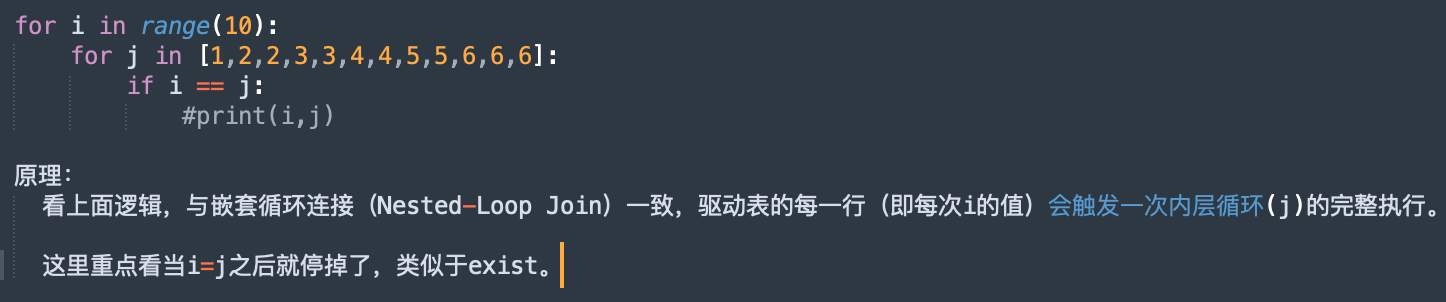
distinct必要条件
- select列必须由distinct关键字
- select列上只能含有驱动表的字段
-- select列只有驱动表时,extra列会出现distinct关键字。
mysql> explain select distinct e.job from emp e left join dept d on d.deptno=e.deptno;
+----+-------------+-------+------------+--------+---------------+---------+---------+----------------+------+----------+-----------------------+
| id | select_type | table | partitions | type   | possible_keys | key     | key_len | ref            | rows | filtered | Extra                 |
+----+-------------+-------+------------+--------+---------------+---------+---------+----------------+------+----------+-----------------------+
|  1 | SIMPLE      | e     | NULL       | ALL    | idx_job_ename | NULL    | NULL    | NULL           |   14 |   100.00 | Using temporary       |
|  1 | SIMPLE      | d     | NULL       | eq_ref | PRIMARY       | PRIMARY | 4       | scott.e.deptno |    1 |   100.00 | Using index; Distinct |
+----+-------------+-------+------------+--------+---------------+---------+---------+----------------+------+----------+-----------------------+
2 rows in set, 1 warning (0.01 sec)
本质上,distinct会对select子句中所有驱动表的列去重,当select列上有被驱动表字段,且该字段有重复值时,结果会出现一对多现象,即e.job对应多个d.name。此时,extra列不会显示distinct。
mysql> explain select distinct e.job,d.dname from emp e left join dept d on d.deptno=e.deptno;
+----+-------------+-------+------------+------+---------------+------+---------+------+------+----------+----------------------------------------------------+
| id | select_type | table | partitions | type | possible_keys | key  | key_len | ref  | rows | filtered | Extra                                              |
+----+-------------+-------+------------+------+---------------+------+---------+------+------+----------+----------------------------------------------------+
|  1 | SIMPLE      | e     | NULL       | ALL  | NULL          | NULL | NULL    | NULL |   14 |   100.00 | Using temporary                                    |
|  1 | SIMPLE      | d     | NULL       | ALL  | PRIMARY       | NULL | NULL    | NULL |    4 |   100.00 | Using where; Using join buffer (Block Nested Loop) |
+----+-------------+-------+------------+------+---------------+------+---------+------+------+----------+----------------------------------------------------+

mysql> select distinct e.job,d.dname from emp e left join dept d on d.deptno=e.deptno;
+-----------+------------+
| job       | dname      |
+-----------+------------+
| MANAGER   | ACCOUNTING |
| PRESIDENT | ACCOUNTING |
| CLERK     | ACCOUNTING |
| CLERK     | RESEARCH   |
| MANAGER   | RESEARCH   |
| ANALYST   | RESEARCH   |
| SALESMAN  | SALES      |
| MANAGER   | SALES      |
| CLERK     | SALES      |
+-----------+------------+
9 rows in set (0.00 sec)
select子句存在被驱动表列时,执行distinct的风险:
<1> 被驱动表字段若含NULL值,DISTINCT会将所有NULL视为相同值,可能掩盖实际数据差异;
<2> DISTINCT + JOIN可能无法利用索引下推(ICP)等优化;
<3> 被驱动表数据量较大时,DISTINCT需对所有字段组合排序去重,可能触发磁盘临时表,性能急剧下降。
9.2 using filesort 发生了排序
在进行order by,group by且没有使用索引时出现。排序参数:sort_buffer_size
mysql> explain select mgr,count(empno) from emp group by mgr order by 1;
+----+-------------+-------+------------+------+---------------+------+---------+------+------+----------+---------------------------------+
| id | select_type | table | partitions | type | possible_keys | key  | key_len | ref  | rows | filtered | Extra                           |
+----+-------------+-------+------------+------+---------------+------+---------+------+------+----------+---------------------------------+
|  1 | SIMPLE      | emp   | NULL       | ALL  | NULL          | NULL | NULL    | NULL |   14 |   100.00 | Using temporary; Using filesort |
+----+-------------+-------+------------+------+---------------+------+---------+------+------+----------+---------------------------------+
1 row in set, 1 warning (0.00 sec)

-- 添加索引后,filesort消失
alter table emp add index idx_mgr(mgr);

mysql> explain select mgr,count(empno) from emp group by mgr order by 1;
+----+-------------+-------+------------+-------+---------------+---------+---------+------+------+----------+-------------+
| id | select_type | table | partitions | type  | possible_keys | key     | key_len | ref  | rows | filtered | Extra       |
+----+-------------+-------+------------+-------+---------------+---------+---------+------+------+----------+-------------+
|  1 | SIMPLE      | emp   | NULL       | index | idx_mgr       | idx_mgr | 5       | NULL |   14 |   100.00 | Using index |
+----+-------------+-------+------------+-------+---------------+---------+---------+------+------+----------+-------------+
1 row in set, 1 warning (0.00 sec)
9.3 using index 不回表
不用回表就可以查到数据
使用场景:where条件选择性不太好时,就可以考虑覆盖查询的列,来达到减少物理IO的目的。
下面sql走了索引idx_hiredate,因为empno是主键,跟在二级索引的后面。
mysql> explain select empno from emp;
+----+-------------+-------+------------+-------+---------------+--------------+---------+------+------+----------+-------------+
| id | select_type | table | partitions | type  | possible_keys | key          | key_len | ref  | rows | filtered | Extra       |
+----+-------------+-------+------------+-------+---------------+--------------+---------+------+------+----------+-------------+
|  1 | SIMPLE      | emp   | NULL       | index | NULL          | idx_hiredate | 4       | NULL |   14 |   100.00 | Using index |
+----+-------------+-------+------------+-------+---------------+--------------+---------+------+------+----------+-------------+
1 row in set, 1 warning (0.01 sec)
9.4 using temporary 使用了临时表
mysql执行过程中,为了存储中间的结果,会使用temporary table 。
<1> 如果执行计划中出现using temporary。使用temporary table后,我们无法判断是在内存中还是disk中。
- order by,group by没有使用索引的时;
- 执行计划中select_type为derived时;
- show session status like ‘%tmp%’;
<2> 下面2个参数那个小就生效那个,木桶效应。
max_heap_table_size
tmp_table_size
9.5 using where 发生了二次过滤
- 一般using where要跟filtered、rows一起看
- using where 表示从存储引擎中拿到一些数据,然后再过滤。
- 其中rows是存储引擎中拿到预估值,filtered是在过滤的百分比。
关于对二次过滤的理解
using where表示执行器发生了二次过滤。innodb层扫描的数据返回给server层,server层通过条件过滤,这称为二次过滤。如果查询的字段都在索引,就需把索引中的行记录(即deptno、empno两个字段)返回server,否则需要回表,当整行数据返回server。
mysql使用覆盖索引后,为什么出现using where ?
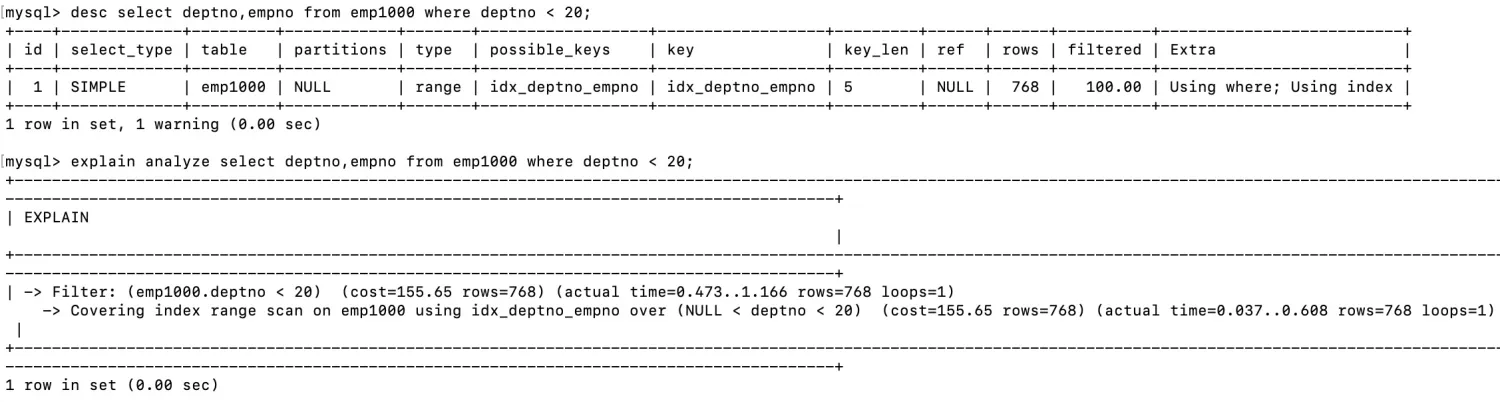

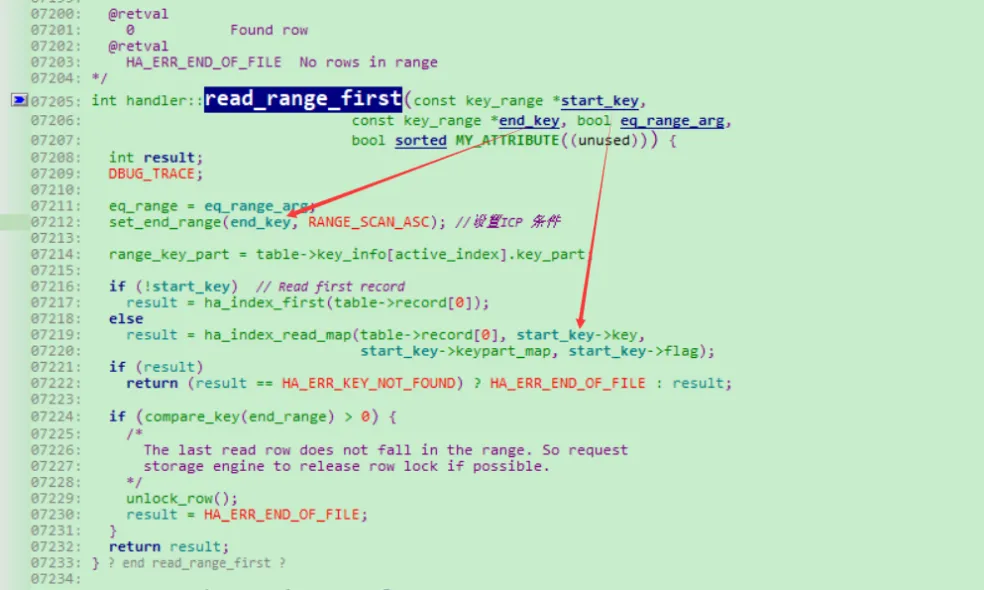
一般来说,在范围扫描中,索引从左向右扫描。所以empno > 20定位时,start_key是开始条件,即索引定位,下图中的执行计划显示不正确。而empno < 20时,start_key从第一行开始扫描,这时empno < 20 只能作为filter过滤的条件,以及end_key,及查询结束的条件。
以下是debug总结出来的,很多执行计划显示是有误的,比如id >20 就可以指定定位数据,并不需要二次过滤。

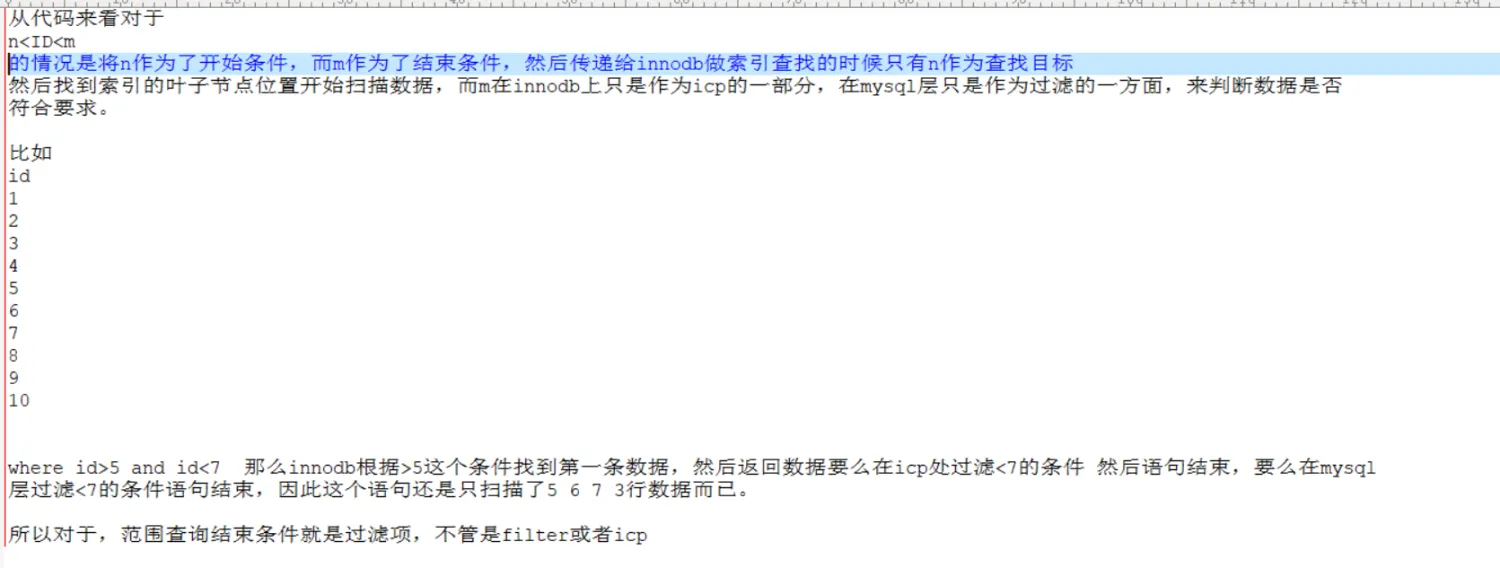
总结:start key 后面是索引定位的条件。
很明显,empno >20中,start key是20。而如果条件为empno <20时,start key 就是索引的第一行了,而empno < 20就只能是filter过滤的条件了。
9.6 using index condition ICP
ICP技术允许innodb引擎在索引树上进行判断,如果数据不符合条件,则无需将该数据读取到server层判断,从而节省了磁盘I/O操作。这个优化技术让存储引擎在索引阶段就进行条件判断,实现了索引和where条件的早期过滤,减少了不必要的数据读取和处理,提高了查询性能。所以,在某种意义上,ICP实现了覆盖索引的功能。
-- 示例
mysql> EXPLAIN SELECT * FROM people WHERE zipcode = '95054' AND lastname LIKE '%etrunia%';
+----+-------------+--------+------+---------------+-------------------+---------+-------+------+-----------------------+
| id | select_type | table  | type | possible_keys | key               | key_len | ref   | rows | Extra                 |
+----+-------------+--------+------+---------------+-------------------+---------+-------+------+-----------------------+
|  1 | SIMPLE      | people | ref  | idx_zip_last_first | idx_zip_last_first | 32      | const |    5 | Using index condition |
+----+-------------+--------+------+---------------+-------------------+---------+-------+------+-----------------------+
ICP的适用条件与限制
适用场景:
- 仅支持二级索引(InnoDB和MyISAM)
- 查询需回表(非覆盖索引)
- WHERE条件部分可被索引列过滤(如联合索引的中间列)
不适用场景:
- 聚簇索引(InnoDB主键索引)
- 虚拟生成列的二级索引
- 条件包含子查询或存储函数
9.7 range checked for each record
一般情况下,隐式转换会出现这个问题。比如2个关联表字符集不匹配、排序规则不匹配、数据类型不匹配等。
执行show warnings就能看到发生隐式转换的详细信息。性能杀手
-- 示例
mysql> CREATE TABLE t1 (id VARCHAR(10), KEY(id));
mysql> CREATE TABLE t2 (id INT, KEY(id));

mysql> SELECT * FROM t1 JOIN t2 ON t1.id = t2.id;

mysql> show warnings;
Warning | 1739 | Cannot use ref access on index 'id' due to type conversion on field 't1.id'
Note    | 1003 | /* select#1 */ select `test`.`t1`.`id` AS `id`...
extra还有一些值,比如use MRR、using join buffer,这些都属于优化对象,不再做详细介绍。

欢迎关注作者公众号:类MySQL学堂
