



引用stackoverflow的一篇文章,我解决了pyqt5 textbrowser控件超链接锚点问题,
文章链接:https://stackoverflow.com/questions/73584865/qtextbrowser-pyqt5-problem-after-click-on-anchor
主要解决方案:每次在textbrowser控件中使用append添加内容(包含超链接内容)之前,将游标移动到textbrowser控件的最下方,即可以解决问题。
'''This might be unintuitive for QTextBrowser, since it doesn't show the text cursor (the "caret"), but clicking on a QTextBrowser does change the cursor position, exactly like it would if you used setReadOnly(False) or by using a standard QTextEdit.

The solution is to always move the text cursor to the end before calling append(). Remember that in order to make the actual text edit/browser cursor move, you must call setTextCursor() again after moving its position.'''

    def addtxt(self):
        # get the QTextCursor of the widget's document
        cursor = self.browser.textCursor()
        # move it to the end of the document
        cursor.movePosition(cursor.End)
        # *restore* the text cursor on the widget
        self.browser.setTextCursor(cursor)

        self.browser.append('sample text 1')
        self.browser.append('some text: <a href="http://link.com">textlink</a>')
        self.browser.append('sample text 2')
现象描述如下:
源代码:
import sys
from PyQt5.QtWidgets import *


class MainWindow(QMainWindow):

    def __init__(self):
        QMainWindow.__init__(self)
        self.resize(500, 500)
        self.browser = QTextBrowser(self)
        self.browser.resize(500, 300)
        self.btn = QPushButton('get html print', self)
        self.btn.move(250, 400)
        self.btn.clicked.connect(self.gethtml)
        self.btn2 = QPushButton('add text', self)
        self.btn2.move(150, 400)
        self.btn2.clicked.connect(self.addtxt)
        self.browser.setOpenLinks(False)
        self.browser.anchorClicked.connect(self.anchor_clicked)

    def gethtml(self):
        print(self.browser.toHtml())

    def addtxt(self):
        self.browser.append('sample text 1')
        self.browser.append('some text: <a href="http://link.com">textlink</a>')
        self.browser.append('sample text 2')

    def anchor_clicked(self):
        pass


if __name__ == '__main__':
    app = QApplication(sys.argv)
    dlgMain = MainWindow()
    dlgMain.show()
    sys.exit(app.exec_())
点击界面上"add text"按钮后,显示结果如下图:
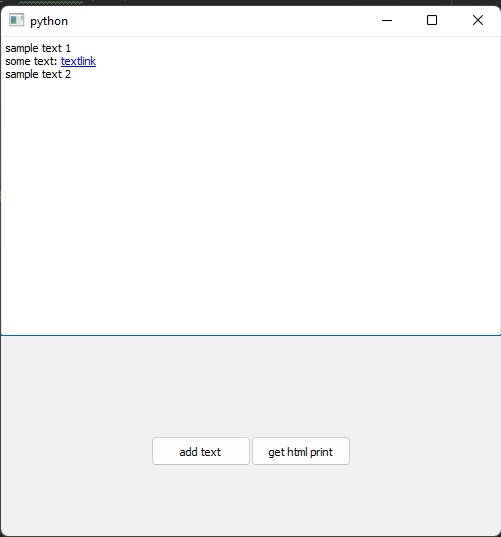
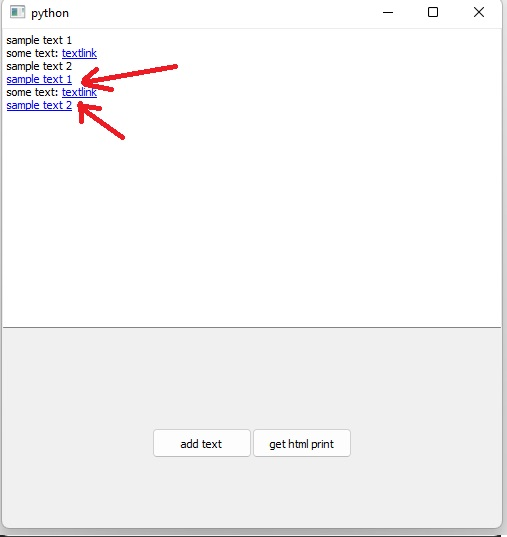
在textbrowser控件显示超链接文本内容之后,点击textlink链接锚点会打开对应的链接,
点击之后,再点击"add text"按钮后会变成如下效果, 没有设置超链接的文本也激活了超链接锚点,
贴出我的代码:
    self.button2.clicked.connect(self.getaccounts)

def getaccounts(self):
        # 启动进度条动画
        self.progress_bar.setRange(0, 0)
        self.progress_timer.start(100)

        # 禁用按钮防止重复点击
        self.button1.setEnabled(False)
        self.button2.setEnabled(False)
        self.scrolledtext1.setReadOnly(True)

        # 创建工作线程
        self.worker = WorkerThread(self._do_getaccounts)
        self.worker.finished.connect(self.on_getaccounts_finished)
        self.worker.start()

def on_getaccounts_finished(self, success, result):
        # 恢复按钮状态
        self.button1.setEnabled(True)
        self.button2.setEnabled(True)


        # 停止进度条
        self.progress_timer.stop()
        self.progress_bar.setRange(0, 1)
        self.progress_bar.setValue(0)
        self.scrolledtext1.clear()

        # 滚动到最后一行,这部分即是点睛之笔。
        self.scrolledtext1.setFocus()
        cursor = self.scrolledtext1.textCursor()
        cursor.movePosition(cursor.End)
        self.scrolledtext1.setTextCursor(cursor)
        self.scrolledtext1.append(result)   # 追加文本内容是在移动游标之后。
        if not success:
            self.scrolledtext1.append(f"操作失败: {result}")

def _do_getaccounts(self):
        try:
            from requests import session
            admin = self.entry1.text()
            passwd = self.entry2.text()
            account = self.entry3.text()
            cip_manageurl = self.entry4.text()

            login_url = jenkins_manageurl + "/j_acegi_security_check"
            payload = "j_username=" + admin + "&j_password=" + passwd + "&from=%2F&Submit=%E7%99%BB%E5%BD%95&remember_me=on"
            headers = {
                'accept': 'text/html,application/xhtml+xml,application/xml;q=0.9,image/webp,*/*;q=0.8',
                'accept-encoding': 'gzip, deflate',
                'accept-language': 'zh-CN,zh;q=0.8,zh-TW;q=0.7,zh-HK;q=0.5,en-US;q=0.3,en;q=0.2',
                'connection': 'keep-alive',
                'content-length': '88',
                'content-type': 'application/x-www-form-urlencoded',
                'dnt': '1',
                'host': jenkins_manageurl.split("//")[1],
                'origin': jenkins_manageurl,
                'referer': jenkins_manageurl + '/login?from=%2F',
                'upgrade-insecure-requests': '1',
                'user-agent': 'Mozilla/5.0 (Windows NT 10.0; Win64; x64; rv:78.0) Gecko/20100101 Firefox/78.0',
            }

            response = self.session.post(login_url, headers=headers, data=payload, timeout=2)
            if response.status_code != 200:
                return "用户名或者密码错误,请管理员重新输入!"
            else:
                self.save_config()  # Save on successful login
                account_url = jenkins_manageurl + "/securityRealm/"
                response = self.session.get(account_url)
                html = etree.HTML(response.text)
                account_list = html.xpath("//tr//td[2]/a/text()")
                # self.scrolledtext1.append("—" * 12 + "\n")
                return "系统中存在%d个账号" % len(account_list) + ":\n" +"\n".join(account_list)
        except Exception as e:
            self.scrolledtext1.append("连接失败,请检查或者修改CIP管理地址.\n" + str(e))

        finally:
            # Use QTimer.singleShot to stop timer in main thread
            QTimer.singleShot(0, lambda: (
                self.progress_timer.stop(),
                self.progress_bar.setRange(0, 1),
                self.progress_bar.setValue(0)
            ))
最后修改时间:2025-04-27 17:17:18
「喜欢这篇文章,您的关注和赞赏是给作者最好的鼓励」
关注作者
【版权声明】本文为墨天轮用户原创内容,转载时必须标注文章的来源(墨天轮),文章链接,文章作者等基本信息,否则作者和墨天轮有权追究责任。如果您发现墨天轮中有涉嫌抄袭或者侵权的内容,欢迎发送邮件至:contact@modb.pro进行举报,并提供相关证据,一经查实,墨天轮将立刻删除相关内容。
