



前言
当数据库抛出错误时,某些场景下我们若要深入分析问题,就需要借助报错时的backtrace。
目前在PG中可以将我们想要跟踪的内核函数配置到backtrace_functions参数,来记录调用该函数发生错误时的backtrace,这是一个Developer Options参数。
不过我个人觉得不是特别方便。
因为第一我们无法提前预估我们将来会在哪个内核函数发生错误,当发生错误时,可能得多次复现先确认报错的内核函数,并将其配置到backtrace_functions 再次复现报错才可记录backtrace;
第二,我想分析很多个内核函数报错时,就需要配置很多个内核函数到backtrace_functions,确实不太方便。
所以,为什么不做一个简单的开关呢,只要报错就记录backtrace。
backtrace_functions原理
backtrace_functions在ConfigureNamesString数组中,入参类型为string,有对应的check函数进行处理,生效级别为PGC_SUSET即superuser set生效。
	{
                {"backtrace_functions", PGC_SUSET, DEVELOPER_OPTIONS,
                        gettext_noop("Log backtrace for errors in these functions."),
                        NULL,
                        GUC_NOT_IN_SAMPLE
                },
                &backtrace_functions,
                "",
                check_backtrace_functions, assign_backtrace_functions, NULL
        },
在errfinish中,当发生错误时,同时backtrace_functions非空,且发生错误的函数和参数配置相匹配时则调用set_backtrace函数。
void
errfinish(const char *filename, int lineno, const char *funcname)
{
	/* 省略 */
	/* Collect backtrace, if enabled and we didn't already */
	if (!edata->backtrace &&
		edata->funcname &&
		backtrace_functions &&
		matches_backtrace_functions(edata->funcname))
		set_backtrace(edata, 2);
	/* 省略 */

}
set_backtrace函数调用glibc的backtrace函数对错误的backtrace进行打印。
static void
set_backtrace(ErrorData *edata, int num_skip)
{
	StringInfoData errtrace;

	initStringInfo(&errtrace);

#ifdef HAVE_BACKTRACE_SYMBOLS
	{
		void	   *buf[100];
		int			nframes;
		char	  **strfrms;

		nframes = backtrace(buf, lengthof(buf));
		strfrms = backtrace_symbols(buf, nframes);
		if (strfrms == NULL)
			return;

		for (int i = num_skip; i < nframes; i++)
			appendStringInfo(&errtrace, "\n%s", strfrms[i]);
		free(strfrms);
	}
#else
	appendStringInfoString(&errtrace,
						   "backtrace generation is not supported by this installation");
#endif

	edata->backtrace = errtrace.data;
}
方案
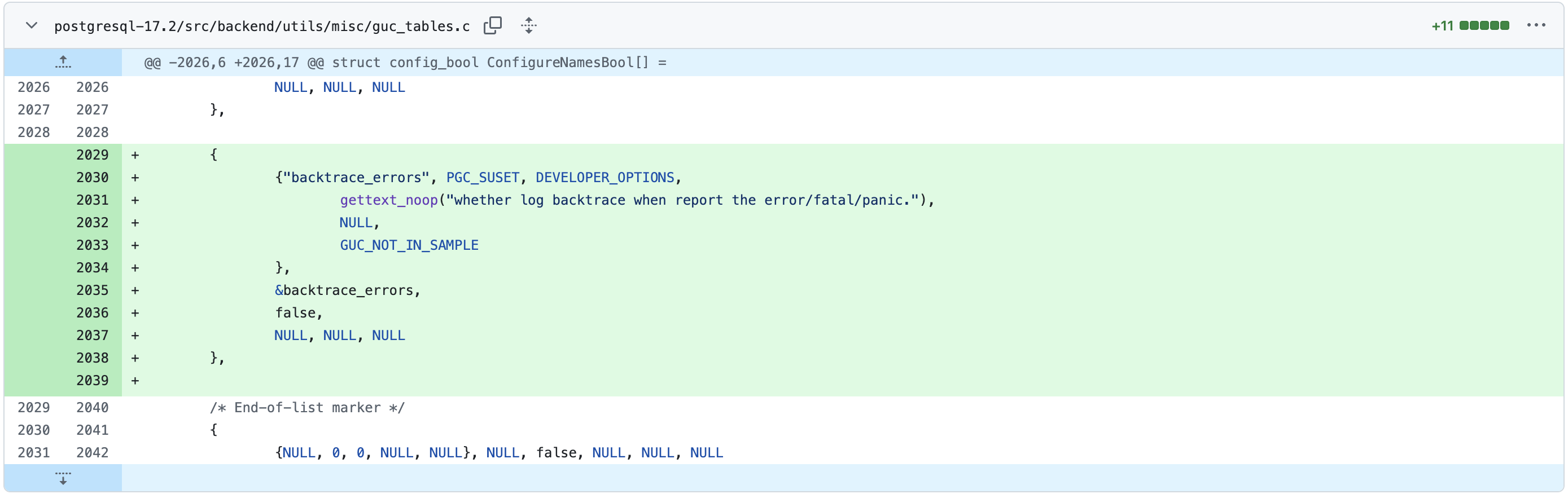
参考backtrace_functions,新增一个参数backtrace_errors,实现打印error backtrace的能力。
为bool类型,默认值为false,生效级别为PGC_SUSET。
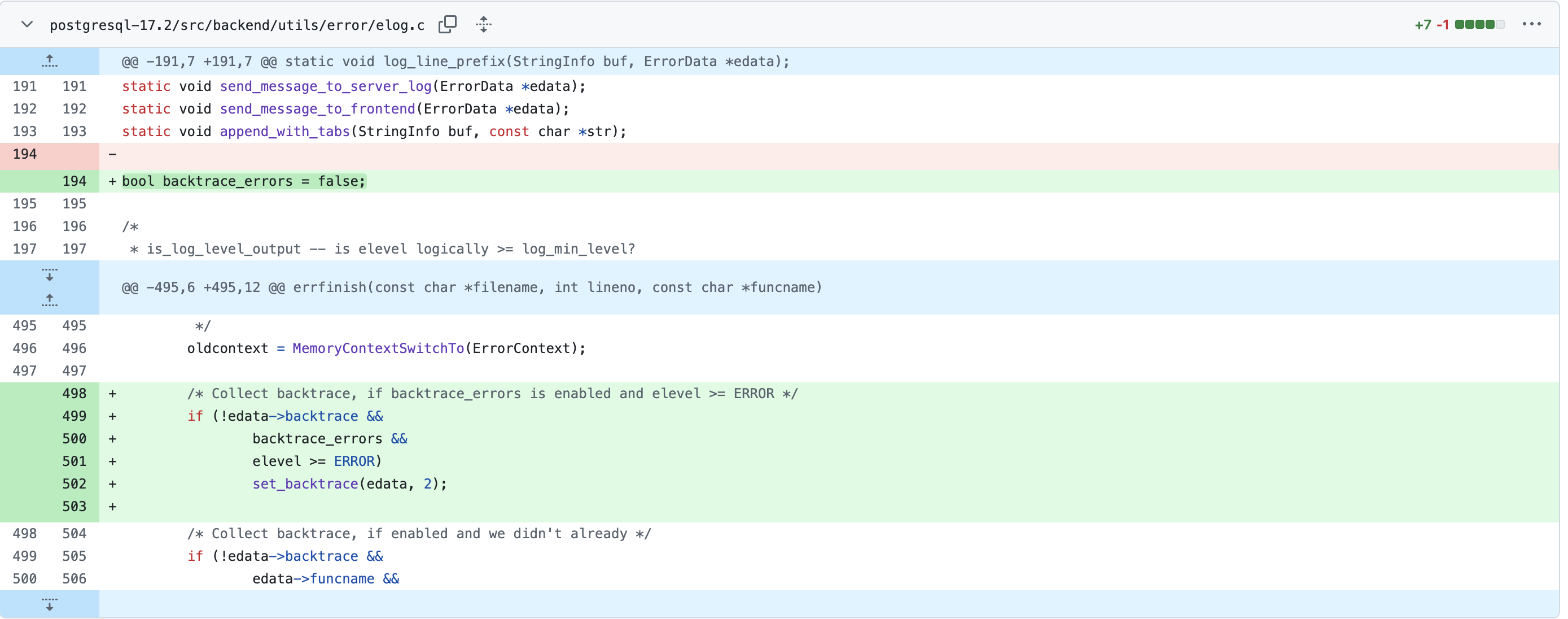
errfinish中,当发生错误并且backtrace_errors为ture时,调用set_backtrace函数记录backtrace。
验证
backtrace_functions未配置,打开backtrace_errors,在postgres库中执行drop database postgres报错"cannot drop the currently open database"
postgres=# show backtrace_functions ;
 backtrace_functions
---------------------

(1 row)

postgres=# set backtrace_errors to on;
SET
postgres=# drop database postgres;
ERROR:  cannot drop the currently open database
postgres=#
报错的backtrace已经记录到日志中。
2025-05-15 00:12:33.746 CST [3887265] ERROR:  cannot drop the currently open database
2025-05-15 00:12:33.746 CST [3887265] BACKTRACE:
        postgres: postgres postgres [local] DROP DATABASE(dropdb+0x22a) [0x66d457]
        postgres: postgres postgres [local] DROP DATABASE(DropDatabase+0x12c) [0x66e524]
        postgres: postgres postgres [local] DROP DATABASE(standard_ProcessUtility+0x6c4) [0x98dbec]
        /data/postgres/postgresql-17.4/pgapp/lib/pg_stat_statements.so(+0x4673) [0x7fdee6961673]
        postgres: postgres postgres [local] DROP DATABASE(ProcessUtility+0x52) [0x98d4f0]
        postgres: postgres postgres [local] DROP DATABASE() [0x98c423]
        postgres: postgres postgres [local] DROP DATABASE() [0x98c622]
        postgres: postgres postgres [local] DROP DATABASE(PortalRun+0x292) [0x98bc16]
        postgres: postgres postgres [local] DROP DATABASE() [0x985822]
        postgres: postgres postgres [local] DROP DATABASE(PostgresMain+0x720) [0x989fa5]
        postgres: postgres postgres [local] DROP DATABASE() [0x982324]
        postgres: postgres postgres [local] DROP DATABASE(postmaster_child_launch+0xd4) [0x8c174f]
        postgres: postgres postgres [local] DROP DATABASE() [0x8c6cfb]
        postgres: postgres postgres [local] DROP DATABASE() [0x8c44b3]
        postgres: postgres postgres [local] DROP DATABASE(PostmasterMain+0x1239) [0x8c3e77]
        postgres: postgres postgres [local] DROP DATABASE() [0x79642b]
        /lib64/libc.so.6(__libc_start_main+0xe5) [0x7fdee8f717e5]
        postgres: postgres postgres [local] DROP DATABASE(_start+0x2e) [0x4904fe]
2025-05-15 00:12:33.746 CST [3887265] STATEMENT:  drop database postgres;
小结
新增参数backtrace_errors,实现只要报错就可以打印backtrace,对比backtrace_functions参数,某种程度上来说算是一种提升。
