



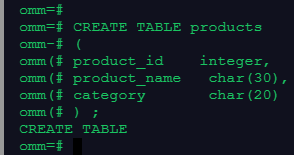
1.创建一个表products
| 字段名 | 数据类型 | 含义 |
|---|---|---|
| product_id | INTEGER | 产品编号 |
| product_name | Char(30) | 产品名 |
| category | Char(20) | 种类 |
回答:
CREATE TABLE products
( product_id integer,
product_name char(30),
category char(20)
) ;
截图:
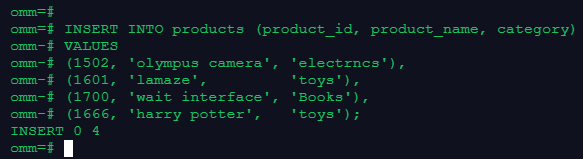
2.向表中插入数据,采用一次插入一条和多条记录的方式
| product_id | product_name | category |
|---|---|---|
| 1502 | olympus camera | electrncs |
| 1601 | lamaze | toys |
| 1700 | wait interface | Books |
| 1666 | harry potter | toys |
回答:
INSERT INTO products (product_id, product_name, category)
VALUES
(1502, 'olympus camera', 'electrncs'),
(1601, 'lamaze', 'toys'),
(1700, 'wait interface', 'Books'),
(1666, 'harry potter', 'toys');
截图:
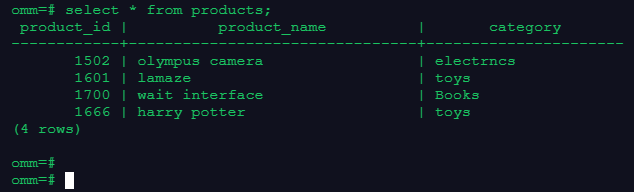
3.查询表中所有记录及记录数
回答:
select * from products;
截图:
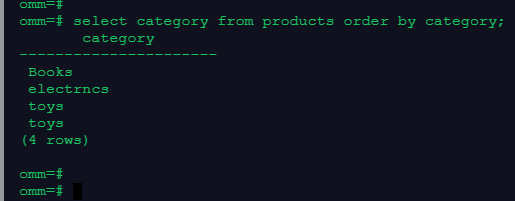
4.查询表中所有category记录,并将查询结果按升序排序
回答:
select category from products order by category;
截图:
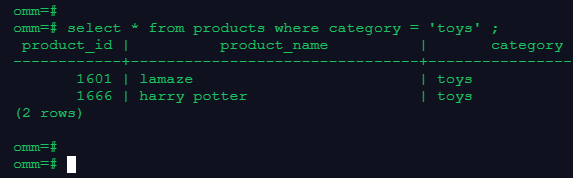
5.查询表中category为toys的记录
回答:
select * from products where category = 'toys' ;
截图:
6.删除表products
回答:
drop table products;
截图:

@openGauss
最后修改时间:2021-12-20 10:30:34
「喜欢这篇文章,您的关注和赞赏是给作者最好的鼓励」
关注作者
【版权声明】本文为墨天轮用户原创内容,转载时必须标注文章的来源(墨天轮),文章链接,文章作者等基本信息,否则作者和墨天轮有权追究责任。如果您发现墨天轮中有涉嫌抄袭或者侵权的内容,欢迎发送邮件至:contact@modb.pro进行举报,并提供相关证据,一经查实,墨天轮将立刻删除相关内容。
