



问题描述
昨天晚上23点24分收到现场同事反馈一读写分离集群不能访问,应用层面提示超过最大连接数。
分析过程
查询集群状态
超过最大连接数后,不能查询集群状态。
repmgr cluster show查看主节点集群状态,提示超过最大连接数

查看数据库配置文件最大连接数参数
如果同一个参数有多条记录,那么位置越靠后的参数生效。
[kingbase@0001 ~]$ cat /data/data/kingbase.conf | grep max_connections
max_connections = 2000			# (change requires restart)
max_connections = 2000
查看服务器层金仓数据库进程数
远远超过了配置文件中的2000.

查看金仓数据库进程
主节点非常多的insert等待
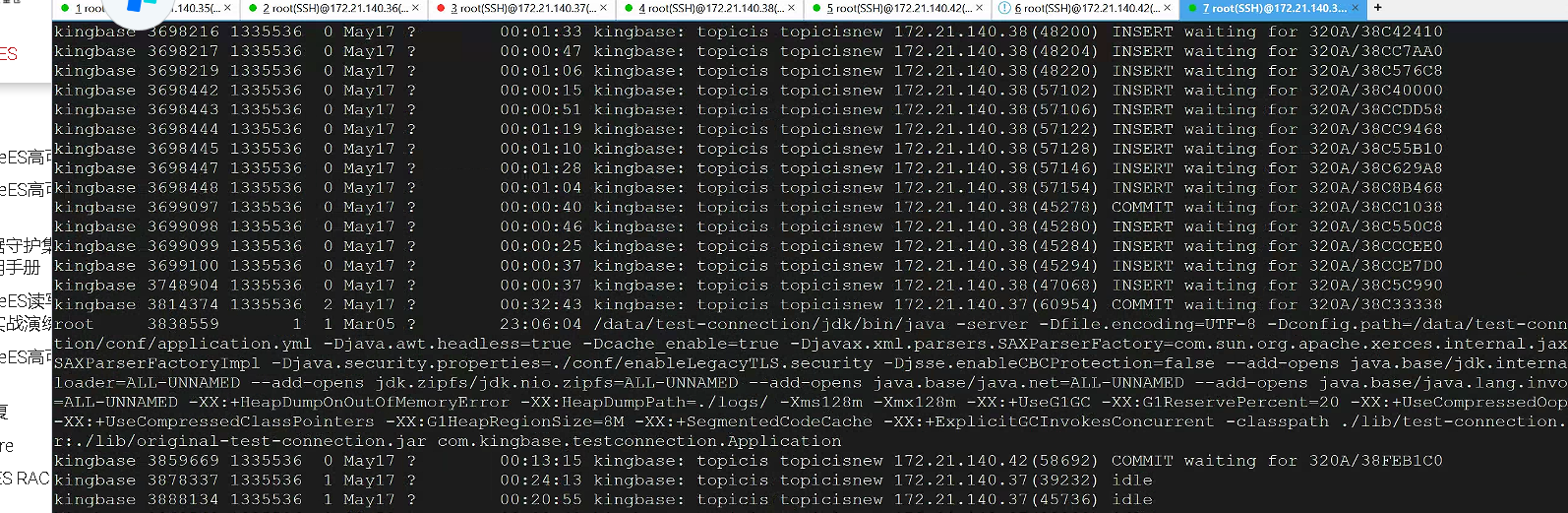
备节点进程中只有以下这些,没有主进程,推测备节点数据库宕机


登录数据库
超过最大连接数后,不能登录数据库。
登录主节点

登录备节点
备节点没有了主进程,未启动

扩展:如果备节点未宕机
查看总连接数
select state,count(*) as connection_count from sys_stat_activity group by state;
或
select state,count(*) as connection_count from pg_stat_activity group by state;
或连接数查询
select max_conn                        "最大连接数",
        used                            "当前连接数",
        res_for_super                   "保留连接数",
        max_conn - used - res_for_super "可用连接数"
 from (select count(*)                                               used,
              CURRENT_SETTING('superuser_reserved_connections')::int res_for_super,
              CURRENT_SETTING('max_connections') ::int               max_conn
       from sys_stat_activity) t1;
输出如下:
 state  | connection_count
--------+------------------
        |                5    --系统进程
 active |                1777
 idle   |              140
(3 rows)
总连接数已远超默认设置,证实了连接数耗尽的判断。
查看执行时长大于5分钟的SQL(也可当作检测连接是否泄露的依据)
如果state显示active 说明存在慢SQL,可杀掉;如果state显示idle可能存在连接泄露。
select datname,usename, application_name, client_addr,pid,now()-backend_start as duration,query_start,state,query
from sys_stat_activity
where state='idle' and now()-query_start>interval '5 minutes'
order by duration desc;
手动杀掉连接
-- kill SQL,pg_terminate_backend(PID);
SELECT pg_terminate_backend(15322);
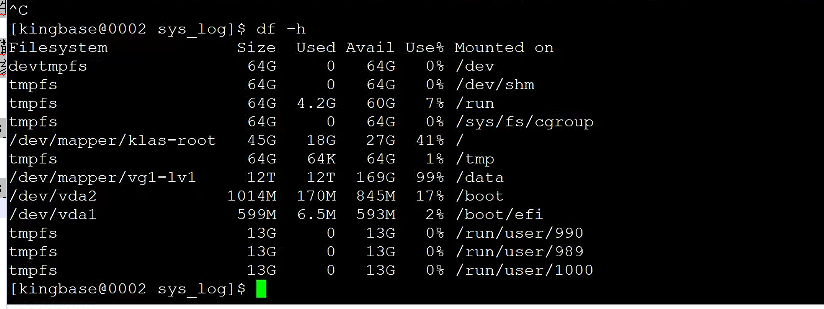
查看磁盘空间
出于排障习惯,习惯性的查询磁盘空间,发现3个节点的剩余可用磁盘空间使用率是100%.处于时间关系,只抓了其中一个备节点的图片。
解决办法
清理磁盘空间
由于前段时间磁盘空间满了一次,将全备策略注释掉了,但是同时没有配置定期删除归档文件的策略,导致归档文件将磁盘空间撑爆,删除过期的归档文件,释放磁盘空间。
修改kingbase.conf(所有节点)
更改最大连接数参数必须所有节点都更改,且重新启动后生效
vi kingbase.conf
max_connections=2000改成max_connections=4000
重启集群
不要过度担心重启会导致主从切换,正常重启不会主备切换;切换分两种,手动switchover,另一种faildover
主节点断了,会切换,只要不是手动只重启主节点数据库,就不会切换的。
如果还是不放心,就手动将所有备节点都关闭,sys_ctl start -D 数据目录 启动主节点 查看集群状态后再分别sys_ctl start -D 数据目录手动启动备节点。
sys_monitor.sh restart
或
sys_monitor.sh stop
sys_monitor.sh start
查看集群状态
确认主备节点状态正常。
repmgr cluster show输出如下:
[kingbase@0001 ~]$ repmgr cluster show
 ID | Name  | Role    | Status    | Upstream | Location | Priority | Timeline | LSN_Lag | Connection string
----+-------+---------+-----------+----------+----------+----------+----------+---------+------------------------------------------------------------------------------------------------------------------------------------------------------------------------
 1  | node1 | primary | * running |          | default  | 100      | 1        |         | host=172.21.140.39 user=esrep dbname=esrep port=54321 connect_timeout=10 keepalives=1 keepalives_idle=2 keepalives_interval=2 keepalives_count=3 tcp_user_timeout=9000
 2  | node2 | standby |   running | node1    | default  | 0        | 1        | 0 bytes | host=172.21.140.40 user=esrep dbname=esrep port=54321 connect_timeout=10 keepalives=1 keepalives_idle=2 keepalives_interval=2 keepalives_count=3 tcp_user_timeout=9000
 3  | node3 | standby |   running | node1    | default  | 0        | 1        | 0 bytes | host=172.21.140.41 user=esrep dbname=esrep port=54321 connect_timeout=10 keepalives=1 keepalives_idle=2 keepalives_interval=2 keepalives_count=3 tcp_user_timeout=9000
收回业务用户的超管权限
发现系统默认有3个保留连接数,该保留连接数对应kingbase.conf中的superuser_reserved_connections,是管理员专用连接,用来当作救命稻草的,不应该随随便便就用掉。
max_conn=2000 sup_conn=3 意味着普通用户能用1997个。这样不论怎么样超管都还有3个连接渠道。而业务用户给supuser角色,这最后3个“管理连接”也给用了,出问题的时候就会连不上数据库。
alter user topicis nosuperuser;再次查看业务用户属性
--查看用户属性
test=# \du+
                                            List of roles
 Role name  |                         Attributes                         |  Member of   | Description
------------+------------------------------------------------------------+--------------+-------------
 esrep      | Replication                                                | {kcluster}   |
 flysync    | Superuser                                                  | {}           |
 kcluster   | Cannot login                                               | {pg_monitor} |
 plprofiler | Cannot login                                               | {}           |
 sao        | No inheritance                                             | {}           |
 sso        | No inheritance                                             | {}           |
 system     | Superuser, Create role, Create DB, Replication, Bypass RLS | {}           |
 topicis    |                                                            | {}           |
复盘max_connections参数理解
查连接数
发现系统默认有3个保留连接数,该保留连接数对应kingbase.conf中的superuser_reserved_connections,是管理员专用连接,用来当作救命稻草的,不应该随随便便就用掉。
--连接数查询
select max_conn                        "最大连接数",
        used                            "当前连接数",
        res_for_super                   "保留连接数",
        max_conn - used - res_for_super "可用连接数"
 from (select count(*)                                               used,
              CURRENT_SETTING('superuser_reserved_connections')::int res_for_super,
              CURRENT_SETTING('max_connections') ::int               max_conn
       from sys_stat_activity) t1;
输出如下:
 最大连接数 | 当前连接数 | 保留连接数 | 可用连接数
------------+------------+------------+------------
       4000 |        332 |          3 |       3665
(1 row)
查业务用户topicis属性
业务用户topicis拥有超管角色
--查看用户属性
test=# \du+
                                            List of roles
 Role name  |                         Attributes                         |  Member of   | Description
------------+------------------------------------------------------------+--------------+-------------
 esrep      | Replication                                                | {kcluster}   |
 flysync    | Superuser                                                  | {}           |
 kcluster   | Cannot login                                               | {pg_monitor} |
 plprofiler | Cannot login                                               | {}           |
 sao        | No inheritance                                             | {}           |
 sso        | No inheritance                                             | {}           |
 system     | Superuser, Create role, Create DB, Replication, Bypass RLS | {}           |
 topicis    | Superuser, Create DB                                       | {}           |
max_conn=100 sup_conn=3 意味着普通用户能用97个。这样不论怎么样超管都还有3个连接渠道。你业务用户给supuser,这最后3个“管理连接”也给用了,出问题的时候就会连不上。
注意事项
1、不要手动在操作系统层面kill 进程,哪怕是idle进程,很容易将数据库至于恢复模式。
2、更改最大连接数参数必须所有节点都更改,且重新启动后生效。
3、尽量不要给业务用户超管角色,避免超过最大连接数无法访问数据库。
