



使用obd离线安装部署OceanBase
因为在大部分的生产环境都是无法进行联网,所以本次案例使用离线部署的方式进行操作。
1. 安装包下载
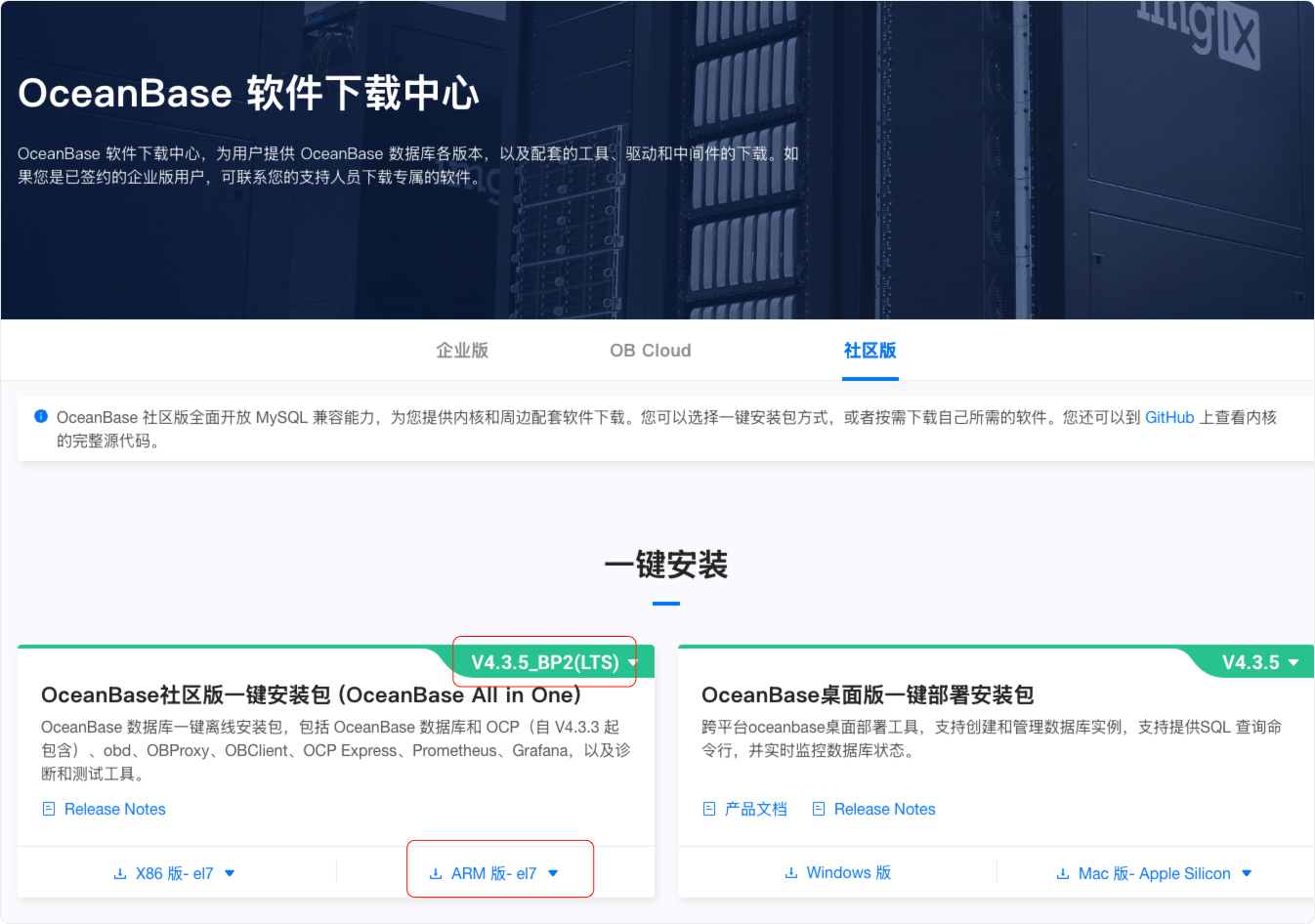
在官方文档进行对应安装包的下载:https://www.oceanbase.com/softwarecenter
本次安装使用的是OceanBase社区版v4.3.5_BP2 ARM版一键安装包

2. 离线安装
2.1.文件解压
[root@CentOS8-02 ~]# ls -lhrt
总用量 2.2G
-rw-------. 1 root root 1.1K 4月   1 22:14 anaconda-ks.cfg
-rw-r--r--. 1 root root 1.3K 4月   1 22:26 initial-setup-ks.cfg
-rw-r--r--. 1 root root 595M 4月   1 23:14 oceanbase-3.2.4.1-101000052023010822.el7.aarch64.rpm
-rw-r--r--. 1 root root 1.6G 4月   1 23:16 oceanbase-all-in-one-4.3.5_bp2_20250515.el7.aarch64.tar.gz
drwxr-xr-x. 6 root root   88 5月  14 2025 oceanbase-all-in-one
[root@CentOS8-02 ~]# tar xf oceanbase-all-in-one-4.3.5_bp2_20250515.el7.aarch64.tar.gz
2.2. 安装obd
[root@CentOS8-02 ~]# cd oceanbase-all-in-one/bin/
[root@CentOS8-02 bin]# ./install.sh
install obd as root
No previous obd installed, try install..., wait a moment
name: grafana
version: 7.5.17
release:1
arch: aarch64
md5: 5129b0134e31d273c970a7e3c7370990016bee16
size: 171613256
add /root/oceanbase-all-in-one/rpms/grafana-7.5.17-1.el7.aarch64.rpm to local mirror
name: obagent
version: 4.2.2
release:100000042024011120.el7
arch: aarch64
md5: 8a5c3b8c55defe409d1e72b7efd13c5e41549545
size: 71788628
add /root/oceanbase-all-in-one/rpms/obagent-4.2.2-100000042024011120.el7.aarch64.rpm to local mirror
name: ob-configserver
version: 1.0.0
release:2.el7
arch: aarch64
md5: 35c121739b84e26b57dae1276ce33ba1186411e3
size: 23010139
add /root/oceanbase-all-in-one/rpms/ob-configserver-1.0.0-2.el7.aarch64.rpm to local mirror
name: ob-deploy
version: 3.2.2
release:2.el7
arch: aarch64
md5: da976ab32b5b07e143feceb94fe9730cb6a70a28
size: 107078289
add /root/oceanbase-all-in-one/rpms/ob-deploy-3.2.2-2.el7.aarch64.rpm to local mirror
name: obproxy-ce
version: 4.3.4.0
release:1.el7
arch: aarch64
md5: d5b7a5efed99a56be6e141b5c33c8049590b9b85
size: 114598638
add /root/oceanbase-all-in-one/rpms/obproxy-ce-4.3.4.0-1.el7.aarch64.rpm to local mirror
name: ob-sysbench
version: 1.0.20
release:21.el7
arch: aarch64
md5: 00275b49f41cc4c75ed498ac203a1cdb9c6d5e5c
size: 1615239
add /root/oceanbase-all-in-one/rpms/ob-sysbench-1.0.20-21.el7.aarch64.rpm to local mirror
name: obtpcc
version: 5.0.0
release:1.el7
arch: aarch64
md5: f80b0e7bf97582f703b2a477617eb86f33f097fd
size: 1890344
add /root/oceanbase-all-in-one/rpms/obtpcc-5.0.0-1.el7.aarch64.rpm to local mirror
name: obtpch
version: 3.0.0
release:1.el7
arch: aarch64
md5: c88f0fd6904e4c5e3b2542c7b61f798f1b82893e
size: 1901873
add /root/oceanbase-all-in-one/rpms/obtpch-3.0.0-1.el7.aarch64.rpm to local mirror
name: oceanbase-ce
version: 4.2.1.8
release:108000022024072217.el7
arch: aarch64
md5: 4285dbe242f497b8655c9b901f60c2848d555f52
size: 440864564
add /root/oceanbase-all-in-one/rpms/oceanbase-ce-4.2.1.8-108000022024072217.el7.aarch64.rpm to local mirror
name: oceanbase-ce
version: 4.3.5.2
release:102000112025051418.el7
arch: aarch64
md5: 15c25fdf311ef01ded797e90ffec28452b5053a1
size: 898611152
add /root/oceanbase-all-in-one/rpms/oceanbase-ce-4.3.5.2-102000112025051418.el7.aarch64.rpm to local mirror
name: oceanbase-ce-libs
version: 4.2.1.8
release:108000022024072217.el7
arch: aarch64
md5: 26012432a483162c581755dd0a865bbd1fb3a547
size: 592800
add /root/oceanbase-all-in-one/rpms/oceanbase-ce-libs-4.2.1.8-108000022024072217.el7.aarch64.rpm to local mirror
name: oceanbase-ce-libs
version: 4.3.5.2
release:102000112025051418.el7
arch: aarch64
md5: caae1e16e87b8880d3c58ff11e0fea23eafefadc
size: 70072
add /root/oceanbase-all-in-one/rpms/oceanbase-ce-libs-4.3.5.2-102000112025051418.el7.aarch64.rpm to local mirror
name: oceanbase-ce-utils
version: 4.2.1.8
release:108000022024072217.el7
arch: aarch64
md5: 581477b035512938cef5364637576f672b0fe904
size: 388404456
add /root/oceanbase-all-in-one/rpms/oceanbase-ce-utils-4.2.1.8-108000022024072217.el7.aarch64.rpm to local mirror
name: oceanbase-ce-utils
version: 4.3.5.2
release:102000112025051418.el7
arch: aarch64
md5: d48c20f4f36ca28515eb9b08577b0165c0d51216
size: 1605014240
add /root/oceanbase-all-in-one/rpms/oceanbase-ce-utils-4.3.5.2-102000112025051418.el7.aarch64.rpm to local mirror
name: oceanbase-diagnostic-tool
version: 2.6.0
release:12024112811.el7
arch: aarch64
md5: 67a4ccab72f205a2db885b6b9d7b315570c06661
size: 50928320
add /root/oceanbase-all-in-one/rpms/oceanbase-diagnostic-tool-2.6.0-12024112811.el7.aarch64.rpm to local mirror
name: ocp-agent-ce
version: 4.3.5
release:20250319105844.el7
arch: aarch64
md5: ae91444cd63f89bb4933d33f2eea801d50bb4fde
size: 122993656
add /root/oceanbase-all-in-one/rpms/ocp-agent-ce-4.3.5-20250319105844.el7.aarch64.rpm to local mirror
name: ocp-agent-ce
version: 4.3.5
release:20250319105844.el7
arch: x86_64
md5: 8c82c1cfb3ebfa951caa660f9d92fa1261a80c45
size: 178952150
add /root/oceanbase-all-in-one/rpms/ocp-agent-ce-4.3.5-20250319105844.el7.x86_64.rpm to local mirror
name: ocp-express
version: 4.2.2
release:100000022024011120.el7
arch: aarch64
md5: 15f098f450ac4e6e938456f86c34d35a5ee9ae9d
size: 78426202
add /root/oceanbase-all-in-one/rpms/ocp-express-4.2.2-100000022024011120.el7.aarch64.rpm to local mirror
name: ocp-server-ce
version: 4.3.5
release:20250319105844.el7
arch: noarch
md5: 5c670871a262a5c95649ca8e2ad4b237e2a8aa43
size: 646926381
add /root/oceanbase-all-in-one/rpms/ocp-server-ce-4.3.5-20250319105844.el7.noarch.rpm to local mirror
name: openjdk-jre
version: 1.8.0_322
release:b09.el7
arch: aarch64
md5: 664b8eaeca384810f407b3925be853a0c6523b92
size: 107802493
add /root/oceanbase-all-in-one/rpms/openjdk-jre-1.8.0_322-b09.el7.aarch64.rpm to local mirror
name: prometheus
version: 2.37.1
release:10000102022110211.el7
arch: aarch64
md5: 2d856b4a90e7a35322bc3412231f714fde3fd794
size: 206787525
add /root/oceanbase-all-in-one/rpms/prometheus-2.37.1-10000102022110211.el7.aarch64.rpm to local mirror
Trace ID: 6ac66168-0f8b-11f0-a781-001c4245e87d
If you want to view detailed obd logs, please run: obd display-trace 6ac66168-0f8b-11f0-a781-001c4245e87d
Disable remote ok
Trace ID: 90942dd0-0f8b-11f0-b259-001c4245e87d
If you want to view detailed obd logs, please run: obd display-trace 90942dd0-0f8b-11f0-b259-001c4245e87d

add auto set env logic to profile: /root/.bash_profile

#########################################################################################
 Install Finished
=========================================================================================
Setup Environment:              source ~/.oceanbase-all-in-one/bin/env.sh
Quick Start:                    obd demo
Use Web Service to install:     obd web
Use Web Service to upgrade:     obd web upgrade
More Details:                   obd -h
=========================================================================================
[root@CentOS8-02 bin]# source ~/.oceanbase-all-in-one/bin/env.sh
通过 OceanBase All in One 安装 obd 时,install.sh 脚本默认会尝试以管理员权限安装,若当前用户无 sudo 权限,可在输入密码处输入当前用户密码或单击三次键盘 Enter 键,之后输入 n 选择使用当前用户进行安装。根据使用用户和权限的不同,有如下两种情况。
若您使用 root 用户或者使用普通用户以管理员权限(sudo)进行安装,安装后 obd 可执行文件的目录为 /usr/bin/obd。
若您使用普通用户进行安装,安装后 obd 可执行文件目录为 ~/.oceanbase-all-in-one/obd/usr/bin/obd。
2.3. 查看本地obd镜像库中的安装包
[root@CentOS8-02 bin]# obd mirror list local
+---------------------------------------------------------------------------------------------------------------------+
|                                                  local Package List                                                 |
+---------------------------+-----------+------------------------+---------+------------------------------------------+
| name                      | version   | release                | arch    | md5                                      |
+---------------------------+-----------+------------------------+---------+------------------------------------------+
| grafana                   | 7.5.17    | 1                      | aarch64 | 5129b0134e31d273c970a7e3c7370990016bee16 |
| obagent                   | 4.2.2     | 100000042024011120.el7 | aarch64 | 8a5c3b8c55defe409d1e72b7efd13c5e41549545 |
| ob-configserver           | 1.0.0     | 2.el7                  | aarch64 | 35c121739b84e26b57dae1276ce33ba1186411e3 |
| ob-deploy                 | 3.2.2     | 2.el7                  | aarch64 | da976ab32b5b07e143feceb94fe9730cb6a70a28 |
| obproxy-ce                | 4.3.4.0   | 1.el7                  | aarch64 | d5b7a5efed99a56be6e141b5c33c8049590b9b85 |
| ob-sysbench               | 1.0.20    | 21.el7                 | aarch64 | 00275b49f41cc4c75ed498ac203a1cdb9c6d5e5c |
| obtpcc                    | 5.0.0     | 1.el7                  | aarch64 | f80b0e7bf97582f703b2a477617eb86f33f097fd |
| obtpch                    | 3.0.0     | 1.el7                  | aarch64 | c88f0fd6904e4c5e3b2542c7b61f798f1b82893e |
| oceanbase-ce              | 4.2.1.8   | 108000022024072217.el7 | aarch64 | 4285dbe242f497b8655c9b901f60c2848d555f52 |
| oceanbase-ce              | 4.3.5.2   | 102000112025051418.el7 | aarch64 | 15c25fdf311ef01ded797e90ffec28452b5053a1 |
| oceanbase-ce-libs         | 4.2.1.8   | 108000022024072217.el7 | aarch64 | 26012432a483162c581755dd0a865bbd1fb3a547 |
| oceanbase-ce-libs         | 4.3.5.2   | 102000112025051418.el7 | aarch64 | caae1e16e87b8880d3c58ff11e0fea23eafefadc |
| oceanbase-ce-utils        | 4.2.1.8   | 108000022024072217.el7 | aarch64 | 581477b035512938cef5364637576f672b0fe904 |
| oceanbase-ce-utils        | 4.3.5.2   | 102000112025051418.el7 | aarch64 | d48c20f4f36ca28515eb9b08577b0165c0d51216 |
| oceanbase-diagnostic-tool | 2.6.0     | 12024112811.el7        | aarch64 | 67a4ccab72f205a2db885b6b9d7b315570c06661 |
| ocp-agent-ce              | 4.3.5     | 20250319105844.el7     | aarch64 | ae91444cd63f89bb4933d33f2eea801d50bb4fde |
| ocp-agent-ce              | 4.3.5     | 20250319105844.el7     | x86_64  | 8c82c1cfb3ebfa951caa660f9d92fa1261a80c45 |
| ocp-express               | 4.2.2     | 100000022024011120.el7 | aarch64 | 15f098f450ac4e6e938456f86c34d35a5ee9ae9d |
| ocp-server-ce             | 4.3.5     | 20250319105844.el7     | noarch  | 5c670871a262a5c95649ca8e2ad4b237e2a8aa43 |
| openjdk-jre               | 1.8.0_322 | b09.el7                | aarch64 | 664b8eaeca384810f407b3925be853a0c6523b92 |
| prometheus                | 2.37.1    | 10000102022110211.el7  | aarch64 | 2d856b4a90e7a35322bc3412231f714fde3fd794 |
+---------------------------+-----------+------------------------+---------+------------------------------------------+
Trace ID: d3453bf0-0f8c-11f0-ae04-001c4245e87d
If you want to view detailed obd logs, please run: obd display-trace d3453bf0-0f8c-11f0-ae04-001c4245e87d
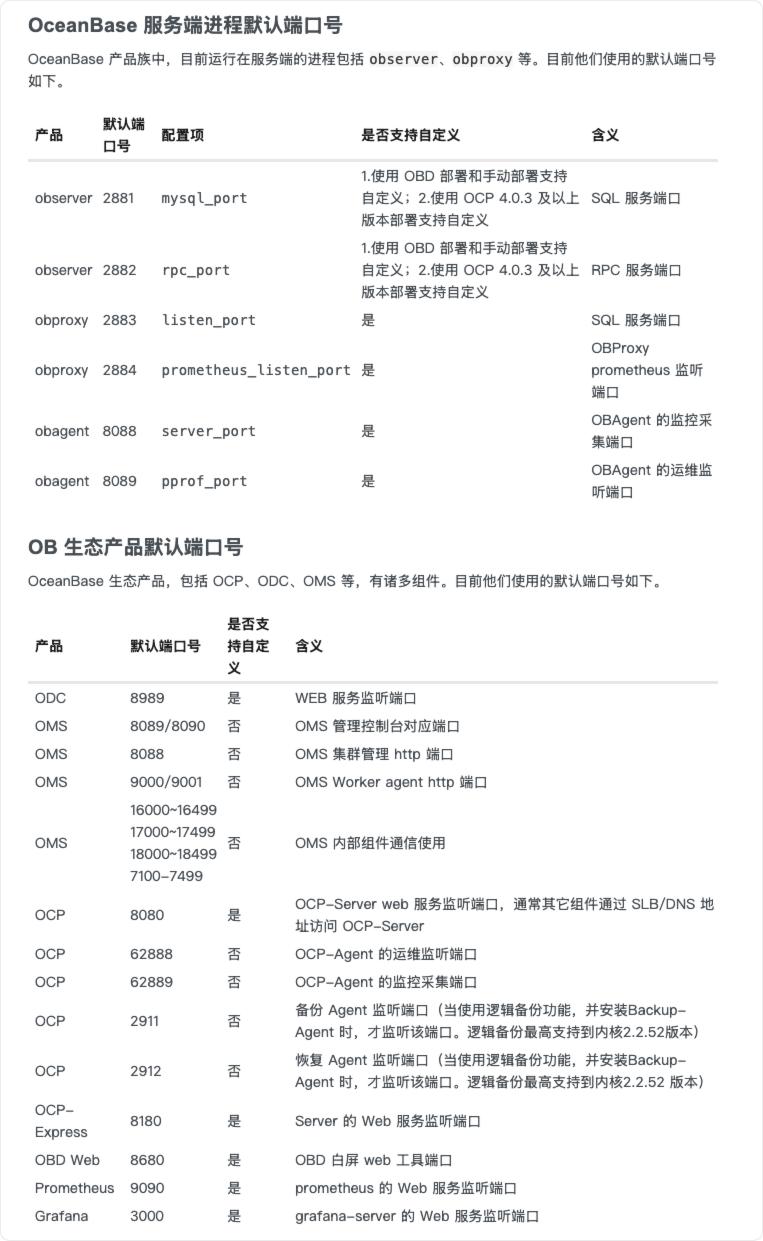
2.4. OceanBase服务及生态产品默认端口号
2.5. 部署OCP
- 前提条件
建议通过下载 OceanBase All in One 进行安装,OceanBase All in One 目前提供部署所需要的全部组件,且组件已经经过相互适配测试,为官方推荐版本。
- 部署所用用户需拥有免密执行 sudo 的权限。
- 已安装 obd V2.4.0 或以上版本,建议安装最新版本。
- 机器至少拥有 8vCPU、26 GB 内存、150 GB 磁盘的可用资源。
- 部署过程默认会使用 2881、2882、2883、2884、2886、8080、8680 端口,需确保对应端口未被占用。
- 待部署 OCP 的机器中已安装 clockdiff 命令。
- 您的机器可以联网,或者 obd 本地镜像库中有部署所需安装包。
- 可执行 obd mirror list local 命令查看本地镜像库中的安装包。若您通过 OceanBase All in One 安装 obd,本地镜像库中默认包含所有部署所需组件的安装包。
- 启动白屏界面
执行obd web命令启动白屏界面,单击输出的地址访问 obd 的图形化操作界面。
[root@CentOS8-02 bin]# obd web
start OBD WEB in 0.0.0.0:8680
please open http://10.211.55.21:8680
白屏界面默认使用 8680 端口,您可使用 obd web -p
命令指定端口。
在阿里云或其他云环境下,可能出现程序无法获取公网 IP,从而输出内网地址的情况,此 IP 非公网地址,您需要使用正确的地址访问白屏界面。
obd web 命令绑定在 0.0.0.0 上,在多网卡部署的情况下,您可通过任意一个可访问的 IP 访问白屏界面。
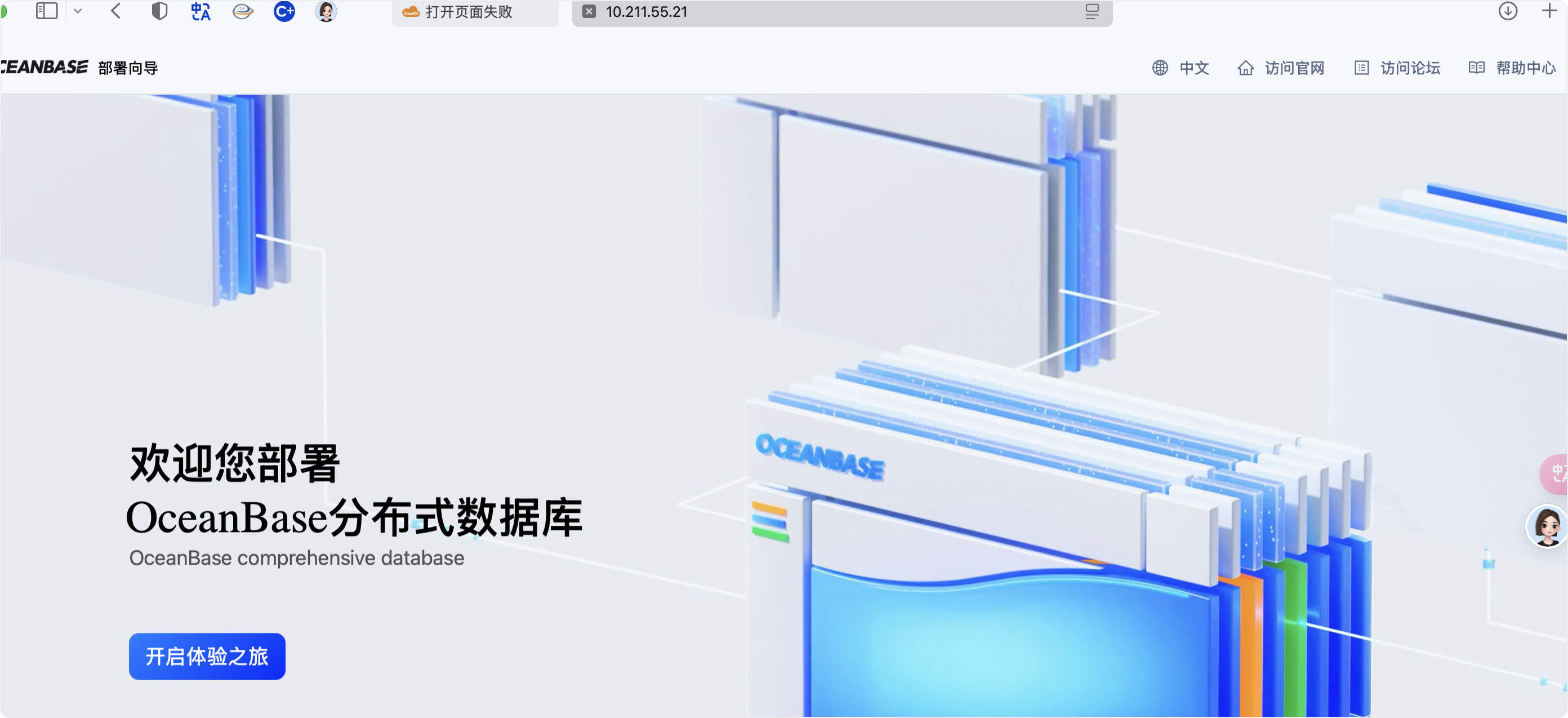
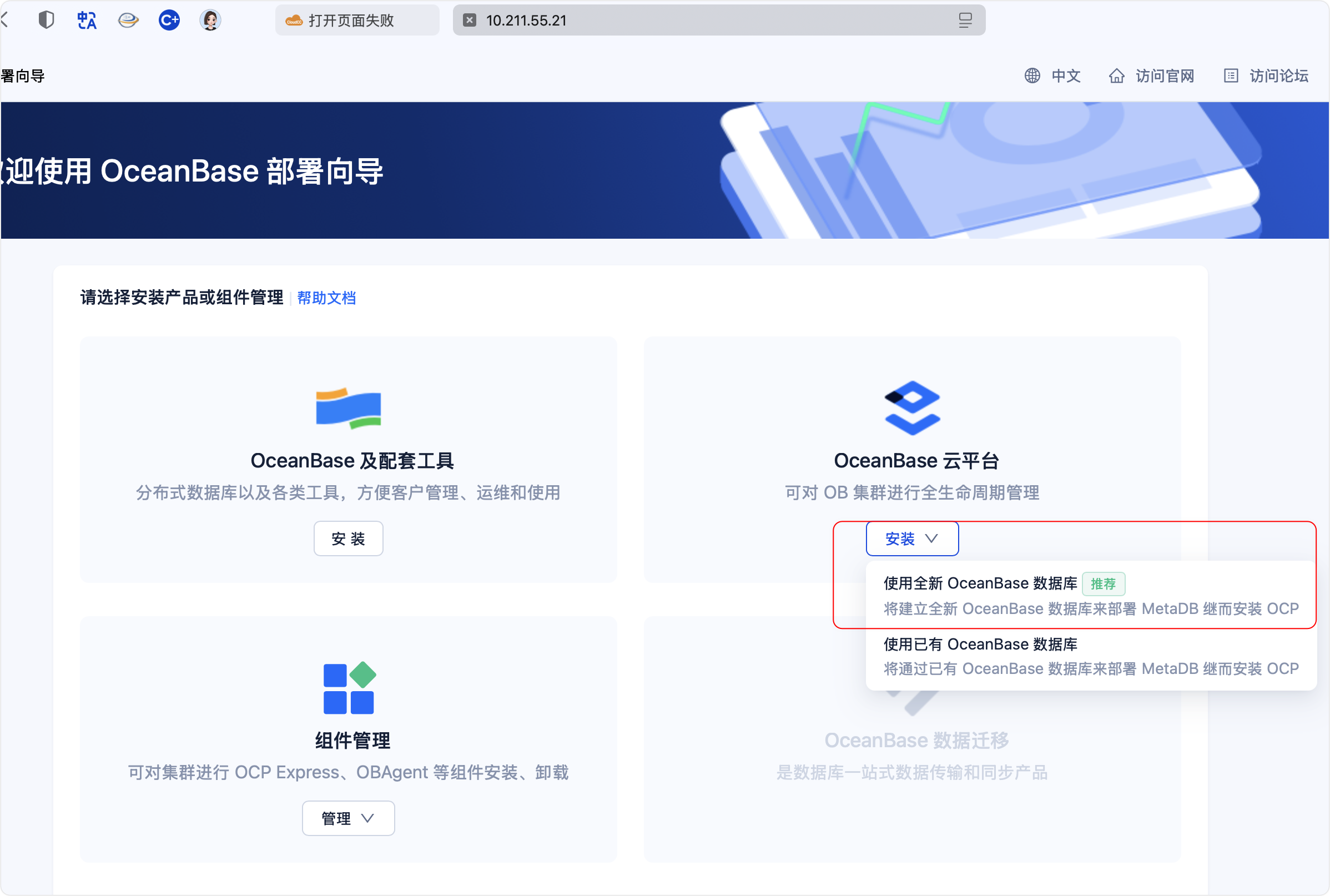
在操作界面中单击 开启体验之旅,在显示的 欢迎使用 OceanBase 部署向导 界面选择 OceanBase 云平台 模块,将鼠标放置在 安装 按钮上,选择 使用全新 OceanBase 数据库 安装方式后进入 欢迎使用 OCP 部署向导 界面。


2.6 MetaDB 配置
- 部署配置
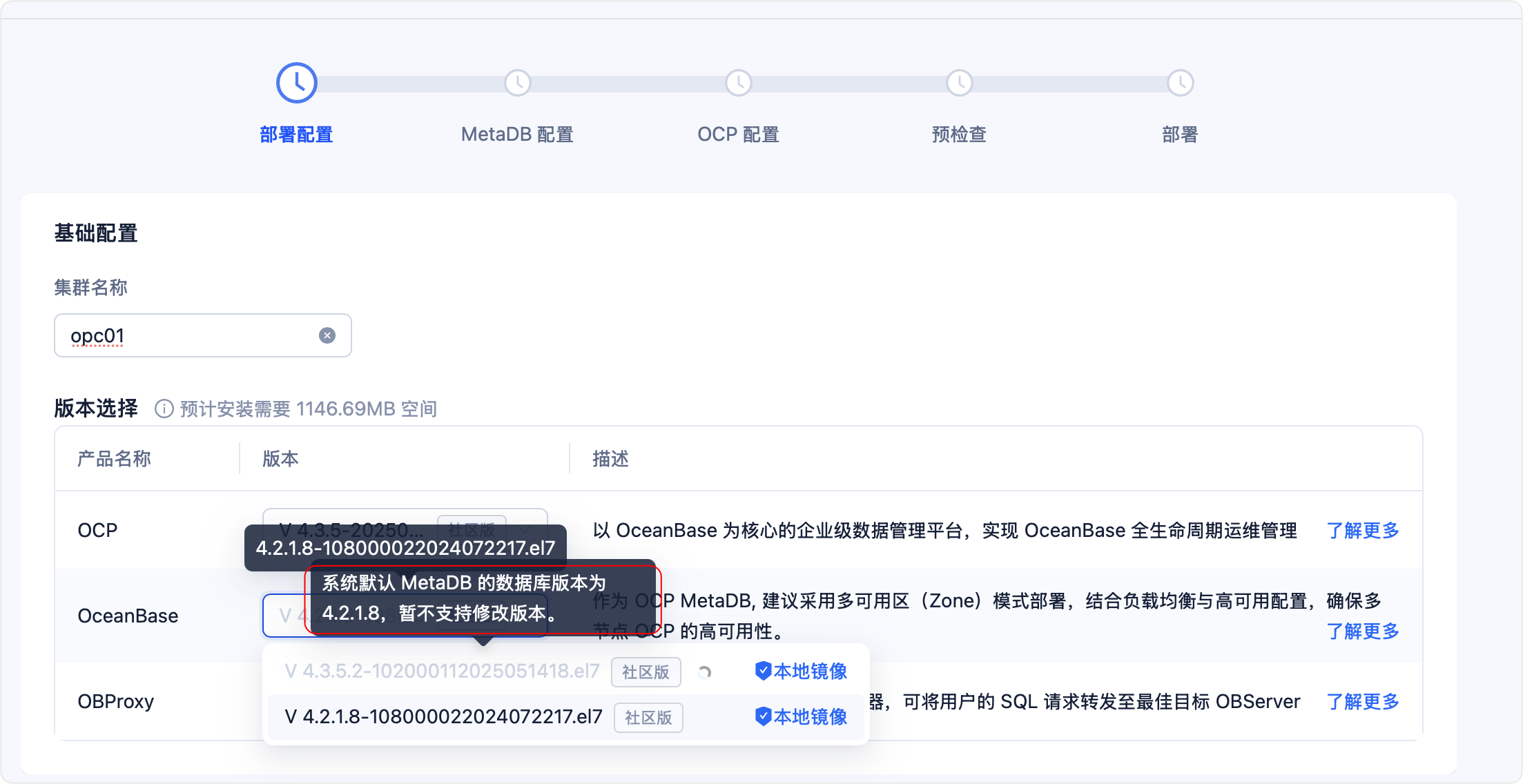
配置 OCP 的集群名称,可自定义,不可与已有集群名称重复(可通过 obd cluster list 命令查看 obd 管理的集群)
部署配置中ocp在v4.3.5版本中默认使用 4.2.18版本作为metaDB 的数据库并且无法修改为其他版本。
[root@CentOS8-02 ~]# obd cluster list
Local deploy is empty
Trace ID: f61e6ebe-0f8f-11f0-8fc3-001c4245e87d
If you want to view detailed obd logs, please run: obd display-trace f61e6ebe-0f8f-11f0-8fc3-001c4245e87d

- 部署用户配置
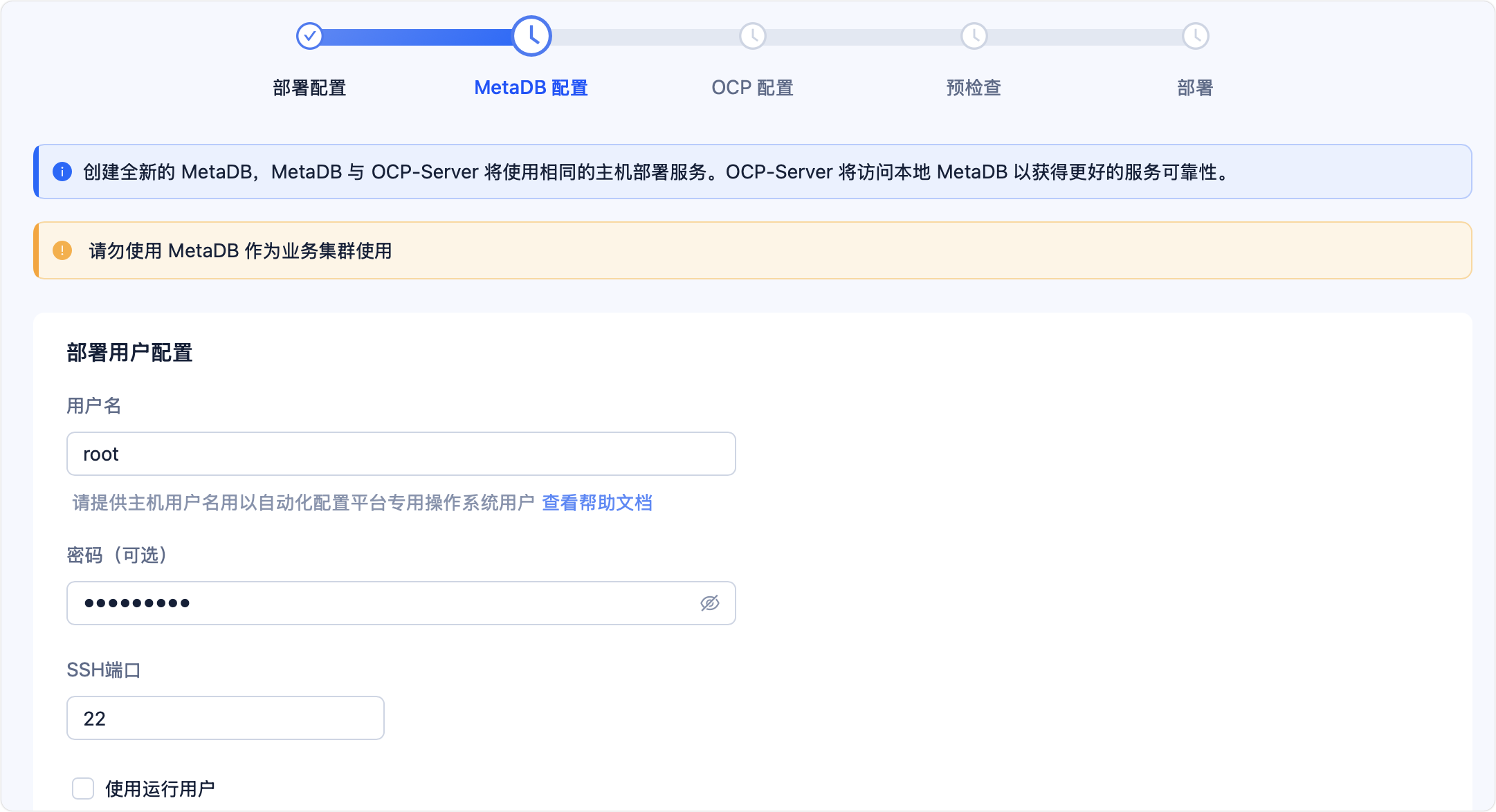
部署用户配置 模块用于配置部署 OCP 的用户信息,界面配置如下图所示。只需配置 用户名 和 密码 即可,配置的用户名必须拥有免密执行 sudo 的权限。若已配置免密登录,可无需输入密码。
- 节点配置
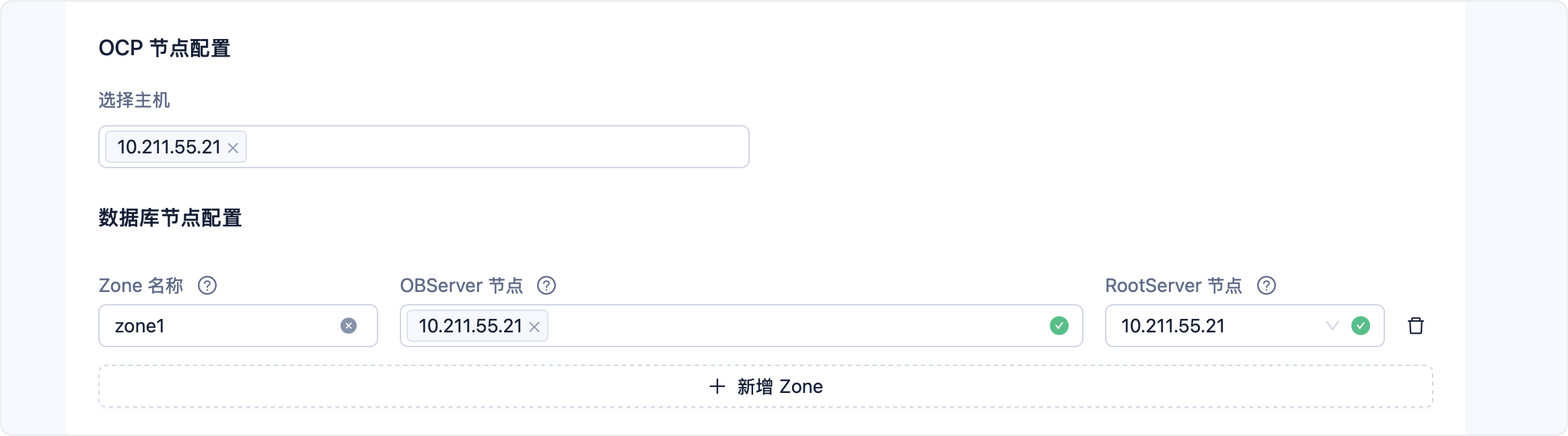
配置 OCP 所在的主机 IP,并在 数据库节点配置 中配置 MetaDB 所在的 OBServer 节点 IP。
需在页面中配置 OCP 和 MetaDB 的节点 IP,IP 不允许配置为 127.0.0.1,输入 IP 后单击键盘 Enter 可配置多个节点 IP;页面中默认会显示三个 Zone 的配置,可单击 + 新增 Zone 或对应 Zone 后的删除图标新增或删除 Zone。
3. 集群配置
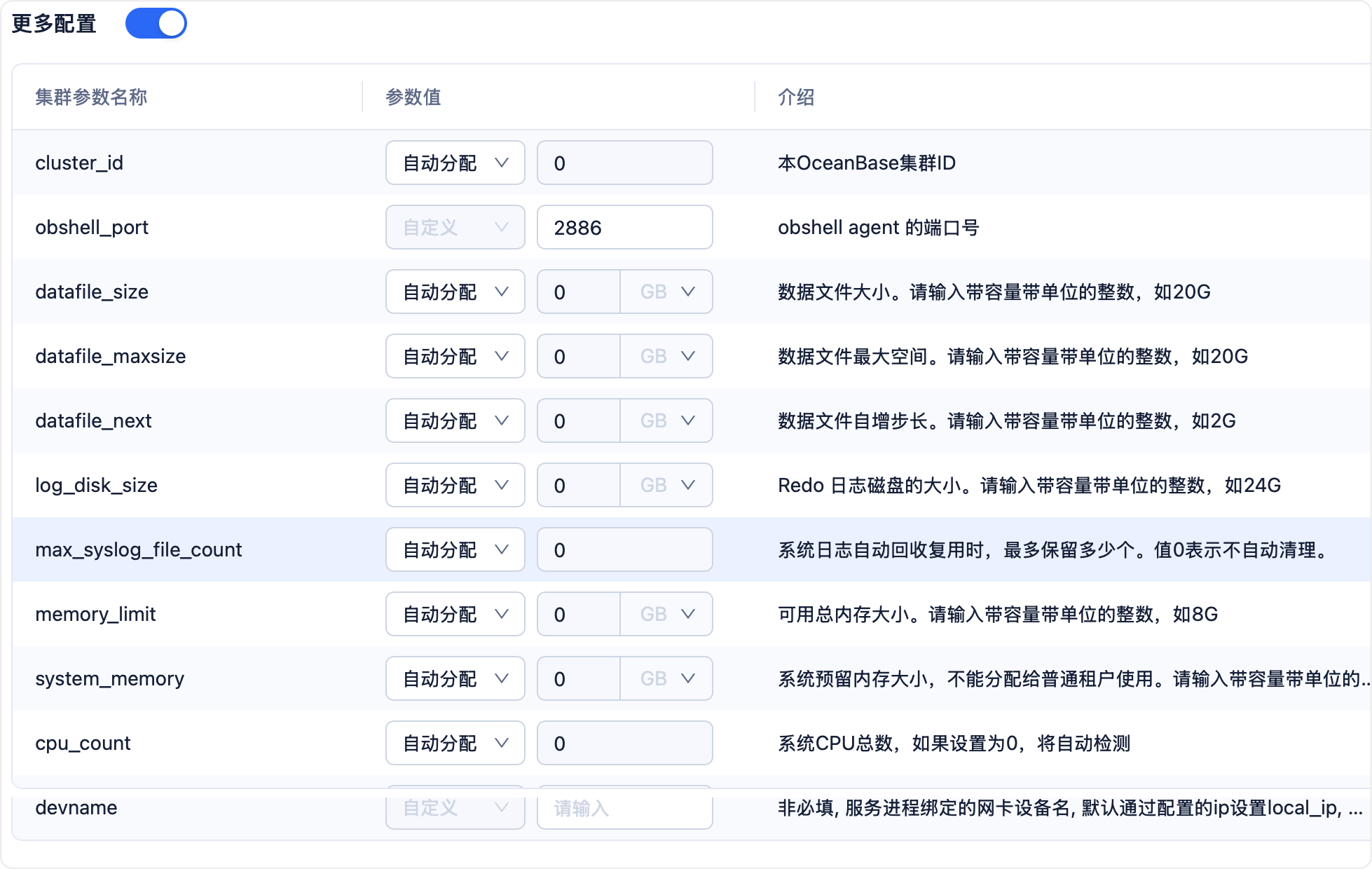
配置 MetaDB 数据库的 root@sys 密码、目录、端口等信息。
单击 随机生成 将 root@sys 密码设置为由 obd 生成的随机字符串;页面中会提供默认路径,支持自定义配置各个路径,需为以 / 开头的绝对路径,并保证目录为空且拥有对应目录的读写权限。
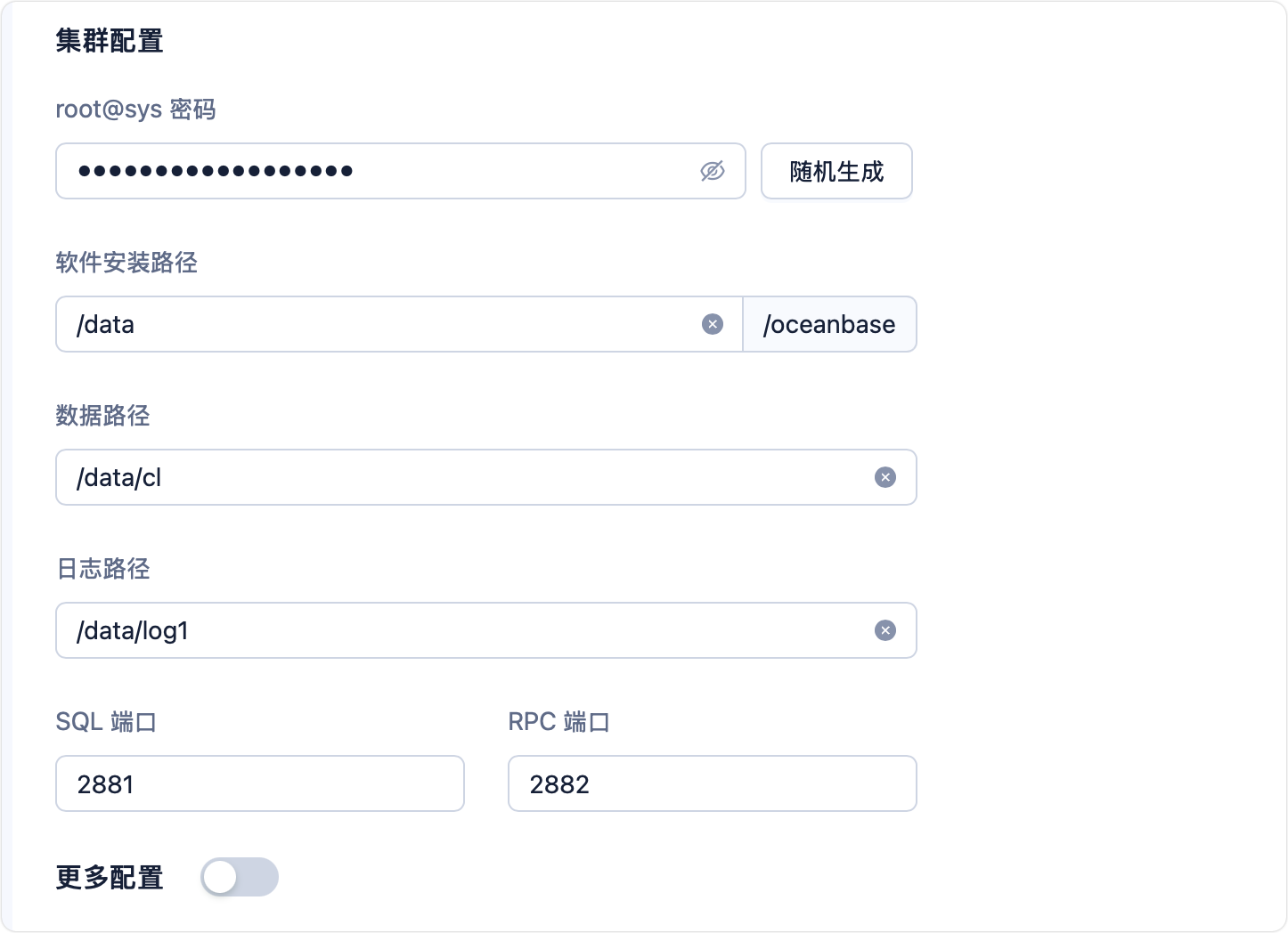
更多配置可配置集群参数

- OBProxy 配置
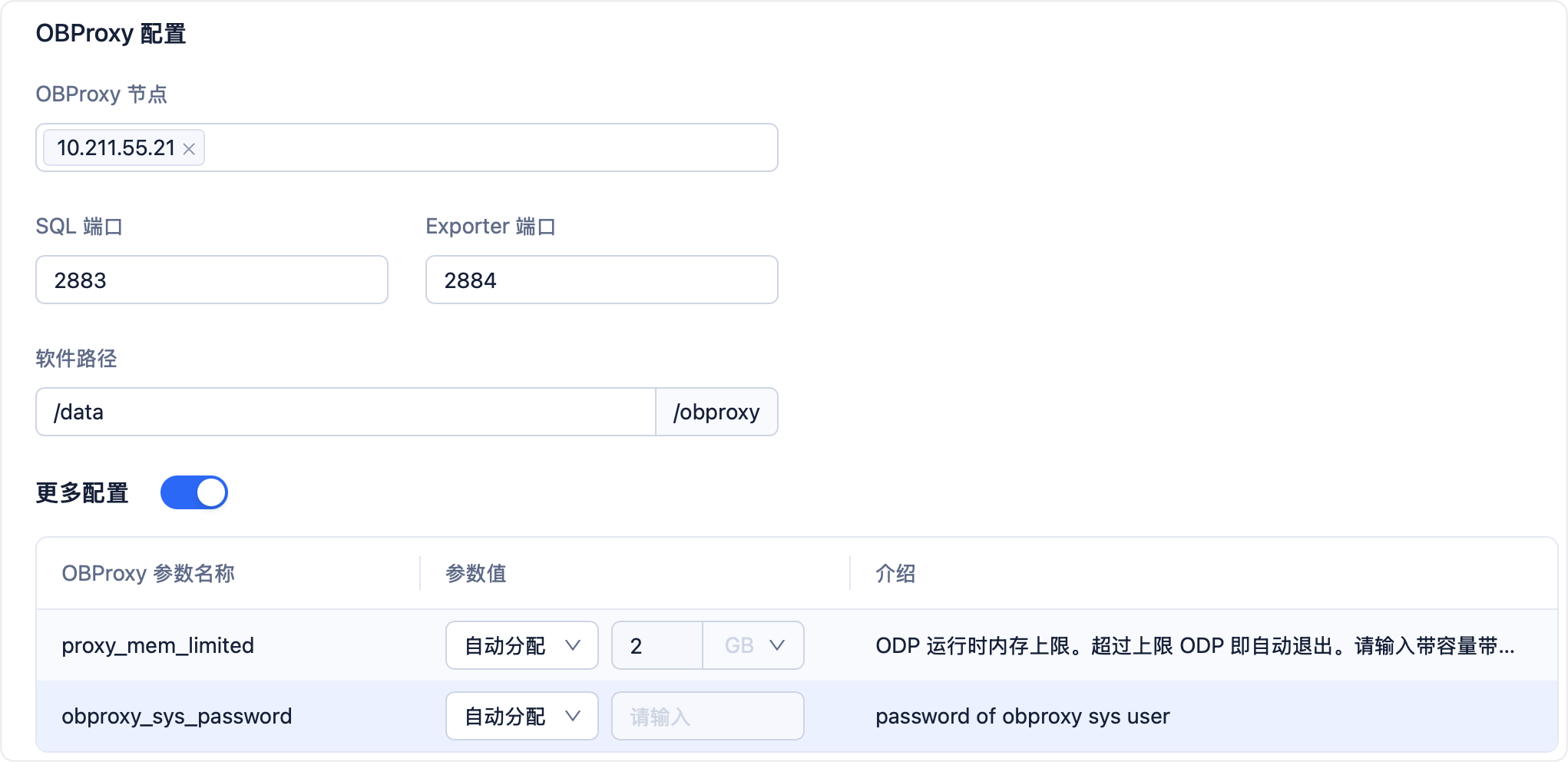
配置 OBProxy 的节点、端口和路径等信息,界面如下图所示。仅支持为 OBProxy 节点 配置一个 IP;默认在部署用户的家目录下创建 obproxy 目录充当 OBProxy 的软件路径,可自定义修改,需为以 / 开头的绝对路径,并保证您需拥有对应目录的读写权限

2.7 OCP 配置
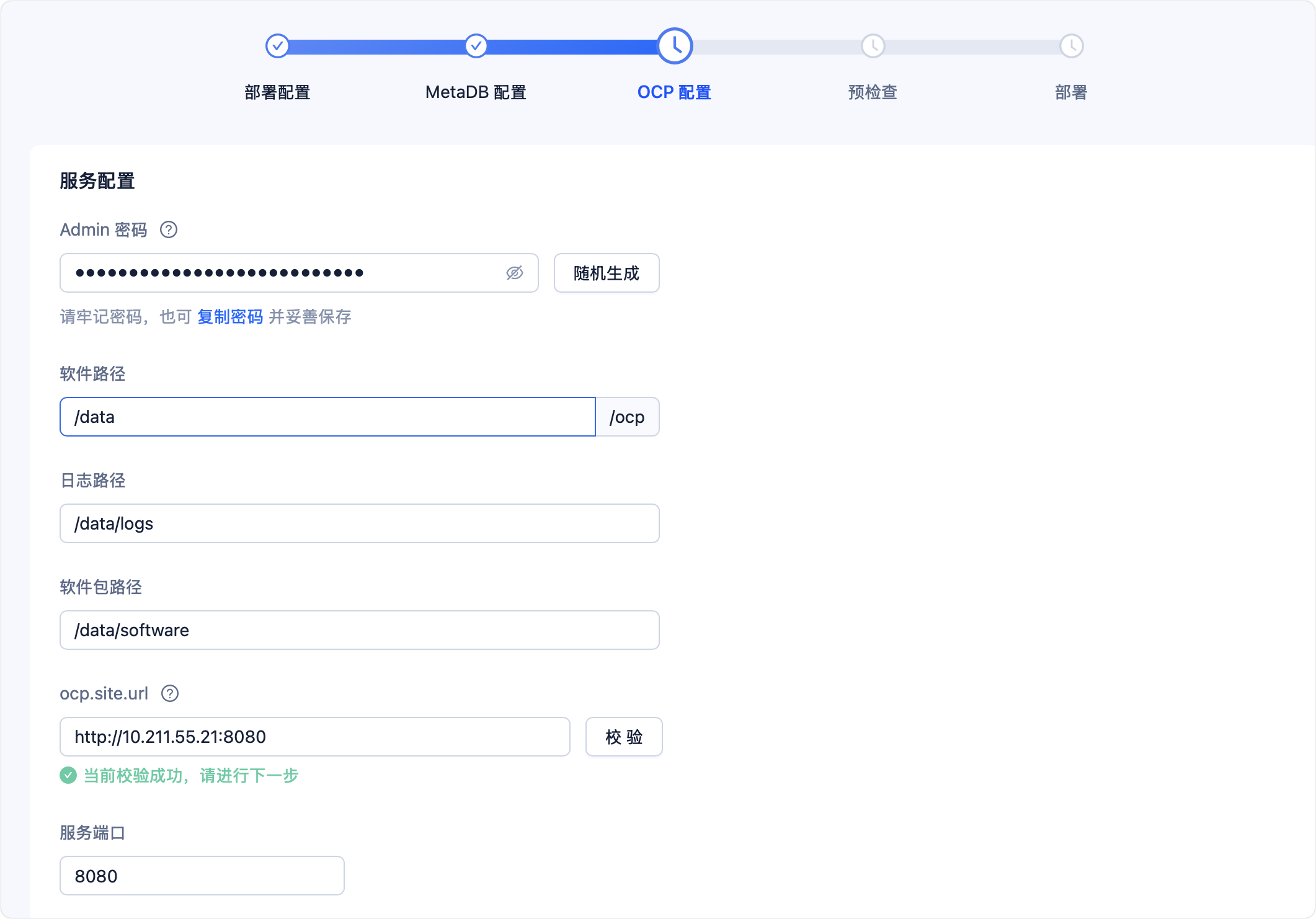
- 服务配置
配置 OCP 的登录密码、路径、URL 及端口,界面如下图所示。可以使用 随机生成 将 Admin 密码设置为由 obd 生成的随机字符串;页面中会提供默认路径,支持自定义配置各个路径,需为以 / 开头的绝对路径,并保证目录为空且拥有对应目录的读写权限。
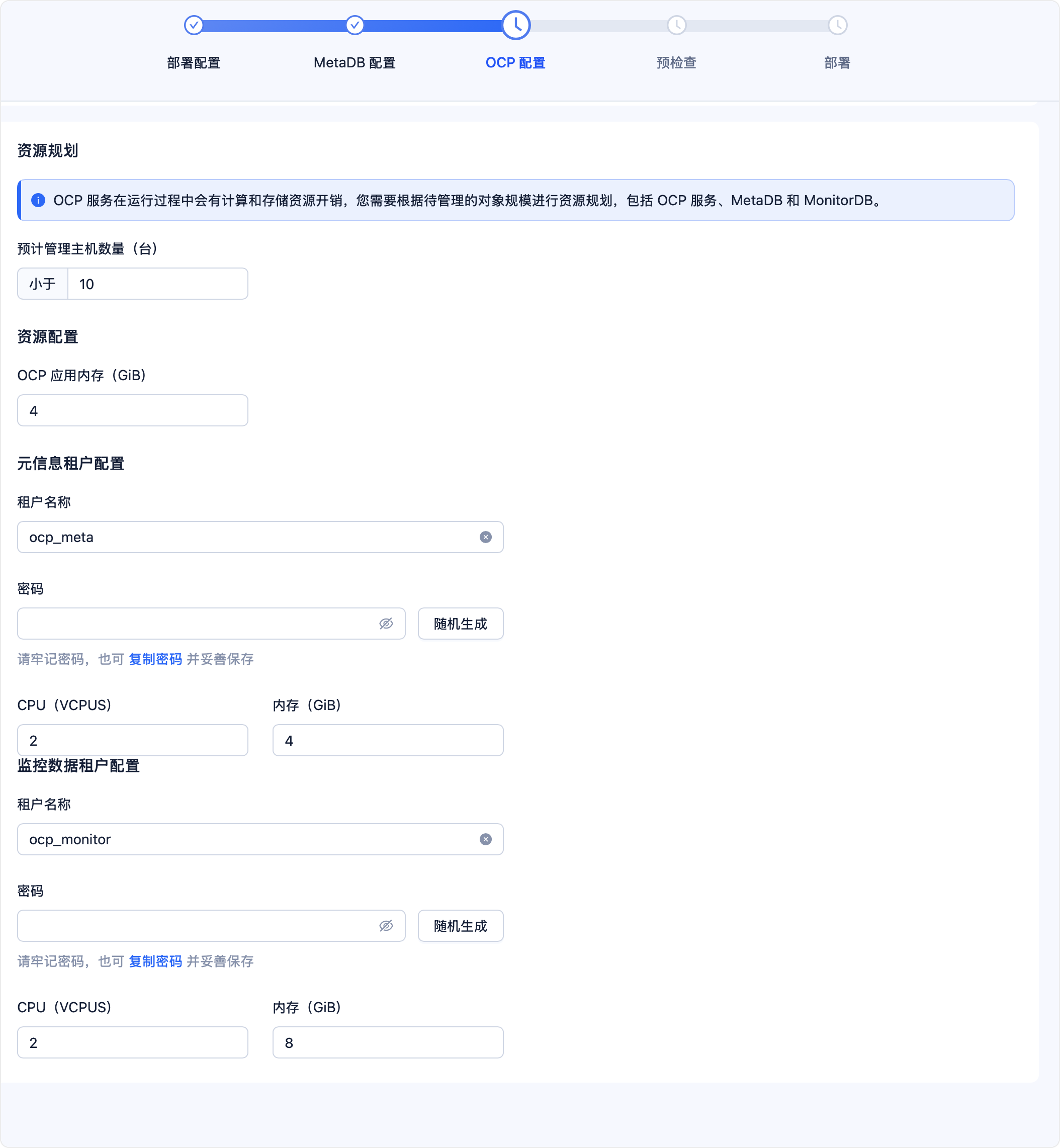
- 资源规划
2.8 预检查
选择预检查,进行当前安装环境验证。如果不满足,则会给出相应的提示
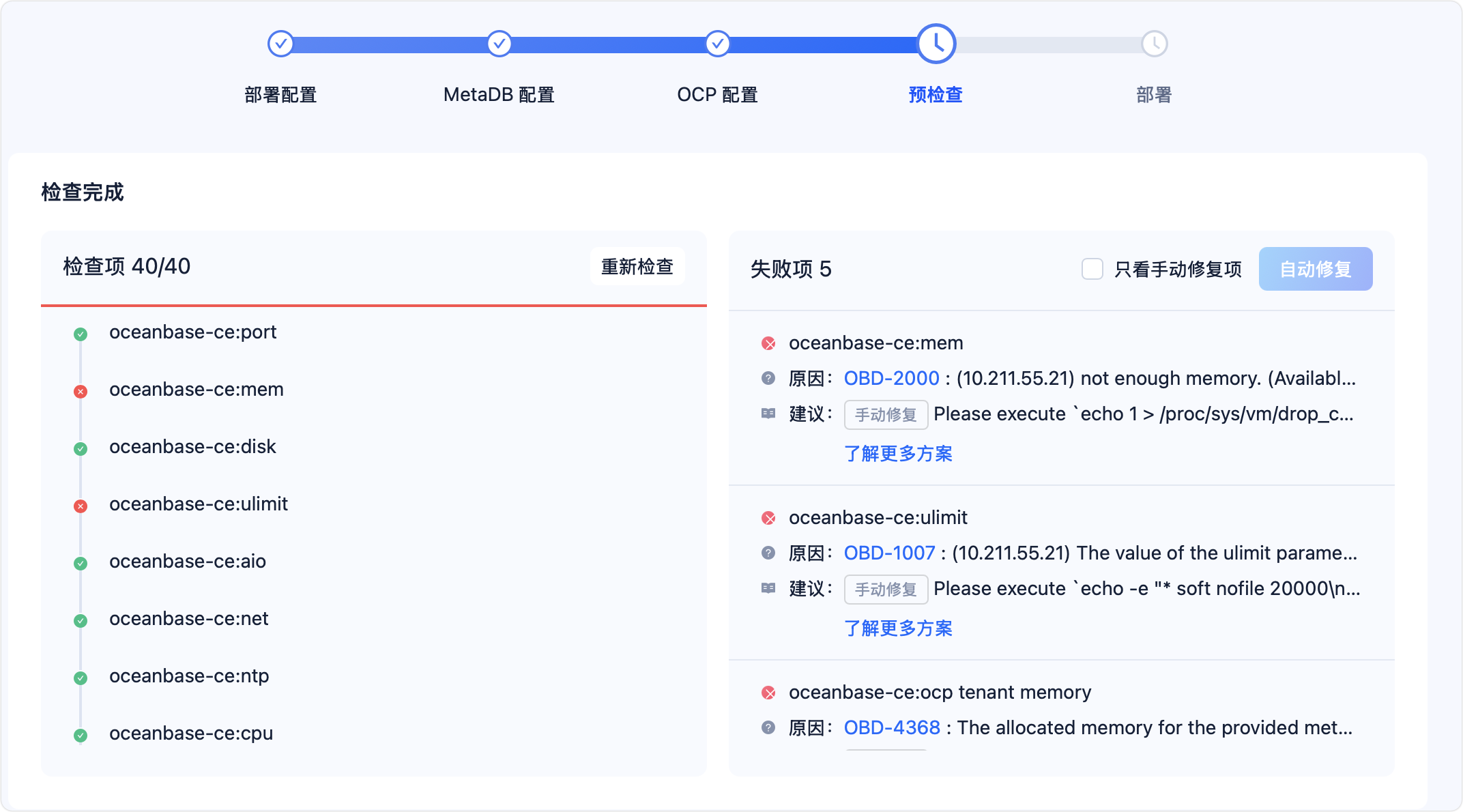

进行修复:
[root@CentOS8-02 ~]# echo 1 > /proc/sys/vm/drop_caches
[root@CentOS8-02 ~]# echo -e "* soft nofile 20000\n* hard nofile 20000" >> /etc/security/limits.d/nofile.conf

useradd -U oceanbase -d /home/oceanbase -s /bin/bash
mkdir -p /home/oceanbase
sudo chown -R oceanbase:oceanbase /home/oceanbase
2.9 部署集群
因为虚拟机内存不足,需要关机扩内存;在关机后web界面无法打开,使用命令进行处理
## 查看集群,处于configured状态
[root@CentOS8-02 ~]# obd cluster list
+----------------------------------------------------+
|                    Cluster List                    |
+-------+--------------------------+-----------------+
| Name  | Configuration Path       | Status (Cached) |
+-------+--------------------------+-----------------+
| ocp01 | /root/.obd/cluster/ocp01 | configured      |
+-------+--------------------------+-----------------+
Trace ID: 03c254f6-36e4-11f0-8765-001c4245e87d
If you want to view detailed obd logs, please run: obd display-trace 03c254f6-36e4-11f0-8765-001c4245e87d
[root@CentOS8-02 ~]#
[root@CentOS8-02 log]# obd cluster deploy ocp01 -f
+---------------------------------------------------------------------------------------------+
|                                           Packages                                          |
+---------------+---------+------------------------+------------------------------------------+
| Repository    | Version | Release                | Md5                                      |
+---------------+---------+------------------------+------------------------------------------+
| oceanbase-ce  | 4.2.1.8 | 108000022024072217.el7 | 4285dbe242f497b8655c9b901f60c2848d555f52 |
| obproxy-ce    | 4.3.4.0 | 1.el7                  | d5b7a5efed99a56be6e141b5c33c8049590b9b85 |
| ocp-server-ce | 4.3.5   | 20250319105844.el7     | 5c670871a262a5c95649ca8e2ad4b237e2a8aa43 |
+---------------+---------+------------------------+------------------------------------------+
Repository integrity check ok
Load param plugin ok
Open ssh connection ok
Generate ocp server configuration ok
Initializes observer work home ok
Initializes obproxy work home ok
Initializes ocp-server-ce work home ok
Parameter check ok
Remote oceanbase-ce-4.2.1.8-108000022024072217.el7-4285dbe242f497b8655c9b901f60c2848d555f52 repository install ok
Remote oceanbase-ce-4.2.1.8-108000022024072217.el7-4285dbe242f497b8655c9b901f60c2848d555f52 repository lib check !!
Remote obproxy-ce-4.3.4.0-1.el7-d5b7a5efed99a56be6e141b5c33c8049590b9b85 repository install ok
Remote obproxy-ce-4.3.4.0-1.el7-d5b7a5efed99a56be6e141b5c33c8049590b9b85 repository lib check ok
Remote ocp-server-ce-4.3.5-20250319105844.el7-5c670871a262a5c95649ca8e2ad4b237e2a8aa43 repository install ok
Remote ocp-server-ce-4.3.5-20250319105844.el7-5c670871a262a5c95649ca8e2ad4b237e2a8aa43 repository lib check !!
Try to get lib-repository
Remote oceanbase-ce-libs-4.2.1.8-108000022024072217.el7-26012432a483162c581755dd0a865bbd1fb3a547 repository install ok
Remote oceanbase-ce-4.2.1.8-108000022024072217.el7-4285dbe242f497b8655c9b901f60c2848d555f52 repository lib check ok
Remote openjdk-jre-1.8.0_322-b09.el7-664b8eaeca384810f407b3925be853a0c6523b92 repository install ok
Remote ocp-server-ce-4.3.5-20250319105844.el7-5c670871a262a5c95649ca8e2ad4b237e2a8aa43 repository lib check ok
ocp01 deployed
Please execute ` obd cluster start ocp01 ` to start
Trace ID: 8fdb59e0-36eb-11f0-a7db-001c4245e87d
If you want to view detailed obd logs, please run: obd display-trace 8fdb59e0-36eb-11f0-a7db-001c4245e87d
[root@CentOS8-02 log]#
[root@CentOS8-02 log]# obd cluster list
+----------------------------------------------------+
|                    Cluster List                    |
+-------+--------------------------+-----------------+
| Name  | Configuration Path       | Status (Cached) |
+-------+--------------------------+-----------------+
| ocp01 | /root/.obd/cluster/ocp01 | deployed        |
+-------+--------------------------+-----------------+
Trace ID: 401a1062-36ec-11f0-942a-001c4245e87d
If you want to view detailed obd logs, please run: obd display-trace 401a1062-36ec-11f0-942a-001c4245e87d
[root@CentOS8-02 log]#
[root@CentOS8-02 log]# obd cluster start ocp01
Get local repositories ok
Load cluster param plugin ok
Open ssh connection ok
[WARN] OBD-1011: (10.211.55.21) The recommended value of fs.aio-max-nr is 1048576 (Current value: 65536)
[WARN] OBD-1007: (10.211.55.21) The recommended number of open files is 655350 (Current value: 20000)
[WARN] OBD-1007: (10.211.55.21) The recommended number of stack size is unlimited (Current value: 8192)
[WARN] OBD-1017: (10.211.55.21) The value of the "vm.max_map_count" must be within [327600, 1310720] (Current value: 65530, Recommended value: 655360)
[WARN] OBD-1017: (10.211.55.21) The value of the "vm.min_free_kbytes" must be within [32768, 2097152] (Current value: 9300, Recommended value: 2097152)
[WARN] OBD-1017: (10.211.55.21) The value of the "fs.file-max" must be greater than 6573688 (Current value: 533799, Recommended value: 6573688)
[ERROR] OBD-2000: (10.211.55.21) not enough memory. (Free: 51M, Buff/Cache: 4G, Need: 6G), Please reduce the `memory_limit` or `memory_limit_percentage`
[WARN] OBD-1012: (10.211.55.21) clog and data use the same disk (/)
[ERROR] OBD-4368: The allocated memory for the provided meta database is currently insufficient for creating a tenant. Available: 3G, Need: 12G(Available = memory_limit [6G] - system_memory [1G] - sys tenant memory [2G]. Need = ocp meta tenant memory [4G] + ocp_monitor_tenant_memory [8G])., Please increase the meta db memory_limit and reduce the ocp meta tenant memory or ocp monitor tenant memory
You can use the `obd cluster init4env ocp01` command to automatically configure system parameters
See https://www.oceanbase.com/product/ob-deployer/error-codes .
Trace ID: 4cea61de-36ec-11f0-8146-001c4245e87d
If you want to view detailed obd logs, please run: obd display-trace 4cea61de-36ec-11f0-8146-001c4245e87d
[root@CentOS8-02 log]#
安装成功,但因为内存不足还需要再扩充到12G以上才能使用全部的功能;使用的内存比较多,在本地环境比较难以进行安装测试,大家还是需要注意下内存的使用情况。
测试环境暂时实在无法扩容到这么大的内存,本次安装测试暂告一段落。集群启动及后续使用在扩充了内存后再进行测试。
2.10 查看集群状态
obd 中注册的集群状态有如下几种。
- configured:已配置,表示 obd 中已包含该集群的配置文件,但该集群还未部署,此时可执行 obd cluster deploy 命令部署该集群。
- deployed:已部署,表示该集群已部署,但是还未启动,此时可执行 obd cluster start 命令启动该集群。
- running:运行中,表示集群正在运行中。
- stopped:已停止,表示集群中有组件已被停止,此时可执行 obd cluster start 命令启动该集群。
- upgrading:升级中,表示集群中有组件处于升级中。
- destroyed:已销毁,表示该集群已被销毁。
