



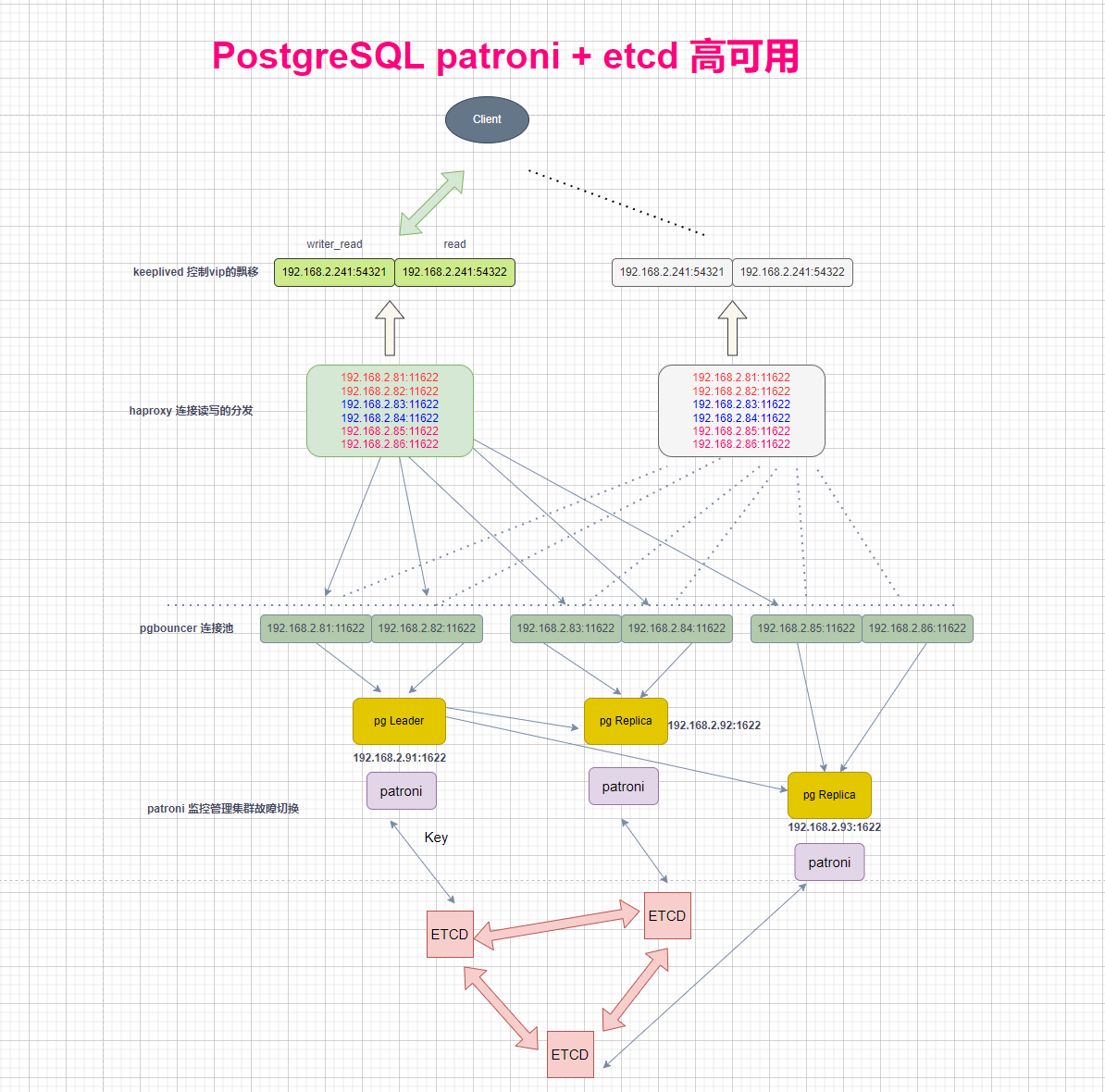
Patroni 是一个用于管理 PostgreSQL 高可用集群的开源工具,而 etcd 是一个分布式键值存储系统,用于存储集群状态和配置信息。结合使用 Patroni 和 etcd 可以实现 PostgreSQL 的自动故障转移、集群管理和高可用性。以下是关于 Patroni + etcd 的详细介绍:
- Patroni 和 etcd 的作用
Patroni:负责管理 PostgreSQL 实例的启动、停止、故障转移和主从切换。它通过定期向 etcd 发送心跳信息来维护集群状态。
etcd:作为分布式配置存储(DCS),存储集群的元数据、健康状态和主从信息。Patroni 通过 etcd 实现集群的一致性和协调。 - 核心功能
自动故障转移:当主节点故障时,Patroni 会自动从备节点中选举新的主节点,并更新 etcd 中的状态。
集群管理:Patroni 通过 etcd 监控集群状态,确保主从同步和数据一致性。
防止脑裂:Patroni 支持通过 watchdog 机制防止脑裂,确保集群的稳定性。
国产数据库 瀚高、高斯都是基于此架构,这不得学习一手啊!
0、准备环境
| 系统 | 配置 | IP | 主 机名 | 部署内容 |
|---|---|---|---|---|
| 银河麒麟V10 SP3 | 2C 4G | 192.168.2.91 | node01 | PostgresSQL+patroni+etcd |
| 银河麒麟V10 SP3 | 2C 4G | 192.168.2.92 | node01 | PostgresSQL+patroni+etcd |
| 银河麒麟V10 SP3 | 2C 4G | 192.168.2.93 | node01 | PostgresSQL+patroni+etcd |
主机名
hostnamectl set-hostname node01
hostnamectl set-hostname node02
hostnamectl set-hostname node03
1、postgresql 安装
安装编译所需 rpm 包
dnf install -y libicu-devel zlib-devel readline readline-devel \
perl-ExtUtils-Embed perl-ExtUtils-MakeMaker pam-devel \
openssl-devel openldap-devel libxml2-devel libxslt-devel \
systemd-devel tcl-devel gcc net-tools python python-devel

yum install python-devel -y
yum install python34-devel -y
yum -y install systemd-devel
yum install pam-devel -y
yum install -y python*
yum install -y perl*
yum install -y Utils*
yum install -y openldap-devel
yum -y install libxml2
yum -y install libxml2-dev
yum -y install libxslt-devel
系统相关参数
cp /etc/sysctl.conf /etc/sysctl.conf.bak
cat >> /etc/sysctl.conf  << "EOF"
fs.aio-max-nr = 2097152
fs.file-max = 76724600
fs.nr_open = 20480000
vm.swappiness = 1
vm.min_free_kbytes = 204800
vm.overcommit_memory = 0
vm.overcommit_ratio = 90
vm.dirty_background_bytes = 409600000
vm.dirty_expire_centisecs = 3000
vm.dirty_ratio = 95
vm.dirty_writeback_centisecs = 100
vm.mmap_min_addr = 65536
vm.zone_reclaim_mode = 2
vm.nr_hugepages = 750
kernel.sem = 4096 2048000 200 32768
kernel.shmmax = 4012843008                 #设置内存一半 33554432
kernel.shmall = 979698                     #kernel.shmmax / 4096
kernel.shmmni = 16384
kernel.numa_balancing = 0
net.ipv4.ip_forward = 1
net.ipv4.ip_nonlocal_bind = 1
net.netfilter.nf_conntrack_max = 1048576
net.ipv4.ip_local_port_range = 40000 65535
net.ipv4.tcp_max_tw_buckets = 62144
net.core.somaxconn = 16384
net.ipv4.tcp_max_syn_backlog = 8198
net.core.betdev_max_hackloq = 1000
net.ipv4.tcp_rmem = 8192 65536 1677216
net.ipv4.tcp_wmem = 8192 65536 1677216
net.ipv4.tcp_mem = 8388608 12582912 1677216
net.core.rmem_default = 262144
het.core.rmem_max = 4194304
net.core.wmem_default = 262144
net.core.wmem_max = 4194304
net.ipv4.tcp_keepalive_intvl = 20
net.ipv4.tcp_keepalive_probes = 3
net.ipv4.tcp_keepalive_time = 60
net.ipv4.tcp_tw_reuse = 1
net.ipv4.tcp_fin_timeout = 5
net.ipv4.tcp_timestamps = 1
net.ipv4.tcp_max_syn_backlog = 4096
net.ipv4.tcp_syncookies = 1
net.ipv4.tcp_synack_retries = 2
net.ipv4.tcp_syn_retries = 1
EOF
sysctl -p

cat > /etc/security/limits.d/postgresql.conf << "EOF"
postgres    soft    nproc       655360
postgres    hard    nproc       655360
postgres    hard    nofile      655360
postgres    soft    nofile      655360
postgres    soft    stack       unlimited
postgres    hard    stack       unlimited
postgres    soft    core        unlimited
postgres    hard    core        unlimited
postgres    soft    memlock     250000000
postgres    hard    memlock     250000000
EOF

#reboot
关闭防火墙和 SeLinux
cp /etc/selinux/config /etc/selinux/config_`date +"%Y%m%d_%H%M%S"`&& sed -i 's/SELINUX\=enforcing/SELINUX\=disabled/g' /etc/selinux/config
systemctl stop firewalld
systemctl disable firewalld
systemctl status firewalld
创建用户密码
groupadd -g 60000 postgres
useradd -u 60000 -g postgres postgres
passwd postgres
解压、创建目录
su - postgres
tar -xvf /soft/postgresql-15.12.tar.gz  -C /home/postgres

mkdir -p /home/postgres/app/postgresql
mkdir -p /home/postgres/pgdata
mkdir -p /home/postgres/archive
mkdir -p /home/postgres/log
配置 configure
--block size. Allowed values are 1,2,4,8,16,32

cd postgresql-15.12/
./configure --prefix=/home/postgres/app/postgresql \
--with-icu \
--with-perl \
--with-tcl \
--with-tclconfig=/usr/lib64 \
--with-openssl \
--with-includes=/usr/include/openssl \
--with-readline \
--with-pam \
--with-gssapi \
--with-libraries=/usr/lib64 \
--enable-nls \
--with-libxml \
--with-libxslt \
--with-ldap \
--with-selinux \
--with-systemd \
--with-system-tzdata=/usr/share/zoneinfo \
--with-blocksize=32 \
--with-wal-blocksize=32
编译安装
gmake world -j8 && gmake install-world -j8

其它扩展模板安装:
cd /home/postgres/postgresql-15.12/contrib/
make -j 16 && make install
环境变量
vim /home/postgres/.bash_profile

# for PostgreSQL
export PGPORT=1622
export PGDATA=/home/postgres/pgdata
export PGHOME=/home/postgres/app/postgresql
export PGHOST=
export LANG='en_US.UTF-8'
export PS1="\[\e[1;32m\][\[\e[0m\]\[\e[1;33m\]\u\[\e[36m\]@\h\[\e[1;31m\] \W\[\e[1;32m\]]\[\e[0m\]\$"
export LANG=en_US.UTF-8
#export PS1="[\u@\h \W]\$ "
export LD_LIBRARY_PATH=$PGHOME/lib:/lib64:/usr/lib64:/usr/local/lib64:/lib:/usr/lib:/usr/local/lib:$LD_LIBRARY_PATH
export PATH=$PGHOME/bin:$PATH:.
export DATE=`date +"%Y%m%d%H%M"`
export MANPATH=$PGHOME/share/man:$MANPATH
export PGHOST=$PGDATA
export PGUSER=postgres
export PGDATABASE=postgres

source /home/postgres/.bash_profile
初始化
/home/postgres/app/postgresql/bin/initdb -D $PGDATA -E UTF8 --locale=C --lc-collate=C --lc-ctype=en_US.UTF-8 -U postgres
cp /home/postgres/pgdata/pg_hba.conf /home/postgres/pgdata/pg_hba.confbak
cat >> /home/postgres/pgdata/pg_hba.conf << EOF
host      all          all             0.0.0.0/0               md5
EOF
修改密码
pg_ctl start
ALTER USER postgres WITH PASSWORD 'Corhwl5cksHt';
配置复制账户
create role repuser login encrypted password 'ZMUFz5cksHt' replication;

host   replication   repuser     0.0.0.0/0      scram-sha-256
配置流复制
pg_basebackup -h 10.10.0.91 -p 1622 -U repuser -W -X stream -F p -P -R -D /home/postgres/pgdata -l backup20250207
并不需要重启主库,只需要重新装载配置即可
pg_ctl reload
psql -c "select application_name,client_addr,sync_state from pg_stat_replication;"
2、etcd
etcd 官方文档:
下载 etcd 二进制文件
https://github.com/etcd-io/etcd/releases/tag/v3.5.4
https://github.com/etcd-io/etcd/releases
su - postgres

mkdir -p /home/postgres/app/
tar -zxvf /soft/etcd-v3.5.19-linux-arm64.tar.gz -C /home/postgres/app/
cd /home/postgres/app/
mv etcd-v3.5.19-linux-arm64 etcd
chmod 775 -R /home/postgres/app/etcd

sed -i "s;:\$PATH:;:/home/postgres/app/etcd:\$PATH:;g" /home/postgres/.bash_profile
source /home/postgres/.bash_profile
etcdctl v

192.168.2.91 机器etcd 配置
cat > /home/postgres/app/etcd/etcd.config.yml << EOF
name: 'etcd01'
data-dir: '/home/postgres/app/etcd/data'
wal-dir: '/home/postgres/app/etcd/wal'
snapshot-count: 5000
heartbeat-interval: 100
election-timeout: 1000
quota-backend-bytes: 0
listen-peer-urls: 'http://192.168.2.91:2380'
listen-client-urls: 'http://192.168.2.91:2379,http://127.0.0.1:2379'
max-snapshots: 3
max-wals: 5
Cors:
initial-advertise-peer-urls: 'http://192.168.2.91:2380'
advertise-client-urls: 'http://192.168.2.91:2379'
discovery:
discovery-fallback: 'proxy'
discovery-proxy:
discovery-srv:
initial-cluster: 'etcd01=http://192.168.2.91:2380,etcd02=http://192.168.2.92:2380,etcd03=http://192.168.2.93:2380'
initial-cluster-token: 'etcd-cluster'
initial-cluster-state: 'new'
strict-reconfig-check: false
enable-v2: true
enable-pprof: true
proxy: 'off'
proxy-failure-wait: 5000
proxy-refresh-interval: 30000
proxy-dial-timeout: 1000
proxy-write-timeout: 5000
proxy-read-timeout: 0
debug: false
log-package-levels:
log-outputs: [default]
force-new-cluster: false
EOF
192.168.2.92 机器etcd 配置
cat > /home/postgres/app/etcd/etcd.config.yml << EOF
name: 'etcd02'
data-dir: '/home/postgres/app/etcd/data'
wal-dir: '/home/postgres/app/etcd/wal'
snapshot-count: 5000
heartbeat-interval: 100
election-timeout: 1000
quota-backend-bytes: 0
listen-peer-urls: 'http://192.168.2.92:2380'
listen-client-urls: 'http://192.168.2.92:2379,http://127.0.0.1:2379'
max-snapshots: 3
max-wals: 5
Cors:
initial-advertise-peer-urls: 'http://192.168.2.92:2380'
advertise-client-urls: 'http://192.168.2.92:2379'
discovery:
discovery-fallback: 'proxy'
discovery-proxy:
discovery-srv:
initial-cluster: 'etcd01=http://192.168.2.91:2380,etcd02=http://192.168.2.92:2380,etcd03=http://192.168.2.93:2380'
initial-cluster-token: 'etcd-cluster'
initial-cluster-state: 'new'
strict-reconfig-check: false
enable-v2: true
enable-pprof: true
proxy: 'off'
proxy-failure-wait: 5000
proxy-refresh-interval: 30000
proxy-dial-timeout: 1000
proxy-write-timeout: 5000
proxy-read-timeout: 0
debug: false
log-package-levels:
log-outputs: [default]
force-new-cluster: false
EOF
192.168.2.93 机器etcd 配置
cat > /home/postgres/app/etcd/etcd.config.yml << EOF
name: 'etcd03'
data-dir: '/home/postgres/app/etcd/data'
wal-dir: '/home/postgres/app/etcd/wal'
snapshot-count: 5000
heartbeat-interval: 100
election-timeout: 1000
quota-backend-bytes: 0
listen-peer-urls: 'http://192.168.2.93:2380'
listen-client-urls: 'http://192.168.2.93:2379,http://127.0.0.1:2379'
max-snapshots: 3
max-wals: 5
Cors:
initial-advertise-peer-urls: 'http://192.168.2.93:2380'
advertise-client-urls: 'http://192.168.2.93:2379'
discovery:
discovery-fallback: 'proxy'
discovery-proxy:
discovery-srv:
initial-cluster: 'etcd01=http://192.168.2.91:2380,etcd02=http://192.168.2.92:2380,etcd03=http://192.168.2.93:2380'
initial-cluster-token: 'etcd-cluster'
initial-cluster-state: 'new'
strict-reconfig-check: false
enable-v2: true
enable-pprof: true
proxy: 'off'
proxy-failure-wait: 5000
proxy-refresh-interval: 30000
proxy-dial-timeout: 1000
proxy-write-timeout: 5000
proxy-read-timeout: 0
debug: false
log-package-levels:
log-outputs: [default]
force-new-cluster: false
EOF
创建etcd systemctl启动文件
三台机器都配置
su - root

cat > /etc/systemd/system/etcd.service << EOF
[Unit]
Description=Etcd Service
After=network.target remote-fs.target nss-lookup.target

[Service]
Type=forking
ExecStart=/bin/bash -c "/home/postgres/app/etcd/etcd --config-file=/home/postgres/app/etcd/etcd.config.yml 2>&1 &"
ExecStop=/usr/bin/killall etcd
Restart=on-failure
RestartSec=10
LimitNOFILE=65536
[install]
WantedBy=multi-user.target
EOF
启动 etcd 服务
systemctl daemon-reload
systemctl enable etcd
systemctl stop etcd
systemctl start etcd
systemctl status etcd |grep Active
确保状态均为为active (running),否则查看日志,确认原因(可以执行"journalctl -u etcd"命令查看启动失败原因
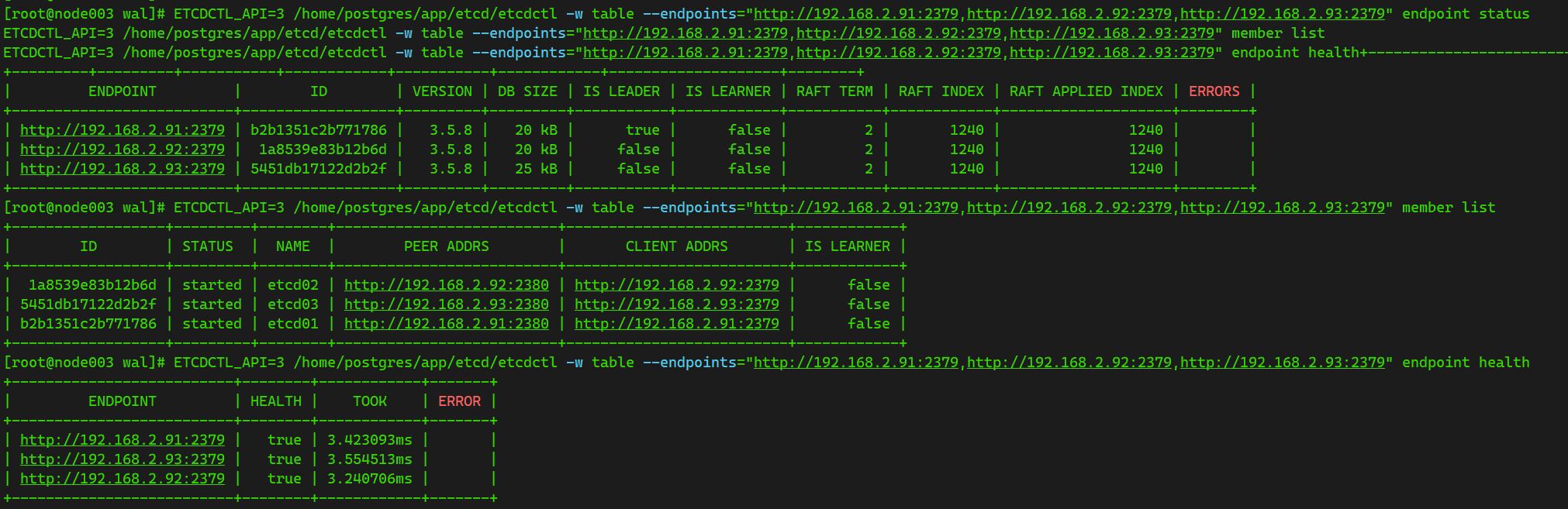
验证etcd服务状态
ETCDCTL_API=3 /home/postgres/app/etcd/etcdctl --endpoints="http://192.168.2.91:2379,http://192.168.2.92:2379,http://192.168.2.93:2379" endpoint health
ETCDCTL_API=3 /home/postgres/app/etcd/etcdctl -w table --endpoints="http://192.168.2.91:2379,http://192.168.2.92:2379,http://192.168.2.93:2379" endpoint status
ETCDCTL_API=3 /home/postgres/app/etcd/etcdctl -w table --endpoints="http://192.168.2.91:2379,http://192.168.2.92:2379,http://192.168.2.93:2379" member list
ETCDCTL_API=3 /home/postgres/app/etcd/etcdctl -w table --endpoints="http://192.168.2.91:2379,http://192.168.2.92:2379,http://192.168.2.93:2379" endpoint health

3、patroni
KylinV10 SP3 适配依赖,参考
有需要银河麒麟SP3 x86,arm环境 patroni依赖包可以联系我
psutil-5.9.8.tar.gz
ydiff-1.4.2.tar.gz
python-etcd-0.4.5.tar.gz
psycopg2-binary-2.8.6.tar.gz
psycopg2-2.8.6.tar.gz
patroni-3.3.5.tar.gz

### 以上环境 patroni 已验证兼容版本
patroni-3.3.5   ydiff==1.4.2
patroni-3.3.6
patroni-4.0.5
这里要注意系统python的版本,银河麒麟V10 SP3 Python=3.7.9 不需要升级也可以
python3 -V

安装 setuptool
cd /soft
tar -zxvf setuptools-67.7.2.tar.gz
cd /soft/setuptools-67.7.2 && python3 setup.py build && python3 setup.py install
安装 pip
cd /soft
tar -zxvf pip-23.1.2.tar.gz
cd /soft/pip-23.1.2 && python3 setup.py build && python3 setup.py install
安装 patroni
#如果是 arm 环境
dnf install gcc python3-devel -y
dnf install libpq.so.5* -y
#依赖要求
urllib3>=1.19.1,!=1.21
psycopg2>=2.5.4 --
PyYAML
requests
six>=1.7 --
python-etcd>=0.4.3,<0.5 --
python-consul>=0.7.0
click>=4.1
prettytable>=0.7 --
tzlocal
python-dateutil
psutil
cdiff
kubernetes>=2.0.0,<=6.0.0,!=4.0.*,!=5.0.*
psycopg[binary]>=3.0.0
psycopg2>=2.5.4
按顺序安装一下依赖包
cd /soft
pip3 install psutil-5.9.8.tar.gz
pip3 install ydiff-1.4.2.tar.gz

#安装*.whl 文件
pip3 install /soft/*.whl
#参数强制安装
pip3 install /soft/*.whl --ignore-installed

pip3 install python-etcd-0.4.5.tar.gz
pip3 install psycopg2-binary-2.8.6.tar.gz
pip3 install psycopg2-2.8.6.tar.gz
pip3 install patroni-3.3.5.tar.gz
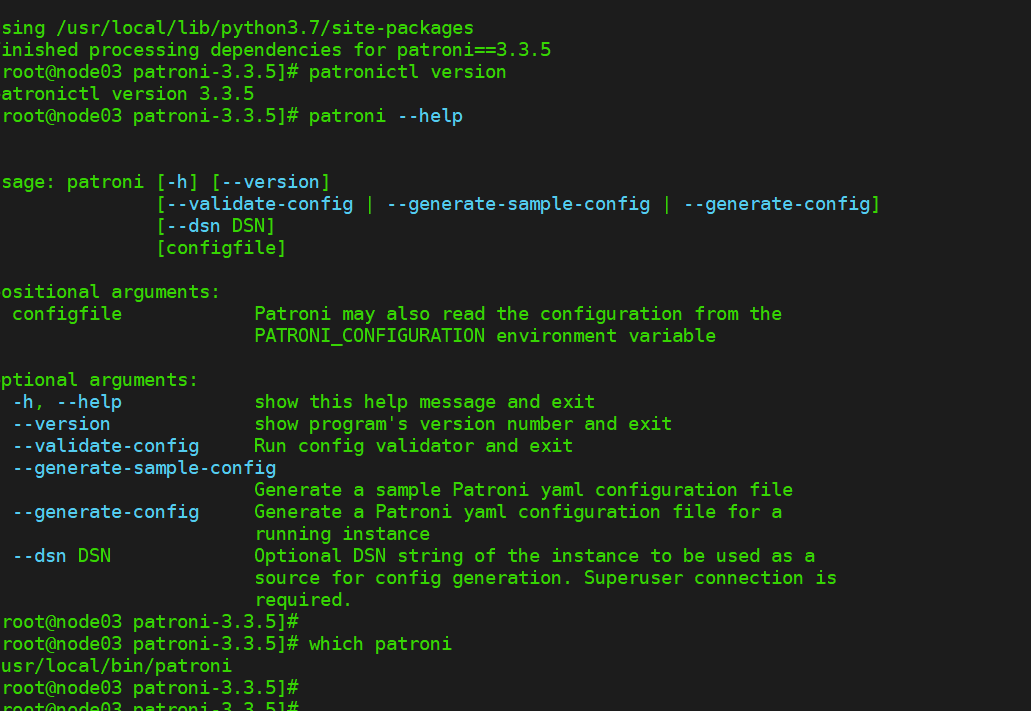
查询patroni版本号,验证是否安装成功
patronictl version
which patroni
patroni --help
查看已安装的包
[root@node03 patroni-3.3.5]# pip3 list
Package             Version
------------------- -------
asn1crypto          1.4.0
Babel               2.8.0
blivet              3.2.2
cffi                1.14.1
chardet             3.0.4
click               8.1.3
cloud-init          19.4
configobj           5.0.6
cryptography        3.3.1
dasbus              1.3
dbus-python         1.2.16
decorator           4.4.2
distro              1.5.0
dnspython           2.3.0
gpg                 1.14.0
idna                2.10
importlib-metadata  6.6.0
initial-setup       0.3.82
IPy                 1.0
Jinja2              2.11.2
jsonpatch           1.26
jsonpointer         2.0
jsonschema          2.6.0
langtable           0.0.51
MarkupSafe          1.1.1
ntplib              0.3.4
oauthlib            3.1.0
ordered-set         3.1.1
patroni             3.3.5
perf                0.1
pid                 3.0.4
pip                 23.1.2
ply                 3.11
prettytable         3.7.0
productmd           1.30
psutil              5.9.8
psycopg2            2.8.6
psycopg2-binary     2.8.6
pwquality           1.4.2
pycairo             1.19.1
pycparser           2.20
PyGObject           3.36.1
PyJWT               1.7.1
pykickstart         3.27
pyparsing           2.4.7
pyparted            3.11.4
pyserial            3.4
PySocks             1.7.0
python-dateutil     2.8.2
python-etcd         0.4.5
python-linux-procfs 0.6.2
python-meh          0.48
pytz                2020.1
pyudev              0.22.0
PyYAML              5.4.1
requests            2.24.0
requests-file       1.5.1
requests-ftp        0.3.1
rpm                 4.15.1
schedutils          0.6
selinux             3.1
sepolicy            3.1
setools             4.3.0
setuptools          44.1.1
simpleline          1.7
six                 1.9.0
slip                0.6.5
slip.dbus           0.6.5
systemd-python      234
typing_extensions   4.5.0
urllib3             1.24.3
wcwidth             0.2.6
ydiff               1.4.2
zipp                3.9.1
配置文件
三台机器都配置
su - postgres

mkdir -p /home/postgres/app/patroni
mkdir -p /home/postgres/patroni_log
vim /home/postgres/app/patroni/patroni_config.yml
配置 patroni 参数
192.168.2.91
scope: cndb
namespace: /server
name: node01

log:
  level: INFO
  traceback_level: ERROR
  dir: /home/postgres/patroni_log
  file_num: 10
  file_size: 104857600

restapi:
  listen: 192.168.2.91:8008
  connect_address: 192.168.2.91:8008

etcd:
  hosts: 192.168.2.91:2379,1192.168.2.92:2379,192.168.2.93:2379

#zookeeper:
#  hosts: ['192.168.31.101:2181', '192.168.31.102:2181', '192.168.31.103:2181']

bootstrap:
  dcs:
    ttl: 30
    loop_wait: 10
    retry_timeout: 10
    maximum_lag_on_failover: 1048576
    max_timelines_history: 0
    master_start_timeout: 300
    master_stop_timeout: 0
    synchronous_mode: false
    postgresql:
      use_pg_rewind: true
      use_slots: true
      parameters:
        max_connections: 2000
        superuser_reserved_connections: 100
        max_locks_per_transaction: 64
        max_worker_processes: 2
        max_prepared_transactions: 0
        wal_level: replica
        wal_log_hints: on
        track_commit_timestamp: off
        max_wal_senders: 32
        max_replication_slots: 10
        wal_keep_size: 4096MB
        hot_standby: "on"
        hot_standby_feedback: "on"
        listen_addresses: "*"
        port: 1622
        cluster_name: "cndb"
        archive_mode: "always"
        archive_command: "cp %p /home/postgres/archive/%f"
        archive_timeout: 1800s


postgresql:
  listen: 0.0.0.0:1622
  connect_address: 192.168.2.91:1622
  bin_dir: /home/postgres/app/postgresql/bin
  data_dir: /home/postgres/pgdata
  config_dir: /home/postgres/pgdata
  pgpass: /home/postgres/.pgpass
  pg_ctl_timeout: 60
  use_pg_rewind: true
  remove_data_directory_on_rewind_failure: false
  remove_data_directory_on_diverged_timelines: true
  authentication:
    replication:
      username: repuser
      password: ZMUF8l5cksHt
    reperuser:
      username: postgres
      password: CorhwVZMUFz8l5cksHt

tags:
    nofailover: false
    noloadbalance: false
    clonefrom: false
    nosync: false
192.168.2.92
scope: cndb
namespace: /server
name: node01

log:
  level: INFO
  traceback_level: ERROR
  dir: /home/postgres/patroni_log
  file_num: 10
  file_size: 104857600

restapi:
  listen: 192.168.2.92:8008
  connect_address: 192.168.2.92:8008

etcd:
  hosts: 192.168.2.91:2379,192.168.2.92:2379,192.168.2.93:2379

#zookeeper:
#  hosts: ['192.168.31.101:2181', '192.168.31.102:2181', '192.168.31.103:2181']

bootstrap:
  dcs:
    ttl: 30
    loop_wait: 10
    retry_timeout: 10
    maximum_lag_on_failover: 1048576
    max_timelines_history: 0
    master_start_timeout: 300
    master_stop_timeout: 0
    synchronous_mode: false
    postgresql:
      use_pg_rewind: true
      use_slots: true
      parameters:
        max_connections: 2000
        superuser_reserved_connections: 100
        max_locks_per_transaction: 64
        max_worker_processes: 2
        max_prepared_transactions: 0
        wal_level: replica
        wal_log_hints: on
        track_commit_timestamp: off
        max_wal_senders: 32
        max_replication_slots: 10
        wal_keep_size: 4096MB
        hot_standby: "on"
        hot_standby_feedback: "on"
        listen_addresses: "*"
        port: 1622
        cluster_name: "cndb"
        archive_mode: "always"
        archive_command: "cp %p /home/postgres/archive/%f"
        archive_timeout: 1800s


postgresql:
  listen: 0.0.0.0:1622
  connect_address: 192.168.2.92:1622
  bin_dir: /home/postgres/app/postgresql/bin
  data_dir: /home/postgres/pgdata
  config_dir: /home/postgres/pgdata
  pgpass: /home/postgres/.pgpass
  pg_ctl_timeout: 60
  use_pg_rewind: true
  remove_data_directory_on_rewind_failure: false
  remove_data_directory_on_diverged_timelines: true
  authentication:
    replication:
      username: repuser
      password: ZMUF8l5cksHt
    reperuser:
      username: postgres
      password: CorhwVZMUFz8l5cksHt

tags:
    nofailover: false
    noloadbalance: false
    clonefrom: false
    nosync: false
192.168.2.93
scope: cndb
namespace: /server
name: node01

log:
  level: INFO
  traceback_level: ERROR
  dir: /home/postgres/patroni_log
  file_num: 10
  file_size: 104857600

restapi:
  listen: 192.168.2.93:8008
  connect_address: 192.168.2.93:8008

etcd:
  hosts: 192.168.2.91:2379,192.168.2.92:2379,192.168.2.93:2379

#zookeeper:
#  hosts: ['192.168.31.101:2181', '192.168.31.102:2181', '192.168.31.103:2181']

bootstrap:
  dcs:
    ttl: 30
    loop_wait: 10
    retry_timeout: 10
    maximum_lag_on_failover: 1048576
    max_timelines_history: 0
    master_start_timeout: 300
    master_stop_timeout: 0
    synchronous_mode: false
    postgresql:
      use_pg_rewind: true
      use_slots: true
      parameters:
        max_connections: 2000
        superuser_reserved_connections: 100
        max_locks_per_transaction: 64
        max_worker_processes: 2
        max_prepared_transactions: 0
        wal_level: replica
        wal_log_hints: on
        track_commit_timestamp: off
        max_wal_senders: 32
        max_replication_slots: 10
        wal_keep_size: 4096MB
        hot_standby: "on"
        hot_standby_feedback: "on"
        listen_addresses: "*"
        port: 1622
        cluster_name: "cndb"
        archive_mode: "always"
        archive_command: "cp %p /home/postgres/archive/%f"
        archive_timeout: 1800s


postgresql:
  listen: 0.0.0.0:1622
  connect_address: 192.168.2.93:1622
  bin_dir: /home/postgres/app/postgresql/bin
  data_dir: /home/postgres/pgdata
  config_dir: /home/postgres/pgdata
  pgpass: /home/postgres/.pgpass
  pg_ctl_timeout: 60
  use_pg_rewind: true
  remove_data_directory_on_rewind_failure: false
  remove_data_directory_on_diverged_timelines: true
  authentication:
    replication:
      username: repuser
      password: ZMUF8l5cksHt
    reperuser:
      username: postgres
      password: CorhwVZMUFz8l5cksHt

tags:
    nofailover: false
    noloadbalance: false
    clonefrom: false
    nosync: false
patroni启动服务配置
直接启动
su - postgres
patroni /home/postgres/app/patroni/patroni_config.yml &
patronictl -c /home/postgres/app/patroni/patroni_config.yml list
systemctl 启动
su - root
vi /usr/lib/systemd/system/patroni.service

[Unit]
Description=patroni
#After=network.target remote-fs.target nss-lookup.target
After=network.target remote-fs.target nss-lookup.target etcd.service
Requires=etcd.service

[Service]
Type=forking
User=postgres
Group=postgres
Environment="PGHOME=/home/postgres/app/postgresql/bin"
Environment="PGDATA=/home/postgres/pgdata"
Environment="PGPORT=1622"
Environment="LD_LIBRARY_PATH=/home/postgres/app/postgresql/lib"
Environment="PATH=/home/postgres/app/postgresql/bin:/usr/local/bin"
ExecStart=/bin/bash -c "patroni /home/postgres/app/patroni/patroni_config.yml >> /home/postgres/patroni_log/patroni.log 2>&1 &"
ExecReload=/bin/kill -s HUP $MAINPID
ExecStop=/usr/bin/killall patroni
KillMode=process
TimeoutSec=30
Restart=on

[Install]
WantedBy=multi-user.target
继续配置其他两台
scp 192.168.2.92:/usr/lib/systemd/system/patroni.service /usr/lib/systemd/system/
scp 192.168.2.93:/usr/lib/systemd/system/patroni.service /usr/lib/systemd/system/
启动服务
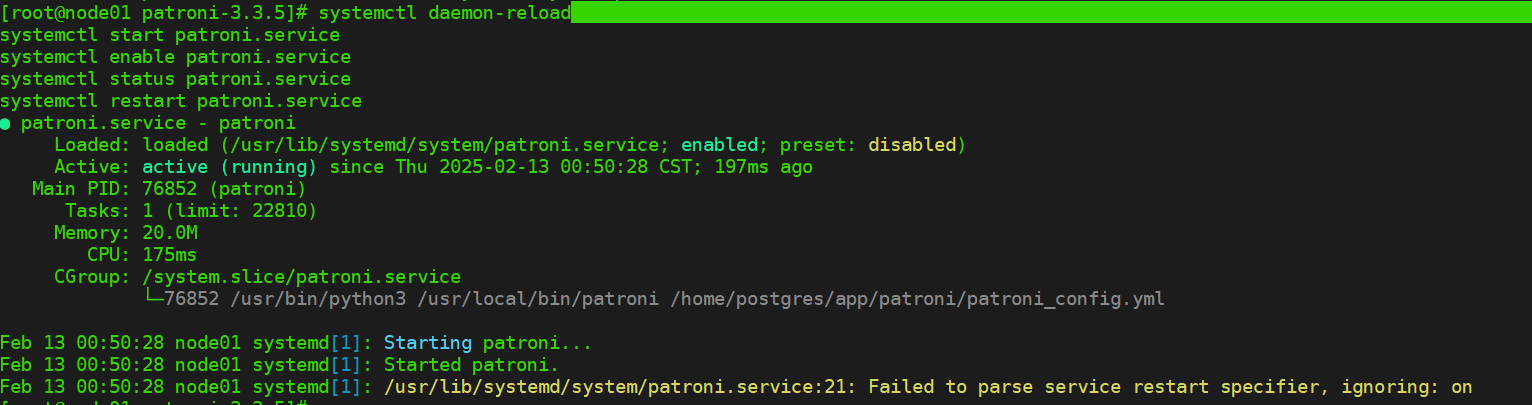
systemctl daemon-reload
systemctl start patroni.service
systemctl enable patroni.service
systemctl status patroni.service
systemctl restart patroni.service
#因为 patroni会检测 PostgreSOL数据库是否正常运行;
如果没有运行,会自动启动PostgreSQL数据库,所以可以考虑禁用PostgreSQL服务,**由 **`patroni托管 PG 的启停
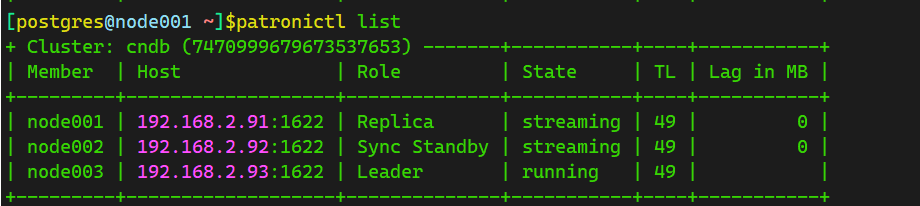
patroni集群状态查看
su - postgres
patronictl -c /home/postgres/app/patroni/patroni_config.yml list


### 也可以添加环境变量
cat >> /home/postgres/.bash_profile << EOF
alias patronictl='patronictl -c /home/postgres/app/patroni/patroni_config.yml'
EOF
source /home/postgres/.bash_profile

patronictl list
4、维护
[postgres@node01 ~]$patronictl --help
Usage: patronictl [OPTIONS] COMMAND [ARGS]...

  Command-line interface for interacting with Patroni.

Options:
  -c, --config-file TEXT     Configuration file
  -d, --dcs-url, --dcs TEXT  The DCS connect url
  -k, --insecure             Allow connections to SSL sites without certs
  --help                     Show this message and exit.

Commands:
  dsn          Generate a dsn for the provided member, defaults to a dsn...
  edit-config  Edit cluster configuration
  failover     Failover to a replica
  flush        Discard scheduled events
  history      Show the history of failovers/switchovers
  list         List the Patroni members for a given Patroni
  pause        Disable auto failover
  query        Query a Patroni PostgreSQL member
  reinit       Reinitialize cluster member
  reload       Reload cluster member configuration
  remove       Remove cluster from DCS
  restart      Restart cluster member
  resume       Resume auto failover
  show-config  Show cluster configuration
  switchover   Switchover to a replica
  topology     Prints ASCII topology for given cluster
  version      Output version of patronictl command or a running Patroni...
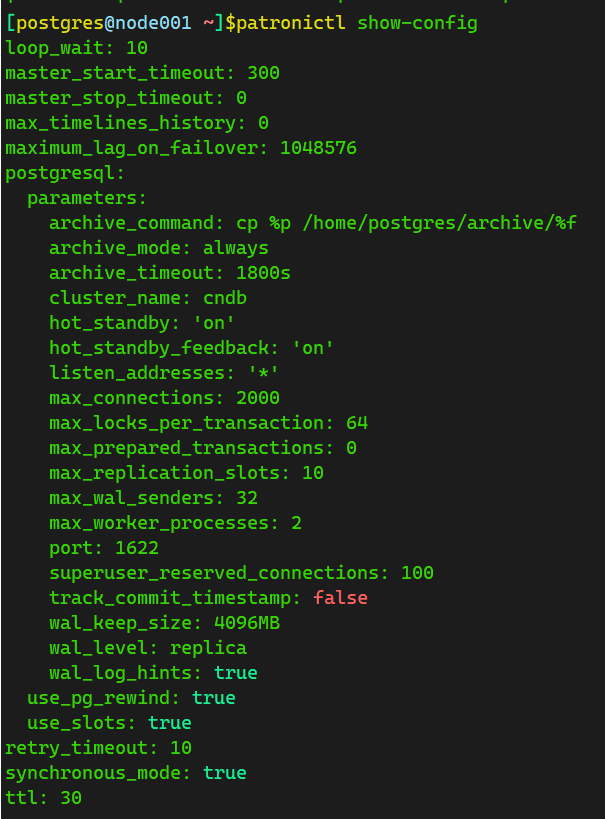
查看参数
patronictl show-config
修改参数, 用vim的形式修改保存
patronictl edit-config
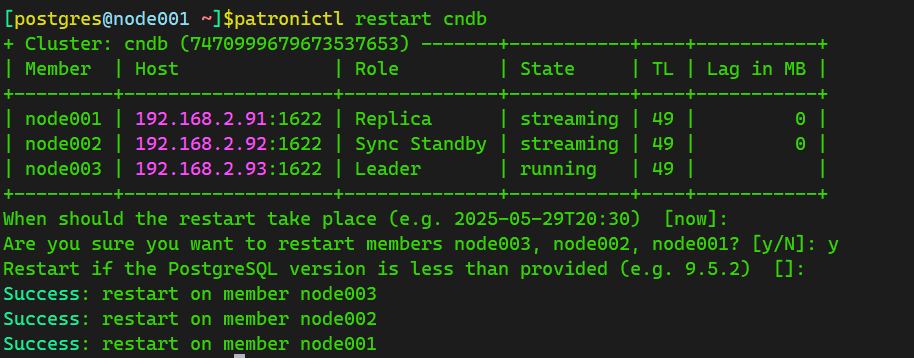
重启数据库集群
patronictl restart cndb(集群名)
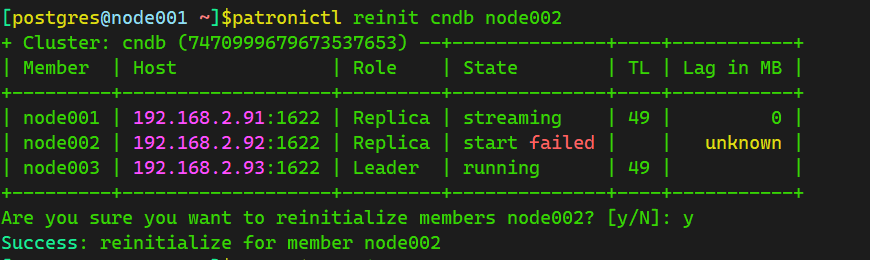
reinit 重新初始化集群节点
[postgres@node001 ~]$patronictl reinit cndb node002
remove
从DCS中删除集群信息:
patronictl remove cndb
remove命令同样提供了-f/--format参数来指定输出格式(pretty, tsv, json, yaml),不指定则默认为pretty:
patronictl remove pgcluster -f yaml
history
查看集群switchover/failover历史记录:
patronictl history
dsn
获取指定节点(默认为主节点)的dsn信息:
patronictl dsn
参数说明:
-r/--role 获取此角色节点的dsn信息,可以是master/replica/any。如果不指定则默认为master,如果是any,则随机获取主节点或任一备节点的dsn信息。
-m/--member 获取该成员的dsn信息。如果不指定则默认为主节点。
需要注意的是,-r和-m参数是互斥的。
以下是使用-r参数获取备节点dsn信息的例子,当集群有多个备节点时,执行该命令将随机获取其中一个备节点的信息:
patronictl dsn -r replica

学习中,有不对的请大家批评指正
最后修改时间:2025-10-27 21:48:07
「喜欢这篇文章,您的关注和赞赏是给作者最好的鼓励」
关注作者
【版权声明】本文为墨天轮用户原创内容,转载时必须标注文章的来源(墨天轮),文章链接,文章作者等基本信息,否则作者和墨天轮有权追究责任。如果您发现墨天轮中有涉嫌抄袭或者侵权的内容,欢迎发送邮件至:contact@modb.pro进行举报,并提供相关证据,一经查实,墨天轮将立刻删除相关内容。
