




点击蓝字,关注我们
在使用 Apache DolphinScheduler 编排任务的过程中,Shell 类型任务是最常见的任务类型之一。然而,很多用户在实际使用中都会遇到一个看似简单却常常引发问题的问题——环境变量怎么设置才有效?
如果你也曾经因为任务执行环境不一致、找不到命令路径、引用变量失败等问题而抓狂,那么这篇文章将为你拨开迷雾。本文将深入解析 DolphinScheduler 中 Shell 任务的环境变量设置机制,分享几种常见的配置方式、注意事项以及实战踩坑经验,帮助你高效、稳定地配置任务运行环境。
1
任务类型总结
- SHELL任务类型:
SHELL、JAVA、PYTHON、FLINK、MR、FLINK_STREAM、HIVECLI、SPARK、SEATUNNEL、DATAX、SQOOP、DATA_QUALICY、JUPYTER、MLFLOW、OPENMLDB、DVC、PYTORCH、KUBEFLOW、CHUNJUN、LINKIS
注意 : 所谓的SHELL任务类型,都是对SHELL任务类型进行的封装,说白了底层调用的就是Java ProcessBudiler
封装的SHELL。
- SQL任务类型(JDBC):
SQL、PROCEDURE
注意 : SQL任务类型其实使用的就是各个DB驱动的JDBC进行的操作。
- HTTP任务类型:
HTTP、DINKY、PIGEON(WebSocket)
注意 : HTTP任务类型其实就是访问其OPEN API,进行HttpClient
封装调用的操作。
- 逻辑节点:
SUB_PROCESS、DEPENDENT、CONDITIONS、SWITHC、DYNAMIC
注意 : 所谓的逻辑节点是虚拟任务,这类任务不会调度到Worker节点上去运行,只会在Master节点作为控制节点。
- Client任务类型:
EMR、K8S、DMS、DATA_FACTORY、SAGEMAKER、ZEPPELIN、DATASYNC、REMOTESHELL
注意 : 其实就是调用各个任务的开放的Client进行任务的封装。
2
Shell任务怎么配置环境变量呢?
因为可能涉及到一个组件的不同的版本的客户端,比如说Spark2、Spark3。还有就是针对不同集群的不同客户端,比如说集群1的Spark3客户端和集群2的Spark客户端。 像这样的需求,怎么在dolphinscheduler中进行配置呢?或者说有几种配置方式呢?
两种方式 : 1、通过task不同的环境变量 2、默认的环境变量
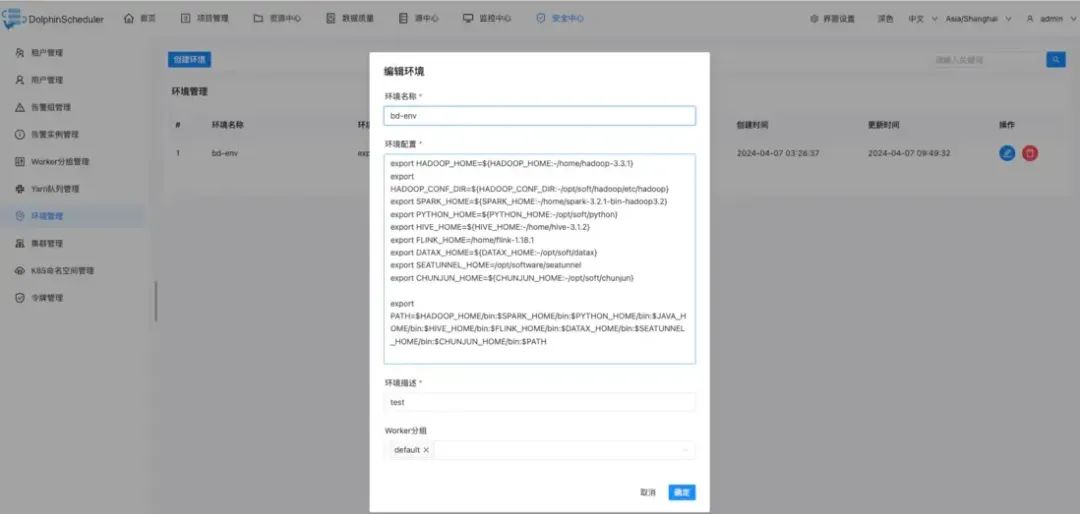
1. 通过task不同的环境变量
安全中心 -> 环境管理
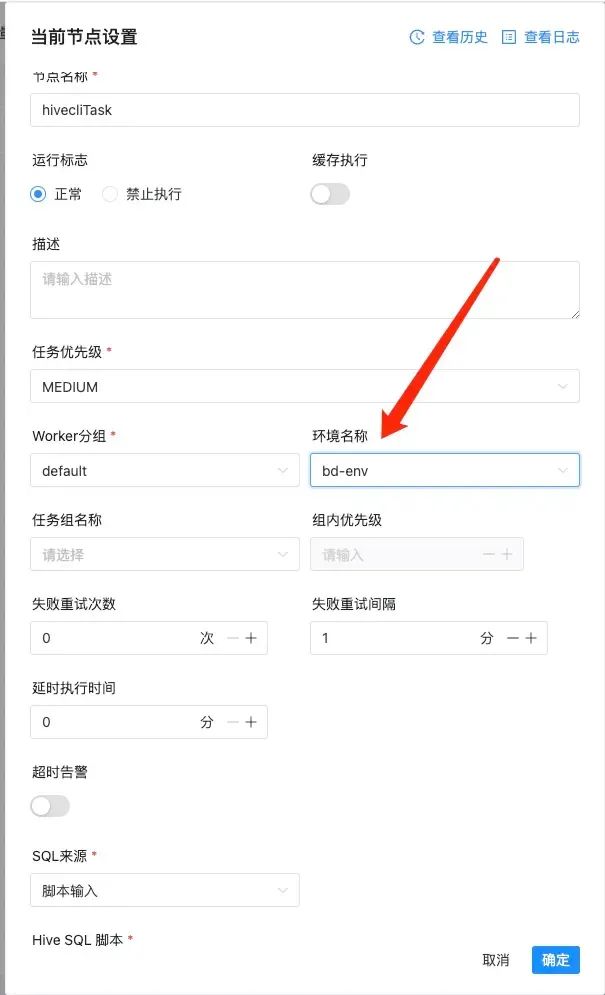
任务中引用
默认的环境变量
common.properties
# The default env list will be load by Shell task, e.g. etc/profile,~/.bash_profileshell.env_source_list=/etc/profile# The interceptor type of Shell task, e.g. bash, sh, cmdshell.interceptor.type=bash
org.apache.dolphinscheduler.plugin.task.api.shell.ShellInterceptorBuilderFactory
public class ShellInterceptorBuilderFactory {private final static String INTERCEPTOR_TYPE = PropertyUtils.getString("shell.interceptor.type", "bash");@SuppressWarnings("unchecked")public static IShellInterceptorBuilder newBuilder() {// TODO 默认的走的是这个逻辑if (INTERCEPTOR_TYPE.equalsIgnoreCase("bash")) {return new BashShellInterceptorBuilder();}if (INTERCEPTOR_TYPE.equalsIgnoreCase("sh")) {return new ShShellInterceptorBuilder();}if (INTERCEPTOR_TYPE.equalsIgnoreCase("cmd")) {return new CmdShellInterceptorBuilder();}throw new IllegalArgumentException("not support shell type: " + INTERCEPTOR_TYPE);}}
org.apache.dolphinscheduler.plugin.task.api.shell.bash.BashShellInterceptorBuilder
public class BashShellInterceptorBuilderextendsBaseLinuxShellInterceptorBuilder<BashShellInterceptorBuilder, BashShellInterceptor> {@Overridepublic BashShellInterceptorBuilder newBuilder() {return new BashShellInterceptorBuilder();}@Overridepublic BashShellInterceptor build() throws FileOperateException, IOException {// TODO 这里是生成shell脚本的核心点generateShellScript();List<String> bootstrapCommand = generateBootstrapCommand();// TODO 实例化BashShellInterceptorreturn new BashShellInterceptor(bootstrapCommand, shellDirectory);}@Overrideprotected String shellInterpreter() {return "bash";}@Overrideprotected String shellExtension() {return ".sh";}@Overrideprotected String shellHeader() {return "#!/bin/bash";}}
org.apache.dolphinscheduler.plugin.task.api.AbstractCommandExecutor#run
public TaskResponse run(IShellInterceptorBuilder iShellInterceptorBuilder,TaskCallBack taskCallBack) throws Exception {TaskResponse result = new TaskResponse();int taskInstanceId = taskRequest.getTaskInstanceId();// todo: we need to use state like JDK Thread to make sure the killed task should not be executediShellInterceptorBuilder = iShellInterceptorBuilder// TODO 设置执行路径.shellDirectory(taskRequest.getExecutePath())// TODO 这里设置shell 名字.shellName(taskRequest.getTaskAppId());// Set system env// TODO 在这里是设置默认的,其实也是可以设置为 opt/dolphinscheduler/bin/env/dolphinscheduler_env.shif (CollectionUtils.isNotEmpty(ShellUtils.ENV_SOURCE_LIST)) {// TODO 这里其实就是向 systemEnvs 中加入ENV_SOURCE_LIST中配置的环境文件的列表ShellUtils.ENV_SOURCE_LIST.forEach(iShellInterceptorBuilder::appendSystemEnv);}// Set custom env// TODO 设置自定义的envif (StringUtils.isNotBlank(taskRequest.getEnvironmentConfig())) {// TODO 向 customEnvScripts 中加入iShellInterceptorBuilder.appendCustomEnvScript(taskRequest.getEnvironmentConfig());}// Set k8s config (This is only work in Linux)if (taskRequest.getK8sTaskExecutionContext() != null) {iShellInterceptorBuilder.k8sConfigYaml(taskRequest.getK8sTaskExecutionContext().getConfigYaml());}// Set sudo (This is only work in Linux)// TODO 设置sudo为true的模式iShellInterceptorBuilder.sudoMode(OSUtils.isSudoEnable());// Set tenant (This is only work in Linux)// TODO 设置租户iShellInterceptorBuilder.runUser(taskRequest.getTenantCode());// Set CPU Quota (This is only work in Linux)if (taskRequest.getCpuQuota() != null) {iShellInterceptorBuilder.cpuQuota(taskRequest.getCpuQuota());}// Set memory Quota (This is only work in Linux)if (taskRequest.getMemoryMax() != null) {iShellInterceptorBuilder.memoryQuota(taskRequest.getMemoryMax());}IShellInterceptor iShellInterceptor = iShellInterceptorBuilder.build();// TODO 使用ProcessBuilder进行执行,支持sudo模式,和bash模式process = iShellInterceptor.execute();// parse process output// TODO 这里解析到进程的输出parseProcessOutput(this.process);// collect pod logcollectPodLogIfNeeded();int processId = getProcessId(this.process);result.setProcessId(processId);// cache processIdtaskRequest.setProcessId(processId);// print process idlog.info("process start, process id is: {}", processId);// if timeout occurs, exit directlylong remainTime = getRemainTime();// update pid before waiting for the run to finishif (null != taskCallBack) {// TODO 这里其实就是更新任务实例西悉尼taskCallBack.updateTaskInstanceInfo(taskInstanceId);}// waiting for the run to finishboolean status = this.process.waitFor(remainTime, TimeUnit.SECONDS);TaskExecutionStatus kubernetesStatus =ProcessUtils.getApplicationStatus(taskRequest.getK8sTaskExecutionContext(), taskRequest.getTaskAppId());if (taskOutputFuture != null) {try {// Wait the task log process finished.taskOutputFuture.get();} catch (ExecutionException e) {log.error("Handle task log error", e);}}if (podLogOutputFuture != null) {try {// Wait kubernetes pod log collection finishedpodLogOutputFuture.get();// delete pod after successful execution and log collectionProcessUtils.cancelApplication(taskRequest);} catch (ExecutionException e) {log.error("Handle pod log error", e);}}// if SHELL task exitif (status && kubernetesStatus.isSuccess()) {// SHELL task stateresult.setExitStatusCode(this.process.exitValue());} else {log.error("process has failure, the task timeout configuration value is:{}, ready to kill ...",taskRequest.getTaskTimeout());result.setExitStatusCode(EXIT_CODE_FAILURE);cancelApplication();}int exitCode = this.process.exitValue();String exitLogMessage = EXIT_CODE_KILL == exitCode ? "process has killed." : "process has exited.";log.info("{} execute path:{}, processId:{} ,exitStatusCode:{} ,processWaitForStatus:{} ,processExitValue:{}",exitLogMessage, taskRequest.getExecutePath(), processId, result.getExitStatusCode(), status, exitCode);return result;}
重点就是:
// Set system env// TODO 在这里是设置默认的,其实也是可以设置为 opt/dolphinscheduler/bin/env/dolphinscheduler_env.shif (CollectionUtils.isNotEmpty(ShellUtils.ENV_SOURCE_LIST)) {// TODO 这里其实就是向 systemEnvs 中加入ENV_SOURCE_LIST中配置的环境文件的列表ShellUtils.ENV_SOURCE_LIST.forEach(iShellInterceptorBuilder::appendSystemEnv);}// Set custom env// TODO 设置自定义的envif (StringUtils.isNotBlank(taskRequest.getEnvironmentConfig())) {// TODO 向 customEnvScripts 中加入iShellInterceptorBuilder.appendCustomEnvScript(taskRequest.getEnvironmentConfig());}
其实就是说自定的环境变量是可以覆盖默认的环境变量的。
转载自Journey
原文链接:https://segmentfault.com/a/1190000044954252



用户案例
迁移实战
发版消息
加入社区
关注社区的方式有很多:
GitHub: https://github.com/apache/dolphinscheduler 官网:https://dolphinscheduler.apache.org/en-us 订阅开发者邮件:dev@dolphinscheduler@apache.org X.com:@DolphinSchedule YouTube:https://www.youtube.com/@apachedolphinscheduler Slack:https://join.slack.com/t/asf-dolphinscheduler/shared_invite/zt-1cmrxsio1-nJHxRJa44jfkrNL_Nsy9Qg
同样地,参与Apache DolphinScheduler 有非常多的参与贡献的方式,主要分为代码方式和非代码方式两种。
📂非代码方式包括:
完善文档、翻译文档;翻译技术性、实践性文章;投稿实践性、原理性文章;成为布道师;社区管理、答疑;会议分享;测试反馈;用户反馈等。
👩💻代码方式包括:
查找Bug;编写修复代码;开发新功能;提交代码贡献;参与代码审查等。

你的好友秀秀子拍了拍你
并请你帮她点一下“分享”
