




前言
小伙伴提了一个问题,怎么理解这句话:"mysql 有一些命令,当在活动的事务中发出时,会导致 MySQL 在事务的所有语句执行完毕前提交当前事务 "
我们从字面可以看成这是 MySQL 对于事务 DDL 的支持程度不高,无法达到彻底的原子程度所留下的缺陷,即 "隐式提交"。
什么是隐式提交?
当我们开启一个事务时,这时我们执行一个 DDL 语句之后该事务会自动提交。即使已经执行了一些 DML,我们再去执行一个 DDL 也会自动提交 DML 的更改。也就是说,事务执行一半就会被提交,这样看来是不是就是一个非常大的问题了,无法保证事务的一致性。
下面我们来探讨这个问题。
MySQL 对于事务 DDL 的支持程度
在 MySQL 5.7 中,连原子的 DDL 都无法保证,如果在执行一条 drop table test1,test2; 时,如果遇到 mysqld 的 crash ,可能会遇到 test1 被删除,但是 test2 没有被删除的情况。
MySQL 8.0 之后引入了 DDL LOG 解决了这个问题,实现了原子 DDL,但是还是无法实现事务 DDL。
但是 PostgreSQL 中没有这个问题,PG 支持完整的事务 DDL,远比 MySQL 要更加强大。
在这里希望 MySQL 的开发加把劲。
看看这个“缺陷”——”隐式提交“
看看官网怎么说:
15.3.3:https://dev.mysql.com/doc/refman/8.0/en/implicit-commit.html
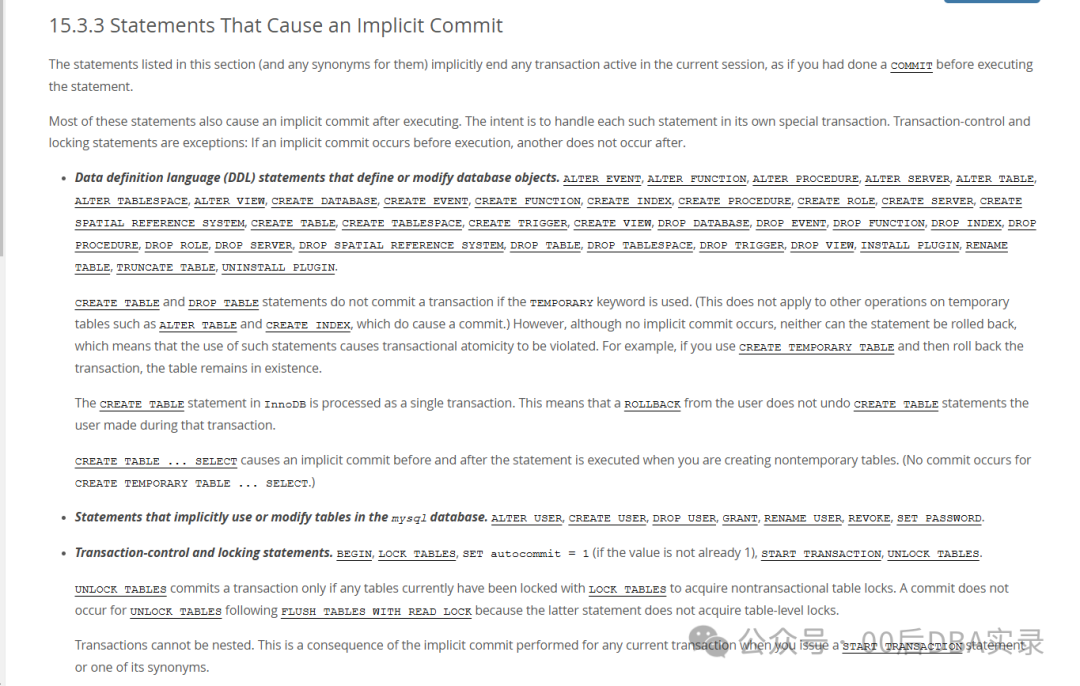
本节中列出的语句(以及它们的任何同义词)会隐式结束当前会话中的任何活动事务,就像在执行该语句之前执行了 COMMIT
一样。
我们看一些吧,具体的挺多的,参考官方文档的描述。
DDL 包括:
ALTER EVENT, ALTER FUNCTION, ALTER PROCEDURE, ALTER SERVER, ALTER TABLE, ALTER TABLESPACE, ALTER VIEW, CREATE DATABASE, CREATE EVENT, CREATE FUNCTION, CREATE INDEX, CREATE PROCEDURE, CREATE ROLE, CREATE SERVER, CREATE SPATIAL REFERENCE SYSTEM, CREATE TABLE, CREATE TABLESPACE, CREATE TRIGGER, CREATE VIEW, DROP DATABASE, DROP EVENT, DROP FUNCTION, DROP INDEX, DROP PROCEDURE, DROP ROLE, DROP SERVER, DROP SPATIAL REFERENCE SYSTEM, DROP TABLE, DROP TABLESPACE, DROP TRIGGER, DROP VIEW, INSTALL PLUGIN, RENAME TABLE, TRUNCATE TABLE, UNINSTALL PLUGIN.
若在 CREATE TABLE
和 DROP TABLE
语句中使用 TEMPORARY
关键字,则不会提交事务。(这不适用于对临时表执行的其他操作,例如 ALTER TABLE
和 CREATE INDEX
,这些操作会导致提交。)然而,尽管不会发生隐式提交,但这些语句也无法回滚,这意味着使用此类语句会导致违反事务原子性。例如,如果您使用CREATE TEMPORARY TABLE
然后回滚事务,则表仍然存在。
在 InnoDB
中,CREATE TABLE
语句被作为单一事务处理,这意味着用户的 ROLLBACK
操作不会撤消用户在该事务期间所做的 CREATE TABLE
语句。
在创建非临时表时,CREATE TABLE ... SELECT
会导致在执行语句之前和之后进行隐式提交。(对于 CREATE TEMPORARY TABLE ... SELECT
则不会发生提交。)
隐式使用或修改 mysql
数据库中表的语句,包括:ALTER USER
, CREATE USER
, DROP USER
, GRANT
, RENAME USER
, REVOKE
, SET PASSWORD
。
事务控制和锁定语句:
BEGIN
, LOCK TABLES
, SET autocommit = 1
(如果值不为 1), START TRANSACTION
, UNLOCK TABLES
。
仅当任何表当前已使用 LOCK TABLES
锁定以获取非事务表锁时,UNLOCK TABLES
才会提交事务。在 FLUSH TABLES WITH READ LOCK
之后,UNLOCK TABLES
不会发生提交,因为后一个语句不会获取表级锁。
事务不能嵌套。这是当您发出 START TRANSACTION
语句或其同义词之一时对任何当前事务执行隐式提交所导致的结果。
当事务处于 ACTIVE
状态时,无法在 XA
事务中使用导致隐式提交的语句。
BEGIN
语句与用于启动 BEGIN ... END
复合语句的 BEGIN
关键字不同,后者不会导致隐式提交。
数据加载语句:
LOAD DATA
。LOAD DATA
仅对使用 NDB
存储引擎的表会导致隐式提交。
管理语句:
ANALYZE TABLE
, CACHE INDEX
, CHECK TABLE
, FLUSH
, LOAD INDEX INTO CACHE
, OPTIMIZE TABLE
, REPAIR TABLE
, RESET
(但不包括 RESET PERSIST
)。
复制控制语句:
START REPLICA
, STOP REPLICA
, RESET REPLICA
, CHANGE REPLICATION SOURCE TO
, CHANGE MASTER TO
. 在 MySQL 8.0.22 中,SLAVE
关键字被替换为 REPLICA
。
示例
上面列的挺多的,我们直接上例子吧
创建测试表。
create table com(id int primary key,info varchar(64));
测试 create index
root@localhost [ddl] 22:05:42 > begin;Query OK, 0 rows affected (0.00 sec)root@localhost [ddl] 22:05:42 *> select connection_id();+-----------------+| connection_id() |+-----------------+| 92 |+-----------------+1 row in set (0.00 sec)root@localhost [ddl] 22:05:42 *> insert into com values(1,'aa');Query OK, 1 row affected (0.00 sec)root@localhost [ddl] 22:05:42 *> create index com_info on com(info);Query OK, 0 rows affected (0.25 sec)Records: 0 Duplicates: 0 Warnings: 0
看下事务表,可以看到啥也没有:
root@localhost [(none)] 22:04:53 > select * from information_schema.innodb_trx\GEmpty set (0.01 sec)
看下 general.log
2024-10-28T22:05:42.654920+08:00 92 Query begin2024-10-28T22:05:42.655485+08:00 92 Query select connection_id()2024-10-28T22:05:42.656094+08:00 92 Query insert into com values(1,'aa')2024-10-28T22:05:46.954452+08:00 92 Query create index com_info on com(info)2024-10-28T22:05:51.379973+08:00 93 Query select * from information_schema.innodb_trx
可以看到只是记录了 DDL 就没有后续了。所以是隐式喽。
root@localhost [ddl] 22:05:47 > select * from com;+----+------+| id | info |+----+------+| 1 | aa |+----+------+1 row in set (0.00 sec)
可以看到已经提交了。
看一个特别的示例 CREATE TEMPORARY ... SELECT
root@localhost [ddl] 22:32:15 > begin;Query OK, 0 rows affected (0.01 sec)root@localhost [ddl] 22:32:26 *> select connection_id();+-----------------+| connection_id() |+-----------------+| 94 |+-----------------+1 row in set (0.00 sec)root@localhost [ddl] 22:32:34 *> insert into com values(2,'bb');Query OK, 1 row affected (0.00 sec)root@localhost [ddl] 22:32:39 *> create temporary table com2 select * from com;Query OK, 2 rows affected (0.00 sec)Records: 2 Duplicates: 0 Warnings: 0root@localhost [ddl] 22:32:44 *> insert into com values(3,'cc');Query OK, 1 row affected (0.00 sec)
可以看到还在事务里面
root@localhost [(none)] 22:29:49 > select * from information_schema.innodb_trx\G*************************** 1. row ***************************trx_id: 328546trx_state: RUNNINGtrx_started: 2024-10-28 22:32:39trx_requested_lock_id: NULLtrx_wait_started: NULLtrx_weight: 5trx_mysql_thread_id: 94trx_query: NULLtrx_operation_state: NULLtrx_tables_in_use: 0trx_tables_locked: 1trx_lock_structs: 1trx_lock_memory_bytes: 1128trx_rows_locked: 0trx_rows_modified: 4trx_concurrency_tickets: 0trx_isolation_level: READ COMMITTEDtrx_unique_checks: 1trx_foreign_key_checks: 1trx_last_foreign_key_error: NULLtrx_adaptive_hash_latched: 0trx_adaptive_hash_timeout: 0trx_is_read_only: 0trx_autocommit_non_locking: 0trx_schedule_weight: NULL1 row in set (0.00 sec)
可以看见这个临时表也在。
root@localhost [(none)] 22:32:55 > select * from information_schema.INNODB_TEMP_TABLE_INFO;+----------+---------------+--------+------------+| TABLE_ID | NAME | N_COLS | SPACE |+----------+---------------+--------+------------+| 1280 | #sql2777_5e_4 | 5 | 4243767289 |+----------+---------------+--------+------------+1 row in set (0.00 sec)
我们将他回滚
root@localhost [ddl] 22:32:49 *> rollback;Query OK, 0 rows affected, 1 warning (0.00 sec)root@localhost [ddl] 22:33:56 > show warnings;+---------+------+-----------------------------------------------------------------+| Level | Code | Message |+---------+------+-----------------------------------------------------------------+| Warning | 1751 | The creation of some temporary tables could not be rolled back. |+---------+------+-----------------------------------------------------------------+1 row in set (0.01 sec)
mysqld 反馈了警告临时表没法回滚:
The creation of some temporary tables could not be rolled back.
再查一次还在
root@localhost [(none)] 22:33:25 > select * from information_schema.INNODB_TEMP_TABLE_INFO;+----------+---------------+--------+------------+| TABLE_ID | NAME | N_COLS | SPACE |+----------+---------------+--------+------------+| 1280 | #sql2777_5e_4 | 5 | 4243767289 |+----------+---------------+--------+------------+1 row in set (0.00 sec)
断开连接就没了
root@localhost [ddl] 22:34:07 > ^DByeroot@localhost [(none)] 22:34:51 > select * from information_schema.INNODB_TEMP_TABLE_INFO;Empty set (0.00 sec)
这违背了原子性。
PG 对于 DDL 事务的支持
配置文件写入 pg_stat_statements
shared_preload_libraries='pg_stat_statements'
然后重启服务,才能有 pg_stat_activity 视图
使用刚才一样的示例看看 PG 的表现。
有两个方式判断 PG 在不在事务:
如果会话空闲且在事务中,pg_stat_activity 表的 state 会 显示 idle in transaction
pg_stat_activity 表 xact_start 显示事务开启的时间。(PG 的 now() 函数在事务里面显示的是事务开始的时间,一直同一个值,mysql 不是)
root@localhost [(none)] 22:47:48 > begin;Query OK, 0 rows affected (0.00 sec)root@localhost [(none)] 22:47:50 *> select now();+---------------------+| now() |+---------------------+| 2024-10-28 22:47:51 |+---------------------+1 row in set (0.00 sec)root@localhost [(none)] 22:47:51 *> select now();+---------------------+| now() |+---------------------+| 2024-10-28 22:47:52 |+---------------------+1 row in set (0.00 sec)testdb=# begin;BEGINtestdb=*# select now();now-------------------------------2024-10-28 22:48:13.828387+08(1 row)testdb=*# select now();now-------------------------------2024-10-28 22:48:13.828387+08(1 row)
创建测试表
create table com(id int primary key,info varchar(64));
试一下 create index
testdb=# begin;BEGINtestdb=*# select pg_backend_pid();pg_backend_pid----------------125365(1 row)testdb=*# insert into com values(1,'aa');INSERT 0 1testdb=*# create index on com(info);CREATE INDEX
查看一下在不在事务
testdb=# select * from pg_stat_activity where pid=125365\gx-[ RECORD 1 ]----+------------------------------datid | 49618datname | testdbpid | 125365leader_pid |usesysid | 10usename | postgresapplication_name | psqlclient_addr |client_hostname |client_port | -1backend_start | 2024-10-28 21:06:19.193109+08xact_start | 2024-10-28 22:38:46.637004+08query_start | 2024-10-28 22:38:47.913117+08state_change | 2024-10-28 22:38:47.920065+08wait_event_type | Clientwait_event | ClientReadstate | idle in transactionbackend_xid | 4493backend_xmin |query_id | -2143444129391234423query | create index on com(info);backend_type | client backend
可以看到状态为 idle in transaction,事务开始时间也比当前早。
我们回滚一下。
testdb=*# rollback;ROLLBACKtestdb=# select * from com;id | info----+------(0 rows)testdb=# \d comTable "public.com"Column | Type | Collation | Nullable | Default--------+-----------------------+-----------+----------+---------id | integer | | not null |info | character varying(64) | | |Indexes:"com_pkey" PRIMARY KEY, btree (id)
可以看到 com 表是空的,com 的索引也没建上。
总结
MySQL 5.7 无法保证 DDL 事务的原子性,8.0 引入了 ddl log,虽然保证了原子性,但是无法使用 DDL 事务(和 DML 一起使用)。
PG 可以实现 DDL 的原子性和 DDL 事务。
