



[HarmonyOS NEXT 实战案例六] 餐饮菜单网格布局(上)
项目已开源,开源地址: https://gitcode.com/nutpi/HarmonyosNextCaseStudyTutorial , 欢迎fork & star
效果演示
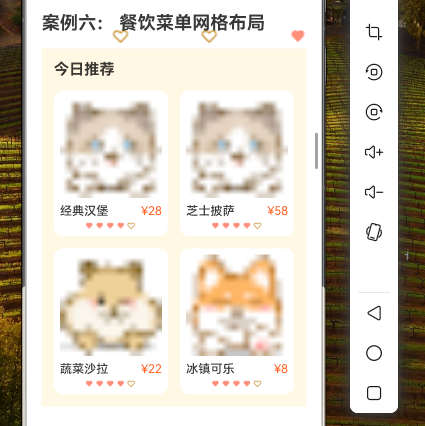
1. 概述
在移动应用开发中,餐饮类应用的菜单展示是一个常见的需求。一个设计良好的菜单布局不仅能够清晰地展示菜品信息,还能提升用户的点餐体验。本教程将详细讲解如何使用HarmonyOS NEXT的GridRow和GridCol组件实现一个美观实用的餐饮菜单网格布局。
通过本教程,你将学习到:
- 餐饮菜单数据结构的设计
- 使用GridRow和GridCol组件创建菜单网格布局
- 实现菜品分类和菜品卡片
- 添加菜品详情和操作按钮
2. 数据结构设计
在实现餐饮菜单网格布局之前,我们需要先设计合适的数据结构来存储菜品信息。
2.1 菜品分类接口
interface FoodCategory {
  id: string;       // 分类ID
  name: string;     // 分类名称
  icon?: string;    // 分类图标
}
2.2 菜品信息接口
interface FoodItem {
  id: string;           // 菜品ID
  name: string;         // 菜品名称
  price: number;        // 菜品价格
  originalPrice?: number; // 原价
  image: ResourceStr;   // 菜品图片
  description: string;  // 菜品描述
  categoryId: string;   // 所属分类ID
  tags?: string[];      // 菜品标签,如「招牌」「新品」「辣」等
  sales: number;        // 销量
  rating: number;       // 评分(1-5)
  isSpicy?: boolean;    // 是否辣
  isRecommended?: boolean; // 是否推荐
}
3. 数据准备
接下来,我们准备一些模拟数据用于展示:
// 菜品分类数据
private categories: FoodCategory[] = [
  { id: 'popular', name: '热门推荐', icon: $r('app.media.ic_popular') },
  { id: 'staple', name: '主食', icon: $r('app.media.ic_staple') },
  { id: 'appetizer', name: '前菜', icon: $r('app.media.ic_appetizer') },
  { id: 'soup', name: '汤类', icon: $r('app.media.ic_soup') },
  { id: 'meat', name: '肉类', icon: $r('app.media.ic_meat') },
  { id: 'vegetable', name: '素菜', icon: $r('app.media.ic_vegetable') },
  { id: 'seafood', name: '海鲜', icon: $r('app.media.ic_seafood') },
  { id: 'dessert', name: '甜点', icon: $r('app.media.ic_dessert') },
  { id: 'beverage', name: '饮品', icon: $r('app.media.ic_beverage') }
];

// 菜品数据
private foodItems: FoodItem[] = [
  {
    id: '1',
    name: '宫保鸡丁',
    price: 38,
    image: $r('app.media.food_kungpao_chicken'),
    description: '选用优质鸡胸肉,配以花生、干辣椒等烹饪而成,口感麻辣鲜香。',
    categoryId: 'popular',
    tags: ['招牌', '辣'],
    sales: 328,
    rating: 4.8,
    isSpicy: true,
    isRecommended: true
  },
  {
    id: '2',
    name: '水煮鱼',
    price: 58,
    image: $r('app.media.food_boiled_fish'),
    description: '选用新鲜草鱼,配以豆芽和辣椒,麻辣鲜香,口感滑嫩。',
    categoryId: 'popular',
    tags: ['热门', '特辣'],
    sales: 256,
    rating: 4.7,
    isSpicy: true,
    isRecommended: true
  },
  // 更多菜品数据...
];
4. 布局实现
4.1 整体布局结构
我们的餐饮菜单布局将包含以下几个部分:
- 顶部搜索栏
- 分类标签栏
- 菜品网格列表
@Component
export struct FoodMenuGrid {
  @State currentCategory: string = 'popular'; // 当前选中的分类
  @State searchText: string = ''; // 搜索文本
  @State cartItems: Map<string, number> = new Map<string, number>(); // 购物车

  // 数据源
  private categories: FoodCategory[] = []; // 分类数据
  private foodItems: FoodItem[] = []; // 菜品数据

  aboutToAppear() {
    // 初始化数据
    this.categories = this.getCategoryData();
    this.foodItems = this.getFoodData();
  }

  build() {
    Column() {
      // 顶部搜索栏
      this.SearchBar()

      // 分类标签栏
      this.CategoryTabs()

      // 菜品网格列表
      this.FoodGrid()
    }
    .width('100%')
    .height('100%')
    .backgroundColor('#F5F5F5')
  }

  // 获取分类数据
  private getCategoryData(): FoodCategory[] {
    // 返回分类数据
    return this.categories;
  }

  // 获取菜品数据
  private getFoodData(): FoodItem[] {
    // 返回菜品数据
    return this.foodItems;
  }

  // 根据当前分类获取菜品
  private getFilteredFoodItems(): FoodItem[] {
    let filtered = this.foodItems;

    // 按分类筛选
    if (this.currentCategory !== 'all') {
      filtered = filtered.filter(item => item.categoryId === this.currentCategory);
    }

    // 按搜索文本筛选
    if (this.searchText.trim() !== '') {
      const keyword = this.searchText.toLowerCase();
      filtered = filtered.filter(item =>
        item.name.toLowerCase().includes(keyword) ||
        item.description.toLowerCase().includes(keyword)
      );
    }

    return filtered;
  }
}
4.2 顶部搜索栏实现
@Builder
private SearchBar() {
  Row() {
    // 搜索框
    Row() {
      Image($r('app.media.ic_search'))
        .width(20)
        .height(20)
        .margin({ right: 8 })

      TextInput({ placeholder: '搜索菜品', text: this.searchText })
        .fontSize(14)
        .backgroundColor('transparent')
        .placeholderColor('#999999')
        .placeholderFont({ size: 14 })
        .width('100%')
        .height(36)
        .onChange((value: string) => {
          this.searchText = value;
        })
    }
    .width('80%')
    .height(36)
    .backgroundColor('#FFFFFF')
    .borderRadius(18)
    .padding({ left: 12, right: 12 })

    // 购物车按钮
    Badge({
      count: this.getCartItemsCount(),
      position: BadgePosition.RightTop,
      style: { color: '#FFFFFF', fontSize: 12, badgeSize: 16, badgeColor: '#FF5722' }
    }) {
      Image($r('app.media.ic_cart'))
        .width(24)
        .height(24)
    }
    .width(40)
    .height(40)
    .margin({ left: 16 })
  }
  .width('100%')
  .height(56)
  .padding({ left: 16, right: 16 })
  .backgroundColor('#FFFFFF')

  // 获取购物车商品总数
  private getCartItemsCount(): number {
    let count = 0;
    this.cartItems.forEach((value) => {
      count += value;
    });
    return count;
  }
}
4.3 分类标签栏实现
@Builder
private CategoryTabs() {
  Scroll() {
    Row() {
      ForEach(this.categories, (category: FoodCategory) => {
        Column() {
          Image(category.icon)
            .width(24)
            .height(24)
            .margin({ bottom: 4 })

          Text(category.name)
            .fontSize(12)
            .fontColor(this.currentCategory === category.id ? '#FF5722' : '#666666')
        }
        .width(56)
        .height(56)
        .margin({ right: 16 })
        .onClick(() => {
          this.currentCategory = category.id;
        })
      })
    }
    .padding({ left: 16, right: 16 })
  }
  .scrollBar(BarState.Off)
  .scrollable(ScrollDirection.Horizontal)
  .width('100%')
  .height(72)
  .backgroundColor('#FFFFFF')
  .margin({ top: 8 })
}
4.4 菜品网格列表实现
@Builder
private FoodGrid() {
  Scroll() {
    Column() {
      // 分类标题
      Row() {
        Text(this.getCategoryName(this.currentCategory))
          .fontSize(16)
          .fontWeight(FontWeight.Bold)
          .fontColor('#333333')

        Text(`${this.getFilteredFoodItems().length}个菜品`)
          .fontSize(12)
          .fontColor('#999999')
          .margin({ left: 8 })
      }
      .width('100%')
      .padding({ left: 16, right: 16, top: 16, bottom: 8 })

      // 菜品网格
      GridRow({
        columns: { xs: 1, sm: 2, md: 3, lg: 4 },
        gutter: { x: 12, y: 12 },
        breakpoints: { value: ['320vp', '600vp', '840vp'], reference: BreakpointsReference.WindowSize }
      }) {
        ForEach(this.getFilteredFoodItems(), (item: FoodItem) => {
          GridCol() {
            this.FoodCard(item)
          }
        })
      }
      .width('100%')
      .padding(16)
    }
    .width('100%')
  }
  .scrollBar(BarState.Off)
  .scrollable(ScrollDirection.Vertical)
  .width('100%')
  .height('100%')
  .margin({ top: 8 })

  // 获取分类名称
  private getCategoryName(categoryId: string): string {
    const category = this.categories.find(item => item.id === categoryId);
    return category ? category.name : '全部菜品';
  }
}
4.5 菜品卡片实现
@Builder
private FoodCard(item: FoodItem) {
  Column() {
    // 菜品图片
    Stack() {
      Image(item.image)
        .width('100%')
        .height(160)
        .borderRadius({ topLeft: 8, topRight: 8 })
        .objectFit(ImageFit.Cover)

      // 标签
      if (item.tags && item.tags.length > 0) {
        Row() {
          ForEach(item.tags, (tag: string) => {
            Text(tag)
              .fontSize(10)
              .fontColor(Color.White)
              .backgroundColor(tag === '辣' || tag === '特辣' ? '#FF5722' : '#FF9800')
              .padding({ left: 6, right: 6, top: 2, bottom: 2 })
              .borderRadius(4)
              .margin({ right: 4 })
          })
        }
        .position({ x: 8, y: 8 })
      }
    }
    .width('100%')

    // 菜品信息
    Column() {
      // 菜品名称和评分
      Row() {
        Text(item.name)
          .fontSize(16)
          .fontWeight(FontWeight.Bold)
          .fontColor('#333333')
          .maxLines(1)
          .textOverflow({ overflow: TextOverflow.Ellipsis })

        Blank()

        Row() {
          Image($r('app.media.ic_star'))
            .width(12)
            .height(12)
            .fillColor('#FFB300')

          Text(item.rating.toString())
            .fontSize(12)
            .fontColor('#FFB300')
            .margin({ left: 4 })
        }
      }
      .width('100%')
      .margin({ top: 8, bottom: 4 })

      // 菜品描述
      Text(item.description)
        .fontSize(12)
        .fontColor('#666666')
        .maxLines(2)
        .textOverflow({ overflow: TextOverflow.Ellipsis })
        .margin({ bottom: 8 })

      // 价格和操作
      Row() {
        Column() {
          Row() {
            Text(`¥${item.price}`)
              .fontSize(16)
              .fontWeight(FontWeight.Bold)
              .fontColor('#FF5722')

            if (item.originalPrice) {
              Text(`¥${item.originalPrice}`)
                .fontSize(12)
                .fontColor('#999999')
                .decoration({ type: TextDecorationType.LineThrough })
                .margin({ left: 4 })
            }
          }

          Text(`月售${item.sales}`)
            .fontSize(10)
            .fontColor('#999999')
            .margin({ top: 2 })
        }
        .alignItems(HorizontalAlign.Start)

        Blank()

        // 加入购物车按钮
        Button({ type: ButtonType.Circle }) {
          Image($r('app.media.ic_add'))
            .width(16)
            .height(16)
            .fillColor(Color.White)
        }
        .width(28)
        .height(28)
        .backgroundColor('#FF5722')
        .onClick(() => {
          this.addToCart(item.id);
        })
      }
      .width('100%')
      .margin({ top: 4 })
    }
    .width('100%')
    .padding({ left: 12, right: 12, bottom: 12 })
  }
  .width('100%')
  .backgroundColor(Color.White)
  .borderRadius(8)
  .shadow({
    radius: 6,
    color: '#1A000000',
    offsetX: 0,
    offsetY: 2
  })

  // 添加到购物车
  private addToCart(foodId: string): void {
    const count = this.cartItems.get(foodId) || 0;
    this.cartItems.set(foodId, count + 1);
  }
}
5. GridRow和GridCol配置详解
在本案例中,我们使用GridRow和GridCol组件来实现菜品的网格布局。下面详细讲解这两个组件的配置:
5.1 GridRow配置
GridRow({
  columns: { xs: 1, sm: 2, md: 3, lg: 4 },
  gutter: { x: 12, y: 12 },
  breakpoints: { value: ['320vp', '600vp', '840vp'], reference: BreakpointsReference.WindowSize }
})
-
columns:定义网格的列数,根据不同的断点设置不同的列数
- xs: 1 - 在小屏设备上(<320vp)显示1列
- sm: 2 - 在中小屏设备上(320vp-600vp)显示2列
- md: 3 - 在中大屏设备上(600vp-840vp)显示3列
- lg: 4 - 在大屏设备上(>840vp)显示4列
-
gutter:定义网格项之间的间距
- x: 12 - 水平间距为12vp
- y: 12 - 垂直间距为12vp
-
breakpoints:定义断点值和参考对象
- value: [‘320vp’, ‘600vp’, ‘840vp’] - 设置三个断点值
- reference: BreakpointsReference.WindowSize - 以窗口大小为参考
5.2 GridCol配置
在本案例中,我们没有为GridCol设置特定的span值,这意味着每个网格项将根据GridRow的columns配置自动适应列数。
5.3 不同断点下的布局效果
下表展示了不同断点下的菜品网格布局效果:
| 断点 | 列数 | 适用设备 |
|---|---|---|
| <320vp | 1列 | 小屏手机 |
| 320vp-600vp | 2列 | 中屏手机 |
| 600vp-840vp | 3列 | 大屏手机/小屏平板 |
| >840vp | 4列 | 平板/桌面设备 |
6. 布局效果分析
6.1 整体布局分析
我们的餐饮菜单网格布局主要包含三个部分:
-
顶部搜索栏:提供搜索功能和购物车入口,方便用户快速查找菜品和查看购物车。
-
分类标签栏:以横向滚动的方式展示所有菜品分类,每个分类包含图标和名称,用户可以点击切换分类。
-
菜品网格列表:使用GridRow和GridCol组件实现的网格布局,根据设备屏幕大小自动调整列数,展示菜品卡片。
6.2 菜品卡片分析
每个菜品卡片包含以下元素:
-
菜品图片:展示菜品的直观形象,占据卡片的上半部分。
-
标签:显示菜品的特性标签,如「招牌」「辣」等,位于图片的左上角。
-
菜品名称和评分:展示菜品名称和用户评分,名称左对齐,评分右对齐。
-
菜品描述:简要介绍菜品的特点和口味,最多显示两行,超出部分省略。
-
价格和销量:显示菜品的价格和月销量,价格使用醒目的颜色,如果有原价则显示划线原价。
-
加入购物车按钮:用户可以点击按钮将菜品添加到购物车。
7. 完整代码
以下是餐饮菜单网格布局的完整代码:
// 菜品分类接口
interface FoodCategory {
  id: string;       // 分类ID
  name: string;     // 分类名称
  icon?: string;    // 分类图标
}

// 菜品信息接口
interface FoodItem {
  id: string;           // 菜品ID
  name: string;         // 菜品名称
  price: number;        // 菜品价格
  originalPrice?: number; // 原价
  image: ResourceStr;   // 菜品图片
  description: string;  // 菜品描述
  categoryId: string;   // 所属分类ID
  tags?: string[];      // 菜品标签,如「招牌」「新品」「辣」等
  sales: number;        // 销量
  rating: number;       // 评分(1-5)
  isSpicy?: boolean;    // 是否辣
  isRecommended?: boolean; // 是否推荐
}

@Component
export struct FoodMenuGrid {
  @State currentCategory: string = 'popular'; // 当前选中的分类
  @State searchText: string = ''; // 搜索文本
  @State cartItems: Map<string, number> = new Map<string, number>(); // 购物车

  // 菜品分类数据
  private categories: FoodCategory[] = [
    { id: 'popular', name: '热门推荐', icon: $r('app.media.ic_popular') },
    { id: 'staple', name: '主食', icon: $r('app.media.ic_staple') },
    { id: 'appetizer', name: '前菜', icon: $r('app.media.ic_appetizer') },
    { id: 'soup', name: '汤类', icon: $r('app.media.ic_soup') },
    { id: 'meat', name: '肉类', icon: $r('app.media.ic_meat') },
    { id: 'vegetable', name: '素菜', icon: $r('app.media.ic_vegetable') },
    { id: 'seafood', name: '海鲜', icon: $r('app.media.ic_seafood') },
    { id: 'dessert', name: '甜点', icon: $r('app.media.ic_dessert') },
    { id: 'beverage', name: '饮品', icon: $r('app.media.ic_beverage') }
  ];

  // 菜品数据
  private foodItems: FoodItem[] = [
    {
      id: '1',
      name: '宫保鸡丁',
      price: 38,
      image: $r('app.media.food_kungpao_chicken'),
      description: '选用优质鸡胸肉,配以花生、干辣椒等烹饪而成,口感麻辣鲜香。',
      categoryId: 'popular',
      tags: ['招牌', '辣'],
      sales: 328,
      rating: 4.8,
      isSpicy: true,
      isRecommended: true
    },
    {
      id: '2',
      name: '水煮鱼',
      price: 58,
      image: $r('app.media.food_boiled_fish'),
      description: '选用新鲜草鱼,配以豆芽和辣椒,麻辣鲜香,口感滑嫩。',
      categoryId: 'popular',
      tags: ['热门', '特辣'],
      sales: 256,
      rating: 4.7,
      isSpicy: true,
      isRecommended: true
    },
    {
      id: '3',
      name: '麻婆豆腐',
      price: 32,
      image: $r('app.media.food_mapo_tofu'),
      description: '选用嫩豆腐,配以肉末和郫县豆瓣酱烹饪而成,麻辣可口。',
      categoryId: 'popular',
      tags: ['经典', '辣'],
      sales: 215,
      rating: 4.6,
      isSpicy: true,
      isRecommended: true
    },
    {
      id: '4',
      name: '糖醋里脊',
      price: 42,
      image: $r('app.media.food_sweet_sour_pork'),
      description: '选用里脊肉,裹以淀粉炸至金黄,浇上糖醋汁,酸甜可口。',
      categoryId: 'meat',
      tags: ['经典'],
      sales: 198,
      rating: 4.5,
      isRecommended: true
    },
    {
      id: '5',
      name: '蒜蓉粉丝蒸扇贝',
      price: 68,
      originalPrice: 88,
      image: $r('app.media.food_steamed_scallop'),
      description: '新鲜扇贝配以蒜蓉和粉丝蒸制而成,鲜香可口。',
      categoryId: 'seafood',
      tags: ['新品', '优惠'],
      sales: 156,
      rating: 4.9,
      isRecommended: true
    },
    {
      id: '6',
      name: '清蒸鲈鱼',
      price: 98,
      image: $r('app.media.food_steamed_fish'),
      description: '选用新鲜鲈鱼,配以姜葱清蒸,保持鱼肉的鲜美和嫩滑。',
      categoryId: 'seafood',
      tags: ['鲜美'],
      sales: 142,
      rating: 4.8
    },
    {
      id: '7',
      name: '小笼包',
      price: 28,
      image: $r('app.media.food_xiaolongbao'),
      description: '皮薄馅多,汤汁丰富,一口一个,鲜香可口。',
      categoryId: 'staple',
      tags: ['招牌'],
      sales: 320,
      rating: 4.7,
      isRecommended: true
    },
    {
      id: '8',
      name: '蟹黄豆腐羹',
      price: 48,
      image: $r('app.media.food_crab_tofu_soup'),
      description: '选用蟹黄和嫩豆腐熬制而成,口感滑嫩,鲜香浓郁。',
      categoryId: 'soup',
      tags: ['鲜美'],
      sales: 135,
      rating: 4.6
    },
    {
      id: '9',
      name: '红烧牛肉面',
      price: 36,
      image: $r('app.media.food_beef_noodle'),
      description: '选用优质牛肉和手工面条,汤底浓郁,牛肉软烂。',
      categoryId: 'staple',
      tags: ['经典'],
      sales: 289,
      rating: 4.7
    },
    {
      id: '10',
      name: '干煸四季豆',
      price: 26,
      image: $r('app.media.food_fried_beans'),
      description: '四季豆炒至干香,配以肉末和干辣椒,香辣可口。',
      categoryId: 'vegetable',
      tags: ['素菜', '辣'],
      sales: 178,
      rating: 4.5,
      isSpicy: true
    },
    {
      id: '11',
      name: '椒盐虾',
      price: 72,
      image: $r('app.media.food_salt_pepper_shrimp'),
      description: '新鲜虾仁裹以椒盐炸至金黄,外酥里嫩,香辣可口。',
      categoryId: 'seafood',
      tags: ['招牌', '微辣'],
      sales: 165,
      rating: 4.8,
      isSpicy: true
    },
    {
      id: '12',
      name: '芒果布丁',
      price: 18,
      image: $r('app.media.food_mango_pudding'),
      description: '选用新鲜芒果制作而成,口感细腻,香甜可口。',
      categoryId: 'dessert',
      tags: ['甜品'],
      sales: 210,
      rating: 4.6
    }
  ];

  aboutToAppear() {
    // 初始化数据已在类中定义
  }

  build() {
    Column() {
      // 顶部搜索栏
      this.SearchBar()

      // 分类标签栏
      this.CategoryTabs()

      // 菜品网格列表
      this.FoodGrid()
    }
    .width('100%')
    .height('100%')
    .backgroundColor('#F5F5F5')
  }

  // 顶部搜索栏
  @Builder
  private SearchBar() {
    Row() {
      // 搜索框
      Row() {
        Image($r('app.media.ic_search'))
          .width(20)
          .height(20)
          .margin({ right: 8 })

        TextInput({ placeholder: '搜索菜品', text: this.searchText })
          .fontSize(14)
          .backgroundColor('transparent')
          .placeholderColor('#999999')
          .placeholderFont({ size: 14 })
          .width('100%')
          .height(36)
          .onChange((value: string) => {
            this.searchText = value;
          })
      }
      .width('80%')
      .height(36)
      .backgroundColor('#FFFFFF')
      .borderRadius(18)
      .padding({ left: 12, right: 12 })

      // 购物车按钮
      Badge({
        count: this.getCartItemsCount(),
        position: BadgePosition.RightTop,
        style: { color: '#FFFFFF', fontSize: 12, badgeSize: 16, badgeColor: '#FF5722' }
      }) {
        Image($r('app.media.ic_cart'))
          .width(24)
          .height(24)
      }
      .width(40)
      .height(40)
      .margin({ left: 16 })
    }
    .width('100%')
    .height(56)
    .padding({ left: 16, right: 16 })
    .backgroundColor('#FFFFFF')
  }

  // 分类标签栏
  @Builder
  private CategoryTabs() {
    Scroll() {
      Row() {
        ForEach(this.categories, (category: FoodCategory) => {
          Column() {
            Image(category.icon)
              .width(24)
              .height(24)
              .margin({ bottom: 4 })

            Text(category.name)
              .fontSize(12)
              .fontColor(this.currentCategory === category.id ? '#FF5722' : '#666666')
          }
          .width(56)
          .height(56)
          .margin({ right: 16 })
          .onClick(() => {
            this.currentCategory = category.id;
          })
        })
      }
      .padding({ left: 16, right: 16 })
    }
    .scrollBar(BarState.Off)
    .scrollable(ScrollDirection.Horizontal)
    .width('100%')
    .height(72)
    .backgroundColor('#FFFFFF')
    .margin({ top: 8 })
  }

  // 菜品网格列表
  @Builder
  private FoodGrid() {
    Scroll() {
      Column() {
        // 分类标题
        Row() {
          Text(this.getCategoryName(this.currentCategory))
            .fontSize(16)
            .fontWeight(FontWeight.Bold)
            .fontColor('#333333')

          Text(`${this.getFilteredFoodItems().length}个菜品`)
            .fontSize(12)
            .fontColor('#999999')
            .margin({ left: 8 })
        }
        .width('100%')
        .padding({ left: 16, right: 16, top: 16, bottom: 8 })

        // 菜品网格
        GridRow({
          columns: { xs: 1, sm: 2, md: 3, lg: 4 },
          gutter: { x: 12, y: 12 },
          breakpoints: { value: ['320vp', '600vp', '840vp'], reference: BreakpointsReference.WindowSize }
        }) {
          ForEach(this.getFilteredFoodItems(), (item: FoodItem) => {
            GridCol() {
              this.FoodCard(item)
            }
          })
        }
        .width('100%')
        .padding(16)
      }
      .width('100%')
    }
    .scrollBar(BarState.Off)
    .scrollable(ScrollDirection.Vertical)
    .width('100%')
    .height('100%')
    .margin({ top: 8 })
  }

  // 菜品卡片
  @Builder
  private FoodCard(item: FoodItem) {
    Column() {
      // 菜品图片
      Stack() {
        Image(item.image)
          .width('100%')
          .height(160)
          .borderRadius({ topLeft: 8, topRight: 8 })
          .objectFit(ImageFit.Cover)

        // 标签
        if (item.tags && item.tags.length > 0) {
          Row() {
            ForEach(item.tags, (tag: string) => {
              Text(tag)
                .fontSize(10)
                .fontColor(Color.White)
                .backgroundColor(tag === '辣' || tag === '特辣' ? '#FF5722' : '#FF9800')
                .padding({ left: 6, right: 6, top: 2, bottom: 2 })
                .borderRadius(4)
                .margin({ right: 4 })
            })
          }
          .position({ x: 8, y: 8 })
        }
      }
      .width('100%')

      // 菜品信息
      Column() {
        // 菜品名称和评分
        Row() {
          Text(item.name)
            .fontSize(16)
            .fontWeight(FontWeight.Bold)
            .fontColor('#333333')
            .maxLines(1)
            .textOverflow({ overflow: TextOverflow.Ellipsis })

          Blank()

          Row() {
            Image($r('app.media.ic_star'))
              .width(12)
              .height(12)
              .fillColor('#FFB300')

            Text(item.rating.toString())
              .fontSize(12)
              .fontColor('#FFB300')
              .margin({ left: 4 })
          }
        }
        .width('100%')
        .margin({ top: 8, bottom: 4 })

        // 菜品描述
        Text(item.description)
          .fontSize(12)
          .fontColor('#666666')
          .maxLines(2)
          .textOverflow({ overflow: TextOverflow.Ellipsis })
          .margin({ bottom: 8 })

        // 价格和操作
        Row() {
          Column() {
            Row() {
              Text(`¥${item.price}`)
                .fontSize(16)
                .fontWeight(FontWeight.Bold)
                .fontColor('#FF5722')

              if (item.originalPrice) {
                Text(`¥${item.originalPrice}`)
                  .fontSize(12)
                  .fontColor('#999999')
                  .decoration({ type: TextDecorationType.LineThrough })
                  .margin({ left: 4 })
              }
            }

            Text(`月售${item.sales}`)
              .fontSize(10)
              .fontColor('#999999')
              .margin({ top: 2 })
          }
          .alignItems(HorizontalAlign.Start)

          Blank()

          // 加入购物车按钮
          Button({ type: ButtonType.Circle }) {
            Image($r('app.media.ic_add'))
              .width(16)
              .height(16)
              .fillColor(Color.White)
          }
          .width(28)
          .height(28)
          .backgroundColor('#FF5722')
          .onClick(() => {
            this.addToCart(item.id);
          })
        }
        .width('100%')
        .margin({ top: 4 })
      }
      .width('100%')
      .padding({ left: 12, right: 12, bottom: 12 })
    }
    .width('100%')
    .backgroundColor(Color.White)
    .borderRadius(8)
    .shadow({
      radius: 6,
      color: '#1A000000',
      offsetX: 0,
      offsetY: 2
    })
  }

  // 获取购物车商品总数
  private getCartItemsCount(): number {
    let count = 0;
    this.cartItems.forEach((value) => {
      count += value;
    });
    return count;
  }

  // 获取分类名称
  private getCategoryName(categoryId: string): string {
    const category = this.categories.find(item => item.id === categoryId);
    return category ? category.name : '全部菜品';
  }

  // 根据当前分类获取菜品
  private getFilteredFoodItems(): FoodItem[] {
    let filtered = this.foodItems;

    // 按分类筛选
    if (this.currentCategory !== 'all') {
      filtered = filtered.filter(item => item.categoryId === this.currentCategory);
    }

    // 按搜索文本筛选
    if (this.searchText.trim() !== '') {
      const keyword = this.searchText.toLowerCase();
      filtered = filtered.filter(item =>
        item.name.toLowerCase().includes(keyword) ||
        item.description.toLowerCase().includes(keyword)
      );
    }

    return filtered;
  }

  // 添加到购物车
  private addToCart(foodId: string): void {
    const count = this.cartItems.get(foodId) || 0;
    this.cartItems.set(foodId, count + 1);
  }
}
8. 总结
本教程详细讲解了如何使用HarmonyOS NEXT的GridRow和GridCol组件实现餐饮菜单网格布局。我们设计了合适的数据结构,实现了顶部搜索栏、分类标签栏和菜品网格列表,并通过GridRow和GridCol组件的配置实现了响应式布局,使菜单能够适应不同屏幕尺寸的设备。
通过本教程,你应该已经掌握了:
- 餐饮菜单数据结构的设计
- 使用GridRow和GridCol组件创建网格布局
- 实现分类标签栏和菜品卡片
- 配置GridRow的columns、gutter和breakpoints属性实现响应式布局
在下一篇教程中,我们将在此基础上进一步优化布局,添加更多交互功能,如菜品详情页、购物车管理、下单流程等,打造一个功能更加完善的餐饮菜单应用。
