




记不住SQL命令不用怕,SQL生成器一键生成SQL语句!
下面是一个充满科技感的Oracle用户创建SQL生成器页面,用户可以输入用户名、密码和表空间信息,系统会自动生成创建Oracle用户的SQL语句。
效果
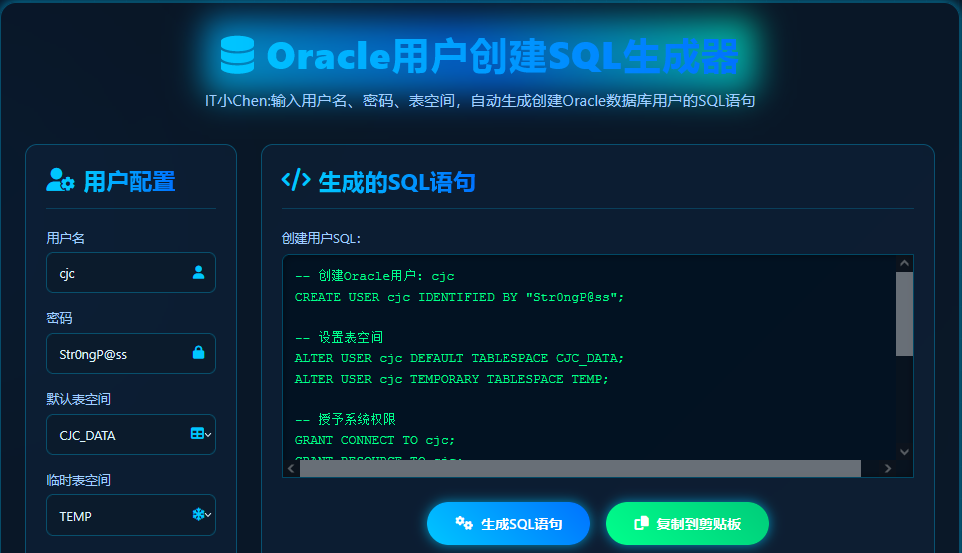
先看效果:
左侧手动输入需要创建用户的用户名、密码、表空间等信息,自动生成右侧的SQL语句。
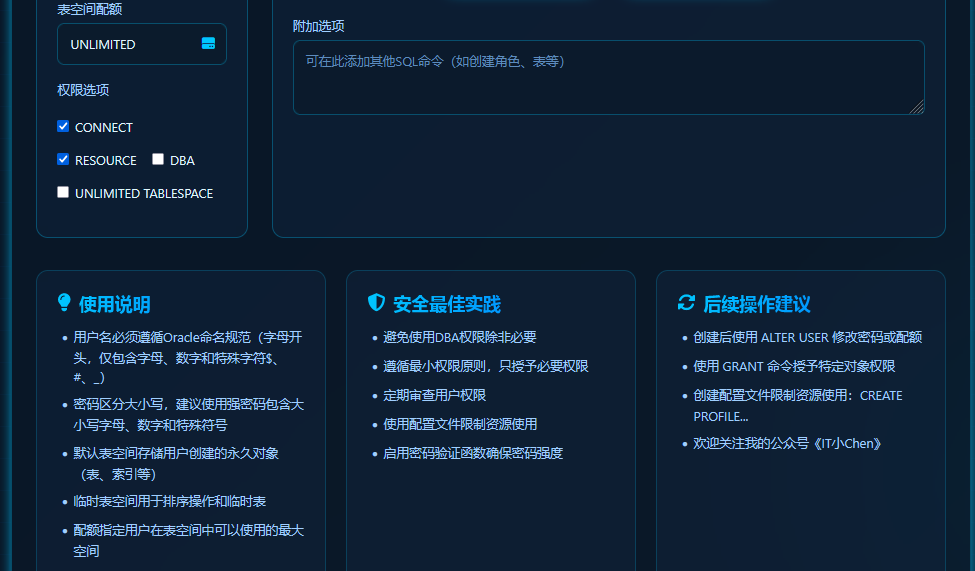
除此以外,还支持表空间配额、权限、使用说明等。
完整代码
完整代码如下,可以根据不同需求进行修改。
<!DOCTYPE html>
<html lang="zh-CN">
<head>
<meta charset="UTF-8">
<meta name="viewport" content="width=device-width, initial-scale=1.0">
<title>Oracle用户创建SQL生成器 | 科技感设计</title>
<link rel="stylesheet" href="https://cdnjs.cloudflare.com/ajax/libs/font-awesome/6.4.0/css/all.min.css">
<style>
:root {
--primary: #00c6ff;
--secondary: #0072ff;
--dark: #0a1929;
--darker: #071120;
--light: #e0f7ff;
--glow: 0 0 15px rgba(0, 198, 255, 0.7);
--success: #00ff8c;
}
* {
margin: 0;
padding: 0;
box-sizing: border-box;
font-family: 'Segoe UI', 'SF Pro Display', -apple-system, BlinkMacSystemFont, sans-serif;
}
body {
background: linear-gradient(135deg, var(--darker), var(--dark));
color: var(--light);
min-height: 100vh;
overflow-x: hidden;
position: relative;
padding: 20px;
}
body::before {
content: "";
position: absolute;
top: 0;
left: 0;
width: 100%;
height: 100%;
background:
radial-gradient(circle at 10% 20%, rgba(0, 114, 255, 0.1) 0%, transparent 20%),
radial-gradient(circle at 90% 80%, rgba(0, 198, 255, 0.1) 0%, transparent 20%);
z-index: -1;
}
.cyber-grid {
position: absolute;
top: 0;
left: 0;
width: 100%;
height: 100%;
background-image:
linear-gradient(rgba(0, 114, 255, 0.1) 1px, transparent 1px),
linear-gradient(90deg, rgba(0, 114, 255, 0.1) 1px, transparent 1px);
background-size: 40px 40px;
z-index: -1;
opacity: 0.3;
}
.container {
max-width: 1200px;
margin: 40px auto;
padding: 30px;
background: rgba(10, 25, 41, 0.6);
border-radius: 20px;
border: 1px solid rgba(0, 198, 255, 0.3);
box-shadow: var(--glow);
backdrop-filter: blur(10px);
}
header {
text-align: center;
margin-bottom: 40px;
position: relative;
}
.holographic {
position: relative;
display: inline-block;
}
.holographic::before {
content: "";
position: absolute;
top: -10px;
left: -20px;
right: -20px;
bottom: -10px;
background: linear-gradient(45deg, var(--primary), var(--secondary), #00ffcc);
z-index: -1;
filter: blur(20px);
opacity: 0.7;
border-radius: 10px;
}
h1 {
font-size: 3rem;
font-weight: 800;
background: linear-gradient(to right, #00c6ff, #0072ff);
-webkit-background-clip: text;
background-clip: text;
color: transparent;
letter-spacing: 1px;
margin-bottom: 10px;
position: relative;
z-index: 2;
}
.subtitle {
font-size: 1.2rem;
color: #a0cfff;
max-width: 700px;
margin: 0 auto;
line-height: 1.6;
}
.app-container {
display: grid;
grid-template-columns: 1fr 1fr;
gap: 30px;
margin-bottom: 30px;
}
@media (max-width: 900px) {
.app-container {
grid-template-columns: 1fr;
}
}
.input-section, .output-section {
background: rgba(15, 35, 60, 0.5);
border: 1px solid rgba(0, 198, 255, 0.3);
border-radius: 15px;
padding: 25px;
transition: all 0.3s ease;
backdrop-filter: blur(5px);
}
.input-section:hover, .output-section:hover {
box-shadow: 0 0 25px rgba(0, 198, 255, 0.5);
border-color: var(--primary);
}
.section-header {
display: flex;
align-items: center;
gap: 10px;
margin-bottom: 25px;
padding-bottom: 15px;
border-bottom: 1px solid rgba(0, 198, 255, 0.2);
}
.section-header i {
font-size: 1.8rem;
color: var(--primary);
}
.section-header h2 {
font-size: 1.8rem;
background: linear-gradient(to right, var(--primary), var(--secondary));
-webkit-background-clip: text;
background-clip: text;
color: transparent;
}
.form-group {
margin-bottom: 20px;
}
label {
display: block;
margin-bottom: 8px;
font-weight: 500;
color: #a0cfff;
}
.input-wrapper {
position: relative;
}
input, select, textarea {
width: 100%;
padding: 14px 15px;
background: rgba(10, 25, 41, 0.7);
border: 1px solid rgba(0, 198, 255, 0.3);
border-radius: 8px;
color: var(--light);
font-size: 1rem;
outline: none;
transition: all 0.3s ease;
}
input:focus, select:focus, textarea:focus {
border-color: var(--primary);
box-shadow: 0 0 10px rgba(0, 198, 255, 0.5);
}
input::placeholder, textarea::placeholder {
color: #5d8cbe;
}
.input-wrapper i {
position: absolute;
right: 15px;
top: 50%;
transform: translateY(-50%);
color: var(--primary);
}
.checkbox-group {
display: flex;
flex-wrap: wrap;
gap: 20px;
margin-top: 25px;
}
.checkbox-item {
display: flex;
align-items: center;
gap: 8px;
}
.checkbox-item input {
width: auto;
}
.checkbox-item label {
margin-bottom: 0;
color: var(--light);
}
.action-buttons {
display: flex;
justify-content: center;
gap: 20px;
margin: 30px 0;
flex-wrap: wrap;
}
.cyber-button {
background: linear-gradient(45deg, var(--primary), var(--secondary));
color: white;
border: none;
padding: 15px 35px;
font-size: 1.1rem;
font-weight: 600;
border-radius: 50px;
cursor: pointer;
transition: all 0.3s ease;
position: relative;
overflow: hidden;
box-shadow: var(--glow);
display: flex;
align-items: center;
gap: 10px;
}
.cyber-button.copy {
background: linear-gradient(45deg, var(--success), #00cc7a);
}
.cyber-button::after {
content: "";
position: absolute;
top: 0;
left: -100%;
width: 100%;
height: 100%;
background: linear-gradient(90deg, transparent, rgba(255, 255, 255, 0.2), transparent);
transition: 0.5s;
}
.cyber-button:hover::after {
left: 100%;
}
.cyber-button:hover {
transform: translateY(-3px);
box-shadow: 0 0 25px rgba(0, 198, 255, 0.9);
}
.cyber-button:active {
transform: translateY(1px);
}
#sql-output {
width: 100%;
height: 280px;
background: rgba(0, 15, 30, 0.8);
border: 1px solid rgba(0, 198, 255, 0.3);
border-radius: 8px;
color: var(--success);
font-family: 'Courier New', monospace;
font-size: 1rem;
padding: 15px;
line-height: 1.6;
overflow-y: auto;
white-space: pre;
margin-top: 10px;
box-shadow: inset 0 0 10px rgba(0, 0, 0, 0.5);
}
.info-cards {
display: grid;
grid-template-columns: repeat(auto-fit, minmax(300px, 1fr));
gap: 25px;
margin-top: 40px;
}
.info-card {
background: rgba(15, 35, 60, 0.5);
border: 1px solid rgba(0, 198, 255, 0.2);
border-radius: 15px;
padding: 25px;
transition: all 0.3s ease;
}
.info-card:hover {
transform: translateY(-5px);
border-color: var(--primary);
box-shadow: var(--glow);
}
.info-card h3 {
font-size: 1.4rem;
margin-bottom: 15px;
background: linear-gradient(to right, var(--primary), var(--secondary));
-webkit-background-clip: text;
background-clip: text;
color: transparent;
display: flex;
align-items: center;
gap: 10px;
}
.info-card ul {
padding-left: 20px;
color: #a0cfff;
}
.info-card li {
margin-bottom: 10px;
line-height: 1.5;
}
footer {
text-align: center;
padding: 30px 0;
color: #5d8cbe;
margin-top: 50px;
border-top: 1px solid rgba(0, 114, 255, 0.2);
}
.notification {
position: fixed;
bottom: 20px;
right: 20px;
background: var(--success);
color: #003320;
padding: 15px 25px;
border-radius: 8px;
font-weight: 600;
box-shadow: 0 5px 15px rgba(0,0,0,0.3);
transform: translateY(100px);
opacity: 0;
transition: all 0.4s ease;
z-index: 1000;
}
.notification.show {
transform: translateY(0);
opacity: 1;
}
</style>
</head>
<body>
<div class="cyber-grid"></div>
<div class="container">
<header>
<div class="holographic">
<h1><i class="fas fa-database"></i> Oracle用户创建SQL生成器</h1>
</div>
<p class="subtitle">输入用户名、密码和表空间信息,自动生成创建Oracle数据库用户的SQL语句</p>
</header>
<div class="app-container">
<div class="input-section">
<div class="section-header">
<i class="fas fa-user-cog"></i>
<h2>用户配置</h2>
</div>
<div class="form-group">
<label for="username">用户名</label>
<div class="input-wrapper">
<input type="text" id="username" placeholder="输入新用户名 (例如: app_user)" value="app_user">
<i class="fas fa-user"></i>
</div>
</div>
<div class="form-group">
<label for="password">密码</label>
<div class="input-wrapper">
<input type="text" id="password" placeholder="输入用户密码 (例如: Str0ngP@ss)" value="Str0ngP@ss">
<i class="fas fa-lock"></i>
</div>
</div>
<div class="form-group">
<label for="default-tablespace">默认表空间</label>
<div class="input-wrapper">
<select id="default-tablespace">
<option value="USERS">USERS</option>
<option value="APP_DATA" selected>APP_DATA</option>
<option value="USER_DATA">USER_DATA</option>
<option value="custom">自定义...</option>
</select>
<i class="fas fa-table"></i>
</div>
<input type="text" id="custom-default-tablespace" placeholder="输入自定义默认表空间名称" style="display: none; margin-top: 10px;">
</div>
<div class="form-group">
<label for="temporary-tablespace">临时表空间</label>
<div class="input-wrapper">
<select id="temporary-tablespace">
<option value="TEMP" selected>TEMP</option>
<option value="TEMP2">TEMP2</option>
<option value="TMP_DATA">TMP_DATA</option>
<option value="custom">自定义...</option>
</select>
<i class="fas fa-snowflake"></i>
</div>
<input type="text" id="custom-temporary-tablespace" placeholder="输入自定义临时表空间名称" style="display: none; margin-top: 10px;">
</div>
<div class="form-group">
<label for="quota">表空间配额</label>
<div class="input-wrapper">
<input type="text" id="quota" placeholder="例如: 500M, 10G 或 UNLIMITED" value="UNLIMITED">
<i class="fas fa-hdd"></i>
</div>
</div>
<div class="form-group">
<label>权限选项</label>
<div class="checkbox-group">
<div class="checkbox-item">
<input type="checkbox" id="connect" checked>
<label for="connect">CONNECT</label>
</div>
<div class="checkbox-item">
<input type="checkbox" id="resource" checked>
<label for="resource">RESOURCE</label>
</div>
<div class="checkbox-item">
<input type="checkbox" id="dba">
<label for="dba">DBA</label>
</div>
<div class="checkbox-item">
<input type="checkbox" id="unlimited-tablespace">
<label for="unlimited-tablespace">UNLIMITED TABLESPACE</label>
</div>
</div>
</div>
</div>
<div class="output-section">
<div class="section-header">
<i class="fas fa-code"></i>
<h2>生成的SQL语句</h2>
</div>
<div class="form-group">
<label for="sql-output">创建用户SQL:</label>
<div id="sql-output">-- 填写左侧表单后自动生成SQL</div>
</div>
<div class="action-buttons">
<button id="generate-btn" class="cyber-button">
<i class="fas fa-cogs"></i> 生成SQL语句
</button>
<button id="copy-btn" class="cyber-button copy">
<i class="fas fa-copy"></i> 复制到剪贴板
</button>
</div>
<div class="form-group">
<label for="additional-sql">附加选项</label>
<textarea id="additional-sql" rows="3" placeholder="可在此添加其他SQL命令(如创建角色、表等)"></textarea>
</div>
</div>
</div>
<div class="info-cards">
<div class="info-card">
<h3><i class="fas fa-lightbulb"></i> 使用说明</h3>
<ul>
<li>用户名必须遵循Oracle命名规范(字母开头,仅包含字母、数字和特殊字符$、#、_)</li>
<li>密码区分大小写,建议使用强密码包含大小写字母、数字和特殊符号</li>
<li>默认表空间存储用户创建的永久对象(表、索引等)</li>
<li>临时表空间用于排序操作和临时表</li>
<li>配额指定用户在表空间中可以使用的最大空间</li>
</ul>
</div>
<div class="info-card">
<h3><i class="fas fa-shield-alt"></i> 安全最佳实践</h3>
<ul>
<li>避免使用DBA权限除非必要</li>
<li>遵循最小权限原则,只授予必要权限</li>
<li>定期审查用户权限</li>
<li>使用配置文件限制资源使用</li>
<li>启用密码验证函数确保密码强度</li>
</ul>
</div>
<div class="info-card">
<h3><i class="fas fa-sync-alt"></i> 后续操作建议</h3>
<ul>
<li>创建后使用 ALTER USER 修改密码或配额</li>
<li>使用 GRANT 命令授予特定对象权限</li>
<li>创建配置文件限制资源使用:CREATE PROFILE...</li>
<li>定期备份用户元数据:使用DBMS_METADATA.GET_DDL</li>
</ul>
</div>
</div>
</div>
<footer>
<p>© 2023 Oracle用户创建SQL生成器 | 科技感设计 | 数据库管理工具</p>
</footer>
<div class="notification" id="notification">SQL已成功复制到剪贴板!</div>
<script>
// DOM元素
const usernameInput = document.getElementById('username');
const passwordInput = document.getElementById('password');
const defaultTablespaceSelect = document.getElementById('default-tablespace');
const customDefaultTablespaceInput = document.getElementById('custom-default-tablespace');
const temporaryTablespaceSelect = document.getElementById('temporary-tablespace');
const customTemporaryTablespaceInput = document.getElementById('custom-temporary-tablespace');
const quotaInput = document.getElementById('quota');
const connectCheckbox = document.getElementById('connect');
const resourceCheckbox = document.getElementById('resource');
const dbaCheckbox = document.getElementById('dba');
const unlimitedTablespaceCheckbox = document.getElementById('unlimited-tablespace');
const sqlOutput = document.getElementById('sql-output');
const generateBtn = document.getElementById('generate-btn');
const copyBtn = document.getElementById('copy-btn');
const additionalSql = document.getElementById('additional-sql');
const notification = document.getElementById('notification');
// 表空间选择事件
defaultTablespaceSelect.addEventListener('change', function() {
customDefaultTablespaceInput.style.display = this.value === 'custom' ? 'block' : 'none';
});
temporaryTablespaceSelect.addEventListener('change', function() {
customTemporaryTablespaceInput.style.display = this.value === 'custom' ? 'block' : 'none';
});
// 生成SQL函数
function generateSQL() {
const username = usernameInput.value.trim() || 'app_user';
const password = passwordInput.value.trim() || 'Str0ngP@ss';
// 获取表空间值
const defaultTablespace = defaultTablespaceSelect.value === 'custom'
? customDefaultTablespaceInput.value.trim() || 'CUSTOM_DATA'
: defaultTablespaceSelect.value;
const temporaryTablespace = temporaryTablespaceSelect.value === 'custom'
? customTemporaryTablespaceInput.value.trim() || 'CUSTOM_TEMP'
: temporaryTablespaceSelect.value;
const quota = quotaInput.value.trim() || 'UNLIMITED';
// 构建SQL
let sql = `-- 创建Oracle用户: ${username}\n`;
sql += `CREATE USER ${username} IDENTIFIED BY "${password}";\n\n`;
sql += `-- 设置表空间\n`;
sql += `ALTER USER ${username} DEFAULT TABLESPACE ${defaultTablespace};\n`;
sql += `ALTER USER ${username} TEMPORARY TABLESPACE ${temporaryTablespace};\n\n`;
if (quota.toUpperCase() !== 'UNLIMITED') {
sql += `-- 设置表空间配额\n`;
sql += `ALTER USER ${username} QUOTA ${quota} ON ${defaultTablespace};\n\n`;
}
sql += `-- 授予系统权限\n`;
if (connectCheckbox.checked) {
sql += `GRANT CONNECT TO ${username};\n`;
}
if (resourceCheckbox.checked) {
sql += `GRANT RESOURCE TO ${username};\n`;
}
if (dbaCheckbox.checked) {
sql += `GRANT DBA TO ${username};\n`;
}
if (unlimitedTablespaceCheckbox.checked) {
sql += `GRANT UNLIMITED TABLESPACE TO ${username};\n`;
}
if (!connectCheckbox.checked && !resourceCheckbox.checked &&
!dbaCheckbox.checked && !unlimitedTablespaceCheckbox.checked) {
sql += `-- 无权限被选中\n`;
}
sql += `\n-- 解锁用户(如果账户被锁定)\n`;
sql += `ALTER USER ${username} ACCOUNT UNLOCK;\n`;
// 添加附加SQL
const additional = additionalSql.value.trim();
if (additional) {
sql += `\n-- 附加SQL命令\n`;
sql += additional;
}
sql += `\n\n-- 验证用户创建\nSELECT username, account_status, created FROM dba_users WHERE username = '${username.toUpperCase()}';`;
sqlOutput.textContent = sql;
}
// 复制到剪贴板
function copyToClipboard() {
const sql = sqlOutput.textContent;
navigator.clipboard.writeText(sql).then(() => {
showNotification('SQL已成功复制到剪贴板!');
});
}
// 显示通知
function showNotification(message) {
notification.textContent = message;
notification.classList.add('show');
setTimeout(() => {
notification.classList.remove('show');
}, 3000);
}
// 事件监听
generateBtn.addEventListener('click', generateSQL);
copyBtn.addEventListener('click', copyToClipboard);
// 输入变化时实时生成SQL
usernameInput.addEventListener('input', generateSQL);
passwordInput.addEventListener('input', generateSQL);
defaultTablespaceSelect.addEventListener('change', generateSQL);
temporaryTablespaceSelect.addEventListener('change', generateSQL);
customDefaultTablespaceInput.addEventListener('input', generateSQL);
customTemporaryTablespaceInput.addEventListener('input', generateSQL);
quotaInput.addEventListener('input', generateSQL);
connectCheckbox.addEventListener('change', generateSQL);
resourceCheckbox.addEventListener('change', generateSQL);
dbaCheckbox.addEventListener('change', generateSQL);
unlimitedTablespaceCheckbox.addEventListener('change', generateSQL);
additionalSql.addEventListener('input', generateSQL);
// 初始生成SQL
generateSQL();
</script>
</body>
</html>
功能说明
这个Oracle用户创建SQL生成器具有以下特点:
-
用户配置:
- 用户名输入(支持Oracle命名规范)
- 密码设置(自动生成带引号的密码)
- 默认表空间选择(包含预设选项和自定义)
- 临时表空间选择(包含预设选项和自定义)
- 表空间配额设置(支持大小限制或UNLIMITED)
- 权限选项(CONNECT、RESOURCE、DBA等)
-
SQL生成:
- 自动创建CREATE USER语句
- 生成ALTER USER设置表空间
- 添加GRANT权限语句
- 包含解锁用户账户命令
- 添加验证查询
-
附加功能:
- 复制SQL到剪贴板
- 添加自定义SQL命令
- 实时预览生成的SQL
-
科技感设计:
- 深色背景搭配霓虹蓝绿色调
- 网格背景和发光效果
- 未来主义卡片设计
- 悬停动画和渐变效果
- 终端风格的SQL输出框
-
信息卡片:
- 使用说明(命名规范、表空间作用等)
- 安全最佳实践(最小权限原则等)
- 后续操作建议(修改用户、创建配置文件等)
使用说明
- 在左侧表单中输入用户名、密码
- 选择或自定义表空间
- 设置配额和权限选项
- 点击"生成SQL语句"按钮(或表单输入时自动生成)
- 检查右侧生成的SQL语句
- 点击"复制到剪贴板"使用生成的SQL
这个工具适合DBA、开发人员和系统管理员快速创建Oracle用户,避免手动编写SQL语句的错误,提高工作效率。
欢迎关注我的公众号《IT小Chen》

「喜欢这篇文章,您的关注和赞赏是给作者最好的鼓励」
关注作者
【版权声明】本文为墨天轮用户原创内容,转载时必须标注文章的来源(墨天轮),文章链接,文章作者等基本信息,否则作者和墨天轮有权追究责任。如果您发现墨天轮中有涉嫌抄袭或者侵权的内容,欢迎发送邮件至:contact@modb.pro进行举报,并提供相关证据,一经查实,墨天轮将立刻删除相关内容。
