



今日学习目标
学习openGauss分区表
(1)分区表是把逻辑上的一张表根据某种方案分成几张物理块进行存储,这张逻辑上的表称之为分区表,物理块称之为分区。
(2)分区表是一张逻辑表,不存储数据,数据实际是存储在分区上的。
Start
连接openGauss
su - omm
gsql -r
1.创建分区表
–范围分区表
create table update_table
(
        c1 int,
        c2 CHAR(2)
)
partition by range (c1)
(
        partition update_table_p0 values less than (50),
        partition update_table_p1 values less than (100),
        partition update_table_p2 values less than (150)
);
–查看分区表信息
\d+ update_table;
select * from pg_partition;
–插入数据
insert into update_table values (1, 'a'), (50, 'b'), (100, 'c');
–超出范围的数据会报错
insert into update_table values (150, 'd');
–查看各区上的数据
select * from update_table partition(update_table_p0);
2.创建分区
alter table update_table add partition update_table_p3 values less than (200);
insert into update_table values (150, 'd');
3.修改分区属性
alter table update_table rename partition update_table_p1 to update_table_p1_1;
4.删除分区
alter table update_table drop partition update_table_p0;
5.删除分区表
sudrop table update_table;
课后作业
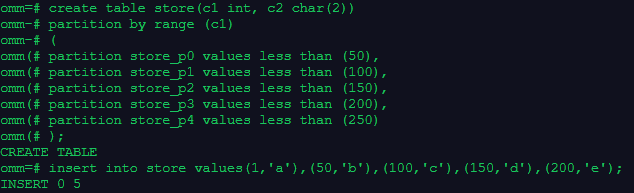
1.创建一个含有5个分区的范围分区表store,在每个分区中插入记录
create table store(c1 int, c2 char(2))
partition by range (c1)
(
    partition store_p0 values less than (50),
    partition store_p1 values less than (100),
    partition store_p2 values less than (150),
    partition store_p3 values less than (200),
    partition store_p4 values less than (250)
);
insert into store values(1,'a'),(50,'b'),(100,'c'),(150,'d'),(200,'e');
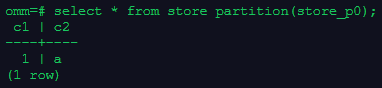
2.查看分区1上的数据
select * from store partition(store_p0);
3.重命名分区2
alter table store rename partition store_p1 to store_p11;

4.删除分区5
alter table store drop partition store_p4;

5.增加分区6
alter table store add partition store_p5 values less than(250);
insert into store values(200,'f');
6.在系统表pg_partition中查看分区信息
\d+ update_table;
select * from pg_partition;
7.删除分区表
drop table store;
今天的实训环境很卡,重启好几次才完成,导致后面没有截图,今晚尝试一下自己搭建一个环境来练习叭。
今日学习打卡完成!
「喜欢这篇文章,您的关注和赞赏是给作者最好的鼓励」
关注作者
【版权声明】本文为墨天轮用户原创内容,转载时必须标注文章的来源(墨天轮),文章链接,文章作者等基本信息,否则作者和墨天轮有权追究责任。如果您发现墨天轮中有涉嫌抄袭或者侵权的内容,欢迎发送邮件至:contact@modb.pro进行举报,并提供相关证据,一经查实,墨天轮将立刻删除相关内容。
