



[HarmonyOS NEXT 实战案例十] 电子书网格布局(下)
项目已开源,开源地址: https://gitcode.com/nutpi/HarmonyosNextCaseStudyTutorial , 欢迎fork & star
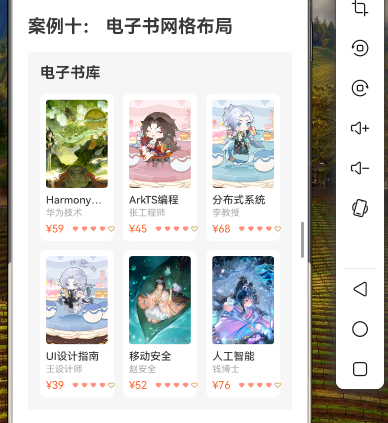
效果演示
1. 概述
在上篇教程中,我们已经实现了电子书网格布局的基本功能。本篇教程将在此基础上,进一步优化布局、添加交互功能以及实现更多高级特性,使电子书应用更加完善和用户友好。
本教程将涵盖以下内容:
- 电子书详情页实现
- 阅读器功能实现
- 书架功能实现
- 分类筛选和排序功能
- 高级动效和交互优化
2. 电子书详情页实现
2.1 状态变量定义
首先,我们需要定义一些状态变量来控制详情页的显示:
@State showDetail: boolean = false;
@State currentBook: BookType = null;
2.2 详情页UI实现
@Builder
private BookDetail() {
  Column() {
    // 顶部导航栏
    Row() {
      Image($r('app.media.ic_back'))
        .width(24)
        .height(24)
        .onClick(() => {
          this.showDetail = false;
        })

      Text('书籍详情')
        .fontSize(16)
        .fontWeight(FontWeight.Medium)
        .fontColor('#333333')
        .margin({ left: 16 })

      Blank()

      Image($r('app.media.ic_share'))
        .width(24)
        .height(24)
    }
    .width('100%')
    .padding({ left: 16, right: 16, top: 12, bottom: 12 })
    .backgroundColor(Color.White)

    Scroll() {
      Column() {
        // 书籍基本信息
        Row() {
          // 封面
          Image(this.currentBook.cover)
            .width(120)
            .height(160)
            .borderRadius(8)
            .objectFit(ImageFit.Cover)

          // 信息
          Column() {
            Text(this.currentBook.title)
              .fontSize(18)
              .fontWeight(FontWeight.Bold)
              .fontColor('#333333')
              .margin({ bottom: 8 })

            Text(`作者:${this.currentBook.author}`)
              .fontSize(14)
              .fontColor('#666666')
              .margin({ bottom: 4 })

            Text(`分类:${this.currentBook.category}`)
              .fontSize(14)
              .fontColor('#666666')
              .margin({ bottom: 4 })

            Row() {
              Text('评分:')
                .fontSize(14)
                .fontColor('#666666')

              Row() {
                ForEach([1, 2, 3, 4, 5], (item) => {
                  Image($r('app.media.ic_star'))
                    .width(16)
                    .height(16)
                    .fillColor(item <= Math.floor(this.currentBook.rating) ? '#FFC107' : '#E0E0E0')
                    .margin({ right: 2 })
                })
              }

              Text(this.currentBook.rating.toString())
                .fontSize(14)
                .fontColor('#FFC107')
                .margin({ left: 4 })
            }
            .margin({ bottom: 8 })

            // 价格和阅读按钮
            Row() {
              Text(this.currentBook.isFree ? '免费' : `¥${this.currentBook.price}`)
                .fontSize(16)
                .fontWeight(FontWeight.Bold)
                .fontColor(this.currentBook.isFree ? '#4CAF50' : '#FF5722')

              Blank()

              Button('开始阅读')
                .fontSize(14)
                .fontColor(Color.White)
                .backgroundColor('#673AB7')
                .borderRadius(16)
                .height(32)
                .width(100)
                .onClick(() => {
                  this.startReading();
                })
            }
            .width('100%')
          }
          .layoutWeight(1)
          .alignItems(HorizontalAlign.Start)
          .margin({ left: 16 })
        }
        .width('100%')
        .padding(16)
        .backgroundColor(Color.White)
        .borderRadius(8)

        // 书籍简介
        Column() {
          Text('内容简介')
            .fontSize(16)
            .fontWeight(FontWeight.Medium)
            .fontColor('#333333')
            .margin({ bottom: 8 })

          Text(this.currentBook.description)
            .fontSize(14)
            .fontColor('#666666')
            .lineHeight(22)
        }
        .width('100%')
        .padding(16)
        .backgroundColor(Color.White)
        .borderRadius(8)
        .margin({ top: 12 })

        // 目录预览
        Column() {
          Text('目录预览')
            .fontSize(16)
            .fontWeight(FontWeight.Medium)
            .fontColor('#333333')
            .margin({ bottom: 8 })

          ForEach(this.getChapters(), (chapter, index) => {
            Row() {
              Text(`第${index + 1}章 ${chapter}`)
                .fontSize(14)
                .fontColor('#666666')

              Blank()

              if (index < 3) {
                Text('免费')
                  .fontSize(12)
                  .fontColor('#4CAF50')
              } else if (!this.currentBook.isFree) {
                Text('付费')
                  .fontSize(12)
                  .fontColor('#FF5722')
              }
            }
            .width('100%')
            .padding({ top: 12, bottom: 12 })
            .border({ width: { bottom: index < this.getChapters().length - 1 ? 0.5 : 0 }, color: '#EEEEEE' })
          })
        }
        .width('100%')
        .padding(16)
        .backgroundColor(Color.White)
        .borderRadius(8)
        .margin({ top: 12 })

        // 相关推荐
        Column() {
          Text('相关推荐')
            .fontSize(16)
            .fontWeight(FontWeight.Medium)
            .fontColor('#333333')
            .margin({ bottom: 8 })

          Scroll(ScrollDirection.Horizontal) {
            Row() {
              ForEach(this.getRelatedBooks(), (book: BookType) => {
                this.RelatedBookCard(book)
              })
            }
          }
          .scrollBar(BarState.Off)
          .width('100%')
        }
        .width('100%')
        .padding(16)
        .backgroundColor(Color.White)
        .borderRadius(8)
        .margin({ top: 12, bottom: 16 })
      }
      .width('100%')
      .padding(16)
    }
    .scrollBar(BarState.Off)
    .scrollable(ScrollDirection.Vertical)
    .width('100%')
    .layoutWeight(1)
    .backgroundColor('#F5F5F5')

    // 底部操作栏
    Row() {
      Button({ type: ButtonType.Capsule }) {
        Row() {
          Image($r('app.media.ic_download'))
            .width(20)
            .height(20)
            .margin({ right: 8 })

          Text('下载')
            .fontSize(14)
            .fontColor('#666666')
        }
      }
      .backgroundColor('#F5F5F5')
      .layoutWeight(1)
      .height(40)

      Button({ type: ButtonType.Capsule }) {
        Row() {
          Image($r('app.media.ic_bookmark'))
            .width(20)
            .height(20)
            .margin({ right: 8 })

          Text('收藏')
            .fontSize(14)
            .fontColor('#666666')
        }
      }
      .backgroundColor('#F5F5F5')
      .layoutWeight(1)
      .height(40)

      Button({ type: ButtonType.Capsule }) {
        Row() {
          Image($r('app.media.ic_cart'))
            .width(20)
            .height(20)
            .margin({ right: 8 })

          Text(this.currentBook.isFree ? '免费阅读' : '购买')
            .fontSize(14)
            .fontColor(Color.White)
        }
      }
      .backgroundColor('#673AB7')
      .layoutWeight(2)
      .height(40)
    }
    .width('100%')
    .padding(16)
    .backgroundColor(Color.White)
    .border({ width: { top: 0.5 }, color: '#EEEEEE' })
  }
  .width('100%')
  .height('100%')
}
2.3 相关推荐卡片
@Builder
private RelatedBookCard(book: BookType) {
  Column() {
    // 书籍封面
    Image(book.cover)
      .width(100)
      .height(140)
      .borderRadius(8)
      .objectFit(ImageFit.Cover)

    // 书名
    Text(book.title)
      .fontSize(14)
      .fontWeight(FontWeight.Medium)
      .fontColor('#333333')
      .maxLines(1)
      .textOverflow({ overflow: TextOverflow.Ellipsis })
      .width(100)
      .margin({ top: 8 })

    // 作者
    Text(book.author)
      .fontSize(12)
      .fontColor('#666666')
      .maxLines(1)
      .textOverflow({ overflow: TextOverflow.Ellipsis })
      .width(100)
      .margin({ top: 4 })
  }
  .margin({ right: 12 })
  .onClick(() => {
    this.currentBook = book;
  })
}
2.4 辅助方法
// 获取章节列表(模拟数据)
private getChapters(): string[] {
  return [
    '引言',
    '基础概念',
    '核心技术',
    '实战案例',
    '进阶技巧',
    '未来展望',
    '附录A:常见问题',
    '附录B:参考资料'
  ];
}

// 获取相关推荐书籍(根据当前书籍分类筛选)
private getRelatedBooks(): BookType[] {
  if (!this.currentBook) return [];
  return this.books.filter(book =>
    book.category === this.currentBook.category &&
    book.id !== this.currentBook.id
  ).slice(0, 5);
}

// 开始阅读方法
private startReading(): void {
  // 在实际应用中,这里会跳转到阅读器页面
  this.showReader = true;
}
3. 阅读器功能实现
3.1 状态变量定义
@State showReader: boolean = false;
@State currentChapter: number = 0;
@State fontSize: number = 16;
@State brightness: number = 80;
@State showReaderSettings: boolean = false;
@State themeMode: string = 'light'; // 'light', 'dark', 'sepia'
3.2 阅读器UI实现
@Builder
private BookReader() {
  Column() {
    // 顶部导航栏(点击显示/隐藏)
    if (this.showReaderSettings) {
      Row() {
        Image($r('app.media.ic_back'))
          .width(24)
          .height(24)
          .onClick(() => {
            this.showReader = false;
            this.showReaderSettings = false;
          })

        Text(`第${this.currentChapter + 1}章 ${this.getChapters()[this.currentChapter]}`)
          .fontSize(16)
          .fontWeight(FontWeight.Medium)
          .fontColor(this.getThemeColor('text'))
          .margin({ left: 16 })

        Blank()

        Text(`${this.currentChapter + 1}/${this.getChapters().length}`)
          .fontSize(14)
          .fontColor(this.getThemeColor('secondaryText'))
      }
      .width('100%')
      .padding({ left: 16, right: 16, top: 12, bottom: 12 })
      .backgroundColor(this.getThemeColor('background'))
    }

    // 阅读内容
    Scroll() {
      Column() {
        Text(this.getChapterContent())
          .fontSize(this.fontSize)
          .fontColor(this.getThemeColor('text'))
          .lineHeight(this.fontSize * 1.5)
          .margin({ bottom: 20 })

        // 章节导航
        Row() {
          Button('上一章')
            .fontSize(14)
            .fontColor(this.getThemeColor('primary'))
            .backgroundColor('transparent')
            .opacity(this.currentChapter > 0 ? 1 : 0.5)
            .enabled(this.currentChapter > 0)
            .onClick(() => {
              if (this.currentChapter > 0) {
                this.currentChapter--;
              }
            })

          Blank()

          Button('下一章')
            .fontSize(14)
            .fontColor(this.getThemeColor('primary'))
            .backgroundColor('transparent')
            .opacity(this.currentChapter < this.getChapters().length - 1 ? 1 : 0.5)
            .enabled(this.currentChapter < this.getChapters().length - 1)
            .onClick(() => {
              if (this.currentChapter < this.getChapters().length - 1) {
                this.currentChapter++;
              }
            })
        }
        .width('100%')
      }
      .width('100%')
      .padding(16)
    }
    .scrollBar(BarState.Off)
    .scrollable(ScrollDirection.Vertical)
    .width('100%')
    .layoutWeight(1)
    .backgroundColor(this.getThemeColor('background'))
    .onClick(() => {
      this.showReaderSettings = !this.showReaderSettings;
    })

    // 底部设置栏(点击显示/隐藏)
    if (this.showReaderSettings) {
      Column() {
        // 字体大小设置
        Row() {
          Text('字体大小')
            .fontSize(14)
            .fontColor(this.getThemeColor('text'))

          Blank()

          Button('-')
            .width(32)
            .height(32)
            .fontSize(16)
            .fontColor(this.getThemeColor('text'))
            .backgroundColor(this.getThemeColor('card'))
            .borderRadius(16)
            .opacity(this.fontSize > 12 ? 1 : 0.5)
            .enabled(this.fontSize > 12)
            .onClick(() => {
              if (this.fontSize > 12) {
                this.fontSize -= 2;
              }
            })

          Text(this.fontSize.toString())
            .fontSize(14)
            .fontColor(this.getThemeColor('text'))
            .margin({ left: 12, right: 12 })

          Button('+')
            .width(32)
            .height(32)
            .fontSize(16)
            .fontColor(this.getThemeColor('text'))
            .backgroundColor(this.getThemeColor('card'))
            .borderRadius(16)
            .opacity(this.fontSize < 24 ? 1 : 0.5)
            .enabled(this.fontSize < 24)
            .onClick(() => {
              if (this.fontSize < 24) {
                this.fontSize += 2;
              }
            })
        }
        .width('100%')
        .margin({ bottom: 16 })

        // 亮度设置
        Row() {
          Text('亮度')
            .fontSize(14)
            .fontColor(this.getThemeColor('text'))

          Blank()

          Slider({
            value: this.brightness,
            min: 0,
            max: 100,
            step: 1,
            style: SliderStyle.OutSet
          })
            .width('60%')
            .onChange((value: number) => {
              this.brightness = value;
            })
        }
        .width('100%')
        .margin({ bottom: 16 })

        // 主题设置
        Row() {
          Text('主题')
            .fontSize(14)
            .fontColor(this.getThemeColor('text'))

          Blank()

          Row() {
            ForEach(['light', 'dark', 'sepia'], (theme) => {
              Column() {
                Circle({ width: 24, height: 24 })
                  .fill(this.getThemePreviewColor(theme))
                  .border({
                    width: this.themeMode === theme ? 2 : 0,
                    color: '#673AB7'
                  })
                  .margin({ right: theme !== 'sepia' ? 16 : 0 })
                  .onClick(() => {
                    this.themeMode = theme;
                  })

                Text(this.getThemeName(theme))
                  .fontSize(12)
                  .fontColor(this.getThemeColor('secondaryText'))
                  .margin({ top: 4 })
              }
              .alignItems(HorizontalAlign.Center)
            })
          }
        }
        .width('100%')
      }
      .width('100%')
      .padding(16)
      .backgroundColor(this.getThemeColor('background'))
      .border({ width: { top: 0.5 }, color: this.getThemeColor('border') })
    }
  }
  .width('100%')
  .height('100%')
  .backgroundColor(this.getThemeColor('background'))
}
3.3 辅助方法
// 获取章节内容(模拟数据)
private getChapterContent(): string {
  const chapterContents = [
    '本章介绍了本书的主要内容和结构,帮助读者了解本书的学习路径和目标。',
    '本章介绍了相关领域的基础概念和术语,为后续章节的学习打下基础。',
    '本章详细讲解了核心技术的原理和实现方法,包括算法、数据结构和设计模式等。',
    '本章通过实际案例演示了如何应用前面章节学到的知识解决实际问题。',
    '本章介绍了一些进阶技巧和优化方法,帮助读者提升技能水平。',
    '本章展望了该领域的未来发展趋势和可能的研究方向。',
    '本附录收集了读者在学习过程中可能遇到的常见问题及其解答。',
    '本附录提供了进一步学习的参考资料和推荐读物。'
  ];

  // 生成更长的内容用于测试滚动
  let content = chapterContents[this.currentChapter];
  for (let i = 0; i < 20; i++) {
    content += '\n\n' + '这是示例段落,用于测试阅读器的滚动和排版效果。'.repeat(5);
  }

  return content;
}

// 获取主题颜色
private getThemeColor(type: string): string {
  const themes = {
    light: {
      background: '#FFFFFF',
      text: '#333333',
      secondaryText: '#666666',
      primary: '#673AB7',
      card: '#F5F5F5',
      border: '#EEEEEE'
    },
    dark: {
      background: '#121212',
      text: '#E0E0E0',
      secondaryText: '#9E9E9E',
      primary: '#BB86FC',
      card: '#1E1E1E',
      border: '#333333'
    },
    sepia: {
      background: '#F8F1E3',
      text: '#5B4636',
      secondaryText: '#7D6B5D',
      primary: '#8D6E63',
      card: '#EFE6D5',
      border: '#D7CFC2'
    }
  };

  return themes[this.themeMode][type];
}

// 获取主题预览颜色
private getThemePreviewColor(theme: string): string {
  const colors = {
    light: '#FFFFFF',
    dark: '#121212',
    sepia: '#F8F1E3'
  };

  return colors[theme];
}

// 获取主题名称
private getThemeName(theme: string): string {
  const names = {
    light: '浅色',
    dark: '深色',
    sepia: '护眼'
  };

  return names[theme];
}
4. 书架功能实现
4.1 状态变量定义
@State showBookshelf: boolean = false;
@State bookshelfBooks: BookType[] = [];
@State bookshelfView: string = 'grid'; // 'grid' or 'list'
4.2 书架UI实现
@Builder
private Bookshelf() {
  Column() {
    // 顶部导航栏
    Row() {
      Image($r('app.media.ic_back'))
        .width(24)
        .height(24)
        .onClick(() => {
          this.showBookshelf = false;
        })

      Text('我的书架')
        .fontSize(16)
        .fontWeight(FontWeight.Medium)
        .fontColor('#333333')
        .margin({ left: 16 })

      Blank()

      Row() {
        Image($r('app.media.ic_grid_view'))
          .width(24)
          .height(24)
          .fillColor(this.bookshelfView === 'grid' ? '#673AB7' : '#999999')
          .onClick(() => {
            this.bookshelfView = 'grid';
          })

        Image($r('app.media.ic_list_view'))
          .width(24)
          .height(24)
          .margin({ left: 16 })
          .fillColor(this.bookshelfView === 'list' ? '#673AB7' : '#999999')
          .onClick(() => {
            this.bookshelfView = 'list';
          })
      }
    }
    .width('100%')
    .padding({ left: 16, right: 16, top: 12, bottom: 12 })
    .backgroundColor(Color.White)

    // 书架内容
    if (this.bookshelfBooks.length > 0) {
      if (this.bookshelfView === 'grid') {
        // 网格视图
        Scroll() {
          GridRow({
            columns: { xs: 3, sm: 4, md: 5, lg: 6 },
            gutter: { x: 16, y: 16 }
          }) {
            ForEach(this.bookshelfBooks, (book: BookType) => {
              GridCol() {
                this.BookshelfGridCard(book)
              }
            })
          }
          .width('100%')
          .padding(16)
        }
        .scrollBar(BarState.Off)
        .scrollable(ScrollDirection.Vertical)
        .width('100%')
        .layoutWeight(1)
        .backgroundColor('#F5F5F5')
      } else {
        // 列表视图
        Scroll() {
          Column() {
            ForEach(this.bookshelfBooks, (book: BookType) => {
              this.BookshelfListCard(book)
            })
          }
          .width('100%')
          .padding(16)
        }
        .scrollBar(BarState.Off)
        .scrollable(ScrollDirection.Vertical)
        .width('100%')
        .layoutWeight(1)
        .backgroundColor('#F5F5F5')
      }
    } else {
      // 空书架提示
      Column() {
        Image($r('app.media.ic_empty_bookshelf'))
          .width(120)
          .height(120)
          .margin({ bottom: 16 })

        Text('您的书架还没有书籍')
          .fontSize(16)
          .fontColor('#666666')
          .margin({ bottom: 8 })

        Text('浏览书城,添加喜欢的书籍到书架')
          .fontSize(14)
          .fontColor('#999999')
          .margin({ bottom: 24 })

        Button('去书城看看')
          .fontSize(16)
          .fontColor(Color.White)
          .backgroundColor('#673AB7')
          .borderRadius(20)
          .width(160)
          .height(40)
          .onClick(() => {
            this.showBookshelf = false;
          })
      }
      .width('100%')
      .layoutWeight(1)
      .justifyContent(FlexAlign.Center)
      .backgroundColor('#F5F5F5')
    }
  }
  .width('100%')
  .height('100%')
}
4.3 书架卡片实现
// 书架网格卡片
@Builder
private BookshelfGridCard(book: BookType) {
  Column() {
    // 书籍封面
    Stack() {
      Image(book.cover)
        .width('100%')
        .aspectRatio(0.75) // 3:4的宽高比
        .borderRadius(8)
        .objectFit(ImageFit.Cover)

      // 阅读进度
      Text('已读30%')
        .fontSize(10)
        .fontColor(Color.White)
        .backgroundColor('rgba(0, 0, 0, 0.6)')
        .borderRadius({ bottomLeft: 8, bottomRight: 8 })
        .width('100%')
        .textAlign(TextAlign.Center)
        .padding(4)
        .position({ x: 0, y: '100%' })
        .translate({ y: -24 })
    }
    .width('100%')

    // 书名
    Text(book.title)
      .fontSize(14)
      .fontWeight(FontWeight.Medium)
      .fontColor('#333333')
      .maxLines(1)
      .textOverflow({ overflow: TextOverflow.Ellipsis })
      .width('100%')
      .margin({ top: 8 })
  }
  .width('100%')
  .onClick(() => {
    this.currentBook = book;
    this.showDetail = true;
    this.showBookshelf = false;
  })
}

// 书架列表卡片
@Builder
private BookshelfListCard(book: BookType) {
  Row() {
    // 书籍封面
    Image(book.cover)
      .width(60)
      .height(80)
      .borderRadius(4)
      .objectFit(ImageFit.Cover)

    // 书籍信息
    Column() {
      Text(book.title)
        .fontSize(16)
        .fontWeight(FontWeight.Medium)
        .fontColor('#333333')
        .maxLines(1)
        .textOverflow({ overflow: TextOverflow.Ellipsis })
        .width('100%')

      Text(book.author)
        .fontSize(14)
        .fontColor('#666666')
        .maxLines(1)
        .textOverflow({ overflow: TextOverflow.Ellipsis })
        .width('100%')
        .margin({ top: 4 })

      Row() {
        Progress({ value: 30, total: 100 })
          .width('80%')
          .height(4)
          .color('#673AB7')

        Text('30%')
          .fontSize(12)
          .fontColor('#999999')
          .margin({ left: 8 })
      }
      .width('100%')
      .margin({ top: 8 })
    }
    .layoutWeight(1)
    .alignItems(HorizontalAlign.Start)
    .margin({ left: 12 })

    // 继续阅读按钮
    Button('继续')
      .fontSize(14)
      .fontColor(Color.White)
      .backgroundColor('#673AB7')
      .borderRadius(16)
      .width(60)
      .height(32)
  }
  .width('100%')
  .padding(12)
  .backgroundColor(Color.White)
  .borderRadius(8)
  .margin({ bottom: 12 })
  .onClick(() => {
    this.currentBook = book;
    this.showReader = true;
    this.showBookshelf = false;
  })
}
4.4 辅助方法
// 添加书籍到书架
private addToBookshelf(book: BookType): void {
  if (!this.isInBookshelf(book)) {
    this.bookshelfBooks.push(book);
  }
}

// 从书架移除书籍
private removeFromBookshelf(book: BookType): void {
  const index = this.bookshelfBooks.findIndex(item => item.id === book.id);
  if (index !== -1) {
    this.bookshelfBooks.splice(index, 1);
  }
}

// 检查书籍是否在书架中
private isInBookshelf(book: BookType): boolean {
  return this.bookshelfBooks.some(item => item.id === book.id);
}
5. 分类筛选和排序功能
5.1 状态变量定义
@State showFilter: boolean = false;
@State selectedCategories: string[] = [];
@State priceFilter: string = 'all'; // 'all', 'free', 'paid'
@State sortBy: string = 'default'; // 'default', 'rating', 'newest'
5.2 筛选面板UI实现
@Builder
private FilterPanel() {
  Column() {
    // 顶部标题栏
    Row() {
      Text('筛选')
        .fontSize(16)
        .fontWeight(FontWeight.Medium)
        .fontColor('#333333')

      Blank()

      Button('重置')
        .fontSize(14)
        .fontColor('#666666')
        .backgroundColor('transparent')
        .onClick(() => {
          this.resetFilter();
        })
    }
    .width('100%')
    .padding({ bottom: 16 })
    .border({ width: { bottom: 0.5 }, color: '#EEEEEE' })

    Scroll() {
      Column() {
        // 分类筛选
        Column() {
          Text('分类')
            .fontSize(16)
            .fontWeight(FontWeight.Medium)
            .fontColor('#333333')
            .margin({ bottom: 12 })

          Flex({ wrap: FlexWrap.Wrap }) {
            ForEach(this.categories, (category: string) => {
              Text(category)
                .fontSize(14)
                .fontColor(this.selectedCategories.includes(category) ? '#673AB7' : '#666666')
                .backgroundColor(this.selectedCategories.includes(category) ? '#EDE7F6' : '#F5F5F5')
                .borderRadius(16)
                .padding({ left: 16, right: 16, top: 8, bottom: 8 })
                .margin({ right: 8, bottom: 8 })
                .onClick(() => {
                  this.toggleCategory(category);
                })
            })
          }
          .width('100%')
        }
        .width('100%')
        .margin({ bottom: 24 })

        // 价格筛选
        Column() {
          Text('价格')
            .fontSize(16)
            .fontWeight(FontWeight.Medium)
            .fontColor('#333333')
            .margin({ bottom: 12 })

          Row() {
            ForEach(['all', 'free', 'paid'], (filter: string) => {
              Text(this.getPriceFilterText(filter))
                .fontSize(14)
                .fontColor(this.priceFilter === filter ? '#673AB7' : '#666666')
                .backgroundColor(this.priceFilter === filter ? '#EDE7F6' : '#F5F5F5')
                .borderRadius(16)
                .padding({ left: 16, right: 16, top: 8, bottom: 8 })
                .margin({ right: 8 })
                .onClick(() => {
                  this.priceFilter = filter;
                })
            })
          }
          .width('100%')
        }
        .width('100%')
        .margin({ bottom: 24 })

        // 排序方式
        Column() {
          Text('排序')
            .fontSize(16)
            .fontWeight(FontWeight.Medium)
            .fontColor('#333333')
            .margin({ bottom: 12 })

          Row() {
            ForEach(['default', 'rating', 'newest'], (sort: string) => {
              Text(this.getSortByText(sort))
                .fontSize(14)
                .fontColor(this.sortBy === sort ? '#673AB7' : '#666666')
                .backgroundColor(this.sortBy === sort ? '#EDE7F6' : '#F5F5F5')
                .borderRadius(16)
                .padding({ left: 16, right: 16, top: 8, bottom: 8 })
                .margin({ right: 8 })
                .onClick(() => {
                  this.sortBy = sort;
                })
            })
          }
          .width('100%')
        }
        .width('100%')
      }
      .width('100%')
      .padding({ top: 16, bottom: 16 })
    }
    .scrollBar(BarState.Off)
    .scrollable(ScrollDirection.Vertical)
    .width('100%')
    .layoutWeight(1)

    // 底部按钮
    Row() {
      Button('取消')
        .fontSize(16)
        .fontColor('#666666')
        .backgroundColor('#F5F5F5')
        .borderRadius(20)
        .width('45%')
        .height(40)
        .onClick(() => {
          this.showFilter = false;
        })

      Button('应用')
        .fontSize(16)
        .fontColor(Color.White)
        .backgroundColor('#673AB7')
        .borderRadius(20)
        .width('45%')
        .height(40)
        .onClick(() => {
          this.applyFilter();
          this.showFilter = false;
        })
    }
    .width('100%')
    .justifyContent(FlexAlign.SpaceBetween)
    .padding({ top: 16 })
    .border({ width: { top: 0.5 }, color: '#EEEEEE' })
  }
  .width('100%')
  .height('60%')
  .padding(16)
  .backgroundColor(Color.White)
  .borderRadius({ topLeft: 16, topRight: 16 })
  .position({ x: 0, y: '40%' })
}
5.3 辅助方法
// 切换分类选择状态
private toggleCategory(category: string): void {
  const index = this.selectedCategories.indexOf(category);
  if (index === -1) {
    this.selectedCategories.push(category);
  } else {
    this.selectedCategories.splice(index, 1);
  }
}

// 获取价格筛选文本
private getPriceFilterText(filter: string): string {
  const texts = {
    all: '全部',
    free: '免费',
    paid: '付费'
  };

  return texts[filter];
}

// 获取排序方式文本
private getSortByText(sort: string): string {
  const texts = {
    default: '默认排序',
    rating: '评分最高',
    newest: '最新上架'
  };

  return texts[sort];
}

// 重置筛选条件
private resetFilter(): void {
  this.selectedCategories = [];
  this.priceFilter = 'all';
  this.sortBy = 'default';
}

// 应用筛选条件
private applyFilter(): void {
  // 在实际应用中,这里会根据筛选条件获取数据
}

// 获取筛选后的书籍列表
private getFilteredBooks(): BookType[] {
  let filteredBooks = [...this.books];

  // 应用分类筛选
  if (this.selectedCategories.length > 0) {
    filteredBooks = filteredBooks.filter(book =>
      this.selectedCategories.includes(book.category)
    );
  }

  // 应用价格筛选
  if (this.priceFilter !== 'all') {
    filteredBooks = filteredBooks.filter(book =>
      (this.priceFilter === 'free' && book.isFree) ||
      (this.priceFilter === 'paid' && !book.isFree)
    );
  }

  // 应用排序
  if (this.sortBy === 'rating') {
    filteredBooks.sort((a, b) => b.rating - a.rating);
  } else if (this.sortBy === 'newest') {
    filteredBooks.sort((a, b) => (a.isNew === b.isNew) ? 0 : a.isNew ? -1 : 1);
  }

  return filteredBooks;
}
6. 高级动效和交互优化
6.1 下拉刷新
@State refreshing: boolean = false;

// 在BookGrid方法中添加下拉刷新
Refresh({ refreshing: this.refreshing }) {
  // 原有的Scroll内容
  Scroll() {
    // ...
  }
  .onRefreshing(() => {
    // 模拟刷新操作
    setTimeout(() => {
      this.refreshing = false;
      // 可以在这里更新数据
    }, 2000);
  })
}
6.2 书籍卡片动画效果
// 在BookCard方法中添加动画效果
@Builder
private BookCard(book: BookType) {
  Column() {
    // 原有的卡片内容
    // ...
  }
  .width('100%')
  .backgroundColor(Color.White)
  .borderRadius(8)
  .padding(8)
  .stateStyles({
    pressed: {
      scale: 0.95,
      opacity: 0.8
    },
    normal: {
      scale: 1.0,
      opacity: 1.0
    }
  })
  .animation({
    duration: 200,
    curve: Curve.EaseOut
  })
  .onClick(() => {
    this.currentBook = book;
    this.showDetail = true;
  })
}
6.3 详情页过渡动画
// 在build方法中添加页面过渡动画
build() {
  Stack() {
    // 主页面
    Column() {
      // 原有的主页面内容
      // ...
    }
    .width('100%')
    .height('100%')
    .backgroundColor('#F5F5F5')
    .visibility(this.showDetail || this.showReader || this.showBookshelf ? Visibility.Hidden : Visibility.Visible)

    // 详情页
    if (this.showDetail) {
      this.BookDetail()
        .transition({
          type: TransitionType.Insert,
          translate: { x: '100%', y: 0 }
        })
        .transition({
          type: TransitionType.Delete,
          translate: { x: '100%', y: 0 }
        })
    }

    // 阅读器页面
    if (this.showReader) {
      this.BookReader()
        .transition({
          type: TransitionType.Insert,
          opacity: 0
        })
        .transition({
          type: TransitionType.Delete,
          opacity: 0
        })
    }

    // 书架页面
    if (this.showBookshelf) {
      this.Bookshelf()
        .transition({
          type: TransitionType.Insert,
          translate: { x: 0, y: '100%' }
        })
        .transition({
          type: TransitionType.Delete,
          translate: { x: 0, y: '100%' }
        })
    }

    // 筛选面板
    if (this.showFilter) {
      // 半透明背景
      Column()
        .width('100%')
        .height('100%')
        .backgroundColor('rgba(0, 0, 0, 0.5)')
        .onClick(() => {
          this.showFilter = false;
        })

      // 筛选面板
      this.FilterPanel()
        .transition({
          type: TransitionType.Insert,
          translate: { x: 0, y: '100%' }
        })
        .transition({
          type: TransitionType.Delete,
          translate: { x: 0, y: '100%' }
        })
    }
  }
  .width('100%')
  .height('100%')
}
7. 完整代码
由于完整代码较长,这里只展示主要的修改部分。完整代码应包括上述所有功能的实现,并在原有基础上进行扩展。
8. 总结
本教程详细讲解了如何优化电子书网格布局、添加交互功能以及实现更多高级特性,使电子书应用更加完善和用户友好。
主要内容包括:
-
电子书详情页实现:展示书籍的详细信息,包括封面、作者、分类、评分、价格、简介、目录预览和相关推荐。
-
阅读器功能实现:提供舒适的阅读体验,支持字体大小调整、亮度调节、主题切换等功能。
-
书架功能实现:管理用户收藏的书籍,支持网格视图和列表视图两种展示方式。
-
分类筛选和排序功能:根据分类、价格和排序方式筛选书籍,提高用户查找效率。
-
高级动效和交互优化:添加下拉刷新、卡片动画效果和页面过渡动画,提升用户体验。
通过这些功能的实现,我们打造了一个功能完善、交互友好的电子书应用。这些技术和设计理念不仅适用于电子书应用,也可以应用到其他需要网格布局和丰富交互的场景中。
「喜欢这篇文章,您的关注和赞赏是给作者最好的鼓励」
关注作者
【版权声明】本文为墨天轮用户原创内容,转载时必须标注文章的来源(墨天轮),文章链接,文章作者等基本信息,否则作者和墨天轮有权追究责任。如果您发现墨天轮中有涉嫌抄袭或者侵权的内容,欢迎发送邮件至:contact@modb.pro进行举报,并提供相关证据,一经查实,墨天轮将立刻删除相关内容。
