



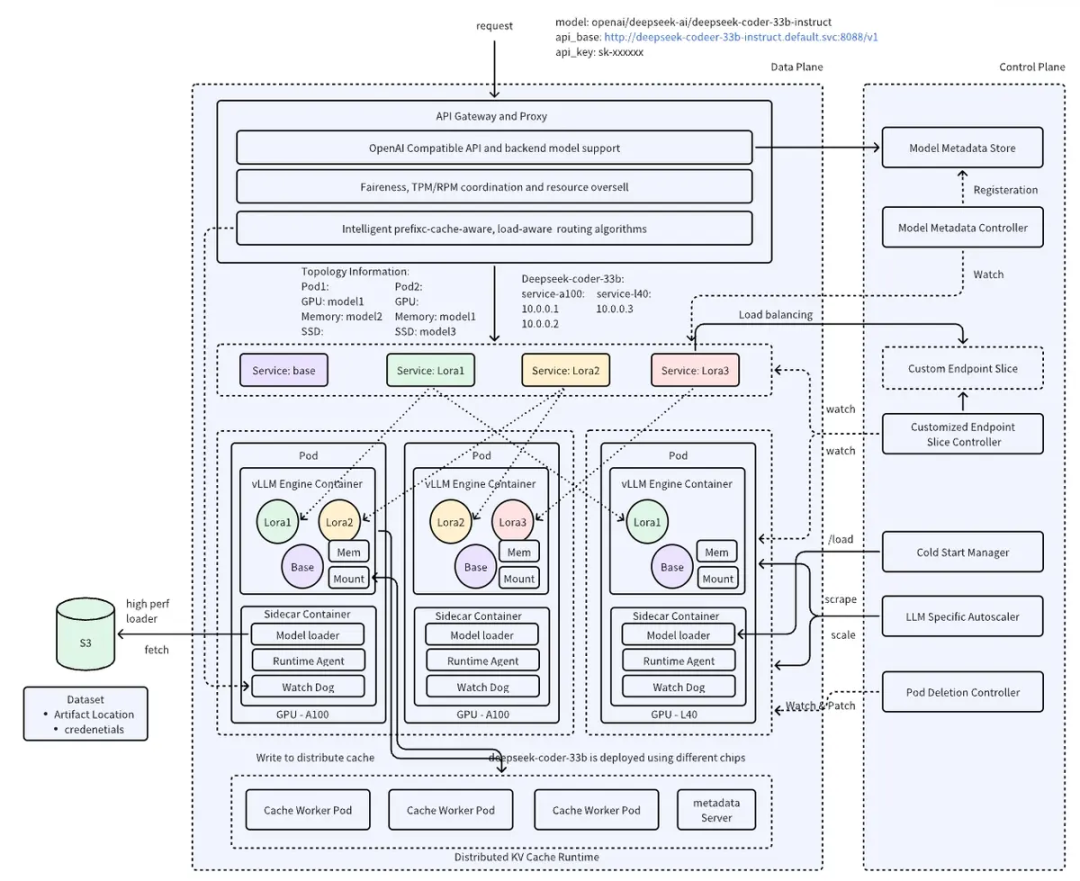
HPA (Horizontal Pod Autoscaler) - 标准Kubernetes HPA KPA (Knative-style Pod Autoscaler) - 具有稳定和紧急扩缩容模式,适合处理流量突发。 APA (Application Pod Autoscaler) - 应用特定的扩缩容逻辑,提供可配置的容忍带,适合应用特定的扩缩容需求。
[root@system-test-102-94 lgy]# kubectl get po -n aibrix-systemNAME READY STATUS RESTARTS AGEaibrix-controller-manager-7557f875bf-xxhmn 1/1 Running 1 (33h ago) 2d23haibrix-gateway-plugins-6f76c4ccf7-bhg6g 1/1 Running 0 2d23haibrix-gpu-optimizer-78cfdb6dc7-vnbtb 1/1 Running 0 2d23haibrix-kuberay-operator-5586cd8976-mm884 1/1 Running 1 (33h ago) 2d23haibrix-metadata-service-79cc7786b9-dxdtm 1/1 Running 0 2d23haibrix-redis-master-84c69b7d5d-dwtdw 1/1 Running 0 2d23h[root@system-test-102-94 lgy]# kubectl get svc -n aibrix-systemNAME TYPE CLUSTER-IP EXTERNAL-IP PORT(S) AGEaibrix-controller-manager-metrics-service ClusterIP 10.96.104.139 <none> 8080/TCP 2d23haibrix-gateway-plugins ClusterIP 10.96.134.7 <none> 50052/TCP 2d23haibrix-gpu-optimizer ClusterIP 10.96.249.205 <none> 8080/TCP 2d23haibrix-kuberay-operator ClusterIP 10.96.60.14 <none> 8080/TCP 2d23haibrix-lora-controller-manager-metrics-service ClusterIP 10.96.89.16 <none> 8080/TCP 74maibrix-metadata-service NodePort 10.96.246.18 <none> 8090:32004/TCP 2d23haibrix-redis-master ClusterIP 10.96.149.47 <none> 6379/TCP 2d23h
apiVersion: apps/v1kind: Deploymentmetadata:labels:model.aibrix.ai/name: deepseek-r1-distill-llama-8b # 和svc一致model.aibrix.ai/port: "8000"name: deepseek-r1-distill-llama-8bnamespace: defaultspec:replicas: 1selector:matchLabels:model.aibrix.ai/name: deepseek-r1-distill-llama-8btemplate:metadata:labels:model.aibrix.ai/name: deepseek-r1-distill-llama-8bspec:containers:- command:- python3- -m- vllm.entrypoints.openai.api_server- --host- "0.0.0.0"- --port- "8000"- --uvicorn-log-level- warning- --model- models/DeepSeek-R1-Distill-Llama-8B- --served-model-name- deepseek-r1-distill-llama-8b # 和svc一致- --max-model-len- "12288"image: docker.1ms.run/vllm/vllm-openai:v0.7.1imagePullPolicy: IfNotPresentname: vllm-openaivolumeMounts:- name: modelsmountPath: models/DeepSeek-R1-Distill-Llama-8Bports:- containerPort: 8000protocol: TCPresources:limits:nvidia.com/nvidia-rtx-3090-24GB: "1"requests:nvidia.com/nvidia-rtx-3090-24GB: "1"livenessProbe:httpGet:path: healthport: 8000scheme: HTTPfailureThreshold: 3periodSeconds: 5successThreshold: 1timeoutSeconds: 1readinessProbe:httpGet:path: healthport: 8000scheme: HTTPfailureThreshold: 5periodSeconds: 5successThreshold: 1timeoutSeconds: 1startupProbe:httpGet:path: healthport: 8000scheme: HTTPfailureThreshold: 30periodSeconds: 5successThreshold: 1timeoutSeconds: 1volumes:- name: modelshostPath:path: root/lgy/models/DeepSeek-R1-Distill-Llama-8Btype: Directory---apiVersion: v1kind: Servicemetadata:labels:model.aibrix.ai/name: deepseek-r1-distill-llama-8bprometheus-discovery: "true"annotations:prometheus.io/scrape: "true"prometheus.io/port: "8080"name: deepseek-r1-distill-llama-8b # 需和model.aibrix.ai/name一致namespace: defaultspec:ports:- name: serveport: 8000protocol: TCPtargetPort: 8000- name: httpport: 8080protocol: TCPtargetPort: 8080selector:model.aibrix.ai/name: deepseek-r1-distill-llama-8btype: ClusterIP
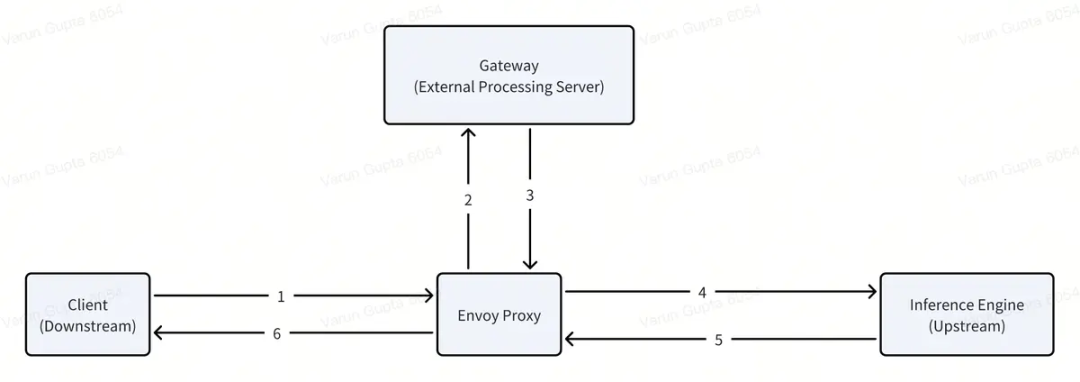
[root@system-test-102-94 lgy]# kubectl get po -n envoy-gateway-systemNAME READY STATUS RESTARTS AGEenvoy-aibrix-system-aibrix-eg-903790dc-fccbb99cd-4b9jg 2/2 Running 0 2d23henvoy-gateway-748f68f8f5-c55xx 1/1 Running 1 (33h ago) 2d23h[root@system-test-102-94 lgy]# kubectl get svc -n envoy-gateway-systemNAME TYPE CLUSTER-IP EXTERNAL-IP PORT(S) AGEenvoy-aibrix-system-aibrix-eg-903790dc NodePort 10.96.192.76 <none> 80:1422/TCP 3denvoy-gateway ClusterIP 10.96.18.242 <none> 18000/TCP,18001/TCP,18002/TCP,19001/TCP 3d[root@system-test-102-94 lgy]# kubectl get gateway -n aibrix-systemNAME CLASS ADDRESS PROGRAMMED AGEaibrix-eg aibrix-eg 10.0.100.16 True 3d[root@system-test-102-94 lgy]# kubectl get httproute -n aibrix-systemNAME HOSTNAMES AGEaibrix-reserved-router 2d23hdeepseek-r1-distill-llama-8b-router 2d16h
random:将请求路由到随机 pod。 least-request:将请求路由到正在进行的请求最少的 pod。 throughput:将请求路由到已处理最低总加权令牌的 pod。 prefix-cache:将请求路由到已经具有与请求的提示前缀匹配的 KV 缓存的 pod。 least-busy-time:将请求路由到累计繁忙处理时间最短的 pod。 least-kv-cache:将请求路由到当前 KV 缓存大小最小(使用的 VRAM 最少)的 pod。 least-latency:将请求路由到平均处理延迟最低的 pod。 prefix-cache-and-load:路由请求时同时考虑前缀缓存命中和 pod 负载。 vtc-basic:使用平衡公平性(用户令牌计数)和 Pod 利用率的混合评分来路由请求。它是虚拟令牌计数器 (VTC) 算法的一个简单变体
curl http://10.0.102.94:32004/CreateUser -H "Content-Type: application/json" -d '{"name": "lgy","rpm": 100,"tpm": 1000}'
curl http://10.0.102.94:32004/CreateUser -H "Content-Type: application/json" -d '{"name": "lgy","rpm": 100,"tpm": 1000}'
curl http://10.0.102.94:32004/ReadUser -H "Content-Type: application/json" -d '{"name": "lgy"}'
curl http://10.0.102.94:32004/UpdateUser -H "Content-Type: application/json" -d '{"name": "lgs","rpm": 3,"tpm": 1000}'
curl -v 10.0.102.94:1422/v1/chat/completions \-H "user: lgy" \-H "Content-Type: application/json" \-d '{"model": "deepseek-r1-distill-llama-8b","messages": [{"role": "user", "content": "Say this is a test!"}],"temperature": 0.7}'
检查RPM限制:验证用户当前的请求数是否已超过RPM限制 增加RPM计数:如果未超过限制,增加用户的RPM计数 检查TPM限制:验证用户当前的令牌使用量是否已超过TPM限制
{"error":{"code":429,"message":"user: lgy has exceeded RPM: 3"}}
- name: aibrix-runtimeimage: docker.1ms.run/aibrix/runtime:v0.2.1command:- aibrix_runtime- --port- "8080"env:- name: INFERENCE_ENGINEvalue: vllm # 指定推理引擎交互(目前主要支持 vLLM)- name: INFERENCE_ENGINE_ENDPOINTvalue: http://localhost:8000 # 指定推理引擎的 API 端点ports:- containerPort: 8080protocol: TCP
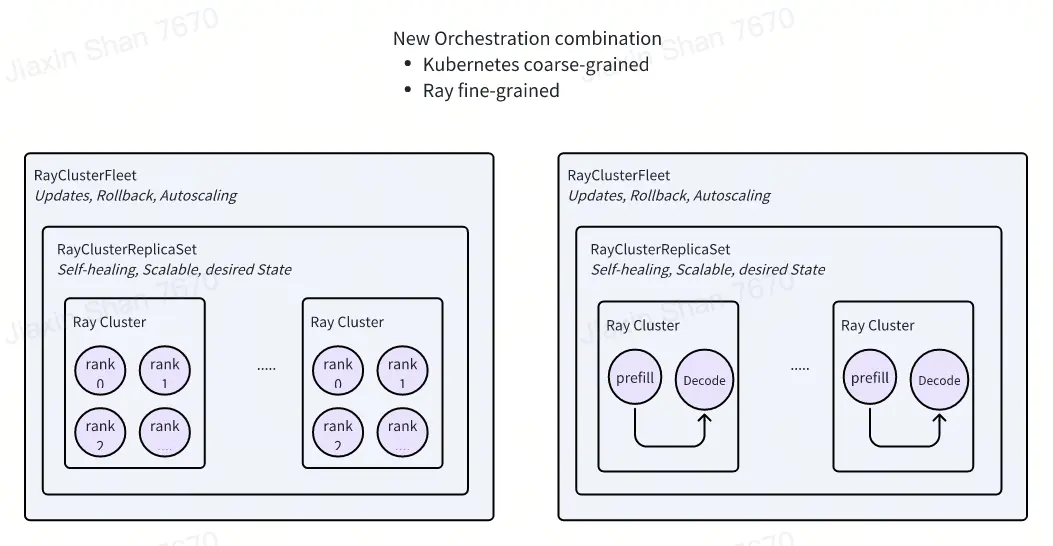
apiVersion: orchestration.aibrix.ai/v1alpha1kind: RayClusterFleetmetadata:name: qwen-coder-7b-instructlabels:app.kubernetes.io/name: aibrixapp.kubernetes.io/managed-by: kustomizespec:replicas: 1selector:matchLabels:model.aibrix.ai/name: qwen-coder-7b-instructstrategy:type: RollingUpdaterollingUpdate:maxSurge: 25%maxUnavailable: 25%template:metadata:labels:model.aibrix.ai/name: qwen-coder-7b-instructannotations:ray.io/overwrite-container-cmd: "true"spec:rayVersion: "2.10.0"headGroupSpec:rayStartParams:dashboard-host: "0.0.0.0"template:metadata:labels:model.aibrix.ai/name: qwen-coder-7b-instructspec:containers:- name: ray-headimage: vllm/vllm-openai:v0.7.1command: ["/bin/bash", "-c"]args:- >ulimit -n 65536 &&echo "[INFO] Starting Ray head node..." &&eval "$KUBERAY_GEN_RAY_START_CMD" &echo "[INFO] Waiting for Ray dashboard to be ready..." &&until curl --max-time 5 --fail http://127.0.0.1:8265 > dev/null 2>&1; doecho "[WAITING] $(date -u +'%Y-%m-%dT%H:%M:%SZ') - Ray dashboard not ready yet...";sleep 2;done &&echo "[SUCCESS] Ray dashboard is available!" &&vllm serve Qwen/Qwen2.5-Coder-7B-Instruct \--served-model-name qwen-coder-7b-instruct \--tensor-parallel-size 2 \--distributed-executor-backend ray \--host 0.0.0.0 \--port 8000 \--dtype halfports:- containerPort: 6379name: gcs-server- containerPort: 8265name: dashboard- containerPort: 10001name: client- containerPort: 8000name: serviceresources:limits:cpu: "4"nvidia.com/nvidia-rtx-3090-24GB: 1requests:cpu: "4"nvidia.com/nvidia-rtx-3090-24GB: 1- name: aibrix-runtimeimage: docker.1ms.run/aibrix/runtime:v0.2.1command:- aibrix_runtime- --port- "8080"env:- name: INFERENCE_ENGINEvalue: vllm- name: INFERENCE_ENGINE_ENDPOINTvalue: http://localhost:8000- name: PYTORCH_CUDA_ALLOC_CONFvalue: "expandable_segments:True"ports:- containerPort: 8080protocol: TCPlivenessProbe:httpGet:path: healthzport: 8080initialDelaySeconds: 3periodSeconds: 2readinessProbe:httpGet:path: readyport: 8080initialDelaySeconds: 5periodSeconds: 10resources:limits:cpu: "1"requests:cpu: "1"workerGroupSpecs:- groupName: small-groupreplicas: 1minReplicas: 1maxReplicas: 5rayStartParams: {}template:metadata:labels:model.aibrix.ai/name: qwen-coder-7b-instructspec:containers:- name: ray-workerimage: docker.1ms.run/vllm/vllm-openai:v0.7.1env:- name: MY_POD_IPvalueFrom:fieldRef:fieldPath: status.podIPcommand: [ "/bin/bash", "-c" ]args:- >ulimit -n 65536 &&eval "$KUBERAY_GEN_RAY_START_CMD --node-ip-address=$MY_POD_IP" &&tail -f dev/nulllifecycle:preStop:exec:command: [ "/bin/sh", "-c", "ray stop" ]resources:limits:cpu: "4"nvidia.com/nvidia-rtx-3090-24GB: 1requests:cpu: "4"nvidia.com/nvidia-rtx-3090-24GB: 1---apiVersion: v1kind: Servicemetadata:name: qwen-coder-7b-instructlabels:model.aibrix.ai/name: qwen-coder-7b-instructprometheus-discovery: "true"annotations:prometheus.io/scrape: "true"prometheus.io/port: "8080"spec:selector:model.aibrix.ai/name: qwen-coder-7b-instructports:- name: serveport: 8000protocol: TCPtargetPort: 8000- name: httpport: 8080protocol: TCPtargetPort: 8080---apiVersion: gateway.networking.k8s.io/v1kind: HTTPRoutemetadata:name: qwen-coder-7b-instruct-routernamespace: aibrix-systemspec:parentRefs:- group: gateway.networking.k8s.iokind: Gatewayname: aibrix-egnamespace: aibrix-systemrules:- backendRefs:- group: ""kind: Servicename: qwen-coder-7b-instructnamespace: defaultport: 8000weight: 1matches:- headers:- name: modeltype: Exactvalue: qwen-coder-7b-instructpath:type: PathPrefixvalue: /v1/completions- headers:- name: modeltype: Exactvalue: qwen-coder-7b-instructpath:type: PathPrefixvalue: /v1/chat/completionstimeouts:request: 120s
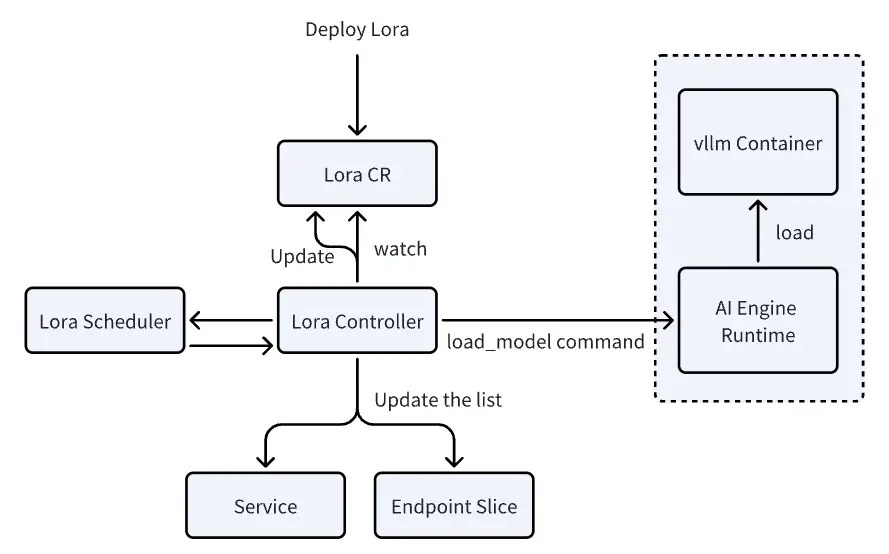
提高模型密度和降低推理成本:通过在共享基础模型上动态加载不同的LoRA适配器,可以更高效地部署多个模型变体。 优化GPU内存使用:多个LoRA适配器可以共享同一个基础模型,减少了重复加载基础模型的需要,从而节省GPU内存。 减少冷启动时间:由于只需加载轻量级的LoRA适配器而不是整个模型,启动新模型变体的时间大大缩短。 提高可扩展性:使系统能够支持更多的模型变体,适合高密度部署和成本效益高的生产环境推理。
ModelAdapter控制器:负责管理LoRA适配器的生命周期,包括调度、加载和服务发现。 服务发现:使用Kubernetes Service作为每个LoRA模型的抽象层,允许单个Pod上的多个LoRA适配器属于多个服务。 vLLM引擎集成:需要vLLM引擎支持LoRA元数据的可见性、动态加载和卸载、远程注册表支持以及可观察性。(现阶段局限性)
# 基础模型apiVersion: apps/v1kind: Deploymentmetadata:labels:model.aibrix.ai/name: qwen-coder-1-5b-instruct # 需和svc保持一致model.aibrix.ai/port: "8000"adapter.model.aibrix.ai/enabled: "true" # 启用适配器功能name: qwen-coder-1-5b-instructspec:replicas: 1selector:matchLabels:model.aibrix.ai/name: qwen-coder-1-5b-instructtemplate:metadata:labels:model.aibrix.ai/name: qwen-coder-1-5b-instructspec:volumes:- name: modelshostPath:path: /root/lgy/modelstype: Directorycontainers:- command:- python3- -m- vllm.entrypoints.openai.api_server- --host- "0.0.0.0"- --port- "8000"- --uvicorn-log-level- warning- --model- /models/DeepSeek-R1-Distill-Llama-8B- --served-model-name- qwen-coder-1-5b-instruct # 需和svc一致- --enable-lora # 启用LoRA功能image: docker.1ms.run/vllm/vllm-openai:v0.7.1imagePullPolicy: Alwaysname: vllm-openaienv:- name: VLLM_ALLOW_RUNTIME_LORA_UPDATING # 允许运行时更新LoRAvalue: "True"ports:- containerPort: 8000protocol: TCPresources:limits:nvidia.com/nvidia-rtx-3090-24GB: "1"requests:nvidia.com/nvidia-rtx-3090-24GB: "1"volumeMounts:- name: modelsmountPath: /models- name: aibrix-runtimeimage: docker.1ms.run/aibrix/runtime:v0.2.1command:- aibrix_runtime- --port- "8080"env:- name: INFERENCE_ENGINEvalue: vllm- name: INFERENCE_ENGINE_ENDPOINTvalue: http://localhost:8000volumeMounts:- name: modelsmountPath: /modelsports:- containerPort: 8080protocol: TCPlivenessProbe:httpGet:path: /healthzport: 8080initialDelaySeconds: 3periodSeconds: 2readinessProbe:httpGet:path: /readyport: 8080initialDelaySeconds: 5periodSeconds: 10---apiVersion: v1kind: Servicemetadata:labels:model.aibrix.ai/name: qwen-coder-1-5b-instructprometheus-discovery: "true"annotations:prometheus.io/scrape: "true"prometheus.io/port: "8080"name: qwen-coder-1-5b-instructnamespace: defaultspec:ports:- name: serveport: 8000protocol: TCPtargetPort: 8000- name: httpport: 8080protocol: TCPtargetPort: 8080selector:model.aibrix.ai/name: qwen-coder-1-5b-instructtype: ClusterIP---# lora适配器apiVersion: model.aibrix.ai/v1alpha1kind: ModelAdaptermetadata:name: qwen-code-lora # lora模型的服务名称labels:model.aibrix.ai/name: "qwen-code-lora"model.aibrix.ai/port: "8000"spec:baseModel: qwen-coder-1-5b-instruct # 部署的基础模型名称podSelector:matchLabels:model.aibrix.ai/name: qwen-coder-1-5b-instruct # 与基础模型的标签匹配artifactURL: huggingface://ai-blond/Qwen-Qwen2.5-Coder-1.5B-Instruct-lora # lora模型路径,可以从hf、S3、hostPath加载schedulerName: default
部署一个基础模型(如LLAMA、Qwen等),这个基础模型运行在独立的Pod中。 基础模型Pod必须启用LoRA支持:容器需要配置特定的参数来支持LoRA,包括--enable-lora参数和VLLM_ALLOW_RUNTIME_LORA_UPDATING=True环境变量。 创建ModelAdapter资源:创建ModelAdapter自定义资源,指定LoRA模型的位置和要应用到哪个基础模型上。 控制器加载LoRA到基础模型Pod:ModelAdapter控制器会找到匹配的基础模型Pod,然后通过API调用将LoRA模型加载到该Pod中。
spec.scaleTargetRef: 要扩缩容的目标资源引用(如Deployment、StatefulSet) spec.minReplicas: 最小副本数(可选,默认为1) spec.maxReplicas: 最大副本数 spec.metricsSources: 要监控的指标源列表 spec.scalingStrategy: 使用的扩缩容策略(HPA、KPA、APA)
apiVersion: autoscaling.aibrix.ai/v1alpha1kind: PodAutoscalermetadata:name: deepseek-r1-distill-llama-8b-hpanamespace: defaultlabels:app.kubernetes.io/name: aibrixapp.kubernetes.io/managed-by: kustomizespec:scalingStrategy: HPAminReplicas: 1maxReplicas: 10metricsSources:- metricSourceType: podprotocolType: httpport: '8000'path: /metricstargetMetric: gpu_cache_usage_perctargetValue: '50'scaleTargetRef:apiVersion: apps/v1kind: Deploymentname: deepseek-r1-distill-llama-8b
稳定模式:在正常情况下,使用60秒的稳定窗口计算平均指标值,平稳地调整副本数 紧急模式:当指标值超过目标值的2倍(可配置)时,切换到紧急模式,使用10秒的短窗口快速响应流量峰值。 扩容保护:防止在紧急模式期间快速缩容 延迟缩容:在负载减少后,维持较高的副本数一段时间(默认30分钟),防止频繁的扩缩容操作。
apiVersion: autoscaling.aibrix.ai/v1alpha1kind: PodAutoscalermetadata:name: deepseek-r1-distill-llama-8b-kpanamespace: defaultlabels:app.kubernetes.io/name: aibrixapp.kubernetes.io/managed-by: kustomizeannotations:kpa.autoscaling.aibrix.ai/target-burst-capacity: "2.0"kpa.autoscaling.aibrix.ai/activation-scale: "2"kpa.autoscaling.aibrix.ai/panic-threshold: "2.0"kpa.autoscaling.aibrix.ai/stable-window: "60s"kpa.autoscaling.aibrix.ai/panic-window: "10s"kpa.autoscaling.aibrix.ai/scale-down-delay: "30m"spec:scalingStrategy: KPAminReplicas: 1maxReplicas: 8metricsSources:- metricSourceType: podprotocolType: httpport: '8000'path: metricstargetMetric: gpu_cache_usage_perctargetValue: '0.5'scaleTargetRef:apiVersion: apps/v1kind: Deploymentname: deepseek-r1-distill-llama-8b
波动容忍度:可配置的扩容和缩容阈值 扩缩容速率:对扩缩容速率的限制 指标窗口:使用时间窗口进行指标平均
apiVersion: autoscaling.aibrix.ai/v1alpha1kind: PodAutoscalermetadata:name: deepseek-r1-distill-llama-8b-apanamespace: defaultlabels:app.kubernetes.io/name: aibrixapp.kubernetes.io/managed-by: kustomizeannotations:autoscaling.aibrix.ai/up-fluctuation-tolerance: '0.1' # 上波动容忍度:扩容前的阈值(例如,目标值上方10%)autoscaling.aibrix.ai/down-fluctuation-tolerance: '0.2' # 下波动容忍度:缩容前的阈值(例如,目标值下方20%)apa.autoscaling.aibrix.ai/window: 30s # 计算指标的时间窗口spec:scalingStrategy: APAminReplicas: 1maxReplicas: 8metricsSources:- metricSourceType: podprotocolType: httpport: '8000'path: metricstargetMetric: gpu_cache_usage_perctargetValue: '0.5'scaleTargetRef:apiVersion: apps/v1kind: Deploymentname: deepseek-r1-distill-llama-8b
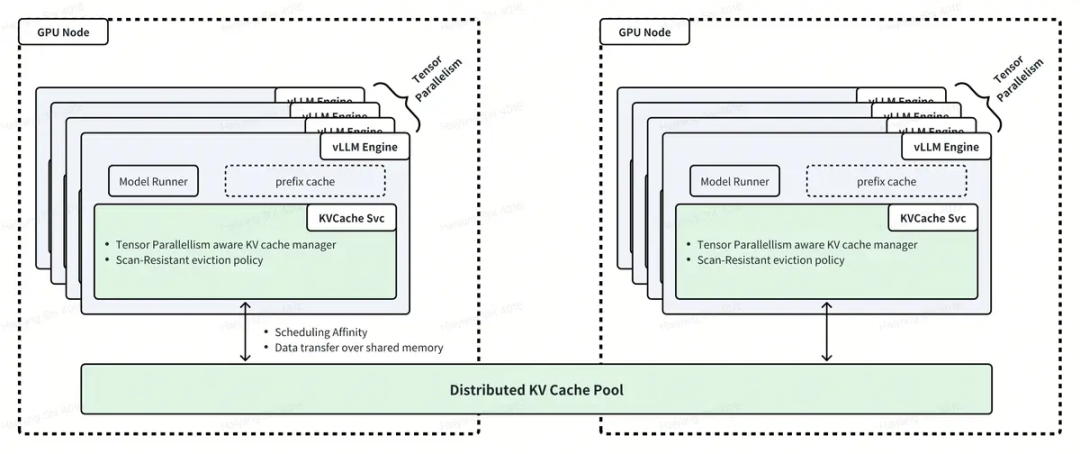
集中式模式:使用 Vineyard 作为 KV 缓存实现,etcd 作为元数据存储。 分布式模式:计划中但尚未完全实现,旨在用于更具可扩展性的场景。
apiVersion: orchestration.aibrix.ai/v1alpha1kind: KVCachemetadata:name: example-kvcacheannotations:kvcache.orchestration.aibrix.ai/node-affinity-gpu-type: "A100"kvcache.orchestration.aibrix.ai/pod-anti-affinity: "true"# kvcache.orchestration.aibrix.ai/mode:缓存模式(集中式/分布式)# kvcache.orchestration.aibrix.ai/node-affinity-key:节点亲和性标签键# kvcache.orchestration.aibrix.ai/node-affinity-gpu-type:节点亲和性的 GPU 类型,异构GPU使用# kvcache.orchestration.aibrix.ai/pod-affinity-workload:必须与metadata.name下面的推理服务部署相匹配# kvcache.orchestration.aibrix.ai/pod-anti-affinity:启用 Pod 反亲和性spec:mode: centralizedreplicas: 3etcdReplicas: 1metadata:etcd:image: "quay.io/coreos/etcd:v3.5.0"storage:size: "10Gi"cacheSpec:image: "docker.1ms.run/aibrix/kvcache:20241120"resources:requests:cpu: "2000m"memory: "4Gi"limits:cpu: "2000m"memory: "4Gi"service:type: ClusterIPports:- name: serviceport: 9600targetPort: 9600protocol: TCP
NAME READY STATUS RESTARTS AGEdeepseek-coder-7b-instruct-85664648c7-xgp9h 1/1 Running 0 2m41sdeepseek-coder-7b-kvcache-7d5896cd89-dcfzt 1/1 Running 0 2m31sdeepseek-coder-7b-kvcache-etcd-0 1/1 Running 0 2m31s
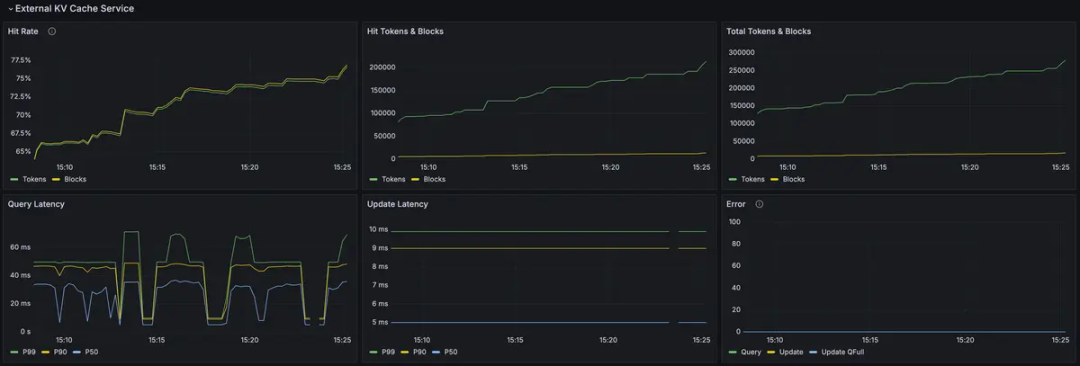
原生支持 vLLM:AIBrix 对 vLLM 有很好的支持,包括配置示例和集成功能。 模块化设计:AIBrix 采用模块化设计,允许您根据需求选择性地部署组件,如自动扩缩容、LoRA 动态加载等。 高密度 LoRA 管理:支持在同一基础模型上动态加载和卸载多个 LoRA 适配器,提高资源利用率。 灵活的自动扩缩容:提供多种扩缩容策略(HPA、KPA、APA),适应不同的工作负载模式。 分布式推理支持:通过 Ray 集群支持跨多个节点的分布式推理,适合部署大型模型。 统一的 AI Runtime:提供统一的接口来管理不同的推理引擎,标准化指标,支持模型的动态加载。 异构 GPU 支持:支持在不同类型的 GPU 上部署相同的模型,解决 GPU 可用性和成本优化挑战。
SGLang和其他推理框架支持有限:从代码库中没有看到对 SGLang 的明确支持。AIBrix 主要针对 vLLM 进行了优化,对于 SGLang 可能需要额外的配置或自定义集成。 仍在开发中:AIBrix 仍处于开发阶段(当前版本 0.2.1),某些功能可能不完善或存在稳定性问题。 分布式 KV Cache 实现不完整:分布式模式尚未完全实现,目前主要支持集中式模式。 文档和示例可能不足:对于某些高级功能,可能缺乏详细的文档和使用示例,增加了学习和使用的难度。 依赖 Kubernetes 特定功能:深度集成 Kubernetes,可能对 Kubernetes 版本或特定功能有依赖,增加了部署的复杂性。
文章转载自AI云枢,如果涉嫌侵权,请发送邮件至:contact@modb.pro进行举报,并提供相关证据,一经查实,墨天轮将立刻删除相关内容。
