



一开始让我运维 Zookeeper 是拒绝的,这东西我没搞过啊,只是一直以来都知道个大概大概而已还从来没使用过;好了,经过一段时间看官网文档和尝试,我只能说“就那样~”。
本文没有参杂过多别人的博客知识,就多看几眼 [zk 官方文档],与 k8s 的官方文档中 zk 教程:[运行 ZooKeeper,一个分布式协调系统];
然后升级了 [start-zookeeper.sh] 配置 zk 高版本,编写 [zookeeper.yaml] 部署 k8s 的 zk 集群;转念又想只能 k8s 单集群部署似乎不够稳啊,那就再出一个 ECS 版吧,这样 [zookeeper-ECS.sh] 就应运而生了。
单纯部署确实是搞掂了,但后续的一系列运维你还是得了解了解的;
- 你不清楚 Zookeeper 选举策略,那你知道 myid 有什么特殊的含义和用途吗?
- 你不知晓 客户端的连接方式,就设计不好它的域名,是否需要多个域名,要不要 SLB,扩缩容如何处理这层网络连接问题;
- 你不搞好 监控+Metrics,不知何时挂了要背个大锅!
- 你不了解 新版提供的 reconfig,就不知道居然可以热扩缩集群成员了;
- ...
极致运维之 清楚 Zookeeper 选举策略
- zxid(事务日志 Id)值大优先,zxid 相等时 myid 值大优先
再具体就不说了,看别人的博客是这么说的,我没看过源码,且根据实践来说确实是这样;(三个节点的顺序初始化,必定是第二个启动的 myid=2 为 leader,你细品)
- 所以这里可以讨论一个问题:双主机房+第三机房架构,那么应该把 myid “最小值” 还是 “最大值” 安排在第三机房呢?
若第三机房的 myid 最小值,则主节点基本不会到第三机房,那么在机房容灾时,存在主节点需重新选举;
若第三机房的 myid 最大值,则主节点基本上可以常驻第三机房,那么在机房容灾时,不存在主节点需重新选举;(除非是第三机房容灾)
极致运维之 知晓客户端的连接方式
org.apache.zookeeper.client.StaticHostProvider
// 对维护的 zk-cluster 地址列表进行 shuffle,顺序不重要,会打乱去提供选择。private List<InetSocketAddress> shuffle(Collection<InetSocketAddress> serverAddresses) {List<InetSocketAddress> tmpList = new ArrayList<>(serverAddresses.size());tmpList.addAll(serverAddresses);Collections.shuffle(tmpList, sourceOfRandomness);return tmpList;}// 对 zk-cluster 地址列表选出的做域名解析,域名可以解析出多个 ip,得到 ip 列表后再 shuffle 打乱去选择其一。private InetSocketAddress resolve(InetSocketAddress address) {try {String curHostString = address.getHostString();List<InetAddress> resolvedAddresses = new ArrayList<>(Arrays.asList(this.resolver.getAllByName(curHostString)));if (resolvedAddresses.isEmpty()) {return address;}Collections.shuffle(resolvedAddresses);return new InetSocketAddress(resolvedAddresses.get(0), address.getPort());} catch (UnknownHostException e) {LOG.error("Unable to resolve address: {}", address.toString(), e);return address;}}
总结上述的地址选择和筛选:Zookeeper 集群在内网直连使用的情况下,不需要 SLB 作中转,直连即可;对于域名一个还是多个请看下节。
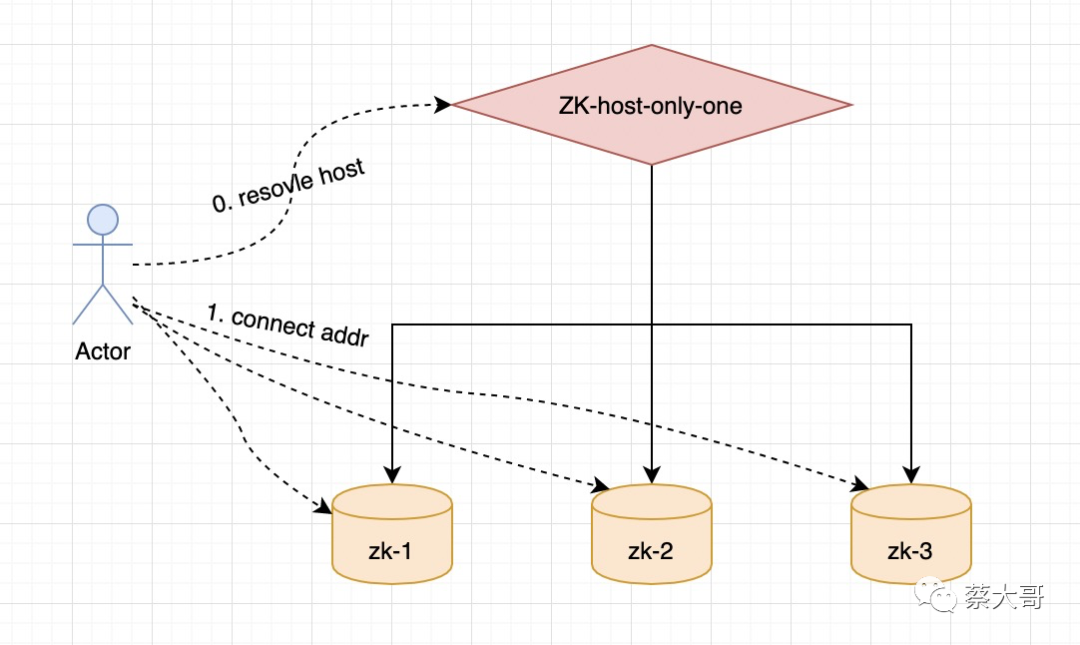
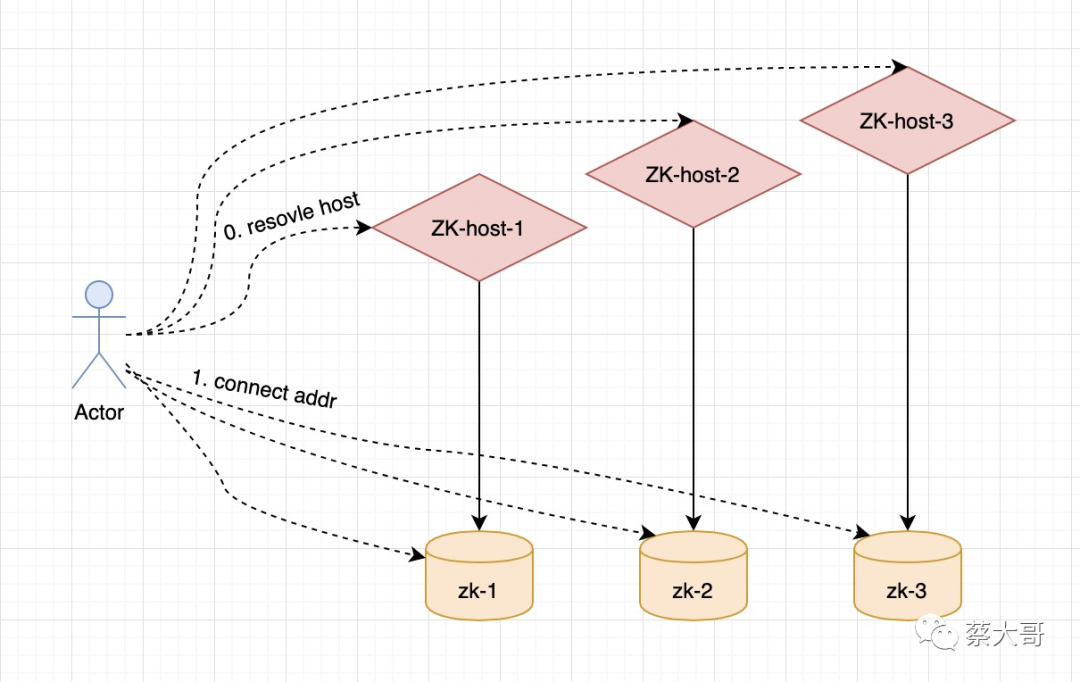
Zookeeper 集群域名
- 可选1(推荐):仅一个域名,域名挂载集群的所有 zk-node 的 ip。(扩缩容时,仅需要在 DNS 上加减 ip 的挂载)
- 可选2:集群中每个 zk-node 都有自己的一个域名。(扩缩容时,需加减域名,并且需要变更客户端维护的地址列表!!!)
- 当然!若特殊的情况,想做机房收敛等等,请客官另外斟酌考虑~
极致运维之 监控+Metrics
- 配置 磁盘 80% 告警
- 端口 2181 down 告警
- Prometheus 采集 :7000/metrics
极致运维之 reconfig:热扩缩集群成员
- [zk-Reconfig] 针对 ECS 的场景更适用,扩缩容再也不怕啦~
【样例】剔除 server.1
[zk: localhost:2181(CONNECTED) 8] reconfig helpreconfig [-s] [-v version] [[-file path] | [-members serverID=host:port1:port2;port3[,...]*]] | [-add serverId=host:port1:port2;port3[,...]]* [-remove serverId[,...]*][zk: localhost:2181(CONNECTED) 9] reconfig -remove 1Committed new configuration:server.2=zookeeper-1.zookeeper-hs.default.svc.cluster.local:2888:3888:participant;0.0.0.0:2181server.3=zookeeper-2.zookeeper-hs.default.svc.cluster.local:2888:3888:participant;0.0.0.0:2181version=100000003[zk: localhost:2181(CONNECTED) 10] configserver.2=zookeeper-1.zookeeper-hs.default.svc.cluster.local:2888:3888:participant;0.0.0.0:2181server.3=zookeeper-2.zookeeper-hs.default.svc.cluster.local:2888:3888:participant;0.0.0.0:2181version=100000003[zk: localhost:2181(CONNECTED) 11] quit[root@zookeeper-1 conf]# lltotal 32-rw-r--r-- 1 1000 1000 535 Apr 8 2021 configuration.xsl-rw-r--r-- 1 root root 264 Nov 9 06:43 dynamicConfigFile.cfg.dynamic-rw-r--r-- 1 root root 84 Nov 9 06:43 java.env-rw-r--r-- 1 1000 1000 3452 Nov 9 06:43 log4j.properties-rw-r--r-- 1 root root 553 Nov 9 07:59 zoo.cfg-rw-r--r-- 1 root root 323 Nov 9 06:43 zoo.cfg.dynamic.100000000-rw-r--r-- 1 root root 215 Nov 9 07:59 zoo.cfg.dynamic.100000003-rw-r--r-- 1 1000 1000 1148 Apr 8 2021 zoo_sample.cfg[root@zookeeper-1 conf]# cat dynamicConfigFile.cfg.dynamicserver.1=zookeeper-0.zookeeper-hs.default.svc.cluster.local:2888:3888;2181server.2=zookeeper-1.zookeeper-hs.default.svc.cluster.local:2888:3888;2181server.3=zookeeper-2.zookeeper-hs.default.svc.cluster.local:2888:3888;2181[root@zookeeper-1 conf]# cat zoo.cfg.dynamic.100000000server.1=zookeeper-0.zookeeper-hs.default.svc.cluster.local:2888:3888:participant;0.0.0.0:2181server.2=zookeeper-1.zookeeper-hs.default.svc.cluster.local:2888:3888:participant;0.0.0.0:2181server.3=zookeeper-2.zookeeper-hs.default.svc.cluster.local:2888:3888:participant;0.0.0.0:2181[root@zookeeper-1 conf]# cat zoo.cfg.dynamic.100000003server.2=zookeeper-1.zookeeper-hs.default.svc.cluster.local:2888:3888:participant;0.0.0.0:2181server.3=zookeeper-2.zookeeper-hs.default.svc.cluster.local:2888:3888:participant;0.0.0.0:2181【样例】再加回 server.1
[zk: localhost:2181(CONNECTED) 0] configserver.2=zookeeper-1.zookeeper-hs.default.svc.cluster.local:2888:3888:participant;0.0.0.0:2181server.3=zookeeper-2.zookeeper-hs.default.svc.cluster.local:2888:3888:participant;0.0.0.0:2181version=100000003[zk: localhost:2181(CONNECTED) 2] reconfig -add server.1=zookeeper-0.zookeeper-hs.default.svc.cluster.local:2888:3888:participant;0.0.0.0:2181Committed new configuration:server.1=zookeeper-0.zookeeper-hs.default.svc.cluster.local:2888:3888:participant;0.0.0.0:2181server.2=zookeeper-1.zookeeper-hs.default.svc.cluster.local:2888:3888:participant;0.0.0.0:2181server.3=zookeeper-2.zookeeper-hs.default.svc.cluster.local:2888:3888:participant;0.0.0.0:2181version=100000008[zk: localhost:2181(CONNECTED) 3] configserver.1=zookeeper-0.zookeeper-hs.default.svc.cluster.local:2888:3888:participant;0.0.0.0:2181server.2=zookeeper-1.zookeeper-hs.default.svc.cluster.local:2888:3888:participant;0.0.0.0:2181server.3=zookeeper-2.zookeeper-hs.default.svc.cluster.local:2888:3888:participant;0.0.0.0:2181version=100000008
附录
zookeeper-ECS.sh
#!/bin/sh#### - server-list, examples=10.1.2.200,10.1.3.78,10.1.4.111 若三机房部署,采用 2 2 1 部署架构,建议第三机房的 1 节点 server 放在第一位,其 myid=1## `sh zookeeper-ECS.sh [server-list]`##USER=`whoami`CUR_HOST_IP=`hostname -i`CUR_PWD=`pwd`ZK_VERSION="3.6.3"ZK_TAR_GZ="apache-zookeeper-${ZK_VERSION}-bin.tar.gz"ZK_PACKAGE_DIR="apache-zookeeper-${ZK_VERSION}-bin"MYID="1"SERVER_PORT="2888"ELECTION_PORT="3888"CLIENT_PORT="2181"SERVERS=${1:-${CUR_HOST_IP}}if [ ! -f ${ZK_TAR_GZ} ]; thenwget --no-check-certificate https://dlcdn.apache.org/zookeeper/zookeeper-${ZK_VERSION}/${ZK_TAR_GZ}fiif [ ! -f ${ZK_TAR_GZ} ]; thenecho "error: has no ${ZK_TAR_GZ}"exit 1;fitar -zxvf ${ZK_TAR_GZ}ZOO_CFG="${ZK_PACKAGE_DIR}/conf/zoo.cfg"ZOO_CFG_DYNAMIC="${ZK_PACKAGE_DIR}/conf/dynamicConfigFile.cfg.dynamic"ZOO_JAVA_ENV="${ZK_PACKAGE_DIR}/conf/java.env"function print_zoo_cfg() {echo """# The number of milliseconds of each ticktickTime=2000# The number of ticks that the initial# synchronization phase can takeinitLimit=10# The number of ticks that can pass between# sending a request and getting an acknowledgementsyncLimit=5# the directory where the snapshot is stored.# do not use /tmp for storage, /tmp here is just# example sakes.dataDir=${CUR_PWD}/zkdatadataLogDir=${CUR_PWD}/zkdata_log# the port at which the clients will connectclientPort=2181# the maximum number of client connections.# increase this if you need to handle more clientsmaxClientCnxns=2000## Be sure to read the maintenance section of the# administrator guide before turning on autopurge.## http://zookeeper.apache.org/doc/current/zookeeperAdmin.html#sc_maintenance## The number of snapshots to retain in dataDirautopurge.snapRetainCount=3# Purge task interval in hours# Set to "0" to disable auto purge featureautopurge.purgeInterval=1#audit.enable=true## Metrics Providers @see https://prometheus.io Metrics ExportermetricsProvider.className=org.apache.zookeeper.metrics.prometheus.PrometheusMetricsProvidermetricsProvider.httpPort=7000metricsProvider.exportJvmInfo=true## Reconfig Enabled @see https://zookeeper.apache.org/doc/current/zookeeperReconfig.htmlreconfigEnabled=truedynamicConfigFile=/root/zoo363/conf/dynamicConfigFile.cfg.dynamicskipACL=yes""" > ${ZOO_CFG}}## server listfunction print_servers_to_zoo_cfg_dynamic() {# 先存储旧的分隔符OLD_IFS="$IFS"# 设置 Configurations 分隔符IFS=","SERVERS_ARR=(${SERVERS})SERVERS_ARR_LEN=${#SERVERS_ARR[@]}# 恢复原来的分隔符IFS="$OLD_IFS"echo "## 集群成员列表 role is also optional, it can be participant or observer (participant by default). peerType=participant." > ${ZOO_CFG_DYNAMIC}for (( i=0; i < ${SERVERS_ARR_LEN}; i++ ))do## 判断 ip 相等获取到 myidif [ "${SERVERS_ARR[${i}]}" == "${CUR_HOST_IP}" ]; thenMYID=$((i+1))fiecho "server.$((i+1))=${SERVERS_ARR[${i}]}:$SERVER_PORT:$ELECTION_PORT;$CLIENT_PORT" >> ${ZOO_CFG_DYNAMIC}done}## ZK_SERVER_HEAPfunction print_zoo_java_env() {ZK_SERVER_HEAP_MEM=1000pyhmem=`free -m |grep "Mem:" |awk '{print $2}'`if [[ ${pyhmem} -gt 3666 ]]; thenZK_SERVER_HEAP_MEM=$((1024 * 3))elif [[ ${pyhmem} -gt 1888 ]]; thenZK_SERVER_HEAP_MEM=$((1024 * 3/2))fiecho """### 默认值 1000,-Xmx 容量单位是 m,别自己带单位,即 -Xmx1000mZK_SERVER_HEAP=${ZK_SERVER_HEAP_MEM}### 关闭 JMXJMXDISABLE=true""" > ${ZOO_JAVA_ENV}}function create_zoo_data_dir() {mkdir -p ${CUR_PWD}/zkdata ${CUR_PWD}/zkdata_logecho ${MYID} > "${CUR_PWD}/zkdata/myid"}print_zoo_cfg && print_servers_to_zoo_cfg_dynamic && print_zoo_java_env && create_zoo_data_dir && sh ${ZK_PACKAGE_DIR}/bin/zkServer.sh start
zookeeper.yaml
### @see https://kubernetes.io/zh/docs/tutorials/stateful-application/zookeeper/#创建一个-zookeeper-ensemble#### 1. 修改字符 zk -> zookeeper#### 2. 修改 start-zookeeper command#### 3. 修改 podManagementPolicy: OrderedReady -> Parallel#### 4. 使用自定义的镜像 cherish/zookeeperapiVersion: v1kind: Servicemetadata:name: zookeeper-hslabels:app: zookeeperspec:ports:- port: 2888name: server- port: 3888name: leader-electionclusterIP: Noneselector:app: zookeeper---apiVersion: v1kind: Servicemetadata:name: zookeeper-cslabels:app: zookeeperspec:ports:- port: 2181name: clientselector:app: zookeeper---apiVersion: policy/v1beta1kind: PodDisruptionBudgetmetadata:name: zookeeper-pdbspec:selector:matchLabels:app: zookeepermaxUnavailable: 1---apiVersion: apps/v1kind: StatefulSetmetadata:name: zookeeperspec:selector:matchLabels:app: zookeeperserviceName: zookeeper-hsreplicas: 3updateStrategy:type: RollingUpdatepodManagementPolicy: Parallel ## Parallel 能批量初始化 pod 达成 3 个 pod,若是 OrderedReady 它会先创建一个 pod 在 ready 后再逐步创建后面的两个。template:metadata:labels:app: zookeeperspec:affinity:podAntiAffinity:requiredDuringSchedulingIgnoredDuringExecution:- labelSelector:matchExpressions:- key: "app"operator: Invalues:- zookeepertopologyKey: "kubernetes.io/hostname"containers:- name: kubernetes-zookeeperimagePullPolicy: Alwaysimage: "cherish/zookeeper:3.6.3-20211121.154529" ## 自定义的镜像resources:requests:memory: "2Gi"cpu: "2" ##ports:- containerPort: 2181name: client- containerPort: 2888name: server- containerPort: 3888name: leader-electioncommand:- sh- -c- "/opt/zookeeper/bin/start-zookeeper.sh \--servers=3 \--data_dir=/var/lib/zookeeper/data \--data_log_dir=/var/lib/zookeeper/data_log \--log_dir=/var/log/zookeeper \--conf_dir=/opt/zookeeper/conf \--client_port=2181 \--election_port=3888 \--server_port=2888 \--tick_time=2000 \--init_limit=10 \--sync_limit=5 \--heap=1536 \--max_client_cnxns=2000 \--snap_retain_count=3 \--purge_interval=3 \--max_session_timeout=40000 \--min_session_timeout=4000 \--log_level=INFO"readinessProbe:exec:command:- sh- -c- "curl 127.0.0.1:8080/commands/ruok"initialDelaySeconds: 10timeoutSeconds: 5livenessProbe:exec:command:- sh- -c- "curl 127.0.0.1:8080/commands/ruok"initialDelaySeconds: 10timeoutSeconds: 5volumeMounts:- name: zkdatadirmountPath: /var/lib/zookeepersecurityContext:runAsUser: 1000fsGroup: 1000volumeClaimTemplates:- metadata:name: zkdatadirspec:accessModes: [ "ReadWriteOnce" ]resources:requests:storage: 20Gi## ----- 无 PVC 暂去掉这段提交,无 PVC 仅能作为样例,生产环境还是得有呀。# volumeMounts:# - name: zkdatadir# mountPath: /var/lib/zookeeper# securityContext:# runAsUser: 1000# fsGroup: 1000# volumeClaimTemplates:# - metadata:# name: zkdatadir# spec:# accessModes: [ "ReadWriteOnce" ]# resources:# requests:# storage: 20Gi
start-zookeeper.sh
#!/usr/bin/env bash# Copyright 2017 The Kubernetes Authors.## Licensed under the Apache License, Version 2.0 (the "License");# you may not use this file except in compliance with the License.# You may obtain a copy of the License at## http://www.apache.org/licenses/LICENSE-2.0## Unless required by applicable law or agreed to in writing, software# distributed under the License is distributed on an "AS IS" BASIS,# WITHOUT WARRANTIES OR CONDITIONS OF ANY KIND, either express or implied.# See the License for the specific language governing permissions and# limitations under the License.###Usage: start-zookeeper [OPTIONS]# Starts a ZooKeeper server based on the supplied options.# --servers The number of servers in the ensemble. The default# value is 1.# --data_dir The directory where the ZooKeeper process will store its# snapshots. The default is /var/lib/zookeeper/data.# --data_log_dir The directory where the ZooKeeper process will store its# write ahead log. The default is# /var/lib/zookeeper/data/log.# --conf_dir The directoyr where the ZooKeeper process will store its# configuration. The default is /opt/zookeeper/conf.# --client_port The port on which the ZooKeeper process will listen for# client requests. The default is 2181.# --election_port The port on which the ZooKeeper process will perform# leader election. The default is 3888.# --server_port The port on which the ZooKeeper process will listen for# requests from other servers in the ensemble. The# default is 2888.# --tick_time The length of a ZooKeeper tick in ms. The default is# 2000.# --init_limit The number of Ticks that an ensemble member is allowed# to perform leader election. The default is 10.# --sync_limit The maximum session timeout that the ensemble will# allows a client to request. The default is 5.# --heap The maximum amount of heap to use. The format is the# same as that used for the Xmx and Xms parameters to the# JVM. e.g. --heap=2G. The default is 2G.# --max_client_cnxns The maximum number of client connections that the# ZooKeeper process will accept simultaneously. The# default is 60.# --snap_retain_count The maximum number of snapshots the ZooKeeper process# will retain if purge_interval is greater than 0. The# default is 3.# --purge_interval The number of hours the ZooKeeper process will wait# between purging its old snapshots. If set to 0 old# snapshots will never be purged. The default is 0.# --max_session_timeout The maximum time in milliseconds for a client session# timeout. The default value is 2 * tick time.# --min_session_timeout The minimum time in milliseconds for a client session# timeout. The default value is 20 * tick time.# --log_level The log level for the zookeeeper server. Either FATAL,# ERROR, WARN, INFO, DEBUG. The default is INFO.USER=`whoami`HOST=`hostname -s`DOMAIN=`hostname -d`LOG_LEVEL=INFODATA_DIR="/var/lib/zookeeper/data"DATA_LOG_DIR="/var/lib/zookeeper/data_log"LOG_DIR="/var/log/zookeeper"CONF_DIR="/opt/zookeeper/conf"CLIENT_PORT=2181SERVER_PORT=2888ELECTION_PORT=3888TICK_TIME=2000INIT_LIMIT=10SYNC_LIMIT=5JVM_OPTS=HEAP=2048MAX_CLIENT_CNXNS=60SNAP_RETAIN_COUNT=3PURGE_INTERVAL=1SERVERS=1ADMINSERVER_ENABLED=trueAUDIT_ENABLE=falseMETRICS_PORT=7000JMX_DISABLE=truefunction print_usage() {echo "\Usage: start-zookeeper [OPTIONS]Starts a ZooKeeper server based on the supplied options.--servers The number of servers in the ensemble. The defaultvalue is 1.--data_dir The directory where the ZooKeeper process will store itssnapshots. The default is /var/lib/zookeeper/data.--data_log_dir The directory where the ZooKeeper process will store itswrite ahead log. The default is /var/lib/zookeeper/data/log.--log_dir The directory where the ZooKeeper process will store its log.The default is /var/log/zookeeper.--conf_dir The directory where the ZooKeeper process will store itsconfiguration. The default is /opt/zookeeper/conf.--client_port The port on which the ZooKeeper process will listen forclient requests. The default is 2181.--election_port The port on which the ZooKeeper process will performleader election. The default is 3888.--server_port The port on which the ZooKeeper process will listen forrequests from other servers in the ensemble. Thedefault is 2888.--tick_time The length of a ZooKeeper tick in ms. The default is2000.--init_limit The number of Ticks that an ensemble member is allowedto perform leader election. The default is 10.--sync_limit The maximum session timeout that the ensemble willallows a client to request. The default is 5.--jvm_props The jvm opts must not contants the Xmx and Xms parameters to theJVM. e.g. -XX:+UseG1GC -XX:MaxGCPauseMillis=200. The default not set.--heap The maximum amount of heap to use. The format is thesame as that used for the Xmx and Xms parameters to theJVM. e.g. --heap=2048. The default is 2048m.--max_client_cnxns The maximum number of client connections that theZooKeeper process will accept simultaneously. Thedefault is 60.--snap_retain_count The maximum number of snapshots the ZooKeeper processwill retain if purge_interval is greater than 0. Thedefault is 3.--purge_interval The number of hours the ZooKeeper process will waitbetween purging its old snapshots. If set to 0 oldsnapshots will never be purged. The default is 1.--max_session_timeout The maximum time in milliseconds for a client sessiontimeout. The default value is 2 * tick time.--min_session_timeout The minimum time in milliseconds for a client sessiontimeout. The default value is 20 * tick time.--log_level The log level for the zookeeeper server. Either FATAL,ERROR, WARN, INFO, DEBUG. The default is INFO.--audit_enable The audit.enable=?. The default is false.--metrics_port The metricsProvider.httpPort=?. The default is 7000."}function create_data_dirs() {if [ ! -d $DATA_DIR ]; thenmkdir -p $DATA_DIRchown -R $USER:$USER $DATA_DIRfiif [ ! -d $DATA_LOG_DIR ]; thenmkdir -p $DATA_LOG_DIRchown -R $USER:$USER $DATA_LOG_DIRfiif [ ! -d $LOG_DIR ]; thenmkdir -p $LOG_DIRchown -R $USER:$USER $LOG_DIRfiif [ ! -f $ID_FILE ] && [ $SERVERS -gt 1 ]; thenecho $MY_ID >> $ID_FILEfi}function print_servers() {for (( i=1; i<=$SERVERS; i++ ))doecho "server.$i=$NAME-$((i-1)).$DOMAIN:$SERVER_PORT:$ELECTION_PORT;$CLIENT_PORT"done}function create_config() {rm -f $CONFIG_FILEecho "# This file was autogenerated DO NOT EDIT" >> $CONFIG_FILEecho "clientPort=$CLIENT_PORT" >> $CONFIG_FILEecho "dataDir=$DATA_DIR" >> $CONFIG_FILEecho "dataLogDir=$DATA_LOG_DIR" >> $CONFIG_FILEecho "tickTime=$TICK_TIME" >> $CONFIG_FILEecho "initLimit=$INIT_LIMIT" >> $CONFIG_FILEecho "syncLimit=$SYNC_LIMIT" >> $CONFIG_FILEecho "maxClientCnxns=$MAX_CLIENT_CNXNS" >> $CONFIG_FILEecho "minSessionTimeout=$MIN_SESSION_TIMEOUT" >> $CONFIG_FILEecho "maxSessionTimeout=$MAX_SESSION_TIMEOUT" >> $CONFIG_FILEecho "autopurge.snapRetainCount=$SNAP_RETAIN_COUNT" >> $CONFIG_FILEecho "autopurge.purgeInterval=$PURGE_INTERVAL" >> $CONFIG_FILEecho "admin.enableServer=$ADMINSERVER_ENABLED" >> $CONFIG_FILEecho "audit.enable=${AUDIT_ENABLE}" >> $CONFIG_FILEecho "## Metrics Providers @see https://prometheus.io Metrics Exporter" >> $CONFIG_FILEecho "metricsProvider.className=org.apache.zookeeper.metrics.prometheus.PrometheusMetricsProvider" >> $CONFIG_FILEecho "metricsProvider.exportJvmInfo=true" >> $CONFIG_FILEecho "metricsProvider.httpPort=${METRICS_PORT}" >> $CONFIG_FILEecho "## Reconfig Enabled @see https://zookeeper.apache.org/doc/current/zookeeperReconfig.html" >> $CONFIG_FILEecho "reconfigEnabled=true" >> $CONFIG_FILEecho "dynamicConfigFile=${DINAMIC_CONF_FILE}" >> $CONFIG_FILEecho "skipACL=yes" >> $CONFIG_FILEif [ $SERVERS -gt 1 ]; thenprint_servers >> $DINAMIC_CONF_FILEficat $CONFIG_FILE >&2cat $DINAMIC_CONF_FILE >&2}function create_jvm_props() {rm -f $JAVA_ENV_FILEecho "ZOO_LOG_DIR=$LOG_DIR" >> $JAVA_ENV_FILEecho "SERVER_JVMFLAGS=${JVM_OPTS}" >> $JAVA_ENV_FILEecho "ZK_SERVER_HEAP=${HEAP}" >> $JAVA_ENV_FILEecho "JMXDISABLE=${JMX_DISABLE}" >> $JAVA_ENV_FILE}function change_log_props() {sed -i "s!zookeeper\.log\.dir=\.!zookeeper\.log\.dir=${LOG_DIR}!g" $LOGGER_PROPS_FILE}optspec=":hv-:"while getopts "$optspec" optchar; docase "${optchar}" in-)case "${OPTARG}" inservers=*)SERVERS=${OPTARG##*=};;data_dir=*)DATA_DIR=${OPTARG##*=};;data_log_dir=*)DATA_LOG_DIR=${OPTARG##*=};;log_dir=*)LOG_DIR=${OPTARG##*=};;conf_dir=*)CONF_DIR=${OPTARG##*=};;client_port=*)CLIENT_PORT=${OPTARG##*=};;election_port=*)ELECTION_PORT=${OPTARG##*=};;server_port=*)SERVER_PORT=${OPTARG##*=};;tick_time=*)TICK_TIME=${OPTARG##*=};;init_limit=*)INIT_LIMIT=${OPTARG##*=};;sync_limit=*)SYNC_LIMIT=${OPTARG##*=};;jvm_props=*)JVM_OPTS=${OPTARG##*=};;heap=*)HEAP=${OPTARG##*=};;max_client_cnxns=*)MAX_CLIENT_CNXNS=${OPTARG##*=};;snap_retain_count=*)SNAP_RETAIN_COUNT=${OPTARG##*=};;purge_interval=*)PURGE_INTERVAL=${OPTARG##*=};;max_session_timeout=*)MAX_SESSION_TIMEOUT=${OPTARG##*=};;min_session_timeout=*)MIN_SESSION_TIMEOUT=${OPTARG##*=};;log_level=*)LOG_LEVEL=${OPTARG##*=};;audit_enable=*)AUDIT_ENABLE=${OPTARG##*=};;metrics_port=*)METRICS_PORT=${OPTARG##*=};;*)echo "Unknown option --${OPTARG}" >&2exit 1;;esac;;h)print_usageexit;;v)echo "Parsing option: '-${optchar}'" >&2;;*)if [ "$OPTERR" != 1 ] || [ "${optspec:0:1}" = ":" ]; thenecho "Non-option argument: '-${OPTARG}'" >&2fi;;esacdoneMIN_SESSION_TIMEOUT=${MIN_SESSION_TIMEOUT:- $((TICK_TIME*2))}MAX_SESSION_TIMEOUT=${MAX_SESSION_TIMEOUT:- $((TICK_TIME*20))}ID_FILE="$DATA_DIR/myid"CONFIG_FILE="$CONF_DIR/zoo.cfg"DINAMIC_CONF_FILE="$CONF_DIR/dynamicConfigFile.cfg.dynamic"LOGGER_PROPS_FILE="$CONF_DIR/log4j.properties"JAVA_ENV_FILE="$CONF_DIR/java.env"if [[ $HOST =~ (.*)-([0-9]+)$ ]]; thenNAME=${BASH_REMATCH[1]}ORD=${BASH_REMATCH[2]}elseecho "Fialed to parse name and ordinal of Pod"exit 1fiMY_ID=$((ORD+1))create_config && create_jvm_props && change_log_props && create_data_dirs && exec ./bin/zkServer.sh start-foreground
Dockerfile
FROM apaas/edas:latestMAINTAINER Cherish "785427346@qq.com"# set environmentENV CLIENT_PORT=2181 \SERVER_PORT=2888 \ELECTION_PORT=3888 \BASE_DIR="/opt/zookeeper"WORKDIR ${BASE_DIR}# add zookeeper-?-bin.tar.gz file, override by --build-arg ZK_VERSION=3.6.3ARG ZK_VERSION=3.6.3RUN wget --no-check-certificate "https://dlcdn.apache.org/zookeeper/zookeeper-${ZK_VERSION}/apache-zookeeper-${ZK_VERSION}-bin.tar.gz" \&& tar -zxf apache-zookeeper-${ZK_VERSION}-bin.tar.gz --strip-components 1 -C ./ \&& rm -rf apache-zookeeper-${ZK_VERSION}-bin.tar.gzADD ./start-zookeeper.sh ${BASE_DIR}/bin/start-zookeeper.shRUN chmod +x ${BASE_DIR}/bin/start-zookeeper.shEXPOSE ${CLIENT_PORT} ${SERVER_PORT} ${ELECTION_PORT}# examples START_ZOOKEEPER_COMMAMDS=--servers=3 --data_dir=/var/lib/zookeeper/data --data_log_dir=/var/lib/zookeeper/data/data_log --conf_dir=/opt/zookeeper/conf --client_port=2181 --election_port=3888 --server_port=2888 --tick_time=2000 --init_limit=10 --sync_limit=5 --heap=1535 --max_client_cnxns=1000 --snap_retain_count=3 --purge_interval=12 --min_session_timeout=4000 --max_session_timeout=40000 --log_level=INFOENTRYPOINT ${BASE_DIR}/bin/start-zookeeper.sh ${START_ZOOKEEPER_COMMAMDS}
参考文档
- [Zookeeper 官方文档](https://zookeeper.apache.org/doc/r3.6.3/)
- [zk-Administrator](https://zookeeper.apache.org/doc/r3.6.3/zookeeperAdmin.html)
- [zk-Reconfig](https://zookeeper.apache.org/doc/r3.6.3/zookeeperReconfig.html)
- [运行 ZooKeeper,一个分布式协调系统](https://kubernetes.io/zh/docs/tutorials/stateful-application/zookeeper/)
