



Helm是k8s生态系统中广泛使用的包管理工具,类似Linux中的apt或yum,主要用于简化k8s引用的部署、管理和升级。
它通过封装k8s资源(如Deployment、service、configMap等)为可分发的包(称Chart),解决了k8s引用配置复杂,版本管理困难等问题。
PolarDB-X Operator Chart包
Chart是Helm中的核心概念,它是一组用于描述和部署 Kubernetes 应用的文件集合。类似于 Linux 中的 RPM 包或 Docker 镜像,Chart 包将复杂应用的所有组件(如 Pod、Service、ConfigMap 等)打包成一个可复用的单元,简化了在 Kubernetes 上部署和管理应用的过程。 结构示例:
  mychart/
├── Chart.yaml       # 元数据(名称、版本、描述等)
├── values.yaml      # 默认配置值(可被用户覆盖)
├── templates/       # K8s 资源模板(使用 Go 模板语法)
│   ├── xx-deployment.yaml #部署相关,定义应用的Deployment(如Pod副本数、容器镜像)
│   └── xx-configmap.yaml
 └── xx-service.yaml # 网络相关,定义 Service 暴露应用(如 ClusterIP、NodePort 类型)
 └── xx-daemonset.yaml # 守护进程集
 └── ...
└── README.md        # 说明文档
PolarDB-X Operator 是阿里云开源的一个 Kubernetes Operator,用于部署和管理PolarDB-X分布式数据库集群,包括 CN(计算节点)、DN(存储节点)、GMS(全局元数据服务)等核心组件。 PolarDB-X Operator 仓库地址:https://github.com/polardb/polardbx-operator
下图是一个已经下载到本地的PolarDB-X Operator 的目录文件结构:

values.yaml文件
# Repo of operator and cluster default images. Default is polardbx.
imageRepo: polardbx-opensource-registry.cn-beijing.cr.aliyuncs.com/polardbx

# Image names of operator components. By default, operator uses the
# images tagged with { .Chart.AppVersion }. Overwrite the tags with
# imageTag.
images:
  polardbxOperator: polardbx-operator
  hpfs: polardbx-hpfs
  toolsUpdater: xstore-tools
  probeProxy: probe-proxy
  polardbxExporter: polardbx-exporter
  polardbxInit: polardbx-init
  polardbxJob: polardbx-job
  polardbxClinic: polardbx-clinic

# Default image tag. Use app version if not specified or 'latest' if useLatestImage is true.
imageTag: v1.7.0

# version will be written to pxc and xstore annotation
version: v1.7.0

# Uses the latest images for operator components.
useLatestImage: false

# Image pull policy of operator pods.
imagePullPolicy: IfNotPresent

# Image pull secrets of operator pods.
imagePullSecrets:

# Default settings for PolarDB-X Cluster.
clusterDefaults:
  version: latest
  images:
    galaxysql: polardbx-sql
    galaxyengine: polardbx-engine-2.0
    galaxycdc: polardbx-cdc

# Configuration of Kubernetes hosts.
node:
# Paths on nodes to be used by the operator.
  volumes:
    # Data volume, used for storing data of DN, caches and tools
    # used by the operator.
    data: data
    log: data-log
    filestream: filestream

# Service account of operator pods.
serviceAccount: polardbx-operator

# Configuration of controller manager.
controllerManager:
  name: polardbx-controller-manager
  replicas: 1

# Feature gates of controller manager.
#   + EnforceQoSGuaranteed, enforces the pod to be Guaranteed QoS by setting resources on
#     containers like exporter and prober. Disabled by default.
  featureGates: [ ]

  config:
    scheduler:
      # Allow schedule PolarDB-X pod to master node.
      # Default is true.
      allowScheduleOnMaster: true
      # Enable resource controller of ACK container service.
      # Default is true.
      enableAliyunAckResourceController: true

    # Create an exporter sidecar in each PolarDB-X pod if enabled.
    # Default is true.
    enableExporters: true

    # Container settings of PolarDB-X pods.
    container:
      privileged: false
      forceCGroup: false

  nodeSelector:
    node-type: polardbx
  affinity:
    nodeAffinity:
      requiredDuringSchedulingIgnoredDuringExecution:
      nodeSelectorTerms:
      - matchExpressions:
        - key: node-type
          operator: In
          values:
          - polardbx
  tolerations:
  - key: "node-type"
    operator: "Equal"
    value: "polardbx"
    effect: "NoSchedule"

# Resource usage of controller manager pod.
  resources:
    requests:
      cpu: 100m
      memory: 50Mi

# Denote whether to use the same time zone as the host machine for the operator
  useHostTimeZone: true

# Settings for host path file service.
hostPathFileService:
  name: polardbx-hpfs
  ossEndpoint: xxx
  ossAccessKey: xxx
  ossAccessSecret: xxx
  ossBucket: xxx
  port: 6543
  fsPort: 6643
  fsMinFlow: 1048576  # 1MB/s
  fsMaxFlow: 104857600 # 100MB/s
  fsTotalFlow: 524288000 # 500MB/s
  fsBufferSize: 2097152 # 2MB
  sinks:
    - name: default
      type: s3
      endpoint: xxx
      accessKey: xxx
      accessSecret: xxxxx
      bucket: xxx
      useSSL: false
      bucketLookupType: dns # auto, dns, path
      uploadPartMaxSize: 629145600 # 300MB
    - name: default
      type: oss
      endpoint: xxx
      accessKey: xxx
      accessSecret: xxxxx
      bucket: xxx
    - name: default
      type: sftp
      host: xxxxx
      port: 22
      user: admin
      password: xxxx
      rootPath: xxx
  cpuBind:
    strategy: auto

  resources:
    requests:
      cpu: 100m
      memory: 50Mi

# Settings for xstore tools updater.
toolsUpdater:
  name: polardbx-tools-updater


kubectlImage: "bitnami/kubectl:latest"

# Settings for webhooks.
webhook:
  serviceName: polardbx-admission-webhook
  defaults:
    protocolVersion: 8.0
    storageEngine: galaxy
    serviceType: ClusterIP
    upgradeStrategy: RollingUpgrade

# Extensions.
extension:
# Ext configs.
  config:
    images:
      store:
    security:

clinic:
  resources:
    requests:
      cpu: 100m
      memory: 50Mi
    limits:
      cpu: 1
      memory: 1Gi
这份是 PolarDB-X Operator 的 Helm Chart values.yaml
配置文件,里面定义了 Operator、集群默认镜像、调度策略、资源限制、HPFS 持久化服务等关键部署参数。
配置核心概览
imageRepo | polardbx-opensource-registry.cn-beijing.cr.aliyuncs.com/polardbx | |
imageTag: v1.7.0 | v1.7.0版本镜像 | |
imagePullPolicy: IfNotPresent | ||
clusterDefaults.images | ||
hostPathFileService | ||
nodeSelector affinity tolerations | node-type=polardbx) | |
controllerManager.config | ||
webhook.defaults | ||
resources.requests/limits |
看几个配置:
1.node配置:
node:
  volumes:
    data: data # 数据文件
    log: data-log # 日志文件
    filestream: filestream #是polardbx集群中某些组件如hpfs、cdc使用的额外文件文件传输目录。
2.节点选择与亲和
  nodeSelector:
    node-type: polardbx #Pod只允许调度到node-type=polardbx的节点上
  affinity: # 冗余但更灵活的调度策略
    nodeAffinity:
      requiredDuringSchedulingIgnoredDuringExecution:
      nodeSelectorTerms:
      - matchExpressions:
        - key: node-type
          operator: In
          values:
          - polardbx
  tolerations: # 表示容忍节点上打的这个污点
  - key: "node-type"
    operator: "Equal"
    value: "polardbx"
    effect: "NoSchedule"
怎么理解toleration?
kubectl taint nodes <node-name> node-type=polardbx:NoSchedule
如果我们给某些节点上打了这个污点(表示其他pod调度不上去),PolarDB-X Pod会因为有对应的toleration而被允许调度。
所谓污点和容忍:
污点(Taint)是加在节点(Node)上的。
容忍(Toleration)是加在Pod上。
如果节点有Taint,默认情况下,Pod不会调度这个节点上,除非Pod配置了对应了toleration。
一些因为污点容忍策略不当,而可能出现的错误:
7 node(s) had untolerated taint {node-type: polardbx}
# 7个节点加了 `taint`,但你的 Pod 没加 `tolerations`,所以被排除。
解决方案:
1)给Pod添加tolerations(容忍taint) 2)为节点移除taint
templates
PolarDB-X Operator 的 Helm Chart 中的 templates/
目录包含了一组 Kubernetes YAML 模板文件,这些模板通过 Helm 渲染最终生成实际部署的资源对象(如 Deployment、Service、Webhook、CRD 等)。
以下是其templates目录下包含的一些yaml文件。
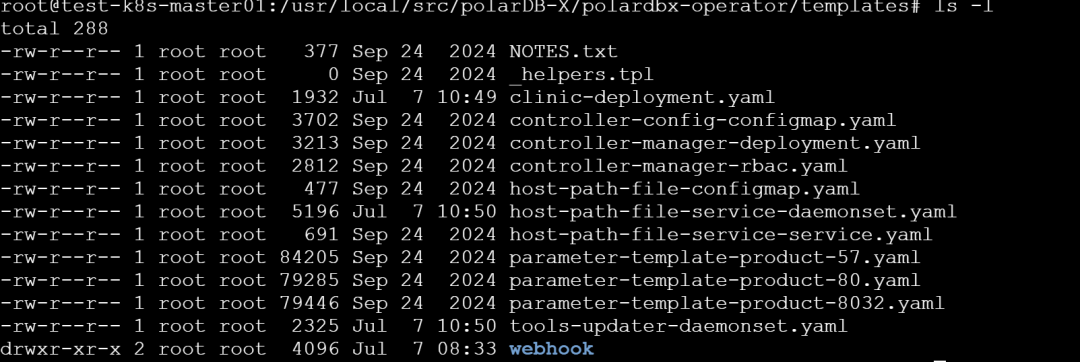
Helm Chart templates 目录结构(粗略理解,可能不对..)
NOTES.txt | ||
_helpers.tpl | ||
clinic-deployment.yaml | polardbx-clinic巡检组件 | |
controller-config-configmap.yaml | ||
controller-manager-deployment.yaml | ||
controller-manager-rbac.yaml | ||
host-path-file-configmap.yaml | hpfs模块(OSS/S3 上传服务)参数 | |
host-path-file-service-daemonset.yaml | polardbx-hpfs部署为每节点一个实例(常用于备份/上传) | |
host-path-file-service-service.yaml | hpfs提供 ClusterIP 类型访问服务 | |
parameter-template-product-57.yaml | ||
parameter-template-product-80.yaml | ||
parameter-template-product-8032.yaml | ||
tools-updater-daemonset.yaml | ||
webhook/ |
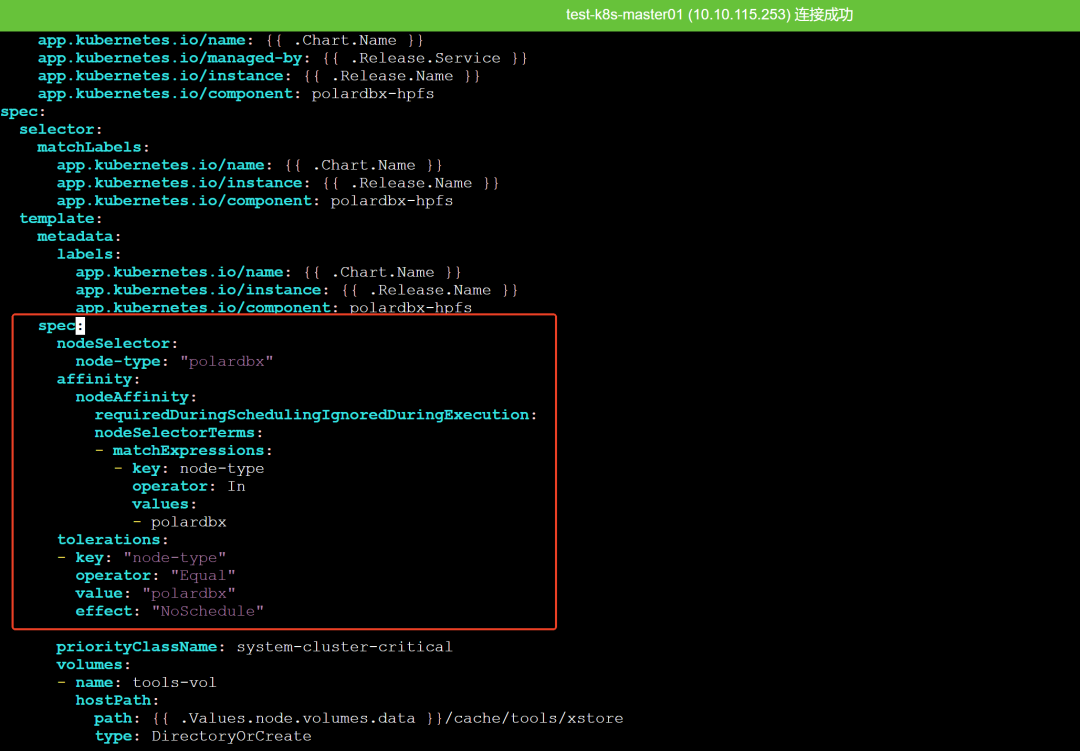
PolarDBX Operator安装后,默认会安装一些资源对象,比如hpfs、tools-updater,可以看到目录下有两个DaemonSet类型的文件,因为DaemonSet默认为集群每个 Node 上运行一个Pod副本,假设我只想为会添加了标签node-type=polardbx的节点上部署这些pod,我们就可以编辑这个文件,添加节点选择或亲和策略。
自定义安装Operator
1.下载chart包到本地
# 添加helm源
helm repo add polardbx https://polardbx-charts.oss-cn-hangzhou.aliyuncs.com/helm/
# 下载
helm pull polardbx/polardbx-operator --untar
2.查看默认配置文件value.yaml
cd polardbx-operator
cp values.yaml my-values.yaml

#或者使用下面的方式导出默认配置并编辑
helm show values polardbx/polardbx-operator > my-values.yaml
3.修改my-values.yaml配置: 根据部署需求,编辑关键项(如节点调度、镜像仓库、oss配置等)
4.创建命名空间
kubectl create namespace polardbx-operator-system
5.自定义安装
helm install --namespace polardbx-operator-system polardbx-operator ./ -f my-values.yaml
这个命令包含以下几个部分:
helm install:这是 Helm 工具中用于安装 Chart 的命令。 --namespace polardbx-operator-system:指定将 PolarDB-X Operator 安装到名为 polardbx-operator-system
的命名空间中。如果该命名空间不存在,需要先创建它。polardbx-operator:这是此次安装的发布名称,用于标识这个特定的安装实例。 ./:表示使用当前目录下的 Chart。这里假设当前目录包含了 PolarDB-X Operator 的 Helm Chart。 -f my-values.yaml:指定使用 values.yaml
文件中的配置值来覆盖 Chart 的默认配置。
6.helm从helm chart仓库安装(我们也可以使用默认values配置从仓库安装)
helm install --namespace polardbx-operator-system polardbx-operator polardbx/polardbx-operator
在 Helm 中,使用 polardbx/polardbx-operator
这种格式时,Helm 默认会尝试从Helm Chart 仓库中查找对应的 Chart。
参考文件: https://github.com/polardb/polardbx-operator https://doc.polardbx.com/quickstart/topics/quickstart-k8s.html
行数:371
字数:2314
字符数:10796
