一、基础监控配置
依赖
        <!-- Druid -->
        <dependency>
            <groupId>com.alibaba</groupId>
            <artifactId>druid-spring-boot-starter</artifactId>
            <version>1.1.10</version>
        </dependency>
1、纯配置文件方式
普通的单数据源项目中,通过在配置文件中配置的方式即可实现监控(但特殊的需求如SpringAOP还是需要通过部分编码)
spring:
  datasource:
    type: com.alibaba.druid.pool.DruidDataSource
    druid:
      filters: stat,wall,slf4j # 配置监控统计拦截的filters,去掉后监控界面sql无法统计,'wall'用于防火墙
      max-active: 20 #最大连接池数量 maxIdle已经不再使用
      initial-size: 5 #初始化时建立物理连接的个数
      max-wait: 60000
      min-idle: 5 #最小连接池数量
      time-between-eviction-runs-millis: 60000 #既作为检测的间隔时间又作为testWhileIdel执行的依据
      min-evictable-idle-time-millis: 300000 #销毁线程时检测当前连接的最后活动时间和当前时间差大于该值时,关闭当前连接
      validation-query: select 'x' #用来检测连接是否有效的sql
      #申请连接的时候检测,如果空闲时间大于timeBetweenEvictionRunsMillis,执行validationQuery检测连接是否有效。
      test-while-idle: true
      test-on-borrow: false #申请连接时会执行validationQuery检测连接是否有效,开启会降低性能,默认为true
      test-on-return: false #归还连接时会执行validationQuery检测连接是否有效,开启会降低性能,默认为true
      pool-prepared-statements: false # 是否缓存preparedStatement,也就是PSCache  官方建议MySQL下建议关闭
      max-open-prepared-statements: 20
      max-pool-prepared-statement-per-connection-size: 20 #当值大于0时poolPreparedStatements会自动修改为true
      # 通过connectProperties属性来打开mergeSql功能;慢SQL记录(配置慢SQL的定义时间)
      connection-properties: druid.stat.mergeSql=true;druid.stat.slowSqlMillis=5000
      use-global-data-source-stat: true # 合并多个DruidDataSource的监控数据

      # 设置监控配置
      web-stat-filter:
        enabled: true
        url-pattern: /*
        exclusions: "*.js,*.gif,*.jpg,*.png,*.css,*.ico,/druid/*"
        session-stat-enable: true
        session-stat-max-count: 100
      #设置视图拦截,访问druid监控页的账号和密码,默认没有
      stat-view-servlet:
        enabled: true
        url-pattern: /druid/*
        reset-enable: true
        login-username: admin
        login-password: admin
2、通过配置类配置方式
在某些特殊情况下,如系统中有多数据源、动态数据源等情况,Spring无法直接读取配置文件,我们会采用Config类的方式进行配置,这样比较灵活。
1)配置文件,同上,供配置类读取
spring:
  datasource:
    type: com.alibaba.druid.pool.DruidDataSource
    druid:
      filters: stat,wall,slf4j # 配置监控统计拦截的filters,去掉后监控界面sql无法统计,'wall'用于防火墙
      max-active: 20 #最大连接池数量 maxIdle已经不再使用
      initial-size: 5 #初始化时建立物理连接的个数
      max-wait: 60000
      min-idle: 5 #最小连接池数量
      time-between-eviction-runs-millis: 60000 #既作为检测的间隔时间又作为testWhileIdel执行的依据
      min-evictable-idle-time-millis: 300000 #销毁线程时检测当前连接的最后活动时间和当前时间差大于该值时,关闭当前连接
      validation-query: select 'x' #用来检测连接是否有效的sql
      #申请连接的时候检测,如果空闲时间大于timeBetweenEvictionRunsMillis,执行validationQuery检测连接是否有效。
      test-while-idle: true
      test-on-borrow: false #申请连接时会执行validationQuery检测连接是否有效,开启会降低性能,默认为true
      test-on-return: false #归还连接时会执行validationQuery检测连接是否有效,开启会降低性能,默认为true
      pool-prepared-statements: false # 是否缓存preparedStatement,也就是PSCache  官方建议MySQL下建议关闭
      max-open-prepared-statements: 20
      max-pool-prepared-statement-per-connection-size: 20 #当值大于0时poolPreparedStatements会自动修改为true
      # 通过connectProperties属性来打开mergeSql功能;慢SQL记录(配置慢SQL的定义时间)
      connection-properties: druid.stat.mergeSql=true;druid.stat.slowSqlMillis=5000
      use-global-data-source-stat: true # 合并多个DruidDataSource的监控数据

      # 设置监控配置
      web-stat-filter:
        enabled: true
        url-pattern: /*
        exclusions: "*.js,*.gif,*.jpg,*.png,*.css,*.ico,/druid/*"
        session-stat-enable: true
        session-stat-max-count: 100
      #设置视图拦截,访问druid监控页的账号和密码,默认没有
      stat-view-servlet:
        enabled: true
        url-pattern: /druid/*
        reset-enable: true
        login-username: admin
        login-password: admin
2)配置信息类DruidDataSourceProperties
负责读入配置文件中的信息
import org.springframework.boot.context.properties.ConfigurationProperties;
import org.springframework.context.annotation.Configuration;

/**
 * Druid配置信息类
 *
 * @author
 * @date
 */
@ConfigurationProperties(prefix = "spring.datasource.druid")
public class DruidDataSourceProperties {

    private String driverClassName;
    private String url;
    private String username;
    private String password;

    private int initialSize;
    private int minIdle;
    private int maxActive = 100;
    private long maxWait;
    private long timeBetweenEvictionRunsMillis;
    private long minEvictableIdleTimeMillis;
    private String validationQuery;
    private boolean testWhileIdle;
    private boolean testOnBorrow;
    private boolean testOnReturn;
    private boolean poolPreparedStatements;
    private int maxPoolPreparedStatementPerConnectionSize;

    private String filters;

    public int getInitialSize() {
        return initialSize;
    }

    public void setInitialSize(int initialSize) {
        this.initialSize = initialSize;
    }

    public int getMinIdle() {
        return minIdle;
    }

    public void setMinIdle(int minIdle) {
        this.minIdle = minIdle;
    }

    public int getMaxActive() {
        return maxActive;
    }

    public void setMaxActive(int maxActive) {
        this.maxActive = maxActive;
    }

    public long getMaxWait() {
        return maxWait;
    }

    public void setMaxWait(long maxWait) {
        this.maxWait = maxWait;
    }

    public long getTimeBetweenEvictionRunsMillis() {
        return timeBetweenEvictionRunsMillis;
    }

    public void setTimeBetweenEvictionRunsMillis(long timeBetweenEvictionRunsMillis) {
        this.timeBetweenEvictionRunsMillis = timeBetweenEvictionRunsMillis;
    }

    public long getMinEvictableIdleTimeMillis() {
        return minEvictableIdleTimeMillis;
    }

    public void setMinEvictableIdleTimeMillis(long minEvictableIdleTimeMillis) {
        this.minEvictableIdleTimeMillis = minEvictableIdleTimeMillis;
    }

    public String getValidationQuery() {
        return validationQuery;
    }

    public void setValidationQuery(String validationQuery) {
        this.validationQuery = validationQuery;
    }

    public boolean isTestWhileIdle() {
        return testWhileIdle;
    }

    public void setTestWhileIdle(boolean testWhileIdle) {
        this.testWhileIdle = testWhileIdle;
    }

    public boolean isTestOnBorrow() {
        return testOnBorrow;
    }

    public void setTestOnBorrow(boolean testOnBorrow) {
        this.testOnBorrow = testOnBorrow;
    }

    public boolean isTestOnReturn() {
        return testOnReturn;
    }

    public void setTestOnReturn(boolean testOnReturn) {
        this.testOnReturn = testOnReturn;
    }

    public boolean isPoolPreparedStatements() {
        return poolPreparedStatements;
    }

    public void setPoolPreparedStatements(boolean poolPreparedStatements) {
        this.poolPreparedStatements = poolPreparedStatements;
    }

    public int getMaxPoolPreparedStatementPerConnectionSize() {
        return maxPoolPreparedStatementPerConnectionSize;
    }

    public void setMaxPoolPreparedStatementPerConnectionSize(int maxPoolPreparedStatementPerConnectionSize) {
        this.maxPoolPreparedStatementPerConnectionSize = maxPoolPreparedStatementPerConnectionSize;
    }

    public String getFilters() {
        return filters;
    }

    public void setFilters(String filters) {
        this.filters = filters;
    }

    public String getDriverClassName() {
        return driverClassName;
    }

    public void setDriverClassName(String driverClassName) {
        this.driverClassName = driverClassName;
    }

    public String getUrl() {
        return url;
    }

    public void setUrl(String url) {
        this.url = url;
    }

    public String getUsername() {
        return username;
    }

    public void setUsername(String username) {
        this.username = username;
    }

    public String getPassword() {
        return password;
    }

    public void setPassword(String password) {
        this.password = password;
    }

}
3)配置DataSource
类中引入刚才的配置信息类
@Configuration
@EnableConfigurationProperties({DruidDataSourceProperties.class})
public class DataSourceConfig{

    @Autowired
    private DruidDataSourceProperties druidProperties;
}
手动配置相关信息
private void setDruidDataSourceConfig(DruidDataSource druidDataSource) {
        druidDataSource.setDriverClassName(druidProperties.getDriverName);
        druidDataSource.setUrl(druidProperties.getUrl);
        druidDataSource.setUsername(druidProperties.getUsername);
        druidDataSource.setPassword(druidProperties.getPassword);
        druidDataSource.setConnectionInitSqls(new ArrayList<String>(){{add(initSqls);}});
        // 初始化大小,最小,最大
        druidDataSource.setInitialSize(druidProperties.getInitialSize());
        druidDataSource.setMinIdle(druidProperties.getMinIdle());
        druidDataSource.setMaxActive(druidProperties.getMaxActive());
        // 配置获取连接等待超时的时间
        druidDataSource.setMaxWait(druidProperties.getMaxWait());
        // 配置间隔多久才进行一次检测,检测需要关闭的空闲连接,单位是毫秒
        druidDataSource.setTimeBetweenEvictionRunsMillis(druidProperties.getTimeBetweenEvictionRunsMillis());
        // 配置一个连接在池中最小生存的时间,单位是毫秒
        druidDataSource.setMinEvictableIdleTimeMillis(druidProperties.getMinEvictableIdleTimeMillis());
        druidDataSource.setTestWhileIdle(druidProperties.isTestWhileIdle());
        druidDataSource.setTestOnBorrow(druidProperties.isTestOnBorrow());
        druidDataSource.setTestOnReturn(druidProperties.isTestOnReturn());
        // 打开PSCache,并且指定每个连接上PSCache的大小
        druidDataSource.setPoolPreparedStatements(druidProperties.isPoolPreparedStatements());
        druidDataSource.setMaxPoolPreparedStatementPerConnectionSize(druidProperties.getMaxPoolPreparedStatementPerConnectionSize());
        druidDataSource.setUseGlobalDataSourceStat(false);

                // 配置慢SQL信息,注意druid.timeBetweenLogStatsMillis为多久记录日志并清空一次信息,与setUseGlobalDataSourceStat互斥
        Properties properties = new Properties();
        properties.setProperty("druid.stat.mergeSql", "true");
        properties.setProperty("druid.stat.slowSqlMillis", "5000");
        properties.setProperty("druid.timeBetweenLogStatsMillis", "100000");
        druidDataSource.setConnectProperties(properties);

        try {
            druidDataSource.setFilters(druidProperties.getFilters());
            druidDataSource.init();
        } catch (SQLException e) {
            e.printStackTrace();
        }
    }
一般情况下,我们采用纯配置文件的方式使用即可。
配置完成后,启动访问http://localhost:8080/druid/index.html
如果配置了访问账号密码,需要登录后查看相关信息

二、扩展
1、Spring类的AOP监控
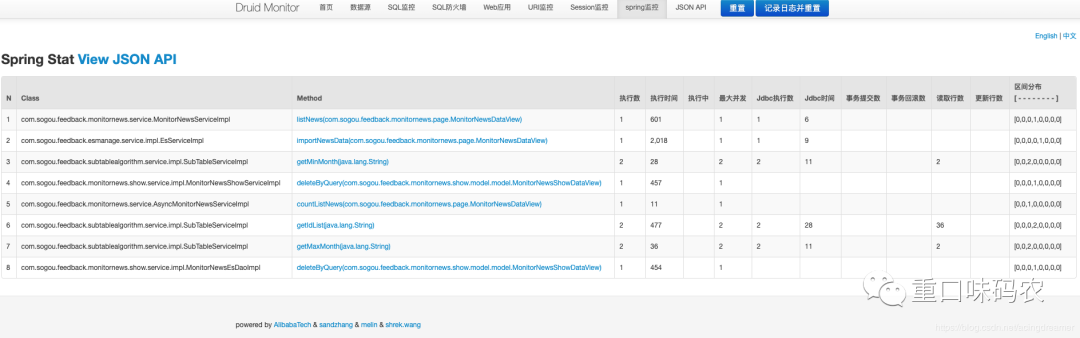
在以上信息完成完成后,有一项还无法查看,就是Spring监控,是因为Spring监控需要对方法做AOP拦截,需要额外配置。这个功能非常强大并且实用,以下是配置方法
新建druid-bean.xml,放入resource文件夹中
<?xml version="1.0" encoding="UTF-8"?>
<beans xmlns="http://www.springframework.org/schema/beans"
       xmlns:aop="http://www.springframework.org/schema/aop" xmlns:xsi="http://www.w3.org/2001/XMLSchema-instance"
       xsi:schemaLocation="
        http://www.springframework.org/schema/beans
        http://www.springframework.org/schema/beans/spring-beans.xsd
        http://www.springframework.org/schema/aop
        http://www.springframework.org/schema/aop/spring-aop.xsd">

    <!-- 配置_Druid和Spring关联监控配置 -->
    <bean id="druid-stat-interceptor"
          class="com.alibaba.druid.support.spring.stat.DruidStatInterceptor"></bean>

    <!-- 方法名正则匹配拦截配置 -->
    <bean id="druid-stat-pointcut" class="org.springframework.aop.support.JdkRegexpMethodPointcut"
          scope="prototype">
        <property name="patterns">
            <list>
                <value>com.sogou.test.*.service.*</value>
            </list>
        </property>
    </bean>

    <aop:config proxy-target-class="true">
        <aop:advisor advice-ref="druid-stat-interceptor"
                     pointcut-ref="druid-stat-pointcut" />
    </aop:config>

</beans>
其中patterns处配置你需要切的位置,比如dao或service层,会对你配置方法进行监控
引入配置
@SpringBootApplication
@ImportResource(locations = { "classpath:druid-bean.xml" })
public class Application {

    public static void main(String[] args) {
        TimeZone.setDefault(TimeZone.getTimeZone("Asia/Shanghai"));
        SpringApplication.run(Application.class, args);
    }

}
配置完成后,即可在Spring监控中查看到对应方法的sql执行信息,可以方便地查看到哪个方法的sql执行有异常情况。
2、日志数据持久化
druid监控的数据,都是存储在缓存中,当应用重启或重新发布时数据会清空,页面上也有两个重置按钮,其中记录日志并重置会将当前日志打印。
当配置了druid.timeBetweenLogStatsMillis参数时,会每隔一段时间记录日志并重置统计信息,会将连接数、SQL信息都打印到日志中,但这样有个缺点是会将这段时间的SQL也打印出来,没有必要,可以通过自定义StatLogger的方式来自定义输出格式。
public class DruidStatLogger extends DruidDataSourceStatLoggerAdapter implements DruidDataSourceStatLogger {

    private static final Log LOG    = LogFactory.getLog(DruidDataSourceStatLoggerImpl.class);

    private Log logger = LOG;

    public DruidStatLogger() {
        this.configFromProperties(System.getProperties());
    }

    public boolean isLogEnable() {
        return logger.isInfoEnabled();
    }

    public void log(String value) {
        logger.info(value);
    }

    @Override
    public void log(DruidDataSourceStatValue druidDataSourceStatValue) {
        if (!isLogEnable()) {
            return;
        }
        Map<String, Object> map = new LinkedHashMap<>();

        map.put("dbType", druidDataSourceStatValue.getDbType());
        map.put("name", druidDataSourceStatValue.getName());
        map.put("activeCount", druidDataSourceStatValue.getActiveCount());

        if (druidDataSourceStatValue.getActivePeak() > 0) {
            map.put("activePeak", druidDataSourceStatValue.getActivePeak());
            map.put("activePeakTime", druidDataSourceStatValue.getActivePeakTime());
        }
        map.put("poolingCount", druidDataSourceStatValue.getPoolingCount());
        if (druidDataSourceStatValue.getPoolingPeak() > 0) {
            map.put("poolingPeak", druidDataSourceStatValue.getPoolingPeak());
            map.put("poolingPeakTime", druidDataSourceStatValue.getPoolingPeakTime());
        }
        map.put("connectCount", druidDataSourceStatValue.getConnectCount());
        map.put("closeCount", druidDataSourceStatValue.getCloseCount());

        if (druidDataSourceStatValue.getWaitThreadCount() > 0) {
            map.put("waitThreadCount", druidDataSourceStatValue.getWaitThreadCount());
        }

        if (druidDataSourceStatValue.getNotEmptyWaitCount() > 0) {
            map.put("notEmptyWaitCount", druidDataSourceStatValue.getNotEmptyWaitCount());
        }

        if (druidDataSourceStatValue.getNotEmptyWaitMillis() > 0) {
            map.put("notEmptyWaitMillis", druidDataSourceStatValue.getNotEmptyWaitMillis());
        }

        if (druidDataSourceStatValue.getLogicConnectErrorCount() > 0) {
            map.put("logicConnectErrorCount", druidDataSourceStatValue.getLogicConnectErrorCount());
        }

        if (druidDataSourceStatValue.getPhysicalConnectCount() > 0) {
            map.put("physicalConnectCount", druidDataSourceStatValue.getPhysicalConnectCount());
        }

        if (druidDataSourceStatValue.getPhysicalCloseCount() > 0) {
            map.put("physicalCloseCount", druidDataSourceStatValue.getPhysicalCloseCount());
        }

        if (druidDataSourceStatValue.getPhysicalConnectErrorCount() > 0) {
            map.put("physicalConnectErrorCount", druidDataSourceStatValue.getPhysicalConnectErrorCount());
        }

        if (druidDataSourceStatValue.getExecuteCount() > 0) {
            map.put("executeCount", druidDataSourceStatValue.getExecuteCount());
        }

        if (druidDataSourceStatValue.getErrorCount() > 0) {
            map.put("errorCount", druidDataSourceStatValue.getErrorCount());
        }

        if (druidDataSourceStatValue.getCommitCount() > 0) {
            map.put("commitCount", druidDataSourceStatValue.getCommitCount());
        }

        if (druidDataSourceStatValue.getRollbackCount() > 0) {
            map.put("rollbackCount", druidDataSourceStatValue.getRollbackCount());
        }

        if (druidDataSourceStatValue.getPstmtCacheHitCount() > 0) {
            map.put("pstmtCacheHitCount", druidDataSourceStatValue.getPstmtCacheHitCount());
        }

        if (druidDataSourceStatValue.getPstmtCacheMissCount() > 0) {
            map.put("pstmtCacheMissCount", druidDataSourceStatValue.getPstmtCacheMissCount());
        }

        if (druidDataSourceStatValue.getStartTransactionCount() > 0) {
            map.put("startTransactionCount", druidDataSourceStatValue.getStartTransactionCount());
            map.put("transactionHistogram", (druidDataSourceStatValue.getTransactionHistogram()));
        }

        if (druidDataSourceStatValue.getConnectCount() > 0) {
            map.put("connectionHoldTimeHistogram", (druidDataSourceStatValue.getConnectionHoldTimeHistogram()));
        }

        if (druidDataSourceStatValue.getClobOpenCount() > 0) {
            map.put("clobOpenCount", druidDataSourceStatValue.getClobOpenCount());
        }

        if (druidDataSourceStatValue.getBlobOpenCount() > 0) {
            map.put("blobOpenCount", druidDataSourceStatValue.getBlobOpenCount());
        }

        if (druidDataSourceStatValue.getSqlSkipCount() > 0) {
            map.put("sqlSkipCount", druidDataSourceStatValue.getSqlSkipCount());
        }
        if (!isLogEnable()) {
            return;
        }
        //Map<String, Object> map = new LinkedHashMap<String, Object>();
        myArrayList<Map<String, Object>> sqlList = new myArrayList<Map<String, Object>>();

        //有执行sql的话 只显示sql语句
        if (druidDataSourceStatValue.getSqlList().size() > 0) {
            for (JdbcSqlStatValue sqlStat : druidDataSourceStatValue.getSqlList()) {
                Map<String, Object> sqlStatMap = new LinkedHashMap<String, Object>();
                sqlStatMap.put("执行了sql语句:", sqlStat.getSql());
                sqlList.add(sqlStatMap);
                String text = sqlList.toString();
                //log(text);
            }
        }
        //没有sql语句的话就显示最上面那些
        else{
            String text = map.toString();
            log(text);
        }
    }

    @Override
    public void configFromProperties(Properties properties) {
        String property = properties.getProperty("druid.stat.loggerName");
        if (property != null && property.length() > 0) {
            setLoggerName(property);
        }
    }

    @Override
    public void setLogger(Log log) {
        if (log == null) {
            throw new IllegalArgumentException("logger can not be null");
        }
        this.logger = log;
    }

    @Override
    public void setLoggerName(String loggerName) {
        logger = LogFactory.getLog(loggerName);
    }

    class myArrayList<E> extends ArrayList<E> {
        @Override
        public String toString() {
            Iterator<E> it = iterator();
            if (!it.hasNext()) {
                return "";
            }

            StringBuilder sb = new StringBuilder();
            for (; ; ) {
                E e = it.next();
                sb.append(e == this ? "(this Collection)" : e);
                if (!it.hasNext()) {
                    return sb.toString();
                }
                sb.append(',').append(' ');
            }
        }
    }
DataSource配置
@Configuration
public class DruidConfig {

    @ConfigurationProperties(prefix="spring.datasource")
    @Bean
    public DataSource druidDataSource()
    {
        DruidDataSource dataSource = new DruidDataSource();
        dataSource.setStatLogger(new MyStatLogger());
        return dataSource;
    }

    @Bean
    public ServletRegistrationBean statViewServlet()
    {
        ServletRegistrationBean<StatViewServlet> bean=new ServletRegistrationBean<>(new StatViewServlet(),"/druid/*");

        //后台需要有人登录监控
        HashMap<String,String> initParameters=new HashMap<>();

        //增加配置
        initParameters.put("loginUsername","admin");
        initParameters.put("loginPassword","123456");

        //允许谁能访问
        initParameters.put("allow"," ");

        bean.setInitParameters(initParameters);//设置初始化参数
        return bean;
    }

    @Bean
    public FilterRegistrationBean webStatFilter()
    {
        FilterRegistrationBean bean=new FilterRegistrationBean();
        bean.setFilter(new WebStatFilter());

        HashMap<String,String> initParameters=new HashMap<>();

        initParameters.put("exclusions","*.js,*.css,/druid/*");

        bean.setInitParameters(initParameters);

        return bean;
    }

}
可以设置每隔24小时记录日志并清空当前数据。
你会用了吗?