



夜莺从5.1版本开始,拥抱开源社区,支持OpenTSDB的协议格式,支持Telegraf、Prometheus生态的exporter(也就是说,他们自己不做agent了)。具体落地实践时,建议优先选用Telegraf(all-in-one的架构,运维简单)
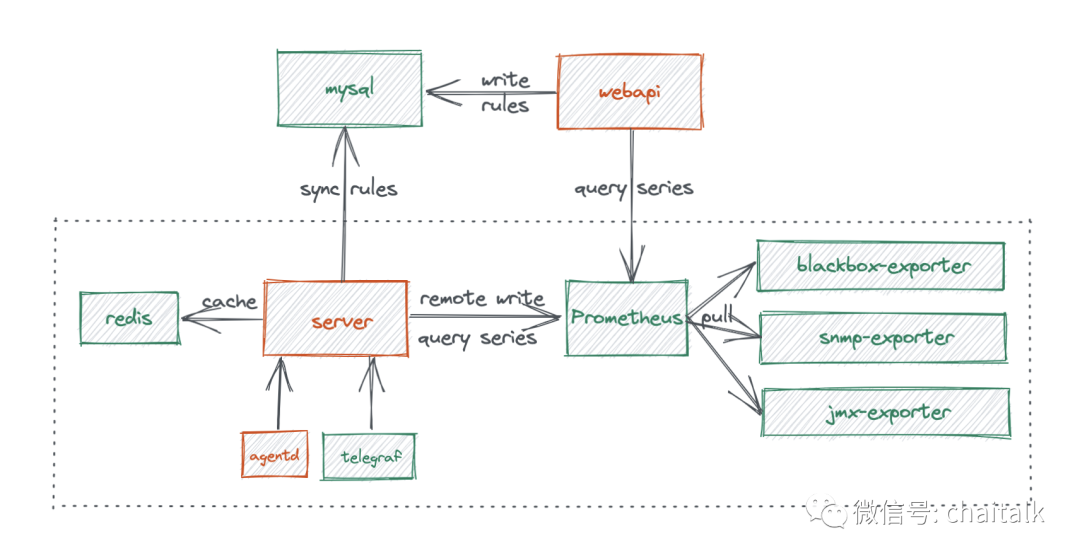
一、使用TELEGRAF采集监控数据(https://n9e.gitee.io/quickstart/telegraf/)
1.telegraf下载地址:https://github.com/influxdata/telegraf/releases
2.在centos8.2中安装telegraf(/opt/telegraf/telegraf.conf的内容是个删减版,只是为了让大家快速跑起来,如果要采集更多监控对象,比如mysql、redis、tomcat等,请往下看)
#!/bin/shversion=1.20.4tarball=telegraf-${version}_linux_amd64.tar.gzwget https://dl.influxdata.com/telegraf/releases/$tarballtar xzvf $tarballmkdir -p /opt/telegrafcp -far telegraf-${version}/usr/bin/telegraf /opt/telegrafcat <<EOF > /etc/telegraf/telegraf.conf[global_tags][agent]interval = "10s"round_interval = truemetric_batch_size = 1000metric_buffer_limit = 10000collection_jitter = "0s"flush_interval = "10s"flush_jitter = "0s"precision = ""hostname = ""omit_hostname = falselogfile = "/var/log/telegraf.log"[[outputs.opentsdb]]host = "http://127.0.0.1"port = 19000http_batch_size = 50http_path = "/opentsdb/put"debug = falseseparator = "_"[[inputs.cpu]]percpu = truetotalcpu = truecollect_cpu_time = falsereport_active = true[[inputs.disk]]ignore_fs = ["tmpfs", "devtmpfs", "devfs", "iso9660", "overlay", "aufs", "squashfs"][[inputs.diskio]][[inputs.kernel]][[inputs.mem]][[inputs.processes]][[inputs.system]]fielddrop = ["uptime_format"][[inputs.net]]ignore_protocol_stats = trueEOFcat <<EOF > /etc/systemd/system/telegraf.service[Unit]Description="telegraf"After=network.target[Service]Type=simpleExecStart=/opt/telegraf/telegraf --config-directory /etc/telegraf/WorkingDirectory=/opt/telegrafRestart=on-failureSuccessExitStatus=0LimitNOFILE=65536StandardOutput=syslogStandardError=syslogSyslogIdentifier=telegraf[Install]WantedBy=multi-user.targetEOFsystemctl daemon-reloadsystemctl enable telegrafsystemctl restart telegrafsystemctl status telegraf
3.使用telegraf采集mysql、redis、tomcat
cat <<EOF > /etc/telegraf/mysql.conf[[inputs.mysql]]interval = "5m"servers = ["root:root@tcp(127.0.0.1:3306)/?tls=false"]perf_events_statements_digest_text_limit = 120perf_events_statements_limit = 250perf_events_statements_time_limit = 86400table_schema_databases = [""]gather_table_schema = falsegather_process_list = truegather_info_schema_auto_inc = truegather_slave_status = truegather_binary_logs = falsegather_table_io_waits = falsegather_table_lock_waits = falsegather_index_io_waits = falsegather_event_waits = falsegather_file_events_stats = falseinterval_slow = "30m"[[inputs.tcp_listener]]service_address = ":8094"allowed_pending_messages = 10000max_tcp_connections = 250data_format = "influx"[[inputs.exec]]commands = ["/tmp/test.sh"]timeout = "5m"data_format = "influx"name_suffix = "_mycollector"[[inputs.redis]]## specify servers via a url matching:## [protocol://][:password]@address[:port]## e.g.servers = ['tcp://127.0.0.1:6379']EOF
4.其中inputs.exec是可以写脚本(shell或者python都可以)获取自己需要的监控数据,简单示例如下(注意标签中如果不包含数据会导致写入失败)
cat <<EOF > /tmp/test.sh#!/bin/shecho "sinoc estab=27,closed=40"EOF
文章转载自老柴杂货铺,如果涉嫌侵权,请发送邮件至:contact@modb.pro进行举报,并提供相关证据,一经查实,墨天轮将立刻删除相关内容。
