



适用范围
磐维数据库2.0
背景
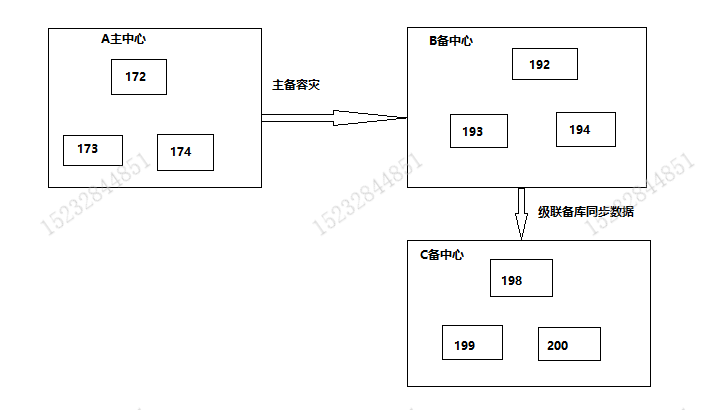
A主中心和B备中心是容灾关系,C备中心需要从B备中心同步一次数据用于测试。
操作范围
B备集群主节点加个流复制通道给C备中心做全量数据build同步;
涉及的设备、系统:
名称 | IP | 主机名 | 角色 | 数据库版本 | 主要操作 |
|---|---|---|---|---|---|
A主中心 | xx.xx.xx.172 | host172 | Primary | 3.0.2_b02 | 无操作 |
xx.xx.xx.173 | host173 | Standby | |||
xx.xx.xx.174 | host174 | Standby |
名称 | IP | 主机名 | 角色 | 数据库版本 | 主要操作 |
|---|---|---|---|---|---|
B备中心 | xx.xx.xx.192 | host192 | Main Standby | 3.0.2_b02 | 修改部分参数 |
xx.xx.xx.193 | host193 | Cascade Standby | |||
xx.xx.xx.194 | host194 | Cascade Standby |
名称 | IP | 主机名 | 角色 | 数据库版本 | 主要操作 |
|---|---|---|---|---|---|
C备中心 | xx.xx.xx.198 | host198 | Primary | 3.0.2_b02 | build同步数据 |
xx.xx.xx.199 | host199 | Standby | |||
xx.xx.xx.200 | host200 | Standby |
前置条件
- A主中心、B备中心、C备中心磐维数据库版本一致。
- A主中心、B备中心已经完成主备容灾环境搭建,C备中心搭建同版本的一主两备数据库集群。
- B备中心到C备中心的17700-17710、18800-18801、22端口要互通。
操作步骤
以下操作均使用omm用户进行操作
1. 环境检查
1)检查集群初始状态
A主中心172以及B备中心192分别执行以下命令:
cm_ctl query -Cdvip
gs_sdr query
确认集群状态为Normal,容灾关系正常后 方可进行后续操作。
2)检查操作系统配置
B备中心192以及C备中心198分别执行:
cat /etc/redhat-release
uname -a
检查操作系统配置是否一致。
3)检查数据库版本
B备中心192以及C备中心198分别执行:
gsql -c"select pw_version()"
检查磐维数据库版本是否一致。
2. 备份集群的配置文件
B备中心所有节点备份:
cp /database/panweidb/data/postgresql.conf /home/omm/postgresql.conf_`date +"%Y-%m-%d-%H%M%S"`
cp /database/panweidb/data/pg_hba.conf /home/omm/pg_hba.conf_`date +"%Y-%m-%d-%H%M%S"`
C备中心所有节点备份:
cp /database/panweidb/data/postgresql.conf /home/omm/postgresql.conf_`date +"%Y-%m-%d-%H%M%S"`
cp /database/panweidb/data/pg_hba.conf /home/omm/pg_hba.conf_`date +"%Y-%m-%d-%H%M%S"`
3. 关闭C备中心的集群
C备中心198:
gs_om -t status –detail
cm_ctl stop
gs_om -t status –detail
确认C备中心集群关闭后执行后续操作。
4. 主机名配置/etc/hosts
B备中心192,/etc/hosts添加:
xx.xx.xx.198 host198
C备中心198,/etc/hosts添加:
xx.xx.xx.192 host192
xx.xx.xx.193 host193
xx.xx.xx.194 host194
5. B备中心参数配置调整
B备中心$PGDATA/postgresql.conf文件添加以下配置:
192:
replconninfo6='localhost=xx.xx.xx.192 localport=17701 localheartbeatport=17705 localservice=17704 remotehost=xx.xx.xx.198 remoteport=17701 remoteheartbeatport=17705 remoteservice=17704 iscascade=true'
193:
replconninfo6='localhost=xx.xx.xx.193 localport=17701 localheartbeatport=17705 localservice=17704 remotehost=xx.xx.xx.198 remoteport=17701 remoteheartbeatport=17705 remoteservice=17704 iscascade=true'
194:
replconninfo6='localhost=xx.xx.xx.194 localport=17701 localheartbeatport=17705 localservice=17704 remotehost=xx.xx.xx.198 remoteport=17701 remoteheartbeatport=17705 remoteservice=17704 iscascade=true'
修改完reload加载生效:
pw_ctl reload
查看参数是否生效:
gsql -c"select name,setting from pg_settings where name like 'replconninfo_';"
6. B备中心白名单调整
B备中心所有节点$PGDATA/pg_hba.conf文件添加以下配置:
host all omm xx.xx.xx.198/32 trust
修改完reload加载生效:
pw_ctl reload
7. C备中心参数配置调整
198:$PGDATA/postgresql.conf文件
- 注释原集群的replconninfo1、replconninfo2参数
- 并添加以下配置条目:
replconninfo6='localhost=xx.xx.xx.198 localport=17701 localheartbeatport=17705 localservice=17704 remotehost=xx.xx.xx.192 remoteport=17701 remoteheartbeatport=17705 remoteservice=17704 iscascade=true'
8. C备中心白名单调整
198:$PGDATA/pg_hba.conf文件添加以下配置
host all omm xx.xx.xx.192/32 trust
host all omm xx.xx.xx.193/32 trust
host all omm xx.xx.xx.194/32 trust
9. build拉取数据
198:构建流复制关系
nohup gs_ctl build -D $PGDATA -b standby_full -M cascade_standby -r 7200 -t 1209600 >>
/home/omm/build_`date+"%Y-%m-%d-%H%M%S"`.log 2>&1 &
10. 主备信息查询
build结束后,会自动拉起C备中心198为级联备。
查询主备信息,确认主备正常同步:
pw_ctl query
当sync_percent 为100%时,表示无延迟,可考虑恢复C备中心为单独的一主两备。
11. C备中心恢复集群
1)198:关闭单节点
pw_ctl stop
2)198:恢复原 $PGDATA/postgresql.conf文件
cp /home/omm/postgresql.conf_ xxxx /database/panweidb/data/postgresql.conf
cp /home/omm/pg_hba.conf_xxxx /database/panweidb/data/pg_hba.conf
3)198:启为主节点
pw_ctl start -D /database/panweidb/data -M primary
4)199、200分别做build(该步骤时间较长,可同时执行 12恢复B备中心环境步骤)
nohup pw_ctl build -b full >> /home/omm/build_`date +"%Y-%m-%d-%H%M%S"`.log 2>&1 &
5)build结束后启动cm
cm_ctl start
//查看集群状态
gs_om -t status –detail
12. B备中心环境恢复
1)所有节点注释$PGDATA/postgresql.conf文件中的replconninfo6参数
2)所有节点注释$PGDATA/pg_hba.conf文件中的条目
# host all omm xx.xx.xx.198/32 trust
3)执行pw_ctl reload重新加载
