



点击上方蓝字关注我们

一.安装前的准备
1.1 机器分配
以下安装使用 root 用户,搭建集群模式,一共三台机器:
| ip | Meta | Graph | Storage |
| 192.168.5.85 | 1 | 1 | 1 |
| 192.168.5.86 | 1 | 1 | 1 |
| 192.168.5.87 | 1 | 1 | 1 |
1.1 安装目录
nebula 主程序、nebula-console 安装在 /opt 目录
nebula-studio 安装在默认目录( /usr/local/nebula/nebula-graph-studio ),我们这里安装指定路径
nebula 的数据文件安装在 /opt/nebula/data/nebula 目录
nebula 的metad数据安装在 /opt/nebula/data/nebula/metd 目录
nebula 的日志文件安装在 /opt/nebula/resource/nebula/storage目录
二 .Nebula 安装部署
2.1 下载安装包
wget https://oss-cdn.nebula-graph.com.cn/package/2.6.1/nebula-graph-2.6.1.el7.x86_64.rpm
2.2 安装 rpm 包
如果不设置安装路径,默认安装路径为 /usr/local/nebula/ ,此处修改为:/opt/nebula-2.6.1
rpm -ivh --prefix=/opt/nebula-2.6.1 nebula-graph-2.6.1.el7.x86_64.rpm
2.3 建立软连接
切换到 /opt 目录,执行以下命令:
ln -s nebula-2.6.1 nebula
2.4 修改配置
配置文件在 /opt/nebula/etc 下:
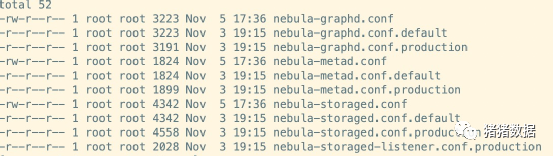
因为是生产环境,可以将其他的配置文件都删了,只保留带 .production 的配置文件,最后要把 .production 扩展名去掉,保证扩展名都是 .conf 。
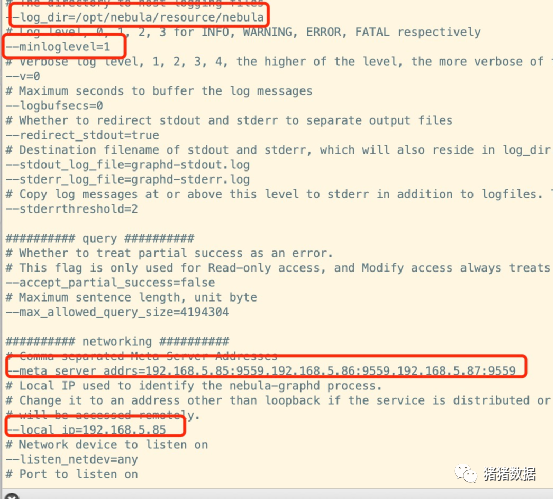
2.4.1 nebula-metad.conf配置修改
主要修改点(日志文件路径、日志级别、元数据服务地址、本机 IP、数据文件路径):

2.4.2 nebula-graphd.conf配置修改
主要修改点(日志文件路径、日志级别、元数据服务地址、本机 IP):
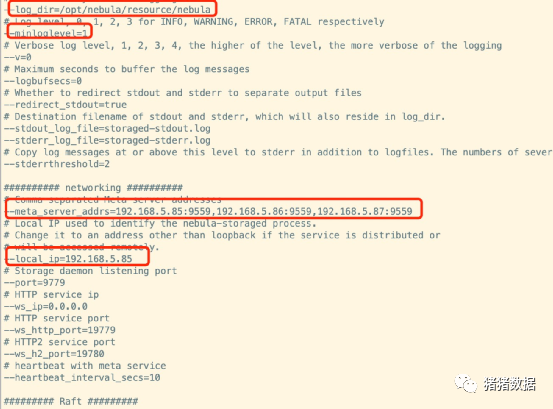
2.4.3 nebula-storaged.conf配置修改
主要修改点(日志文件路径、日志级别、元数据服务地址、本机 IP、数据文件路径):

2.5 将 其中一台机器的文件 拷贝到 其余机器
[root@xuehai-streaming-01 opt]# scp -r nebula/ xuehai-streaming-02:/opt/
db_dump 100% 41MB 41.2MB/s 00:01
db_upgrader 100% 41MB 43.6MB/s 00:00
meta_dump 100% 41MB 53.9MB/s 00:00
nebula-graphd 100% 37MB 64.7MB/s 00:00
nebula-metad 100% 41MB 40.8MB/s 00:01
nebula-storaged 100% 41MB 41.1MB/s 00:01
nebula-storaged-listener.conf 100% 2028 157.5KB/s 00:00
nebula-graphd.conf 100% 3256 327.2KB/s 00:00
nebula-storaged.conf 100% 4637 415.5KB/s 00:00
nebula-metad.conf 100% 1981 260.7KB/s 00:00
meta-transfer-tools.sh 100% 1985 547.8KB/s 00:00
nebula-graphd.service 100% 202 52.5KB/s 00:00
nebula-metad.service 100% 201 315.8KB/s 00:00
nebula-storaged.service 100% 204 460.1KB/s 00:00
nebula.service 100% 6298 878.0KB/s 00:00
utils.sh 100% 3383 4.2MB/s 00:00
date_time_zonespec.csv 100% 47KB 1.8MB/s 00:00
gflags.json 100% 697 129.2KB/s 00:00
[root@xuehai-streaming-01 opt]# scp -r nebula/ xuehai-streaming-03:/opt/
db_dump 100% 41MB 45.9MB/s 00:00
db_upgrader 100% 41MB 49.7MB/s 00:00
meta_dump 100% 41MB 67.0MB/s 00:00
nebula-graphd 100% 37MB 63.6MB/s 00:00
nebula-metad 100% 41MB 68.2MB/s 00:00
nebula-storaged 100% 41MB 43.3MB/s 00:00
nebula-storaged-listener.conf 100% 2028 248.1KB/s 00:00
nebula-graphd.conf 100% 3256 3.5MB/s 00:00
nebula-storaged.conf 100% 4637 5.1MB/s 00:00
nebula-metad.conf 100% 1981 2.4MB/s 00:00
meta-transfer-tools.sh 100% 1985 2.5MB/s 00:00
nebula-graphd.service 100% 202 362.8KB/s 00:00
nebula-metad.service 100% 201 335.2KB/s 00:00
nebula-storaged.service 100% 204 391.5KB/s 00:00
nebula.service 100% 6298 9.2MB/s 00:00
utils.sh 100% 3383 5.2MB/s 00:00
date_time_zonespec.csv 100% 47KB 22.7MB/s 00:00
gflags.json 100% 697 1.3MB/s 00:00
2.6 分别修改第二台/第三台机器配置文件中本地ip地址
local_ip=192.168.5.85 改成本机器的ip地址
2.7 启动 Nebula
切换到每个机器的 /opt/nebula/scripts 下,执行如下命令:
[root@xuehai-streaming-01 ~]# cd /opt/nebula/scripts

[root@xuehai-streaming-01 scripts]# ll

total 28

-rwxr-xr-x 1 root root 1985 Nov  3 19:15 meta-transfer-tools.sh

-rwxr-xr-x 1 root root  202 Nov  3 19:15 nebula-graphd.service

-rwxr-xr-x 1 root root  201 Nov  3 19:15 nebula-metad.service

-rwxr-xr-x 1 root root 6298 Nov  3 19:15 nebula.service

-rwxr-xr-x 1 root root  204 Nov  3 19:15 nebula-storaged.service

-rwxr-xr-x 1 root root 3383 Nov  3 19:15 utils.sh
三台机器 分别 执行启动命令 :
./nebula.service start all

[root@xuehai-streaming-01 scripts]# ./nebula.service start all

[INFO] Starting nebula-metad...

[INFO] Done

[INFO] Starting nebula-graphd...

[INFO] Done

[INFO] Starting nebula-storaged...

[INFO] Done

[root@xuehai-streaming-02 scripts]# ./nebula.service start all

[INFO] Starting nebula-metad...

[INFO] Done

[INFO] Starting nebula-graphd...

[INFO] Done

[INFO] Starting nebula-storaged...

[INFO] Done

[root@xuehai-streaming-03 scripts]# ./nebula.service start all

[INFO] Starting nebula-metad...

[INFO] Done

[INFO] Starting nebula-graphd...

[INFO] Done

[INFO] Starting nebula-storaged...

[INFO] Done
2.8 查看Nebula每个服务的状态
切换到每个机器的 /opt/nebula/scripts 下,执行如下命令:
./nebula.service status all
返回信息如下代表正常:
[root@xuehai-streaming-01 scripts]# ./nebula.service status all

[INFO] nebula-metad(de03025): Running as 19419, Listening on 9559

[INFO] nebula-graphd(de03025): Running as 19444, Listening on 9669

[INFO] nebula-storaged(de03025): Running as 19511, Listening on 9779

[root@xuehai-streaming-02 scripts]# ./nebula.service status all

[INFO] nebula-metad(de03025): Running as 27124, Listening on 9559

[INFO] nebula-graphd(de03025): Running as 28438, Listening on 9669

[INFO] nebula-storaged(de03025): Running as 28456, Listening on 9779

[root@xuehai-streaming-03 scripts]# ./nebula.service status all

[INFO] nebula-metad(de03025): Running as 2061, Listening on 9559

[INFO] nebula-graphd(de03025): Running as 2151, Listening on 9669

[INFO] nebula-storaged(de03025): Running as 2167, Listening on 9779
三. Nebula-Console安装
3.1 下载安装包
GitHub 地址:https://github.com/vesoft-inc/nebula-console/releases
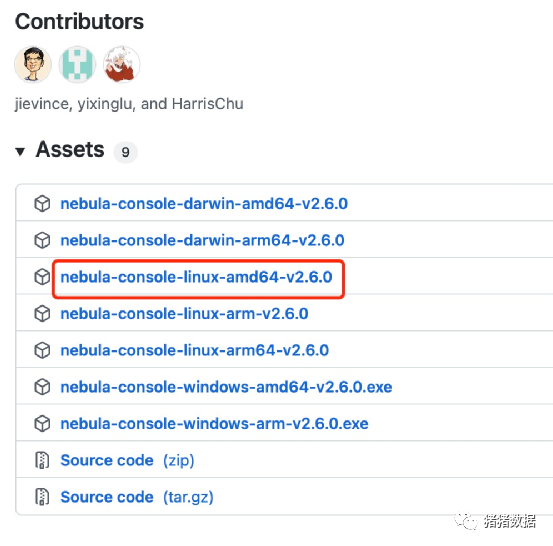 wget直接下载 到 /opt/nebula/scripts目录 下 :
[root@xuehai-streaming-01 scripts]# wget http://github.com/vesoft-inc/nebula-console/releases/download/v2.6.0/nebula-console-linux-amd64-v2.6.0

--2021-11-08 11:09:44--  http://github.com/vesoft-inc/nebula-console/releases/download/v2.6.0/nebula-console-linux-amd64-v2.6.0

Resolving github.com (github.com)... 20.205.243.166

Connecting to github.com (github.com)|20.205.243.166|:80... connected.

HTTP request sent, awaiting response... 301 Moved Permanently

Location: https://github.com/vesoft-inc/nebula-console/releases/download/v2.6.0/nebula-console-linux-amd64-v2.6.0 [following]

--2021-11-08 11:09:44--  https://github.com/vesoft-inc/nebula-console/releases/download/v2.6.0/nebula-console-linux-amd64-v2.6.0

Connecting to github.com (github.com)|20.205.243.166|:443... connected.

HTTP request sent, awaiting response... 302 Found

Location: https://github-releases.githubusercontent.com/257145326/f50b183a-6391-43a8-ba00-bf1480ac1eea?X-Amz-Algorithm=AWS4-HMAC-SHA256&X-Amz-Credential=AKIAIWNJYAX4CSVEH53A%2F20211108%2Fus-east-1%2Fs3%2Faws4_request&X-Amz-Date=20211108T030945Z&X-Amz-Expires=300&X-Amz-Signature=b9fd20ef484303ee9dc264378efdb4e0dd2bd41dc65acb245954e911cae969e9&X-Amz-SignedHeaders=host&actor_id=0&key_id=0&repo_id=257145326&response-content-disposition=attachment%3B%20filename%3Dnebula-console-linux-amd64-v2.6.0&response-content-type=application%2Foctet-stream [following]

--2021-11-08 11:09:45--  https://github-releases.githubusercontent.com/257145326/f50b183a-6391-43a8-ba00-bf1480ac1eea?X-Amz-Algorithm=AWS4-HMAC-SHA256&X-Amz-Credential=AKIAIWNJYAX4CSVEH53A%2F20211108%2Fus-east-1%2Fs3%2Faws4_request&X-Amz-Date=20211108T030945Z&X-Amz-Expires=300&X-Amz-Signature=b9fd20ef484303ee9dc264378efdb4e0dd2bd41dc65acb245954e911cae969e9&X-Amz-SignedHeaders=host&actor_id=0&key_id=0&repo_id=257145326&response-content-disposition=attachment%3B%20filename%3Dnebula-console-linux-amd64-v2.6.0&response-content-type=application%2Foctet-stream

Resolving github-releases.githubusercontent.com (github-releases.githubusercontent.com)... 185.199.108.154, 185.199.110.154, 185.199.109.154, ...

Connecting to github-releases.githubusercontent.com (github-releases.githubusercontent.com)|185.199.108.154|:443... connected.

HTTP request sent, awaiting response... 200 OK

Length: 5704389 (5.4M) [application/octet-stream]

Saving to: ‘nebula-console-linux-amd64-v2.6.0’


100%[=========================================================================================================================================================================>] 5,704,389   37.5KB/s   in 51s


2021-11-08 11:10:37 (109 KB/s) - ‘nebula-console-linux-amd64-v2.6.0’ saved [5704389/5704389]
3.3 重命名为 nebula-console
[root@xuehai-streaming-01 scripts]# mv nebula-console-linux-amd64-v2.6.0 nebula-console
3.4 添加可执行权限
[root@xuehai-streaming-01 scripts]# [root@xuehai-streaming-01 scripts]# chmod +x nebula-console

[root@xuehai-streaming-01 scripts]# ll

total 5600

-rwxr-xr-x 1 root root    1985 Nov  3 19:15 meta-transfer-tools.sh

-rwxr-xr-x 1 root root 5704389 Oct 26 18:04 nebula-console

-rwxr-xr-x 1 root root     202 Nov  3 19:15 nebula-graphd.service

-rwxr-xr-x 1 root root     201 Nov  3 19:15 nebula-metad.service

-rwxr-xr-x 1 root root    6298 Nov  3 19:15 nebula.service

-rwxr-xr-x 1 root root     204 Nov  3 19:15 nebula-storaged.service

-rwxr-xr-x 1 root root    3383 Nov  3 19:15 utils.sh
3.5 连接 Nebula
切换到 /opt/nebula/scripts 下,执行如下命令:
[root@xuehai-streaming-01 scripts]# ./nebula-console -addr 127.0.0.1 -port 9669 -u root -p password


Welcome to Nebula Graph!


(root@nebula) [(none)]>
出现这个代表成功了
四. Nebula-Studio
4.1 依赖安装
使用的 Linux 发行版为 CentOS ,前提条件依赖 :
a.安装有 lsof
b.版本为 v10.16.0 + 以上的 Node.js。
【note:a,b必须先安装,再进行四。安装步骤在下文五。】
4.2下载 Nebula Studio
下载地址:https://oss-cdn.nebula-graph.com.cn/nebula-graph-studio/3.1.0/nebula-graph-studio-3.1.0.x86_64.rpm
4.3 通过 rpm 安装 Nebula Studio
[root@xuehai-streaming-01 software]# rpm -i nebula-graph-studio-3.1.0.x86_64.rpm

 node_modules/rc-table/es/Table.d.ts

node_modules/rc-table/es/ExpandIcon.d.ts

node_modules/rc-table/es/BaseTable.js

node_modules/rc-table/es/interface.d.ts

node_modules/rc-table/package.json

node_modules/rc-table/LICENSE.md

node_modules/socks-proxy-agent/

node_modules/socks-proxy-agent/README.md

node_modules/socks-proxy-agent/node_modules/

node_modules/socks-proxy-agent/node_modules/debug/

node_modules/socks-proxy-agent/node_modules/debug/README.md

node_modules/socks-proxy-agent/node_modules/debug/LICENSE

node_modules/socks-proxy-agent/node_modules/debug/package.json

node_modules/socks-proxy-agent/node_modules/debug/src/

node_modules/socks-proxy-agent/node_modules/debug/src/node.js

node_modules/socks-proxy-agent/node_modules/debug/src/browser.js

node_modules/socks-proxy-agent/node_modules/debug/src/common.js

node_modules/socks-proxy-agent/node_modules/debug/src/index.js

node_modules/socks-proxy-agent/node_modules/ms/

node_modules/socks-proxy-agent/node_modules/ms/package.json

node_modules/socks-proxy-agent/node_modules/ms/readme.md

node_modules/socks-proxy-agent/node_modules/ms/index.js

node_modules/socks-proxy-agent/node_modules/ms/license.md

node_modules/socks-proxy-agent/package.json

node_modules/socks-proxy-agent/dist/

node_modules/socks-proxy-agent/dist/agent.js

node_modules/socks-proxy-agent/dist/index.js.map

node_modules/socks-proxy-agent/dist/agent.d.ts

node_modules/socks-proxy-agent/dist/index.d.ts

node_modules/socks-proxy-agent/dist/agent.js.map

node_modules/socks-proxy-agent/dist/index.js

node_modules/esutils/

node_modules/esutils/lib/

node_modules/esutils/lib/keyword.js

node_modules/esutils/lib/code.js

node_modules/esutils/lib/utils.js

node_modules/esutils/lib/ast.js

node_modules/esutils/README.md

node_modules/esutils/LICENSE.BSD

node_modules/esutils/package.json

node_modules/rc-progress/

node_modules/rc-progress/lib/

node_modules/rc-progress/lib/types.js

node_modules/rc-progress/lib/Circle.js

node_modules/rc-progress/lib/Line.js

node_modules/rc-progress/lib/enhancer.js

node_modules/rc-progress/lib/index.js

node_modules/rc-progress/HISTORY.md

node_modules/rc-progress/README.md

node_modules/rc-progress/typings/

node_modules/rc-progress/typings/index.d.ts

node_modules/rc-progress/assets/

node_modules/rc-progress/assets/index.css

node_modules/rc-progress/es/

node_modules/rc-progress/es/types.js

node_modules/rc-progress/es/Circle.js

node_modules/rc-progress/es/Line.js

node_modules/rc-progress/es/enhancer.js

node_modules/rc-progress/es/index.js

node_modules/rc-progress/package.json

node_modules/rc-progress/LICENSE.md

node_modules/has-values/

node_modules/has-values/README.md

node_modules/has-values/LICENSE

node_modules/has-values/node_modules/

node_modules/has-values/node_modules/kind-of/

node_modules/has-values/node_modules/kind-of/README.md

node_modules/has-values/node_modules/kind-of/LICENSE

node_modules/has-values/node_modules/kind-of/package.json

node_modules/has-values/node_modules/kind-of/index.js

node_modules/has-values/package.json

node_modules/has-values/index.js

node_modules/body-parser/

node_modules/body-parser/lib/

node_modules/body-parser/lib/read.js

node_modules/body-parser/lib/types/

node_modules/body-parser/lib/types/json.js

node_modules/body-parser/lib/types/raw.js

node_modules/body-parser/lib/types/text.js

node_modules/body-parser/lib/types/urlencoded.js

node_modules/body-parser/HISTORY.md

node_modules/body-parser/README.md

node_modules/body-parser/LICENSE

node_modules/body-parser/node_modules/

node_modules/body-parser/node_modules/raw-body/

node_modules/body-parser/node_modules/raw-body/HISTORY.md

node_modules/body-parser/node_modules/raw-body/README.md

node_modules/body-parser/node_modules/raw-body/index.d.ts

node_modules/body-parser/node_modules/raw-body/LICENSE

node_modules/body-parser/node_modules/raw-body/package.json

node_modules/body-parser/node_modules/raw-body/index.js

node_modules/body-parser/node_modules/setprototypeof/

node_modules/body-parser/node_modules/setprototypeof/README.md

node_modules/body-parser/node_modules/setprototypeof/index.d.ts

node_modules/body-parser/node_modules/setprototypeof/LICENSE

node_modules/body-parser/node_modules/setprototypeof/test/

node_modules/body-parser/node_modules/setprototypeof/test/index.js

node_modules/body-parser/node_modules/setprototypeof/package.json

node_modules/body-parser/node_modules/setprototypeof/index.js

node_modules/body-parser/node_modules/debug/

node_modules/body-parser/node_modules/debug/node.js

node_modules/body-parser/node_modules/debug/README.md

node_modules/body-parser/node_modules/debug/LICENSE

node_modules/body-parser/node_modules/debug/package.json

node_modules/body-parser/node_modules/debug/.npmignore

node_modules/body-parser/node_modules/debug/Makefile

node_modules/body-parser/node_modules/debug/src/

node_modules/body-parser/node_modules/debug/src/node.js

node_modules/body-parser/node_modules/debug/src/browser.js

node_modules/body-parser/node_modules/debug/src/inspector-log.js

node_modules/body-parser/node_modules/debug/src/index.js

node_modules/body-parser/node_modules/debug/src/debug.js

node_modules/body-parser/node_modules/debug/component.json

node_modules/body-parser/node_modules/debug/.travis.yml

node_modules/body-parser/node_modules/debug/karma.conf.js

node_modules/body-parser/node_modules/debug/CHANGELOG.md

node_modules/body-parser/node_modules/debug/.eslintrc

node_modules/body-parser/node_modules/debug/.coveralls.yml

node_modules/body-parser/node_modules/http-errors/

node_modules/body-parser/node_modules/http-errors/HISTORY.md

node_modules/body-parser/node_modules/http-errors/README.md

node_modules/body-parser/node_modules/http-errors/LICENSE

node_modules/body-parser/node_modules/http-errors/package.json

node_modules/body-parser/node_modules/http-errors/index.js

node_modules/body-parser/node_modules/inherits/

node_modules/body-parser/node_modules/inherits/README.md

node_modules/body-parser/node_modules/inherits/LICENSE

node_modules/body-parser/node_modules/inherits/package.json

node_modules/body-parser/node_modules/inherits/inherits.js

node_modules/body-parser/node_modules/inherits/inherits_browser.js

node_modules/body-parser/node_modules/iconv-lite/

node_modules/body-parser/node_modules/iconv-lite/lib/

node_modules/body-parser/node_modules/iconv-lite/lib/extend-node.js

node_modules/body-parser/node_modules/iconv-lite/lib/streams.js

node_modules/body-parser/node_modules/iconv-lite/lib/index.d.ts

node_modules/body-parser/node_modules/iconv-lite/lib/bom-handling.js

node_modules/body-parser/node_modules/iconv-lite/lib/index.js

node_modules/body-parser/node_modules/iconv-lite/README.md

node_modules/body-parser/node_modules/iconv-lite/LICENSE

node_modules/body-parser/node_modules/iconv-lite/Changelog.md

node_modules/body-parser/node_modules/iconv-lite/package.json

node_modules/body-parser/node_modules/iconv-lite/encodings/

node_modules/body-parser/node_modules/iconv-lite/encodings/sbcs-data.js

node_modules/body-parser/node_modules/iconv-lite/encodings/sbcs-data-generated.js

node_modules/body-parser/node_modules/iconv-lite/encodings/internal.js

node_modules/body-parser/node_modules/iconv-lite/encodings/dbcs-codec.js

node_modules/body-parser/node_modules/iconv-lite/encodings/index.js

node_modules/body-parser/node_modules/iconv-lite/encodings/sbcs-codec.js

node_modules/body-parser/node_modules/iconv-lite/encodings/dbcs-data.js

node_modules/body-parser/node_modules/iconv-lite/encodings/utf7.js

node_modules/body-parser/node_modules/iconv-lite/encodings/tables/

node_modules/body-parser/node_modules/iconv-lite/encodings/tables/eucjp.json

node_modules/body-parser/node_modules/iconv-lite/encodings/tables/shiftjis.json

node_modules/body-parser/node_modules/iconv-lite/encodings/tables/cp949.json

node_modules/body-parser/node_modules/iconv-lite/encodings/tables/gbk-added.json

node_modules/body-parser/node_modules/iconv-lite/encodings/tables/cp950.json

node_modules/body-parser/node_modules/iconv-lite/encodings/tables/cp936.json

node_modules/body-parser/node_modules/iconv-lite/encodings/tables/gb18030-ranges.json

node_modules/body-parser/node_modules/iconv-lite/encodings/tables/big5-added.json

node_modules/body-parser/node_modules/iconv-lite/encodings/utf16.js

node_modules/body-parser/node_modules/qs/

node_modules/body-parser/node_modules/qs/lib/

node_modules/body-parser/node_modules/qs/lib/utils.js

node_modules/body-parser/node_modules/qs/lib/formats.js

node_modules/body-parser/node_modules/qs/lib/stringify.js

node_modules/body-parser/node_modules/qs/lib/parse.js

node_modules/body-parser/node_modules/qs/lib/index.js

node_modules/body-parser/node_modules/qs/.editorconfig

node_modules/body-parser/node_modules/qs/.eslintignore

node_modules/body-parser/node_modules/qs/README.md

node_modules/body-parser/node_modules/qs/LICENSE

node_modules/body-parser/node_modules/qs/test/

node_modules/body-parser/node_modules/qs/test/utils.js

node_modules/body-parser/node_modules/qs/test/stringify.js

node_modules/body-parser/node_modules/qs/test/parse.js

node_modules/body-parser/node_modules/qs/test/.eslintrc

node_modules/body-parser/node_modules/qs/test/index.js

node_modules/body-parser/node_modules/qs/package.json

node_modules/body-parser/node_modules/qs/CHANGELOG.md

node_modules/body-parser/node_modules/qs/dist/

node_modules/body-parser/node_modules/qs/dist/qs.js

node_modules/body-parser/node_modules/qs/.eslintrc

node_modules/body-parser/node_modules/bytes/

node_modules/body-parser/node_modules/bytes/LICENSE

node_modules/body-parser/node_modules/bytes/package.json

node_modules/body-parser/node_modules/bytes/Readme.md

node_modules/body-parser/node_modules/bytes/History.md

node_modules/body-parser/node_modules/bytes/index.js

node_modules/body-parser/package.json

node_modules/body-parser/index.js

node_modules/which/

node_modules/which/which.js

node_modules/which/README.md

node_modules/which/LICENSE

node_modules/which/bin/

node_modules/which/bin/which

node_modules/which/package.json

node_modules/which/CHANGELOG.md


> nebula-graph-studio@3.1.0 start

> egg-scripts start --daemon --title=egg-server-nebula-graph-studio --workers=3


[egg-scripts] Starting egg application at /usr/local/nebula-graph-studio

[egg-scripts] Run node --no-deprecation --require /usr/local/nebula-graph-studio/node_modules/source-map-support/register.js /usr/local/nebula-graph-studio/node_modules/egg-scripts/lib/start-cluster {"title":"egg-server-nebula-graph-studio","workers":3,"baseDir":"/usr/local/nebula-graph-studio","framework":"/usr/local/nebula-graph-studio/node_modules/egg"} --title=egg-server-nebula-graph-studio

[egg-scripts] Save log file to /root/logs

[egg-scripts] Wait Start: 1...

[egg-scripts] Wait Start: 2...

[egg-scripts] Wait Start: 3...

[egg-scripts] egg started on http://0.0.0.0:7001

npm notice

npm notice New patch version of npm available! 8.1.0 -> 8.1.3

npm notice Changelog: https://github.com/npm/cli/releases/tag/v8.1.3

npm notice Run npm install -g npm@8.1.3 to update!

npm notice

nohup: appending output to ‘nohup.out
4.4 查看下 端口
[root@xuehai-streaming-01 software]# lsof -i:7001

COMMAND PID USER FD TYPE DEVICE SIZE/OFF NODE NAME

node 28471 root 23u IPv4 16403577      0t0  TCP *:afs3-callback (LISTEN)
4.4 访问 Nebula Studio
在浏览器中访问:http://192.168.5.85:7001/
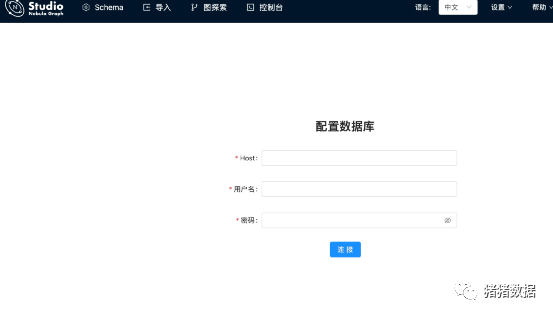 出现以上代表成功了
4.5 输入 graphd 的连接地址及用户名密码
a Host:填写 Nebula Graph 的 Graph 服务本机 IP 地址及端口。格式为
b ip:port :如果端口未修改,则使用默认端口 9669。
c. 用户名 和 密码:根据 Nebula Graph 的身份验证设置填写登录账号和密码。
c1.如果未启用身份验证,可以填写默认用户名root和任意密码。
c2.如果已启用身份验证,但是未创建账号信息,用户只能以 GOD 角色登录,必须填写root及对应的密码nebula
c3.l如果已启用身份验证,同时又创建了不同的用户并分配了角色,不同角色的用户使用自己的账号和密码登录。
我们这里输入如下,没有开启身份认证
ip:192.1685.85:9669
用户名 :root
密码 :root
进入Studio 界面后,可以选择 Space,默认没有 Space,需要单独创建一个
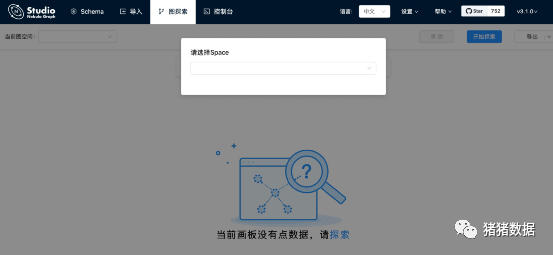
如果能看到如上 图所示的界面,表示已经成功连接到 Nebula Graph 数据库。
那么 可以 创建 scheme【放在后文】
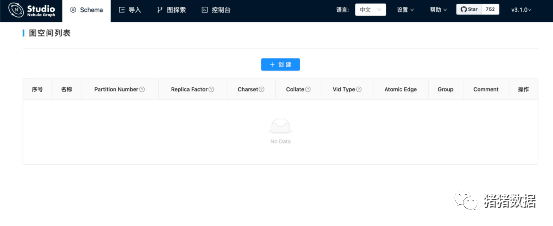
可以进去代表 安装 成功 了
五.依赖安装
5.1 安装 lsof
yum install lsof -y
5.2 安装 Node.js
5.2.1 下载 Node.js
官网下载地址:https://nodejs.org/zh-cn/download/
下载地址:https://nodejs.org/dist/v16.13.0/node-v16.13.0-linux-x64.tar.xz
[root@xuehai-streaming-01 software]# wget https://nodejs.org/dist/v16.13.0/node-v16.13.0-linux-x64.tar.xz
--2021-11-08 12:09:17--  https://nodejs.org/dist/v16.13.0/node-v16.13.0-linux-x64.tar.xz
Resolving nodejs.org (nodejs.org)... 104.20.22.46, 104.20.23.46, 2606:4700:10::6814:172e, ...
Connecting to nodejs.org (nodejs.org)|104.20.22.46|:443... connected.
HTTP request sent, awaiting response... 200 OK
Length: 21605928 (21M) [application/x-xz]
Saving to: ‘node-v16.13.0-linux-x64.tar.xz’


100%[=========================================================================================================================================================================>] 21,605,928  1.44MB/s   in 13s


2021-11-08 12:09:30 (1.60 MB/s) - ‘node-v16.13.0-linux-x64.tar.xz’ saved [21605928/21605928]
5.2.2 解压 Node.js
需要分两步解压:
xz -d node-v16.13.0-linux-x64.tar.xz


tar -xvf node-v16.13.0-linux-x64.tar
5.2.3 将 node-v16.13.0-linux-x64 拷贝到 /opt 底下
[root@xuehai-streaming-01 software]# mv node-v16.13.0-linux-x64 ../
5.2.4 对 /opt 底下的 Node 建立软连接
[root@xuehai-streaming-01 opt]# ln -s node-v16.13.0-linux-x64 node
5.2.5 将 Node.js 添加到环境变量
vi /etc/profile
#Node Env
NODE_HOME=/opt/node
PATH=$PATH:$NODE_HOME/bin
export NODE_HOME PATH
5.2.6 使环境变量生效
[root@xuehai-streaming-01 node]# source /etc/profile
5.2.7 验证 Node.js 是否可用
在命令行直接输入:node ,返回信息如下代表成功了:

5.2.8 在 /usr/bin 下建立对 Node.js、npm 的软连接【如过有低版本的要删掉】
[root@xuehai-streaming-01 software]# ln -s /opt/node/bin/node /usr/bin/node
[root@xuehai-streaming-01 software]# ln -s /opt/node/bin/npm /usr/bin/npm
六. 卸载
6.1 用户可以使用以下的命令卸载 Studio
rpm -e nebula-graph-studio-3.1.0.x86_64
6.2 异常处理
6.2.1 如果在安装过程中自动启动失败或是需要手动启动或停止服务,请使用以下命令
手动启动服务
$ bash /usr/local/nebula-graph-studio/scripts/rpm/start.sh
手动停止服务
$ bash /usr/local/nebula-graph-studio/scripts/rpm/stop.sh
6.2.2 如果启动服务时遇到报错报错 ERROR: bind EADDRINUSE 0.0.0.0:7001,用户可以通过以下命令查看端口7001是否被占用。
$ lsof -i:7001
6.2.3如果端口被占用
无法结束该端口上进程,用户可以通过以下命令修改Studio服务启动端口,并重新启动服务。
//修改studio服务启动端口
$ vi config/config.default.js


//修改
...
    config.cluster = {
        listen: {
            port: 7001, // 修改这个端口号,改成任意一个当前可用的即可
            hostname: '0.0.0.0',
        },
    };
...


//重新启动npm
$ npm run start
安装完毕,让我们开启使用之旅吧。详细使用步骤:
图数据库使用不断更新:
| 序号 | 文章 | |
| 1 | 图数据库选型-nebula | |
| 2 | 本文 | |
| 3 | 图数据库增删改查 | |
| 4 | ...... |

点个在看你最好看
