一、准备Linux服务器多台,
正常按照生产环境部署redis集群是需要3台机器,1台机器双节点(主节点、从节点),3台机器6个节点集群(具体可看系统数据量、服务器配置来定)。redis集群官方给出了一个标准,必须要6个节点以上集群。(当然自己学习一台服务器也可以,但是要启6个节点)不然创建集群的时候会报错。
二、准备需要的安装包等工具:
百度网盘:https://pan.baidu.com/s/1RQhrdnMXHU-yGc6Izz7xoA      密码:sfzn
里面是Linux版redis安装包、搭建集群需要的插件redis-3.3.3.gem、一个可视化客户端
三、准备环境安装:
 1.解压redis安装包:tar -zxvf  redis-3.2.8.tar.gz
 2.cd 进redis-3.2.8文件夹 (如果不熟悉Linux命令的话,可以看我之前的博客学习:      Linux命令大全)
 3.make  (编译环境)
 4.cd 进入/opt/redis-3.2.8/src/      执行: make install PREFIX=/opt/redis
注:如果中间编译发生错误,那就是你的机器没有安装C++什么之类的编译环境因为Redis是C语言开发的需要这些环境支 持,机器能连接外网可以直接源命令下载按 : yum install gcc-c++
不能连接外网就非常、非常、非常麻烦,需要你自己去网上一个个下载环境包,一个个安装而且中间不能出现纰漏。以上步骤是3台机器的通用步骤
四、cp /opt/redis/redis-3.2.8/src/redis-trib.rb /opt/redis/bin
#只需要第一台机器操作
在每台机器上建立两个实例 使用一下步骤
1.mkdir -p /opt/redis/instance/ins端口号/conf
2.mkdir -p /opt/redis/instance/ins端口号/data
3.mkdir -p /opt/redis/instance/ins端口号/data
4.mkdir -p /opt/redis/instance/ins端口号/log
5.vim  /opt/redis/instance/ins端口号/conf/redis.conf
内容如下(通用配置): 需注意标红的地方
//GENERAL
protected-mode no

bind 192.168.0.182 127.0.0.1
daemonize yes
tcp-backlog 511
timeout 0
tcp-keepalive 0
loglevel notice
databases 16
dir /opt/redis/instance/ins7000/data
slave-serve-stale-data yes

//slave只读
slave-read-only yes

//ot use default
repl-disable-tcp-nodelay yes

slave-priority 100

//打开aof持久化
appendonly yes

//每秒一次aof写
appendfsync everysec

//关闭在aof rewrite的时候对新的写操作进行fsync
no-appendfsync-on-rewrite yes
auto-aof-rewrite-min-size 64mb
lua-time-limit 5000

//打开redis集群
cluster-enabled yes

//节点互连超时的阀值
cluster-node-timeout 15000
cluster-migration-barrier 1
slowlog-log-slower-than 10000
slowlog-max-len 128
notify-keyspace-events ""
hash-max-ziplist-entries 512
hash-max-ziplist-value 64
list-max-ziplist-entries 512
list-max-ziplist-value 64
set-max-intset-entries 512
zset-max-ziplist-entries 128
zset-max-ziplist-value 64
activerehashing yes
client-output-buffer-limit normal 0 0 0
client-output-buffer-limit slave 256mb 64mb 60
client-output-buffer-limit pubsub 32mb 8mb 60
hz 10
aof-rewrite-incremental-fsync yes

//包含通用配置
include /root/redis/conf/redis-common.conf

//监听tcp端口
port 7000

//最大可用内存
maxmemory 100m

//内存耗尽时采用的淘汰策略:
//volatile-lru -> remove the key with an expire set using an LRU algorithm
//allkeys-lru -> remove any key accordingly to the LRU algorithm
//volatile-random -> remove a random key with an expire set
//allkeys-random -> remove a random key, any key
//volatile-ttl -> remove the key with the nearest expire time (minor TTL)  //noeviction -> don't expire at all, just return an error on write operations
maxmemory-policy allkeys-lru
//aof存储文件
appendfilename "appendonly.aof"
//不开启rdb存储,只用于添加slave过程
dbfilename dump.rdb
//cluster配置文件(启动自动生成)
cluster-config-file nodes.conf
//部署在同一机器的redis实例,把auto-aof-rewrite搓开,因为cluster环境下内存占用基本一致.
//防止同意机器下瞬间fork所有redis进程做aof rewrite,占用大量内存
 auto-aof-rewrite-percentage 80-100
五、启动所有的6个实例 ./redis-server conf配置文件的地址
/opt/redis/bin/redis-server /opt/redis/instance/ins端口号/conf/redis.conf
在一台机器上安装 yum install ruby rubygems 搭建集群的环境
安装插件 gem install -l redis-3.3.3.gem (这个非常重要,是管理redis集群的一个工具)
六、创建集群
/opt/redis/bin/redis-trib.rb create --replicas 1 ip1:port1 ip2:port2
创建之后如果没有报错就会显示集群的主从节点信息
七、使用redis-trib.rb命令redis集群管理工具
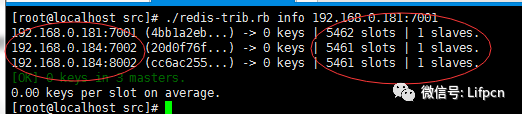
1.查看集群信息 ./redis-trib.rb info 192.168.0.181:7001 (集群中的任意节点都可以)