大家好,我是JiekeXu,江湖人称“强哥”,青学会MOP技术社区主席,荣获Oracle ACE Pro称号,IvorySQL开源社区专家顾问委员会成员,墨天轮MVP,墨天轮年度“墨力之星”,拥有 Oracle OCP/OCM 认证,MySQL 5.7/8.0 OCP 认证以及金仓KCA、KCP、KCM、KCSM证书,PCA、PCTA、OBCA、OGCA等众多国产数据库认证证书,欢迎关注我的微信公众号“JiekeXu DBA之路”,然后点击右上方三个点“设为星标”置顶,更多干货文章才能第一时间推送,谢谢!

IvorySQL 简介
IvorySQL 是一款以 PostgreSQL 为基础进行开发,并且兼容 Oracle 的开源数据库,由领先的 PostgreSQL 数据库提供商瀚高软件提供支持。
IvorySQ L社区始终承诺与 PostgreSQL 数据库保持 100% 兼容,并且可以直接替换最新版本的 PostgreSQL。
IvorySQL 增加了一个名为 ivorysql.compatible_mode 的 GUC 参数用以控制 IvorySQL 的兼容模式,该参数有 oracle 和 pg 两种值。在初始化数据目录的时候,通过指定 -m 参数来指定数据目录的兼容模式,-m pg 则数据目录为 PostgreSQL 模式,该模式下 ivorysql.compatible_mode 参数将会失效,-m oracle 或者不指定 -m 参数则数据目录为兼容 Oracle 模式,该模式下 ivorysql.compatible_mode 参数初始值为 oracle 并且不支持部分 PostgreSQL 的语法,通过 set ivorysql.compatible_mode to pg 就可以使得数据库 100% 支持 PostgreSQL 的语法及功能。
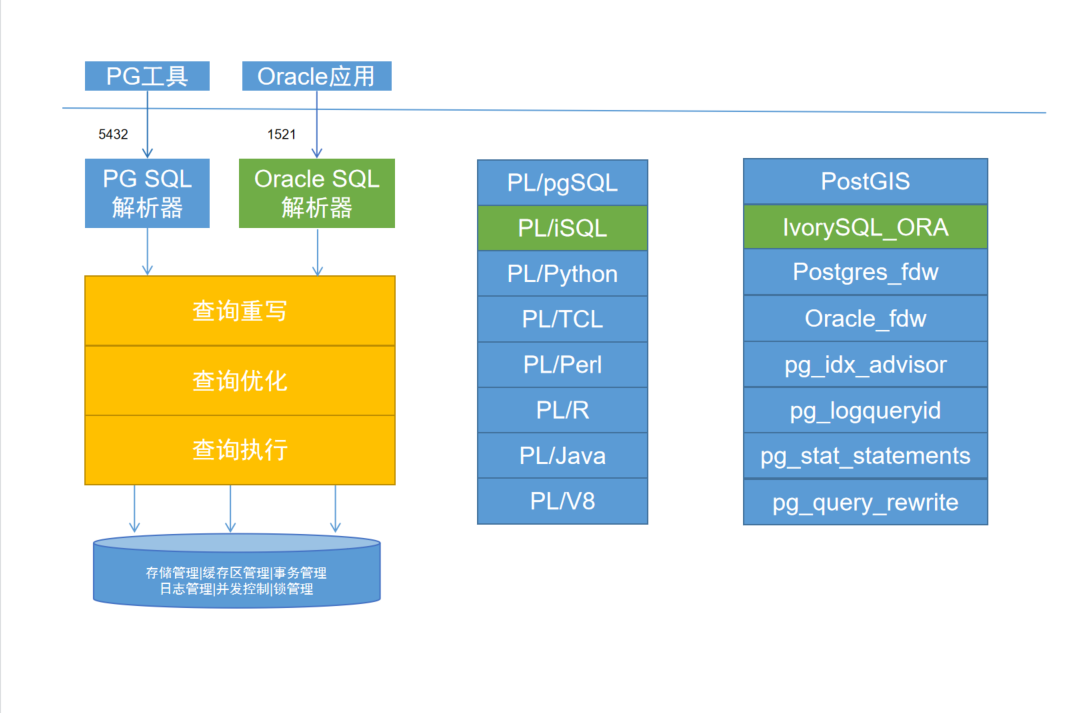
在对原有的 PostgreSQL 改动最小的前提下,实现对 Oracle 的兼容。需要实现双parser、双端口、模式 PL/pgSQL 实现 PL/iSQL 的框架。实现流程图如下:
快速安装体验
IvorySQL 数据库目前支持的操作系统包括但不限于 CentOS 8.X、CentOS Stream 9 以及 Ubuntu 系统。硬件要求 4c4g 以上的配置,800M 以上的磁盘大小即可。
基础环境
[root@jiekexu ~]# free -h
              total        used        free      shared  buff/cache   available
Mem:           15Gi       2.0Gi       6.5Gi       1.6Gi       6.8Gi        11Gi
Swap:         8.0Gi          0B       8.0Gi
[root@jiekexu ~]# df -h
Filesystem                 Size  Used Avail Use% Mounted on
devtmpfs                   7.7G     0  7.7G   0% /dev
tmpfs                      7.7G  1.1M  7.7G   1% /dev/shm
tmpfs                      7.7G   66M  7.7G   1% /run
tmpfs                      7.7G     0  7.7G   0% /sys/fs/cgroup
/dev/mapper/rootvg-lvroot   90G   42G   49G  47% /
/dev/sda2                 1014M  331M  684M  33% /boot
/dev/sda1                 1022M  5.1M 1017M   1% /boot/efi
tmpfs                      1.6G     0  1.6G   0% /run/user/54321
tmpfs                      1.6G   12K  1.6G   1% /run/user/42
tmpfs                      1.6G     0  1.6G   0% /run/user/0
tmpfs                      1.6G  4.0K  1.6G   1% /run/user/5555
[root@jiekexu ~]# head /etc/os-release
NAME="Oracle Linux Server"
VERSION="8.7"
ID="ol"
ID_LIKE="fedora"
VARIANT="Server"
VARIANT_ID="server"
VERSION_ID="8.7"
PLATFORM_ID="platform:el8"
PRETTY_NAME="Oracle Linux Server 8.7"
ANSI_COLOR="0;31"
[root@jiekexu ~]# uname -a
Linux jiekexu 5.15.0-3.60.5.1.el8uek.x86_64 #2 SMP Wed Oct 19 20:04:48 PDT 2022 x86_64 x86_64 x86_64 GNU/Linux
创建安装用户
这里创建一个安装用户叫 ivorysql,并指定组 ivorysql,且需要给它 sudo 权限
groupadd -g 5555 ivorysql
useradd -g 5555 -u 5555 ivorysql
echo "DbHg52jiEkR#" | passwd --stdin ivorysql

vi /etc/sudoers

ivorysql ALL=(ALL)NOPASSWD:ALL
yum 源安装失败
按照官网提示创建或编辑 IvorySQL yum 源配置文件 /etc/yum.repos.d/ivorysql.repo
vim /etc/yum.repos.d/ivorysql.repo
[ivorysql4]
name=IvorySQL Server 4 $releasever - $basearch
baseurl=https://yum.highgo.com/dists/ivorysql-rpms/4/redhat/rhel-$releasever-$basearch
enabled=1
gpgcheck=0
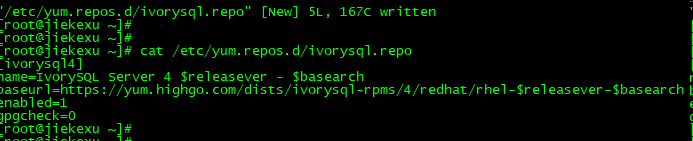
保存退出后,安装 IvorySQL4.5,但是无法下载,可能因为网络不稳定或者上面 baseurl yum 地址错误。
--安装 IvorySQL-4.5 下载失败
[ivorysql@jiekexu ~]$ sudo dnf install -y IvorySQL-4.5
IvorySQL Server 4 8 - x86_64                                                                                                                                                                                 0.0  B/s |   0  B     00:00
Errors during downloading metadata for repository 'ivorysql4':
  - Curl error (35): SSL connect error for https://yum.highgo.com/dists/ivorysql-rpms/4/redhat/rhel-8-x86_64/repodata/repomd.xml [error:1408F10B:SSL routines:ssl3_get_record:wrong version number]
Error: Failed to download metadata for repo 'ivorysql4': Cannot download repomd.xml: Cannot download repodata/repomd.xml: All mirrors were tried

[ivorysql@jiekexu ~]$ sudo dnf install -y ivorysql4
IvorySQL Server 4 8 - x86_64                                                                                                                                                                                 0.0  B/s |   0  B     01:20
Errors during downloading metadata for repository 'ivorysql4':
  - Curl error (6): Couldn't resolve host name for https://yum.highgo.com/dists/ivorysql-rpms/4/redhat/rhel-8-x86_64/repodata/repomd.xml [Could not resolve host: yum.highgo.com]
Error: Failed to download metadata for repo 'ivorysql4': Cannot download repomd.xml: Cannot download repodata/repomd.xml: All mirrors were tried

--查看安装结果
dnf search IvorySQL
rpm 源安装
下载 rpm 包安装,需要依赖以下四个包 lz4 libicu libxslt python3。这里之前已经安装了 python3.12.3 了,原主机自带 Python3.6,去年将其从 Python3.6 升级到 Python3.12。
[ivorysql@jiekexu ~]$ rpm -q lz4 libicu libxslt python3 | grep "not installed"
package python3 is not installed
[ivorysql@jiekexu ~]$ python3 -V
Python 3.12.3
[ivorysql@jiekexu ~]$ python3
Python 3.12.3 (main, May 23 2024, 15:47:07) [GCC 8.5.0 20210514 (Red Hat 8.5.0-15.0.1)] on linux
Type "help", "copyright", "credits" or "license" for more information.
>>>
下载 IvorySQL rpm 安装包
两个问题,一是可能我的 Linux 无法解析 github 地址,二是官方文档给的地址错误,打开直接 404,因为地址变化了,主要是包名字和版本发生变化。
[ivorysql@jiekexu ~]$ sudo wget https://github.com/IvorySQL/IvorySQL/releases/download/IvorySQL_4.5/IvorySQL-4.5-a50789d-20250304.x86_64.rpm

--可以使用如下地址尝试,我这里选择手动下载,然后上传至服务器
sudo wget https://github.com/IvorySQL/IvorySQL/releases/download/IvorySQL_4.5.3/IvorySQL-4.5-0ffca11-20250527.x86_64.rpm

[ivorysql@jiekexu ~]$ md5sum IvorySQL-4.5-0ffca11-20250527.x86_64.rpm
eff5d4b1ce1c29b8ae464582f0d19aef  IvorySQL-4.5-0ffca11-20250527.x86_64.rpm
安装 IvorySQL rpm 安装包
使用以下命令安装所有 IvorySQL rpm 包,数据库将被安装在 /usr/ivory-4/ 路径下,注意,这点和官网也不一样。
[ivorysql@jiekexu ~]$ sudo dnf --disablerepo=* localinstall IvorySQL-4.5-0ffca11-20250527.x86_64.rpm
Dependencies resolved.
=============================================================================================================================================================================================================================================
 Package                                                  Architecture                                          Version                                                    Repository                                                   Size
=============================================================================================================================================================================================================================================
Installing:
 ivorysql4                                                x86_64                                                4.5-0ffca11                                                @commandline                                                150 M

Transaction Summary
=============================================================================================================================================================================================================================================
Install  1 Package

Total size: 150 M
Installed size: 498 M
Is this ok [y/N]: y
Downloading Packages:
Running transaction check
Transaction check succeeded.
Running transaction test
Transaction test succeeded.
Running transaction
  Preparing        :                                                                                                                                                                                                                     1/1
  Running scriptlet: ivorysql4-4.5-0ffca11.x86_64                                                                                                                                                                                        1/1
  Installing       : ivorysql4-4.5-0ffca11.x86_64                                                                                                                                                                                        1/1
  Running scriptlet: ivorysql4-4.5-0ffca11.x86_64                                                                                                                                                                                        1/1
  Verifying        : ivorysql4-4.5-0ffca11.x86_64                                                                                                                                                                                        1/1

Installed:
  ivorysql4-4.5-0ffca11.x86_64

Complete!
启动数据库
需要手动启动数据库,安装目录为 /usr/ivory-4,我们先配置环境变量,将以下配置写入用户的 ~/.bash_profile 文件并使用 source 命令该文件使环境变量生效:
su - ivorysql

vim ~/.bash_profile

export PATH=/usr/ivory-4/bin:$PATH
export PGDATA=/usr/ivory-4/data


[ivorysql@jiekexu ivory-4]$ source  ~/.bash_profile
[ivorysql@jiekexu ivory-4]$ which psql
/usr/ivory-4/bin/psql
[ivorysql@jiekexu ivory-4]$ which initdb
/usr/ivory-4/bin/initdb
数据库初始化
[ivorysql@jiekexu ivory-4]$ mkdir /usr/ivory-4/data
[ivorysql@jiekexu ivory-4]$ initdb -D /usr/ivory-4/data
The files belonging to this database system will be owned by user "ivorysql".
This user must also own the server process.

The database cluster will be initialized with locale "en_US.UTF-8".
The default database encoding has accordingly been set to "UTF8".
The default text search configuration will be set to "english".

Data page checksums are disabled.

fixing permissions on existing directory /usr/ivory-4/data ... ok
creating subdirectories ... ok
selecting dynamic shared memory implementation ... posix
selecting default "max_connections" ... 100
selecting default "shared_buffers" ... 128MB
selecting default time zone ... Asia/Shanghai
creating configuration files ... ok
running bootstrap script ... ok
performing post-bootstrap initialization ... ok
syncing data to disk ... ok

initdb: warning: enabling "trust" authentication for local connections
initdb: hint: You can change this by editing pg_hba.conf or using the option -A, or --auth-local and --auth-host, the next time you run initdb.

Success. You can now start the database server using:

    pg_ctl -D /usr/ivory-4/data -l logfile start
其中 -D 参数用来指定数据库的数据目录。更多参数使用方法,请使用 initdb --help 命令获取。
启动数据库服务
[ivorysql@jiekexu ivory-4]$ pg_ctl -D /usr/ivory-4/data -l logfile start
waiting for server to start.... stopped waiting
pg_ctl: could not start server
Examine the log output.
--启动失败,我们来查看
[ivorysql@jiekexu ivory-4]$ more logfile
2025-08-18 13:57:11.577 CST [1909220] LOG:  starting PostgreSQL 17.5 (IvorySQL 4.5) on x86_64-pc-linux-gnu, compiled by gcc (GCC) 10.4.0, 64-bit
2025-08-18 13:57:11.577 CST [1909220] LOG:  listening on IPv6 address "::1", port 5432
2025-08-18 13:57:11.577 CST [1909220] LOG:  listening on IPv4 address "127.0.0.1", port 5432
2025-08-18 13:57:11.578 CST [1909220] LOG:  could not bind IPv6 address "::1": Address already in use
2025-08-18 13:57:11.578 CST [1909220] HINT:  Is another postmaster already running on port 1521? If not, wait a few seconds and retry.
2025-08-18 13:57:11.578 CST [1909220] LOG:  could not bind IPv4 address "127.0.0.1": Address already in use
2025-08-18 13:57:11.578 CST [1909220] HINT:  Is another postmaster already running on port 1521? If not, wait a few seconds and retry.
2025-08-18 13:57:11.578 CST [1909220] WARNING:  could not create listen socket for "localhost"
2025-08-18 13:57:11.578 CST [1909220] FATAL:  could not create any Oracle TCP/IP sockets
2025-08-18 13:57:11.580 CST [1909220] LOG:  database system is shut down
其中 -D 参数用来指定数据库的数据目录,如果[配置环境变量] 配置了 PGDATA,则该参数可以省略。-l 参数用来指定日志目录。更多参数使用方法,请使用 pg_ctl --help 命令获取。不过这里启动失败了,查看启动日志发现 1521 端口被占用了,主要因为此服务器之前安装了 Oracle23ai,所以我们这里需要修改 ivorysql 默认的 1521 端口为 15211,然后重新启动即可。
[ivorysql@jiekexu data]$ echo "ivorysql.port = 15211" >> /usr/ivory-4/data/ivorysql.conf
[ivorysql@jiekexu data]$ cd ..
[ivorysql@jiekexu ivory-4]$ pg_ctl -D /usr/ivory-4/data -l ivorysql.log start
waiting for server to start.... done
server started
[ivorysql@jiekexu ivory-4]$ ll
total 28
drwxr-xr-x  2 ivorysql ivorysql 4096 Aug 18 11:28 bin
drwx------ 19 ivorysql ivorysql 4096 Aug 18 16:35 data
drwxr-xr-x  4 ivorysql ivorysql 4096 Aug 18 11:28 include
-rw-------  1 ivorysql ivorysql  880 Aug 18 16:35 ivorysql.log
drwxr-xr-x  6 ivorysql ivorysql 4096 Aug 18 11:28 lib
-rw-------  1 ivorysql ivorysql 1062 Aug 18 13:57 logfile
drwxr-xr-x  8 ivorysql ivorysql   82 Aug 18 11:28 share
[ivorysql@jiekexu ivory-4]$ more ivorysql.log
2025-08-18 16:35:29.759 CST [1911837] LOG:  starting PostgreSQL 17.5 (IvorySQL 4.5) on x86_64-pc-linux-gnu, compiled by gcc (GCC) 10.4.0, 64-bit
2025-08-18 16:35:29.760 CST [1911837] LOG:  listening on IPv6 address "::1", port 5432
2025-08-18 16:35:29.760 CST [1911837] LOG:  listening on IPv4 address "127.0.0.1", port 5432
2025-08-18 16:35:29.760 CST [1911837] LOG:  listening on IPv6 address "::1", port 15211
2025-08-18 16:35:29.760 CST [1911837] LOG:  listening on IPv4 address "127.0.0.1", port 15211
2025-08-18 16:35:29.761 CST [1911837] LOG:  listening on Unix socket "/tmp/.s.PGSQL.5432"
2025-08-18 16:35:29.761 CST [1911837] LOG:  listening on Unix socket "/tmp/.s.PGSQL.15211"
2025-08-18 16:35:29.764 CST [1911840] LOG:  database system was shut down at 2025-08-18 13:53:45 CST
2025-08-18 16:35:29.842 CST [1911837] LOG:  database system is ready to accept connections
查看确认数据库启动成功
[ivorysql@jiekexu ivory-4]$ ps -ef | grep postgres
ivorysql 1911837       1  0 16:35 ?        00:00:00 /usr/ivory-4/bin/postgres -D /usr/ivory-4/data
ivorysql 1911838 1911837  0 16:35 ?        00:00:00 postgres: checkpointer
ivorysql 1911839 1911837  0 16:35 ?        00:00:00 postgres: background writer
ivorysql 1911841 1911837  0 16:35 ?        00:00:00 postgres: walwriter
ivorysql 1911842 1911837  0 16:35 ?        00:00:00 postgres: autovacuum launcher
ivorysql 1911843 1911837  0 16:35 ?        00:00:00 postgres: logical replication launcher
ivorysql 1911970 1840656  0 16:42 pts/0    00:00:00 grep --color=auto postgres
数据库连接
使用 psql 连接数据库
[ivorysql@jiekexu ivory-4]$ psql -p15211
psql (17.5)
Type "help" for help.
ivorysql=# select version();
                                           version
---------------------------------------------------------------------------------------------
 PostgreSQL 17.5 (IvorySQL 4.5) on x86_64-pc-linux-gnu, compiled by gcc (GCC) 10.4.0, 64-bit
(1 row)
ivorysql=# \l
                                                     List of databases
   Name    |  Owner   | Encoding | Locale Provider |   Collate   |    Ctype    | Locale | ICU Rules |   Access privileges
-----------+----------+----------+-----------------+-------------+-------------+--------+-----------+-----------------------
 ivorysql  | ivorysql | UTF8     | libc            | en_US.UTF-8 | en_US.UTF-8 |        |           |
 postgres  | ivorysql | UTF8     | libc            | en_US.UTF-8 | en_US.UTF-8 |        |           |
 template0 | ivorysql | UTF8     | libc            | en_US.UTF-8 | en_US.UTF-8 |        |           | =c/ivorysql          +
           |          |          |                 |             |             |        |           | ivorysql=CTc/ivorysql
 template1 | ivorysql | UTF8     | libc            | en_US.UTF-8 | en_US.UTF-8 |        |           | =c/ivorysql          +
           |          |          |                 |             |             |        |           | ivorysql=CTc/ivorysql
(4 rows)

ivorysql=# create database jiekexu;
CREATE DATABASE
ivorysql=# \c jiekexu
You are now connected to database "jiekexu" as user "ivorysql".
ivorysql=# show ivorysql.compatible_mode;
 ivorysql.compatible_mode
--------------------------
 oracle
(1 row)
IvorySQL 默认使用 ivorysql 数据库,但较低版本的IvorySQL首次使用时需用户先连接postgres数据库,然后自己创建 ivorysql 数据库。较高版本的 IvorySQL 则已为用户创建好 ivorysql 数据库,可以直接连接。更多参数使用方法,请使用 psql --help 命令获取。
兼容 Oracle 的简单使用
IvorySQL 是对原有的 PostgreSQL 改动最小的前提下,通过双 parser、双端口
实现对 Oracle 的兼容。那么今天我们就来简单的试一试吧。
jiekexu=# CREATE sequence seq;
CREATE SEQUENCE
jiekexu=# SELECT seq.NEXTVAL FROM DUAL;
 nextval
---------
       1
(1 row)

jiekexu=# ALTER sequence seq restart start with 100;
ALTER SEQUENCE
jiekexu=# SELECT seq.NEXTVAL FROM DUAL;
 nextval
---------
     100
(1 row)
jiekexu=# create table test(a varchar2(32768));
ERROR:  length for type varchar2 cannot exceed 32767
LINE 1: create table test(a varchar2(32768));

jiekexu=# DROP SEQUENCE seq;
DROP SEQUENCE
jiekexu=# create table tb_test1(id int, flg char(10));
CREATE TABLE
jiekexu=# alter table tb_test1 add (name varchar);
ALTER TABLE
jiekexu=# ALTER TABLE tb_test1
jiekexu-#     ADD adress varchar,
jiekexu-#     ADD num int,
jiekexu-#     ADD flg1 char;
ALTER TABLE
jiekexu=# \d tb_test1
                  Table "public.tb_test1"
 Column |      Type       | Collation | Nullable | Default
--------+-----------------+-----------+----------+---------
 id     | pg_catalog.int4 |           |          |
 flg    | char(10)        |           |          |
 name   | varchar2(4000)  |           |          |
 adress | varchar2(4000)  |           |          |
 num    | pg_catalog.int4 |           |          |
 flg1   | char(1)         |

jiekexu=# select systimestamp();
           systimestamp
-----------------------------------
 2025-08-19 16:59:07.853641 +08:00
(1 row)
jiekexu=# select last_day(timestamp '2025-08-19 17:07:19') from dual;
  last_day
------------
 2025-08-31
(1 row)
jiekexu=# select sysdate()-1 from dual;
  ?column?
------------
 2025-08-18
(1 row)
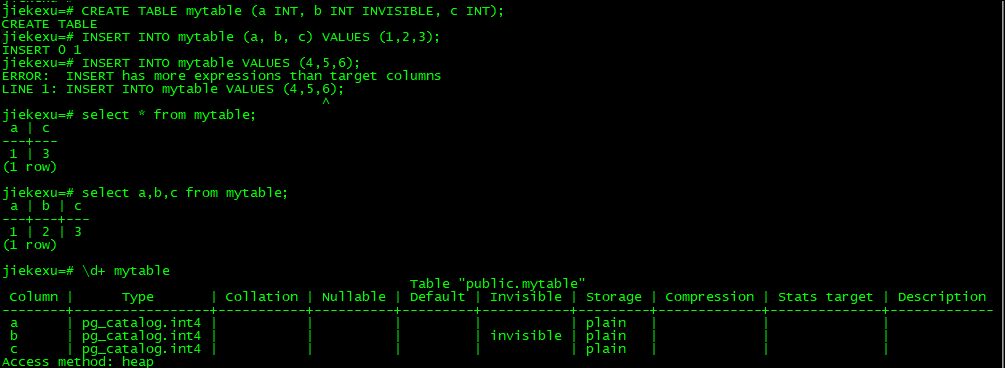
Oracle 不可见列兼容测试
[ivorysql@jiekexu ~]$ psql -o "-p 5432 -o 15211"
psql (17.5)
Type "help" for help.
rpm 安装后的卸载
执行以下命令依次卸载:
$ sudo dnf remove --disablerepo=* ivorysql4\*
$ sudo rm -rf /usr/ivory-4
参考链接
https://docs.ivorysql.org/cn/ivorysql-doc/v4.5/v4.5/6
全文完,希望可以帮到正在阅读的你,如果觉得有帮助,可以分享给你身边的朋友,同事,你关心谁就分享给谁,一起学习共同进步~~~
欢迎关注我的公众号【JiekeXu DBA之路】,一起学习新知识!
——————————————————————————
公众号:JiekeXu DBA之路
墨天轮:https://www.modb.pro/u/4347
CSDN :https://blog.csdn.net/JiekeXu
ITPUB:https://blog.itpub.net/69968215
IFCLUB:https://ifclub.com.cn/user?type=1
腾讯云:https://cloud.tencent.com/developer/user/5645107
——————————————————————————