



之前写了一篇多租户pdb的文件被rm了和被drop了该如何恢复呢?
这个是对整个数据库实例都做了备份的情况,也就是说既备份了root根容器又备份了pdb1库。不论是rm还是drop恢复起来都没问题,很方便。
文章最后留的思考:如果没有全库备份,仅仅只有租户pdb2的备份,上述两种情况都还能恢复吗???
如下以pdb1为例子,模拟rm和drop的场景恢复测试:
即rman备份只做了租户库pdb1的备份,根本没有做过根容器的备份,也就是说只有pdb1租户库的备份,看是否也能方便恢复?
答案是:都可以恢复,rm恢复和之前一样,但对于drop的恢复命令步骤则不同
1.对于rm,直接restore+recover即可
2.对于drop,需要restore+xml+create
更多结论请继续看到最后。。。。。。
备份:
[oracle@oracle pdb1]$ pwd
/data/u01/app/oracle/oradata/JYC/pdb1
[oracle@oracle pdb1]$ ll
total 752992
-rw-r----- 1 oracle oinstall 367009792 Aug 22 13:17 sysaux01.dbf
-rw-r----- 1 oracle oinstall 293609472 Aug 22 13:17 system01.dbf
-rw-r----- 1 oracle oinstall 134225920 Aug 22 13:02 temp01.dbf
-rw-r----- 1 oracle oinstall 104865792 Aug 22 13:16 undotbs01.dbf
-rw-r----- 1 oracle oinstall   5251072 Aug 22 03:05 users01.dbf

[oracle@oracle pdb1]$ rman target /

Recovery Manager: Release 19.0.0.0.0 - Production on Fri Aug 22 13:21:11 2025
Version 19.3.0.0.0

Copyright (c) 1982, 2019, Oracle and/or its affiliates.  All rights reserved.

connected to target database: JYC (DBID=187041746)

RMAN> delete noprompt backup;

using target database control file instead of recovery catalog
allocated channel: ORA_DISK_1
channel ORA_DISK_1: SID=1578 device type=DISK

List of Backup Pieces
BP Key  BS Key  Pc# Cp# Status      Device Type Piece Name
------- ------- --- --- ----------- ----------- ----------
14      14      1   1   AVAILABLE   DISK        /data/u01/app/oracle/flash_recovery_area/JYC/3CB4CD2155D04C02E06310CFA8C0A781/backupset/2025_08_22/o1_mf_nnndf_TAG20250822T131810_nbhzdlwn_.bkp
15      15      1   1   AVAILABLE   DISK        /data/u01/app/oracle/flash_recovery_area/JYC/autobackup/2025_08_22/o1_mf_s_1209820698_nbhzdt46_.bkp
deleted backup piece
backup piece handle=/data/u01/app/oracle/flash_recovery_area/JYC/3CB4CD2155D04C02E06310CFA8C0A781/backupset/2025_08_22/o1_mf_nnndf_TAG20250822T131810_nbhzdlwn_.bkp RECID=14 STAMP=1209820690
deleted backup piece
backup piece handle=/data/u01/app/oracle/flash_recovery_area/JYC/autobackup/2025_08_22/o1_mf_s_1209820698_nbhzdt46_.bkp RECID=15 STAMP=1209820698
Deleted 2 objects


RMAN> delete noprompt copy;

released channel: ORA_DISK_1
allocated channel: ORA_DISK_1
channel ORA_DISK_1: SID=1578 device type=DISK
specification does not match any datafile copy in the repository
specification does not match any control file copy in the repository
specification does not match any archived log in the repository

RMAN> list backup;

specification does not match any backup in the repository

RMAN> list copy;

specification does not match any datafile copy in the repository
specification does not match any control file copy in the repository
specification does not match any archived log in the repository

RMAN> backup pluggable database pdb1;

Starting backup at 22-AUG-25
using channel ORA_DISK_1
channel ORA_DISK_1: starting full datafile backup set
channel ORA_DISK_1: specifying datafile(s) in backup set
input datafile file number=00073 name=/data/u01/app/oracle/oradata/JYC/pdb1/sysaux01.dbf
input datafile file number=00072 name=/data/u01/app/oracle/oradata/JYC/pdb1/system01.dbf
input datafile file number=00074 name=/data/u01/app/oracle/oradata/JYC/pdb1/undotbs01.dbf
input datafile file number=00075 name=/data/u01/app/oracle/oradata/JYC/pdb1/users01.dbf
channel ORA_DISK_1: starting piece 1 at 22-AUG-25
channel ORA_DISK_1: finished piece 1 at 22-AUG-25
piece handle=/data/u01/app/oracle/flash_recovery_area/JYC/3CB4CD2155D04C02E06310CFA8C0A781/backupset/2025_08_22/o1_mf_nnndf_TAG20250822T132203_nbhzmvbn_.bkp tag=TAG20250822T132203 comment=NONE
channel ORA_DISK_1: backup set complete, elapsed time: 00:00:03
Finished backup at 22-AUG-25

Starting Control File and SPFILE Autobackup at 22-AUG-25
piece handle=/data/u01/app/oracle/flash_recovery_area/JYC/autobackup/2025_08_22/o1_mf_s_1209820926_nbhzmyk0_.bkp comment=NONE
Finished Control File and SPFILE Autobackup at 22-AUG-25

RMAN> list backup;


List of Backup Sets
===================


BS Key  Type LV Size       Device Type Elapsed Time Completion Time
------- ---- -- ---------- ----------- ------------ ---------------
16      Full    505.00M    DISK        00:00:01     22-AUG-25
        BP Key: 16   Status: AVAILABLE  Compressed: NO  Tag: TAG20250822T132203
        Piece Name: /data/u01/app/oracle/flash_recovery_area/JYC/3CB4CD2155D04C02E06310CFA8C0A781/backupset/2025_08_22/o1_mf_nnndf_TAG20250822T132203_nbhzmvbn_.bkp
  List of Datafiles in backup set 16
  Container ID: 6, PDB Name: PDB1
  File LV Type Ckp SCN    Ckp Time  Abs Fuz SCN Sparse Name
  ---- -- ---- ---------- --------- ----------- ------ ----
  72      Full 3140197    22-AUG-25              NO    /data/u01/app/oracle/oradata/JYC/pdb1/system01.dbf
  73      Full 3140197    22-AUG-25              NO    /data/u01/app/oracle/oradata/JYC/pdb1/sysaux01.dbf
  74      Full 3140197    22-AUG-25              NO    /data/u01/app/oracle/oradata/JYC/pdb1/undotbs01.dbf
  75      Full 3140197    22-AUG-25              NO    /data/u01/app/oracle/oradata/JYC/pdb1/users01.dbf

BS Key  Type LV Size       Device Type Elapsed Time Completion Time
------- ---- -- ---------- ----------- ------------ ---------------
17      Full    17.95M     DISK        00:00:00     22-AUG-25
        BP Key: 17   Status: AVAILABLE  Compressed: NO  Tag: TAG20250822T132206
        Piece Name: /data/u01/app/oracle/flash_recovery_area/JYC/autobackup/2025_08_22/o1_mf_s_1209820926_nbhzmyk0_.bkp
  SPFILE Included: Modification time: 22-AUG-25
  SPFILE db_unique_name: JYC
  Control File Included: Ckp SCN: 3140206      Ckp time: 22-AUG-25

RMAN> list copy;

specification does not match any datafile copy in the repository
specification does not match any control file copy in the repository
specification does not match any archived log in the repository

RMAN> exit


Recovery Manager complete.
pdb1的所有文件被rm了
[oracle@oracle pdb1]$ sqlplus / as sysdba

SQL*Plus: Release 19.0.0.0.0 - Production on Fri Aug 22 13:23:03 2025
Version 19.3.0.0.0

Copyright (c) 1982, 2019, Oracle.  All rights reserved.


Connected to:
Oracle Database 19c Enterprise Edition Release 19.0.0.0.0 - Production
Version 19.3.0.0.0

SQL> show pdbs;

    CON_ID CON_NAME                       OPEN MODE  RESTRICTED
---------- ------------------------------ ---------- ----------
         2 PDB$SEED                       READ ONLY  NO
         3 PDB5                           READ WRITE NO
         4 PDB2                           READ WRITE NO
         5 PDB3                           READ WRITE NO
         6 PDB1                           READ WRITE NO
         8 PDB6                           READ WRITE NO
SQL> alter session set container=pdb1;

Session altered.

SQL> select name from v$datafile;

NAME
--------------------------------------------------------------------------------
/data/u01/app/oracle/oradata/JYC/pdb1/system01.dbf
/data/u01/app/oracle/oradata/JYC/pdb1/sysaux01.dbf
/data/u01/app/oracle/oradata/JYC/pdb1/undotbs01.dbf
/data/u01/app/oracle/oradata/JYC/pdb1/users01.dbf

SQL> !ls -l /data/u01/app/oracle/oradata/JYC/pdb1/*
-rw-r----- 1 oracle oinstall 377495552 Aug 22 13:22 /data/u01/app/oracle/oradata/JYC/pdb1/sysaux01.dbf
-rw-r----- 1 oracle oinstall 293609472 Aug 22 13:22 /data/u01/app/oracle/oradata/JYC/pdb1/system01.dbf
-rw-r----- 1 oracle oinstall 134225920 Aug 22 13:02 /data/u01/app/oracle/oradata/JYC/pdb1/temp01.dbf
-rw-r----- 1 oracle oinstall 104865792 Aug 22 13:22 /data/u01/app/oracle/oradata/JYC/pdb1/undotbs01.dbf
-rw-r----- 1 oracle oinstall   5251072 Aug 22 13:22 /data/u01/app/oracle/oradata/JYC/pdb1/users01.dbf

SQL> !rm -f /data/u01/app/oracle/oradata/JYC/pdb1/*

SQL> !ls -l /data/u01/app/oracle/oradata/JYC/pdb1/*
ls: cannot access /data/u01/app/oracle/oradata/JYC/pdb1/*: No such file or directory

SQL> insert into jyc.test values(2);

1 row created.

SQL> commit;

Commit complete.

SQL> shutdown immediate
Pluggable Database closed.
SQL> alter pluggable database pdb1 open;
alter pluggable database pdb1 open
*
ERROR at line 1:
ORA-01157: cannot identify/lock data file 75 - see DBWR trace file
ORA-01110: data file 75: '/data/u01/app/oracle/oradata/JYC/pdb1/users01.dbf'


SQL> exit
Disconnected from Oracle Database 19c Enterprise Edition Release 19.0.0.0.0 - Production
Version 19.3.0.0.0
[oracle@oracle pdb1]$
[oracle@oracle pdb1]$ sqlplus / as sysdba

SQL*Plus: Release 19.0.0.0.0 - Production on Fri Aug 22 13:25:42 2025
Version 19.3.0.0.0

Copyright (c) 1982, 2019, Oracle.  All rights reserved.


Connected to:
Oracle Database 19c Enterprise Edition Release 19.0.0.0.0 - Production
Version 19.3.0.0.0

SQL> show pdbs;

    CON_ID CON_NAME                       OPEN MODE  RESTRICTED
---------- ------------------------------ ---------- ----------
         2 PDB$SEED                       READ ONLY  NO
         3 PDB5                           READ WRITE NO
         4 PDB2                           READ WRITE NO
         5 PDB3                           READ WRITE NO
         6 PDB1                           MOUNTED
         8 PDB6                           READ WRITE NO
SQL> exit
Disconnected from Oracle Database 19c Enterprise Edition Release 19.0.0.0.0 - Production
Version 19.3.0.0.0
恢复被rm的pdb1
[oracle@oracle pdb1]$ rman target /

Recovery Manager: Release 19.0.0.0.0 - Production on Fri Aug 22 13:25:49 2025
Version 19.3.0.0.0

Copyright (c) 1982, 2019, Oracle and/or its affiliates.  All rights reserved.

connected to target database: JYC (DBID=187041746)

RMAN> restore pluggable database pdb1;

Starting restore at 22-AUG-25
using target database control file instead of recovery catalog
allocated channel: ORA_DISK_1
channel ORA_DISK_1: SID=1578 device type=DISK

channel ORA_DISK_1: starting datafile backup set restore
channel ORA_DISK_1: specifying datafile(s) to restore from backup set
channel ORA_DISK_1: restoring datafile 00072 to /data/u01/app/oracle/oradata/JYC/pdb1/system01.dbf
channel ORA_DISK_1: restoring datafile 00073 to /data/u01/app/oracle/oradata/JYC/pdb1/sysaux01.dbf
channel ORA_DISK_1: restoring datafile 00074 to /data/u01/app/oracle/oradata/JYC/pdb1/undotbs01.dbf
channel ORA_DISK_1: restoring datafile 00075 to /data/u01/app/oracle/oradata/JYC/pdb1/users01.dbf
channel ORA_DISK_1: reading from backup piece /data/u01/app/oracle/flash_recovery_area/JYC/3CB4CD2155D04C02E06310CFA8C0A781/backupset/2025_08_22/o1_mf_nnndf_TAG20250822T132203_nbhzmvbn_.bkp
channel ORA_DISK_1: piece handle=/data/u01/app/oracle/flash_recovery_area/JYC/3CB4CD2155D04C02E06310CFA8C0A781/backupset/2025_08_22/o1_mf_nnndf_TAG20250822T132203_nbhzmvbn_.bkp tag=TAG20250822T132203
channel ORA_DISK_1: restored backup piece 1
channel ORA_DISK_1: restore complete, elapsed time: 00:00:03
Finished restore at 22-AUG-25

RMAN> alter pluggable database pdb1 open;

RMAN-00571: ===========================================================
RMAN-00569: =============== ERROR MESSAGE STACK FOLLOWS ===============
RMAN-00571: ===========================================================
RMAN-03002: failure of sql statement command at 08/22/2025 13:26:18
ORA-01113: file 75 needs media recovery
ORA-01110: data file 75: '/data/u01/app/oracle/oradata/JYC/pdb1/users01.dbf'

RMAN> recover pluggable database pdb1;

Starting recover at 22-AUG-25
using channel ORA_DISK_1

starting media recovery
media recovery complete, elapsed time: 00:00:00

Finished recover at 22-AUG-25

RMAN> alter pluggable database pdb1 open;

Statement processed

RMAN> exit


Recovery Manager complete.
[oracle@oracle pdb1]$ sqlplus / as sysdba

SQL*Plus: Release 19.0.0.0.0 - Production on Fri Aug 22 13:26:39 2025
Version 19.3.0.0.0

Copyright (c) 1982, 2019, Oracle.  All rights reserved.


Connected to:
Oracle Database 19c Enterprise Edition Release 19.0.0.0.0 - Production
Version 19.3.0.0.0

SQL> show pdbs;

    CON_ID CON_NAME                       OPEN MODE  RESTRICTED
---------- ------------------------------ ---------- ----------
         2 PDB$SEED                       READ ONLY  NO
         3 PDB5                           READ WRITE NO
         4 PDB2                           READ WRITE NO
         5 PDB3                           READ WRITE NO
         6 PDB1                           READ WRITE NO
         8 PDB6                           READ WRITE NO
SQL> alter session set container=pdb1;

Session altered.

SQL> select * from jyc.test;

        ID
----------
         1
         2

SQL>
pdb1库被drop了
[oracle@oracle pdb1]$ sqlplus / as sysdba

SQL*Plus: Release 19.0.0.0.0 - Production on Fri Aug 22 13:26:39 2025
Version 19.3.0.0.0

Copyright (c) 1982, 2019, Oracle.  All rights reserved.


Connected to:
Oracle Database 19c Enterprise Edition Release 19.0.0.0.0 - Production
Version 19.3.0.0.0

SQL> show pdbs;

    CON_ID CON_NAME                       OPEN MODE  RESTRICTED
---------- ------------------------------ ---------- ----------
         2 PDB$SEED                       READ ONLY  NO
         3 PDB5                           READ WRITE NO
         4 PDB2                           READ WRITE NO
         5 PDB3                           READ WRITE NO
         6 PDB1                           READ WRITE NO
         8 PDB6                           READ WRITE NO
SQL> alter session set container=pdb1;

Session altered.

SQL> select * from jyc.test;

        ID
----------
         1
         2

SQL>
SQL>
SQL> shutdown immediate
Pluggable Database closed.
SQL> conn / as sysdba
Connected.
SQL> show pdbs;

    CON_ID CON_NAME                       OPEN MODE  RESTRICTED
---------- ------------------------------ ---------- ----------
         2 PDB$SEED                       READ ONLY  NO
         3 PDB5                           READ WRITE NO
         4 PDB2                           READ WRITE NO
         5 PDB3                           READ WRITE NO
         6 PDB1                           MOUNTED
         8 PDB6                           READ WRITE NO
SQL> set time on
13:28:25 SQL> drop pluggable database pdb1 including datafiles;

Pluggable database dropped.

13:28:47 SQL> show pdbs;

    CON_ID CON_NAME                       OPEN MODE  RESTRICTED
---------- ------------------------------ ---------- ----------
         2 PDB$SEED                       READ ONLY  NO
         3 PDB5                           READ WRITE NO
         4 PDB2                           READ WRITE NO
         5 PDB3                           READ WRITE NO
         8 PDB6                           READ WRITE NO
13:28:50 SQL> exit
Disconnected from Oracle Database 19c Enterprise Edition Release 19.0.0.0.0 - Production
Version 19.3.0.0.0
[oracle@oracle pdb1]$ pwd
/data/u01/app/oracle/oradata/JYC/pdb1
[oracle@oracle pdb1]$ ll
total 0
恢复被drop的pdb1
[oracle@oracle pdb1]$ rman target /

Recovery Manager: Release 19.0.0.0.0 - Production on Fri Aug 22 13:29:32 2025
Version 19.3.0.0.0

Copyright (c) 1982, 2019, Oracle and/or its affiliates.  All rights reserved.

connected to target database: JYC (DBID=187041746)

RMAN> list backup;

using target database control file instead of recovery catalog

List of Backup Sets
===================


BS Key  Type LV Size       Device Type Elapsed Time Completion Time
------- ---- -- ---------- ----------- ------------ ---------------
16      Full    505.00M    DISK        00:00:01     22-AUG-25
        BP Key: 16   Status: AVAILABLE  Compressed: NO  Tag: TAG20250822T132203
        Piece Name: /data/u01/app/oracle/flash_recovery_area/JYC/3CB4CD2155D04C02E06310CFA8C0A781/backupset/2025_08_22/o1_mf_nnndf_TAG20250822T132203_nbhzmvbn_.bkp
  List of Datafiles in backup set 16
  Container ID: 4099, PDB Name: UNKNOWN
  File LV Type Ckp SCN    Ckp Time  Abs Fuz SCN Sparse Name
  ---- -- ---- ---------- --------- ----------- ------ ----
  72      Full 3140197    22-AUG-25              NO
  73      Full 3140197    22-AUG-25              NO
  74      Full 3140197    22-AUG-25              NO
  75      Full 3140197    22-AUG-25              NO

BS Key  Type LV Size       Device Type Elapsed Time Completion Time
------- ---- -- ---------- ----------- ------------ ---------------
17      Full    17.95M     DISK        00:00:00     22-AUG-25
        BP Key: 17   Status: AVAILABLE  Compressed: NO  Tag: TAG20250822T132206
        Piece Name: /data/u01/app/oracle/flash_recovery_area/JYC/autobackup/2025_08_22/o1_mf_s_1209820926_nbhzmyk0_.bkp
  SPFILE Included: Modification time: 22-AUG-25
  SPFILE db_unique_name: JYC
  Control File Included: Ckp SCN: 3140206      Ckp time: 22-AUG-25

RMAN>

RMAN> restore pluggable database pdb1;

Starting restore at 22-AUG-25
allocated channel: ORA_DISK_1
channel ORA_DISK_1: SID=1577 device type=DISK
RMAN-00571: ===========================================================
RMAN-00569: =============== ERROR MESSAGE STACK FOLLOWS ===============
RMAN-00571: ===========================================================
RMAN-03002: failure of restore command at 08/22/2025 13:31:28
RMAN-06813: could not translate pluggable database PDB1

RMAN> restore foreign pluggable database pdb1;

RMAN-00571: ===========================================================
RMAN-00569: =============== ERROR MESSAGE STACK FOLLOWS ===============
RMAN-00571: ===========================================================
RMAN-00558: error encountered while parsing input commands
RMAN-01009: syntax error: found ";": expecting one of: "format, from service, to"
RMAN-01007: at line 1 column 40 file: standard input

RMAN>

RMAN>

RMAN>

RMAN> recover pluggable database pdb1 until time "to_date('2025-08-22 13:28:25','YYYY-MM-DD HH24:MI:SS')" auxiliary destination '/home/oracle/aux/';

Starting recover at 22-AUG-25
current log archived
using channel ORA_DISK_1
RMAN-05026: warning: presuming following set of tablespaces applies to specified point-in-time

List of tablespaces expected to have UNDO segments
Tablespace SYSTEM
Tablespace UNDOTBS1

Creating automatic instance, with SID='vbjn'

initialization parameters used for automatic instance:
db_name=JYC
db_unique_name=vbjn_pitr_pdb1_JYC
compatible=19.0.0
db_block_size=8192
db_files=200
diagnostic_dest=/data/u01/app/oracle
_system_trig_enabled=FALSE
sga_target=6560M
processes=200
db_create_file_dest=/home/oracle/aux/
log_archive_dest_1='location=/home/oracle/aux/'
enable_pluggable_database=true
_clone_one_pdb_recovery=true
#No auxiliary parameter file used


starting up automatic instance JYC

Oracle instance started

Total System Global Area    6878658336 bytes

Fixed Size                     9150240 bytes
Variable Size               1207959552 bytes
Database Buffers            5653921792 bytes
Redo Buffers                   7626752 bytes
Automatic instance created

contents of Memory Script:
{
# set requested point in time
set until  time "to_date('2025-08-22 13:28:25','YYYY-MM-DD HH24:MI:SS')";
# restore the controlfile
restore clone controlfile;

# mount the controlfile
sql clone 'alter database mount clone database';
}
executing Memory Script

executing command: SET until clause

Starting restore at 22-AUG-25
allocated channel: ORA_AUX_DISK_1
channel ORA_AUX_DISK_1: SID=198 device type=DISK

channel ORA_AUX_DISK_1: starting datafile backup set restore
channel ORA_AUX_DISK_1: restoring control file
channel ORA_AUX_DISK_1: reading from backup piece /data/u01/app/oracle/flash_recovery_area/JYC/autobackup/2025_08_22/o1_mf_s_1209820926_nbhzmyk0_.bkp
channel ORA_AUX_DISK_1: piece handle=/data/u01/app/oracle/flash_recovery_area/JYC/autobackup/2025_08_22/o1_mf_s_1209820926_nbhzmyk0_.bkp tag=TAG20250822T132206
channel ORA_AUX_DISK_1: restored backup piece 1
channel ORA_AUX_DISK_1: restore complete, elapsed time: 00:00:01
output file name=/home/oracle/aux/JYC/controlfile/o1_mf_nbj09r4s_.ctl
Finished restore at 22-AUG-25

sql statement: alter database mount clone database

contents of Memory Script:
{
# set requested point in time
set until  time "to_date('2025-08-22 13:28:25','YYYY-MM-DD HH24:MI:SS')";
# set destinations for recovery set and auxiliary set datafiles
set newname for clone datafile  1 to new;
set newname for clone datafile  4 to new;
set newname for clone datafile  3 to new;
set newname for clone datafile  7 to new;
set newname for datafile  72 to
 "/data/u01/app/oracle/oradata/JYC/pdb1/system01.dbf";
set newname for datafile  73 to
 "/data/u01/app/oracle/oradata/JYC/pdb1/sysaux01.dbf";
set newname for datafile  74 to
 "/data/u01/app/oracle/oradata/JYC/pdb1/undotbs01.dbf";
set newname for datafile  75 to
 "/data/u01/app/oracle/oradata/JYC/pdb1/users01.dbf";
# restore the tablespaces in the recovery set and the auxiliary set
restore clone datafile  1, 4, 3, 7, 72, 73, 74, 75;

switch clone datafile all;
}
executing Memory Script

executing command: SET until clause

executing command: SET NEWNAME

executing command: SET NEWNAME

executing command: SET NEWNAME

executing command: SET NEWNAME

executing command: SET NEWNAME

executing command: SET NEWNAME

executing command: SET NEWNAME

executing command: SET NEWNAME

Starting restore at 22-AUG-25
using channel ORA_AUX_DISK_1


Removing automatic instance
shutting down automatic instance
Oracle instance shut down
Automatic instance removed
auxiliary instance file /home/oracle/aux/JYC/controlfile/o1_mf_nbj09r4s_.ctl deleted
RMAN-00571: ===========================================================
RMAN-00569: =============== ERROR MESSAGE STACK FOLLOWS ===============
RMAN-00571: ===========================================================
RMAN-03002: failure of recover command at 08/22/2025 13:33:52
RMAN-03015: error occurred in stored script Memory Script
RMAN-06026: some targets not found - aborting restore
RMAN-06023: no backup or copy of datafile 7 found to restore
RMAN-06023: no backup or copy of datafile 3 found to restore
RMAN-06023: no backup or copy of datafile 4 found to restore
RMAN-06023: no backup or copy of datafile 1 found to restore

RMAN> exit


Recovery Manager complete.
[oracle@oracle pdb1]$ ll
total 0
[oracle@oracle pdb1]$ rman target /

Recovery Manager: Release 19.0.0.0.0 - Production on Fri Aug 22 13:34:22 2025
Version 19.3.0.0.0

Copyright (c) 1982, 2019, Oracle and/or its affiliates.  All rights reserved.

connected to target database: JYC (DBID=187041746)

RMAN> restore foreign pluggable database pdb1 from backupset '/data/u01/app/oracle/flash_recovery_area/JYC/3CB4CD2155D04C02E06310CFA8C0A781/backupset/2025_08_22/o1_mf_nnndf_TAG20250822T132203_nbhzmvbn_.bkp';

RMAN-00571: ===========================================================
RMAN-00569: =============== ERROR MESSAGE STACK FOLLOWS ===============
RMAN-00571: ===========================================================
RMAN-00558: error encountered while parsing input commands
RMAN-01009: syntax error: found "from": expecting one of: "format, from service, to"
RMAN-01007: at line 1 column 41 file: standard input

RMAN>

RMAN> restore foreign pluggable database pdb1
2> format '/data/u01/app/oracle/oradata/JYC/pdb1/%U'
3> from backupset '/data/u01/app/oracle/flash_recovery_area/JYC/3CB4CD2155D04C02E06310CFA8C0A781/backupset/2025_08_22/o1_mf_nnndf_TAG20250822T132203_nbhzmvbn_.bkp';

Starting restore at 22-AUG-25
using target database control file instead of recovery catalog
allocated channel: ORA_DISK_1
channel ORA_DISK_1: SID=1577 device type=DISK

channel ORA_DISK_1: starting datafile backup set restore
channel ORA_DISK_1: specifying datafile(s) to restore from backup set
channel ORA_DISK_1: restoring all foreign files in backup piece
channel ORA_DISK_1: reading from backup piece /data/u01/app/oracle/flash_recovery_area/JYC/3CB4CD2155D04C02E06310CFA8C0A781/backupset/2025_08_22/o1_mf_nnndf_TAG20250822T132203_nbhzmvbn_.bkp
channel ORA_DISK_1: restoring foreign file 73 to /data/u01/app/oracle/oradata/JYC/pdb1/data_D-JYC_I-187041746_TS-SYSAUX_FNO-73_vk41oqg7
channel ORA_DISK_1: restoring foreign file 72 to /data/u01/app/oracle/oradata/JYC/pdb1/data_D-JYC_I-187041746_TS-SYSTEM_FNO-72_1d41oqg7
channel ORA_DISK_1: restoring foreign file 74 to /data/u01/app/oracle/oradata/JYC/pdb1/data_D-JYC_I-187041746_TS-UNDOTBS1_FNO-74_to41oqg7
channel ORA_DISK_1: restoring foreign file 75 to /data/u01/app/oracle/oradata/JYC/pdb1/data_D-JYC_I-187041746_TS-USERS_FNO-75_7541oqg7
channel ORA_DISK_1: foreign piece handle=/data/u01/app/oracle/flash_recovery_area/JYC/3CB4CD2155D04C02E06310CFA8C0A781/backupset/2025_08_22/o1_mf_nnndf_TAG20250822T132203_nbhzmvbn_.bkp
channel ORA_DISK_1: restored backup piece 1
channel ORA_DISK_1: restore complete, elapsed time: 00:00:04
Finished restore at 22-AUG-25

RMAN> exit


Recovery Manager complete.
[oracle@oracle pdb1]$ ll
total 762912
-rw-r----- 1 oracle oinstall 377495552 Aug 22 13:35 data_D-JYC_I-187041746_TS-SYSAUX_FNO-73_vk41oqg7
-rw-r----- 1 oracle oinstall 293609472 Aug 22 13:35 data_D-JYC_I-187041746_TS-SYSTEM_FNO-72_1d41oqg7
-rw-r----- 1 oracle oinstall 104865792 Aug 22 13:35 data_D-JYC_I-187041746_TS-UNDOTBS1_FNO-74_to41oqg7
-rw-r----- 1 oracle oinstall   5251072 Aug 22 13:35 data_D-JYC_I-187041746_TS-USERS_FNO-75_7541oqg7
[oracle@oracle pdb1]$ sqlplus / as sysdba

SQL*Plus: Release 19.0.0.0.0 - Production on Fri Aug 22 13:35:45 2025
Version 19.3.0.0.0

Copyright (c) 1982, 2019, Oracle.  All rights reserved.


Connected to:
Oracle Database 19c Enterprise Edition Release 19.0.0.0.0 - Production
Version 19.3.0.0.0

SQL> show pdbs;

    CON_ID CON_NAME                       OPEN MODE  RESTRICTED
---------- ------------------------------ ---------- ----------
         2 PDB$SEED                       READ ONLY  NO
         3 PDB5                           READ WRITE NO
         4 PDB2                           READ WRITE NO
         5 PDB3                           READ WRITE NO
         8 PDB6                           READ WRITE NO
SQL> BEGIN
  2     DBMS_PDB.RECOVER (
  3        pdb_descr_file    =>   '/home/oracle/jyc-pdb1-20250822.xml',
  4        pdb_name          =>   'PDB1',
  5        filenames         =>   '/data/u01/app/oracle/oradata/JYC/pdb1/'
  6     );
  7  END;
  8  /

PL/SQL procedure successfully completed.

SQL> exit
Disconnected from Oracle Database 19c Enterprise Edition Release 19.0.0.0.0 - Production
Version 19.3.0.0.0
g[oracle@oracle pdb1]$ grep path /home/oracle/jyc-pdb1-20250822.xml
      <path>/data/u01/app/oracle/oradata/JYC/pdb1/data_D-JYC_I-187041746_TS-SYSAUX_FNO-73_vk41oqg7</path>
      <path>/data/u01/app/oracle/oradata/JYC/pdb1/data_D-JYC_I-187041746_TS-SYSTEM_FNO-72_1d41oqg7</path>
      <path>/data/u01/app/oracle/oradata/JYC/pdb1/data_D-JYC_I-187041746_TS-UNDOTBS1_FNO-74_to41oqg7</path>
      <path>/data/u01/app/oracle/oradata/JYC/pdb1/data_D-JYC_I-187041746_TS-USERS_FNO-75_7541oqg7</path>
[oracle@oracle pdb1]$
[oracle@oracle pdb1]$ sqlplus / as sysdba

SQL*Plus: Release 19.0.0.0.0 - Production on Fri Aug 22 13:37:19 2025
Version 19.3.0.0.0

Copyright (c) 1982, 2019, Oracle.  All rights reserved.


Connected to:
Oracle Database 19c Enterprise Edition Release 19.0.0.0.0 - Production
Version 19.3.0.0.0

SQL> CREATE PLUGGABLE DATABASE PDB1 USING '/home/oracle/jyc-pdb1-20250822.xml' NOCOPY tempfile reuse;

Pluggable database created.

SQL> show pdbs;

    CON_ID CON_NAME                       OPEN MODE  RESTRICTED
---------- ------------------------------ ---------- ----------
         2 PDB$SEED                       READ ONLY  NO
         3 PDB5                           READ WRITE NO
         4 PDB2                           READ WRITE NO
         5 PDB3                           READ WRITE NO
         6 PDB1                           MOUNTED
         8 PDB6                           READ WRITE NO
SQL> alter pluggable database pdb1 open;

Pluggable database altered.

SQL> show pdbs;

    CON_ID CON_NAME                       OPEN MODE  RESTRICTED
---------- ------------------------------ ---------- ----------
         2 PDB$SEED                       READ ONLY  NO
         3 PDB5                           READ WRITE NO
         4 PDB2                           READ WRITE NO
         5 PDB3                           READ WRITE NO
         6 PDB1                           MIGRATE    YES
         8 PDB6                           READ WRITE NO
SQL> alter pluggable database pdb1 close immediate;

Pluggable database altered.

SQL> alter pluggable database pdb1 open;

Pluggable database altered.

SQL> show pdbs;

    CON_ID CON_NAME                       OPEN MODE  RESTRICTED
---------- ------------------------------ ---------- ----------
         2 PDB$SEED                       READ ONLY  NO
         3 PDB5                           READ WRITE NO
         4 PDB2                           READ WRITE NO
         5 PDB3                           READ WRITE NO
         6 PDB1                           READ WRITE NO
         8 PDB6                           READ WRITE NO
SQL> alter session set container=pdb1;

Session altered.

SQL> select * from jyc.test;

        ID
----------
         1


SQL> exit
结论:
1.pdb1的文件被rm了
处理办法:restore+recover可以恢复到最近时刻
2.pdb1被drop掉了
处理办法:直接recover until time auxiliary destination是不行的。
需要通过restore恢复备份集的文件,然后根据恢复后的所有文件再生成xml元数据文件,再创建出新库,此时相当于多租户库的插拔操作。这个方法同样适用于将租户库插拔到不同的目标实例cdb中。
由此也发现,只有租户库的所有文件也是可以通过根据文件生成xml插拔的方式恢复的。
注意:数据只能恢复到备份的时刻。
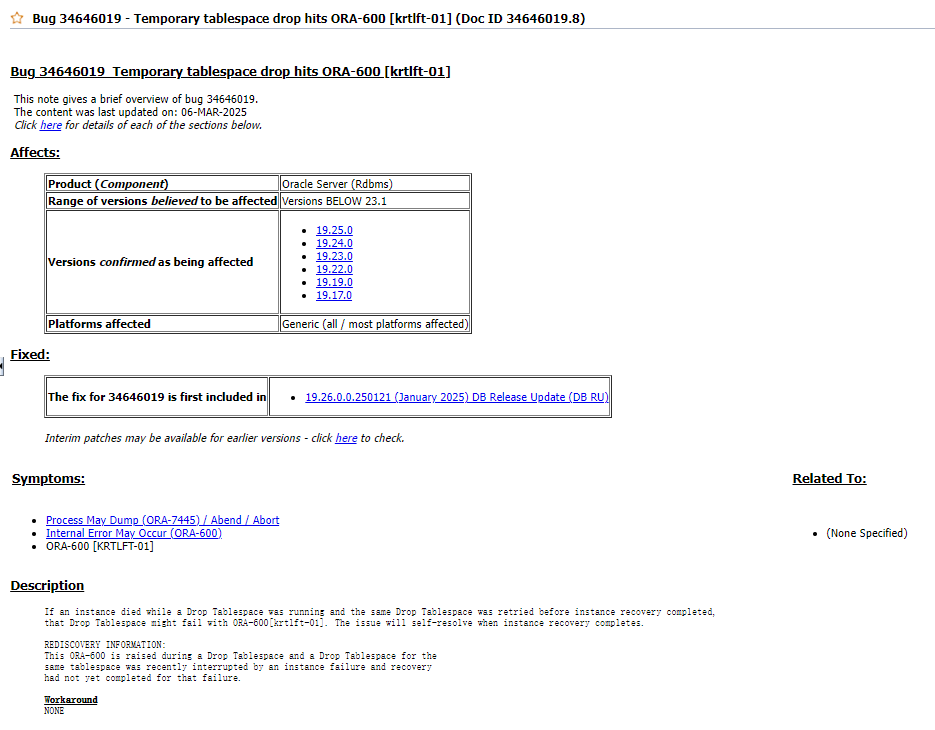
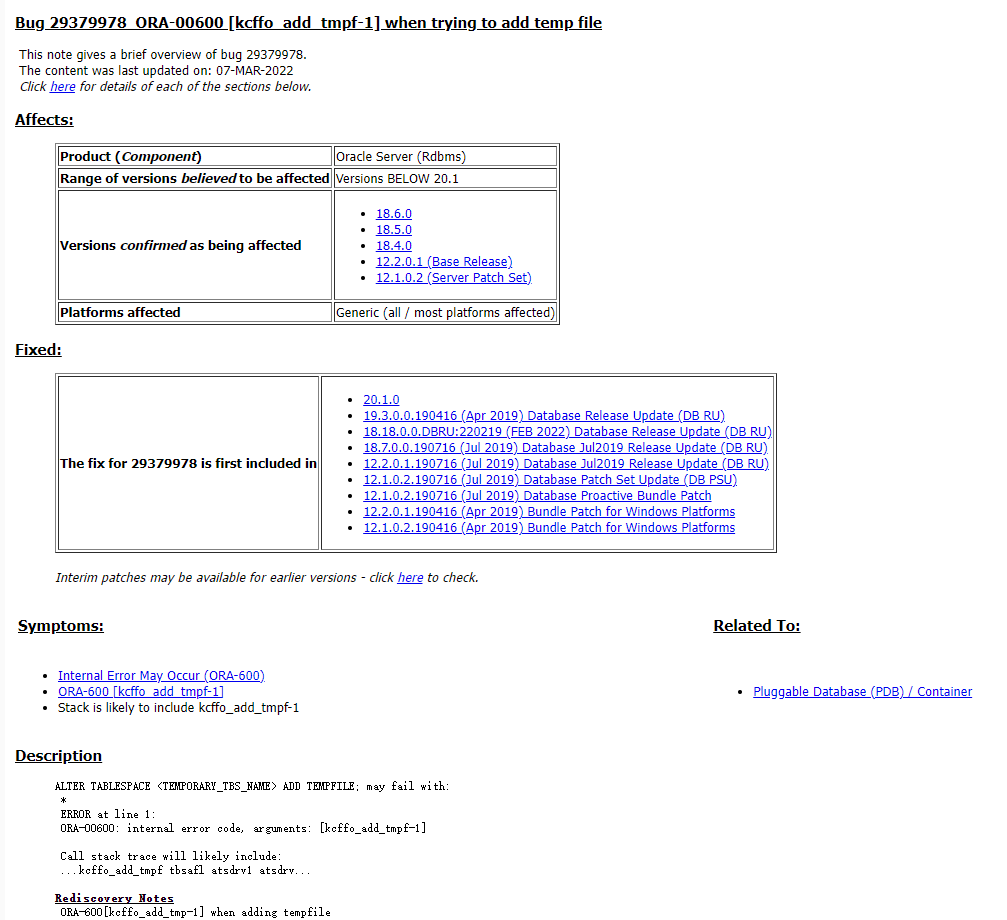
3.最后有遇到temp临时表空间bug问题,可忽略,仅此记录一下
SQL> alter session set container=pdb1;

Session altered.

SQL> show pdbs;

    CON_ID CON_NAME                       OPEN MODE  RESTRICTED
---------- ------------------------------ ---------- ----------
         6 PDB1                           READ WRITE NO
SQL> select name from v$tempfile;

no rows selected

SQL> select name from v$tablespace;

NAME
------------------------------
SYSTEM
SYSAUX
UNDOTBS1
USERS

SQL> create temporary tablespace temp tempfile '/data/u01/app/oracle/oradata/JYC/pdb1/temp01.dbf' size 5m;
create temporary tablespace temp tempfile '/data/u01/app/oracle/oradata/JYC/pdb1/temp01.dbf' size 5m
*
ERROR at line 1:
ORA-01543: tablespace 'TEMP' already exists


SQL> alter tablespace temp add tempfile '/data/u01/app/oracle/oradata/JYC/pdb1/temp01.dbf' size 5m;
alter tablespace temp add tempfile '/data/u01/app/oracle/oradata/JYC/pdb1/temp01.dbf' size 5m
*
ERROR at line 1:
ORA-00600: internal error code, arguments: [kcffo_add_tmpf-1], [3], [], [], [],
[], [], [], [], [], [], []


SQL> create temporary tablespace temp1 tempfile '/data/u01/app/oracle/oradata/JYC/pdb1/temp101.dbf' size 5m;

Tablespace created.

SQL> alter database default temporary tablespace temp1;

Database altered.

SQL> drop tablespace temp including contents and datafiles;
drop tablespace temp including contents and datafiles
*
ERROR at line 1:
ORA-00600: internal error code, arguments: [krtlft-01], [3], [], [], [], [],
[], [], [], [], [], []


SQL> drop tablespace temp including contents;
drop tablespace temp including contents
*
ERROR at line 1:
ORA-00600: internal error code, arguments: [krtlft-01], [3], [], [], [], [],
[], [], [], [], [], []


SQL> drop tablespace temp ;
drop tablespace temp
*
ERROR at line 1:
ORA-00600: internal error code, arguments: [krtlft-01], [3], [], [], [], [],
[], [], [], [], [], []
最后修改时间:2025-08-26 14:58:29
「喜欢这篇文章,您的关注和赞赏是给作者最好的鼓励」
关注作者
【版权声明】本文为墨天轮用户原创内容,转载时必须标注文章的来源(墨天轮),文章链接,文章作者等基本信息,否则作者和墨天轮有权追究责任。如果您发现墨天轮中有涉嫌抄袭或者侵权的内容,欢迎发送邮件至:contact@modb.pro进行举报,并提供相关证据,一经查实,墨天轮将立刻删除相关内容。
