



金仓数据库Mysql版本安装测试顺畅,兼容性方面很棒,已从功能兼容阶段过渡到强性能兼容、生态全面兼容阶段
金仓体验官来了,第一期、第二期、第三期 ···· 没写的加紧入局 ~

1. 金仓mysql兼容版本安装配置
1.1 简单准备工作
PS : 安装具体细节参照之前写的:十分钟内搞定金仓数据库V8静默安装(新手完全上手)
https://bbs.kingbase.com.cn/blogDetail?postsId=9a0cfd3b13dad2b395ee0e2df4a1b3dd
# 新建安装及数据目录
[kingbase@dba236 mysql]$ mkdir -p /data/Kingbase/kmysql/{kbinstall,data}

# 挂载ISO安装文件
[root@dba236 Kingbase]# mount /data/Kingbase/KingbaseES_V009R003C011B0003_Lin64_install.iso /data/Kingbase/kmysql/kbinstall
mount: /dev/loop1 is write-protected, mounting read-only

# 下载license文件,并放置到如下目录,并授权
[root@dba236 mysql]# chown -R kingbase:kingbase  /data/Kingbase/license_mysql.dat
1.2 校验安装包
[root@dba236 Kingbase]# md5sum KingbaseES_V009R003C011B0003_Lin64_install.iso
a5d73025035c5616f8b696423f7d0bf8  KingbaseES_V009R003C011B0003_Lin64_install.iso
1.3 复制并配置静默安装的配置文件
[root@dba236 setup]# cat silent.cfg > /data/Kingbase/silent.cfg
vi  /data/Kingbase/silent.cfg
KB_LICENSE_PATH=/data/Kingbase/license_mysql.dat
USER_INSTALL_DIR=/data/Kingbase/kmysql
USER_SELECTED_DATA_FOLDER=/data/cd -Kingbase/kmysql/data
DB_PORT=54322
DB_PASS2=kbdb#134
DATABASE_MODE_PARAM=MySQL # 留意下就好,配置文件包含
1.4 静默安装
PS:进入安装程序所在目录,以kingbase用户执行如下命令,否则会报错提示需要非root用户安装
cd /data/Kingbase/V9/mysql/kbinstall
[root@dba236 kbinstall]# ll
total 6
dr-xr-xr-x 2 root root 2048 Feb 14  2025 setup
-r-xr-xr-x 1 root root 3932 Feb 14  2025 setup.sh

[kingbase@dba236 kbinstall]$ ./setup.sh -i silent -f/data/Kingbase/silent.cfg
Now launch installer...
          .Complete.
1.5 查看安装日志下
cd /data/Kingbase/kmysql/install/Logs

1.6 启动服务
cd /data/Kingbase/kmysql/Server/bin
./sys_ctl -w start -D /data/Kingbase/kmysql/data -l /data/Kingbase/kmysql/data/sys_log/startup.log

# 输出:
waiting for server to start.... done
server started

# 查看端口

[kingbase@dba236 bin]$ netstat -ntpl|grep 54322
(Not all processes could be identified, non-owned process info
 will not be shown, you would have to be root to see it all.)
tcp        0      0 0.0.0.0:54322           0.0.0.0:*               LISTEN      7166/kingbase
tcp6       0      0 :::54322                :::*                    LISTEN      7166/kingbase
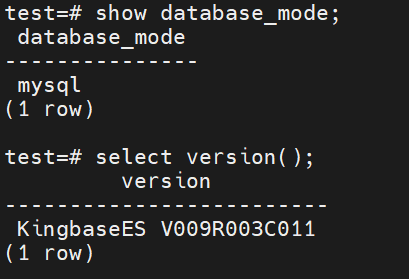
1.7 查看版本
test=# show database_mode;

test=# select version();
1.8 快捷命令及免密登录
编辑环境变量
# 增加 ~/.bash_profile
alias ks2='ksql -p 54322 -d test -U system'
 # 马上生效
source $ cat ~/.bash_profile
编辑sys_hba.conf配置文件(如图)
/data/Kingbase/kmysql/data/sys_hba.conf
# 重新加载配置
./Server/bin/sys_ctl reload

2. Mysql兼容性测试
KingbaseES以内核兼容为基础,通过初始化参数控制,兼容MySQL 数据库,支持MySQL常用功能。KingbaseES对MySQL的兼容性,已从功能兼容阶段过渡到强性能兼容、生态全面兼容阶段,做到在迁移过程中对上层应用透明,实现低成本,低难度,低风险的平滑迁移。
在基础能力方面,KingbaseES兼容SQL语法及PL/SQL过程化语言的语法基础,完成了对数据类型、常用表达式和条件、系统视图、内置函数、DML、DQL语句,以及控制语句、存储过程、函数、触发器、游标,静态SQL、动态SQL等各方面的兼容。在高级能力方面,KingbaseES支持BIT,ENUM类型,SET类型等特殊类型,支持INTERVAL表达式,MySQL的用户变量,REPLACE,INSERT ON DUPLICATE KEY子句,INSERT IGNORE INTO子句,DELETE和UPDATE语句支持LIMIT子句,建表兼容CURRENT_TIMESTAMP ON UPDATE CURRENT_TIMESTAMP子句,COMOMENT子句,多表更新等能力。
2.1 导入导出测试(mysql导出csv,导入到kes mysql兼容版本)
PS:注意导出的CSV文件,分隔符默认是逗号,需要将逗号换成tab符,不然会当成一个字段处理;字符用双引号,若是单引号会默认为是数据的一部分
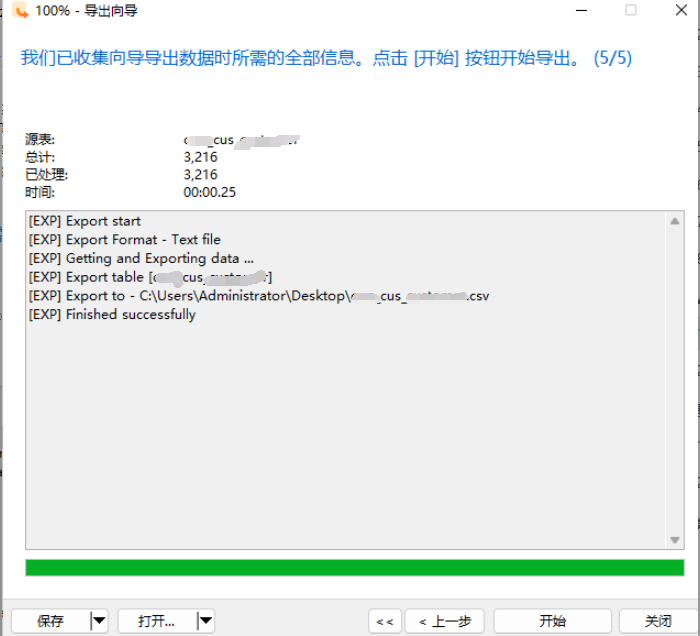
经常维护mysql的DBA来说,简单的数据导出,还是navicat工具更快,免得再登录到服务器
直接通过navicat导出csv格式,并上传到服务器
(1) 在金仓执行导入
test=# \dt
 public | cus      | table | system
 public | customer | table | system
 public | t        | table | system

# 执行导入(3216行记录,秒入,超级棒)
test=# load data infile '/data/cus.csv' into table cus;
COPY 3216
test=# select count(1) from cus;
  3216

(2) 建表语句不完全兼容的部分

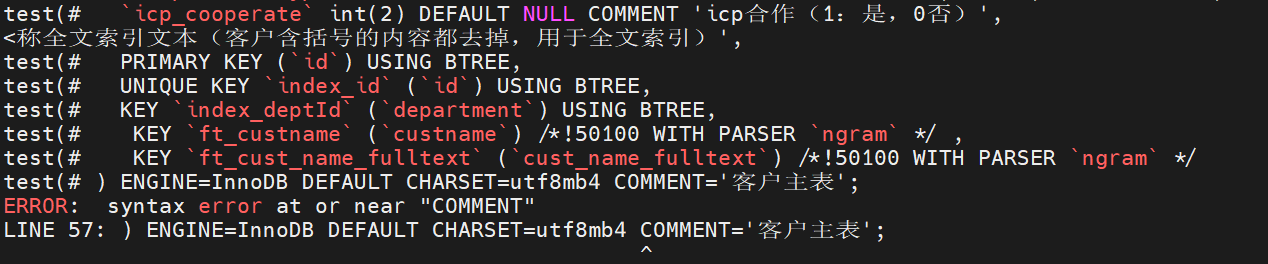
去除之后,再执行返回成功

(3) 导入的CSV若用逗号分隔及导入错误的表报错如下,请欣赏
test=# load data infile '/data/cus.csv' into table mysql.film;
ERROR:  relation "mysql.film" does not exist
test=# load data infile '/data/cus.csv' into table cus.film;
ERROR:  schema or package "cus" does not exist
test=#

test=# load data infile '/data/cus.csv' into table cus;
WARNING:  data truncated for type numeric: "'id','reccode','custname'"
ERROR:  missing data for column "reccode"
CONTEXT:  COPY cus, line 1: "'id','reccode','custname'"
2.2 多表联合更新(完美支持)
在金仓数据库(KingbaseES)的 MySQL 兼容模式下进行多表更新,确实能让熟悉 MySQL 的你更方便地操作数据
# 更新前查询

test=# select * from cus e, cus_acc d
test-# WHERE e.id = d.cid
test-# and e.reccode = 'CU202101000019' ;
 1441289030321831958 | CU202101000019 | 广州     | 1447846574276214861 | 1441289030321831958 | 10244230150
 1441289030321831958 | CU202101000019 | 广州     | 1447846574276214862 | 1441289030321831958 | 10244230151
 1441289030321831958 | CU202101000019 | 广州     | 1447846574276214863 | 1441289030321831958 | 1024401100107
 1441289030321831958 | CU202101000019 | 广州     | 1447846574276214864 | 1441289030321831958 | 10244230152

# 多表联合更新,由于cus 1条数据,cus_acc 4条数据,共计更新5条数据
test=# UPDATE cus e, cus_acc d
test-# SET e.custname = CONCAT('GZ2025_',e.custname) ,
test-# d.code = CONCAT('GZ_',d.code)
test-# WHERE e.id = d.cid
test-# and e.reccode = 'CU202101000019';
UPDATE 5

# 更新前查询
test=# select * from cus e, cus_acc d
test-# WHERE e.id = d.cid
test-# and e.reccode = 'CU202101000019' ;
 1441289030321831958 | CU202101000019 | GZ2025_广州 | 1447846574276214861 | 1441289030321831958 | GZ_10244230150
 1441289030321831958 | CU202101000019 | GZ2025_广州 | 1447846574276214862 | 1441289030321831958 | GZ_10244230151
 1441289030321831958 | CU202101000019 | GZ2025_广州 | 1447846574276214863 | 1441289030321831958 | GZ_1024401100107
 1441289030321831958 | CU202101000019 | GZ2025_广州 | 1447846574276214864 | 1441289030321831958 | GZ_10244230152
3. 遇见问题
3.1 若是使用root安装,会报错
[root@dba236 kbinstall]# ./setup.sh -i silent -f /data/Kingbase/V9/mysql/silent.cfg
Current user is ROOT.
Please re-run the installer as Non-Root user.
3.2 安装命令错误示范
[kingbase@dba236 kbinstall]$ ./setup.sh -i silent -f/data/Kingbase/silent.cfg
Now launch installer...
          .Usage: install [-f <path_to_installer_properties_file> | -options]
            (to execute the installer)

Where options include:
    -?      Show this help text
    -h      Show this help text
    -help   Show this help text
    --help  Show this help text
    -i [gui | console | silent]
            Specify the user interface mode for the installer
    -D<name>=<value>
            Specify installer properties
    -r <path_to_generate_response_file>
            Generates response file.
JVM heap size options are only applicable to Installers
    -jvmxms <size>
            Specify JVM initial heap size.
    -jvmxmx <size>
            Specify JVM maximum heap size.
The options field may also include the following in case of uninstaller
if it is enabled for Maintenance Mode
    -add <feature_name_1> [<feature_name_2 ...]
            Add Specified Features
    -remove <feature_name_1> [<feature_name_2 ...]
            Remove Specified Features
    -repair
            Repair Installation
    -uninstall
            Uninstall

Notes:
    1. The path to the installer properties file may be either absolute,
       or relative to the directory in which the installer resides.
    2. If an installer properties file is specified and exists, all other
       command line options will be ignored.
    3. If a properties file named either 'installer.properties' or
       <NameOfInstaller>.properties resides in the same directory as the
       installer, it will automatically be used, overriding all other command
       line options, unless the '-f' option is used to point to another valid
       properties file.
    4. If an installer properties file is specified but does not exist, the
       default properties file, if present, will be used.  Otherwise, any
       supplied command line options will be used, or if no additional
       options were specified, the installer will be run using the default
       settings.
Complete.
参考文档
金仓官方文档
https://bbs.kingbase.com.cn/documentGuide?recId=ef7404928de44316a3e72c84e64af712
金仓软件下载
https://www.kingbase.com.cn/download.html
金仓mysql序列下载
https://www.kingbase.com.cn/download.html#authorization?authorcurrV=V9R3C11%EF%BC%88MySQL%E5%85%BC%E5%AE%B9%E7%89%88%EF%BC%89
