



目录
磐维分布式数据库采用 share nothing 架构,计算节点和存储节点分离,节点间通过高速网络进行通信。所有节点都有主从互备,确保系统的高可用性。逻辑架构如下图所示:
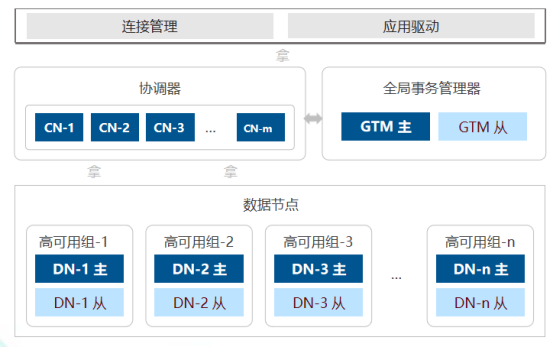
磐维分布式数据库集群中的节点主要分为三类,分别是协调器(Coordinator,CN)、数据节点(Data Node,DN)、全局事务管理器(Global Transaction Manager,GTM)。
1、Coordinator 协调器:协调器管理和客户端的连接,对客户端发来的 SQL 进行解析,生成执行计划,把执行计划发到相应的数据节点进行读写操作,并将结果汇总返回给客户端。对于涉及跨 DN 的数据写操作,协调者还负责协调所有参与者进行两阶段提交。
2、Data Node 数据节点:数据节点是数据实际存放的节点,保存表和索引等数据库对象。数据节点接收协调器下发的读写操作,并将结果返回给协调器处理。数据节点间也可以通信,进行跨数据节点的数据重分布和联合查询。
3、GTM 全局事务管理器:全局事务管理器管理全局事务号和活动事务状态,确保系统的全局一致性。
主机名 | ip地址 | OS版本 | 内存 | CPU |
pwdb1 | 169.18.18.91 | openEuler release 22.03 (LTS-SP2) | 32G | 1*4Core |
pwdb2 | 169.18.18.92 | openEuler release 22.03 (LTS-SP2) | 32G | 1*4Core |
pwdb3 | 169.18.18.93 | openEuler release 22.03 (LTS-SP2) | 32G | 1*4Core |
节点类型 | 节点名称 | 节点 IP | 端口 | 代理端口 | 角色 | 目录 |
gha_server | gha_server1 | 169.18.18.91 | 20001 | - | - | - |
dcs | - | 169.18.18.91 | 2379 | - | - | - |
dcs | - | 169.18.18.92 | 2379 | - | - | - |
dcs | - | 169.18.18.93 | 2379 | - | - | - |
gtm | gtm1 | 169.18.18.93 | 6666 | 8011 | 主 | /database/panweidb/gtm/gtm1 |
gtm | gtm2 | 169.18.18.92 | 6666 | 8012 | 备 | /database/panweidb/gtm/gtm2 |
coordinator | cn1 | 169.18.18.91 | 5432 | 8021 | 主 | /database/panweidb/coord/cn1 |
coordinator | cn2 | 169.18.18.92 | 5432 | 8022 | 主 | /database/panweidb/coord/cn2 |
datanode | dn1_1 | 169.18.18.91 | 20010 | 8031 | 主 | /database/panweidb/dn1/dn1_1 |
datanode | dn1_2 | 169.18.18.92 | 20010 | 8032 | 备 | /database/panweidb/dn1/dn1_2 |
datanode | dn1_3 | 169.18.18.93 | 20010 | 8033 | 备 | /database/panweidb/dn1/dn1_3 |
datanode | dn2_1 | 169.18.18.92 | 20020 | 8034 | 主 | /database/panweidb/dn1/dn2_1 |
datanode | dn2_2 | 169.18.18.93 | 20020 | 8035 | 备 | /database/panweidb/dn1/dn2_2 |
datanode | dn2_3 | 169.18.18.91 | 20020 | 8036 | 备 | /database/panweidb/dn1/dn2_3 |
datanode | dn3_1 | 169.18.18.93 | 20030 | 8037 | 主 | /database/panweidb/dn1/dn3_1 |
datanode | dn3_2 | 169.18.18.92 | 20030 | 8038 | 备 | /database/panweidb/dn1/dn3_2 |
datanode | dn3_3 | 169.18.18.91 | 20030 | 8039 | 备 | /database/panweidb/dn1/dn3_3 |
根据规划修改各系统的hostname:
hostnamectl set-hostname pwdb1
hostnamectl set-hostname pwdb2
hostnamectl set-hostname pwdb3
检查 bison、flex、patch、bzip2 依赖是否已安装,执行命令:
# rpm -q bison flex patch bzip2
若未安装需要配置yum源,并进行安装执行命令:
# yum install -y bison flex patch bzip2
# cat /proc/cpuinfo | grep rdtscp
仅虚拟机需要确认是否支持rdtscp指令集。返回如下信息即可。否则请参考对应 CPU 型号官网资料,安装 rdtscp 指令集。
flags : fpu vme de pse tsc msr pae mce cx8 apic sep mtrr pge mca cmov pat pse36 clflush
mmx fxsr sse sse2 ss ht syscall nx rdtscp lm constant_tsc arch_perfmon nopl xtopology
tsc_reliable nonstop_tsc eagerfpu pni pclmulqdq ssse3 cx16 sse4_1 sse4_2 x2apic popcnt
tsc_deadline_timer aes hypervisor lahf_lm ssbd ibrs ibpb stibp tsc_adjust arat spec_ctrl
intel_stibp flush_l1d arch_capabilities
systemctl status firewalld.service
sudo systemctl stop firewalld.service
sudo systemctl disable firewalld.service
(1) 查看 SELINUX 状态,确认是否处于关闭状态。
$ sestatus
如果系统提示以下信息,说明 selinux 已被禁用:
SELinux status: disabled
(2) 如 SELINUX 处于可用状态,打开配置文件,将 SELINUX 参数设置为 disabled。
$ sudo vim /etc/selinux/config
进入编辑模式,在打开文件如下位置,设置 SELINUX=disabled:
(3) 重启服务器生效
PanWeiDB 分布式数据库系统,需要各节点间时间同步,来保证数据库一致性。一般采用 NTP 服务方式来保证各节点间的时间同步。
首先检查服务器是否安装 NTP 服务以及是否正常运行:
systemctl status ntpd.service
若 NTP 服务未处于正常运行状态,执行rpm -qa|grep ntp: 如果没有 ntp 显示,则应删除原有 ntpdate 后重新安装 ntp:
yum -y remove ntpdate-xxxxx.x86_64
yum -y install ntp
(1)、pwdb1节点(169.18.18.91) 作为ntp服务器服务节点,其它节点与他做时间同步
执行vi /etc/ntp.conf
添加内容:
restrict 169.18.18.91 nomodify notrap nopeer noquery
restrict 169.18.18.255 mask 255.255.255.0 nomodify notrap
server 127.127.1.0
Fudge 127.127.1.0 stratum 10
注释:
#server 0.centos.pool.ntp.org iburst
#server 1.centos.pool.ntp.org iburst
#server 2.centos.pool.ntp.org iburst
#server 3.centos.pool.ntp.org iburst
(2)、pwdb2节点(169.18.18.92)执行vi /etc/ntp.conf
添加内容:
restrict 169.18.18.92 nomodify notrap nopeer noquery
server 169.18.18.91
Fudge 169.18.18.91 stratum 10
注释:
#server 0.centos.pool.ntp.org iburst
#server 1.centos.pool.ntp.org iburst
#server 2.centos.pool.ntp.org iburst
#server 3.centos.pool.ntp.org iburst
(3)、pwdb3节点(169.18.18.93)执行vi /etc/ntp.conf
添加内容:
restrict 169.18.18.93 nomodify notrap nopeer noquery
server 169.18.18.91
Fudge 169.18.18.91 stratum 10
注释:
#server 0.centos.pool.ntp.org iburst
#server 1.centos.pool.ntp.org iburst
#server 2.centos.pool.ntp.org iburst
#server 3.centos.pool.ntp.org iburst
(4)、重启ntp服务,并配置随机启动,所有节点都执行:
systemctl stop ntpd
systemctl start ntpd
systemctl status ntpd
systemctl enable ntpd
(5)、查看NTP服务连通性
[root@pwdb1 ~]# ntpstat
synchronised to local net (127.127.1.0) at stratum 6
time correct to within 198 ms
polling server every 64 s
[root@pwdb2 ~]# ntpstat
synchronised to NTP server (169.18.18.91) at stratum 7
time correct to within 1393 ms
polling server every 64 s
[root@pwdb3 ~]# ntpstat
synchronised to NTP server (169.18.18.91) at stratum 7
time correct to within 1393 ms
polling server every 64 s
编辑系统内核 sysctl.conf 配置文件,配置参数如下(可根据时间配置调整):
#vi /etc/sysctl.conf
kernel.sem = 40960 2048000 40960 20480
#sysctl -p
groupadd dbgrp
useradd -m -d /home/omm omm -g dbgrp
passwd omm
配置sudoer
visudo
omm ALL=(ALL) NOPASSWD:ALL
确保上级目录的所有者(owner)为 omm 用户,且具有读写权限。
mkdir -p /database/panweidb
chown -R omm:dbgrp /database/panweidb
安装包及解压文件均在该安装目录下即可。
数据库安装目录为/home/omm/omm_package,则具体操作如下:
$ su - omm
mkdir -p /home/omm/omm_package
cd /home/omm/
上传安装软件包并解压
[omm@pwdb1 omm_package]$ ls
PanWeiDB_V2.0_dist_S3.1.0_B02_x86_64.tar.gz
tar -xvf PanWeiDB_V2.0_dist_S3.1.0_B02_x86_64.tar.gz
tar -vxf PanWeiDB_V2.0_dist_S3.1.0_B02_x86_64_om.tar.gz
根据部署规划编译yml配置文件:
cat panwei.yml
ha_server:
- ha_server1:
host: 169.18.18.91
port: 20001
dcs:
- host: 169.18.18.91
port: 2379
- host: 169.18.18.92
port: 2379
- host: 169.18.18.93
port: 2379
gtm:
- gtm1:
host: 169.18.18.93
agent_host: 169.18.18.93
role: primary
port: 6666
agent_port: 8011
work_dir: /database/panweidb/gtm/gtm1
- gtm2:
host: 169.18.18.92
agent_host: 169.18.18.92
role: standby
port: 6666
agent_port: 8012
work_dir: /database/panweidb/gtm/gtm2
coordinator:
- cn1:
host: 169.18.18.91
agent_host: 169.18.18.91
role: primary
port: 5432
agent_port: 8021
work_dir: /database/panweidb/coord/cn1
- cn2:
host: 169.18.18.92
agent_host: 169.18.18.92
role: primary
port: 5432
agent_port: 8022
work_dir: /database/panweidb/coord/cn2
datanode:
- dn1:
- dn1_1:
host: 169.18.18.91
agent_host: 169.18.18.91
role: primary
port: 20010
agent_port: 8031
work_dir: /database/panweidb/dn1/dn1_1
- dn1_2:
host: 169.18.18.92
agent_host: 169.18.18.92
role: standby
port: 20010
agent_port: 8032
work_dir: /database/panweidb/dn1/dn1_2
- dn1_3:
host: 169.18.18.93
agent_host: 169.18.18.93
role: standby
port: 20010
agent_port: 8033
work_dir: /database/panweidb/dn1/dn1_3
- dn2:
- dn2_1:
host: 169.18.18.92
agent_host: 169.18.18.92
role: primary
port: 20020
agent_port: 8034
work_dir: /database/panweidb/dn2/dn2_1
- dn2_2:
host: 169.18.18.93
agent_host: 169.18.18.93
role: standby
port: 20020
agent_port: 8035
work_dir: /database/panweidb/dn2/dn2_2
- dn2_3:
host: 169.18.18.91
agent_host: 169.18.18.91
role: standby
port: 20020
agent_port: 8036
work_dir: /database/panweidb/dn2/dn2_3
- dn3:
- dn3_1:
host: 169.18.18.93
agent_host: 169.18.18.93
role: primary
port: 20030
agent_port: 8037
work_dir: /database/panweidb/dn3/dn3_1
- dn3_2:
host: 169.18.18.91
agent_host: 169.18.18.91
role: standby
port: 20030
agent_port: 8038
work_dir: /database/panweidb/dn3/dn3_2
- dn3_3:
host: 169.18.18.92
agent_host: 169.18.18.92
role: standby
port: 20030
agent_port: 8039
work_dir: /database/panweidb/dn3/dn3_3
env:
# cluster_type allowed values: multiple-nodes, single-inst, default is multiple-nodes
cluster_type: multiple-nodes
pkg_path: /home/omm/omm_package
prefix: /home/omm/omm_db
version: V2.0_dist_S3.1.0_B02
user: omm
port: 22
third_ssh: false
# constant:
# virtual_ip: 100.0.1.254/24
完成两层安装包解压后会在安装目录下生成 script 子目录。执行 ha_preinstall 命令进行环境配置,包括建立用户互信、安装前环境检查和环境修复功能等。
磐维分布式数据库需要在所有节点创建 omm 用户免密登录,可以直接使用ha_preinstall 脚本配置用户互信,减少手工操作。
cd /home/omm/omm_package/script
./ha_preinstall -s --add-user --add-trust --root-passwd='DiskTxxx#@83' --set-user-passwd='Pwxxx*123.' -h 169.18.18.91,169.18.18.92,169.18.18.93 -u omm -p 22
安装数据库之前使用 ha_preinstall 脚本进行环境检查:
[omm@pwdb1 script]$ ./ha_preinstall -i A -h 169.18.18.91,169.18.18.92,169.18.18.93 -u omm -p 22
Checking items:
A1. [ OS version status ] : Normal
A2. [ Kernel version status ] : Normal
A3. [ Unicode status ] : Normal
A4. [ Time zone status ] : Normal
A5. [ Swap memory status ] : Normal
A6. [ Bash type ] : Normal
A7. [ System limits ] : Normal
A8. [ Disk configuration status ] : Normal
A9. [ Pre-read block size status ] : Normal
A10.[ IO scheduler status ] : Normal
A11.[ Network card configuration status ] : Normal
A12.[ Time consistency status ] : Normal
A13.[ Firewall/Ufw service status ] : Normal
A14.[ THP service status ] : Normal
A15.[ SELinux status ] : Normal
A16.[ Dependency version ] : Normal
A17.[ Sudo privilege ] : Normal
A18.[ Command permission ] : Normal
Total numbers:18. Abnormal numbers:0. Warning numbers:0.
若安装检查有报错如:Total numbers:18. Abnormal numbers:2. Warning numbers:1.需要执行以下命令进行环境配置修复:
./ha_preinstall -i B -h 169.18.18.91,169.18.18.92,169.18.18.93 -u omm -p 22
./ha_ctl install -c panwei -p /home/omm/omm_package/
返回以下信息,说明集群安装部署成功
{
"ret":0,
"msg":"Success"
}
[omm@pwdb1 script]$ ha_ctl monitor all -l http://169.18.18.91:2379 -H
+----+------------+--------------+-------+---------+--------+
| No | name | host | port | state | leader |
+----+------------+--------------+-------+---------+--------+
| 0 | ha_server1 | 169.18.18.91 | 20001 | running | True |
+----+------------+--------------+-------+---------+--------+
+----+------+--------------+------+-----------------------------+---------+---------+
| No | name | host | port | work_dir | state | role |
+----+------+--------------+------+-----------------------------+---------+---------+
| 0 | gtm1 | 169.18.18.93 | 6666 | /database/panweidb/gtm/gtm1 | running | primary |
| 1 | gtm2 | 169.18.18.92 | 6666 | /database/panweidb/gtm/gtm2 | running | standby |
+----+------+--------------+------+-----------------------------+---------+---------+
+----+------+--------------+------+------------------------------+---------+---------+
| No | name | host | port | work_dir | state | role |
+----+------+--------------+------+------------------------------+---------+---------+
| 0 | cn1 | 169.18.18.91 | 5432 | /database/panweidb/coord/cn1 | running | primary |
| 1 | cn2 | 169.18.18.92 | 5432 | /database/panweidb/coord/cn2 | running | primary |
+----+------+--------------+------+------------------------------+---------+---------+
+----+-------+-------+--------------+-------+------------------------------+---------+---------+
| No | group | name | host | port | work_dir | state | role |
+----+-------+-------+--------------+-------+------------------------------+---------+---------+
| 0 | dn1 | dn1_1 | 169.18.18.91 | 20010 | /database/panweidb/dn1/dn1_1 | running | primary |
| 1 | dn1 | dn1_2 | 169.18.18.92 | 20010 | /database/panweidb/dn1/dn1_2 | running | standby |
| 2 | dn1 | dn1_3 | 169.18.18.93 | 20010 | /database/panweidb/dn1/dn1_3 | running | standby |
| 3 | dn2 | dn2_1 | 169.18.18.92 | 20020 | /database/panweidb/dn2/dn2_1 | running | primary |
| 4 | dn2 | dn2_2 | 169.18.18.93 | 20020 | /database/panweidb/dn2/dn2_2 | running | standby |
| 5 | dn2 | dn2_3 | 169.18.18.91 | 20020 | /database/panweidb/dn2/dn2_3 | running | standby |
| 6 | dn3 | dn3_1 | 169.18.18.93 | 20030 | /database/panweidb/dn3/dn3_1 | running | primary |
| 7 | dn3 | dn3_2 | 169.18.18.91 | 20030 | /database/panweidb/dn3/dn3_2 | running | standby |
| 8 | dn3 | dn3_3 | 169.18.18.92 | 20030 | /database/panweidb/dn3/dn3_3 | running | standby |
+----+-------+-------+--------------+-------+------------------------------+---------+---------+
+----+--------------------------+--------+---------+----------+
| No | url | name | state | isLeader |
+----+--------------------------+--------+---------+----------+
| 0 | http://169.18.18.93:2379 | node_2 | healthy | True |
| 1 | http://169.18.18.91:2379 | node_0 | healthy | False |
| 2 | http://169.18.18.92:2379 | node_1 | healthy | False |
+----+--------------------------+--------+---------+----------+
[omm@pwdb1 script]$ ha_ctl stop all -l http://169.18.18.91:2379
{
"ret":0,
"msg":"Success"
}
[omm@pwdb1 script]$ ha_ctl start all -l http://169.18.18.91:2379
{
"ret":0,
"msg":"Success"
}
(1)、集群卸载语法格式:
ha_ctl uninstall <-f> <-c cluster> -l dcslist
参数说明:
-f 参数:表示清理安装目录,为可选字段。缺省保留目录文件夹。
ha_ctl uninstall -f -l http://169.18.18.91:2379
(2)、卸载完成后删除 DCS 工具:
在集群卸载后环境变量自动清除,执行 ha_ctl 命令需要进入 script 目录。
/home/omm/omm_package/script/ha_ctl destroy dcs -l http://169.18.18.91:2379
登录CN节点通过本地连接登录数据库、创建testdb及t1 测试表:
[omm@pwdb1 script]$ gsql -d postgres -p5432
gsql ((PanWeiDB_V2.0(openGauss)-distributed version-3.1.0_B02 build 352525d7) compiled at 2024-12-18 17:59:11 commit 0 last mr 2914 )
Non-SSL connection (SSL connection is recommended when requiring high-security)
Type "help" for help.
postgres=# \c testdb
Non-SSL connection (SSL connection is recommended when requiring high-security)
You are now connected to database "testdb" as user "omm".
testdb=# create table t1(col1 int,col2 int);
CREATE TABLE
testdb=# insert into t1 values(1,2);
INSERT 0 1
testdb=# select * from t1;
col1 | col2
------+------
1 | 2
(1 row)
通过CN节点远程连接数据库
登录DN节点通过本地连接登录testdb数据库,数据为只读状态:
[omm@pwdb1 ~]$ gsql -d testdb -p20010 -r
gsql ((PanWeiDB_V2.0(openGauss)-distributed version-3.1.0_B02 build 352525d7) compiled at 2024-12-18 17:59:11 commit 0 last mr 2914 )
Non-SSL connection (SSL connection is recommended when requiring high-security)
Type "help" for help.
testdb=# \dt
List of relations
Schema | Name | Type | Owner | Storage
--------+------+-------+-------+----------------------------------
public | t1 | table | omm | {orientation=row,compression=no}
(1 row)
testdb=# insert into t1 values(1,2);
ERROR: dn1: cannot execute INSERT in a read-only transaction
testdb=# select * from t1;
col1 | col2
------+------
1 | 2
(1 row)
安装过程参考《磐维数据库_V2.0_dist-S3.1.0_B02_安装部署手册》,参数详解及详细安装过程请参考部署手册。
