
暂无图片
暂无图片
暂无图片
暂无图片
暂无图片

PostgreSQL 17.6 表被误删除,无备份,如何恢复?

使用PDU工具,一键恢复误删除的数据:
    cjc.cjc=# restore del all;
    ▌ 扫描归档目录
       起始文件: 000000010000000000000001
       终点文件: 00000001000000000000000C
    当前startwal设置和建议startwal之间差距较大
    导致恢复效率低下,是否确认执行?y/n  y
    ▌ 事务恢复模式
    ────────────────────────────────────────
    |-已解析数据条数: 10000
    ▌ 解析完成
    ┌───────────────────────────────────────────────────────────────┐
     表 t100
     ● 恢复数据共计 10000 行
     ● 成功: 10000      ● 失败: 0
     ● 文件路径: restore/public/t100_del_2025-08-30 05:20:55.802215 CST_2025-08-30 18:40:36.241959 CST.csv
    └───────────────────────────────────────────────────────────────┘

    工具作者ZhangChen,微信公众号《ZhangChen-PDU》,可以关注大佬的微信公众号,获取工具。

    详细过程如下:

    PostgreSQL17.6源码安装

    环境说明:

      OS:Oracle Linux Server 7.5
      DB:PostgreSQL 17.6

      创建用户,组,目录等

        groupadd -g 1500 postgres
        useradd -g 1500 -u 1500 postgres
        passwd postgres
        mkdir -p pg/{app/17,data,log,conf,soft,arch}
        chown postgres.postgres pg -R

        配置环境变量

          su - postgres
          vi home/postgres/.bash_profile
          export PGHOME=/pg/app/17/pgsql
          export PATH=$PATH:$PGHOME/bin
          export PGDATA=/pg/data
          export PGLOG=/pg/log
          export LD_LIBRARY_PATH=/pg/app/17/lib:$LD_LIBRARY_PATH


          source /home/postgres/.bash_profile

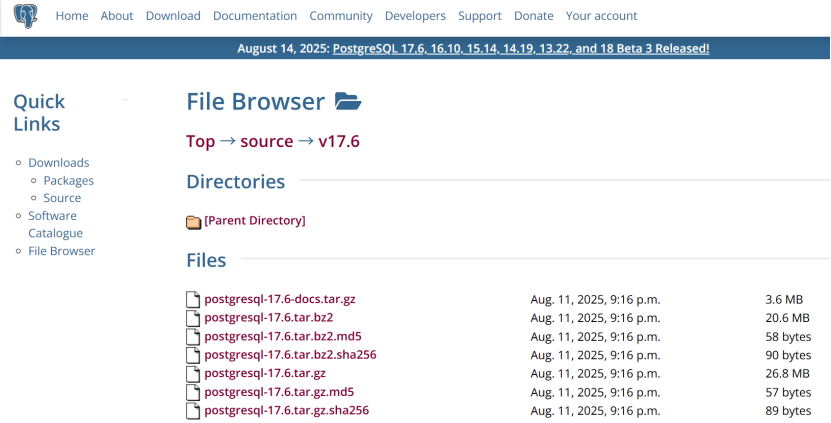
          下载安装介质

            https://www.postgresql.org/ftp/source/v17.6/
            解压

              [postgres@cjc-db-05 ~]$ ls -lrth pg/soft/
              total 27M
              -rw-r--r-- 1 postgres postgres 27M Aug 30 04:45 postgresql-17.6.tar.gz


              cd /pg/soft/
              tar -zxvf postgresql-17.6.tar.gz
              mv postgresql-17.6/* pg/app/17/

              编译

                yum install -y gcc gzip bzip2 tar perl perl-ExtUtils-Embed readline-devel zlib-devel pam-devel libxml2-devel libxslt-devel openldap-devel python-devel gcc-c++ openssl-devel cmake libicu-devel gcc gzip bzip2 tar systemd-devel
                  cd /pg/app/17/
                  ./configure 
                  make && make install


                  mv /usr/local/pgsql/* pg/app/17/
                  chown postgres:postgres pg -R

                  初始化

                    su - postgres
                    [postgres@cjc-db-05 ~]$ initdb -D pg/data

                    修改参数:

                      vi /pg/data/postgresql.conf
                      listen_addresses = '*'


                      vi /pg/data/pg_hba.conf 
                      # IPv4 local connections:
                      # host all             all             127.0.0.1/32            trust
                      host all             all             0.0.0.0/0               trust

                      启动:

                        [postgres@cjc-db-05 ~]$ pg_ctl -D /pg/data -l /pg/log/pg.log start
                        waiting for server to start.... done
                        server started

                        登录

                          [postgres@cjc-db-05 ~]$ psql 
                          psql (17.6)
                          Type "help" for help.

                          版本

                            postgres=# select version();
                            version                                                   
                            -------------------------------------------------------------------------------------------------------------
                            PostgreSQL 17.6 on x86_64-pc-linux-gnu, compiled by gcc (GCC) 4.8.5 20150623 (Red Hat 4.8.5-28.0.1), 64-bit
                            (1 row)

                            开启归档

                              postgres=show archive_mode;
                              archive_mode 
                              --------------
                              off
                              (1 row)

                              修改参数

                                archive_mode = on 
                                archive_command = 'DATE=$(date "+%%F-%%T");DIR="/pg/arch/$DATE";(test -d $DIR || bin/mkdir -p $DIR) && bin/cp %p $DIR/%f'

                                重启数据库

                                  pg_ctl -D pg/data -l pg/log/pg.log stop -m smart
                                  pg_ctl -D pg/data -l /pg/log/pg.log start

                                  查看归档:

                                    postgres=show archive_mode;
                                    archive_mode 
                                    --------------
                                    on
                                    (1 row)


                                    postgres=# checkpoint;
                                    CHECKPOINT


                                    postgres=select pg_switch_wal();
                                    pg_switch_wal 
                                    ---------------
                                    0/19AE878
                                    (1 row)


                                    [postgres@cjc-db-05 ~]$ ls -lrth /pg/arch/
                                    total 0
                                    drwx------ 2 postgres postgres 38 Aug 30 16:23 2025-08-30-16:23:09


                                    [postgres@cjc-db-05 ~]$ ls -lrth /pg/arch/2025-08-30-16\:23\:09/
                                    total 16M
                                    -rw------- 1 postgres postgres 16M Aug 30 16:23 000000010000000000000001

                                    新建测试数据

                                    创建用户

                                      create role cjc SUPERUSER PASSWORD '1';
                                      alter role cjc with login;
                                      CREATE SCHEMA cjc AUTHORIZATION cjc;

                                      创建表空间

                                        CREATE TABLESPACE cjc OWNER cjc LOCATION '/pg/cjc';

                                        创建数据库

                                          create database cjc owner cjc tablespace cjc;
                                          grant connect on database cjc to cjc;

                                          登录

                                            [postgres@cjc-db-05 scripts]$ psql -p 5432 -U cjc -W cjc
                                            Password: 
                                            psql (17.6)
                                            Type "help" for help.


                                            cjc=# \c cjc
                                            Password: 
                                            You are now connected to database "cjc" as user "cjc".

                                            新建表:

                                            创建员工信息表并随机插入10000条数据

                                              CREATE TABLE cjc.t100 (
                                              employee_id SERIAL PRIMARY KEY,
                                              name VARCHAR(50NOT NULL,
                                              department VARCHAR(50),
                                              position VARCHAR(50),
                                              age INTEGER CHECK (age >= 18 AND age <= 65),
                                              phone VARCHAR(15)
                                              );

                                              插入10000条随机数据

                                              INSERT INTO cjc.t100 (name, department, position, age, phone)

                                              SELECT 

                                              -- 生成随机姓名(中文)

                                              (array['','','','','','','','','',''])[floor(random()*10)+1] ||

                                              (array['','','','秀英','','','','','',''])[floor(random()*10)+1],

                                              -- 生成随机部门

                                              (array['人力资源部','财务部','技术部','市场部','销售部','运营部','研发部','客服部','采购部','行政部'])[floor(random()*10)+1],

                                              -- 生成随机岗位

                                              (array['经理','主管','工程师','专员','助理','分析师','顾问','代表','协调员','总监'])[floor(random()*10)+1],

                                              -- 生成随机年龄(18-65岁)

                                              floor(random()*(65-18+1))+18,

                                              -- 生成随机手机号(1开头11位)

                                              '1' || lpad(floor(random()*10000000000)::bigint::text, 10, '0')

                                              FROM generate_series(1,10000);

                                              查看测试数据:

                                              cjc=# select * from cjc.t100;

                                              employee_id |  name  | department | position | age |    phone    

                                              -------------+--------+------------+----------+-----+-------------

                                              1 | 赵勇   财务部     代表     |  39 | 11307775998

                                              2 | 周娜   技术部     协调员   |  60 | 16313987906

                                              3 | 赵芳   研发部     助理     |  45 | 14987637004

                                              4 | 郑勇   运营部     协调员   |  44 | 15410717321

                                              5 | 吴芳   技术部     代表     |  64 | 13225099067

                                              6 | 钱洋   采购部     分析师   |  26 | 14959971395

                                              7 | 钱娜   市场部     代表     |  23 | 17328770772

                                              8 | 郑敏   采购部     协调员   |  54 | 14822293070

                                              9 | 张强   市场部     顾问     |  31 | 11616783226

                                              10 | 吴静   客服部     工程师   |  27 | 18070893302

                                              ......

                                              模拟delete误删除

                                                cjc=delete from cjc.t100;
                                                DELETE 10000
                                                cjc=select * from cjc.t100;
                                                employee_id | name | department | position | age | phone 
                                                -------------+------+------------+----------+-----+-------
                                                (0 rows)
                                                  cjc=# select pg_switch_wal();
                                                  pg_switch_wal 
                                                  ---------------
                                                  0/C14D4C8
                                                  (1 row)


                                                  cjc=# checkpoint;
                                                  CHECKPOINT

                                                  将归档文件拷贝到/pg/other下,准备进行恢复。

                                                    [postgres@cjc-db-05 pg]cp /pg/arch/*/* /pg/other/

                                                    PDU恢复误删除的数据

                                                    工具获取:

                                                    作者ZhangChen,微信公众号《ZhangChen-PDU》,可以关注大佬的微信公众号,获取工具。

                                                      https://mp.weixin.qq.com/s/7YfjR611vfAbSbt4RUC_hg

                                                      上传工具

                                                      PDU2.5_for_Postgresql10-17社区版_20250809_x86.zip

                                                        [postgres@cjc-db-05 soft]$ mkdir PDU
                                                        [postgres@cjc-db-05 soft]$ mv PDU2.5_for_Postgresql10-17社区版_20250809_x86.zip PDU2.5.zip
                                                        [postgres@cjc-db-05 soft]$ mv PDU2.5.zip PDU


                                                        [postgres@cjc-db-05 PDU]$ unzip PDU2.5.zip 
                                                        [postgres@cjc-db-05 PDU]$ ls -lrth *
                                                        -rw-r--r-- 1 postgres postgres 273 Aug  9 21:23 pdu.ini
                                                        -rwxr-xr-x 1 postgres postgres 2.1M Aug 9 21:25 pdu10
                                                        -rwxr-xr-x 1 postgres postgres 2.1M Aug 9 21:25 pdu11
                                                        -rwxr-xr-x 1 postgres postgres 2.1M Aug 9 21:25 pdu12
                                                        -rwxr-xr-x 1 postgres postgres 2.1M Aug 9 21:25 pdu13
                                                        -rwxr-xr-x 1 postgres postgres 2.1M Aug 9 21:25 pdu14
                                                        -rwxr-xr-x 1 postgres postgres 2.1M Aug 9 21:25 pdu15
                                                        -rwxr-xr-x 1 postgres postgres 2.1M Aug 9 21:25 pdu16
                                                        -rwxr-xr-x 1 postgres postgres 2.1M Aug 9 21:25 pdu17
                                                        -rw-r--r-- 1 root root      17M Aug 30 05:34 PDU2.5.zip

                                                        修改pdu.ini 配置文件

                                                          [root@cjc-db-05 PDU]
                                                          vi pdu.ini 
                                                          #Postgresql 数据目录
                                                          PGDATA=/pg/data
                                                          #Postgresql 归档目录
                                                          #ARCHIVE_DEST=/pg/arch
                                                          ARCHIVE_DEST=/pg/other
                                                          #dropScan 需要扫描的磁盘
                                                          DISK_PATH=/dev/mapper/ol-root
                                                          #dropScan 时跳跃的数据块数量,数值越小覆盖磁盘越全面,速度越慢
                                                          BLOCK_INTERVAL=5

                                                          登录PDU:

                                                            [postgres@cjc-db-05 PDU]$ ./pdu17 
                                                            ╔══════════════════════════════════════════════════════╗
                                                            ║  Copyright 2024-2025 ZhangChen. All rights reserved  ║
                                                            ║  PDU: PostgreSQL Data Unloader                       ║
                                                            ║  Version 2.5.0 (2025-08-09)                          ║
                                                            ╚══════════════════════════════════════════════════════╝
                                                              Current DB Supported Version:
                                                              ──────────────────────────
                                                              • PostgreSQL 17
                                                            ╔═══════════════════════════════════════════╗
                                                            ║              COMMUNITY VERSION            ║
                                                            ╠═══════════════════════════════════════════╣
                                                            ║ • Max 100000 Records Per Table (unload)   ║
                                                            ║ • Max 100000 Records Per Table (restore)  ║
                                                            ║ • Max 1 GB Per Table                      ║
                                                            ║ • Max 50 Columns Per Table                ║
                                                            ║ • Max 500 Object Per Schema               ║
                                                            ╚═══════════════════════════════════════════╝
                                                              Contact Me:
                                                              ───────────────────
                                                              • WeChat: x1987LJ2020929
                                                              • Email:  1109315180@qq.com
                                                              • Tel:    15251853831

                                                            查看PDU帮助信息

                                                            (随便输入一个不存在的命令,分号结尾)

                                                              PDU.public=# xxxxx;
                                                              PDU数据拯救工具 | 命令帮助
                                                              ┌──────────────────────────────────────────────────────────────────────────────────────────────────┐
                                                                **基础操作**
                                                                b;                                      │ 初始化数据库元信息
                                                                <exit;>|<\q;>                           │ 退出工具
                                                                ----------------------------------------.--------------------------------
                                                                **数据库切换**
                                                                use <db>;                               │ 指定当前数据库(例: use logs;)
                                                                set <schema>;                           │ 指定当前模式(例: set recovery;)
                                                                ----------------------------------------.--------------------------------
                                                                **元数据展示**
                                                                \l;                                     │ 列出所有数据库
                                                                \dn;                                    │ 列出当前数据库所有模式
                                                                \dt;                                    │ 列出当前模式下的所有表
                                                                \d+ <table>;                            │ 查看表结构详情(例: \d+ users;)
                                                                \d <table>;                             │ 查看表列类型(例: \d users;)
                                                                ----------------------------------------.--------------------------------
                                                                **数据导出**
                                                                u|unload tab <table>;                   │ 导出表数据到CSV(例: unload tab orders;)
                                                                u|unload sch <schema>;                  │ 导出整个模式数据(例: unload sch public;)
                                                                u|unload ddl;                           │ 生成当前模式DDL语句文件
                                                                u|unload copy;                          │ 生成CSV的COPY语句脚本
                                                                ----------------------------------------.--------------------------------
                                                                **误操作数据恢复**
                                                                scan [t1|manual];                       │ 扫描误删表/从manual目录初始化元数据
                                                                restore del/upd [<TxID>|all];           │ 按事务号/时间区间恢复数据
                                                                add <filenode> <表名> <字段类型列表>;   │ 手动添加表信息(例: add 12345 t1 varchar,...)[!] 需将数据文件放入restore/datafile
                                                                restore db <库名> <路径>;               │ 初始化自定义数据库目录(例: restore db xmandb /home/...)
                                                                ----------------------------------------.--------------------------------
                                                                **Drop Table恢复**
                                                                dropscan/ds;                            │ 针对文件restore/tab.config中配置的表进行碎片扫描恢复
                                                                dropscan/ds repair;                     │ 针对此前扫描失败的TOAST表进行恢复
                                                                dropscan/ds clean;                      │ 删除restore/dropscan下的所有目录
                                                                dropscan/ds copy;                       │ 生成restore/dropscan下的所有表文件的COPY命令
                                                                ----------------------------------------.--------------------------------
                                                                **参数设置**
                                                                p|param startwal/endwal <WAL文件>;      │ 设置WAL扫描范围(默认归档目录首尾)
                                                                p|param starttime/endtime <时间>;       │ 设置时间扫描范围(例: 2025-01-01 00:00:00
                                                                p|param resmode tx|time;                │ 设置恢复模式(事务号/时间区间)
                                                                p|param restype delete|update;          │ 设置恢复类型(删除/更新)
                                                                p|param exmode csv|sql;                 │ 设置导出格式(默认CSV)
                                                                p|param encoding utf8|gbk;              │ 设置字符编码(默认utf8)
                                                                reset <参数名>|all;                     │ 重置指定参数|所有参数
                                                                show;                                   │ 查看所有参数状态
                                                                t;                                      │ 查看当前支持的数据类型
                                                              └──────────────────────────────────────────────────────────────────────────────────────────────────┘
                                                              语法规则
                                                              ◈ 所有指令必须以`;`结尾

                                                              数据初始化

                                                                PDU.public=# b;
                                                                开始初始化...
                                                                 -pg_database:</pg/data/global/1262>
                                                                数据库:postgres 
                                                                      -pg_schema:</pg/data/base/5/2615>
                                                                      -pg_class:</pg/data/base/5/1259> 共82
                                                                      -pg_attribute:</pg/data/base/5/1249> 共3126
                                                                      模式:
                                                                        ▌ public 0张表
                                                                数据库:cjc 
                                                                      -pg_schema:</pg/cjc/PG_17_202406281/16406/2615>
                                                                      -pg_class:</pg/cjc/PG_17_202406281/16406/1259> 共83
                                                                      -pg_attribute:</pg/cjc/PG_17_202406281/16406/1249> 共3148
                                                                      模式:
                                                                        ▌ public 0张表
                                                                        ▌ cjc 1张表

                                                                切换数据库和模式:

                                                                  PDU.public=# use cjc;
                                                                  ┌────────────────────────────────────────┐
                                                                  │          模式             │  表数量    │
                                                                  ├────────────────────────────────────────┤
                                                                  │    public                 │  0         │
                                                                  │    cjc                    │  1         │
                                                                  └────────────────────────────────────────┘
                                                                  cjc.public=# set cjc;  
                                                                  ┌──────────────────────────────────────────────────┐
                                                                  │               表名                  │  表大小    │
                                                                  ├──────────────────────────────────────────────────┤
                                                                  │    t100                             │  0         │
                                                                  └──────────────────────────────────────────────────┘
                                                                  仅显示表大小排名前 1 的表名

                                                                  扫描被误删除的表

                                                                    cjc.cjc=# scan t100;
                                                                    正在扫描表<t100>的删除记录...
                                                                    ▌ 扫描归档目录
                                                                       起始文件: 000000010000000000000001
                                                                       终点文件: 00000001000000000000000C
                                                                    ▌ 时间区间恢复模式 [按时间区间内全部显示]
                                                                    ────────────────────────────────────────
                                                                    ▌ 扫描结束,当前时间范围
                                                                      开始: 2025-08-30 05:20:55.802215 CST
                                                                      结束: 2025-08-30 18:40:36.241959 CST
                                                                    ▌ 时间区间详情
                                                                    ┌─────────────────────────────────────────────────────────┐
                                                                     开始时间: 2025-08-30 05:20:55.802215 CST
                                                                     结束时间: 2025-08-30 18:40:36.241959 CST
                                                                     LSN: 0/0C0000F8 - 0/0C146710    
                                                                     建议startwal: 00000001000000000000000C    
                                                                     建议endwal: 00000001000000000000000C    
                                                                           -------------------.--------------------
                                                                     ● 数据文件OID: 16417     ● Toast文件OID: 0
                                                                     ● 该区间内删除的数据量: 10000 行
                                                                    └─────────────────────────────────────────────────────────┘
                                                                      [!] 提示: 建议startwal仅表示该事务恢复时建议将startwal设置为该值
                                                                                建议endwal表示该事务恢复时必须将startwal设置为该值,否则恢复可能会失败

                                                                    restore误删除的数据

                                                                      cjc.cjc=# restore del all;
                                                                      ▌ 扫描归档目录
                                                                         起始文件: 000000010000000000000001
                                                                         终点文件: 00000001000000000000000C
                                                                      当前startwal设置和建议startwal之间差距较大
                                                                      导致恢复效率低下,是否确认执行?y/n  y
                                                                      ▌ 事务恢复模式
                                                                      ────────────────────────────────────────
                                                                      |-已解析数据条数: 10000
                                                                      ▌ 解析完成
                                                                      ┌───────────────────────────────────────────────────────────────┐
                                                                       表 t100
                                                                       ● 恢复数据共计 10000 行
                                                                       ● 成功: 10000      ● 失败: 0
                                                                       ● 文件路径: restore/public/t100_del_2025-08-30 05:20:55.802215 CST_2025-08-30 18:40:36.241959 CST.csv
                                                                      └───────────────────────────────────────────────────────────────┘

                                                                      查看恢复的数据,输出到csv文件

                                                                        [postgres@cjc-db-05 public]$ pwd
                                                                        /pg/soft/PDU/restore/public


                                                                        [postgres@cjc-db-05 public]$ cat t100_del_2025-08-3005\:20\:55.802215CST_2025-08-3018\:40\:36.241959CST.csv |wc -l
                                                                        10000


                                                                        [postgres@cjc-db-05 public]$ more t100_del_2025-08-3005\:20\:55.802215CST_2025-08-3018\:40\:36.241959CST.csv 
                                                                        1 赵勇 财务部 代表 3911307775998
                                                                        2 周娜 技术部 协调员 6016313987906
                                                                        3 赵芳 研发部 助理 4514987637004
                                                                        4 郑勇 运营部 协调员 4415410717321
                                                                        5 吴芳 技术部 代表 6413225099067
                                                                        6 钱洋 采购部 分析师 2614959971395
                                                                        7 钱娜 市场部 代表 2317328770772
                                                                        8 郑敏 采购部 协调员 5414822293070
                                                                        9 张强 市场部 顾问 3111616783226
                                                                        10 吴静 客服部 工程师 2718070893302
                                                                        ......

                                                                        重命名

                                                                          mv t100_del_2025-08-3005\:20\:55.802215\ CST_2025-08-3018\:40\:36.241959\ CST.csv t100_del.csv

                                                                          导入表数据

                                                                            [postgres@cjc-db-05 scripts]$ psql -5432 -U cjc -W cjc
                                                                            Password: 
                                                                            psql (17.6)
                                                                            Type "help" for help.


                                                                            cjc=# \c cjc
                                                                            Password: 
                                                                            You are now connected to database "cjc" as user "cjc".


                                                                            cjc=select * from t100;
                                                                             employee_id | name | department | position | age | phone 
                                                                            -------------+------+------------+----------+-----+-------
                                                                            (0 rows)


                                                                            cjc=COPY cjc.t100 FROM '/pg/soft/PDU/restore/public/t100_del.csv';
                                                                            COPY 10000

                                                                            恢复成功

                                                                              cjc=select count(*from cjc.t100;
                                                                               count 
                                                                              -------
                                                                               10000
                                                                              (1 row)


                                                                              cjc=select * from cjc.t100 limit 10;
                                                                               employee_id | name | department | position | age |    phone    
                                                                              -------------+------+------------+----------+-----+-------------
                                                                                         1 | 赵勇 | 财务部     | 代表     |  39 | 11307775998
                                                                                         2 | 周娜 | 技术部     | 协调员   |  60 | 16313987906
                                                                                         3 | 赵芳 | 研发部     | 助理     |  45 | 14987637004
                                                                                         4 | 郑勇 | 运营部     | 协调员   |  44 | 15410717321
                                                                                         5 | 吴芳 | 技术部     | 代表     |  64 | 13225099067
                                                                                         6 | 钱洋 | 采购部     | 分析师   |  26 | 14959971395
                                                                                         7 | 钱娜 | 市场部     | 代表     |  23 | 17328770772
                                                                                         8 | 郑敏 | 采购部     | 协调员   |  54 | 14822293070
                                                                                         9 | 张强 | 市场部     | 顾问     |  31 | 11616783226
                                                                                        10 | 吴静 | 客服部     | 工程师   |  27 | 18070893302
                                                                              (10 rows)

                                                                              参考:

                                                                                https://mp.weixin.qq.com/s/7YfjR611vfAbSbt4RUC_hg

                                                                                欢迎关注我的公众号《IT小Chen》

                                                                                文章转载自青年数据库学习互助会,如果涉嫌侵权,请发送邮件至:contact@modb.pro进行举报,并提供相关证据,一经查实,墨天轮将立刻删除相关内容。

                                                                                评论