



repmgr自PostgreSQL 9.0引入内置复制机制以来,便为其提供了高级支持。当前的repmgr系列(repmgr 5)支持PostgreSQL 9.3及后续版本引入的最新复制功能,包括级联复制、时间线切换以及通过复制协议实现的基础备份。
当前repmgr最新版本为5.5.0,该版本支持PostgreSQL 13 - PostgreSQL 17,跟PostgreSQL官方当前在保版本一致,足够满足绝大多数用户环境需求。
repmgr兼容性矩阵
下表概述了各版本repmgr支持哪些PostgreSQL版本:
| repmgr version | Supported? | Latest release | Supported PostgreSQL versions | Notes |
|---|---|---|---|---|
| repmgr 5.5 | Yes | 5.5.0 (2024-11-24) | 13, 14, 15, 16, 17 | |
| repmgr 5.4.1 | Yes | 5.4.1 (2023-04-04) | 10, 11, 12, 13, 14, 15 | |
| repmgr 5.3.1 | Yes | 5.3.1 (2022-02-15) | 9.4, 9.5, 9.6, 10, 11, 12, 13, 14, 15 | PostgreSQL 15 supported from repmgr 5.3.3 |
| repmgr 5.2 | No | 5.2.1 (2020-12-07) | 9.4, 9.5, 9.6, 10, 11, 12, 13 | |
| repmgr 5.1 | No | 5.1.0 (2020-04-13) | 9.3, 9.4, 9.5, 9.6, 10, 11, 12 | |
| repmgr 5.0 | No | 5.0 (2019-10-15) | 9.3, 9.4, 9.5, 9.6, 10, 11, 12 | |
| repmgr 4.x | No | 4.4 (2019-06-27) | 9.3, 9.4, 9.5, 9.6, 10, 11 | |
| repmgr 3.x | No | 3.3.2 (2017-05-30) | 9.3, 9.4, 9.5, 9.6 | |
| repmgr 2.x | No | 2.0.3 (2015-04-16) | 9.0, 9.1, 9.2, 9.3, 9.4 |
部署架构
本次部署环境为一主两从一见证,主库提供读写功能,从库可提供只读功能,在数据库架构前端也可以配置中间件等组件实现负载均衡及读写分离。见证节点随时监控主从节点的状态,故障时可自行判断环境状态,从而自动切换主从,防止数据库脑裂。
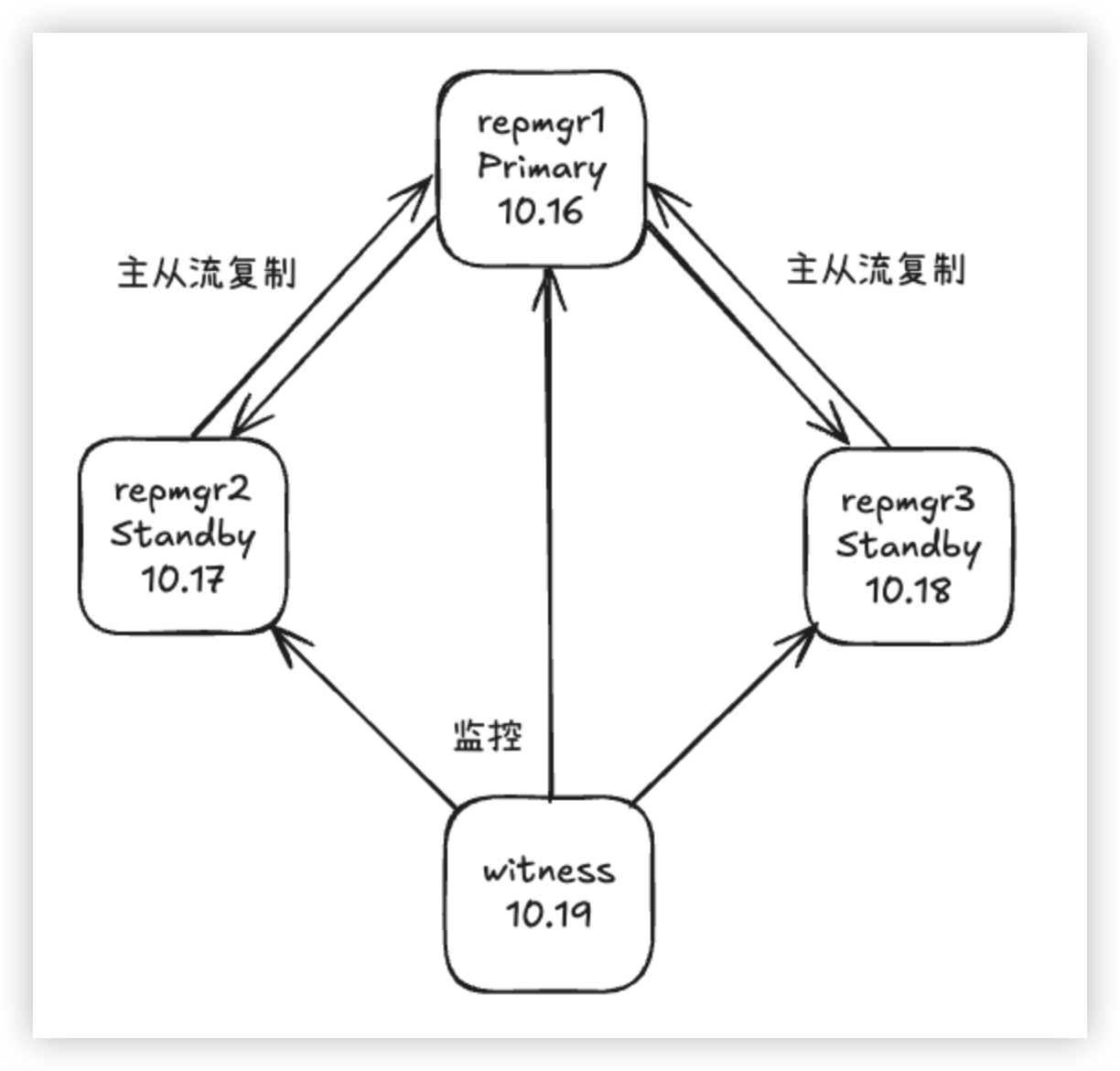
部署环境信息
| 主机名 | IP地址 | 硬件配置 | OS版本 | PG版本 | Repmgr版本 | 部署角色 |
|---|---|---|---|---|---|---|
| repmgr1 | 192.168.10.16 | 1 Core 4G Mem | Rocky 8.10 | 17.6 | 5.5.0 | Primary |
| repmgr2 | 192.168.10.17 | 1 Core 4G Mem | Rocky 8.10 | 17.6 | 5.5.0 | Standby |
| repmgr3 | 192.168.10.18 | 1 Core 4G Mem | Rocky 8.10 | 17.6 | 5.5.0 | Standby |
| witness | 192.168.10.19 | 1 Core 4G Mem | Rocky 8.10 | 17.6 | 5.5.0 | Witness |
| 规划目录用途 | 文件系统路径 |
|---|---|
| PG软件安装目录 | /pgsql/app |
| PG实例安装目录 | /pgsql/pgdata |
| PG归档存放目录 | /pgsql/pgarch |
| PG日志存放目录 | /pgsql/pglog |
部署过程
安装 PostgreSQL
4个节点编译安装PostgreSQL 17.6,以1节点为例:
[root@witness ~]# dnf -y install gcc readline-devel zlib-devel make bison flex libicu-devel perl wget tar openssl-devel openssl
[root@repmgr1 ~]# su - postgres
[postgres@repmgr1 ~]# cd /soft/
[postgres@repmgr1 soft]# tar zxf postgresql-17.6.tar.gz
[postgres@repmgr1 soft]# cd postgresql-17.6
[postgres@repmgr1 postgresql-17.6]# ./configure --with-openssl --prefix=/pgsql/app
[postgres@repmgr1 postgresql-17.6]# make world-bin && make install-world-bin
4个节点均添加hosts信息,以1节点为例:
[root@repmgr1 ~]# vi /etc/hosts
[root@repmgr1 ~]# cat /etc/hosts
127.0.0.1   localhost localhost.localdomain localhost4 localhost4.localdomain4
::1         localhost localhost.localdomain localhost6 localhost6.localdomain6

192.168.10.16  repmgr1
192.168.10.17  repmgr2
192.168.10.18  repmgr3
192.168.10.19  witness
4个节点配置SSH互信,以1节点为例:
[root@repmgr1 ~]# su - postgres
Last login: Fri Aug 29 09:41:41 CST 2025 on pts/0
[postgres@repmgr1 ~]$ ssh-keygen
Generating public/private rsa key pair.
Enter file in which to save the key (/home/postgres/.ssh/id_rsa):
Created directory '/home/postgres/.ssh'.
Enter passphrase (empty for no passphrase):
Enter same passphrase again:
Your identification has been saved in /home/postgres/.ssh/id_rsa.
Your public key has been saved in /home/postgres/.ssh/id_rsa.pub.
The key fingerprint is:
SHA256:PPgCjUs0qJ5/qqdvezFH+fXHxgO2/GuyCMoccoz6ods postgres@repmgr1
The key's randomart image is:
+---[RSA 3072]----+
|                 |
|   .             |
|  . o   .        |
| . . + =   . o   |
|.   + + S . + =  |
|. .. =oo o   + * |
| o  .+=+..    + .|
|  .o+o*.o . .. o |
| o*OBE +   . .+..|
+----[SHA256]-----+
[postgres@repmgr1 ~]$ ssh-copy-id postgres@repmgr1
/usr/bin/ssh-copy-id: INFO: Source of key(s) to be installed: "/home/postgres/.ssh/id_rsa.pub"
The authenticity of host 'repmgr1 (192.168.10.16)' can't be established.
ECDSA key fingerprint is SHA256:bwiX7zclr+mBNTlHMADsD00FWgJrVXu5hUa3VZ/Uuuw.
Are you sure you want to continue connecting (yes/no/[fingerprint])? yes
/usr/bin/ssh-copy-id: INFO: attempting to log in with the new key(s), to filter out any that are already installed
/usr/bin/ssh-copy-id: INFO: 1 key(s) remain to be installed -- if you are prompted now it is to install the new keys
postgres@repmgr1's password:

Number of key(s) added: 1

Now try logging into the machine, with:   "ssh 'postgres@repmgr1'"
and check to make sure that only the key(s) you wanted were added.

[postgres@repmgr1 ~]$ ssh-copy-id postgres@repmgr2
/usr/bin/ssh-copy-id: INFO: Source of key(s) to be installed: "/home/postgres/.ssh/id_rsa.pub"
The authenticity of host 'repmgr2 (192.168.10.17)' can't be established.
ECDSA key fingerprint is SHA256:l8Z1E+Tdl8MLpxgBLdKTttm3IoiqtPcdKtB88f8/PSY.
Are you sure you want to continue connecting (yes/no/[fingerprint])? yes
/usr/bin/ssh-copy-id: INFO: attempting to log in with the new key(s), to filter out any that are already installed
/usr/bin/ssh-copy-id: INFO: 1 key(s) remain to be installed -- if you are prompted now it is to install the new keys
postgres@repmgr2's password:

Number of key(s) added: 1

Now try logging into the machine, with:   "ssh 'postgres@repmgr2'"
and check to make sure that only the key(s) you wanted were added.

[postgres@repmgr1 ~]$ ssh-copy-id postgres@repmgr3
/usr/bin/ssh-copy-id: INFO: Source of key(s) to be installed: "/home/postgres/.ssh/id_rsa.pub"
The authenticity of host 'repmgr3 (192.168.10.18)' can't be established.
ECDSA key fingerprint is SHA256:9wk7zKwYa8O3uBowwVV5PYFT2zSQ4OR4hdzwnHwoeE4.
Are you sure you want to continue connecting (yes/no/[fingerprint])? yes
/usr/bin/ssh-copy-id: INFO: attempting to log in with the new key(s), to filter out any that are already installed
/usr/bin/ssh-copy-id: INFO: 1 key(s) remain to be installed -- if you are prompted now it is to install the new keys
postgres@repmgr3's password:

Number of key(s) added: 1

Now try logging into the machine, with:   "ssh 'postgres@repmgr3'"
and check to make sure that only the key(s) you wanted were added.

[postgres@repmgr1 ~]$ ssh-copy-id postgres@witness
/usr/bin/ssh-copy-id: INFO: Source of key(s) to be installed: "/home/postgres/.ssh/id_rsa.pub"
The authenticity of host 'witness (192.168.10.19)' can't be established.
ECDSA key fingerprint is SHA256:4mf2L9ua2ur27HeOrQe20NQgtzunHbT+ABqK9/ShdBg.
Are you sure you want to continue connecting (yes/no/[fingerprint])? yes
/usr/bin/ssh-copy-id: INFO: attempting to log in with the new key(s), to filter out any that are already installed
/usr/bin/ssh-copy-id: INFO: 1 key(s) remain to be installed -- if you are prompted now it is to install the new keys
postgres@witness's password:

Number of key(s) added: 1

Now try logging into the machine, with:   "ssh 'postgres@witness'"
and check to make sure that only the key(s) you wanted were added.

[postgres@repmgr1 ~]$
安装 repmgr
4个节点编译安装repmgr 5.5.0,以1节点为例:
[root@repmgr1 ~]# dnf install -y libcurl-devel json-c-devel
[root@repmgr1 ~]# su - postgres
[postgres@repmgr1 ~]$ cd /soft/
[postgres@repmgr1 soft]$ tar zxf repmgr-5.5.0.tar.gz
[postgres@repmgr1 soft]$ cd repmgr-5.5.0
[postgres@repmgr1 repmgr-5.5.0]$ ./configure && make install
初始化主库
只需在1节点初始化主库,初始化方式按照自己的需求而定,没有特殊要求。
[postgres@repmgr1 ~]$ initdb -D $PGDATA -U postgres --data-checksums --pwprompt
The files belonging to this database system will be owned by user "postgres".
This user must also own the server process.

The database cluster will be initialized with locale "en_US.UTF-8".
The default database encoding has accordingly been set to "UTF8".
The default text search configuration will be set to "english".

Data page checksums are enabled.

Enter new superuser password:
Enter it again:

fixing permissions on existing directory /pgsql/pgdata ... ok
creating subdirectories ... ok
selecting dynamic shared memory implementation ... posix
selecting default "max_connections" ... 100
selecting default "shared_buffers" ... 128MB
selecting default time zone ... Asia/Shanghai
creating configuration files ... ok
running bootstrap script ... ok
performing post-bootstrap initialization ... ok
syncing data to disk ... ok

initdb: warning: enabling "trust" authentication for local connections
initdb: hint: You can change this by editing pg_hba.conf or using the option -A, or --auth-local and --auth-host, the next time you run initdb.

Success. You can now start the database server using:

    pg_ctl -D /pgsql/pgdata -l logfile start

[postgres@repmgr1 ~]$
修改主库配置文件
修改主库配置文件,按需修改,若数据库未开启data-checksums,wal_log_hints确保要设置为on。
[postgres@repmgr1 ~]$ cd $PGDATA
[postgres@repmgr1 pgdata]$ vi postgresql.conf
[postgres@repmgr1 pgdata]$ cat postgresql.conf
listen_addresses = '0.0.0.0'
port = 5432
max_connections = 503
superuser_reserved_connections = 3
shared_buffers = 1GB
dynamic_shared_memory_type = posix
wal_level = replica
wal_log_hints = on
max_wal_size = 1GB
min_wal_size = 80MB
archive_mode = on
archive_command = 'test ! -f /pgsql/pgarch/%f && cp %p /pgsql/pgarch/%f'
max_wal_senders = 10
max_replication_slots = 10
wal_keep_size = 0
wal_sender_timeout = 60s
hot_standby = on
max_standby_streaming_delay = 30s
wal_receiver_status_interval = 10s
hot_standby_feedback = on
log_destination = 'csvlog'
logging_collector = on
log_directory = '/pgsql/pglog'
log_filename = 'postgresql-%Y-%m-%d_%H%M%S.log'
log_file_mode = 0600
log_timezone = 'Asia/Shanghai'
datestyle = 'iso, mdy'
timezone = 'Asia/Shanghai'
lc_messages = 'en_US.UTF-8'
lc_monetary = 'en_US.UTF-8'
lc_numeric = 'en_US.UTF-8'
lc_time = 'en_US.UTF-8'
default_text_search_config = 'pg_catalog.english'
shared_preload_libraries = 'repmgr'
[postgres@repmgr1 pgdata]$
修改主库HBA策略
修改主库HBA,按实际需求修改,本测试中对repmgr用户访问repmgr库均免密认证。
[postgres@repmgr1 pgdata]$ vi pg_hba.conf
[postgres@repmgr1 pgdata]$ cat pg_hba.conf
local   all             all                                     trust
host    all             all             127.0.0.1/32            trust
host    all             all             ::1/128                 trust
host    repmgr          repmgr          192.168.10.16/32        trust
host    repmgr          repmgr          192.168.10.17/32        trust
host    repmgr          repmgr          192.168.10.18/32        trust
host    repmgr          repmgr          192.168.10.19/32        trust
local   replication     all                                     trust
host    replication     all             127.0.0.1/32            trust
host    replication     all             ::1/128                 trust
host    replication     repmgr          192.168.10.16/32        trust
host    replication     repmgr          192.168.10.17/32        trust
host    replication     repmgr          192.168.10.18/32        trust
host    replication     repmgr          192.168.10.19/32        trust
启动主库实例
启动主库实例。
[postgres@repmgr1 ~]$ pg_ctl start -D $PGDATA
waiting for server to start....2025-08-29 11:23:12.304 CST [15835] LOG:  redirecting log output to logging collector process
2025-08-29 11:23:12.304 CST [15835] HINT:  Future log output will appear in directory "/pgsql/pglog".
 done
server started
[postgres@repmgr1 ~]$
创建repmgr的用户及数据库
创建repmgr使用的用户及管理使用的资料库。
[postgres@repmgr1 ~]$ psql
psql (17.6)
Type "help" for help.

postgres=# create user repmgr with password 'repmgr' superuser replication;
CREATE ROLE
postgres=# create database repmgr owner repmgr;
CREATE DATABASE
postgres=# \q
[postgres@repmgr1 ~]$
创建repmgr的配置文件
精简配置repmgr,满足自动切换需求。
[postgres@repmgr1 ~]$ pg_config --sysconfdir
/pgsql/app/etc
[postgres@repmgr1 ~]$ mkdir /pgsql/app/etc
[postgres@repmgr1 ~]$ cd /pgsql/app/etc
[postgres@repmgr1 etc]$ vi repmgr.conf
[postgres@repmgr1 etc]$ cat repmgr.conf
node_id=1
node_name='repmgr1'
conninfo='host=192.168.10.16 port=5432 dbname=repmgr user=repmgr connect_timeout=2'
data_directory='/pgsql/pgdata'
config_directory='/pgsql/pgdata'
log_level='INFO'
log_facility='STDERR'
log_file='/pgsql/app/etc/repmgr.log'
log_status_interval=300
pg_bindir='/pgsql/app/bin'
ssh_options='-q -o ConnectTimeout=10'
failover='automatic'
priority=100
connection_check_type='ping'
reconnect_attempts=6
reconnect_interval=10
promote_command='/pgsql/app/bin/repmgr standby promote -f /pgsql/app/etc/repmgr.conf'
follow_command='/pgsql/app/bin/repmgr standby follow -f /pgsql/app/etc/repmgr.conf --upstream-node-id=%n'
monitoring_history=true
monitor_interval_secs=2
standby_disconnect_on_failover=true
[postgres@repmgr1 etc]$
注册主节点
在repmgr中注册主节点信息。
[postgres@repmgr1 ~]$ repmgr primary register -f /pgsql/app/etc/repmgr.conf
INFO: connecting to primary database...
NOTICE: attempting to install extension "repmgr"
NOTICE: "repmgr" extension successfully installed
NOTICE: primary node record (ID: 1) registered
[postgres@repmgr1 ~]$
[postgres@repmgr1 ~]$ repmgr cluster show
 ID | Name    | Role    | Status    | Upstream | Location | Priority | Timeline | Connection string
----+---------+---------+-----------+----------+----------+----------+----------+--------------------------------------------------------------------------
 1  | repmgr1 | primary | * running |          | default  | 100      | 1        | host=192.168.10.16 port=5432 dbname=repmgr user=repmgr connect_timeout=2
[postgres@repmgr1 ~]$
开启主库守护进程repmgrd
开启守护进程,对实例进行监控及维护。
[postgres@repmgr1 ~]$ repmgrd -d
[2025-08-29 11:50:23] [NOTICE] redirecting logging output to "/pgsql/app/etc/repmgr.log"

[postgres@repmgr1 ~]$ repmgr service status
 ID | Name    | Role    | Status    | Upstream | repmgrd | PID   | Paused? | Upstream last seen
----+---------+---------+-----------+----------+---------+-------+---------+--------------------
 1  | repmgr1 | primary | * running |          | running | 15955 | no      | n/a
[postgres@repmgr1 ~]$
克隆从库
克隆2个从库,均以主库为源端,实现一拖二架构。克隆耗时依数据量而定,同时确保克隆过程中,主库生成的wal日志或归档日志不被清除丢失。
传输repmgr配置文件到从库
将主库的repmgr配置文件传输到2个从库。
[postgres@repmgr1 ~]$ scp /pgsql/app/etc/repmgr.conf repmgr2:/pgsql/app/etc/
repmgr.conf                                                                                                                             100%   21KB  16.4MB/s   00:00
[postgres@repmgr1 ~]$ scp /pgsql/app/etc/repmgr.conf repmgr3:/pgsql/app/etc/
repmgr.conf                                                                                                                             100%   21KB  17.2MB/s   00:00
[postgres@repmgr1 ~]$
修改repmgr配置文件
根据实际情况修改从库repmgr配置文件,主要确保各节点的node_id,node_name,conninfo唯一且无误。
[postgres@repmgr2 ~]$ cd /pgsql/app/etc/
[postgres@repmgr2 etc]$ vi repmgr.conf
[postgres@repmgr2 etc]$ cat repmgr.conf
node_id=2
node_name='repmgr2'
conninfo='host=192.168.10.17 port=5432 dbname=repmgr user=repmgr connect_timeout=2'
data_directory='/pgsql/pgdata'
config_directory='/pgsql/pgdata'
log_level='INFO'
log_facility='STDERR'
log_file='/pgsql/app/etc/repmgr.log'
log_status_interval=300
pg_bindir='/pgsql/app/bin'
ssh_options='-q -o ConnectTimeout=10'
failover='automatic'
priority=100
connection_check_type='ping'
reconnect_attempts=6
reconnect_interval=10
promote_command='/pgsql/app/bin/repmgr standby promote -f /pgsql/app/etc/repmgr.conf'
follow_command='/pgsql/app/bin/repmgr standby follow -f /pgsql/app/etc/repmgr.conf --upstream-node-id=%n'
monitoring_history=true
monitor_interval_secs=2
standby_disconnect_on_failover=true
[postgres@repmgr2 etc]$
[postgres@repmgr3 ~]$ cd /pgsql/app/etc/
[postgres@repmgr3 etc]$ vi repmgr.conf
[postgres@repmgr3 etc]$ cat repmgr.conf
node_id=3
node_name='repmgr3'
conninfo='host=192.168.10.18 port=5432 dbname=repmgr user=repmgr connect_timeout=2'
data_directory='/pgsql/pgdata'
config_directory='/pgsql/pgdata'
log_level='INFO'
log_facility='STDERR'
log_file='/pgsql/app/etc/repmgr.log'
log_status_interval=300
pg_bindir='/pgsql/app/bin'
ssh_options='-q -o ConnectTimeout=10'
failover='automatic'
priority=100
connection_check_type='ping'
reconnect_attempts=6
reconnect_interval=10
promote_command='/pgsql/app/bin/repmgr standby promote -f /pgsql/app/etc/repmgr.conf'
follow_command='/pgsql/app/bin/repmgr standby follow -f /pgsql/app/etc/repmgr.conf --upstream-node-id=%n'
monitoring_history=true
monitor_interval_secs=2
standby_disconnect_on_failover=true
[postgres@repmgr3 etc]$
测试克隆从库
在从库使用–dry-run模拟测试克隆过程,看看是否存在错误并进行修正。
[postgres@repmgr2 ~]$ repmgr -h 192.168.10.16 -p 5432 -d repmgr -U repmgr -f /pgsql/app/etc/repmgr.conf standby clone --dry-run
WARNING: following problems with command line parameters detected:
  "config_directory" set in repmgr.conf, but --copy-external-config-files not provided
NOTICE: destination directory "/pgsql/pgdata" provided
INFO: connecting to source node
DETAIL: connection string is: host=192.168.10.16 port=5432 user=repmgr dbname=repmgr
DETAIL: current installation size is 29 MB
INFO: "repmgr" extension is installed in database "repmgr"
INFO: replication slot usage not requested;  no replication slot will be set up for this standby
INFO: parameter "max_wal_senders" set to 10
NOTICE: checking for available walsenders on the source node (2 required)
INFO: sufficient walsenders available on the source node
DETAIL: 2 required, 10 available
NOTICE: checking replication connections can be made to the source server (2 required)
INFO: required number of replication connections could be made to the source server
DETAIL: 2 replication connections required
NOTICE: standby will attach to upstream node 1
HINT: consider using the -c/--fast-checkpoint option
INFO: would execute:
  /pgsql/app/bin/pg_basebackup -l "repmgr base backup"  -D /pgsql/pgdata -h 192.168.10.16 -p 5432 -U repmgr -X stream
INFO: all prerequisites for "standby clone" are met
[postgres@repmgr2 ~]$
[postgres@repmgr3 ~]$ repmgr -h 192.168.10.16 -p 5432 -d repmgr -U repmgr -f /pgsql/app/etc/repmgr.conf standby clone --dry-run
WARNING: following problems with command line parameters detected:
  "config_directory" set in repmgr.conf, but --copy-external-config-files not provided
NOTICE: destination directory "/pgsql/pgdata" provided
INFO: connecting to source node
DETAIL: connection string is: host=192.168.10.16 port=5432 user=repmgr dbname=repmgr
DETAIL: current installation size is 29 MB
INFO: "repmgr" extension is installed in database "repmgr"
INFO: replication slot usage not requested;  no replication slot will be set up for this standby
INFO: parameter "max_wal_senders" set to 10
NOTICE: checking for available walsenders on the source node (2 required)
INFO: sufficient walsenders available on the source node
DETAIL: 2 required, 9 available
NOTICE: checking replication connections can be made to the source server (2 required)
INFO: required number of replication connections could be made to the source server
DETAIL: 2 replication connections required
NOTICE: standby will attach to upstream node 1
HINT: consider using the -c/--fast-checkpoint option
INFO: would execute:
  /pgsql/app/bin/pg_basebackup -l "repmgr base backup"  -D /pgsql/pgdata -h 192.168.10.16 -p 5432 -U repmgr -X stream
INFO: all prerequisites for "standby clone" are met
[postgres@repmgr3 ~]$
正式克隆从库
在从库正式进行克隆,确认克隆过程正常。
[postgres@repmgr2 ~]$ repmgr -h 192.168.10.16 -p 5432 -d repmgr -U repmgr -f /pgsql/app/etc/repmgr.conf standby clone
WARNING: following problems with command line parameters detected:
  "config_directory" set in repmgr.conf, but --copy-external-config-files not provided
NOTICE: destination directory "/pgsql/pgdata" provided
INFO: connecting to source node
DETAIL: connection string is: host=192.168.10.16 port=5432 user=repmgr dbname=repmgr
DETAIL: current installation size is 29 MB
INFO: replication slot usage not requested;  no replication slot will be set up for this standby
NOTICE: checking for available walsenders on the source node (2 required)
NOTICE: checking replication connections can be made to the source server (2 required)
INFO: checking and correcting permissions on existing directory "/pgsql/pgdata"
NOTICE: starting backup (using pg_basebackup)...
HINT: this may take some time; consider using the -c/--fast-checkpoint option
INFO: executing:
  /pgsql/app/bin/pg_basebackup -l "repmgr base backup"  -D /pgsql/pgdata -h 192.168.10.16 -p 5432 -U repmgr -X stream
NOTICE: standby clone (using pg_basebackup) complete
NOTICE: you can now start your PostgreSQL server
HINT: for example: pg_ctl -D /pgsql/pgdata start
HINT: after starting the server, you need to register this standby with "repmgr standby register"
[postgres@repmgr2 ~]$
[postgres@repmgr3 ~]$ repmgr -h 192.168.10.16 -p 5432 -d repmgr -U repmgr -f /pgsql/app/etc/repmgr.conf standby clone
WARNING: following problems with command line parameters detected:
  "config_directory" set in repmgr.conf, but --copy-external-config-files not provided
NOTICE: destination directory "/pgsql/pgdata" provided
INFO: connecting to source node
DETAIL: connection string is: host=192.168.10.16 port=5432 user=repmgr dbname=repmgr
DETAIL: current installation size is 29 MB
INFO: replication slot usage not requested;  no replication slot will be set up for this standby
NOTICE: checking for available walsenders on the source node (2 required)
NOTICE: checking replication connections can be made to the source server (2 required)
INFO: checking and correcting permissions on existing directory "/pgsql/pgdata"
NOTICE: starting backup (using pg_basebackup)...
HINT: this may take some time; consider using the -c/--fast-checkpoint option
INFO: executing:
  /pgsql/app/bin/pg_basebackup -l "repmgr base backup"  -D /pgsql/pgdata -h 192.168.10.16 -p 5432 -U repmgr -X stream
NOTICE: standby clone (using pg_basebackup) complete
NOTICE: you can now start your PostgreSQL server
HINT: for example: pg_ctl -D /pgsql/pgdata start
HINT: after starting the server, you need to register this standby with "repmgr standby register"
[postgres@repmgr3 ~]$
启动从库实例
启动从库数据库,若有需求,可先对postgresql.conf或pg_hba.conf进行修改。
[postgres@repmgr2 ~]$ pg_ctl start -D $PGDATA
waiting for server to start....2025-08-29 12:00:09.794 CST [15786] LOG:  redirecting log output to logging collector process
2025-08-29 12:00:09.794 CST [15786] HINT:  Future log output will appear in directory "/pgsql/pglog".
 done
server started
[postgres@repmgr2 ~]$
[postgres@repmgr3 ~]$ pg_ctl start -D $PGDATA
waiting for server to start....2025-08-29 12:03:12.205 CST [15749] LOG:  redirecting log output to logging collector process
2025-08-29 12:03:12.205 CST [15749] HINT:  Future log output will appear in directory "/pgsql/pglog".
 done
server started
[postgres@repmgr3 ~]$
注册从库
在2个从库的repmgr资料库中进行信息注册。
[postgres@repmgr2 ~]$ repmgr standby register -f /pgsql/app/etc/repmgr.conf
INFO: connecting to local node "repmgr2" (ID: 2)
INFO: connecting to primary database
WARNING: --upstream-node-id not supplied, assuming upstream node is primary (node ID: 1)
INFO: standby registration complete
NOTICE: standby node "repmgr2" (ID: 2) successfully registered
[postgres@repmgr2 ~]$
[postgres@repmgr2 ~]$ repmgr cluster show
 ID | Name    | Role    | Status    | Upstream | Location | Priority | Timeline | Connection string
----+---------+---------+-----------+----------+----------+----------+----------+--------------------------------------------------------------------------
 1  | repmgr1 | primary | * running |          | default  | 100      | 1        | host=192.168.10.16 port=5432 dbname=repmgr user=repmgr connect_timeout=2
 2  | repmgr2 | standby |   running | repmgr1  | default  | 100      | 1        | host=192.168.10.17 port=5432 dbname=repmgr user=repmgr connect_timeout=2
[postgres@repmgr2 ~]$
[postgres@repmgr3 ~]$ repmgr standby register -f /pgsql/app/etc/repmgr.conf
INFO: connecting to local node "repmgr3" (ID: 3)
INFO: connecting to primary database
WARNING: --upstream-node-id not supplied, assuming upstream node is primary (node ID: 1)
INFO: standby registration complete
NOTICE: standby node "repmgr3" (ID: 3) successfully registered
[postgres@repmgr3 ~]$
[postgres@repmgr3 ~]$ repmgr cluster show
 ID | Name    | Role    | Status    | Upstream | Location | Priority | Timeline | Connection string
----+---------+---------+-----------+----------+----------+----------+----------+--------------------------------------------------------------------------
 1  | repmgr1 | primary | * running |          | default  | 100      | 1        | host=192.168.10.16 port=5432 dbname=repmgr user=repmgr connect_timeout=2
 2  | repmgr2 | standby |   running | repmgr1  | default  | 100      | 1        | host=192.168.10.17 port=5432 dbname=repmgr user=repmgr connect_timeout=2
 3  | repmgr3 | standby |   running | repmgr1  | default  | 100      | 1        | host=192.168.10.18 port=5432 dbname=repmgr user=repmgr connect_timeout=2
[postgres@repmgr3 ~]$
开启从库守护进程repmgrd
所有从库节点开启守护进程。
[postgres@repmgr2 ~]$ repmgrd -d
[2025-08-29 12:05:14] [NOTICE] redirecting logging output to "/pgsql/app/etc/repmgr.log"

[postgres@repmgr2 ~]$ repmgr service status
 ID | Name    | Role    | Status    | Upstream | repmgrd     | PID   | Paused? | Upstream last seen
----+---------+---------+-----------+----------+-------------+-------+---------+--------------------
 1  | repmgr1 | primary | * running |          | running     | 15955 | no      | n/a
 2  | repmgr2 | standby |   running | repmgr1  | running     | 15813 | no      | 1 second(s) ago
 3  | repmgr3 | standby |   running | repmgr1  | not running | n/a   | n/a     | n/a
[postgres@repmgr2 ~]$
[postgres@repmgr3 ~]$ repmgrd -d
[2025-08-29 12:06:30] [NOTICE] redirecting logging output to "/pgsql/app/etc/repmgr.log"

[postgres@repmgr3 ~]$ repmgr service status
 ID | Name    | Role    | Status    | Upstream | repmgrd | PID   | Paused? | Upstream last seen
----+---------+---------+-----------+----------+---------+-------+---------+--------------------
 1  | repmgr1 | primary | * running |          | running | 15955 | no      | n/a
 2  | repmgr2 | standby |   running | repmgr1  | running | 15813 | no      | 1 second(s) ago
 3  | repmgr3 | standby |   running | repmgr1  | running | 15765 | no      | 0 second(s) ago
[postgres@repmgr3 ~]$
监控节点配置实例
监控节点单独创建实例并进行相应配置。
[postgres@witness ~]$ initdb -D $PGDATA
The files belonging to this database system will be owned by user "postgres".
This user must also own the server process.

The database cluster will be initialized with locale "en_US.UTF-8".
The default database encoding has accordingly been set to "UTF8".
The default text search configuration will be set to "english".

Data page checksums are disabled.

fixing permissions on existing directory /pgsql/pgdata ... ok
creating subdirectories ... ok
selecting dynamic shared memory implementation ... posix
selecting default "max_connections" ... 100
selecting default "shared_buffers" ... 128MB
selecting default time zone ... Asia/Shanghai
creating configuration files ... ok
running bootstrap script ... ok
performing post-bootstrap initialization ... ok
syncing data to disk ... ok

initdb: warning: enabling "trust" authentication for local connections
initdb: hint: You can change this by editing pg_hba.conf or using the option -A, or --auth-local and --auth-host, the next time you run initdb.

Success. You can now start the database server using:

    pg_ctl -D /pgsql/pgdata -l logfile start

[postgres@witness ~]$
[postgres@witness ~]$ cd $PGDATA
[postgres@witness pgdata]$ vi postgresql.conf
[postgres@witness pgdata]$ cat postgresql.conf
listen_addresses = '0.0.0.0'
port = 5432
max_connections = 503
superuser_reserved_connections = 3
shared_buffers = 1GB
dynamic_shared_memory_type = posix
wal_level = replica
wal_log_hints = on
max_wal_size = 1GB
min_wal_size = 80MB
archive_mode = on
archive_command = 'test ! -f /pgsql/pgarch/%f && cp %p /pgsql/pgarch/%f'
max_wal_senders = 10
max_replication_slots = 10
wal_keep_size = 0
wal_sender_timeout = 60s
hot_standby = on
max_standby_streaming_delay = 30s
wal_receiver_status_interval = 10s
hot_standby_feedback = on
log_destination = 'csvlog'
logging_collector = on
log_directory = '/pgsql/pglog'
log_filename = 'postgresql-%Y-%m-%d_%H%M%S.log'
log_file_mode = 0600
log_timezone = 'Asia/Shanghai'
datestyle = 'iso, mdy'
timezone = 'Asia/Shanghai'
lc_messages = 'en_US.UTF-8'
lc_monetary = 'en_US.UTF-8'
lc_numeric = 'en_US.UTF-8'
lc_time = 'en_US.UTF-8'
default_text_search_config = 'pg_catalog.english'
shared_preload_libraries = 'repmgr'
[postgres@witness pgdata]$
[postgres@witness pgdata]$ vi pg_hba.conf
[postgres@witness pgdata]$ cat pg_hba.conf
local   all             all                                     trust
host    all             all             127.0.0.1/32            trust
host    all             all             ::1/128                 trust
host    repmgr          repmgr          192.168.10.16/32        trust
host    repmgr          repmgr          192.168.10.17/32        trust
host    repmgr          repmgr          192.168.10.18/32        trust
host    repmgr          repmgr          192.168.10.19/32        trust
local   replication     all                                     trust
host    replication     all             127.0.0.1/32            trust
host    replication     all             ::1/128                 trust
host    replication     repmgr          192.168.10.16/32        trust
host    replication     repmgr          192.168.10.17/32        trust
host    replication     repmgr          192.168.10.18/32        trust
host    replication     repmgr          192.168.10.19/32        trust
[postgres@witness pgdata]$
[postgres@witness pgdata]$ pg_ctl start -D $PGDATA
waiting for server to start....2025-08-29 14:42:39.566 CST [1211] LOG:  redirecting log output to logging collector process
2025-08-29 14:42:39.566 CST [1211] HINT:  Future log output will appear in directory "/pgsql/pglog".
 done
server started
[postgres@witness pgdata]$
[postgres@witness pgdata]$ psql
psql (17.6)
Type "help" for help.

postgres=# create user repmgr with password 'repmgr' superuser replication;
CREATE ROLE
postgres=# create database repmgr owner repmgr;
CREATE DATABASE
postgres=# \q
[postgres@witness pgdata]$
监控节点配置repmgr
监控节点配置repmgr的配置文件,该节点不涉及数据库的切换。
[postgres@witness ~]$ mkdir /pgsql/app/etc
[postgres@witness ~]$ cd /pgsql/app/etc/
[postgres@witness etc]$ vi repmgr.conf
[postgres@witness etc]$ cat repmgr.conf
node_id=4
node_name='witness'
conninfo='host=192.168.10.19 port=5432 dbname=repmgr user=repmgr connect_timeout=2'
data_directory='/pgsql/pgdata'
config_directory='/pgsql/pgdata'
log_level='INFO'
log_facility='STDERR'
log_file='/pgsql/app/etc/repmgr.log'
log_status_interval=300
pg_bindir='/pgsql/app/bin'
ssh_options='-q -o ConnectTimeout=10'
[postgres@witness etc]$
注册监控节点
注册监控节点的信息到repmgr的资料库。
[postgres@witness ~]$ repmgr -h 192.168.10.16 -p 5432 -d repmgr -U repmgr witness register -f /pgsql/app/etc/repmgr.conf
INFO: connecting to witness node "witness" (ID: 4)
INFO: connecting to primary node
NOTICE: attempting to install extension "repmgr"
NOTICE: "repmgr" extension successfully installed
INFO: witness registration complete
NOTICE: witness node "witness" (ID: 4) successfully registered
[postgres@witness ~]$
[postgres@witness ~]$ repmgr cluster show
 ID | Name    | Role    | Status    | Upstream | Location | Priority | Timeline | Connection string
----+---------+---------+-----------+----------+----------+----------+----------+--------------------------------------------------------------------------
 1  | repmgr1 | primary | * running |          | default  | 100      | 1        | host=192.168.10.16 port=5432 dbname=repmgr user=repmgr connect_timeout=2
 2  | repmgr2 | standby |   running | repmgr1  | default  | 100      | 1        | host=192.168.10.17 port=5432 dbname=repmgr user=repmgr connect_timeout=2
 3  | repmgr3 | standby |   running | repmgr1  | default  | 100      | 1        | host=192.168.10.18 port=5432 dbname=repmgr user=repmgr connect_timeout=2
 4  | witness | witness | * running | repmgr1  | default  | 0        | n/a      | host=192.168.10.19 port=5432 dbname=repmgr user=repmgr connect_timeout=2
[postgres@witness ~]$
开启监控守护进程repmgrd
监控节点开启守护进程。
[postgres@witness ~]$ repmgrd -d
[2025-08-29 14:59:47] [NOTICE] redirecting logging output to "/pgsql/app/etc/repmgr.log"

[postgres@witness ~]$ repmgr service status
 ID | Name    | Role    | Status    | Upstream | repmgrd | PID  | Paused? | Upstream last seen
----+---------+---------+-----------+----------+---------+------+---------+--------------------
 1  | repmgr1 | primary | * running |          | running | 15955 | no      | n/a
 2  | repmgr2 | standby |   running | repmgr1  | running | 15813 | no      | 0 second(s) ago
 3  | repmgr3 | standby |   running | repmgr1  | running | 15765 | no      | 0 second(s) ago
 4  | witness | witness | * running | repmgr1  | running | 15837 | no      | 0 second(s) ago
[postgres@witness ~]$
集群状态检查
简单测试部分repmgr的状态检查命令。
状态拓扑
[postgres@repmgr1 ~]$ repmgr cluster show
 ID | Name    | Role    | Status    | Upstream | Location | Priority | Timeline | Connection string
----+---------+---------+-----------+----------+----------+----------+----------+--------------------------------------------------------------------------
 1  | repmgr1 | primary | * running |          | default  | 100      | 1        | host=192.168.10.16 port=5432 dbname=repmgr user=repmgr connect_timeout=2
 2  | repmgr2 | standby |   running | repmgr1  | default  | 100      | 1        | host=192.168.10.17 port=5432 dbname=repmgr user=repmgr connect_timeout=2
 3  | repmgr3 | standby |   running | repmgr1  | default  | 100      | 1        | host=192.168.10.18 port=5432 dbname=repmgr user=repmgr connect_timeout=2
 4  | witness | witness | * running | repmgr1  | default  | 0        | n/a      | host=192.168.10.19 port=5432 dbname=repmgr user=repmgr connect_timeout=2
ssh连接
[postgres@repmgr1 ~]$ repmgr cluster matrix
INFO: connecting to database
 Name    | ID | 1 | 2 | 3 | 4
---------+----+---+---+---+---
 repmgr1 | 1  | * | * | * | *
 repmgr2 | 2  | * | * | * | *
 repmgr3 | 3  | * | * | * | *
 witness | 4  | * | * | * | *
repmgr连接
[postgres@repmgr1 ~]$ repmgr cluster crosscheck
INFO: connecting to database
 Name    | ID | 1 | 2 | 3 | 4
---------+----+---+---+---+---
 repmgr1 | 1  | * | * | * | *
 repmgr2 | 2  | * | * | * | *
 repmgr3 | 3  | * | * | * | *
 witness | 4  | * | * | * | *
当前节点信息和复制状态
在主节点执行:
[postgres@repmgr1 ~]$ repmgr node status
Node "repmgr1":
        PostgreSQL version: 17.6
        Total data size: 30 MB
        Conninfo: host=192.168.10.16 port=5432 dbname=repmgr user=repmgr connect_timeout=2
        Role: primary
        WAL archiving: enabled
        Archive command: test ! -f /pgsql/pgarch/%f && cp %p /pgsql/pgarch/%f
        WALs pending archiving: 0 pending files
        Replication connections: 2 (of maximal 10)
        Replication slots: 0 physical (of maximal 10; 0 missing)
        Replication lag: n/a
在从节点执行:
[postgres@repmgr2 ~]$ repmgr node status
Node "repmgr2":
        PostgreSQL version: 17.6
        Total data size: 30 MB
        Conninfo: host=192.168.10.17 port=5432 dbname=repmgr user=repmgr connect_timeout=2
        Role: standby
        WAL archiving: disabled (on standbys "archive_mode" must be set to "always" to be effective)
        Archive command: test ! -f /pgsql/pgarch/%f && cp %p /pgsql/pgarch/%f
        WALs pending archiving: 0 pending files
        Replication connections: 0 (of maximal 10)
        Replication slots: 0 physical (of maximal 10; 0 missing)
        Upstream node: repmgr1 (ID: 1)
        Replication lag: 0 seconds
        Last received LSN: 0/C11E3E0
        Last replayed LSN: 0/C11E3E0
在监控节点执行:
[postgres@witness ~]$ repmgr node status
Node "witness":
        PostgreSQL version: 17.6
        Total data size: 29 MB
        Conninfo: host=192.168.10.19 port=5432 dbname=repmgr user=repmgr connect_timeout=2
        Role: witness
        WAL archiving: enabled
        Archive command: test ! -f /pgsql/pgarch/%f && cp %p /pgsql/pgarch/%f
        WALs pending archiving: 0 pending files
        Replication connections: 0 (of maximal 10)
        Replication slots: 0 physical (of maximal 10; 0 missing)
        Replication lag: n/a
复制状况
在主节点执行:
[postgres@repmgr1 ~]$ repmgr node check
Node "repmgr1":
        Server role: OK (node is primary)
        Replication lag: OK (N/A - node is primary)
        WAL archiving: OK (0 pending archive ready files)
        Upstream connection: OK (N/A - node is primary)
        Downstream servers: OK (2 of 2 downstream nodes attached)
        Replication slots: OK (node has no physical replication slots)
        Missing physical replication slots: OK (node has no missing physical replication slots)
        Configured data directory: OK (configured "data_directory" is "/pgsql/pgdata")
在从节点执行:
[postgres@repmgr2 ~]$ repmgr node check
Node "repmgr2":
        Server role: OK (node is standby)
        Replication lag: OK (0 seconds)
        WAL archiving: OK (0 pending archive ready files)
        Upstream connection: OK (node "repmgr2" (ID: 2) is attached to expected upstream node "repmgr1" (ID: 1))
        Downstream servers: OK (this node has no downstream nodes)
        Replication slots: OK (node has no physical replication slots)
        Missing physical replication slots: OK (node has no missing physical replication slots)
        Configured data directory: OK (configured "data_directory" is "/pgsql/pgdata")
在监控节点执行:
[postgres@witness ~]$ repmgr node check
Node "witness":
        Server role: OK (node is witness)
        Replication lag: OK (N/A - node is witness)
        WAL archiving: OK (0 pending archive ready files)
        Upstream connection: OK (N/A - node is a witness)
        Downstream servers: OK (N/A - node is a witness)
        Replication slots: OK (node has no physical replication slots)
        Missing physical replication slots: OK (node has no missing physical replication slots)
        Configured data directory: OK (configured "data_directory" is "/pgsql/pgdata")
故障切换测试
测试repmgr在主库故障后的自动切换功能。
当前集群状态
检查当前集群的状态,repmgr1为主库,repmgr2、repmgr3为备库,集群状态正常。
[postgres@witness ~]$ repmgr cluster show
 ID | Name    | Role    | Status    | Upstream | Location | Priority | Timeline | Connection string
----+---------+---------+-----------+----------+----------+----------+----------+--------------------------------------------------------------------------
 1  | repmgr1 | primary | * running |          | default  | 100      | 1        | host=192.168.10.16 port=5432 dbname=repmgr user=repmgr connect_timeout=2
 2  | repmgr2 | standby |   running | repmgr1  | default  | 100      | 1        | host=192.168.10.17 port=5432 dbname=repmgr user=repmgr connect_timeout=2
 3  | repmgr3 | standby |   running | repmgr1  | default  | 100      | 1        | host=192.168.10.18 port=5432 dbname=repmgr user=repmgr connect_timeout=2
 4  | witness | witness | * running | repmgr1  | default  | 0        | n/a      | host=192.168.10.19 port=5432 dbname=repmgr user=repmgr connect_timeout=2
[postgres@witness ~]$
[postgres@witness ~]$ repmgr service status
 ID | Name    | Role    | Status    | Upstream | repmgrd | PID  | Paused? | Upstream last seen
----+---------+---------+-----------+----------+---------+------+---------+--------------------
 1  | repmgr1 | primary | * running |          | running | 1320 | no      | n/a
 2  | repmgr2 | standby |   running | repmgr1  | running | 1186 | no      | 0 second(s) ago
 3  | repmgr3 | standby |   running | repmgr1  | running | 1208 | no      | 0 second(s) ago
 4  | witness | witness | * running | repmgr1  | running | 1178 | no      | 0 second(s) ago
[postgres@witness ~]$
模拟主库宕机
在主库repmgr1停止实例,模拟主库异常当机情况。
[postgres@repmgr1 ~]$ pg_ctl stop -D $PGDATA
waiting for server to shut down.... done
server stopped
[postgres@repmgr1 ~]$
等待自动切换
repmgr监测到repmgr1已经无法连接,处于unreachable状态,随后确认无法正常连接后,repmgr1标记状态为failed,repmgr2的从库提升为主库,同时repmgr3的从库更新流复制源为repmgr2新主库,监控节点同理。
[postgres@witness ~]$ repmgr cluster show
 ID | Name    | Role    | Status        | Upstream  | Location | Priority | Timeline | Connection string
----+---------+---------+---------------+-----------+----------+----------+----------+--------------------------------------------------------------------------
 1  | repmgr1 | primary | ? unreachable | ?         | default  | 100      |          | host=192.168.10.16 port=5432 dbname=repmgr user=repmgr connect_timeout=2
 2  | repmgr2 | standby |   running     | ? repmgr1 | default  | 100      | 1        | host=192.168.10.17 port=5432 dbname=repmgr user=repmgr connect_timeout=2
 3  | repmgr3 | standby |   running     | ? repmgr1 | default  | 100      | 1        | host=192.168.10.18 port=5432 dbname=repmgr user=repmgr connect_timeout=2
 4  | witness | witness | * running     | ? repmgr1 | default  | 0        | n/a      | host=192.168.10.19 port=5432 dbname=repmgr user=repmgr connect_timeout=2

WARNING: following issues were detected
  - unable to connect to node "repmgr1" (ID: 1)
  - node "repmgr1" (ID: 1) is registered as an active primary but is unreachable
  - unable to connect to node "repmgr2" (ID: 2)'s upstream node "repmgr1" (ID: 1)
  - unable to determine if node "repmgr2" (ID: 2) is attached to its upstream node "repmgr1" (ID: 1)
  - unable to connect to node "repmgr3" (ID: 3)'s upstream node "repmgr1" (ID: 1)
  - unable to determine if node "repmgr3" (ID: 3) is attached to its upstream node "repmgr1" (ID: 1)
  - unable to connect to node "witness" (ID: 4)'s upstream node "repmgr1" (ID: 1)

HINT: execute with --verbose option to see connection error messages
[postgres@witness ~]$
[postgres@witness ~]$
[postgres@witness ~]$ repmgr cluster show
 ID | Name    | Role    | Status    | Upstream  | Location | Priority | Timeline | Connection string
----+---------+---------+-----------+-----------+----------+----------+----------+--------------------------------------------------------------------------
 1  | repmgr1 | primary | - failed  | ?         | default  | 100      |          | host=192.168.10.16 port=5432 dbname=repmgr user=repmgr connect_timeout=2
 2  | repmgr2 | primary | * running |           | default  | 100      | 2        | host=192.168.10.17 port=5432 dbname=repmgr user=repmgr connect_timeout=2
 3  | repmgr3 | standby |   running | ! repmgr2 | default  | 100      | 1        | host=192.168.10.18 port=5432 dbname=repmgr user=repmgr connect_timeout=2
 4  | witness | witness | * running | repmgr2   | default  | 0        | n/a      | host=192.168.10.19 port=5432 dbname=repmgr user=repmgr connect_timeout=2

WARNING: following issues were detected
  - unable to connect to node "repmgr1" (ID: 1)
  - node "repmgr3" (ID: 3) reports a different upstream (reported: "repmgr2", expected "repmgr1")

HINT: execute with --verbose option to see connection error messages
[postgres@witness ~]$
原主库恢复测试
repmgr1实例启动后,无法顺利进入现有集群,形成实际的脑裂状态,2个主库分别运行。
[postgres@repmgr1 ~]$ pg_ctl start -D $PGDATA
waiting for server to start....2025-08-29 19:03:45.139 CST [2149] LOG:  redirecting log output to logging collector process
2025-08-29 19:03:45.139 CST [2149] HINT:  Future log output will appear in directory "/pgsql/pglog".
 done
server started
[postgres@witness ~]$ repmgr cluster show
 ID | Name    | Role    | Status    | Upstream | Location | Priority | Timeline | Connection string
----+---------+---------+-----------+----------+----------+----------+----------+--------------------------------------------------------------------------
 1  | repmgr1 | primary | ! running |          | default  | 100      | 1        | host=192.168.10.16 port=5432 dbname=repmgr user=repmgr connect_timeout=2
 2  | repmgr2 | primary | * running |          | default  | 100      | 2        | host=192.168.10.17 port=5432 dbname=repmgr user=repmgr connect_timeout=2
 3  | repmgr3 | standby |   running | repmgr2  | default  | 100      | 2        | host=192.168.10.18 port=5432 dbname=repmgr user=repmgr connect_timeout=2
 4  | witness | witness | * running | repmgr2  | default  | 0        | n/a      | host=192.168.10.19 port=5432 dbname=repmgr user=repmgr connect_timeout=2

WARNING: following issues were detected
  - node "repmgr1" (ID: 1) is running but the repmgr node record is inactive
原主库恢复为从库
将repmgr1重新恢复为新的从库,流复制同步源为repmgr2新主库。
[postgres@repmgr1 ~]$ pg_ctl stop -D $PGDATA
waiting for server to shut down.... done
server stopped
[postgres@repmgr1 ~]$
[postgres@repmgr1 ~]$ repmgr -h 192.168.10.17 -p 5432 -d repmgr -U repmgr node rejoin --force-rewind
NOTICE: rejoin target is node "repmgr2" (ID: 2)
NOTICE: pg_rewind execution required for this node to attach to rejoin target node 2
DETAIL: rejoin target server's timeline 2 forked off current database system timeline 1 before current recovery point 0/10000028
NOTICE: executing pg_rewind
DETAIL: pg_rewind command is "/pgsql/app/bin/pg_rewind -D '/pgsql/pgdata' --source-server='host=192.168.10.17 port=5432 dbname=repmgr user=repmgr connect_timeout=2'"
ERROR: pg_rewind execution failed
DETAIL: pg_rewind: servers diverged at WAL location 0/E0000A0 on timeline 1
pg_rewind: error: could not open file "/pgsql/pgdata/pg_wal/00000001000000000000000E": No such file or directory
pg_rewind: error: could not find previous WAL record at 0/E0000A0

[postgres@repmgr1 ~]$ cp /pgsql/pgarch/00000001000000000000000E /pgsql/pgdata/pg_wal/
[postgres@repmgr1 ~]$
[postgres@repmgr1 ~]$ repmgr -h 192.168.10.17 -p 5432 -d repmgr -U repmgr node rejoin --force-rewind
NOTICE: rejoin target is node "repmgr2" (ID: 2)
NOTICE: pg_rewind execution required for this node to attach to rejoin target node 2
DETAIL: rejoin target server's timeline 2 forked off current database system timeline 1 before current recovery point 0/10000028
NOTICE: executing pg_rewind
DETAIL: pg_rewind command is "/pgsql/app/bin/pg_rewind -D '/pgsql/pgdata' --source-server='host=192.168.10.17 port=5432 dbname=repmgr user=repmgr connect_timeout=2'"
ERROR: pg_rewind execution failed
DETAIL: pg_rewind: servers diverged at WAL location 0/E0000A0 on timeline 1
pg_rewind: rewinding from last common checkpoint at 0/E000028 on timeline 1
pg_rewind: error: could not open file "/pgsql/pgdata/pg_wal/00000001000000000000000F": No such file or directory
pg_rewind: error: could not read WAL record at 0/F000000

[postgres@repmgr1 ~]$ cp /pgsql/pgarch/00000001000000000000000F /pgsql/pgdata/pg_wal/
[postgres@repmgr1 ~]$
[postgres@repmgr1 ~]$ repmgr -h 192.168.10.17 -p 5432 -d repmgr -U repmgr node rejoin --force-rewind
NOTICE: rejoin target is node "repmgr2" (ID: 2)
NOTICE: pg_rewind execution required for this node to attach to rejoin target node 2
DETAIL: rejoin target server's timeline 2 forked off current database system timeline 1 before current recovery point 0/10000028
NOTICE: executing pg_rewind
DETAIL: pg_rewind command is "/pgsql/app/bin/pg_rewind -D '/pgsql/pgdata' --source-server='host=192.168.10.17 port=5432 dbname=repmgr user=repmgr connect_timeout=2'"
NOTICE: 0 files copied to /pgsql/pgdata
NOTICE: setting node 1's upstream to node 2
WARNING: unable to ping "host=192.168.10.16 port=5432 dbname=repmgr user=repmgr connect_timeout=2"
DETAIL: PQping() returned "PQPING_NO_RESPONSE"
NOTICE: starting server using "/pgsql/app/bin/pg_ctl  -w -D '/pgsql/pgdata' start"
NOTICE: NODE REJOIN successful
DETAIL: node 1 is now attached to node 2
检查集群状态,repmgr1已恢复为新从库并正常加入集群。
[postgres@witness ~]$ repmgr cluster show
 ID | Name    | Role    | Status    | Upstream | Location | Priority | Timeline | Connection string
----+---------+---------+-----------+----------+----------+----------+----------+--------------------------------------------------------------------------
 1  | repmgr1 | standby |   running | repmgr2  | default  | 100      | 1        | host=192.168.10.16 port=5432 dbname=repmgr user=repmgr connect_timeout=2
 2  | repmgr2 | primary | * running |          | default  | 100      | 2        | host=192.168.10.17 port=5432 dbname=repmgr user=repmgr connect_timeout=2
 3  | repmgr3 | standby |   running | repmgr2  | default  | 100      | 2        | host=192.168.10.18 port=5432 dbname=repmgr user=repmgr connect_timeout=2
 4  | witness | witness | * running | repmgr2  | default  | 0        | n/a      | host=192.168.10.19 port=5432 dbname=repmgr user=repmgr connect_timeout=2
[postgres@witness ~]$
[postgres@witness ~]$ repmgr service status
 ID | Name    | Role    | Status    | Upstream | repmgrd | PID  | Paused? | Upstream last seen
----+---------+---------+-----------+----------+---------+------+---------+--------------------
 1  | repmgr1 | standby |   running | repmgr2  | running | 1320 | no      | 1 second(s) ago
 2  | repmgr2 | primary | * running |          | running | 1186 | no      | n/a
 3  | repmgr3 | standby |   running | repmgr2  | running | 1208 | no      | 0 second(s) ago
 4  | witness | witness | * running | repmgr2  | running | 1178 | no      | 0 second(s) ago
